



No-code app development lets you build an app with visual tools instead of writing code. I've built apps this way before, so here's what actually holds together and where beginners get stuck.
What Is No-Code App Development? The 30-Second Answer
No-code app development is a way to build software by clicking and dragging instead of typing code. You arrange the screens, decide where your information lives, and set the rules for how everything works.
No-code handles the coding part, but the planning still matters. You still have to plan how your app works, who uses it, and what happens when someone taps a button.
That caught me on my first test build. I built a yoga studio booking app as a test over a weekend, then realized I had not planned how each booking connected to a customer record. Fixing that took longer than building the first version.
Key Features
Almost every no-code tool gives you the same five building blocks. Once you learn these, every platform starts to feel more familiar.
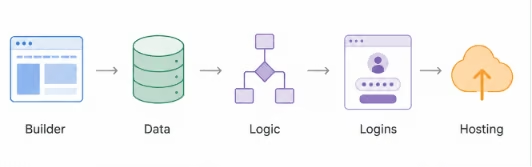
- Visual builder: The canvas where you drag screens, buttons, and forms into place. What you arrange here is what your users see.
- A place for data: Every app needs somewhere to store information, like a list of customers. Some tools connect to a spreadsheet-style database such as Airtable, which works like Google Sheets. Others give you a database built in.
- Logic: The rules that make the app act. For example, when someone fills out a form, the app saves it and sends a confirmation email. You set these rules with menus, not code.
- Logins: The part that controls who gets in and what they can see. A manager sees everything; a customer sees only their own account.
- Hosting: Putting your app online so people can use it. The platform handles this for you.
Pro Tip
When you compare tools, look past the pretty drag-and-drop part. Where your data lives and how the logic works are what you'll wrestle with most.
The No-Code Tools You'll Actually Run Into
Once you start searching, the same handful of names keep coming up. The right move is to match the tool to the job in front of you. "Best" depends entirely on what you're making.
I think about these tools the way I think about kitchen knives. A bread knife and a paring knife are both knives, but you'd be miserable using one for the other's job. Same deal here. Match the tool to the cut.
Here's how the popular builders sort out by what they're actually good at.
| Tool | Best for | The catch | Pricing |
|---|---|---|---|
| Glide | Internal tools and dashboards built from a spreadsheet | No app store publishing, costs climb as you scale | Free plan, paid from $25/month |
| Softr | Client portals layered on top of Airtable | Rigid block design needs an outside database | Free plan, paid from $59/month |
| Airtable Omni | AI-assisted internal apps, databases, and workflows built on Airtable | Still tied to Airtable's database and interface model, not a standalone app platform | Free plan, paid plans from $24/month |
| Bubble | Complex web apps with real backend logic | Steep learning curve, usage-based bills | Free dev plan, paid from $69/month |
| Adalo | True native apps for the Apple and Google stores | Less flexible once your web app gets complex | Free plan, paid from $45/month |
| Emergent | A full working app from a plain-English description | Newer, and you lean on AI to do the building | Free plan (10 credits/month), paid plans from $20/month |
TL;DR
- Glide. The fastest way to turn a spreadsheet into a clean app. I reach for it when a team needs an internal tracker by Friday, and nobody's putting it in an app store.
- Softr. If your data already lives in Airtable, Softr puts a tidy front end on it in an afternoon. Great for client portals, less great when you want pixel-level control over the design.
- Airtable Omni. Worth knowing about because so many people already run their data in Airtable. It's built for your internal team. Outside customers signing in is where it starts to strain.
- Bubble. The one that can build almost anything, and the one that takes the longest to learn. Real backend logic, real power, real homework.
- Adalo. The pick when being in the actual app store is the whole point, since it compiles genuine native apps you can ship to the store.
- Emergent. The AI-builder lane. You describe the app in plain language, and its agents build the working version underneath. It picks up where pure no-code runs short, since the AI can build past the pre-set blocks you'd otherwise be stuck dragging around.
Pro Tip
Pick by where your app lives. Is it a staff tool behind a login, a customer portal, or a real phone app in the store? Answer that one question, and most of this table clears itself in seconds.
How Does No-Code App Development Work?
No-code works by turning each coding task into something you click instead of type. You build the screens, tell the app where its data lives, add the rules, then put it online. The platform turns those choices into an app people can use.
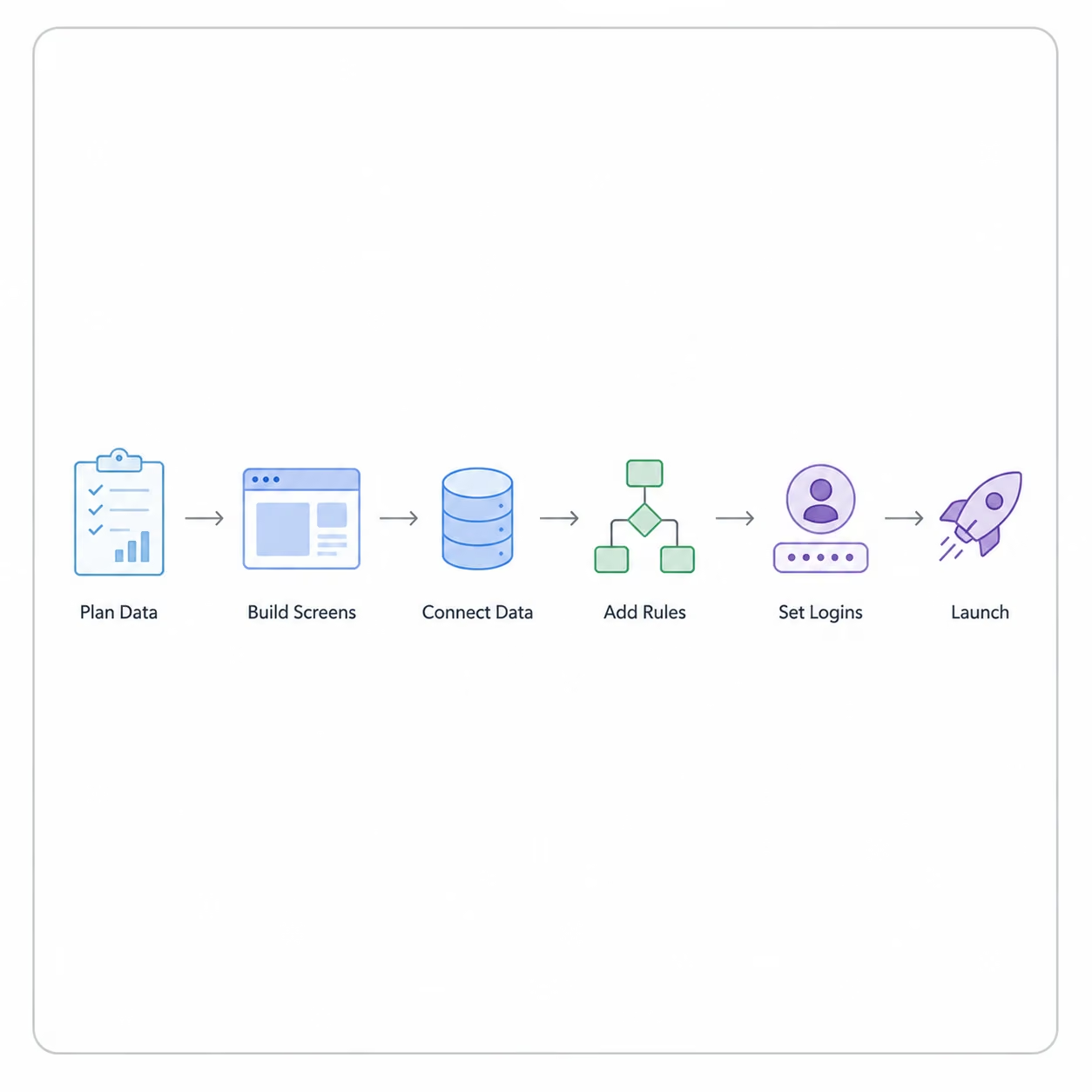
Across my test builds, I've landed on the same order every time:
- Plan your data first: Before I build a single screen, I write down what the app needs to store and how those things connect. A customer connects to their bookings. A task connects to its project. Skip this step, and you'll end up rebuilding later, the way I did.
- Build the screens: Next, I lay out the pages people will tap through. That usually means a list of items, a detail page, and a form to add something new. This part feels like designing a slideshow, and it goes quickly.
- Connect the data: Now, I link those screens to the stored information, so the app shows real names and real numbers instead of blank boxes.
- Add the rules: This is where I tell the app how to behave. I set rules for saving information, sending messages, and blocking actions I don't want. This is the part that turns a set of screens into an actual app.
- Set up logins: I decide who can sign in and what each person is allowed to do once they're in.
- Test, then launch: I tap every button trying to break it, fix what falls apart, then put it live for real people.
Let me show you what that looks like with a real example.
I once built a booking app for a small yoga studio. The screens were done in an afternoon. But the rules took two full days, because I had to stop two people from booking the same slot, send reminder emails, and block anyone from booking a date in the past.
That gap shows where no-code gets harder. The screens were quick and fun. The rules underneath took most of the work. The same screen-versus-rules split shows up in almost every app I build.
Also read our guide on how to create a business app in an afternoon to see the full process from data planning to launch.
No-Code vs. Vibe Coding: What's the Difference?
The main difference between no-code and vibe coding is control. No-code keeps you inside the platform's guardrails. Vibe coding hands you more speed and freedom, plus more ways to break things. I've shipped real projects with both, and they fail in completely different ways.
Vibe coding is the other way to build without being a developer. You type a plain-English description of what you want, and an AI writes the code for you.
| What matters | No-code | Vibe coding |
|---|---|---|
| Who it suits | People who want to avoid code entirely | People who don't mind meeting code eventually |
| Speed at the start | Slower, but fewer nasty surprises | Very fast, a rough version in hours |
| Who owns the work | The platform keeps it inside its walls | You get the actual code files to keep |
| Biggest risk | Hitting a limit you can't get around | Security holes and edits that break things |
| Fixing problems | Built-in safety nets catch most slip-ups | You fix it yourself, often by trial and error |
Vibe coding is fast, and you walk away with the actual code files, which no-code won't give you. I once described an expense tracker in a single sentence and watched the AI build the whole thing in minutes. The risk rides along with that speed. An AI-built app you don't check can leak private data, run up surprise bills, or let people unlock paid features for free.
That is the trade-off with vibe coding. No-code holds your hand and stops you from hurting yourself. Vibe coding gives you the keys and trusts you not to crash.
That freedom carries real risk. An AI-built app you don't check can leak private data, run up surprise bills, or let people unlock paid features for free.
Pick based on where you're starting. If you're brand new, no-code wins. The safety nets protect you while you learn how apps work. You can always move to vibe coding later, once the basics click.
If you already know a little code and want raw speed, vibe coding pulls ahead. You move fast, and you keep the actual files, so you're not locked into one company forever.
Also read our guide on Vibe Coding vs No Code to see which approach fits where you are right now in 2026.
What I Liked and Didn't Like About No-Code App Development
Weekend experiments have shown me where no-code helps and where it gets in the way.
Pros (What Works)
- Speed from idea to app: My test booking app was live in three days. Building that by hand would have taken weeks and coding skills I don't have. For testing an idea quickly, no-code has been the fastest option for me.
- No waiting on anyone: The person who knows the problem gets to fix it. When I wanted to add a new field mid-test, it took two minutes of clicking.
- Safety nets that protect you: No-code catches many mistakes before they reach your users. I've broken plenty of my own builds, but I've never leaked data, because the platform won't let me get that far.
- A real way to learn: Building like this taught me how data, rules, and logins fit together. That knowledge carried into every tool I touched afterward. You pick up the ideas without drowning in code first.
Cons (Where It Falls Short)
- Pricing gets expensive fast: I've felt it myself once user, storage, and rule limits started to matter. Many tools charge per user, or limit how much data you store and how many times your rules run. The price you sign up for is rarely the price you pay once the app grows.
- You hit hard limits: No-code feels flexible until you hit a feature or pricing limit. The easier a tool is, the less it lets you customize later. I've had projects stall because the one feature I needed wasn't an option, and there was no code I could write to add it.
- Mobile is a hidden trap: Building the screens is easy, but getting a real app into the Apple or Google store is not. That step needs developer accounts, approvals, and review rules that have nothing to do with your builder.
Many "mobile" no-code tools only make a web app you open in a browser, which is fine for staff tools but won't get you into an app store.
Should You Use No-Code App Development? My Take
After all the builds, the broken logins, and the surprise bills, I still reach for no-code first on most projects, as long as I know where it starts to strain. It's the fastest way to turn an idea into something people can use. It works best when the job matches the tool's limits, and the problems show quickly once you push past them.
No-Code App Development is Perfect For:
- Testing an idea cheaply: If you want to know whether people will use your idea, build a rough version this week and find out. I've proven and killed ideas in days instead of wasting months.
- Tools for your own team: Trackers, dashboards, and staff portals that live behind a login. These almost never need an app store, so you skip the hardest part. This is where no-code is a joy.
- Apps that show data to people: If your app mostly shows the right information to the right person, no-code gets you there fast. You need a login, a filtered list, and a clean view.
- Founders who want control: If you'd rather build and tweak it yourself than manage a developer, no-code gives you direct control over your own product.
Skip No-Code App Development If You:
- Need unusual features or huge scale: If your app does something rare or has to handle massive traffic, no-code will run short. A developer or vibe coding will serve you better, since you own the code and can push further.
- Are building something regulated: Marketplaces, finance apps, or anything handling medical data that needs more control than most no-code tools allow. Bring in a developer early.
- Want a true app-store app: If being in the App Store is the whole point, pure no-code makes that a grind. Some tools get you closer to real mobile apps, but they tend to be more technical and take longer to learn.
Also read our guide on best low-code app builders for scalable apps in 2026.
How to Get Started With No-Code App Development in 5 Steps
You don't need a course or a big plan to begin. You need one idea small enough to finish. Here's the exact path I'd give a friend starting from zero.
- Pick one small problem: Skip the dream startup for now and pick one annoying task instead. A habit tracker, a sign-up form, or a contact list. At this stage, the goal is to learn the tool before you try to launch a company.
- Plan your data: Write down what your app stores and how the pieces connect. A customer might connect to a booking, and a task might connect to a project. This is the step everyone skips, and the one that cost me a full rebuild on that first client tracker. Five minutes here saves you days later.
- Pick the right tool: Grab the one that fits the job, whether that's a staff tool, a public web app, or a phone app, not just the most powerful option. Whether it's pure no-code or an AI builder like Emergent, the right fit is the one built for what you're making. Most tools have free versions, so trying costs nothing.
- Build screens, then rules: Lay out the pages first, because that part is quick and gives you an early win. Then add the rules underneath. Expect the rules to take longer than the design. In my builds, that order has held up.
- Try to break it, then launch: Tap every button, submit empty forms, and try booking the same slot twice. Find what falls apart while you're the only one testing, before real users hit it, not your users. Then put it live.
Pro Tip
Start two projects from day one. Use one project for the thing you care about and one as your practice space. When you get stuck on the real one, test the fix in the practice space first. You keep your main app clean, and you learn faster by breaking the spare.
Also read our guide on the best no-code software builders to find the right platform before you start building in 2026.
No-Code Best Practices I Wish I Knew Earlier
Every tip here came from a build that bit me. Learn them now and skip the painful version where you learn them yourself.
- Plan data first: Plan your data before you touch a single screen. How your information connects is the backbone of the app, and getting it wrong early means taking the whole thing apart later.
- Read the limits: The headline price tells you almost nothing. Look at the per-user fees and the caps on how much you can store or run. One time, I needed a basic feature and found out it sat three price tiers above what I was paying. Check the limits against your real needs before you build.
- Keep a practice copy: Never test a risky change on your live app. Make a spare copy, break things there, and only move the fix over once it works. This habit has saved my builds many times.
- Know your exit: Ask the boring questions up front. Can I get my data out? Could I rebuild this somewhere else if I had to? You may never need the exit, but you want to know where it is before a price hike forces your hand.
Beginners tend to make the same mistakes. These are the ones I see again and again:
- Mixing up web and app-store apps: Opening an app in a browser is not the same as downloading it from the App Store. Know which one you need before you pick a tool.
- Grabbing the most powerful tool: More power means a harder learning curve. Beginners who start on the heavy tools often give up. Start simple, then move up when you outgrow it.
- Trusting the first screen: AI tools spit out a slick first draft that looks finished. The real test comes later, when the app has to handle live data and real logins, which is where a lot of them fall apart.
My Verdict on No-Code App Development
I've built with no-code for years now, and I still start most projects here. It's the fastest, honest path from "I have an idea" to "here's an app you can use." For staff tools, customer portals, and testing an idea before you spend real money, no-code usually gets you there faster with less risk.
No-code isn't a fringe experiment anymore, so learning it now gives you a useful build skill.
It isn't the answer for everything, though. If you need rare features, a huge scale, or a real app-store presence, no-code runs short. For those builds, a developer or vibe coding earns its place, because you own the code and can build further. For regulated or marketplace apps, you'll want more control than most all-in-one tools give.
No-code is the right first move for most people building common app projects. Start here, ship something real, and reach for heavier tools only when you need them. The mistake is expecting no-code to handle work it was never built for.
Ready to Build Your First App?
If the steps above made building feel doable, an AI builder is the easiest place to start, and it picks up right where pure no-code runs short. Emergent is built for non-technical builders who want a full, working app from one description, without running into the feature limits that stall most no-code tools.
With Emergent, you can:
- Go from prompt to full app: Its agents turn one plain-English description into a working app, with the interface, backend, logins, and integrations wired up for you.
- Build without getting boxed in: Emergent is an open platform, so you can plug in any tool with an API key, sync your code to your own GitHub repo, and keep extending the app as you grow.
- Start without spending anything: A free plan lets you test an idea and see what it builds before you commit to a paid tier.
Try building your first app on Emergent and see how far one clear description gets you.


Describe what you want and Emergent builds it. A real, production-ready app you can launch the same day.
- One prompt to build
- Zero code required
- Deploy in minutes







