



Windsurf pricing runs across five tiers, from a free plan to a custom Enterprise option. After testing Pro through the Devin Desktop rebrand, here's what each tier costs and where the math stops working.
Windsurf Pricing at a Glance
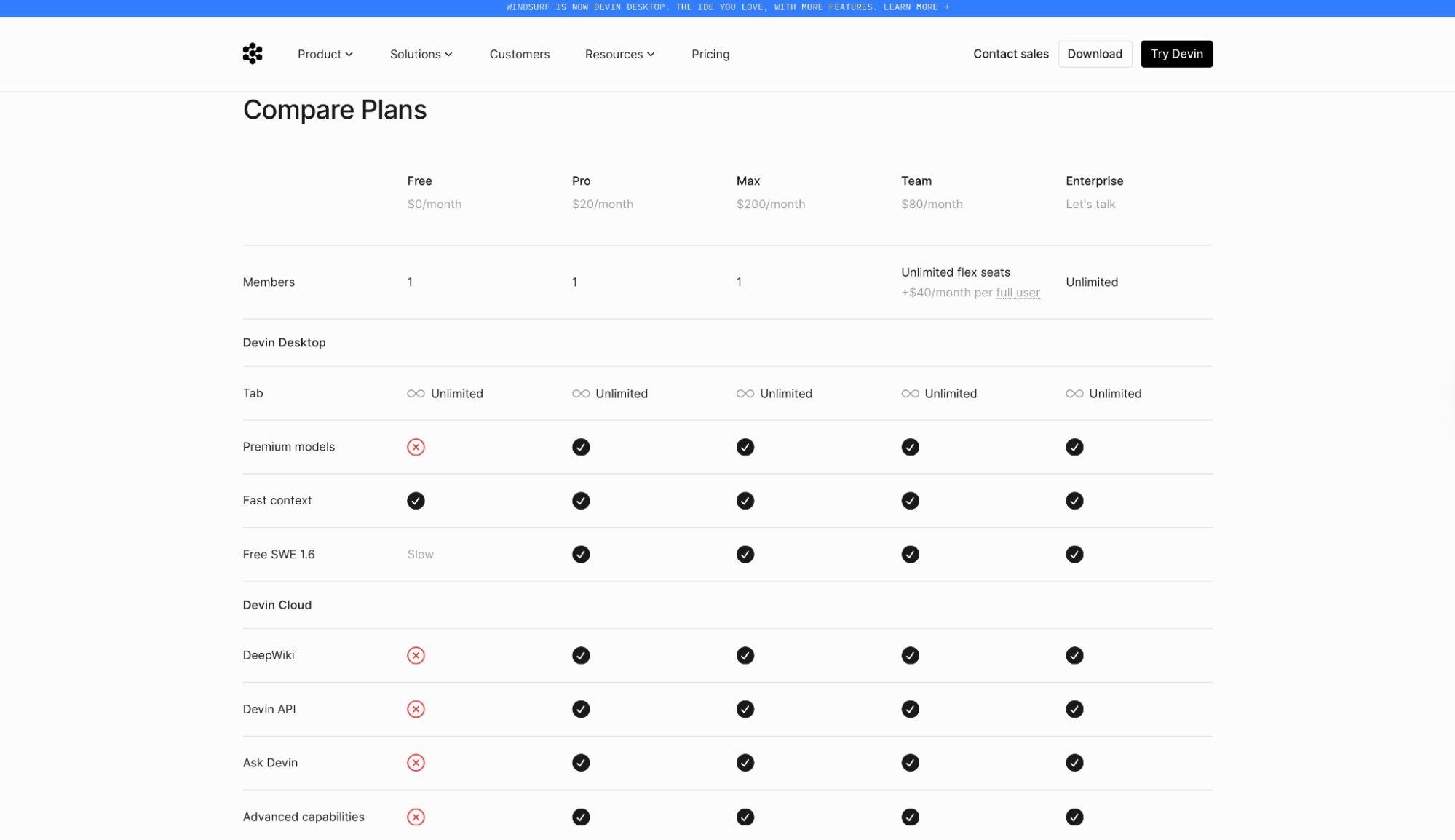
| Plan | Price | Best For | Key Features |
|---|---|---|---|
| Free | $0/month | Trying it out | Light usage quota, unlimited Tab completions, unlimited inline edits, limited model access |
| Pro | $20/month | Solo developers | Full model access (Claude, GPT, Gemini), Devin Cloud, extra usage at API pricing |
| Max | $200/month | Power users | Everything in Pro, plus significantly higher usage quotas |
| Teams | $80/month + $40/month per full seat | Dev teams | Everything in Pro plus centralized billing, admin dashboard, priority support, unlimited members |
| Enterprise | Custom | Large orgs | Everything in Teams plus SSO, dedicated deployment, dedicated account management |
All pricing is sourced from the pricing page. Plans and quotas carry over automatically from Windsurf with no interruption.
Windsurf Pricing Plans Breakdown
The numbers are in the table. What follows is where each plan breaks down in practice.
Free: $0/Month
Tab completions and inline edits are unlimited on this tier, plus you get a light quota to run agents. The limits show up on model access: SWE 1.6 runs slower than on paid tiers and frontier model availability is restricted.
It runs out fast in any session that demands serious agent depth, because frontier models on Claude, ChatGPT, and Gemini are restricted or unavailable depending on the request. Agent sessions that run longer than a few exchanges burn through the quota before you finish the task.
Best for: Developers who want to test the IDE and Tab completions before putting a card down.
Pros
- No cost to get started: You get full access to the editor and a working agent quota from the first download. That's enough to run a meaningful eval before committing to Pro.
- Tab completions and inline edits are unlimited, even on Free: Neither feature touches your quota, so the editing experience doesn't degrade as your allowance runs down.
Cons
- Limited model availability slows down agent sessions: Free users get SWE 1.6 at a slower speed, and frontier models require upgrading to Pro. Workflows that depend on model quality tend to run into that ceiling quickly.
- The usage quota is described as "light" with no published number: There's no fixed execution count or token cap listed publicly, which makes it hard to predict how far a session goes before hitting the limit.
Pro: $20/Month
Pro opens full model availability, including all frontier models, plus access to SWE 1.6 and open source models at full speed. The usage quota also increases significantly over Free, giving more room before overages kick in.
The plan also adds access to Devin Cloud for longer-running autonomous sessions. And if you hit your quota mid-project, extra usage is available at API pricing rather than forcing an upgrade.
Concurrent sessions cap at 10 on Pro. Two developers sharing one seat will hit it within a busy afternoon of parallel work.
Best for: Solo developers who need frontier models from Anthropic, OpenAI, and Google, and Devin Cloud for production work without paying for a team plan.
Pros
- Full model access included: Switching models mid-session costs nothing extra. Different tasks run better on different models, and Pro doesn't charge you to find that out.
- Extra usage purchases at API pricing rather than forcing an upgrade: If you run over your quota in a heavy week, you top up at cost. That keeps the bill proportional to actual usage instead of jumping to the next tier.
- Devin Cloud is included at the Pro level without a separate subscription: Longer-running autonomous sessions run on Cognition's infrastructure, so the agent keeps working without tying up your local machine.
Cons
- Concurrent sessions cap at 10, identical to Free: Solo developers rarely hit it, but teams sharing one seat across two people will reach the cap within a busy afternoon.
- No published quota number makes cost prediction difficult: Pro's allowance is described as "increased" compared to Free, with no specific number attached.
Max: $200/Month
Max is Pro with a higher usage quota and unlimited concurrent sessions. Cognition describes the ceiling as "significantly higher" without publishing a specific number, so the $180/month difference buys headroom you can't size in advance.
That math works only if you're already hitting Pro's limit regularly and tracking what overage costs you each month.
Best for: Power users who hit Pro's usage limits regularly and spend enough on top-ups that $200/month comes out cheaper than $20 plus overage.
Pros
- Significantly higher quotas on the same plan structure: If you're already on Pro and topping up frequently, Max absorbs that variable cost into a flat rate.
- Overage stays at API pricing on Max, same as Pro: Heavy weeks don't trigger a tier penalty. You pay the cost for anything beyond the quota, whichever plan you're on.
Cons
- No team features: Max lifts concurrency to unlimited and raises the quota, but centralized billing, an admin dashboard, and priority support still require Teams.
- The value case is hard to verify without a published quota: "Significantly higher" is Cognition's description. Without a specific number, modeling whether Max works out cheaper than Pro plus overages is guesswork until you've tracked a few months of spend.
Teams: $80/Month + $40/Month Per Full Seat
Teams adds centralized billing, an admin dashboard with analytics, and priority support across unlimited members. Each full seat costs $40/month and includes that user's own usage quota plus access to Devin Desktop.
Teams supports unlimited members, with full seats at $40/month each. The pricing page lists flex seats as available, but doesn't publish a separate rate or define what access they include. On the usage side, concurrent sessions go unlimited, the biggest structural difference from the 10-session cap on Pro.
For engineering teams running multiple sessions at once, the unlimited cap is why Teams costs more than Pro. On the pricing side, the base fee covers the team infrastructure, and developer access starts with the first full seat on top of that.
Best for: Engineering teams where multiple developers need full agent access, centralized billing, and a shared admin view of usage across the org.
Pros
- Unlimited concurrent sessions across the team: The 10-session cap on Pro and Max is a hard ceiling for parallel workloads. Max and Teams both remove it entirely. A multi-developer team can run full sprint sessions without hitting a queue.
- Centralized billing and admin dashboard included: For orgs where finance and engineering sit separately, one invoice and a usage dashboard per member means no per-person subscriptions to track.
Cons
- The starting price is $120/month once you add the first full seat: The base plan covers the team structure, but no developer access. Budget conversations should start from that number, not the headline figure.
- Priority support but no dedicated account management: Dedicated account management and a Slack Connect channel sit behind Enterprise custom pricing. For teams with complex onboarding or integration needs, that distinction matters.
- Flex-seat terms aren't fully spelled out: Their pricing page lists "unlimited flex seats" at +$40/month per full user but doesn't define a lighter, cheaper seat. Each full user gets their own quota, so budget as if every active user is a full $40 seat.
Enterprise: Custom Pricing
Enterprise adds SAML/OIDC SSO, VPC deployment, dedicated account management, a Slack Connect channel to the Cognition team, and the highest priority support tier. Everything in Teams carries over, with the security and compliance layer added on top.
Pricing is negotiated directly with Cognition's sales team. For organizations where identity federation and isolated deployment are hard requirements, this is the only tier that covers both.
Best for: Large organizations where SSO, dedicated deployment, and a contractual support relationship are non-negotiable requirements.
Pros
- VPC deployment and SAML/OIDC SSO are only available here: If your security team requires isolated deployment or identity federation, those features don't exist on any tier below Enterprise.
- Dedicated account management and Slack Connect support: Every other plan routes you through standard support channels. Enterprise gets a named contact and a direct line. Blocking issues go to a person, not a queue.
Cons
- No published pricing means budget approval requires a sales conversation first: Teams evaluating Enterprise have no published number to anchor the conversation. For organizations with long procurement cycles, that adds friction before the evaluation even starts.
- No intermediate tier between Teams and Enterprise: The jump skips from $80/month plus seats straight to custom pricing. If SSO is the only feature you need, there's no tier below Enterprise that covers it.
Which Windsurf Plan Should You Choose?
Choose Free if you:
- Want to test the IDE and Tab completions before paying anything, with enough agent quota to run a few full sessions and see whether the workflow fits.
- Are evaluating Devin Desktop after the Windsurf rebrand and want to confirm your extensions, settings, and keybindings carried over before committing to Pro.
- Use another primary editor and only need Tab completions and inline edits occasionally, without sustained agent sessions.
Choose Pro if you:
- Need access to all major frontier models, and find Free's limited availability cuts off sessions before the task is done.
- Want Devin Cloud agents for longer-running autonomous work that runs past what a local session can handle.
- Hit Free's usage quota on a regular basis and spend more time managing limits than shipping code.
Choose Max if you:
- Are already on Pro and topping up with extra usage at API pricing often enough that $200/month works out cheaper than $20 plus overage across a typical month.
- Run sustained, complex agent sessions where model depth and reasoning matter more than parallelism, and quota is what stops you from finishing the task.
- Work solo and don't need team features, shared billing, or a centralized admin dashboard.
Choose Teams if you:
- Have more than one developer who needs full agent access, because a shared Pro seat with a 10-session cap breaks down fast once two people are working in parallel.
- Need centralized billing and a usage dashboard across the team, particularly if finance and engineering handle expenses separately.
- Run parallel agent sessions across more than one developer, since Teams lifts the 10-session cap and shares it across the whole team (Max also runs unlimited sessions, but only for a single user).
Choose Enterprise if you:
- Require SAML/OIDC SSO or VPC deployment, since neither is available on any published plan short of Enterprise, no matter how many seats you're running.
- Need a dedicated account contact and a Slack Connect channel for direct support, rather than routing through standard support queues.
- Operate in a regulated industry where centralized enterprise admin controls and isolated deployment are hard requirements before procurement signs off.
Want to put these tools to work beyond just building? Our guide on how to make money with AI covers the most practical ways to do it in 2026.
Is Windsurf Worth the Cost?
Pro at $20/month is worth it. Max at $200/month is harder to justify. At $20, you get frontier model access across every major frontier model inside a full IDE, and Tab completions land immediately if you're coming from Copilot or Cursor.
The quota is where the pricing breaks down. Cognition doesn't publish a number. The ceiling is invisible until you hit it, and the cost per session varies by model, task complexity, and reasoning depth. Heavy users on Pro can find themselves buying more usage before the month ends.
Max at $200/month is difficult to justify without a published quota to compare against. You're betting that the headroom is large enough to absorb what Pro's quota left unfinished, without knowing how wide that gap actually is.
For developers who burned through Pro consistently and tracked their overage spend, the math may land in Max's favor. For everyone else, the jump from $20 to $200 is steep for what's officially described as "significantly higher quotas" with no further detail.
The rebrand from Windsurf to Devin Desktop on June 2, 2026, left pricing, plans, and features unchanged for existing users. The IDE, extensions, and billing carry over automatically.
Windsurf is worth it if you:
- Use frontier models heavily and want frontier models accessible from the same IDE without managing separate API keys or switching tools mid-session.
- Run multi-step agent sessions where Devin Cloud agents handle the work so you don't have to supervise each step.
- Are coming from a per-seat tool like Copilot Business and have more than a couple of developers, since Pro's flat rate covers one user across all the models without per-seat scaling.
Skip Windsurf if you:
- Need to forecast monthly spend precisely, since neither Pro nor Max publishes a quota number, and cost per session varies enough that the bill can surprise you.
- Are a team of more than one developer on a budget, because the Teams floor is $120/month before a second seat, which is more than double what Pro costs for a solo user.
- Need SSO or VPC deployment at any price below Enterprise custom pricing, since neither feature appears on any published plan, regardless of how many seats you add.
Before you decide, check out our Windsurf Review to learn how real users rate its performance, pricing, and overall developer experience.
Windsurf Pricing Alternatives Worth Comparing
Cursor and GitHub Copilot charge less at entry and structure usage differently. Below is how Emergent, Windsurf pricing, and its closest alternatives compare on the numbers that matter.
| Tool | Starting Price | Best For | Key Pricing Advantage |
|---|---|---|---|
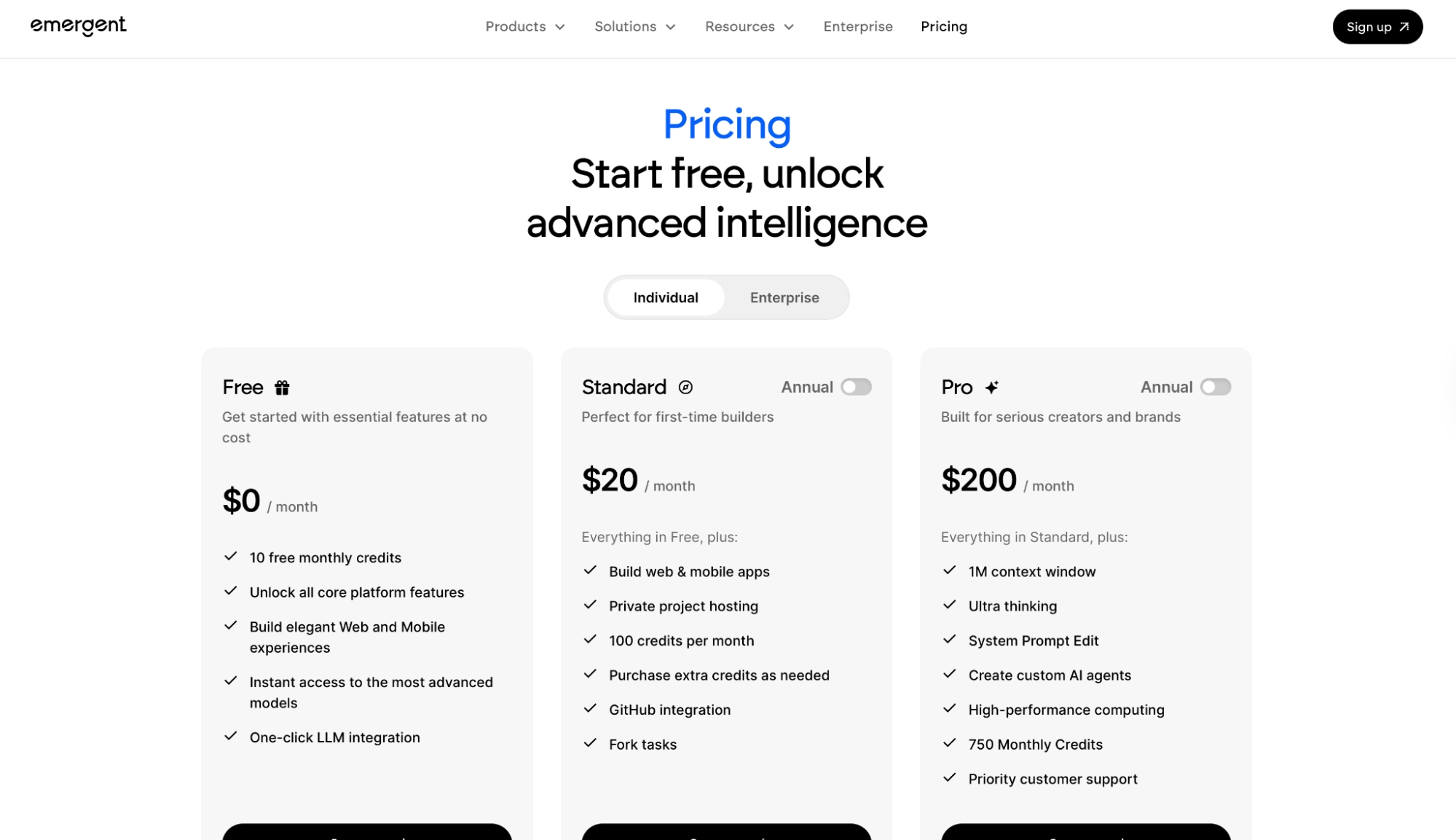
| Emergent | $20/month (Standard) | Non-technical founders and service businesses who need to launch a working app without a dev team | Build, deploy, user login, data storage, and payments in one platform; free plan to start without a credit card |
| Windsurf (Devin Desktop) | $20/month (Pro) | Developers who want frontier models and Devin Cloud in one IDE | Flat $20 entry point with extra usage at API pricing instead of forcing tier jumps |
| Cursor | $20/month (Individual) | Developers who want a published usage pool and SAML/OIDC SSO on Teams | SSO included on Teams at $40/user/month; a published usage allowance plus on-demand overage (Cursor models and third-party API) |
| GitHub Copilot | $10/month (Pro) | Developers already on GitHub who want AI completions across VS Code, JetBrains, and Neovim | Lowest individual entry point at $10/month; Free tier includes 2,000 completions per month plus limited chat usage |
Looking beyond the comparison table? See our in-depth analysis of the best Windsurf alternatives, including features, pricing, and use cases.
Emergent vs Windsurf: Which Should You Choose?
Windsurf is an IDE for writing and reviewing code. Emergent takes a different approach, letting you describe what you want and have agents handle the build, database, and deployment.
If you need to go from idea to a live app without writing the code yourself, that's Emergent's territory.
Emergent's agents get to work from the first prompt. The platform runs on a coordinated multi-agent system. Agents handle different layers of the build, from shaping the interface to wiring the logic, and the work gets checked before anything ships.
Non-technical founders, consultants, agencies, and real estate operators use it to turn a plain-English description into a live app, no developer required.
Emergent is better for:
- Non-technical builders who need a finished, deployable app from day one. Emergent handles login flows with Emergent Auth, a database to store your app's data (MongoDB by default, Supabase optional), payments via Stripe and Razorpay, hosting, and a custom domain you can connect or buy directly through the platform.
- Teams that need web and mobile from one workspace. Apps publish to the App Store and Google Play directly, with React Native and Expo, without switching tools or platforms mid-project.
- Builders who need apps that stay stable as they grow. Emergent is built to handle regressions in large codebases, an area the team points to as a specific strength compared to tools that start breaking as projects scale.
Windsurf is better for:
- An AI-assisted IDE for writing, reviewing, and debugging code with full model access.
- Devin Cloud agents for longer-running autonomous coding sessions that run on Cognition's infrastructure while you step away.
- Developers who want their existing VS Code extensions, keybindings, and workflows with Tab completions and inline edits that don't touch their quota.
Use both if you're already writing code in Windsurf and want to prototype or ship a complete app alongside it. If you're building something new from a blank slate, Emergent covers the build, deployment, and hosting from one conversation.
You can also plug Claude, GPT, or Gemini directly into your app with Universal LLM Key, using Emergent credits without separate accounts.
Emergent connects to hundreds of tools, including Discord, Outlook, Gmail, and more, for preview links and job creation.
Everything syncs to GitHub from the Standard plan up, so the code is yours to open in VS Code, hand to a developer, or keep building on yourself.
Emergent is SOC 2 Type I and ISO 27001 certified with SSO and audit logs included, which counts if you're building anything that touches user data or payments.
The free plan on Emergent starts at 10 credits/month.
Building for Android specifically? Our best no-code Android app builders breakdown covers what else is worth trying in 2026.

Most AI app builders stop at prototypes. Emergent creates production-ready apps you can actually launch.
- Production-ready apps
- Web & mobile apps
- Deploy in minutes







