



Windsurf has emerged as a powerful AI coding companion for developers who want faster iteration through intelligent suggestions, multi-file edits, and context-aware refactoring. For engineers working inside real codebases, it offers a productivity boost by reducing repetitive tasks and accelerating day-to-day development workflows.
However, as teams move beyond code assistance toward shipping full products, expectations begin to change. Developers increasingly look for platforms that not only help write code, but also automate testing, deployment, backend workflows, and infrastructure management. This is where many teams start evaluating Windsurf alternatives that offer deeper automation, stronger collaboration, and production-ready delivery.
In this guide, we explore the 7 best Windsurf alternatives and competitors in 2026, comparing AI-driven development platforms that go beyond editor-level assistance and support scalable, end-to-end software development.
What are the Challenges with Windsurf and Why Existing Users are Looking for Alternatives?
1. Broken Credit System and Free Tier Frustrations
Several users report that free-credits never apply or vanish, making the “free” tier unusable and eroding trust in the platform.

Source of Information: Reddit
2. Workflow Interruptions
Despite promising smooth coding flow, many users encounter long delays, context-loss, and hotkey inconsistencies, which disrupt development momentum.

Source of Information: Reddit
3. Unresponsive Customer Support
User comments reveal delayed responses and lacked resolution, especially when system errors or billing issues were reported.
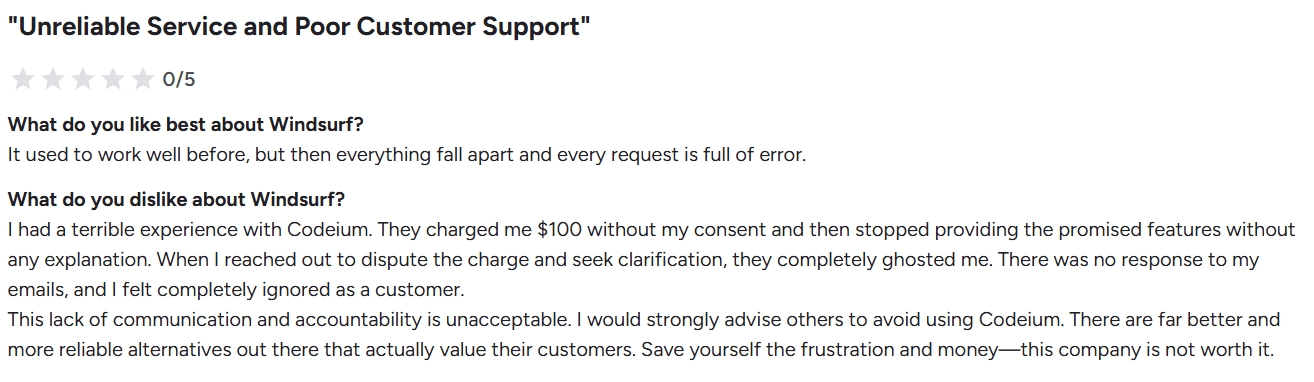
Source of Information: Reddit
List of TOP 7 Windsurf Alternatives and Competitors
Here’s the list of 7 best Windsurf alternatives and competitors to overcome the above challenges.
- Emergent (Best overall Windsurf alternative for full-stack AI development)
- Cursor (Best AI-powered IDE for serious developers)
- BlackBox (Best for fast code search and snippet discovery)
- Replit (Best for collaborative cloud-based coding and deployment)
- Glide (Best for no-code, data-driven applications)
- Base44 (Best for internal tools and low-code workflows)
- Qodo (Best for AI-assisted coding with deployment automation)
Quick Comparison Table
| Platform | Best For | Core Strength | Customization Level | Ease of Use | Scalability | Pricing (Starting) |
|---|---|---|---|---|---|---|
| Emergent | Teams building full-stack production apps | End-to-end AI-driven app lifecycle | Very High | Medium | Very High | Free and paid from $20/mo |
| Cursor | Professional developers using AI IDEs | Deep codebase-aware AI editing | Very High | Medium | High | Free and paid from ~$20/mo |
| Blackbox | Developers needing fast code discovery | AI-powered code search & snippets | Medium | High | Medium | Free and paid plans from ~$10/mo |
| Replit | Teams needing collaborative cloud coding | Browser-based coding + deployment | High | High | Medium | Free and paid from $20/mo |
| Glide | Non-technical teams building internal apps | Spreadsheet-to-app workflows | Medium | Very High | Medium | Free and paid from $25/mo |
| Base44 | Internal tools and admin dashboards | Low-code + backend automation | Medium to High | Medium | Medium | Free and paid plans from ~$25/mo |
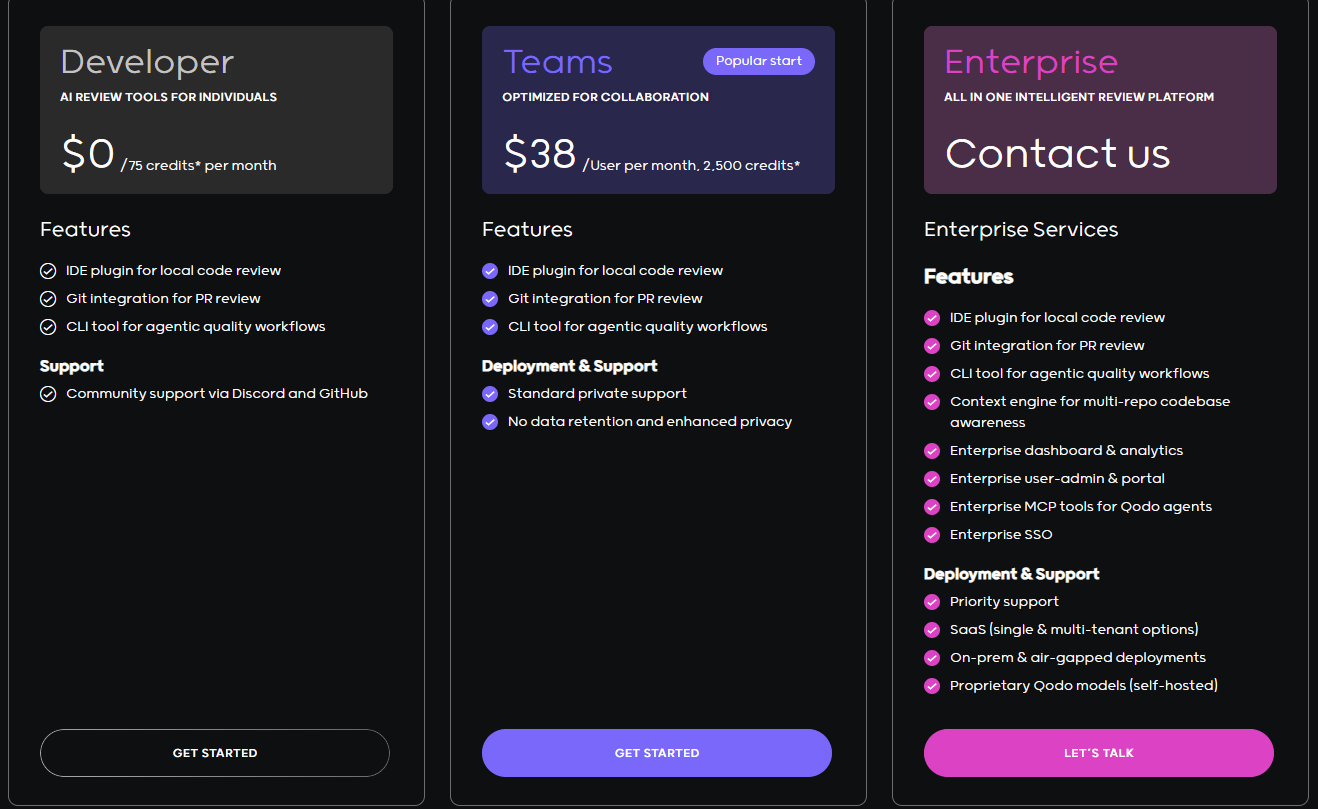
| Qodo | AI-assisted coding with deployment | AI copiloting + cloud execution | High | Medium | High | Free & paid plans from ~$38/mo |
1. Emergent
Emergent is an AI-native, full-stack “vibe coding” platform that enables founders, startups, and teams to build, test, and deploy production-grade web and mobile applications using simple natural language prompts. It replaces traditional coding workflows with AI-powered automation while maintaining complete code transparency, control, and scalability. From frontend and backend to deployment and cloud orchestration, Emergent manages the entire software lifecycle directly in the browser.
Read More About: Windsurf vs Emergent - One to One Comparision
Key Features of Emergent
1. Multi-Agent Development Architecture
Emergent operates through multiple AI agents like Builder, Designer, Quality, and Deploy Agents that work together to plan, code, test, and launch projects. Each agent handles specialized tasks to streamline development from concept to production.
2. Prompt-to-Production Code Generation
Users describe the desired functionality, and Emergent generates real, editable React/Next.js and Node/Python codebases. It ensures quick iteration and the ability to export, self-host, or scale outside the platform without lock-in.
3. Full-Stack Cloud Workspace in the Browser
All builds run in secure, containerized environments with Kubernetes orchestration. This enables teams to develop and collaborate in real time without worrying about local setups or DevOps.
4. Integrated Testing and Monitoring Suite
The platform automatically runs quality checks, performance tests, and error diagnostics. Built-in monitoring tools help users maintain stability post-launch.
5. Rapid and Secure Deployment
Emergent’s Deploy Agent automates SSL configuration, routing, and global domain setup, allowing users to publish updates instantly with zero manual DevOps effort.
Unique Features of Emergent
1. Enterprise-Grade Security and Compliance
Every project runs in an isolated environment with encrypted storage, role-based access control, and compliance with SOC standards, making it suitable for professional and enterprise-grade builds.
2. Customizable AI Skill Assignment
Users can select which AI model (GPT-4, Claude, Llama, etc.) handles specific development roles. This flexibility optimizes cost, precision, and speed across different project phases.
3. Adaptive Learning for Style and Architecture
Emergent learns user preferences, naming patterns, and design choices over time. This adaptive intelligence makes each subsequent project faster and more aligned with the user’s standards.
4. Model Context Protocol (MCP) Integrations
Emergent connects seamlessly with external tools like GitHub, Figma, Notion, and API documentation to sync data, assets, and workflows directly into the build pipeline.
5. Agent-Driven Multimedia Creation
The platform supports next-gen app components including image, video, audio, and AR/VR integrations, enabling developers to build advanced generative and multimedia applications.
Advantages of Emergent
- Fully automates the build lifecycle from UI to deployment
- Exports clean, production-grade code with full ownership
- Eliminates DevOps complexity and hosting setup
- Supports real-time collaboration and version control
- Continuously improves through adaptive AI learning
- Highly secure and compliant with enterprise standards
- Integrated testing ensures consistent production reliability
- Scalable across frontend, backend, and AI-driven apps
Limitations of Emergent
- Advanced custom logic may still need human developer refinement
- Cloud-only workspace; no offline coding support yet
- High-intensity projects can increase compute usage and cost
- Plugin marketplace is expanding but not yet vast
- May require onboarding to understand multi-agent workflows
- Integration with certain niche APIs still in beta
Pricing
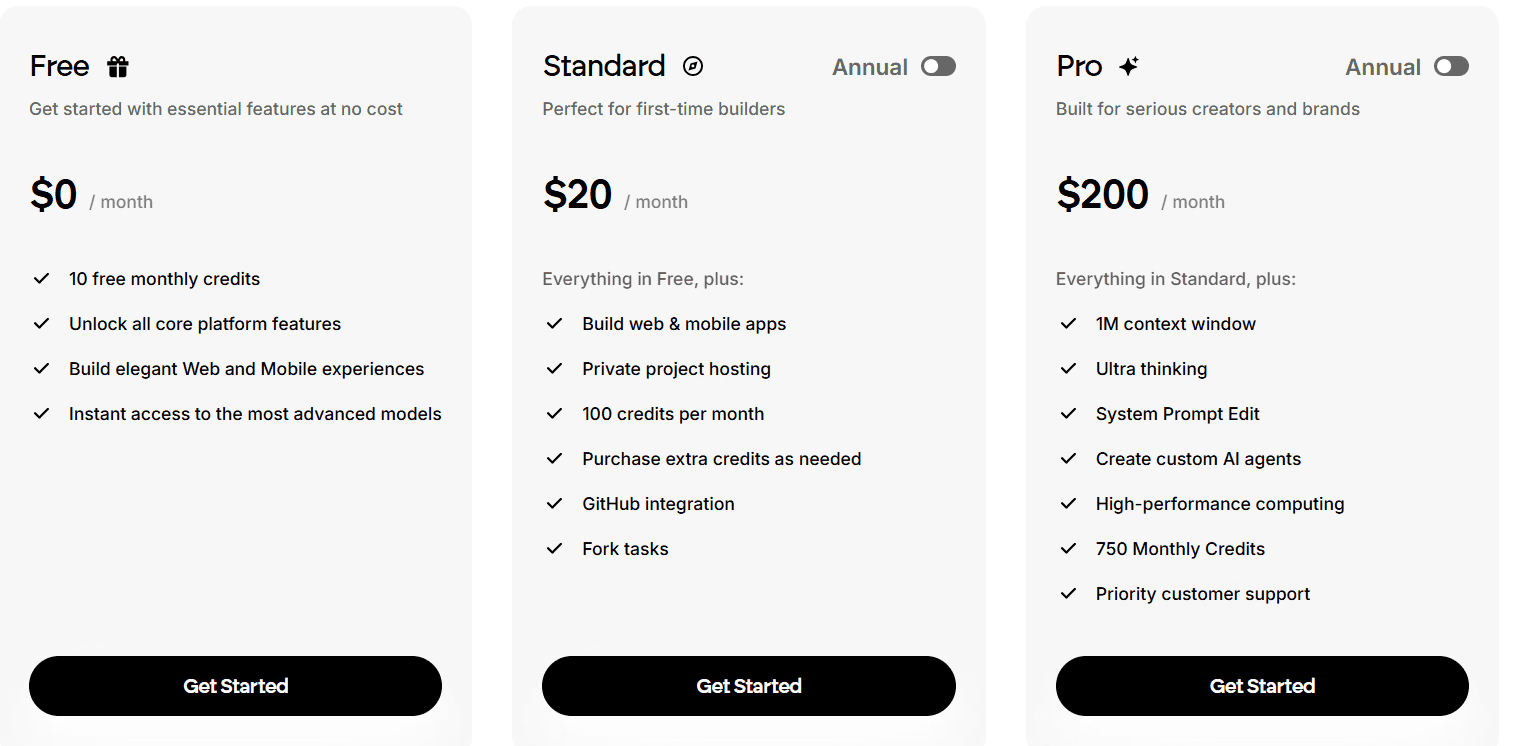
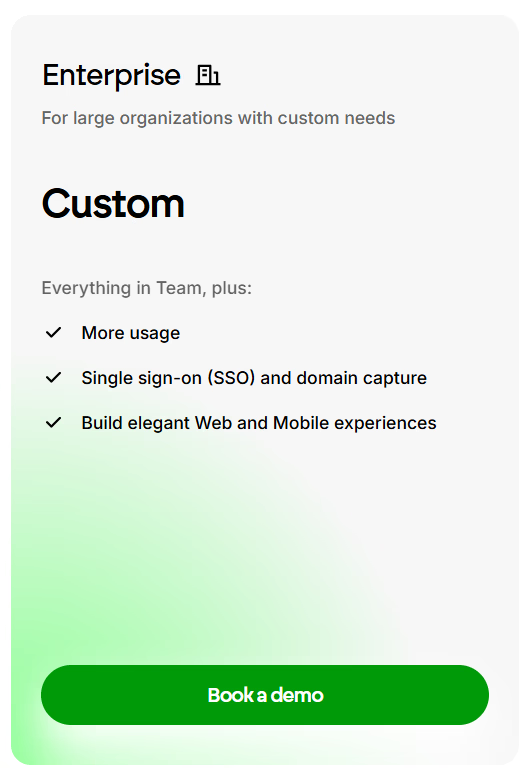
2. Cursor
Cursor is an AI-powered code editor designed to help developers write, refactor, and debug code faster with deep AI integration. Built as a next-generation IDE, Cursor combines the familiarity of VS Code with advanced coding assistance powered by models like GPT-4 and Claude. It is ideal for developers who want to supercharge productivity, automate repetitive coding tasks, and maintain high-quality standards across projects.
Not sure Cursor fits your workflow? Our best Cursor alternatives breakdown covers what else is worth trying in 2026.
Key Features of Cursor
1. Context-Aware AI Coding Assistance
Cursor understands your entire codebase and provides intelligent code completions, inline suggestions, and explanations based on real project context. This minimizes switching between documentation and the editor.
2. Interactive Chat for Code Editing
Developers can highlight sections of code and chat directly with AI to refactor, document, or optimize logic. The AI can even generate unit tests, fix bugs, or rewrite large modules on command.
3. Seamless Integration with Popular Frameworks
Cursor supports major languages and frameworks like React, Next.js, Python, Rust, and Go. It automatically detects environment setup, dependencies, and project structure to streamline onboarding.
4. Built-In Version Control and Git Support
Developers can commit, branch, and push code directly from the Cursor interface. The AI can also suggest commit messages, making version control more efficient and less error-prone.
5. Local-First Development for Privacy and Control
Unlike purely cloud-based editors, Cursor runs locally and keeps sensitive data on your machine. Users can still connect to remote repos or containers when collaboration is needed.
Unique Features of Cursor
1. AI Refactoring and Multi-File Edits
Cursor allows developers to request large-scale refactors that span multiple files. The AI intelligently applies changes across dependencies and modules, maintaining code integrity.
2. Embedded AI Documentation Generator
With a single command, developers can auto-generate docstrings, READMEs, or function explanations based on context. This makes codebases more maintainable and readable.
3. AI-Driven Code Search and Understanding
The AI can instantly locate functions, dependencies, and references across large repositories. Developers can ask “where is this variable used?” or “which function handles login?” to navigate instantly.
4. Team Collaboration with Shared Context
Teams can share AI sessions, meaning the assistant remembers discussions and code suggestions made by collaborators. This enables consistent AI-assisted collaboration in real time.
5. Cross-Model AI Support
Cursor supports multiple AI providers like OpenAI, Anthropic, and Gemini, giving developers flexibility in choosing models for accuracy, cost, or performance optimization.
Still weighing your options? Our Windsurf vs Cursor breakdown shows exactly where each one pulls ahead.
Advantages of Cursor
- Deep AI understanding of the full codebase for precise assistance
- Enables fast refactoring, bug fixing, and optimization
- Compatible with VS Code extensions and workflows
- Works offline for local-first privacy and reliability
- Strong documentation generation and AI search features
- Supports multiple AI providers and coding languages
- Smooth integration with Git and CI/CD pipelines
- Ideal for developers seeking AI-augmented productivity
Limitations of Cursor
- Still in early stages for large enterprise-level collaboration
- Heavy projects may experience slight latency during large AI queries
- Limited visual or no-code capabilities compared to app builders
- Occasional model context drift on massive repositories
- Requires a paid plan for access to advanced AI models
- Cloud sync and shared sessions depend on stable internet
Want more hands-on takes before you decide? Read our Cursor Reviews for a closer look at what real users actually ran into.
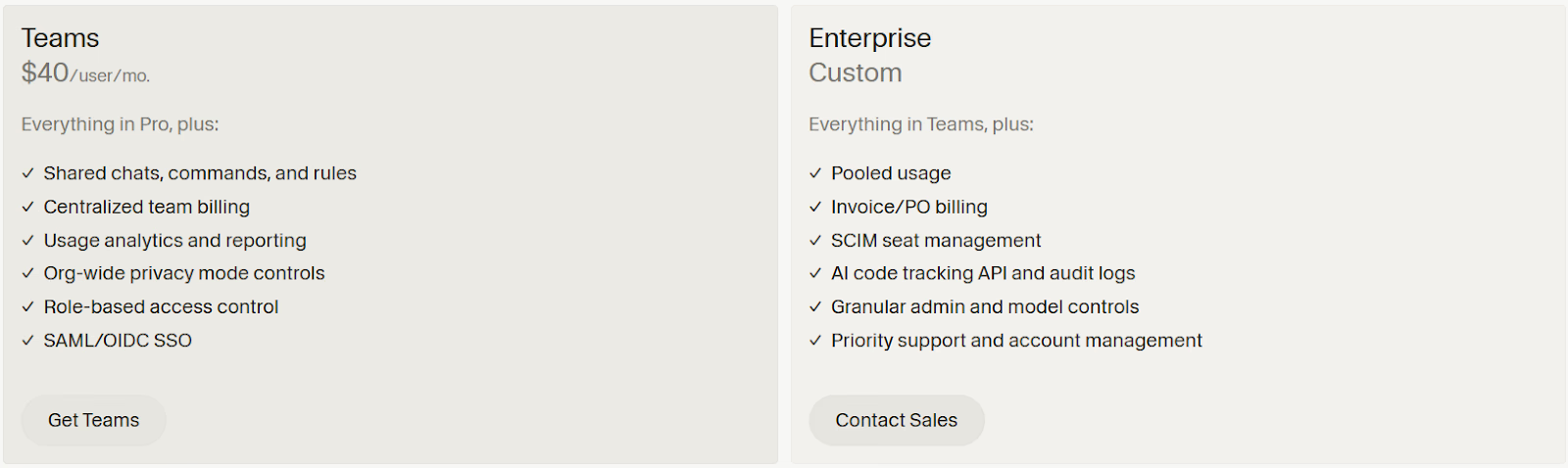
Pricing

3. Blackbox
Blackbox is an AI coding assistant that helps developers search, understand, and generate code across multiple programming languages. It’s known for its GitHub-integrated code search and autocomplete capabilities, allowing users to extract code snippets from millions of repositories instantly. Blackbox is particularly popular among developers who want quick, contextually relevant coding help without leaving their IDE or browser.
Read More About: 6 Best Blackbox Alternatives and Competitors
Key Features of Blackbox
1. AI-Powered Code Autocomplete
Blackbox offers intelligent code completion that predicts and writes lines or entire functions as you type. It learns from public repositories and adapts to your personal coding style over time.
2. Advanced Code Search Engine
You can search through millions of open-source GitHub repositories in seconds. Developers can find specific functions, implementations, or patterns simply by describing them in natural language.
3. Multi-Language Support
Blackbox supports over 20 programming languages including Python, JavaScript, Java, and C++. This makes it a universal tool for polyglot developers working across different stacks.
4. Integrated Browser Extension
With the Chrome and VS Code extensions, developers can copy, paste, and run AI-generated code snippets directly from the browser or editor, reducing friction in the workflow.
5. Real-Time Code Explanation
The assistant can explain code line by line, helping developers understand legacy or unfamiliar codebases. This is particularly useful for onboarding and debugging.
Unique Features of Blackbox
1. GitHub Codebase Indexing
Blackbox connects directly to GitHub and indexes repositories to provide instant, high-accuracy code suggestions and references. This makes it one of the most data-rich AI assistants for developers.
2. Context-Aware Copy & Paste Recognition
Blackbox can detect copied code snippets and offer contextual improvements, alternative implementations, or optimizations automatically.
3. Natural Language-to-Code Search
Developers can describe the desired functionality in plain English and Blackbox returns working code snippets across multiple languages.
4. AI Explanation Mode
The Explain feature enables users to highlight any code block and instantly get a human-readable breakdown of its purpose, inputs, and outputs.
5. One-Click Export to IDEs
Developers can seamlessly transfer AI-suggested snippets into their preferred IDE with one click, ensuring fast testing and integration.
Advantages of Blackbox
- Extensive access to real GitHub data and repositories
- Efficient and accurate AI-powered code search
- Supports multiple programming languages and frameworks
- Excellent for quick reference, prototyping, and debugging
- Intuitive browser and IDE integrations
- Offers code explanations and educational insights
- Lightweight and fast setup process
- Suitable for individual developers and teams
Limitations of Blackbox
- Limited deep context awareness compared to full AI IDEs like Cursor
- Cannot fully refactor or modify codebases autonomously
- Free plan restricts search queries and autocomplete length
- Occasional irrelevant snippets due to GitHub data noise
- Collaboration tools are less developed than competitors
- Privacy concerns for sensitive or proprietary projects
- No native mobile or offline support
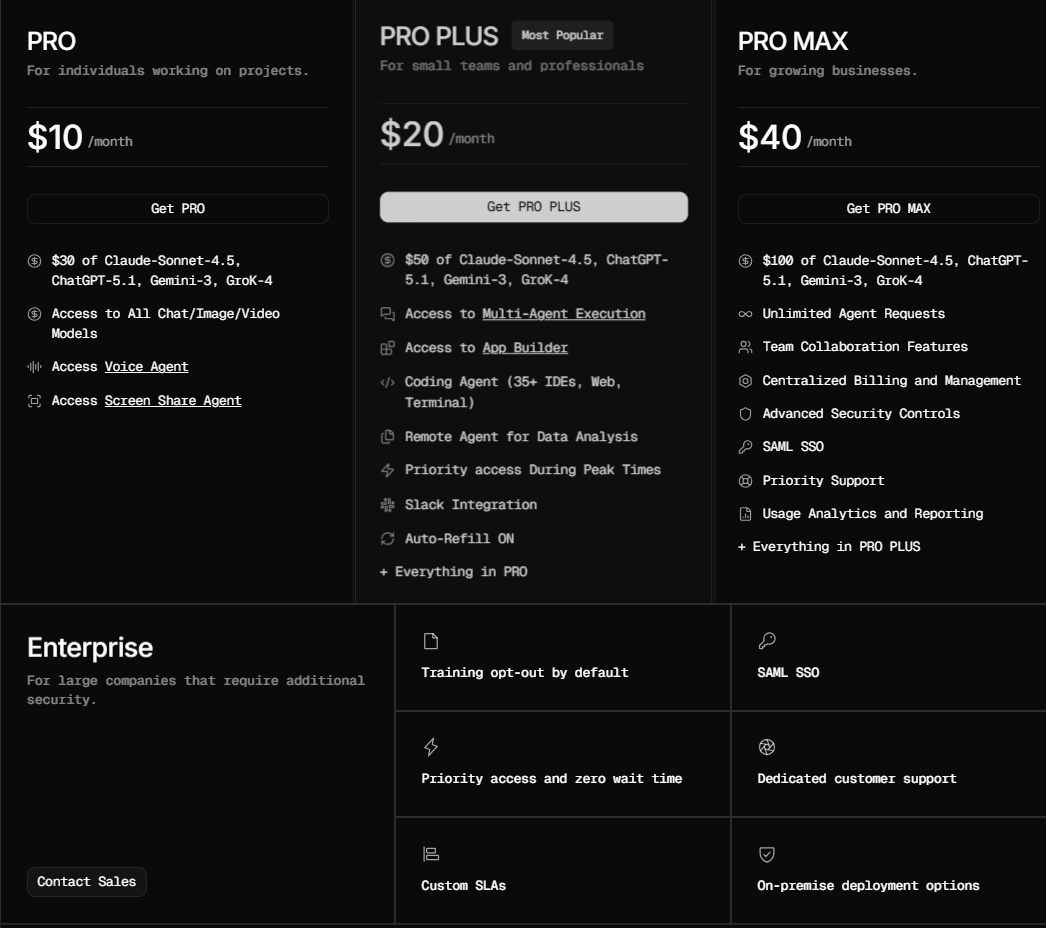
Pricing
4. Replit
Replit is an AI-enhanced cloud development platform that allows users to code, build, and deploy software directly from their browser. Known for its collaborative workspace and powerful AI agent called “Replit Ghostwriter,” it simplifies coding by suggesting code snippets, fixing bugs, and even completing entire functions. Replit is ideal for developers, students, and startups who want a fast, accessible, and scalable coding environment without managing infrastructure.
Read More About: Best Replit Alternatives and Competitors
Key Features of Replit
- Cloud-Based Development Environment
Replit lets users code in over 50 programming languages directly in the browser. Projects are hosted online, allowing developers to start coding instantly without setup or downloads.
- AI-Powered Coding Assistant
The integrated Ghostwriter AI suggests code completions, generates functions, and explains errors in real-time. It enhances productivity and helps developers learn faster through guided suggestions.
- Instant Hosting and Deployment
Users can deploy web apps, APIs, and full-stack projects with one click. Automatic hosting and domain setup make it easy to publish prototypes or production-ready apps.
- Multiplayer Collaboration
Replit enables real-time coding collaboration where multiple users can edit the same file simultaneously, similar to Google Docs for code.
5. Built-In Package Manager and Version Control
Developers can import dependencies, manage packages, and maintain project versions directly in the Replit interface without relying on external tools.
Unique Features of Replit
1. Ghostwriter Chat for AI Pair Programming
Ghostwriter Chat acts as a real-time AI coding partner that helps debug, explain, and write code on request. It learns from your project context to give smarter suggestions.
2. Replit Deployments and Autoscaling
Replit provides scalable cloud hosting where apps automatically scale based on user traffic, minimizing manual server management.
3. Template-Based Project Creation
Users can start from pre-built templates for Python, JavaScript, React, and more, reducing setup time and boosting development speed.
4. Replit Bounties Marketplace
A unique platform feature where developers can earn money by completing coding tasks posted by other users or companies.
5. Always-On Repls
Replit allows your hosted applications to run continuously, ensuring APIs or bots remain active without downtime.
Advantages of Replit
- Browser-based coding eliminates setup and compatibility issues
- Real-time AI assistance speeds up coding and learning
- Seamless collaboration for teams and classrooms
- One-click deployment with scalable hosting options
- Supports a wide range of languages and frameworks
- Continuous runtime for bots and web apps
- Free and affordable paid plans for individuals and teams
- Excellent community support and educational resources
Limitations of Replit
- Performance may lag for larger or resource-heavy projects
- Limited customization compared to full local IDEs
- AI suggestions can occasionally be inaccurate or generic
- Free tier has restrictions on compute power and uptime
- Storage and memory limits for larger Repls
- Privacy concerns for sensitive code hosted on shared servers
- Some advanced collaboration features locked behind paid tiers
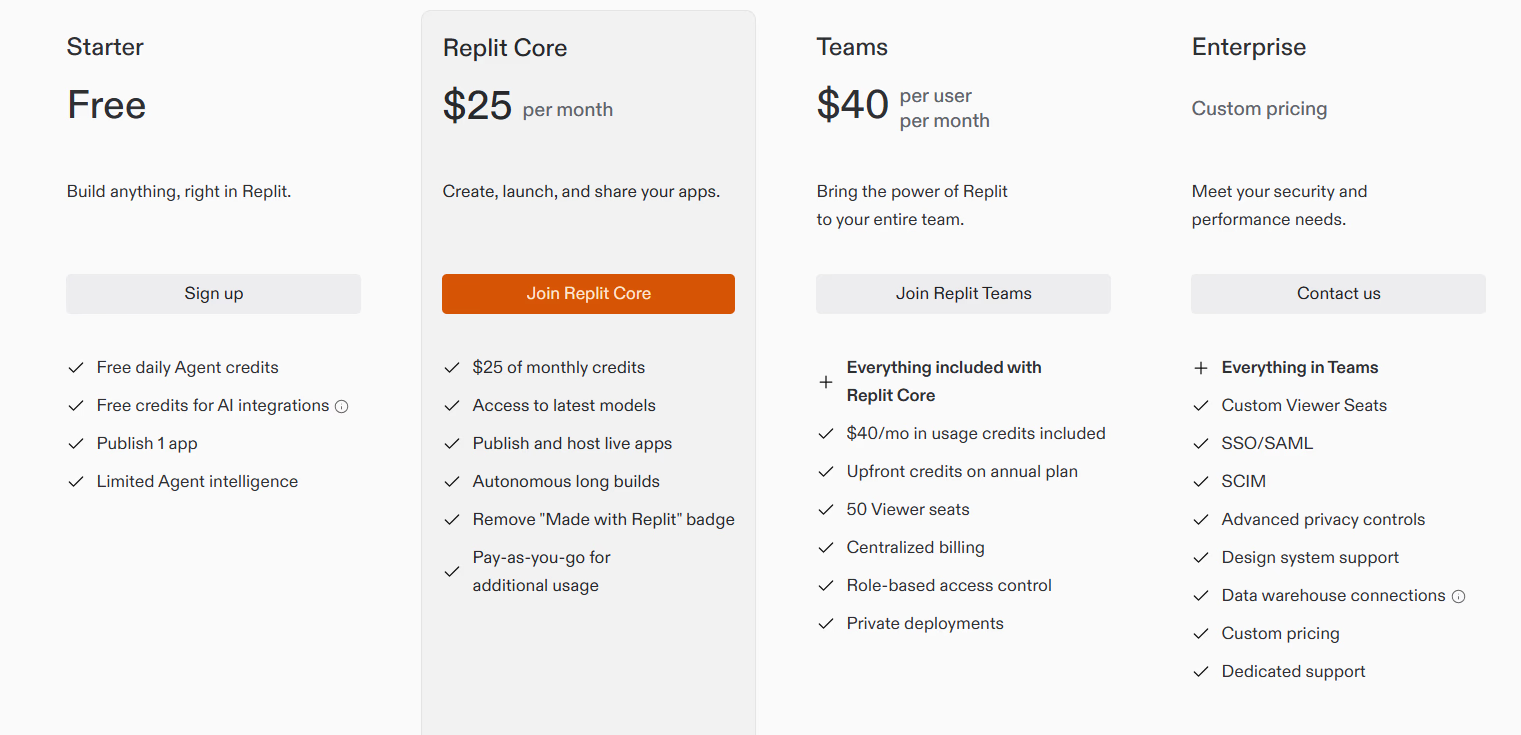
Pricing
5. Glide
Glide is a no-code app builder that turns spreadsheets and data sources into fully functional mobile and web applications. It’s popular among small businesses, educators, and entrepreneurs for its simplicity, speed, and visually polished results. Glide eliminates the need for traditional programming by offering a drag-and-drop interface, rich design templates, and instant data sync across platforms.
Key Features of Glide
1. Spreadsheet-to-App Conversion
Glide directly connects with Google Sheets, Excel, and Airtable to create data-driven apps instantly. Any change in the sheet reflects in real-time inside the app, ensuring live updates and accuracy.
2. Intuitive Drag-and-Drop Editor
The interface allows users to design layouts, components, and workflows visually without writing code. It supports powerful customization options that still maintain design consistency and responsiveness.
3. Rich Component Library and Templates
Glide offers a wide selection of UI elements, charts, maps, lists, and form components. Pre-built templates for common use cases like CRMs, booking systems, and dashboards help users launch apps faster.
4. Real-Time Data Sync and Automation
All connected data sources update automatically across the app. Users can also create automated actions and conditional logic to trigger workflows without needing external automation tools.
5. Role-Based Access and Permissions
Glide enables granular user management with role-based visibility, authentication options, and access control to secure sensitive data.
Unique Features of Glide
1. Glide Tables for Native Data Handling
Besides spreadsheets, Glide includes its own built-in data structure called Glide Tables, allowing faster performance and better scalability for larger datasets.
2. Offline Functionality for Mobile Apps
Glide apps work even when offline, letting users continue using key features and syncing updates once the connection is restored.
3. Integrated Action Builder for Custom Workflows
Users can chain together multiple logic-driven actions such as sending notifications, updating records, and showing alerts. This turns simple apps into dynamic and interactive tools.
4. Instant Publishing Across Devices
Apps built on Glide are automatically optimized for desktop and mobile and can be shared instantly via links or QR codes without the need for app store approvals.
5. Business Branding and Custom Domains
Glide lets teams add custom branding, logos, and domains for a professional, white-labeled experience suitable for internal tools or client-facing applications.
Advantages of Glide
- Simple drag-and-drop design with zero coding required
- Instant app creation from Google Sheets or Airtable data
- Built-in database and automation system for improved control
- Real-time updates ensure instant data consistency
- Offline support enhances user experience
- Excellent for MVPs, internal tools, and small business apps
- White-labeling available for professional branding
- No installation needed for app sharing or testing
Limitations of Glide
- Limited flexibility for complex or highly customized logic
- Scaling to enterprise-level applications can be challenging
- Free plan apps may have Glide branding and feature limits
- Advanced actions or integrations may require paid tiers
- Performance can slow with large data sets or frequent syncs
- No native code export for developers who want deeper control
- Offline mode may not support all app features
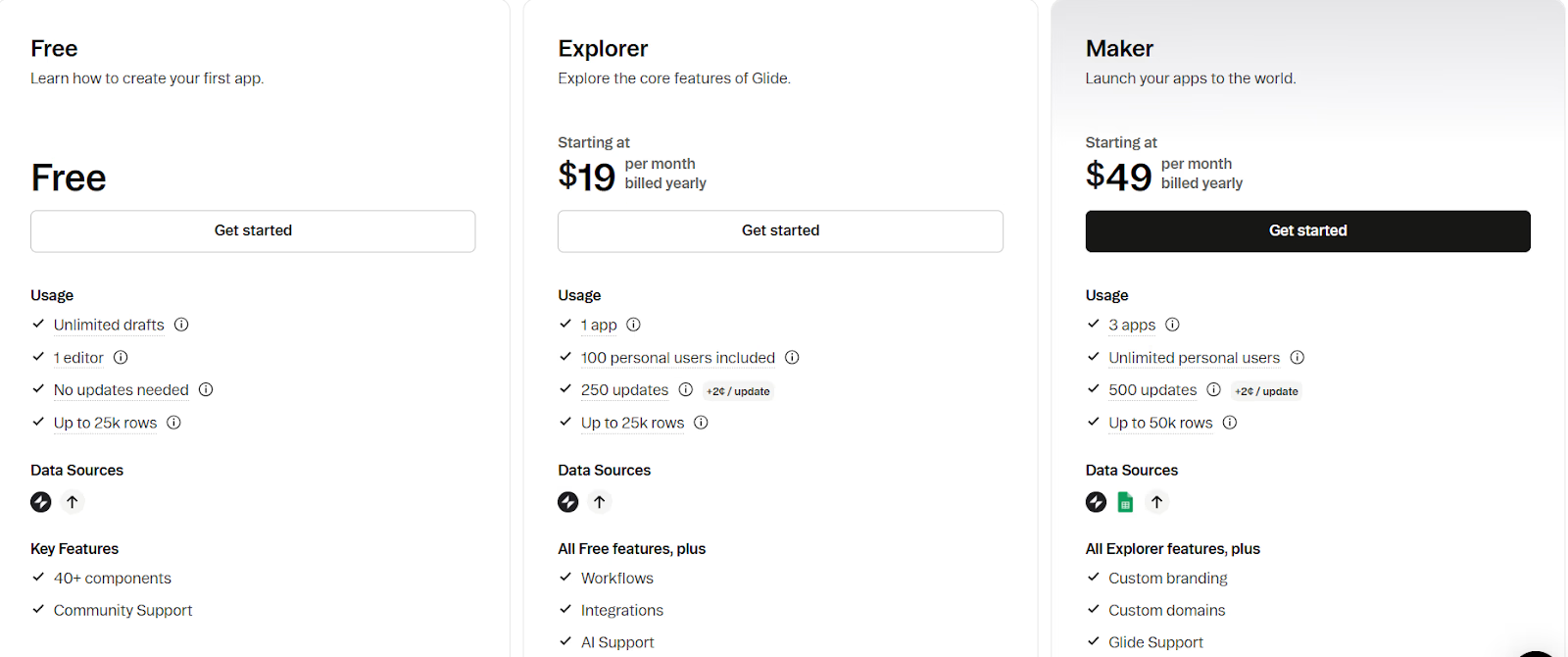
Pricing
6. Base44
Base44 is a modern low-code development platform designed to accelerate the creation of internal tools, admin dashboards, and customer-facing web applications. It combines visual editing, automation, and AI-powered assistance to help teams prototype, build, and deploy applications quickly without managing infrastructure. Its flexible integration system allows seamless connections with APIs, databases, and third-party services, making it ideal for startups and businesses scaling their digital operations.
Key Features of Base44
1. Visual Development Environment with AI Support
Base44 offers a powerful drag-and-drop interface paired with AI-assisted generation for UI components, workflows, and API connections. This helps non-developers create functional applications quickly while giving developers deeper customization control when needed.
2. Built-In Backend and Data Management Tools
The platform includes ready-to-use data tables, schema builders, and authentication systems. Users can model relationships, manage CRUD operations, and enforce data validation without needing a separate backend service.
3. Native API Integrations and External Data Connectivity
Base44 integrates seamlessly with REST APIs, GraphQL, and SQL databases, allowing users to connect external services or internal systems into their applications in minutes.
4. Real-Time Collaboration and Version Control
Teams can build together in real time with shared editing, project roles, and branching capabilities. Version history ensures rollback and safe experimentation without breaking production apps.
5. One-Click Deployment and Hosting
With built-in cloud deployment, SSL configuration, and domain mapping, Base44 removes the need for DevOps or manual hosting setups. Apps can go live instantly with optimized performance.
Unique Features of Base44
1. AI-Powered Workflow Automation
Base44 enables AI-driven logic creation, automatically suggesting automation rules and conditional flows to handle repetitive actions, user triggers, or API responses.
2. Secure Role-Based Access Control (RBAC)
The platform provides fine-grained permission systems for different user levels, ensuring sensitive operations are restricted to authorized roles only.
3. Component Reusability and Design Tokens
Developers can save and reuse custom components, maintaining brand consistency across multiple projects while reducing rebuild time for similar modules.
4. Custom Scripting and Logic Extension
For advanced users, Base44 supports custom JavaScript blocks and logic extensions, allowing greater flexibility than typical low-code platforms.
5. Built-In Analytics and Error Monitoring
Base44 integrates basic analytics dashboards and error tracking tools, giving teams visibility into user activity and system performance without third-party add-ons.
Not sure Base44 is the right fit for what you're building? Our best Base44 alternatives breakdown covers the closest options worth trying.
Advantages of Base44
- Combines low-code flexibility with developer-level customization
- AI-assisted workflows accelerate app building and automation
- Integrated backend, hosting, and authentication simplify setup
- Secure and scalable for production-grade apps
- Supports real-time collaboration and project versioning
- Pre-built templates shorten development cycles
- Offers strong API and database integration support
- Allows code extension for technical teams needing deeper control
Limitations of Base44
- Limited plugin marketplace compared to mature low-code ecosystems
- Performance may vary for heavy, data-intensive workloads
- Advanced analytics or complex automation may need external tools
- Offline usage is not supported
- AI features may occasionally generate generic logic requiring manual tuning
- Higher learning curve for users transitioning from no-code tools
- Code export options are limited, which can affect portability
Want more hands-on takes before you decide? Read our Base44 Reviews for a closer look at what real users actually ran into
Pricing
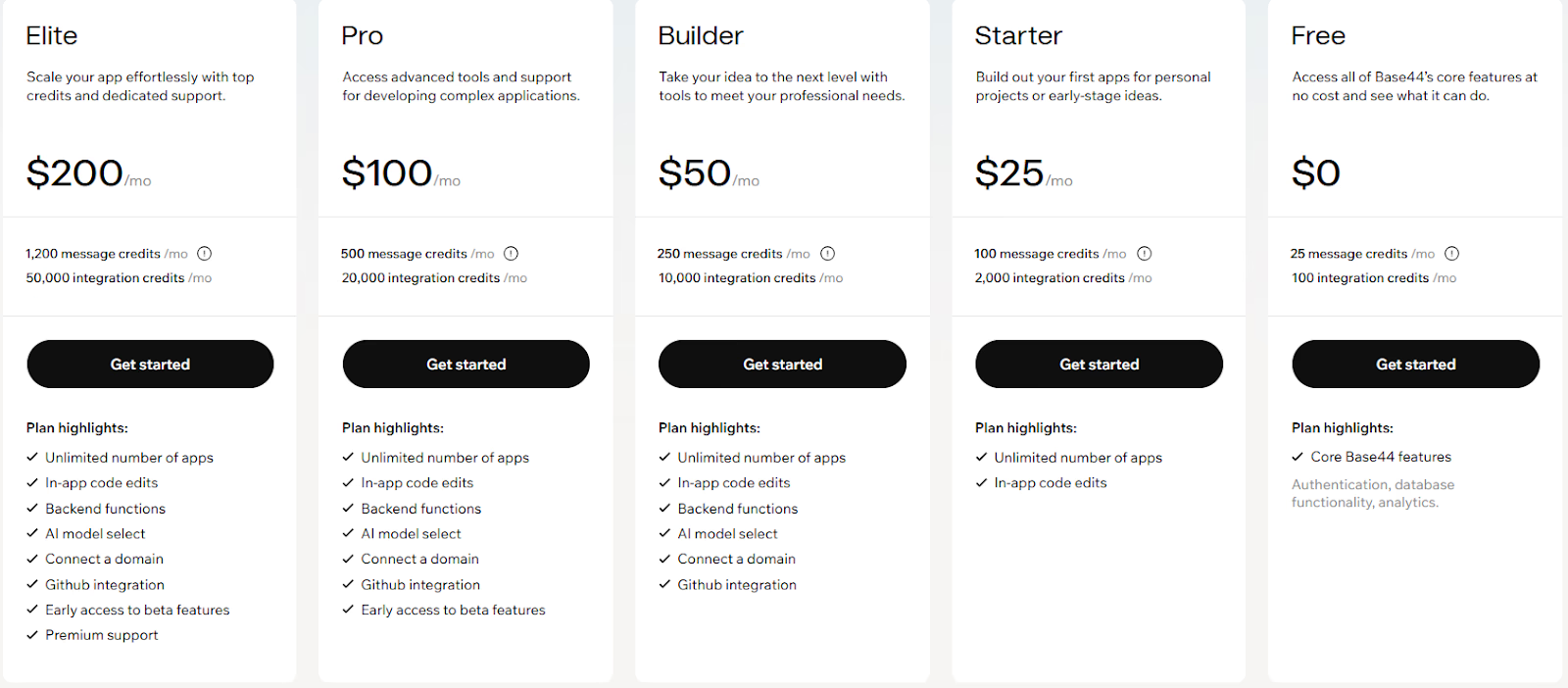
Want to know if the credits are worth it before you commit? Our Base44 pricing breakdown covers exactly what you get on each plan.
7. Qodo
Qodo is an AI-driven software development platform built to accelerate coding, debugging, and deployment workflows for developers and teams. It combines intelligent code completion, multi-language support, and integrated collaboration tools to help developers write production-ready code faster. Unlike traditional IDEs, Qodo blends AI copiloting with cloud-based execution and automation, creating a streamlined environment for end-to-end development.
Key Features of Qodo
1. AI-Powered Code Generation and Completion
Qodo’s AI engine assists developers by suggesting full code snippets, function completions, and bug fixes based on natural language inputs and contextual understanding of the codebase. This significantly reduces time spent on repetitive or boilerplate coding.
2. Real-Time Collaboration and Shared Workspaces
Multiple developers can work on the same project simultaneously, view changes instantly, and comment directly within the editor. This makes remote teamwork faster and more efficient compared to traditional Git-based workflows.
3. Built-In Debugging and Error Resolution Tools
Qodo includes smart debugging capabilities that automatically identify syntax and logic errors, provide explanations, and offer AI-generated fixes without requiring manual inspection of large codebases.
4. Integrated Cloud Deployment and Hosting
Developers can deploy their applications to the cloud directly from Qodo with automated SSL, domain configuration, and scaling. This removes the need for separate DevOps tools or manual hosting setups.
5. Multi-Language and Framework Support
Qodo supports popular languages such as Python, JavaScript, TypeScript, Java, and Go, along with frameworks like React, Next.js, and Flask. This allows flexibility across web, backend, and AI-related projects.
Unique Features of Qodo
1. AI-Powered Bug Resolution with Explanations
Beyond code completion, Qodo provides human-like explanations for detected issues and recommends multiple fix options. This helps both junior and senior developers maintain cleaner, more reliable codebases.
2. AI Pair Programming Mode
Qodo’s interactive AI pair programming feature allows developers to “converse” with their coding assistant, ask for design or logic advice, and collaboratively refactor complex modules.
3. Context-Aware Refactoring and Optimization
The platform intelligently restructures existing code for performance or readability improvements while preserving logic and architecture. This helps maintain code quality as projects scale.
4. End-to-End Development Lifecycle Automation
From code generation to deployment, Qodo automates the entire software lifecycle. Its integration with GitHub and cloud infrastructure simplifies CI/CD pipelines and version management.
5. Secure Cloud Workspaces with Team Controls
Qodo offers enterprise-grade security with isolated workspaces, encrypted storage, and role-based access control to protect sensitive projects.
Advantages of Qodo
- Combines AI copiloting with full lifecycle automation
- Reduces debugging and repetitive coding with contextual AI
- Enables seamless real-time team collaboration
- Offers direct cloud deployment and hosting support
- Multi-language and multi-framework flexibility
- Improves learning curve through interactive AI explanations
- Ensures secure, isolated workspaces for enterprise use
- Saves time and improves productivity for developers of all levels
Limitations of Qodo
- Requires a stable internet connection due to cloud-first nature
- Limited customization options for local environments
- May occasionally generate inaccurate AI suggestions requiring human review
- Performance may slow during large-scale collaborative sessions
- Advanced DevOps or multi-cloud support still under development
- Paid tiers required for extended AI usage and team features
- Integration ecosystem smaller than major incumbents like GitHub or Replit
Pricing
How to Choose the Right Windsurf Alternative
Choosing the best alternative to Windsurf depends on your priorities such as full-stack capabilities, AI workflow automation, team collaboration, and deployment readiness. Here are key decision criteria:
1. Ideation vs Production Readiness
If your main goal is rapid prototyping or UI experiments, many lighter platforms suffice. If you’re building production-level stack with backend, deployment, and scalability, consider alternatives like Emergent or Replit.
2. Multi-File & Context-Aware AI Support
Windsurf specializes in code editing with AI across files and modules. If you require deeper deployment automation, hosting, and backend logic, prefer full-stack platforms over pure IDE assistants.
3. Team Workflow & Git Integration
Coding teams often need version control, branching, multi-user editing, and continuous delivery pipelines. Evaluate how well alternatives support collaboration, not just individual edits.
4. Hosting and Infrastructure Automation
Some tools focus purely on code; others embed hosting, monitoring, scaling. If you want minimal infrastructure work, choose platforms that manage deployment and runtime automatically.
5. Complexity of Codebase and Architecture
For small, self-contained apps, lightweight tools like Windsurf may suffice. For larger modules, microservices or enterprise architecture, pick a platform designed for full-stack lifecycle management.
6. Cost Predictability and Token Use
AI-driven coding tools may depend on tokens or usage. Make sure billing scales reasonably with team size and project complexity, especially if you plan long-term development.
Conclusion
Windsurf excels as an AI-powered coding assistant, particularly for developers who want faster refactoring, contextual edits, and productivity gains inside real codebases. For editor-centric workflows, it remains a strong and specialized tool.
However, as teams shift from writing code to delivering complete products, limitations begin to surface around deployment automation, backend workflows, collaboration at scale, and infrastructure management. This is why many developers explore Windsurf alternatives that extend beyond the IDE and support the full software lifecycle.
Platforms like Emergent and Replit focus on end-to-end application delivery, while tools such as Cursor, Blackbox, and Qodo enhance different aspects of AI-assisted coding. The right choice ultimately depends on whether your priority is faster coding, full-stack automation, or scalable production delivery. Aligning your platform with long-term product goals ensures your development workflow grows with you rather than holding you back.

Every alternative has trade-offs. Emergent just builds production-ready apps from one prompt.
- Production-ready apps
- Web & mobile apps
- Deploy in minutes







