



Retool's per-user pricing and app lock-in push plenty of teams to look elsewhere. So I built the same dashboard in 10 Retool alternatives and ranked them based on which one fixes your specific problem.
10 Best Retool Alternatives: At a Glance
Why Look for Retool Alternatives?
Retool can put a working tool in front of your team fast. My support dashboard took an afternoon. So why do people leave? The trouble tends to start once the tool stops being a quick experiment and becomes something people rely on daily.
Price scales with your team: Retool charges for each builder (the people who make apps) and each end user (the people who just use them). So a simple dashboard that 40 support reps log into can cost a lot, even though most of them only look at it. For teams with many viewers, this is usually the first complaint.
The daily-use features cost the most: Things like version history, performance tracking, and audit logs sit on the priciest Enterprise plan. Those are the features that make a tool safe to depend on, so paying top rates to get them stings.
Self-hosting is no longer DIY: Some teams want to keep their data inside their own network instead of a vendor's cloud. That's called self-hosting. Retool now sends new self-hosted setups through its Enterprise sales team, so it's no longer a quick, do-it-yourself option.
You don't own what you build: Retool apps live inside Retool, and you can't export them as code. If you ever leave, you start over from scratch.
None of this makes Retool bad. It just means the best alternative depends on which of these problems is yours.
Which Retool Alternative Should You Choose?
Pick based on the problem pushing you off Retool, not the longest feature list.
- Choose Superblocks if you want to build internal tools fast but still need your IT team to control who accesses what. It's more than a solo builder needs for one quick dashboard.
- Choose Appsmith if you want to run the software for free on your own servers and skip per-user fees. You'll build by hand, since there's no AI help.
- Choose ToolJet if a large number of viewers is what's inflating your bill, because it charges per builder, not per viewer. Test it with your real data first, as big tables can feel slow.
- Choose UI Bakery if you want AI to build a good-looking app for you without touching design code. Keep an eye on AI usage costs for complex work.
- Choose Budibase if you mostly build forms and approval steps and want free self-hosting. It's weaker for polished or mobile-heavy apps.
- Stick with Retool if you're an enterprise team with the budget, and you value its mature ecosystem and fast, polished results more than cost or code ownership.
Read More: 5 Best Self-Hosted No-Code App Builders That Work in 2026
The 10 Best Retool Alternatives
1. Superblocks
Superblocks is best when you need to build tools fast but still pass an IT review. You describe what you want to its AI assistant, Clark, and it builds a working app connected to your data. What sets it apart is governance, meaning your IT team controls access, logins, and permissions from day one rather than adding them later.
Rebuilding my dashboard, Clark created the order table and refund flow from a short prompt, and I could export the code to my own repository. Setting up who could approve refunds was the smoothest of any tool here.
Key features
- AI app builder: Describe an app in plain English and get a working tool, instead of placing every button by hand.
- Central permissions: Admins set access rules once, so a rep never sees data they shouldn't.
- Code ownership: Export everything to your own code repository, so you're never stuck.
Pros
- Rare mix of AI speed and real IT control
- You own the code and can self-host on Enterprise
- Strong security certifications out of the box
Cons
- Some users still want deeper customization
- The controls take time to learn if you're solo
Best for: Teams whose tools touch sensitive customer or money data and need IT sign-off.
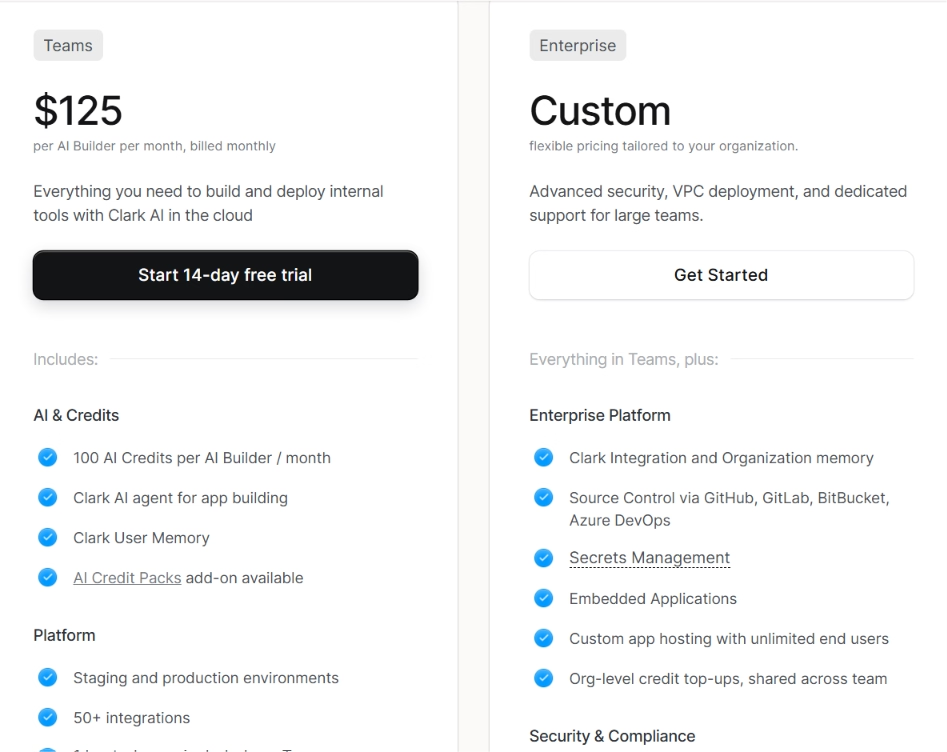
Pricing: $125/builder/month billed monthly, or $100/builder/month billed annually, with one hosted app included. Enterprise is custom. A 14-day free trial is available.
2. Appsmith
Appsmith is best when you want Retool-style building without paying for every viewer. It's open source, which means the code is public and free to run on your own servers. You drag pre-built pieces like tables and forms onto a page and connect them to your data.
I ran it self-hosted, and the building blocks covered my dashboard fine. The catch: There's no AI here, so I wired everything by hand.
Key features
- Free and self-hostable: Run it on your own servers at no license cost.
- Ready-made widgets: Tables, forms, and charts connect to databases and APIs.
- Version history included: Track changes from the free tier, not just on paid plans.
Pros
- Genuinely free and open source
- No surcharge for the people who build apps
- Keeps your data on your own infrastructure
Cons
- No AI, so all building is manual
- Self-hosting means setup and upkeep work
Best for: Teams that want to keep data in-house and avoid per-viewer pricing.
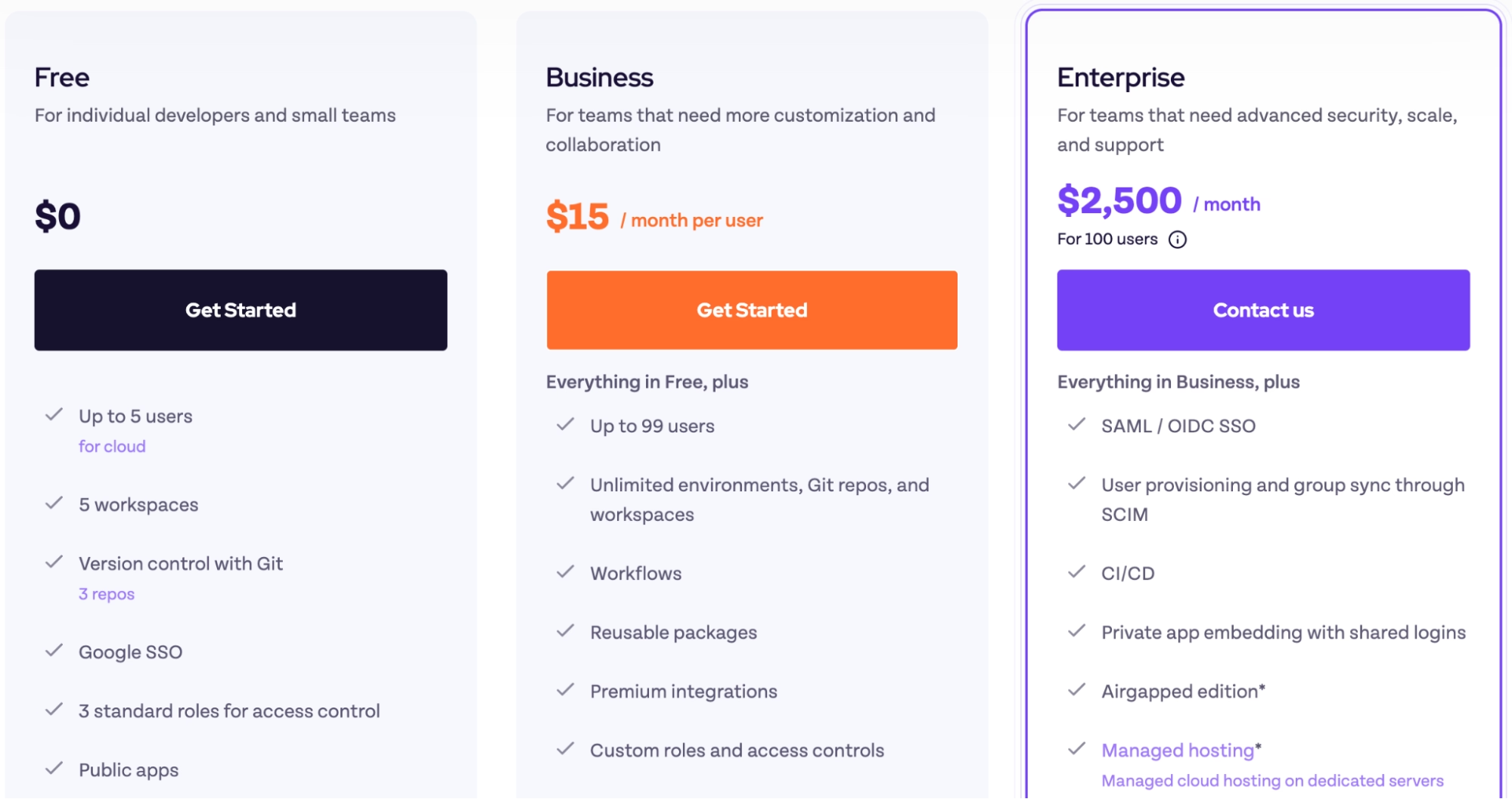
Pricing: Free for up to five cloud users. Business is $15/user/month. The self-hosted Community edition is free.
3. ToolJet
ToolJet is best when a large viewer count is wrecking your budget. It charges per builder, so a dashboard used by hundreds of people costs the same as one used by ten. It's open source too, so you can run it yourself.
Its AI got my order page roughly 80% done from a prompt.
One honest note: With the full customer table loaded, the editor felt sluggish, which matches what other reviewers report on bigger datasets.
Key features
- Builder-based pricing: Add unlimited viewers without the bill climbing.
- AI app generation: Turn a prompt into working pages and queries.
- Fast self-hosting: Set it up on your own servers, even fully offline, in under 30 minutes.
Pros
- Pricing ignores how many people use the app
- Open source with quick self-hosting
- AI help plus room for custom code
Cons
- Big tables and busy pages can lag
- Complex workflows take setup effort
Best for: Teams with many viewers and few builders, on a tight budget.
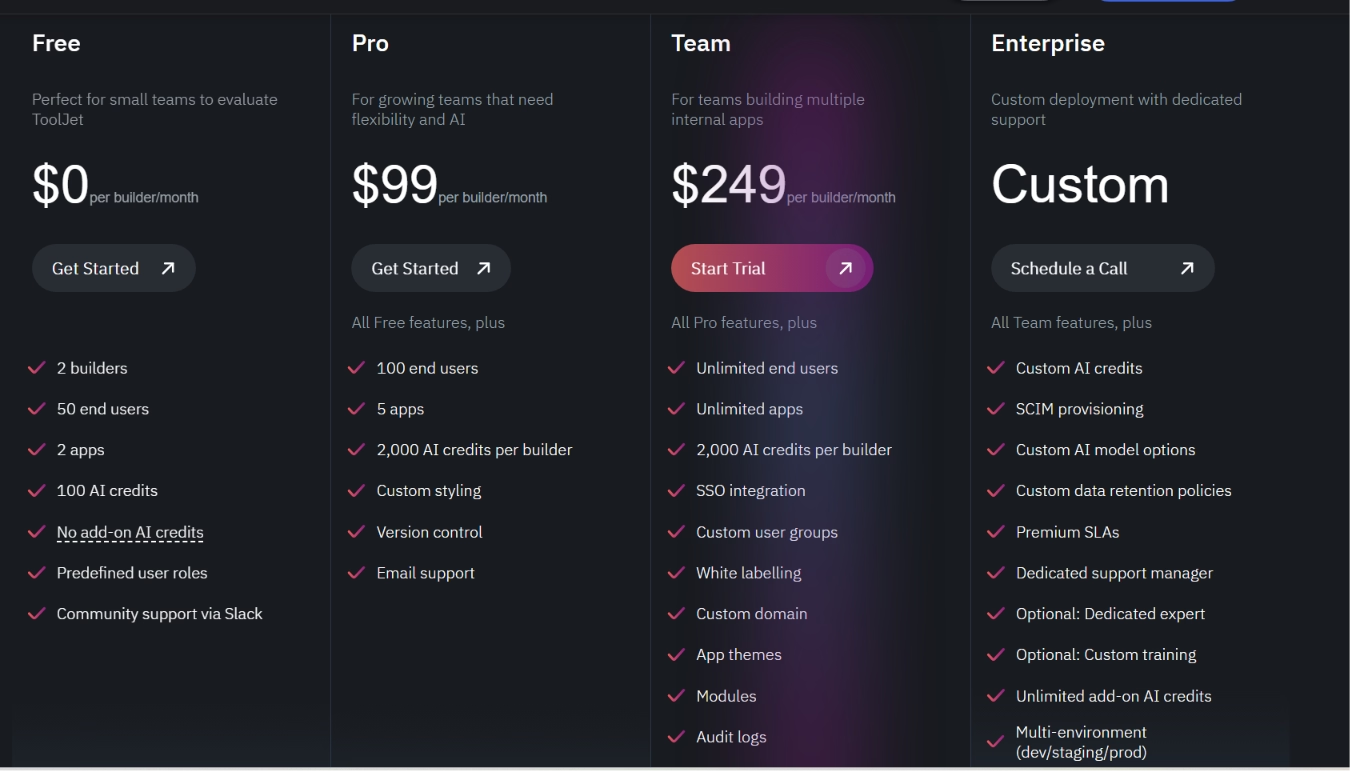
Pricing: Free for two builders and 50 viewers. Paid plans start at $99/builder/month or $79/builder/month billed annually. The self-hosted community edition is free.
4. UI Bakery
UI Bakery is best when you want AI to build a polished app without touching design code. A CRUD app, the kind that lets you create, read, update, and delete records, is exactly its strength. Its components look clean by default, so you skip the styling work.
The AI got my dashboard most of the way there fast. The last stretch, the custom refund rules, used more AI credits than I expected, so watch your usage on tricky tasks.
Key features
- AI builder: Describe a CRUD app and edit the code it generates.
- Polished components: Build sharp admin panels without writing styles.
- Self-hosting option: Run it on your own network if you prefer.
Pros
- Strong AI for everyday CRUD apps
- Clean look with no design work
- Reasonable per-developer pricing
Cons
- AI credits drain fast on complex logic
- Credit usage is hard to predict
Best for: Small teams building admin panels and dashboards with AI help.
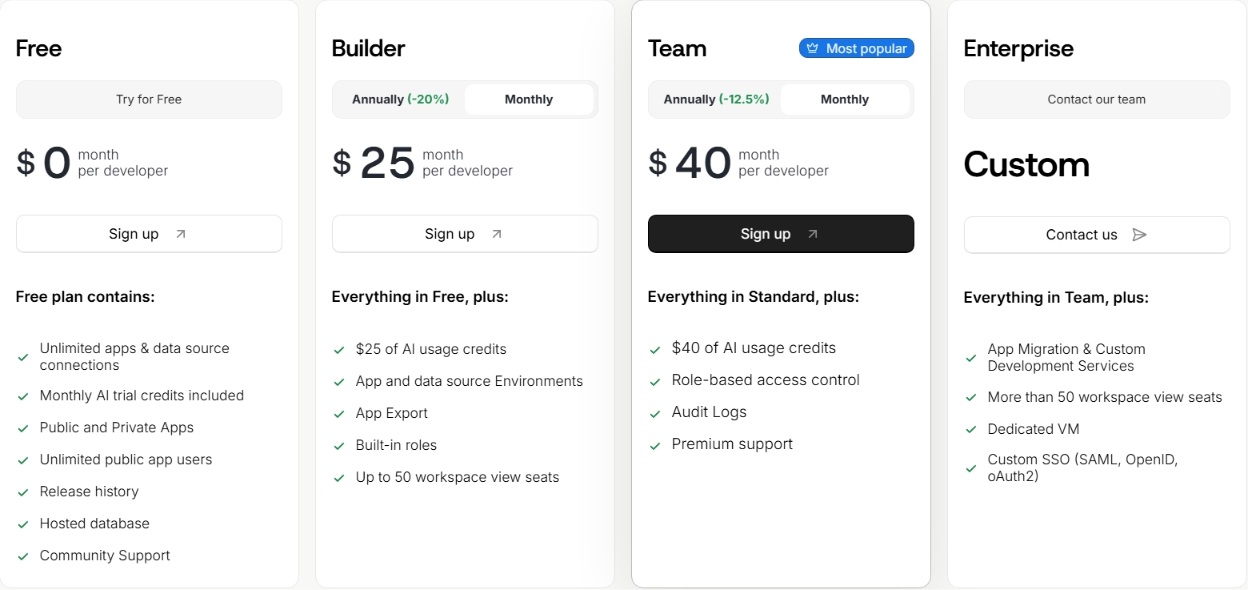
Pricing: Free plan available. The entry Builder plan is $25/dev/month billed monthly, or $20/dev/month billed annually. The Team plan ($40/dev/month billed monthly, or $35/dev/month billed annually) adds RBAC and audit logs.
5. Budibase
Budibase is best when your tools are mostly forms and approval steps. It pairs an app builder with automations, which are rules that trigger actions on their own, like sending an email when a record changes. You can run it for free on your own servers.
My refund approval flow came together more naturally here than anywhere else, since automations are built in. The data-heavy order view felt more limited by comparison.
Hitting Budibase's limits on data-heavy builds? Our best Budibase alternatives breakdown covers what else is worth trying.
Key features
- Built-in automations: Trigger emails and updates from data changes.
- Free self-hosting: Run it on your own servers with unlimited users.
- Database included: Store data without setting up an outside source first.
Pros
- Free self-hosting with unlimited users
- Automations make approval flows easy
- Predictable pricing
Cons
- Weaker for polished or mobile-heavy apps
- Limited on unusual, custom builds
Best for: Teams building forms, portals, and approval workflows.
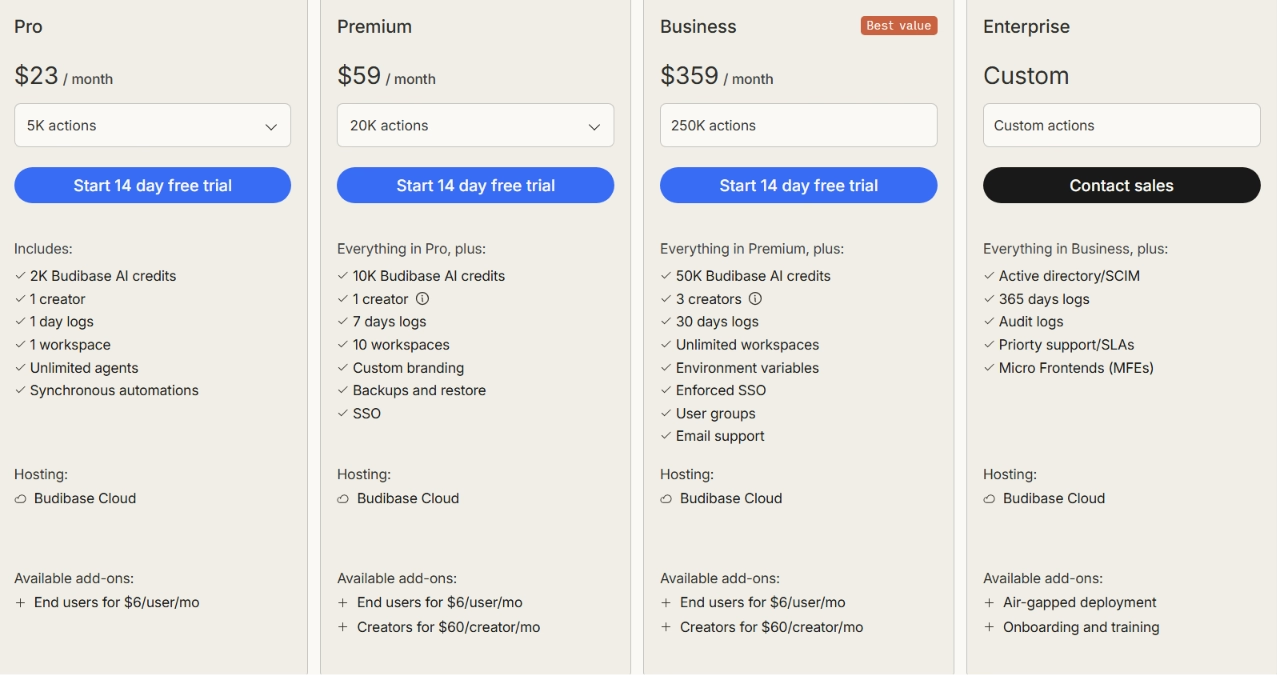
Pricing: Free self-hosting. Cloud plans start with Pro at $23/month billed monthly, or $19/month billed annually, which includes one creator, one workspace, 2,000 AI credits, and 5,000 automation actions. Premium is $59/$49, and Business is $359/$299.
6. DronaHQ
DronaHQ is best when your team works on phones, not just desktops. It builds mobile apps that work offline, which most tools here can't, so it suits field staff who aren't at a computer. When I rebuilt my order lookup as a mobile form, the offline support stood out.
Key features
- Mobile and offline apps: Build tools that field staff use without a connection.
- Workflow automation: Chain multi-step approvals.
Pros
- Real mobile and offline support
- Strong approval workflows
Cons
- Pricing recently changed and is harder to pin down
Best for: Field teams and mobile-first internal tools.
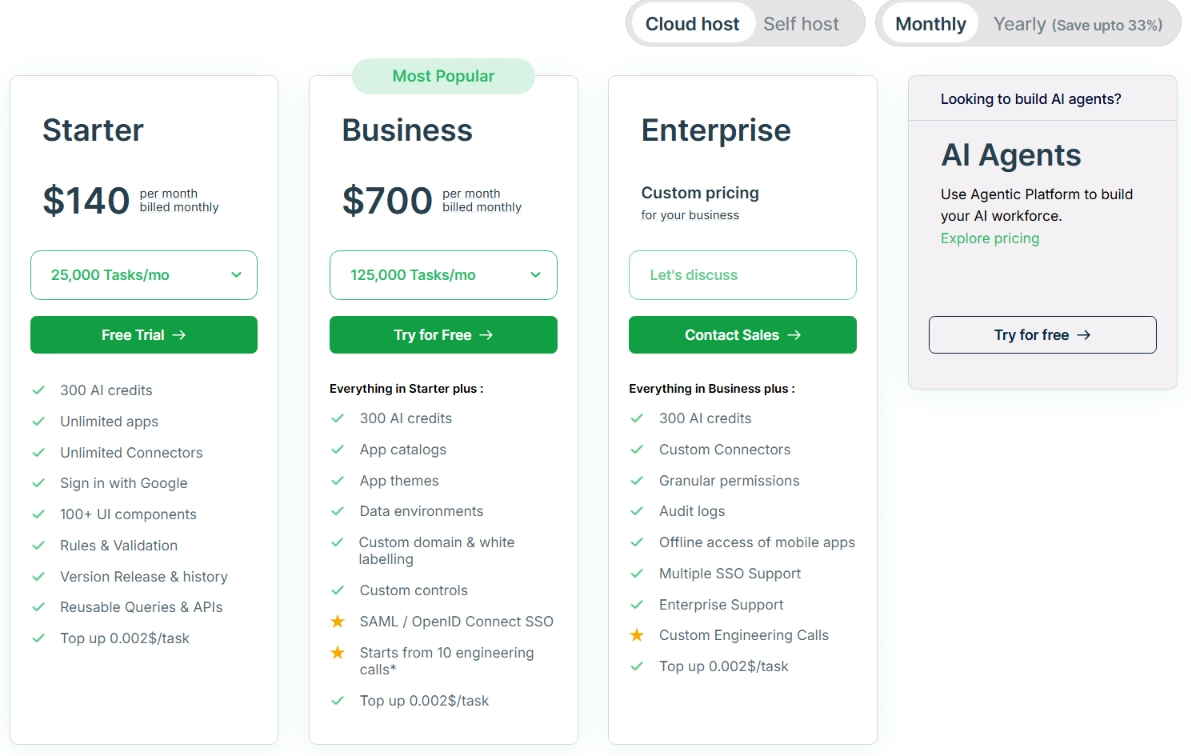
Pricing: The task-based Starter plan is $140/month billed monthly, or $100/month billed annually.
7. Microsoft Power Apps
Power Apps is best when your company already runs on Microsoft 365. It connects straight to SharePoint, Teams, and Excel, so your existing data is right there. I pointed it at a SharePoint list, and the connection was instant. The downside: Licensing gets confusing, and some connectors cost extra.
Key features
- Deep Microsoft links: Connect SharePoint, Teams, and Excel without extra work.
- Power BI reporting: Attach real reporting from the same ecosystem.
Pros
- Ideal for Microsoft 365 shops
- Hundreds of connectors
Cons
- Licensing and add-on costs add up
- Can lag on large datasets
Best for: Companies standardized on Microsoft 365.
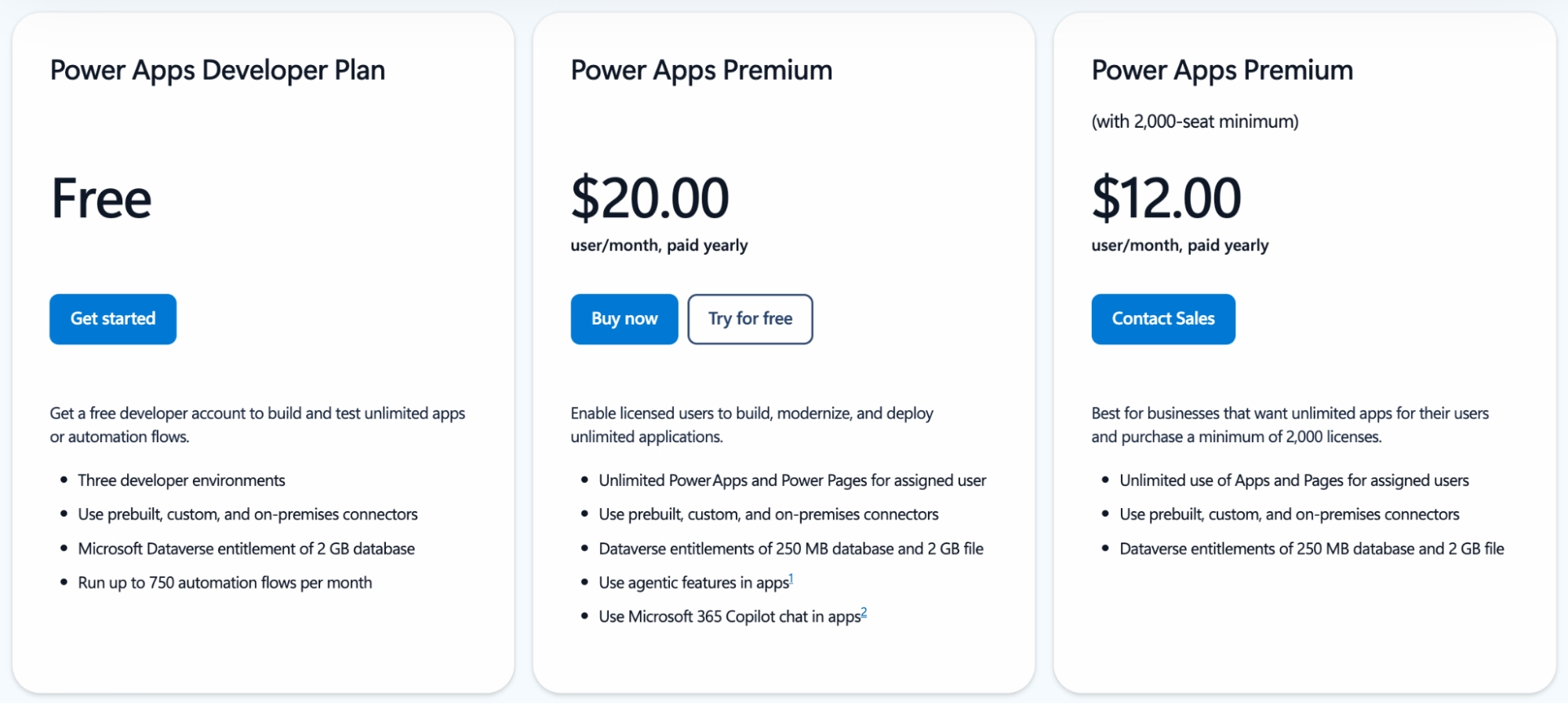
Pricing: The Premium plan runs $20/user/month on an annual plan paid yearly. It drops to $12/user/month with a 2,000-seat minimum. A free Developer plan is available for testing.
8. Mendix
Mendix is best for enterprise teams building full applications, not quick dashboards. It's a visual platform where business staff and developers work together, with room for custom code. My small dashboard was overkill here. Mendix earns its place on big, long-lived apps with many stakeholders.
Key features
- Visual modeling: Build serious web and mobile apps with business and IT together.
- Multiple environments: Separate setups for testing and production.
Pros
- Built for complex, lasting apps
- Free plan to start
Cons
- Too heavy and pricey for simple tools
Best for: Enterprises building department-wide apps.
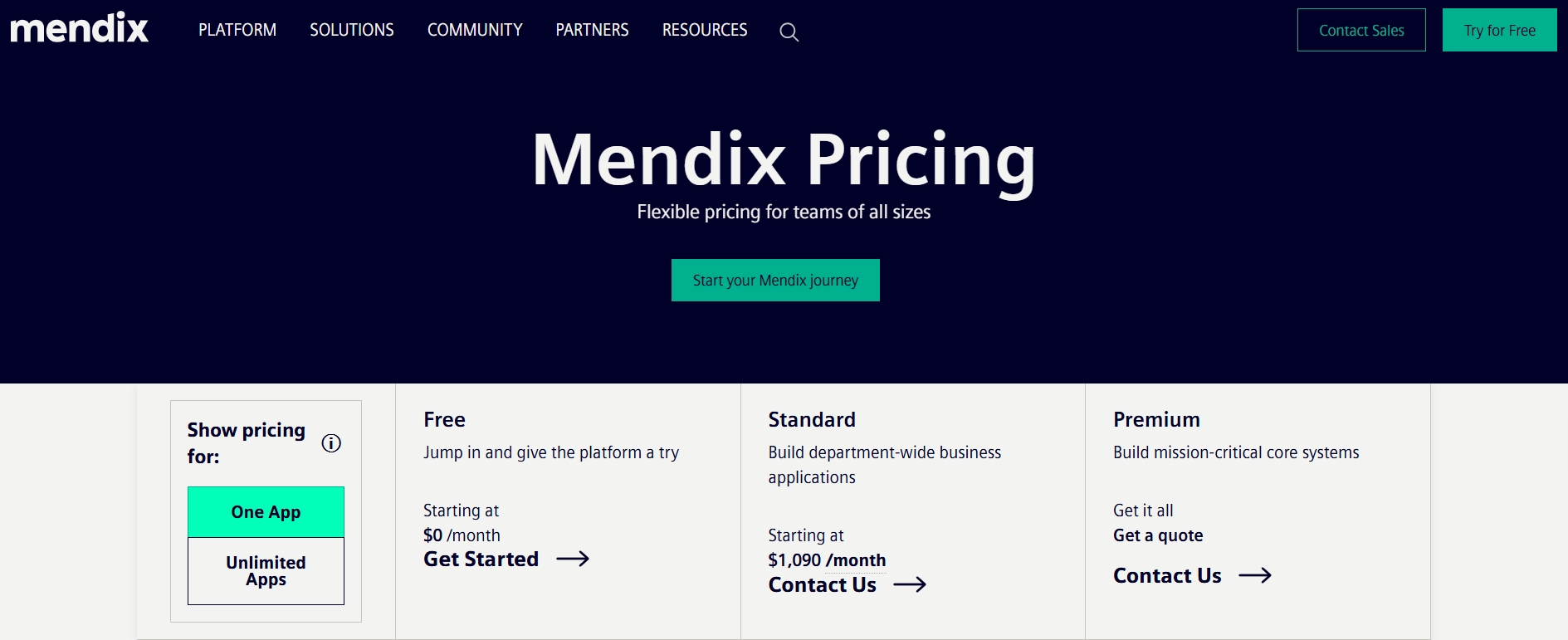
Pricing: Free plan available. Paid starts around $1,090/mo for one app.
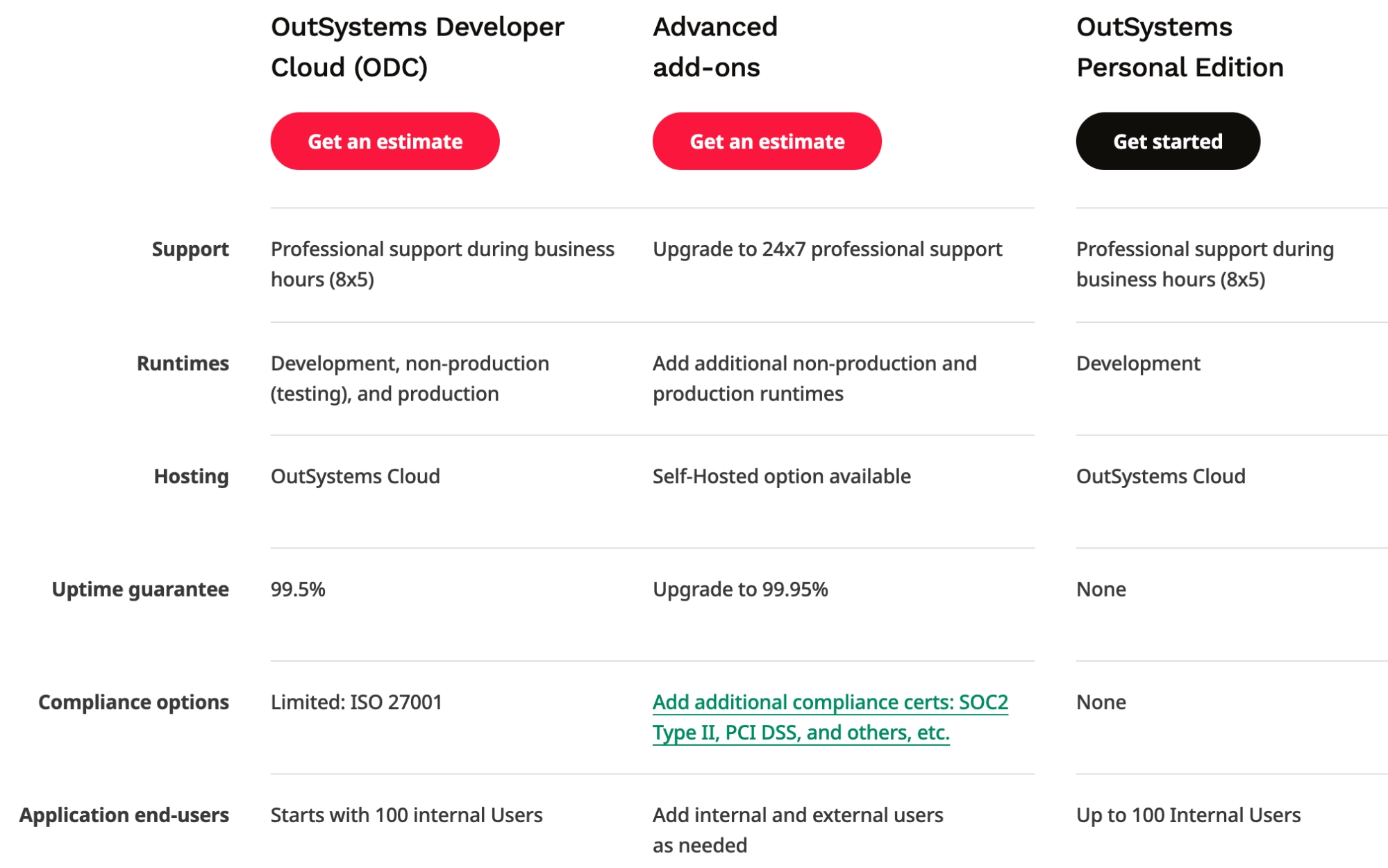
9. OutSystems
OutSystems is best for large companies replacing old, aging software. It handles the full process of building and shipping enterprise apps under tight controls. That's far more than my support dashboard needed, but it's the right fit for serious modernization projects.
Key features
- Full delivery pipeline: Manage building, testing, and release in one place.
- Wide integrations: Connect to many enterprise and legacy systems.
Pros
- Enterprise-grade with strong controls
- Free tier for a first app
Cons
- Custom, sales-led pricing
- Heavier than internal-tool builders need
Best for: Enterprises modernizing legacy software.
Pricing: Free tier for your first app (up to 100 users). Paid pricing is custom.
10. Appian
Appian is best for automating complex, multi-step business processes. It focuses on workflows and case tracking, where the steps and handoffs matter more than the look of the screen. For my simple dashboard, it was more engine than I needed.
Key features
- Process automation: Model multi-step approvals as the core of the app.
- Case management: Track work across teams with full history.
Pros
- Deep workflow and case tools
- Free edition for development
Cons
- Not a simple tool builder
- Pricing routes through sales
Best for: Operations teams automating heavy workflows.
Pricing: Free Community Edition for development. Platform pricing is custom.
When a Retool Alternative Is the Wrong Tool
Every tool above solves the same kind of problem: building apps your own team uses, on top of data you already have. Sometimes that isn't your actual problem.
If you're building something your customers will use, a public product with its own design that you plan to ship and grow, an internal tool builder will fight you. That's a different category. AI app builders like Emergent are made for that, turning a prompt into a working product your customers can actually use, the kind of thing you'd normally hire a dev shop to build.
A quick test: Are you managing your own operations over data you already run, or shipping a new product to outside users? The first calls for a Retool alternative. The second doesn't.
Read More: 6 Best Low-Code App Builders for Scalable Apps in 2026
Stop Forcing One Tool to Do Every Job
The mistake was never picking Retool. It's expecting one tool to fit every job as your needs grow apart. A team fighting per-user costs needs something different from a team that needs self-hosting. The best alternative is the one that fixes the exact problem slowing you down.
For internal tools your IT team can trust, Superblocks is the strongest starting point here. But if the boundary above sounded like you, and your real goal is a product for outside users, that's a different build. That's where an AI app builder like Emergent fits.
Ready to build something your customers can actually use? Our guide on how to create a business app walks you through the whole process in an afternoon.

Every alternative has trade-offs. Emergent just builds production-ready apps from one prompt.
- Production-ready apps
- Web & mobile apps
- Deploy in minutes







