




I filled out the same registration form on 10 Jotform alternatives and hit submit twice in a row, the way people do when a page hangs, and they're not sure it went through.
Only a couple of them caught the repeat. The rest logged two separate registrations, and the ones that take payment inside the form ran the $25 fee twice.
That test is the quickest way to separate a form builder that just collects answers from one that actually handles what comes next.
Jotform is fine at the basics, and the builder handles payments, logic, and integrations. The reasons to leave show up in the pricing: forms, submissions, storage, and views are each capped separately, a second editor jumps you to custom pricing, and costs climb with volume.
So I rebuilt the same form in 10 alternatives over two weeks to see which ones hold up. The form was for a community 5K run I made up, the Riverside Fun Run.
Every build needed the same parts: a branch for in-person and virtual runners, a waiver upload, a $25 fee, and a status field to confirm each registration went through. Some tools handled all of it, some couldn't.
Here's how the 10 compare, which ones caught that duplicate, and which ones still dead-end at a spreadsheet once the form closes.
10 Best Jotform Alternatives: TL;DR
- Fillout: best for connecting form data straight into your existing database or workflow tools.
- Google Forms: best for a free, unlimited, zero-friction form with no setup.
- Typeform: best for conversational, design-first forms where completion rate is the priority.
- Tally: best for the most generous free tier for creators and startups.
- Formstack: best for regulated industries, compliance workflows, and e-signatures.
- Microsoft Forms: best for teams already living inside Microsoft 365.
- Zoho Forms: best for teams already running on the Zoho suite.
- Paperform: best for selling through a form with order and payment fields built in.
- SurveyMonkey: best for market research and structured survey logic.
- forms.app: best for pairing AI-assisted form generation with a dedicated product and order field.
Why Look for Jotform Alternatives?
Jotform earns its reputation fairly. The editor is fast to open, and a straightforward contact form takes minutes to build. The trouble starts once a form has to do more than collect a name and an email.
I used each limit below as a comparison point while testing the 10 alternatives that follow.
Stacked usage limits: Forms, submissions, storage, and form views are each capped separately on every plan below Enterprise. Hitting any single one forces an upgrade even if the other three still have headroom.
Single-user plans: Every tier short of Enterprise is built for one person, so a second teammate editing the form means jumping straight to a custom-priced plan.
No self-hosting: Jotform gives no self-hosting option, ruling it out for any team that needs its form data on its own infrastructure.
That double-submit problem from the intro is the sharpest limitation of all, and it isn't rare: only two of the 10 alternatives caught the repeat.
The other eight logged two separate registrations with no warning, and the ones running payment inside the form would have charged the $25 fee twice.
That matches what a nonprofit organizer described in a Reddit post about a tennis tournament waiver form: 65 of 240 submissions (27.1%) came back as duplicates, because parents kept hitting submit when the form appeared to error out.
Unpredictable, response-based billing is another ceiling. Costs scale with submission volume, so a plan can blow past budget mid-cycle with little warning, and you're left untangling the dispute after the fact.
The last limitation isn't specific to Jotform. Most forms still stop at a spreadsheet.
Routing a response, approving it, updating a record, or notifying someone stays manual work until you move the data somewhere you can filter and act on it, which usually means wiring up a separate tool yourself.
That's exactly where Fillout earns its spot further down this list.
How I Tested These 10 Jotform Alternatives
Every tool below got the same brief, down to the exact fields and logic, so you can judge the results for yourself. On the surface, it's a participant registration and waiver form for a community five-kilometer run called the Riverside Fun Run, invented purely for this test. Here's the full spec every tool had to hit:
- Contact info plus a branch: The form collects a name, email, and phone, then splits based on whether the runner is registering in-person or virtually. (No real event or runners sit behind it.) In-person runners pick a T-shirt size and a check-in time slot.
- Virtual runners enter a shipping address for their race packet instead. Every runner uploads a signed waiver file and pays a $25 registration fee, running through each tool's own test mode or sandbox payment integration, wherever one exists. No real charge is ever collected.
The workflow is meant to mark the registration Confirmed, or Needs Follow-Up if the waiver didn't upload cleanly, and send a confirmation email either way. How far each tool carries that logic is what the sections below sort out.
I built the same branch, upload, payment, and status logic into each tool's own visual editor as far as the tool allowed, noting where a step needed a workaround or wasn't supported at all.
Then I ran one more test, identical across all 10, submitting the form and immediately hitting submit again with the same information. I watched whether the tool caught the repeat, flagged it, or silently logged two separate registrations.
I also tested and cut six tools that didn't make the final 10.
Wufoo: A fit for basic, no-frills branching and thorough documentation for connecting it to other software, dated interface aside.
Gravity Forms: A WordPress plugin, mainly for developers wiring forms into a theme or plugin stack through code hooks.
WPForms: Same niche as Gravity Forms, but the template-heavy, beginner-friendly choice, with a lighter developer-hook setup.
Formbricks: The only open-source, self-hostable tool here, the pick if self-hosting is a hard requirement.
Checkbox: An on-premise HIPAA niche overlapping Formstack, relevant only for literal on-premise hosting, which even Formstack doesn't offer.
Zapier Forms: One to consider only if you're already deep in the Zapier platform.
I judged every tool on six things, each mapped to a real reason people leave Jotform:
- Conditional-logic handling: Did the branch work cleanly, or need a workaround?
- Payment collection: Native, bolted on, or missing entirely?
- Duplicate and error-submission handling: Caught, flagged, or silently logged twice?
- What happens after submission: A flat spreadsheet, or a structured view you can filter and act on?
- Setup time to a fully working form.
- True monthly cost at the volume this build needed, separate from the teaser starting price.
10 Best Jotform Alternatives: At a Glance
With the methodology settled, the fast comparison comes before the full breakdown.
| Platform | Best for | Price |
|---|---|---|
| Fillout | Database and workflow connections | Starter starts at $19/month ($15/month, billed annually) |
| Google Forms | Free, unlimited basic forms | Free (no submission cap) |
| Typeform | Conversational, design-first forms | Basic starts at $39/month ($28/month, billed annually) |
| Tally | Generous free tier | Pro starts at $29/month ($24/month, billed annually) |
| Formstack | Regulated industries and compliance | Forms starts at $99/month ($83/month, billed annually) |
| Microsoft Forms | Microsoft 365 teams | Included with Microsoft 365 |
| Zoho Forms | Zoho suite teams | Basic starts at $12/month ($10/month, billed annually) |
| Paperform | Selling and payment forms | Essentials starts at $29/month ($24/month, billed annually) |
| SurveyMonkey | Market research and surveys | Standard Monthly starts at $99/month |
| forms.app | AI-assisted product and order forms | Basic starts at €24/month (€16/month, billed annually) |
The 10 Best Jotform Alternatives
Below is what building the same registration form in each of these looked like, tool by tool.
1. Fillout: Best for Connecting Form Data to Your Database or Workflow
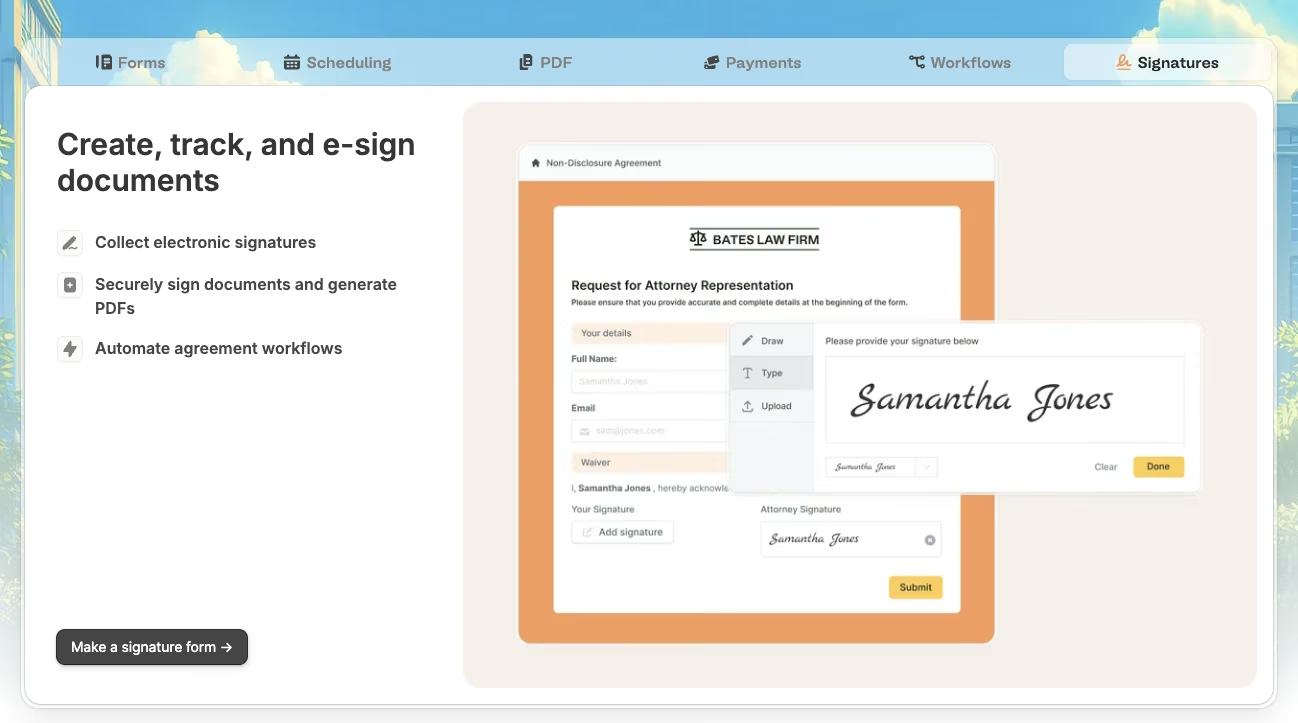
Fillout separated itself from the rest of the pack on the duplicate-submission test. I built the Riverside Fun Run form by hand in Fillout's editor.
That covered the in-person and virtual branch, the T-shirt size and check-in fields on one path, and the shipping-address field on the other, plus the signed waiver upload and a Stripe test-mode payment step for the $25 fee.
The whole build ran 22 minutes, mid-pack for the manual builds.
Then I ran the same stress test on every tool, submitting the form, then hitting submit again immediately with the same information. Fillout caught it.
The second attempt got flagged and held, so only one $25 test-mode charge was ever recorded against the two attempts. Fillout was one of only two tools across the whole test to catch it.
What impressed me more than the branch logic itself was what happened after the form. Responses landed in a linked, structured view I could filter by status, with no flat sheet to sort through by hand.
Adding two extra editors to review incoming registrations costs nothing beyond the base plan, since Fillout bills a flat fee regardless of seat count.
The one friction point was tagging individual registrations by status inside that linked view, a few more clicks than it should have taken.
Outside of that, this was the cleanest build in the test, and my strongest overall pick when what happens after the form counts as much as the form itself.
Key features
- Native database view: Responses land in a filterable, linked view ready to query and sort.
- Deep integrations: Direct connections to Airtable, Notion, and Salesforce carry structured data into the tools a team already uses.
Pros
- Caught the duplicate-submission test cleanly.
- Clean 22-minute build with the branch, upload, and payment step all wired in.
Cons
- Linked-record management inside the response view felt a little fiddly.
- Free tier caps out at 1,000 responses/month.
Best for
Teams that want form responses to plug straight into an existing database or workflow tool
Pricing
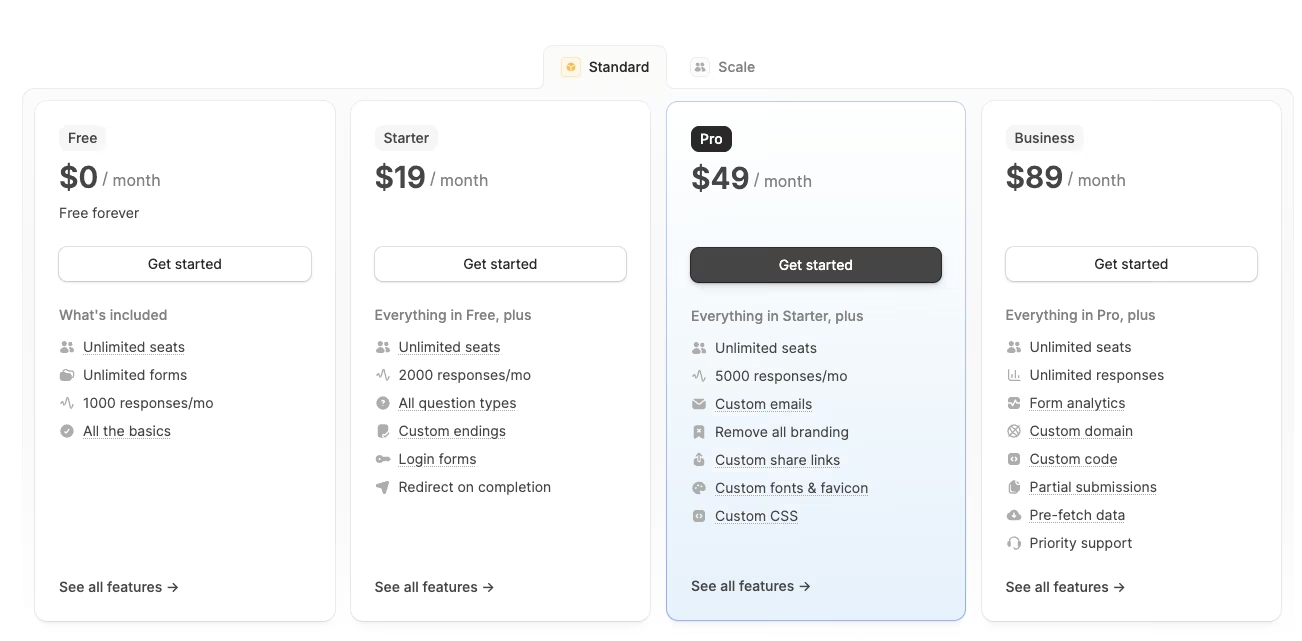
- Free covers unlimited forms and users with 1,000 responses/month.
- Starter is $19/month ($15/month, billed annually) for 2,000 responses/month.
- Pro costs $49/month ($40/month billed annually) for 5,000 responses/month.
- Business is $89/month ($75/month, billed annually) flat for unlimited responses.
2. Google Forms: Best for a Free, Unlimited, Zero-Friction Form

Google Forms built the easy half of this brief without complaint. The in-person and virtual branch and the waiver upload went together natively, using its built-in branching and file-upload question types, no add-on required.
Putting the form together took about 15 minutes, most of it spent setting the "go to section based on answer" logic for the branch. There's no dollar cost or submission cap to watch.
The free-and-simple story ends at the $25 fee. Google Forms has no native payment field, so the only way to collect the fee was routing runners to a separate payment link pasted into the confirmation message.
That's a manual hop that adds a place to drop off before paying.
The repeat-submission test made the bigger problem obvious. Hitting submit twice logged two identical registrations in the response sheet, side by side, with zero warning that anything had repeated. For a form with money attached, that's a liability.
The duplicate rows would need untangling by hand. Because the fee runs on a separate payment link, a double charge would depend on that external flow, since Google Forms never touches the payment itself.
For a completely free form with nothing financial riding on it, Google Forms is still hard to beat. It's the tool anyone already knows, with responses syncing straight to a spreadsheet automatically.
The moment real money touches the form, though, it's the wrong tool for the job.
One smaller snag turned up on the waiver upload, too. A runner without a Google account already signed in would hit a sign-in prompt before the file would attach, a step none of the other tools here required.
Key features
- Native Google Sheets sync: Every response lands in a live-updating spreadsheet with no export step.
- Built-in branching: The in-person and virtual split worked without a third-party add-on.
Pros
- Completely free with no submission limit.
- File upload and branching logic work natively.
Cons
- No native payment field, the $25 fee needs a separate link.
- Failed the duplicate-submission test outright, no catch or flag.
Best for
A completely free form with nothing financial attached to it.
Pricing
Free, with no submission cap and no paid tier to upgrade to.
3. Typeform: Best for Conversational, Design-First Forms
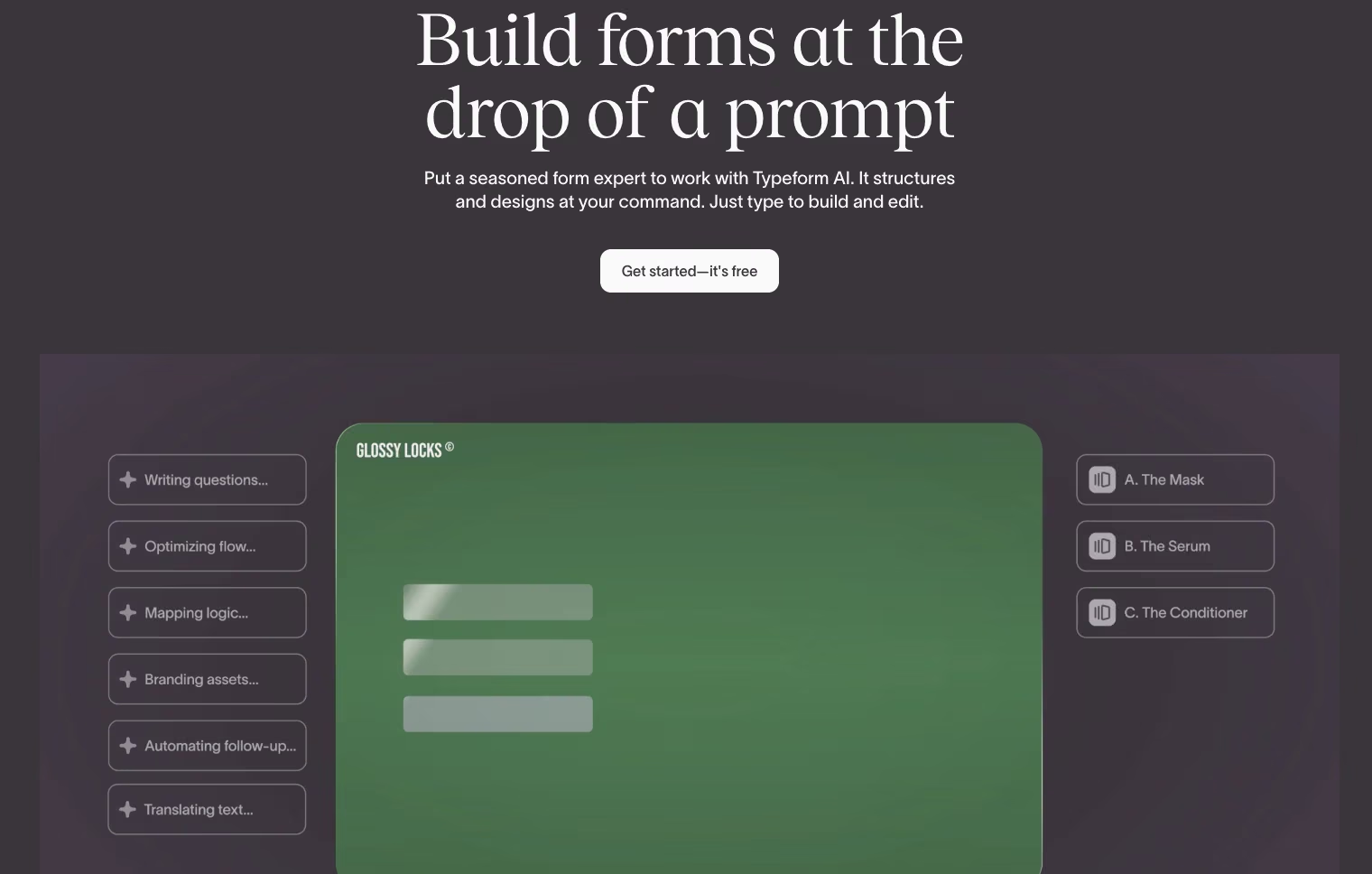
Typeform's one-question-per-page format is the whole pitch, and it's also the first thing that worked against this build. The four contact fields (name, email, phone, and the in-person or virtual choice) took one screen in every other tool.
In Typeform, the four fields plus a welcome screen and the branch-choice step are spread across six separate screens, one question at a time, with a progress bar climbing between each.
It's a distinctly different experience that also takes longer to get through.
The conditional branch itself gave no trouble once I got past the screen count, splitting into the T-shirt and check-in path or the shipping-address path.
The waiver upload and payment step both built natively too, each on its own dedicated screen with the same animated transition. The setup ran about 28 minutes, longer than most hand-built tools here, almost entirely because of the extra screens.
Typeform failed the duplicate-submission test as well. A second submission slipped through as its own separate entry, with no automatic catch. Seven other tools here stumbled the same way.
The bigger issue is cost. Typeform's free plan can't accept the $25 fee and caps at 10 responses a month across all forms, so this build starts on Basic at $39/month ($28/month, billed annually).
That buys payment acceptance and a 100-response base, a ceiling that a busy registration page could still clear in an afternoon.
I'd believe the completion-rate story, but $39 a month is hard to justify for a form this simple, when Basic is the floor just to take the payment.
Key features
- One-question-per-page format: Each question gets its own animated screen.
- Design-first templates: Branding, imagery, and layout controls go deeper than most form builders here.
Pros
- Conversational format creates a distinctly different, more engaging fill-out experience.
- Branding and design controls are the strongest in this field.
Cons
- A duplicate logged as a brand-new response, no catch.
- Accepting the $25 fee requires the Basic plan at $39/month ($28/month, billed annually).
Best for
Lead-generation or survey forms that prioritize completion rate over speed of fill-out
Pricing
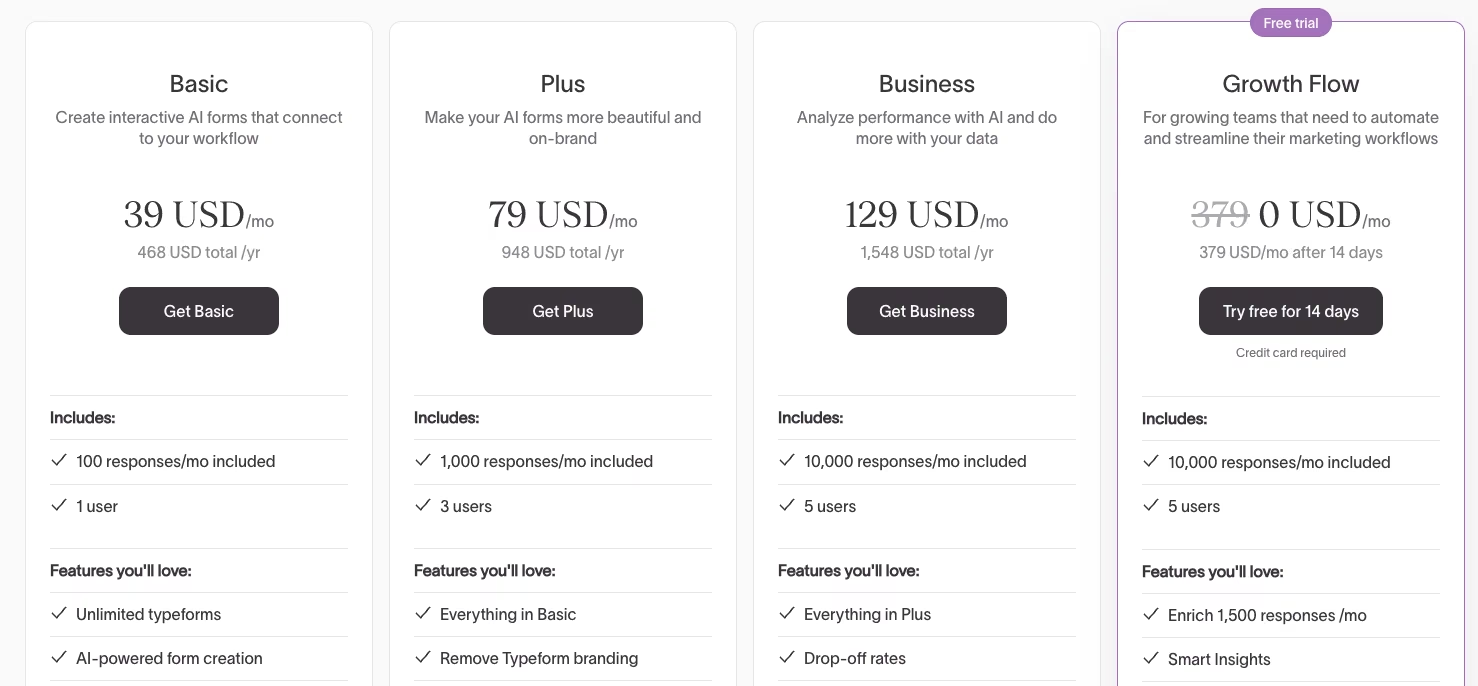
Free includes 10 responses/month across all forms for one user, with no payment acceptance. Basic is $39/month ($28/month, billed annually) for a 100-response base. Plus is $79/month for 1,000 responses. Business is $129/month for 10,000 responses.
4. Tally: Best for the Most Generous Free Tier
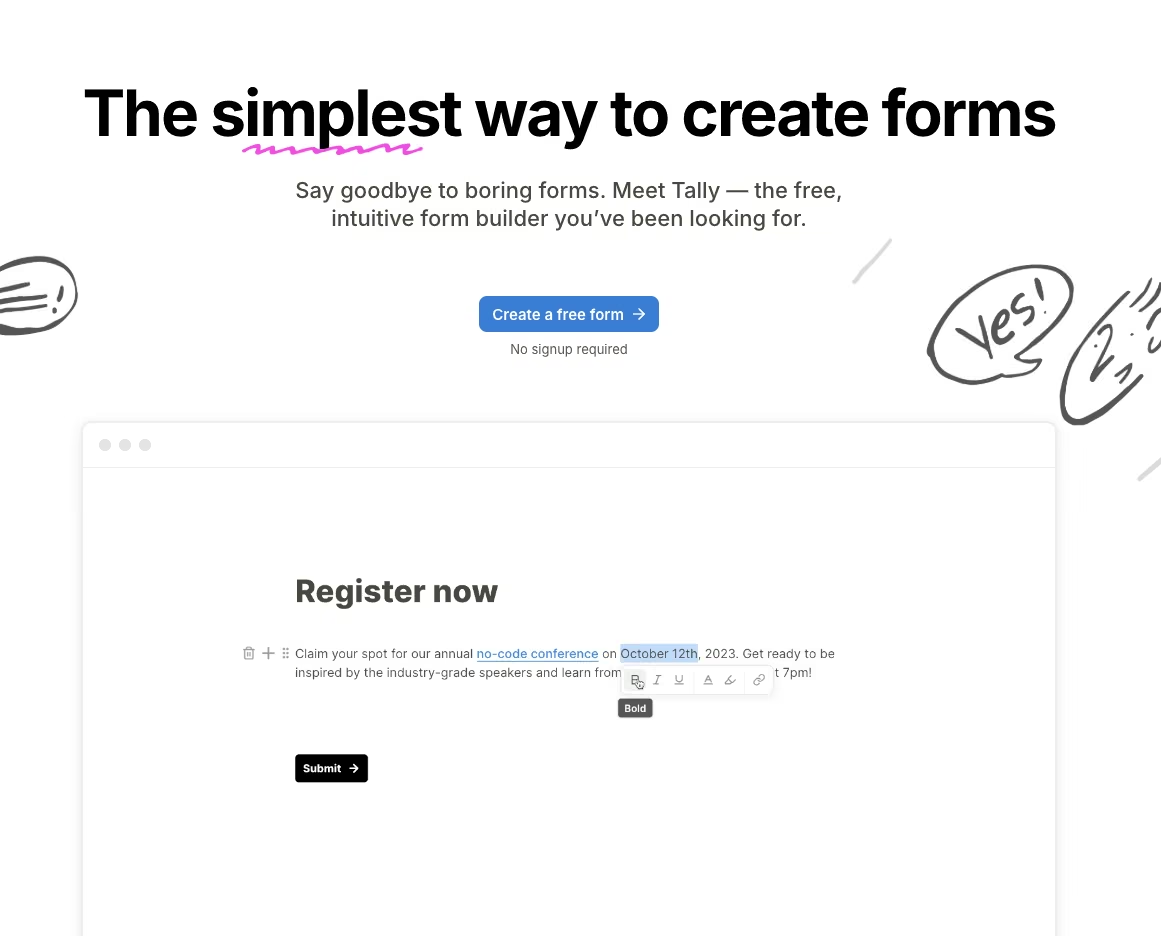
A free plan usually comes with a catch. Tally's is unusually small, and it took a while to surface. Duplicate-blocking is an opt-in toggle you switch on yourself, and submissions run under a fair-use policy with no fixed cap.
The Notion-style editor is fast to work in. I built the conditional branch and the waiver-upload field in 13 minutes, the fastest hand-built form in the group. Adding blocks works the same way it does in a Notion document.
Type a slash, pick a field type, and it drops in ready to configure.
The T-shirt size, check-in slot, and shipping-address fields on the in-person and virtual paths all reused that same pattern, with no separate logic panel to hunt through.
The payment step was simpler here than on most other tools. Tally's payment field is free too, needing only a connected Stripe account, the same connected-account setup most payment-enabled tools here rely on under the hood.
The duplicate-submission test didn't go Tally's way out of the box either. Two quick submissions produced two separate entries; Tally's opt-in duplicate-prevention toggle only catches repeats if you flip it on before the form goes live, and I hadn't.
Tally has the best free tier of the ten. Close to zero learning curve if you've used Notion, unlimited forms and submissions, and even the payment step ran on that same plan once Stripe connected.
Branding removal, custom domains, and team collaboration are what push you toward Pro.
Key features
- Notion-style editor: A familiar, block-based building experience with almost no learning curve.
- Unlimited free tier: Forms and submissions run unlimited under a fair-use policy, with no fixed numeric cap.
Pros
- Fastest manual build time in this test, 13 minutes.
- Free tier's only ceiling is fair use, with no fixed submission cap.
Cons
- Duplicate protection is off by default, so a repeat slipped through.
- Custom domains, branding removal, and team features are all paywalled to the Pro tier.
Best for
A registration or payment form that needs to stay on a real free plan.
Pricing
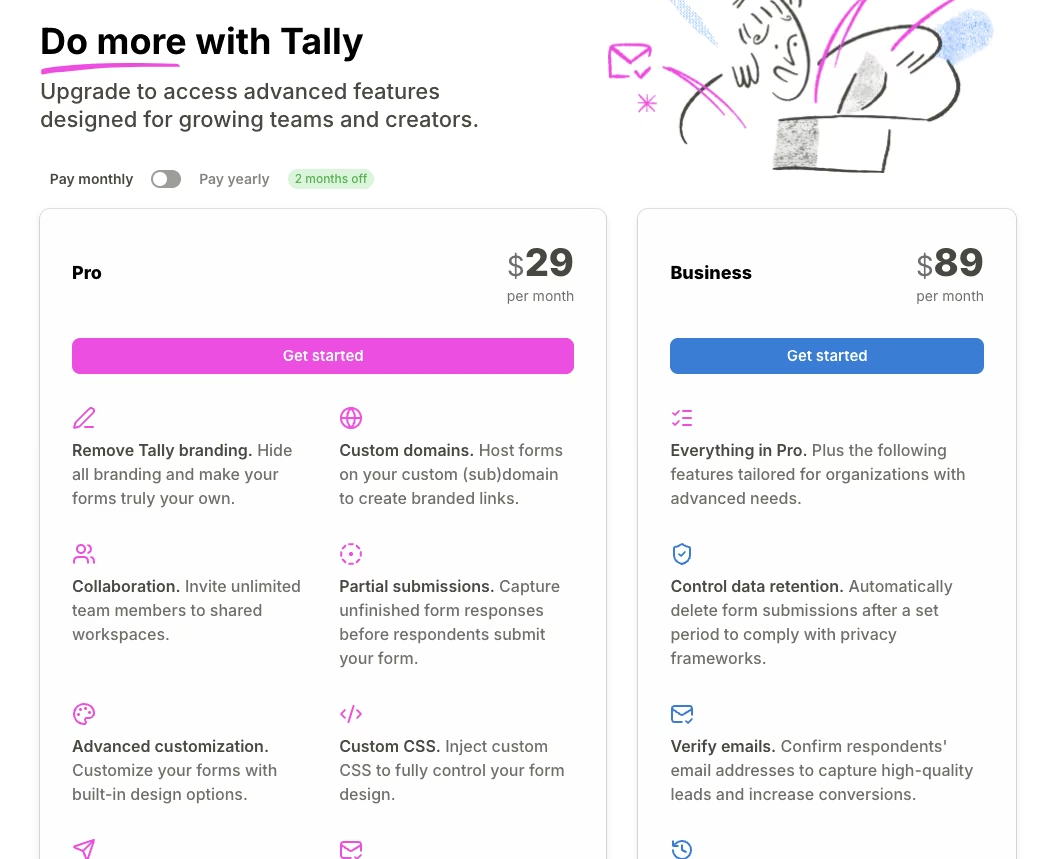
Free includes unlimited forms and submissions under fair use, with native payment collection included. Pro is $29/month ($24/month, billed annually) for branding removal, custom domains, and team collaboration. Business is $89/month ($74/month, billed annually) for data-retention controls and email verification.
5. Formstack: Best for Regulated Industries and Compliance
Formstack is the one tool here where I swapped the waiver file upload for a native e-signature step instead. Attaching the e-signature to the waiver field took two clicks inside the editor, with an audit trail built in automatically.
That makes this part of the build different from the file-upload approach that every other tool used.
For a form collecting something like a signed waiver, that's a meaningfully different level of legal weight than a scanned PDF sitting in a folder.
The rest of the build (the conditional branch and the payment step) came together with little friction. Setup came to about 30 minutes, toward the slow end of the lineup.
Most of that came from the editor's menu structure, which buries conditional logic a layer deeper than tools like Fillout or Tally do.
The price buys the compliance tooling underneath the form, not a faster or smoother building experience; Fillout and Tally both felt quicker to work in.
The repeat test went the way most of the field did.
A repeat submission produced two separate entries and two separate charge attempts, with no flag or hold anywhere in the workflow builder, despite all the compliance tooling wrapped around everything else on the form.
That tooling comes at a real cost. Formstack has no free tier at all. The cheapest paid plan is $99/month ($83/month, billed annually) for 25 forms and 1,000 submissions per form, the rate without a full-year commitment.
Only SurveyMonkey's monthly plan starts as high, also at $99/month.
For a simple registration form with no compliance requirement attached, $99/month ($83/month, billed annually) is hard to justify. Fillout or Tally do the same job for a fraction of the cost.
Formstack is worth the price the moment a form needs to meet a HIPAA standard (a paid add-on beyond the base Forms plan), hold an audit trail, or carry a legally meaningful signature.
Key features
- Native e-signature step: Attach a legally binding signature to a form field, with an audit trail included.
- Advanced conditional logic: Complex branching and calculations build without needing a workaround.
- Deep system integrations: Connects into existing compliance and records systems without custom glue work.
Pros
- Native e-signature backed by an audit trail, a pairing no other tool here matches.
- Strong system integrations for regulated workflows.
Cons
- No free tier at all, only a 14-day trial.
- Among the highest starting prices in the field at $99/month ($83/month, billed annually).
Best for
Healthcare, legal, or other regulated workflows that need a real e-signature and audit trail
Pricing

No free plan, 14-day trial only. Forms is $99/month ($83/month, billed annually) for 25 forms and 1,000 submissions per form. Suite is $299/month ($250/month, billed annually) for three users, 100 forms, and unlimited e-signatures.
6. Microsoft Forms: Best for Microsoft 365 Organizations

The conditional branch in Microsoft Forms works, but the branching logic gets hard to follow past two nested levels. That's right around where this build's in-person and virtual paths, plus the T-shirt-size and shipping-address sub-fields, started to stack up.
I got there, but it took about 35 minutes, longer than most of the dedicated form tools here. Most of that time went to retracing which fields belonged to which path.
There's no native payment field, so the $25 fee had to route out to a separate payment link, the same workaround Google Forms needed. The waiver upload went through the built-in file-upload question type without fuss.
It accepted both a PDF and a photo of a signed page without any extra configuration.
The duplicate check came back the way most tools here did.
A second tap dropped two full, separate responses into the results grid, with no flag to catch it, one more thing to watch for by hand on top of the branching quirks above.
Microsoft Forms is included with a Microsoft 365 seat that most organizations already pay for, and that inclusion is the main reason to reach for it.
It doesn't add a separate line item, a new vendor to onboard, or an extra login for IT to approve.
The building experience felt the most dated of anything I tested. The interface and overall visual design both looked older than tools with more recent design attention.
If your organization already runs on Microsoft 365 and the form stays under that two-level branching ceiling, the bundled cost makes this an easy default. Outside that setup, there's little reason to choose it over a purpose-built form tool.
Key features
- Bundled Microsoft 365 access: No separate purchase or vendor onboarding for organizations already on it.
- Native Excel and Teams integration: Responses flow directly into tools the organization likely already uses.
Pros
- Included at no added cost with an existing Microsoft 365 seat.
- Native Excel export with no separate integration step.
Cons
- No native payment field, so the fee routes out to a separate link.
- Conditional branching got hard to follow past two nested levels.
Best for
Organizations already paying for Microsoft 365 that want zero added cost.
Pricing
Included with an existing Microsoft 365 subscription. Microsoft Forms has no standalone price of its own.
7. Zoho Forms: Best for the Zoho Suite

Connecting the $25 fee to a payment gateway took four clicks inside Zoho Forms' editor, fewer than any other payment build here. The conditional branch and waiver upload dropped in alongside it with nothing to work around.
The build clocked about 19 minutes, most of it spent on branch logic since the payment step and file upload both had dedicated field types ready to drop in.
Zoho Forms passed the duplicate-submission test outright. The second attempt got caught and blocked before a second charge could go through. That put Zoho alongside Fillout as one of only two to manage it.
The free tier covers three forms and 500 submissions/month, workable for a build this size, but tight for anything scaling past a single event. The editor itself felt closer to Google Forms than Typeform, plain and function-first.
That tracks with a tool built to plug into a bigger suite. Standing alone as a polished product was never the goal.
As a standalone tool with no Zoho suite behind it, Zoho Forms didn't stand out from the rest of the field.
It worked without any drama, and the specific reason to reach for it is the Zoho connection more than the form-building experience alone.
Zoho Forms is the right call, mainly if a team already runs Zoho CRM or Zoho Books. Registration data connects straight into that existing system without a separate integration step, a real advantage for a team already inside that suite.
Key features
- Native payment gateway connection: The $25 fee routed through a built-in gateway in a handful of clicks, no separate link.
- Zoho CRM and Books integration: Registration data flows straight into the tools a Zoho-based team already runs.
Pros
- Caught and blocked the duplicate-submission test cleanly.
- Deep, no-extra-step integration for teams already on Zoho.
Cons
- Free tier caps at three forms and 500 submissions/month.
- Unremarkable as a standalone tool outside the Zoho suite.
Best for
Teams already running Zoho CRM or Zoho Books
Pricing
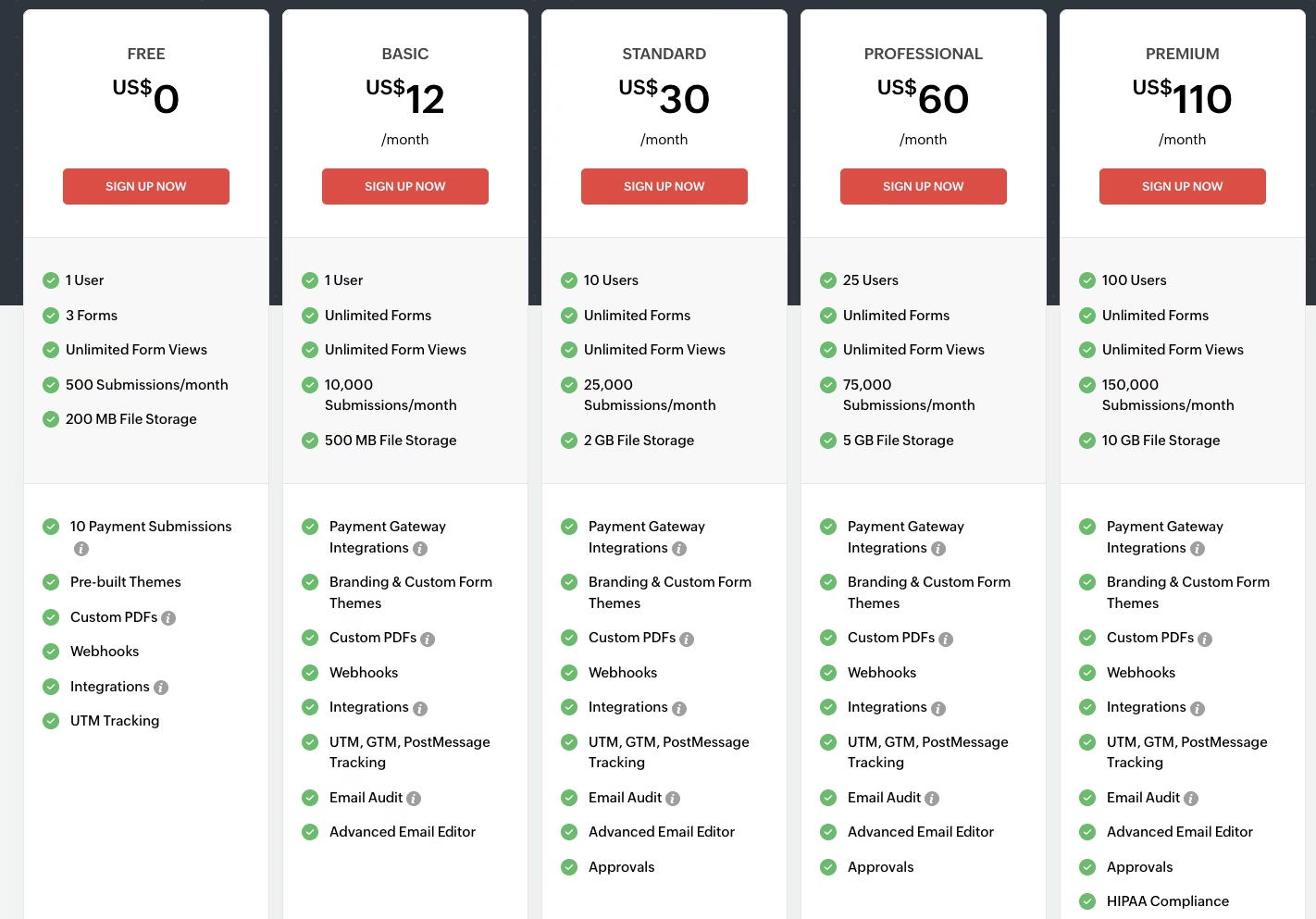
Free includes three forms, 500 submissions/month, and one user. Basic is $12/month ($10/month, billed annually) for unlimited forms and 10,000 submissions/month. Standard is $30/month ($25/month, billed annually) for 10 users and 25,000 submissions/month.
8. Paperform: Best for Selling Through a Form

Paperform came closest to making the $25 fee feel like part of a real checkout.
The whole form reads more like a product page than a plain intake form, with the payment block sitting naturally alongside the waiver upload and the conditional branch.
Setting up the fee and an order-style summary took under five minutes, the fastest payment build in the group.
That order-first design is the whole point of Paperform: it's built for teams that sell through a form.
The conditional branch and waiver upload went in with nothing to work around, same as most tools here, and the build landed at about 17 minutes.
The order-summary block automatically totaled the fee and displayed it back to the runner before checkout. It's a small touch that made the payment step feel closer to a real store than a form.
The duplicate-submission test broke the illusion a little. A second submission ran the order-summary flow twice, logging two separate $25 line items with no catch anywhere in the checkout-style block, the exact duplicate charge this test was built to surface.
The free plan caps at 30 submissions a month, too small for a live registration form, so using Paperform long-term realistically starts at a paid plan.
Essentials runs $29/month ($24/month, billed annually) for roughly 100 submissions/month, which covers a build this size comfortably but would need an upgrade fast for anything bigger.
For a registration form where money changes hands, Paperform made that part feel the most natural of anything tested here.
If the build had stayed purely informational, with nothing to sell or collect payment for, a free option like Tally or Google Forms would make more sense.
Key features
- Order-style payment blocks: Payment fields read like a checkout flow, with the fee built into the block itself.
- Design-forward templates: Forms read closer to a product page than a plain intake form.
Pros
- Fastest payment build including the order-summary block, under five minutes.
- Order-summary design makes a paid form feel intentional and planned.
Cons
- Free plan caps at 30 submissions/month, too tight for a real registration form.
- Submission cap on the entry paid tier stays tight for a growing form.
Best for
A form where making the sale counts as much as collecting the data.
Pricing
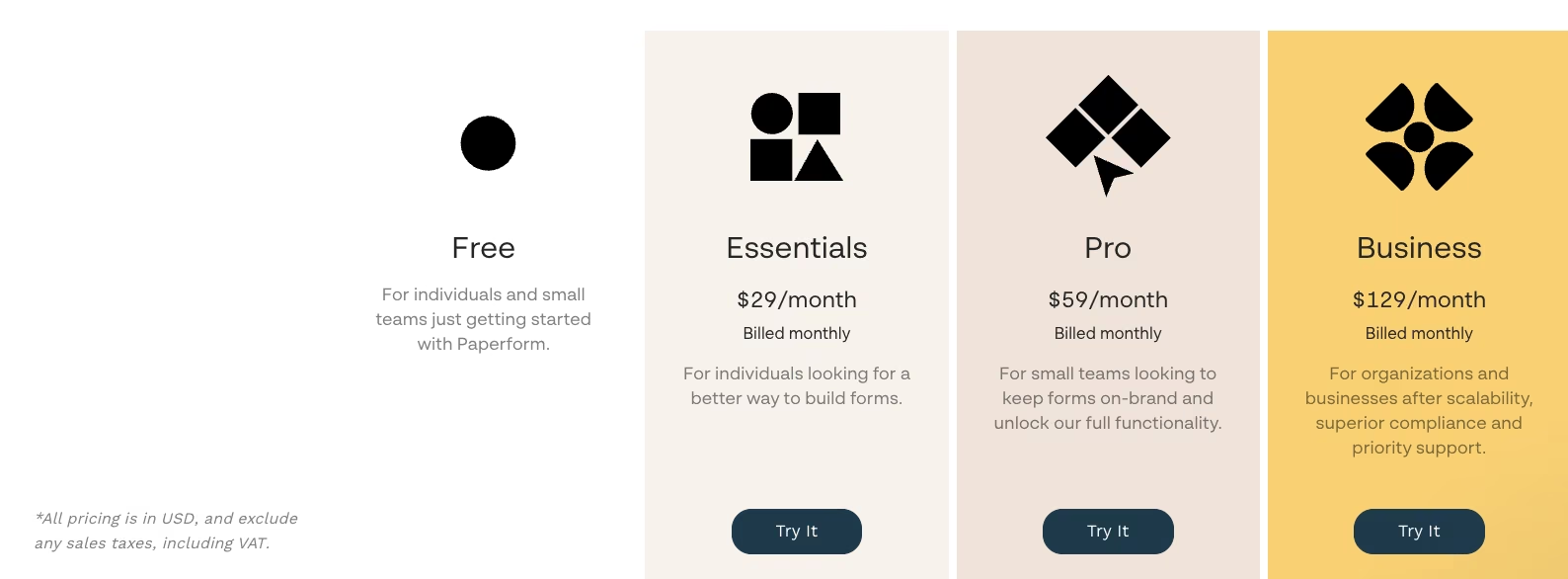
Free plan covers 30 submissions/month for one user; new accounts also start with a 7-day Pro trial. Essentials is $29/month ($24/month, billed annually) for ~100 submissions/month. Business is $129/month ($99/month, billed annually) for ~10,000 submissions/month and five users, plus $9/month per additional user.
9. SurveyMonkey: Best for Market Research and Structured Surveys
SurveyMonkey handled the easy part of this build without a hitch, then hit a wall on everything else. The conditional branch and the underlying survey logic came together in about 20 minutes, roughly average for the manual builds.
The T-shirt size, check-in slot, and shipping-address questions all used that same skip-logic panel.
The trouble was everything this form needed beyond the branch.
Native payment only appears on SurveyMonkey's annual Advantage plan, so on the free and monthly tiers that a one-off event would reach for, there's no in-form way to collect the $25 fee without bolting on an outside tool.
Committing to a yearly plan for a single race is the kind of mismatch that rules it out here.
Setting the payment question aside, the duplicate stress test still applied to the response data. A second submission dropped another identical entry into the results dashboard with nothing flagging it. That tracks with what this tool is built to assume.
A survey tool is built to gather many independent responses. Nothing in its response pipeline watches for the same-named payer submitting twice, the way a transactional form tool would.
SurveyMonkey is built for market research and survey analysis. The branching logic, response analysis, and reporting tools all reflect that focus, which explains the mismatch with a transactional form.
The response-analysis dashboard went deeper than anything the plain form builders here offer, with cross-tabulation, filtering by answer, and exportable charts all coming standard.
The free Basic plan caps at 25 responses per survey, tight even for a small event like this. Standard Monthly, at $99/month, lifts that to 1,000 responses a month but still can't take a payment.
Accepting the $25 fee starts on the Advantage plan, $46/month billed annually at $552, so the cheapest version of this build that would collect money is annual-only.
Across the ten, this was the weakest fit the moment money or a legally meaningful e-signature needed to attach to the form. If the job looks anything like this registration build, it's the wrong tool from the start.
If the actual job is structured survey logic and analyzable response data, though, SurveyMonkey earns its spot.
Key features
- Structured survey logic: Branching, skip logic, and question piping build for research-grade surveys, a tier above simple intake forms.
- Deep response analysis: Cross-tabulation, filtering, and exportable charts go beyond what a plain form builder offers.
Pros
- Strongest response-analysis tooling of any tool tested here.
- Conditional logic built cleanly with no workaround needed.
Cons
- Native payment only on the annual Advantage plan, and no e-signature for a legally binding waiver.
- Free Basic plan caps at 25 responses per survey.
Best for
Market research, structured surveys, and feedback forms.
Pricing

Free Basic: 25 responses per survey. Standard Monthly: $99/month, 1,000 responses/month, no payment acceptance. Advantage: $46/month ($552 billed annually), 15,000 responses per year, the first tier that accepts payments.
10. forms.app: Best for AI-Assisted Product and Order Forms

forms.app pitches itself as the one alternative that pairs AI-assisted form generation with a dedicated product-selling field, the block Paperform builds its whole product around.
Unlike the hand-built forms everywhere else in this test, I let forms.app's AI generator take the first pass at the Riverside Fun Run registration.
Describing the form in a few lines got most of the structure right on the first try, including the name, email, and phone fields, plus a rough draft of the in-person and virtual split.
What the generator didn't get right was the branch logic itself, which still needed manual rework in the editor to route the T-shirt size and check-in slot to in-person runners and the shipping-address field to virtual ones.
The whole build took about 24 minutes, most of the extra time over a clean AI pass going into that manual branch rework.
The $25 fee brought out forms.app's other identity.
The fee ran through forms.app's dedicated products block, the same field type built for listing products with variations and stock, connected straight to a test-mode Stripe charge, not a plain payment field stapled onto the end of the form.
That block sets forms.app apart from every tool here except Paperform. The runner saw the fee summarized before paying, without landing on a generic checkout redirect.
The waiver upload and the confirmation email needed no special handling, using two of the 30+ field types available even on the free plan. forms.app came up short on the duplicate-submission test, though.
A repeat submission went straight through as two separate entries and two separate test-mode charges, with nothing in the editor set to catch it by default.
If the actual job is selling through the form, forms.app pairs an AI-assisted setup with a product-style fee field in one tool.
Anyone who needs the data to land somewhere smarter than a response table should look at Fillout instead, since forms.app never tries to be a database.
Key features
- AI form generator: Describing the form in plain language drafts the fields and a first pass at the logic before any manual editing starts.
- Dedicated product fields: A product block built for listing items with variations, stock, and images turns the payment step into a structured order summary.
Pros
- Only tool tested here that pairs an AI-assisted setup with a dedicated product and order field.
- 30+ field types available even on the free plan, including e-signatures and payments.
Cons
- A repeat went through as a new response, plus a second test-mode charge.
- No offline form submission and no built-in HIPAA compliance.
Best for
Teams selling through a form who want an AI-assisted setup without hand-building the product and payment fields separately.
Pricing
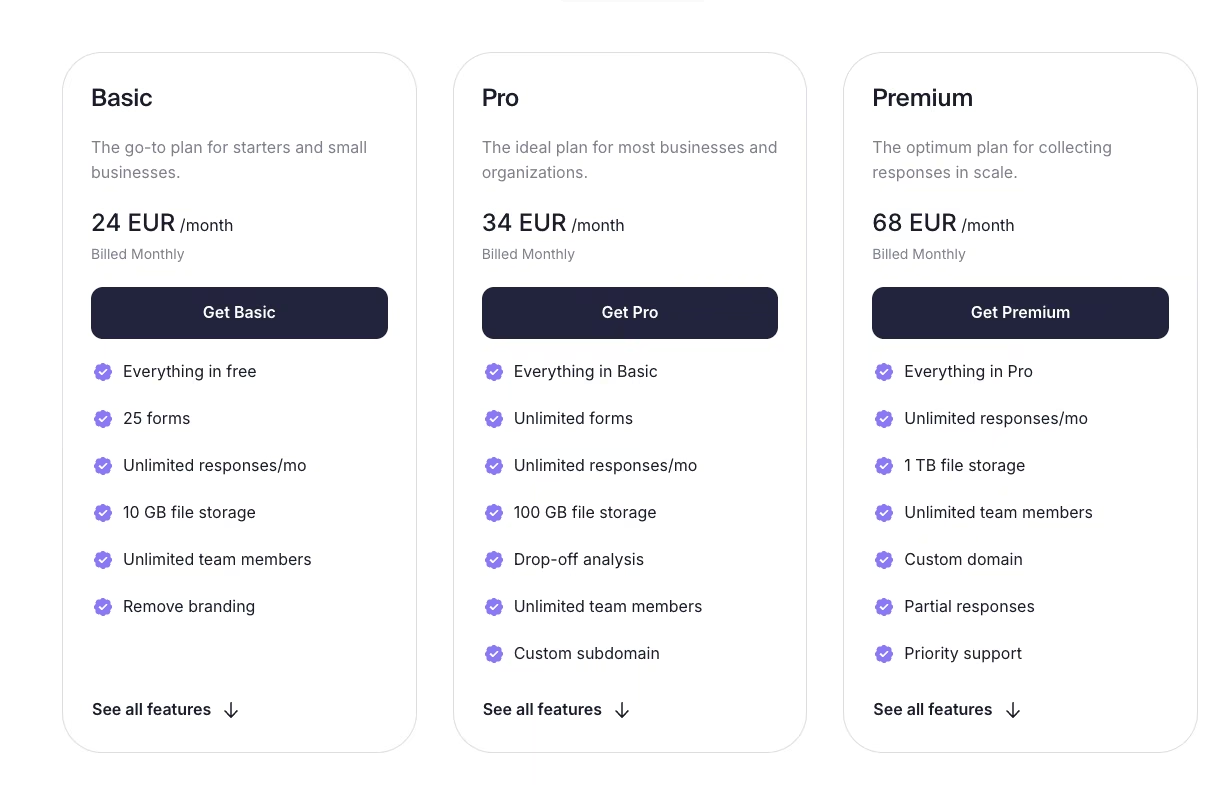
forms.app bills in euros rather than dollars. Free includes five forms and unlimited responses, with 30+ field types, e-signatures, and payments built in.
Basic runs 24 euros/month (16 euros/month, billed annually) for 25 forms and 10GB of storage. Pro runs 34 euros/month (24 euros/month, billed annually) for unlimited forms and drop-off analysis. Premium runs 68 euros/month (49 euros/month, billed annually) for a custom domain and priority support.
Pick the Jotform Alternative That Matches Your Blockers
No single tool among these Jotform alternatives won every round. Fillout came closest, catching the duplicate-submission test cleanly and handing back a structured view to filter by status.
Tally undercut it on price due to its generous free tier, and Formstack pulled ahead once a legally meaningful signature was in play.
The right pick depends on which ceiling sent you looking in the first place. Fillout, Tally, and Google Forms each take the pressure off a stacked usage limit.
If design and completion rate are the real problems, Typeform is the one built for that. For a compliance requirement, Formstack is the strongest of the tools tested here.
And if a form only ever gets you to a spreadsheet, Fillout is the clearest route past that point among these ten.
Decide first whether you need a basic form or a connected database, and pick on that, before you run into the same limit that sent you looking for Jotform alternatives.
Whatever you land on, even a tool that isn't on this list, weigh it on the axes that decided this test:
- How separately its usage limits are capped.
- Whether a second editor costs a full seat.
- How it handles a double submission.
- Whether responses land somewhere you can act on.
- How it treats anything with legal weight.
- The true monthly cost at your real volume.
How Emergent Helps Teams Turn Form Data Into a Real Workflow

Every tool in this list gets you to a working form, but what happens after someone hits submit is a separate problem.
For many of the 10 tested here, that means a spreadsheet plus whatever manual routing, approval, or record-updating a team builds by hand.
Emergent is built for that specific gap. You lay out what the finished registration should do, skipping the separate step of configuring a form and wiring together a system to handle what comes after.
Emergent's agents turn that description straight into the app, checking each registration against a rule and updating its own status automatically.
The result is a real database and workflow logic behind every submission, so no one keeps a flat sheet current by hand. This isn't the right call for every team. If a spreadsheet has always handled the form fine, a dedicated builder is enough.
When the form's real job starts after submission, describing the whole workflow is the move, which is why Emergent earns its place here.
Describe the whole workflow once, and Emergent builds the app, the database, and the logic together. Try Emergent for free.

Every alternative has trade-offs. Emergent just builds production-ready apps from one prompt.
- Production-ready apps
- Web & mobile apps
- Deploy in minutes





