



Which is better, Wix or WordPress? I built the same site on both, a full end-to-end build, using a small Dallas moving company as my test case because a service business stresses every part that matters.
The Same Test, Run Twice
For this test I built a full site for Liberty Haul Moving Co., the Dallas moving company I used as a stand-in for any local service business, the kind that needs to show its services, earn trust, and turn visitors into calls.
I gave both platforms the same job: a working site with a homepage, service pages, a quote form, a blog, and a mobile layout built to make someone call or book.
Then I judged them on the five things that actually decide it:
- How fast could I get a professional site live
- How much control I have over local SEO and city pages
- Whether the quote form and payments worked the way a customer expects
- How much ongoing maintenance the platform demanded
- What it really costs once I added the features a mover needs
Same site, same goals, two very different builds. That is what made the difference easy to see.
Wix vs WordPress: What's the Difference?
Wix is an all-in-one hosted website builder. WordPress is the most popular way to build a site on the web, and it comes in two flavors that people constantly mix up.
Sort the name out first, because it quietly changes the whole comparison. WordPress.com is the hosted, managed version, the one that sits closest to Wix. WordPress.org is the free, self-hosted software you install and run on your own hosting. When people praise WordPress for ownership and control, they almost always mean .org.
Wix gives you a ready-to-use setup from the day you start. WordPress.org gives you a blank setup you can build exactly how you want, and it pays you back for the work you put in.
Choose Wix if: You want a polished moving company site live this week, with a quote form and a phone CTA your team can edit themselves. You would rather never think about hosting or plugins.
Choose WordPress if: You plan to own the site outright and grow city pages and SEO content over years. You can handle maintenance, or pay someone who can.
| Feature | Wix | WordPress |
|---|---|---|
| Best for | Fast, low-maintenance local service sites | Content-heavy, SEO-led, fully owned sites |
| Pricing (starting) | $17/mo Light, but $29/mo Core to take deposits, billed annually | $9/mo Personal on .com, or .org hosting plus plugins |
| Key strength | Speed and all-in-one tools | Ownership, flexibility, and SEO at scale |
| Main weakness | Lock-in and a ceiling you will eventually feel | Maintenance and a learning curve |
| Ideal team size | Non-technical owners and small teams | Builders, agencies, content-led brands |
Wix gives you convenience. WordPress gives you control. The rest of this shows which one is right for a moving company.
Meet Wix: The Fast, All-in-One Build
Wix is built so a non-technical owner can ship a working site and keep editing it without calling anyone for help. You get drag-and-drop design, hosting, and a bundle of business tools behind one login.

I started with the Liberty Haul site on Wix. The homepage, three service pages, and the quote form were live the same afternoon. Most of my time went to writing the copy, not fighting the tool.
For an owner who wants a working site this week, Wix takes almost every technical decision off the table. The trade is that you live inside Wix's world, on Wix's terms. That matters a lot more on day 1,000 than it does on day one.
Meet WordPress: The Control-and-Ownership Build
WordPress starts from the opposite belief, that you should own and control the thing you build.
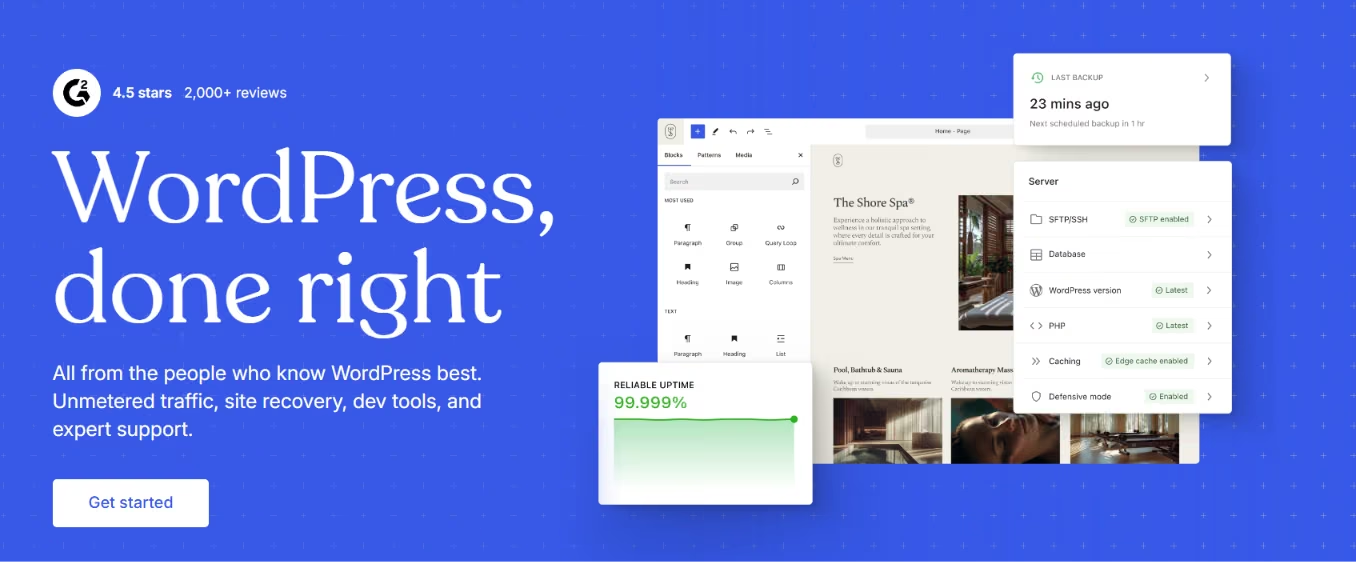
WordPress.com handles hosting, security, and updates for you, with real-time backups on its higher tiers. WordPress.org hands you the open-source software and turns you loose to run it on your own hosting. You get full access to the files, the database, the themes, and tens of thousands of plugins.
The same Liberty Haul build took me the better part of two evenings on WordPress. I had to set up hosting, a theme, a contact-form plugin, and caching before the first page felt fast.
The payoff was ownership I could feel. I could change anything, pick the whole site up and move it elsewhere, and grow the blog without hitting a wall. That control is the reason people choose it. The maintenance is the bill that comes with it.
Wix vs WordPress: Feature by Feature
I judged the same build piece by piece, from the editor down to ownership, the piece that most people ignore until they try to leave.
Ease of Use and the Editor
Ease of use is Wix's home field. The editor is friendly. What you drag is what you get, and a non-technical owner can update the holiday hours without blowing up the layout.
WordPress.com is approachable, but still asks you to learn its block editor. WordPress.org piles themes and page builders on top, which is more power and more to figure out.
If "my office manager needs to edit the phone number herself" is a hard requirement, Wix wins it cleanly.
Winner: Wix.
Design and Themes
Wix gives you polished templates and guardrails. It is hard to make something ugly, but it is also hard to make something fully custom.

WordPress works the other way around. With the right theme and a page builder, the design ceiling is effectively unlimited, but you can also paint yourself into a corner.

For a clean, trustworthy moving company look, Wix gets you there faster. For a distinctive, exactly-this design, WordPress goes further.
Winner: Wix for speed, WordPress for ceiling.
AI Site Building
Both platforms lead with AI now, so this is table stakes, not a tiebreaker. Wix builds your site from a single prompt with its AI website builder, then flows you into the drag-and-drop editor to refine any detail. WordPress.com does the same through its built-in AI assistant, launching a site in minutes by chatting before you touch the block editor.
For Liberty Haul, both got me a rough homepage fast. The prompt is a quicker on-ramp, but you land in the same editor doing the same cleanup either way.
Winner: Tie, AI speeds up the first draft on both, but neither one changes what the finished site can actually do.
eCommerce and Taking Payments
Plenty of sites need to sell, whether that is a full catalog or a service business taking a deposit online, so this is worth its own look.
For a real online store, the two go about it differently. Wix has Wix Stores built into its plans, with the catalog, cart, and checkout managed for you, which stands up fast for a small to mid-size catalog. WordPress sells through WooCommerce, the open-source plugin that runs on WordPress.org and the WordPress.com Commerce plan. WooCommerce handles far more, from large catalogs to deep customization, but it asks more of you to set up and maintain.
Fees matter too. Wix takes no extra commission on sales when you use its own payment tools, and WooCommerce charges no platform fee of its own, so your main cost on both is the standard card-processing rate plus your plan.
For the Liberty Haul side of the test, the need was smaller, just selling boxes and packing supplies, and taking a deposit. On Wix, that starts at the Core plan, the same $29 tier that unlocks deposits, which keeps a short list of items simple to run.
Winner: Wix for a fast, built-in store, WordPress for a large or highly custom catalog. Wix Stores wins when you want selling handled for you, while WooCommerce wins once the store becomes the main event.
SEO and Local Content
SEO is where this comparison gets real, because most sites live or die on search.
For Liberty Haul's core pages, both ranked fine, and you would be hard-pressed to tell them apart at that size. The gap opens as the content grows.
WordPress is built to scale a content library and the technical SEO underneath it. That is especially true of .org, with an SEO plugin and full control over your URLs, redirects, and structure. I spun up a "Plano movers" page in minutes and owned its URL and meta title outright. On Wix, I could build the same page, but the structure felt more boxed in.
One honest caveat comes from the people who have actually switched. Sellers who moved off Wix are blunt that changing platforms alone won't lift your rankings. Wix gives you fewer things to break. WordPress gives you more knobs to turn. Neither one writes your content or earns your backlinks for you.
Winner: WordPress, for direct control over the structural SEO that a growing content library depends on.
Both platforms share one limit. They get you found, but neither runs the quote portal or booking system a customer actually uses after they land. If your site needs to become that kind of tool, you are describing an app, and a builder like Emergent fits that job. More on that below.
The Quote Form and Trust Signals
A service-business site has one job: turn a visitor into a lead or a phone call.
Both platforms handle the basics. Wix has lead-capture forms built in, though the lower plans cap how many you get. WordPress.com has a form block, and .org has form plugins that go as deep as you want.
Adding testimonials and a "licensed and insured" badge was simple on both. I dropped in the section, added the logos, and moved on.
Winner: Tie on a standard quote form, WordPress for anything custom.
Blogging for Local Reach
WordPress was a blogging engine before it was anything else, and that history still shows.
On the rebuild, the blog was the one piece where WordPress felt purpose-built. Categories, tags, scheduled posts, and clean control over archives all came standard. For a mover publishing "How to pack a kitchen" and "Moving in Dallas summer heat" to pull in search traffic, that room matters.
Wix can run a blog, and for a few posts a month, it is fine. The difference shows once the blog becomes a real traffic channel.
Winner: WordPress for a content engine, Wix for an occasional blog.
Support and Maintenance
When something breaks on a small-business site, you want a fast answer instead of a research project.
Wix gives you one company to call. WordPress.com has managed support on its paid plans. WordPress.org has no central help desk at all, so you lean on documentation, forums, and whoever built your theme.
Maintenance is the flip side. On Wix and WordPress.com, updates, security, and backups are handled for you. On WordPress.org, that is your job or your developer's, and a neglected site is where the horror stories start.
Winner: Wix.
Ownership and the "Can You Leave?" Test
Ownership decides more than people realize. Ask whether you can export the whole site, move your hosting, access the database, and keep the site if prices rise.
On Wix, the answers are mostly "not easily," because you are building inside a closed platform. On WordPress.org, the answer is yes across the board. That is the entire point of self-hosting.
Winner: WordPress.
What Real Users Are Saying
I used G2, Trustpilot, and Reddit instead of marketing pages. On G2, Wix sits at 4.2 stars and WordPress.org at 4.4. On Trustpilot, Wix scores 3.5 and WordPress.com 3.7. The ratings are close enough that the star rating will not decide it for you. The patterns in the comments will.
Wix
Pros
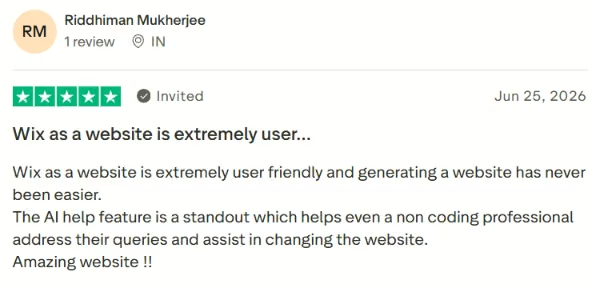
One reviewer said: "Wix as a website is extremely user friendly and generating a website has never been easier.”
Another noted: "Their customer service is just simply top-notch."

Cons
One reviewer complained: "Too expensive, not value for money.”

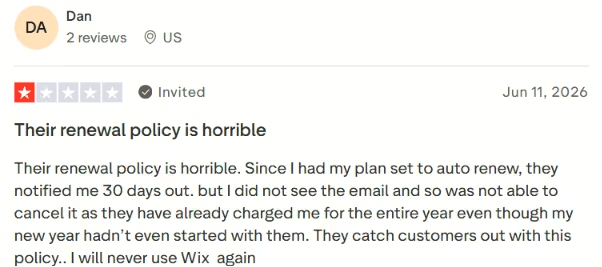
A long-time user warned: "Their renewal policy is horrible."
WordPress
Pros
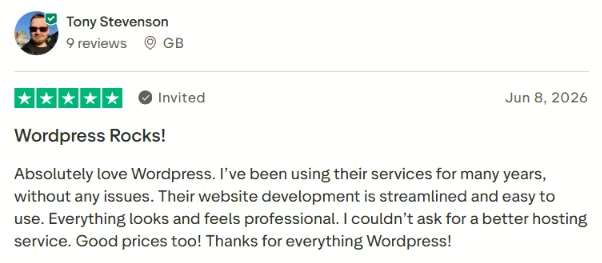
One Trustpilot reviewer said: "Their website development is streamlined and easy to use."
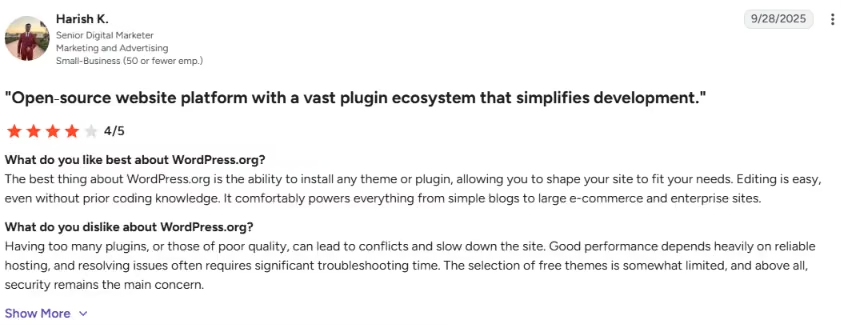
A reviewer described it: "It comfortably powers everything from simple blogs to large e-commerce and enterprise sites."
Cons
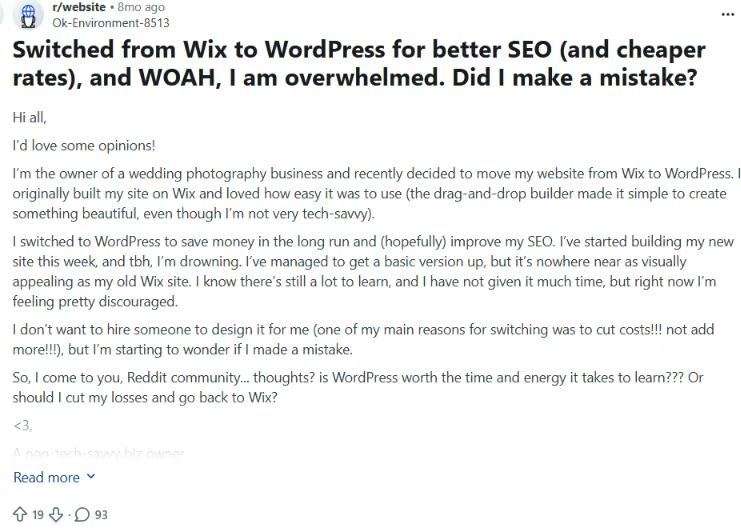
A user who switched from Wix said: "WordPress…has an extremely steep learning curve."
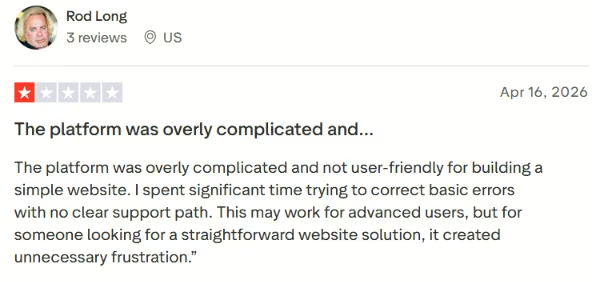
A reviewer noted: "The platform was overly complicated and not user-friendly for building a simple website."
The Pricing Nobody Tells You About Up Front
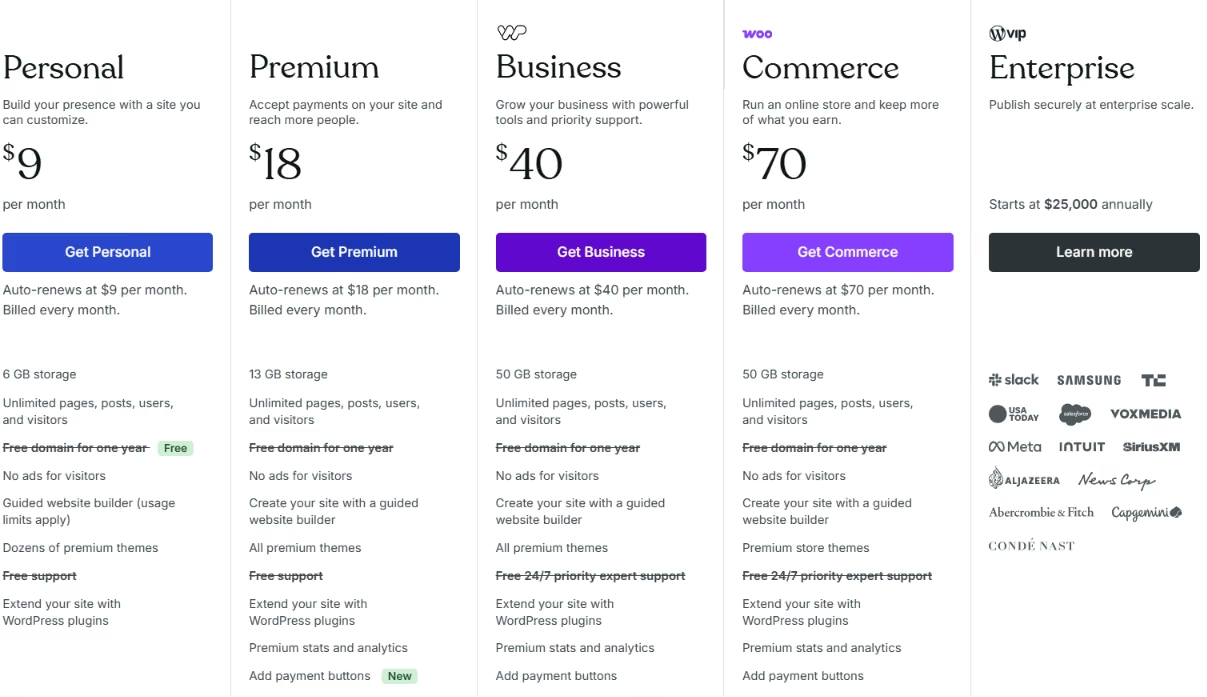
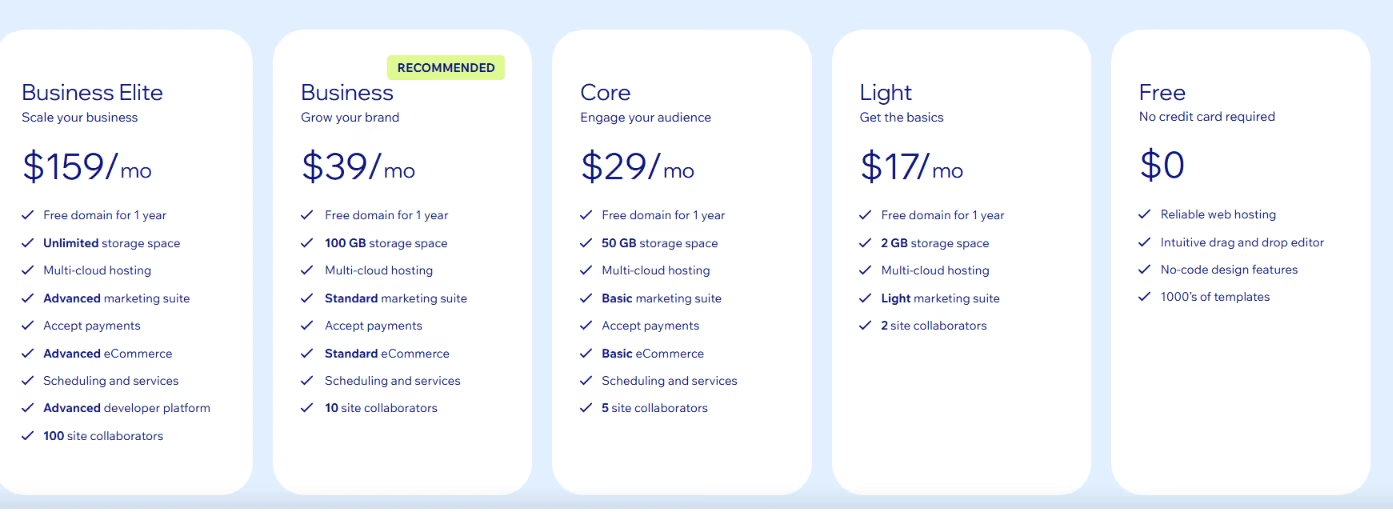
The sticker price is half the story. I checked the live pricing pages, and Wix's monthly figures below assume you pay for a year up front. WordPress.com shows monthly pricing, with lower annual and multi-year rates available.
| Plan tier | Wix (per month, billed annually) | WordPress.com (per month) |
|---|---|---|
| Free | $0 | $0, shows ads to visitors |
| Entry | $17, Light | $9, Personal |
| Core or popular | $29, Core | $18, Premium |
| Business | $39, Business | $40, Business |
| Top tier | $159, Business Elite | $70, Commerce |
WordPress.org has no plan price of its own. Budget instead for hosting, a premium theme, premium plugins, and any developer help.
The moving company use case changes the starting price. The cheapest Wix plan is not your real starting price.
Wix Light at $17 does not accept payments and has no scheduling. If you want to take a deposit to lock a move date, that starts at Wix Core, which is $29 a month. So the honest entry point for a mover that wants deposits and bookings is $29, not $17.
Price the whole stack instead of the headline plan.
Also read our best Wix alternatives guide for platforms that give you more control in 2026.
How to Make Your Choice
Most people pick by what the site looks like on launch day. The deciding question is who is still maintaining the site a year in.
Plenty of owners start on Wix to get live, then move to WordPress once content and SEO become the growth engine. That is often the smartest path, and it does not mean either tool failed.
Wix Is Better For:
- Local and service businesses that want a polished site fast
- Non-technical owners who will edit the site themselves
- Quote-request pages, booking-based businesses, and simple online payments
- Owners who value "done and low-maintenance" over "portable and custom"
WordPress Is Better For:
- Content-led, SEO-driven businesses planning lots of city and service pages
- Owners who want to publish often and own the traffic they build
- Sites needing custom workflows, integrations, and full design control
- Owners who want true ownership and portability, meaning WordPress.org
My Verdict
Wix wins for most small business owners because it gets a clean, ready-to-sell site live in an afternoon with no hosting or plugins to manage. WordPress only pulls ahead once you are committed to publishing content and SEO pages to rank over time.
Pick Wix to get live fast and stay low-maintenance. Pick WordPress to own the site and scale the content. Either way, settle who is maintaining it before you commit.
You can also outgrow both. When the site needs a real quote calculator, a customer login, or a booking system that tracks which trucks are free, you have crossed from website into software. At that point, another plugin stops being the answer.
Building Beyond Wix and WordPress
Most site builders work the same way. You pick a template, adjust the settings, and patch the gaps with apps. That template-based setup is fine until your site needs something the template was never built to do.
A newer approach skips templates. With vibe coding, you describe the site you want in plain language. The tool then builds it around how your business actually runs.
Emergent is one builder that works this way. You describe the site or app you want, and it builds the working product, from the pages to the booking logic to the integrations. The free plan lets you try it before you commit.
A template is still faster for a plain five-page site. But if you have hit the ceiling of what templates and apps can do, prompt-based building is worth a look.
Wix and WordPress prompt you to create a website. Emergent goes further, building a site that can behave like an app, with the quote calculator, customer login, or booking system built in.
Next Steps
Map your next year before you pick.
If you want a polished moving company site live this week with nothing to maintain, start a Wix plan and keep moving. If you are building a local SEO engine of city and service pages you will want to own, set up WordPress and budget for upkeep from day one.
Look hard at what you are building. If the site is a quote portal, a customer dashboard, or a booking system that tracks your trucks, treat it as an app rather than a brochure. With Emergent, you describe the site or app you want, and it builds the working product. The free plan lets you try it before you commit. You can do that before spending weekends forcing a site builder into a job it was never shaped for.

Also read our guide on how to create a business app in an afternoon if your site is really a booking system or customer portal in disguise.

Most AI app builders stop at prototypes. Emergent creates production-ready apps you can actually launch.
- Production-ready apps
- Web & mobile apps
- Deploy in minutes







