




Introduction
JERAI FITNESS is a modern, ClassPass-style gym booking platform built using Emergent. It demonstrates how a service-based booking application with multiple locations, membership tiers, and payment processing can be created from prompts without compromising on user experience, visual polish, or business functionality.
This tutorial walks through the final JERAI FITNESS experience: a sleek fitness booking app with location-based service browsing, category filters, detailed class pages, membership management, and a professional, energizing design system.
At its core, JERAI FITNESS showcases three key principles:
- Prompt-driven product development for service businesses From gym services to membership plans, every feature was built through natural conversation, proving that complex booking flows, Stripe integrations, and multi-tier pricing can emerge from clear prompts.
- Design-first thinking with clean, professional UI patterns The interface prioritizes clarity and trust. Poppins typography, thoughtful spacing, and a restrained color palette create an experience that feels premium without being intimidating—essential for converting visitors into members.
- Practical business logic that scales, not complicates Membership benefits automatically apply at checkout. Free classes for members, tiered discounts, and usage tracking all work seamlessly, showing how real-world business rules can be implemented without overwhelming the user or the codebase.
By the end of this tutorial, you’ll understand how to use Emergent to build a real real-estate discovery product, not a wireframe or demo.
Problem Statement and Proposed Solution
The Problem
Most real estate discovery platforms struggle with at least one of the following:
- Overwhelming interfaces with too many controls upfront
- Listings that show prices but do not explain them
- Cluttered maps and disconnected list views
- Design that feels dated or visually noisy
- High friction when trying to contact an agent or save listings
Users want clarity, visual context, and confidence when browsing homes, not just raw data.
The Solution
EstateHub solves this by focusing on property discovery rather than transactions, allowing users to explore homes without the pressure of buying or selling flows. It combines listings and an interactive map into a single, cohesive view so users always understand both location and context.
Properties are presented visually through rich image galleries that make it easy to imagine the space, while AI is used to explain pricing in simple, human language instead of confusing market jargon. All of this is wrapped in a calm, premium, and intuitive interface designed to build confidence as users browse.
Emergent Stack Used
- Frontend: React, Tailwind CSS, shadcn/ui, Framer Motion
- Backend: FastAPI, MongoDB
- AI: Claude via Emergent LLM for price explanations
- Maps: Interactive leaflets map with property pins
Learning Outcomes
By completing this tutorial, you will be able to:
- Turn a vague product idea into a clear, shippable app
- Design a discovery-first marketplace experience
- Create rich listing cards and property detail pages
- Use AI to explain complex information simply
- Design a premium UI that feels calm and trustworthy
- Ship a real-world app users can actually explore
Step 0: Prerequisites
Accounts & Access
Emergent account
Emergent LLM access (built in)
Step 1: Initial Prompt and Scope Definition
User Input
Build a Zillow-like real estate discovery MVP called EstateHub.

The goal is to ship a fast, production-ready app that lets users explore properties on a map, view clean listing details, and understand pricing through simple AI explanations. Focus on discovery, clarity, and speed. Do not build transactions, payments, or agent marketplaces.

Core features include map-based search by city or ZIP, basic filters, clean property cards, detailed property pages with images and comps, AI-generated “Why is this home priced this way?” explanations, and basic save functionality.

Use quick, preferably free APIs for property data, maps, neighborhood insights, and AI. Build with a modern, lightweight stack and a clean, Zillow-lite UI that works well on mobile.

Deliver a complete frontend and backend with clear setup instructions, environment variables, and fallback data so the MVP can realistically be shipped in 1–2 weeks.
Expected Response
Emergent does not immediately jump into building.
Instead, it clarifies scope, UX direction, and feature priorities:
Before I build this Zillow-like real estate MVP, I need to clarify a few key choices:

1. AI Provider for Price Explanations - Which AI model should I use? a. OpenAI GPT-4 or GPT-4o b. Anthropic Claude Sonnet c. Use Emergent LLM key (if available for OpenAI/Claude)

2. API Keys - Which of these do you have ready? a. Realty Mole Property API key (from RapidAPI) b. AI provider API key (OpenAI or Claude) c. Resend API key (for email notifications) d. Should I use mock/sample data initially and integrate real APIs later?

3. Database - For geospatial queries: a. Keep using MongoDB with geospatial features b. Switch to PostgreSQL + PostGIS (better for geo queries but requires setup)

4. Authentication a. Build simple email/password auth b. Integrate Supabase auth c. Skip auth for MVP (saved properties stored locally)

5. Map Features Priority a. Start with basic map + markers first, add draw-to-search later b. Include draw-to-search from the beginning

Please provide your choices so I can tailor the implementation perfectly!
Best Practice
Discovery apps become complex quickly.
Clarifying scope early prevents overbuilding and keeps the experience focused.
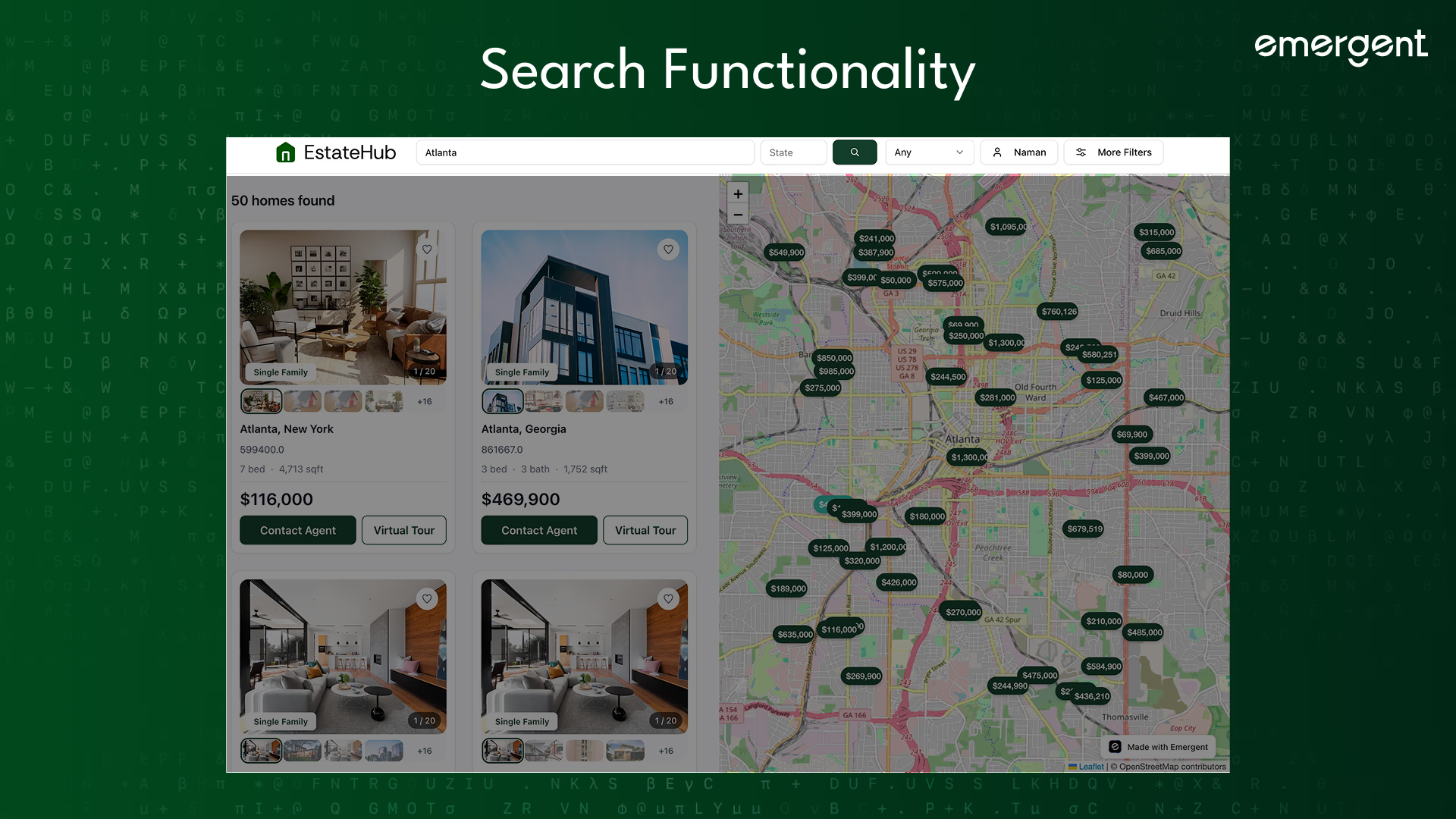
Step 2: Property Discovery Experience
Users can search properties by city and refine results using filters such as:
- Price range
- Bedrooms and bathrooms
- Property type
- Square footage
- Year built
- Key features like parking or pools
Advanced filters are tucked away so the main interface stays clean.
Step 3: Split-Screen Map Layout
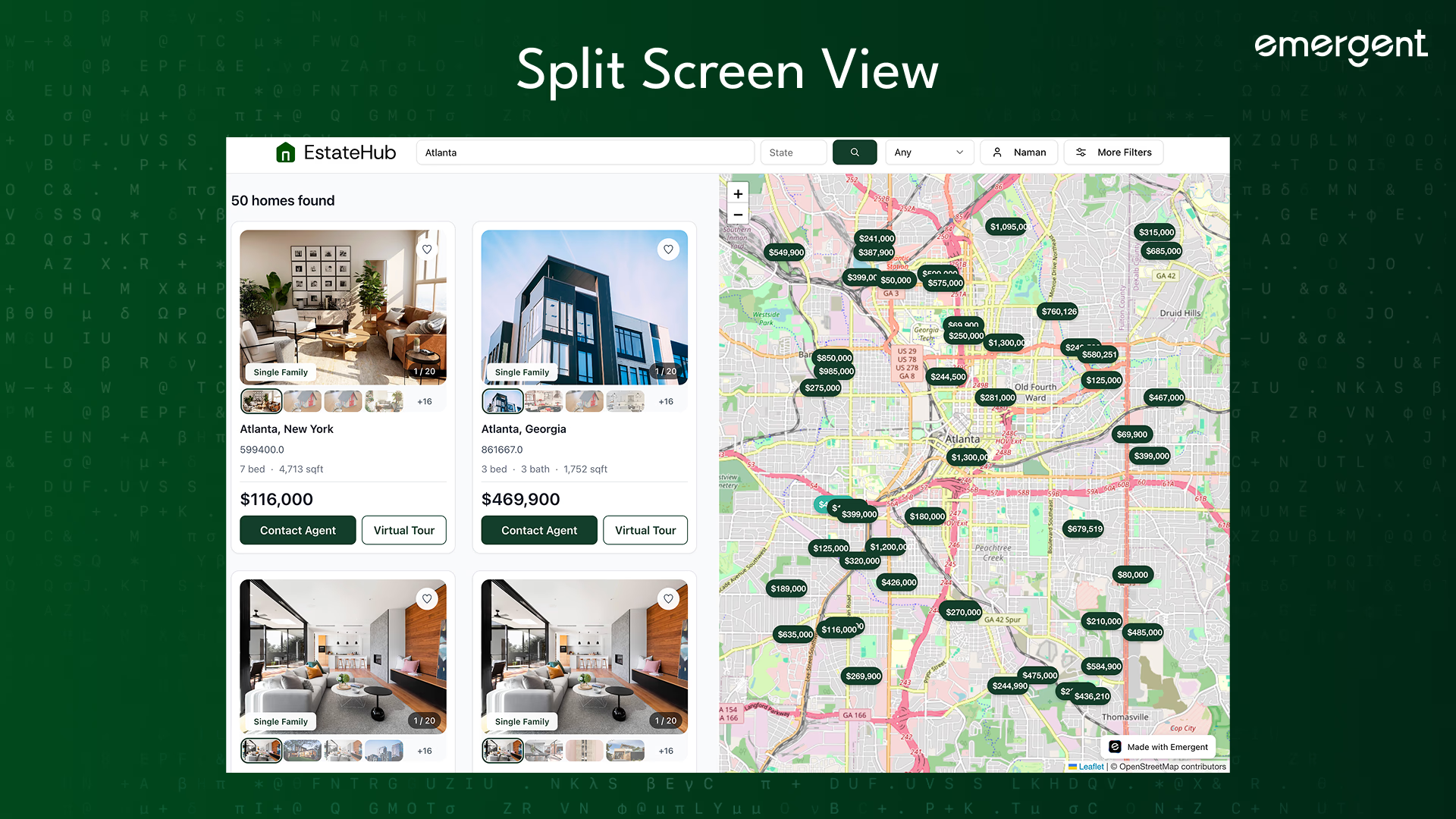
The core layout uses a split screen.
Listings appear on the left. An interactive map appears on the right.
Additionally, property pins show prices directly on the map. Hovering a card highlights its pin and clicking a pin focuses the listing.
This allows users to understand location and value at the same time.
Step 4: Property Cards
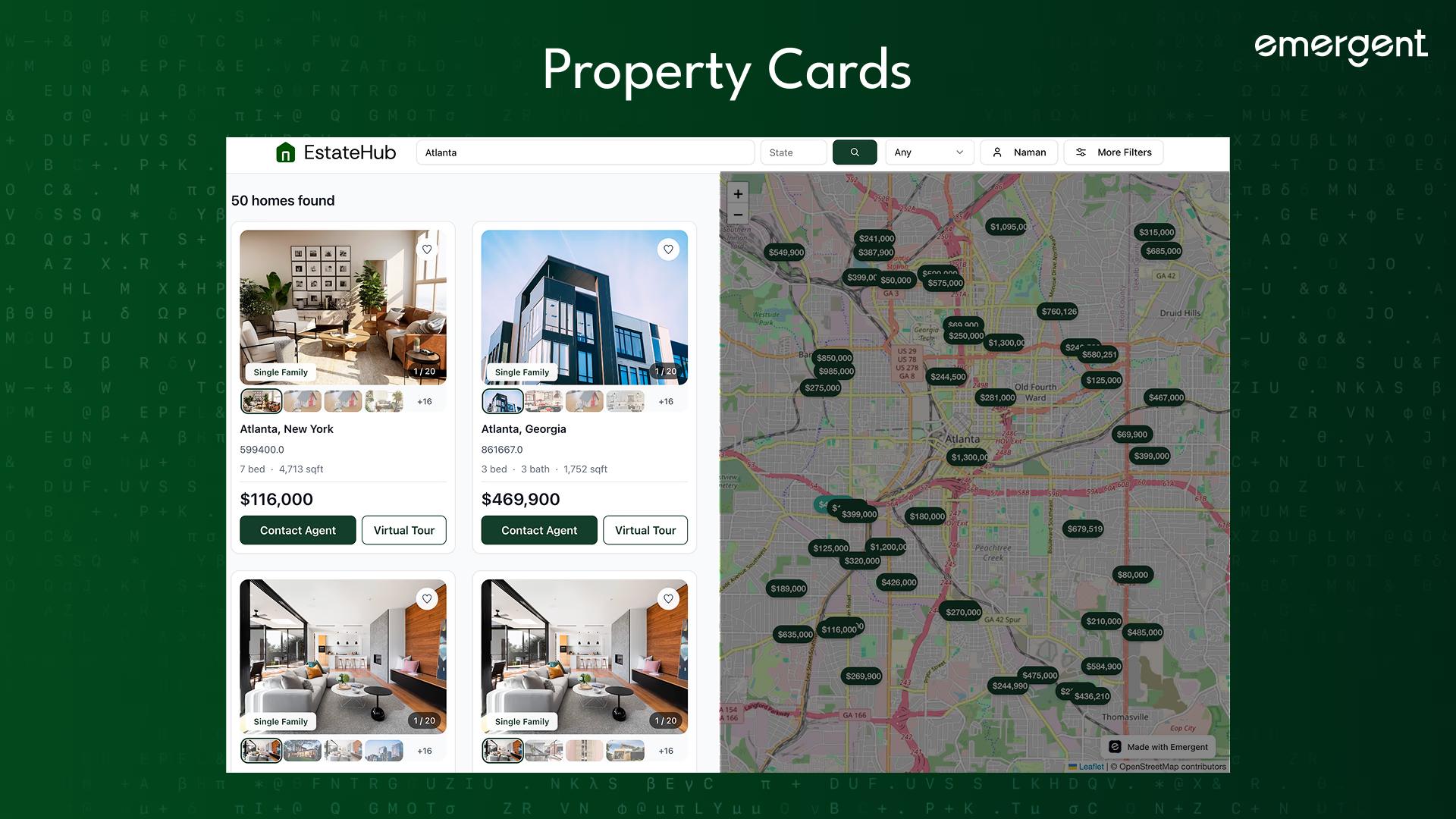
Each property card is designed for fast scanning.
Cards include:
- Price
- Beds, baths, and size
- Address
- Property type badge
- Image gallery with thumbnails
- Save button
- Contact agent button
Subtle animations make interactions feel responsive without distraction.
Step 5: Property Detail Page
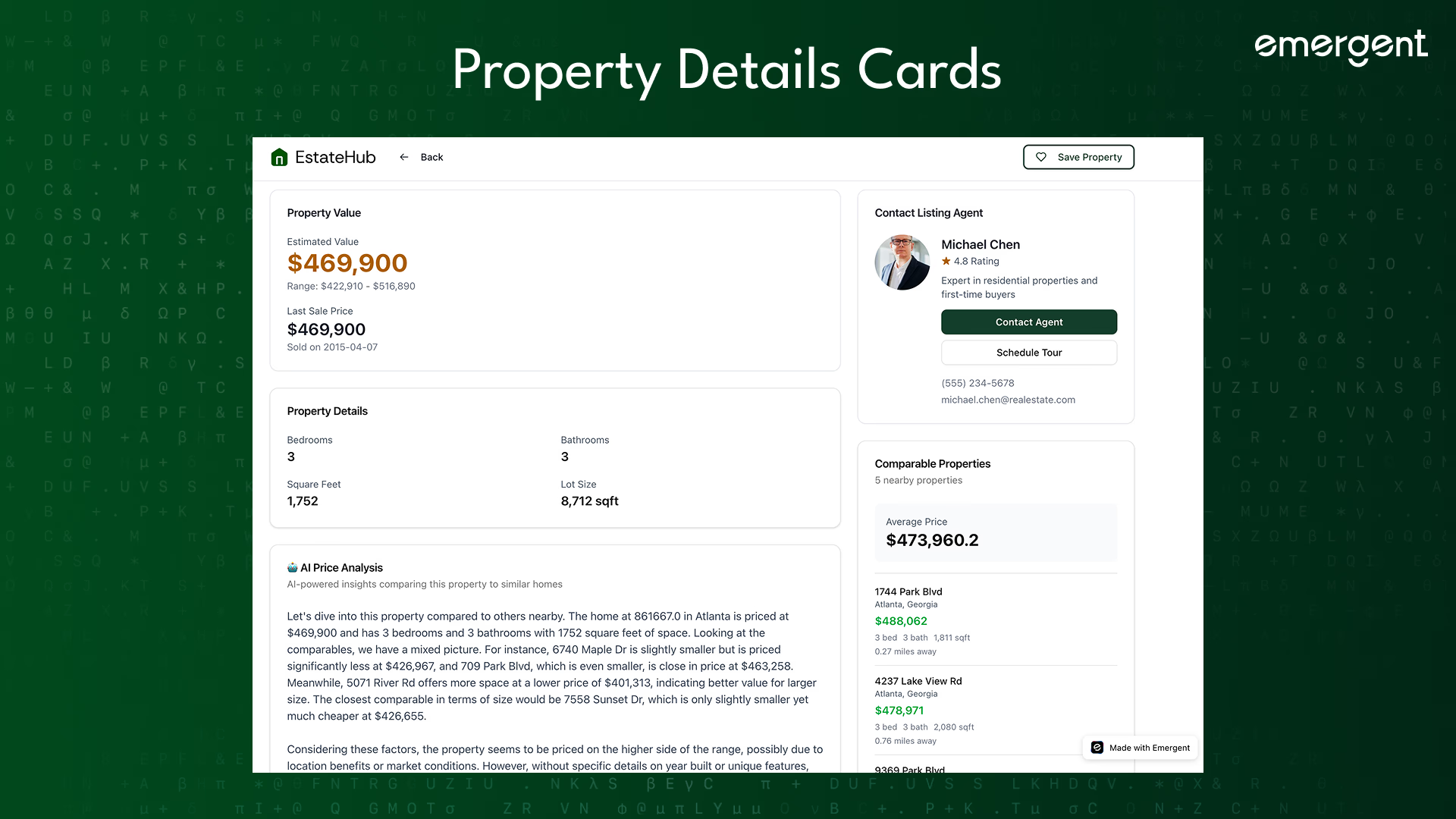
Clicking a listing opens a dedicated property page.
The page includes:
- A large hero image
- A gallery of additional photos
- Clear property facts
- Agent information
- Save and contact actions
The layout prioritizes visual understanding and trust.
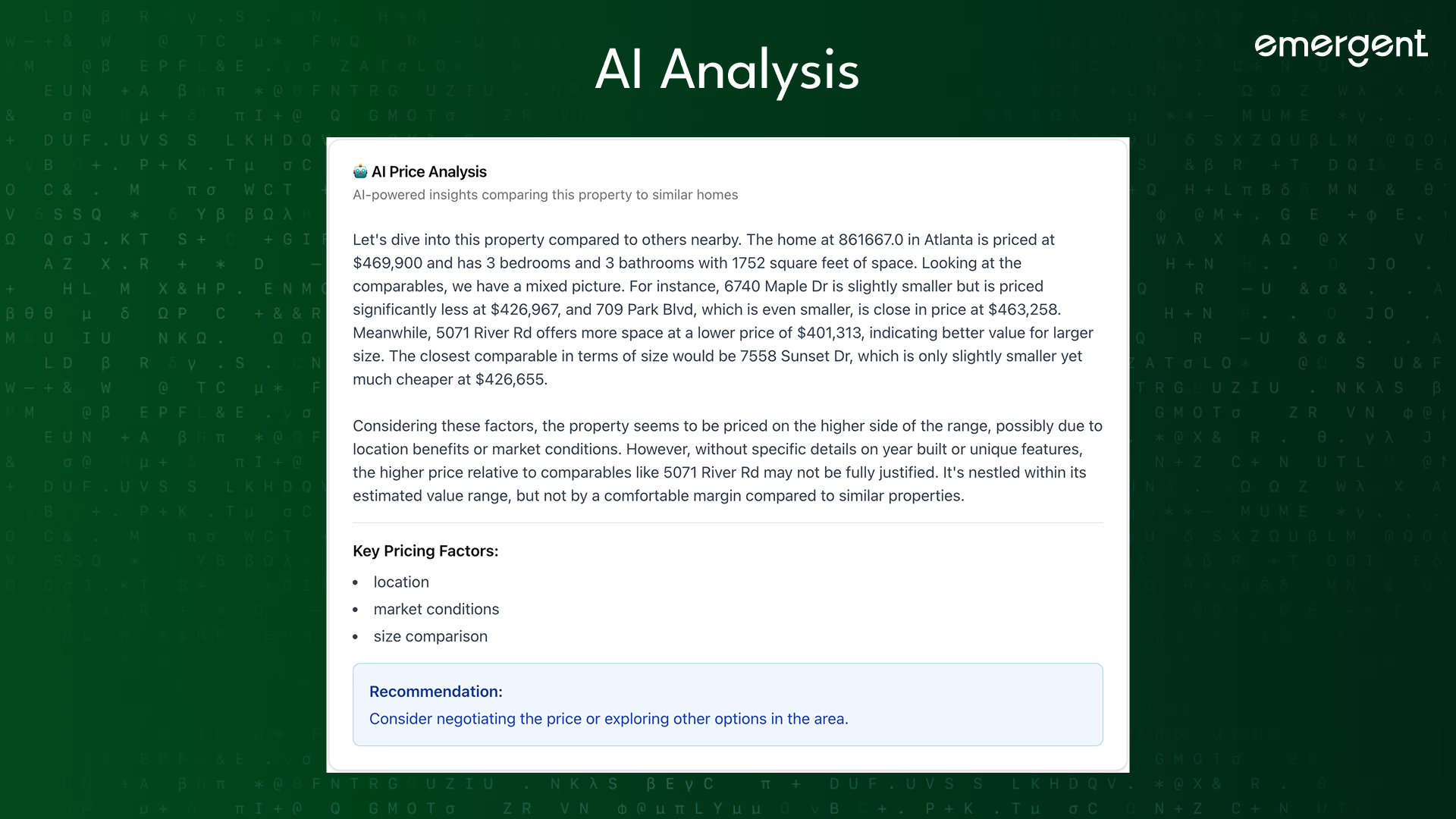
Step 6: AI Price Explanation
Goal
Help users understand pricing without needing market expertise.
How It Works
Each property includes an AI-generated explanation answering:
Why is this home priced at this level?
The explanation uses plain language, market context, simple comparisons
It avoids jargon and technical financial terms.
This feature is especially useful for first-time buyers.
Step 7: Images and Media
Every property includes a diverse image set covering exterior views, living spaces, kitchens and bedrooms, outdoor areas.
Images load smoothly and always fall back gracefully if something fails.
Visual quality is treated as a first-class feature.
Step 8: Saved Properties and Searches
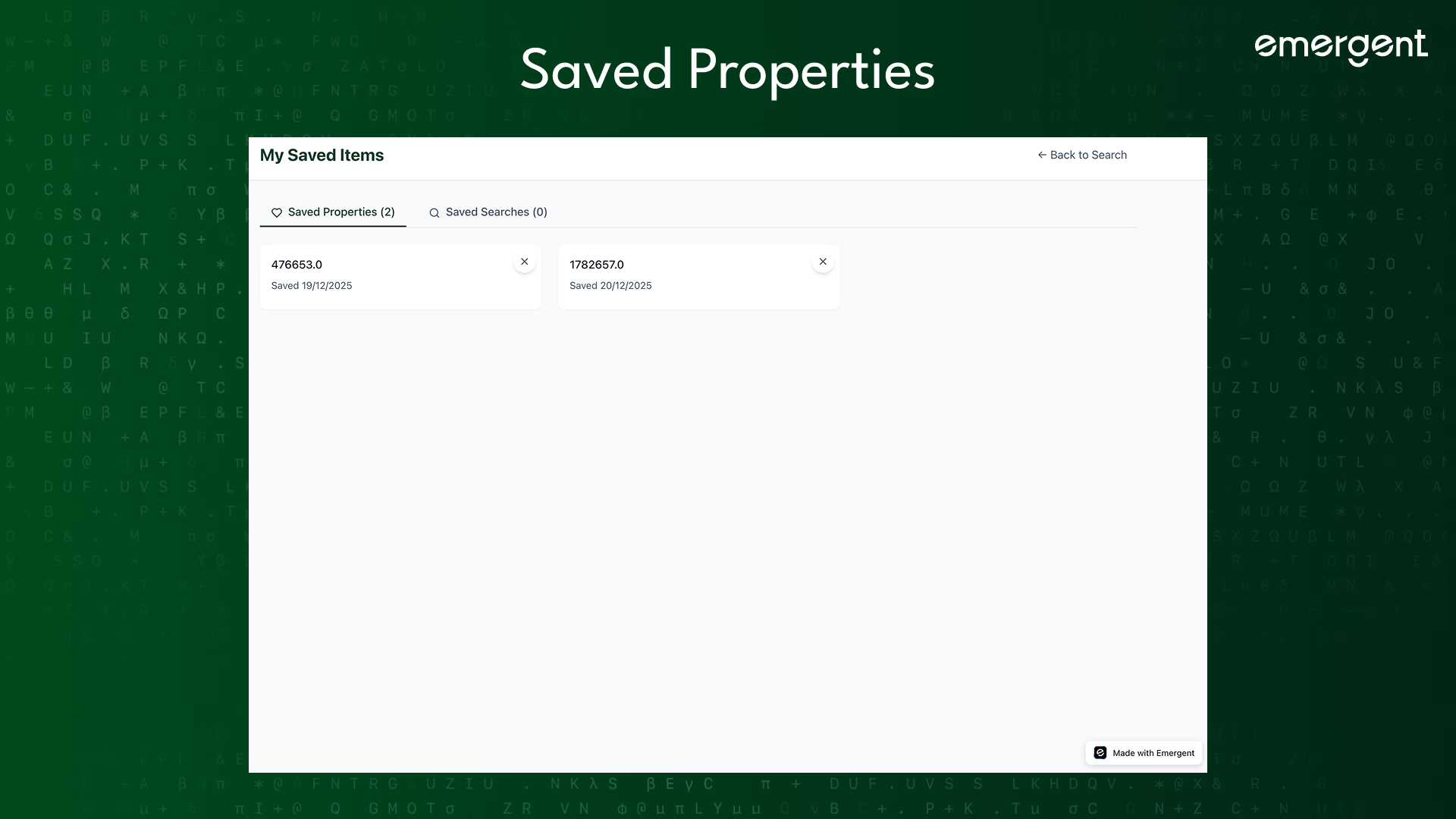
Users can save properties they like and revisit them later.
Saved searches allow users to quickly rerun criteria they care about without reapplying filters.
This supports longer-term decision-making.
Step 9: Contact Agent Flow
EstateHub makes it easy to take action.
From both cards and detail pages, users can open a contact modal that shows:
Agent photo and name
Phone number and email
One-click copy actions
Direct call or email options
The experience feels professional and low-friction.
Step 10: Design System
EstateHub uses a premium, no-blue color palette built around greens and neutral tones.
The design emphasizes spacing and clarity, visual hierarchy, consistency across screens.
Components are reused throughout the app to maintain cohesion.
Animations are subtle and purposeful.
Deployment
Once complete, deployment is handled directly through Emergent.
Click Deploy, wait for Emergent to finalize hosting, and share the production URL instantly.
If you run into issues, refer to the Emergent Deployment Guide for troubleshooting.
Recap
You built EstateHub, a real estate discovery platform with:
- Map-based property exploration
- Rich listing cards and galleries
- Detailed property pages
- AI-powered price explanations
- Saved properties and searches
- Professional contact flows
- A premium, calm design system
Key Learnings
A key learning from this project is that discovery-focused apps are most effective when they prioritize visual clarity, allowing users to understand information at a glance without feeling overwhelmed.
Combining maps and lists into a single, synchronized experience helps users connect location with context naturally. AI adds the most value when it explains complex information in simple terms rather than introducing more complexity.
Consistent design across the product builds trust and makes the experience feel polished, while intentionally reducing scope often leads to a better product by keeping the focus on what users actually need.
Possible Future Extensions
- Price history charts
- Neighborhood insights
- Mortgage calculators
- Email alerts for saved searches
- Mobile app version
Final Demo
Check out the finished EstateHub app below:
If you liked the app, share feedback with the team on X or Discord to unlock more behind-the-scenes builds and experiments.
Happy building!

Emergent turns your idea into a full-stack web or mobile app, no coding required.
 No coding required
- Web & mobile apps
- Deploys instantly

on Emergent today



