Beginner
•
How to Build an AI Pixel-Art Monster Generator
A Dungeons & Dragons (D&D)-inspired creature generator that lets users summon pixel-art monsters with AI-generated lore, customize prompts with randomized templates, and download collectible cards, with dual-AI generation, VHS aesthetics, and community sharing handled automatically end to end.
Written By :

Shreyas Bhattacharjee
How to Build an AI Pixel-Art Monster Generator
Introduction
Generating AI images seems simple.
Pick a model. Write a prompt. Get an image.
But building a pixel-art creature generator reveals harder problems: model selection, prompt engineering, blur-free resizing, parallel AI calls, VHS aesthetics, responsive design, and pixel-perfect rendering across devices.
This project documents building a Stranger Things-inspired creature generator where users summon dark fantasy monsters with AI-generated lore, stats, and collectible cards.
The constraint: every creature must look like it belongs in an 80s VHS horror gamecomplete with pixel-art rendering, VHS grain, and retro aesthetics.
The app combines two AI models in parallel: Gemini 3 Pro Image (Nano Banana) for pixel-art creatures, and Claude Sonnet 4 for dark fantasy lore. Each creature includes a title, rarity tier, backstory, and three stats, all wrapped in a downloadable card with Stranger Things-style red glows and floating ash particles.
This tutorial walks through planning, building from scratch, debugging model migration issues, and polishing into a mobile-responsive experience using the Emergent LLM universal key for seamless AI integration.
Problem Statement and Proposed Solution
The Problem
AI image generation products often suffer from:
Generic outputs that lack cohesive aesthetic identity
Smooth, antialiased results when you need hard pixel edges
No storytelling layer, just images with no context or lore
UI/UX that doesn't match the creative content being generated
Isolated experiences with no community or sharing features
Image quality degradation during post-processing and resizing
For builders, this means shipping something that generates images but fails to deliver a complete creative experience, leaving users with random outputs instead of collectible artifacts they actually want to share and keep.
The Solution
This creature generator is well…….different.
Aesthetics drive the AI prompts.
Lore is generated alongside imagery.
Design system enforces visual consistency.
The solution combines:
A dual-AI generation pipeline (image + narrative in parallel)
Pixel-art preservation system using nearest-neighbor upscaling
Stranger Things design language with enforced color tokens and glow effects
Community-first architecture where all creatures are globally shared
Downloadable collectible cards with full metadata baked into PNG exports
Responsive layouts with desktop side panels and mobile carousels
Advanced features like randomized prompts, rarity tiers, stat generation, and VHS atmospheric effects
This approach aims to create a cohesive creative tool that generates not just images but complete monster artifacts with personality, backstory, and a unified retro-horror aesthetic designed for collection and sharing.
Learning Outcomes
By completing this tutorial, you'll learn to build a dual-AI pipeline with Gemini and Claude, preserve pixel-art quality through CSS rendering, create a Stranger Things design system, implement responsive layouts with carousels, handle base64 encoding and PNG exports, build exportable cards with html2canvas, structure MongoDB schemas, debug model migrations, optimize FastAPI image serving, and ship a production-ready creative tool with cross-device compatibility.
Step 1: Dual-AI Generation Pipeline
Users can generate unique pixel-art creatures through a parallel AI orchestration system that coordinates two specialized models, refining outputs using parameters such as:
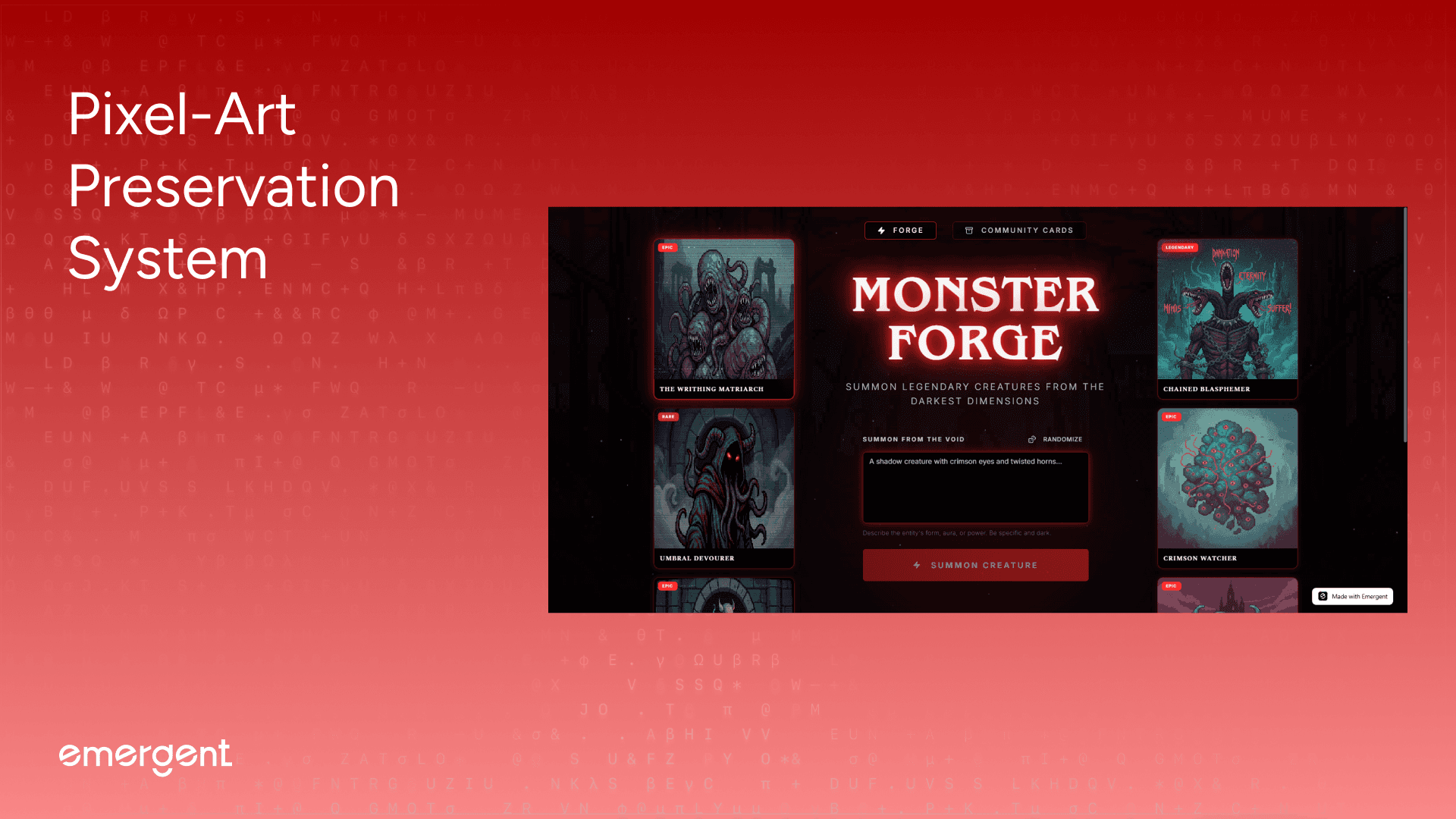
Prompt Input: 5-500 character text field with live validation and character counter
Randomize Options: 15 pre-written prompts including "A shadowy beast with glowing eyes emerging from ancient ruins", "A crystalline creature that feeds on moonlight", "A corrupted forest guardian twisted by dark magic"
Image Model: Gemini 3 Pro Image "Nano Banana" for pixel-art generation with VHS filter and fog effects
Lore Model: Claude Sonnet 4 for gothic narrative generation with JSON-structured responses
Rarity Assignment: AI-determined badges (Common, Rare, Epic, Legendary) based on trait analysis
Stat Generation: three 0-100 attributes (Intensity, Stealth, Rift Affinity) calculated from prompt context
Generation Progress: real-time toast notifications showing "Channeling creature from the void..." during image generation, "Inscribing dark lore..." during narrative creation, and "{Creature Title} has been summoned!" upon completion
Backend Execution: asynchronous AI calls using Python's asyncio.gather() with automatic failover—if image generation succeeds but lore fails, the system retries lore generation without regenerating the image
Response Data: full 2048×2048 PNG (resized using PIL's nearest-neighbor algorithm), 1024×1024 thumbnail, JSON-structured lore with markdown code block parsing, MongoDB document with UUID identifier, and ISO-formatted UTC timestamps
Image Processing: server-side Pillow transformations delivering pixel-perfect outputs with zero antialiasing artifacts when upscaling from 1024×1024 to 2048×2048, maintaining authentic retro aesthetic across all display sizes
Step 2: Pixel-Art Preservation System
Users can maintain authentic 80s retro aesthetics across all generated creatures and display contexts, enforcing pixel integrity using techniques such as:
Image Resampling Algorithm: PIL's Image.NEAREST mode with zero interpolation, no smoothing, and pure pixel replication
CSS Rendering Properties: image-rendering: pixelated, -moz-crisp-edges, crisp-edges with cross-browser fallbacks
Source Resolution: Gemini outputs 1024×1024, upscaled to 2048×2048 for full cards, 1024×1024 for thumbnails
Display Contexts: gallery grid cards, detail modal viewer, side panel samples, mobile carousel tiles, downloadable PNG exports
Aspect Ratio Enforcement: 1:1 square containers with AspectRatio component preventing distortion
File Format: PNG with no compression artifacts, preserving hard pixel edges and limited color palettes
Visual Quality: consistent across viewport changes with crisp pixel boundaries at 280px, 400px, 800px, and 2048px without blur or antialiasing
Backend Resizing: Pillow's resize() with NEAREST parameter before database storage, eliminating browser-side interpolation
Frontend Components: image-rendering-pixelated utility class applied globally to preserve hard pixel boundaries
Gallery Rendering: all 9 creatures render with pixel-perfect clarity using GPU-accelerated CSS with zero performance overhead on mobile devices
Step 3: Community-First Architecture
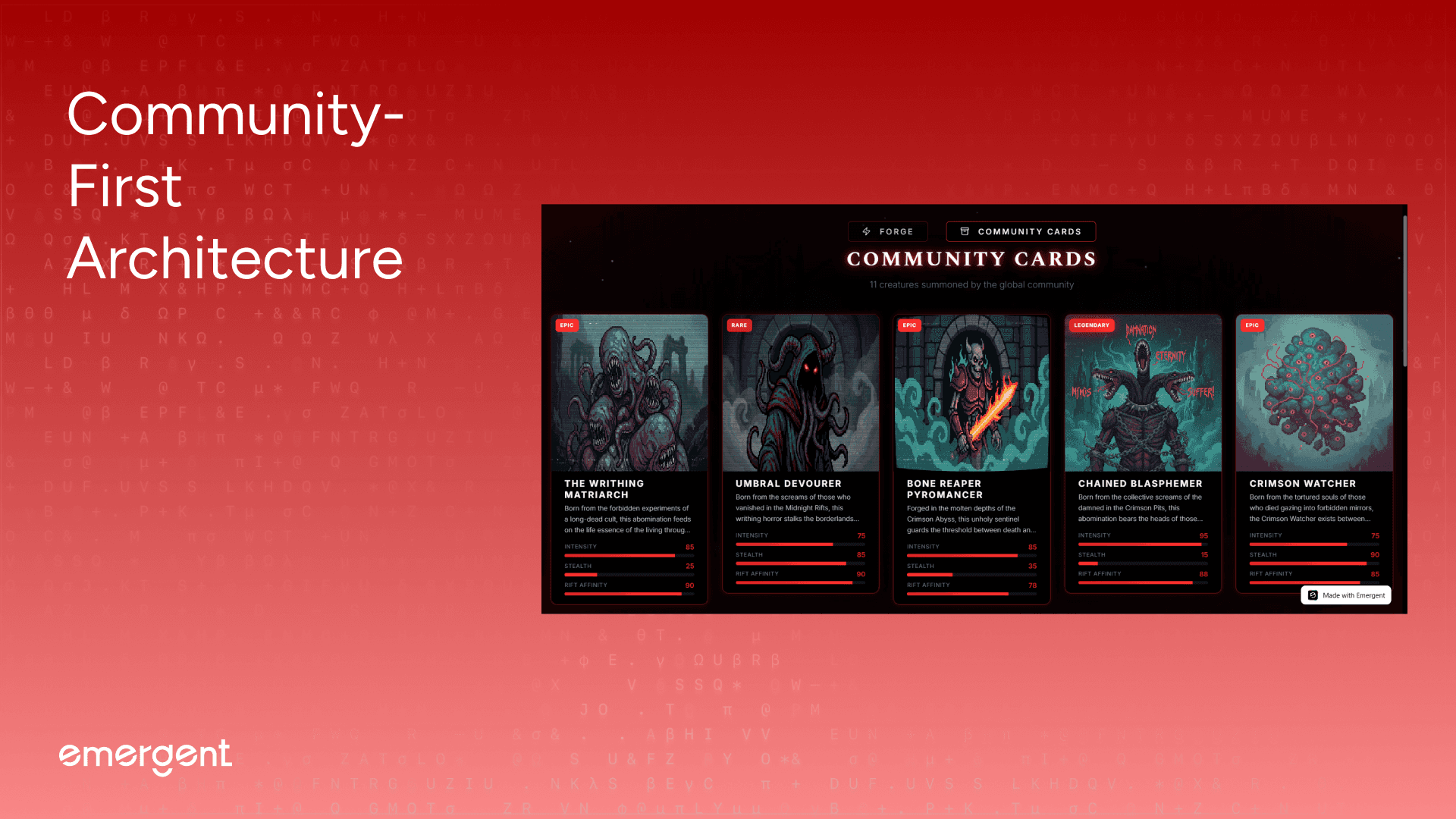
Users can explore the global monster compendium across all generated creatures without authentication barriers, discovering entities using features such as:
Database Scope (MongoDB collection with no user ownership, every creature instantly visible to all visitors worldwide)
Gallery Display (Community Cards page showing chronological feed with newest creatures first, sortable by creation timestamp)
Sample Rotation (6 most recent creatures populate desktop side panels, 3 left, 3 right ; with auto-refresh after each new generation)
Mobile Carousel (Auto-scrolling horizontal feed with touch-pause interaction, seamless infinite loop using duplicated array technique)
Creature Count Header ("X creatures summoned by the global community" updates in real-time as new monsters are forged)
Step 4: Downloadable Collectible Cards
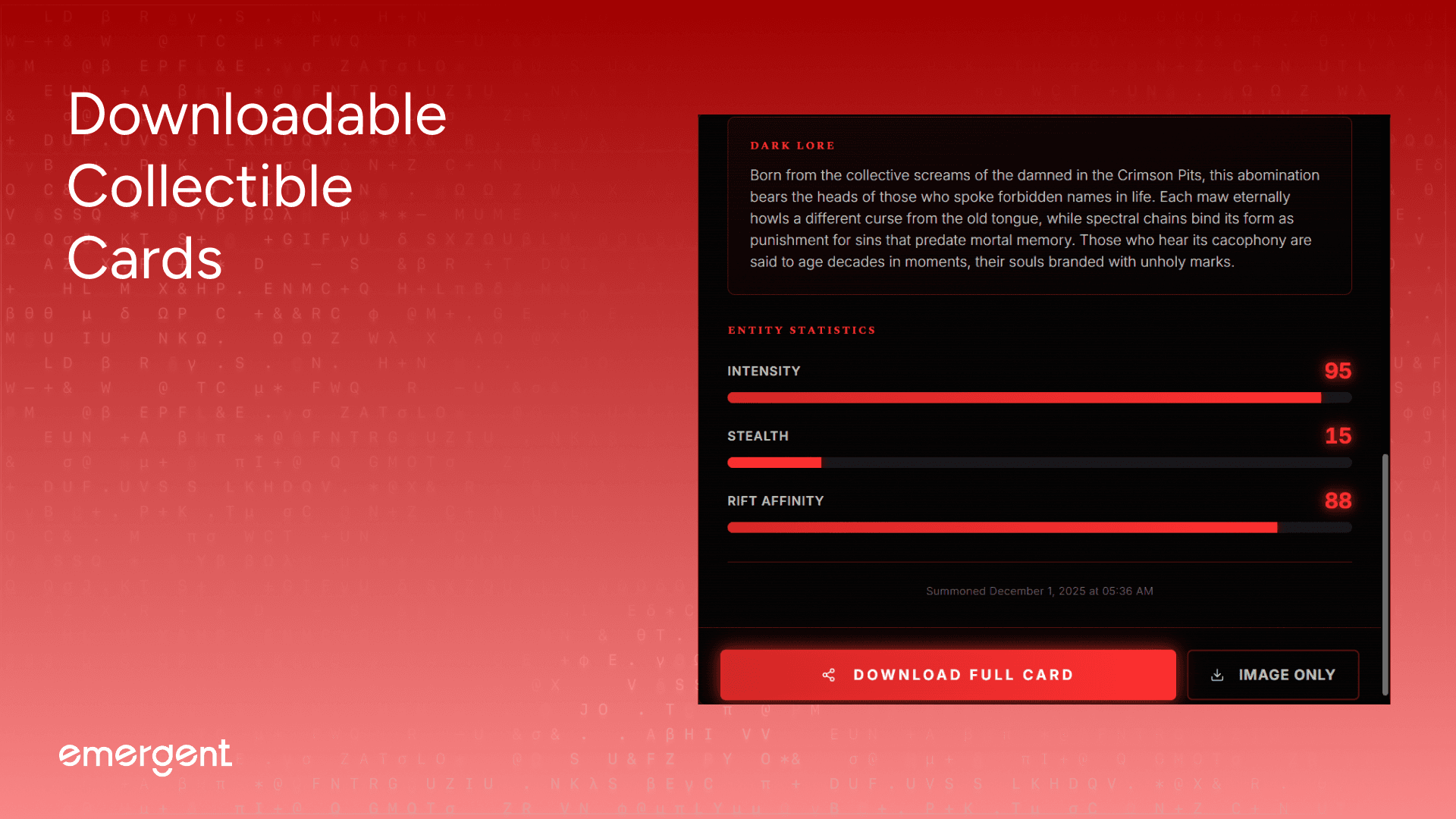
Users can export generated creatures as high-resolution artifacts for sharing and archival purposes, customizing outputs using options such as:
Export Format (PNG with transparent or solid black backgrounds, optimized for social media and print)
Card Type (Full Card with complete layout including title, lore, stats, and VHS effects—or Image Only with pure creature artwork)
Resolution Options (2048×2048 full-resolution card render, 1024×1024 thumbnail version for web sharing)
Filename Convention (Auto-generated slugs: "Bone-Reaper-Pyromancer-card.png" or "Chained-Blasphemer.png" with sanitized titles)
Render Quality (html2canvas captures entire modal DOM at scale=2 for crisp text, glows, and gradient effects)
Download Trigger (Instant browser download using Blob URLs with automatic cleanup after file transfer)
Export buttons activate within the detail modal, triggering client-side canvas rendering that preserves all CSS effects including red corner glows, VHS grain overlays, stranger-glow text-shadow layers, and gradient stat bars without quality loss.
A key best practice here was testing login flows in incognito and with multiple accounts early.
Step 5: Responsive Adaptive Layouts
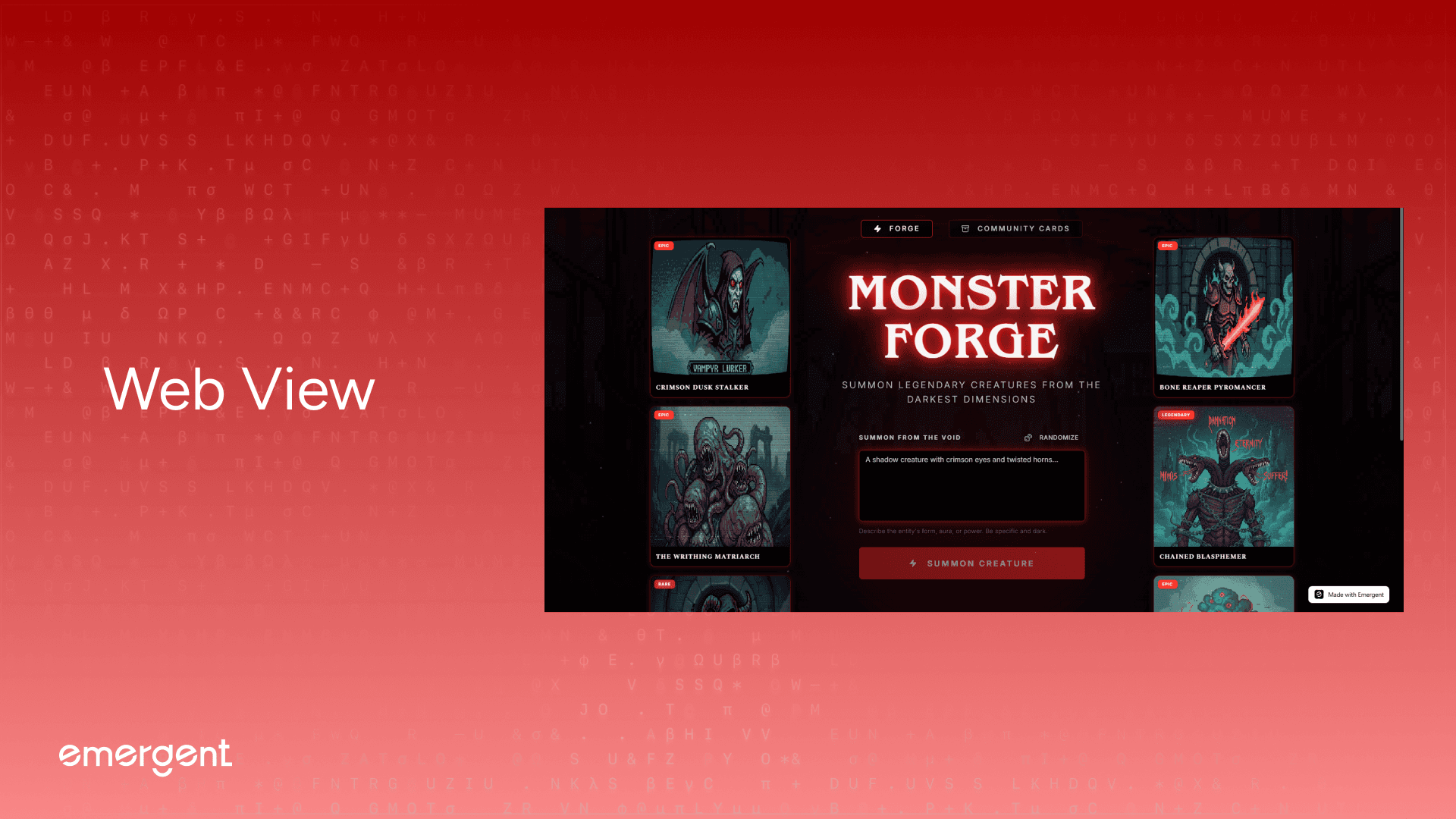
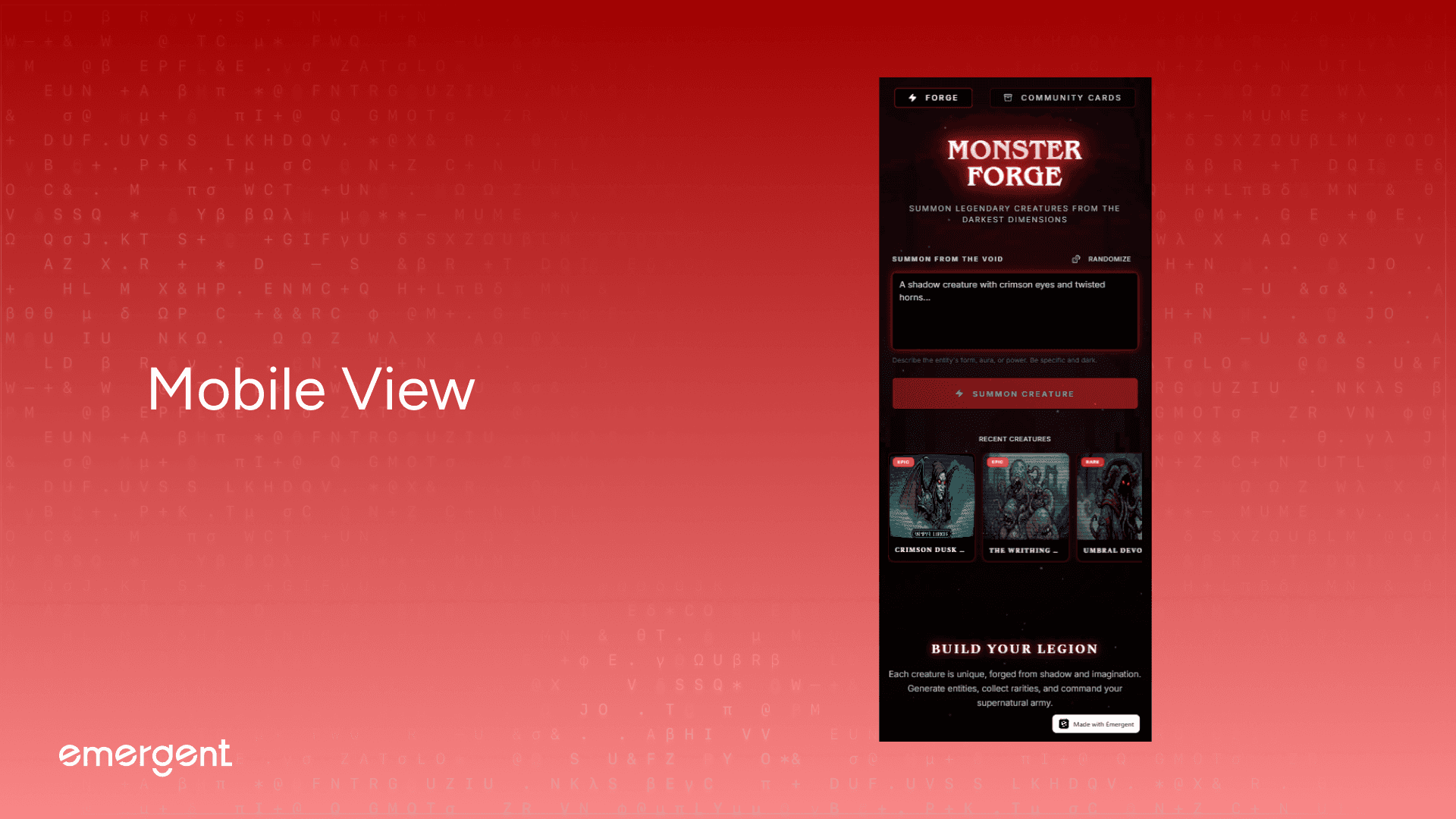
Users can experience optimized creature viewing across all devices and screen sizes from mobile to ultrawide displays, adapting interfaces using breakpoints such as:
Mobile Portrait (390px-640px with single-column centered layout, icon-only navigation, and 2-column gallery grid)
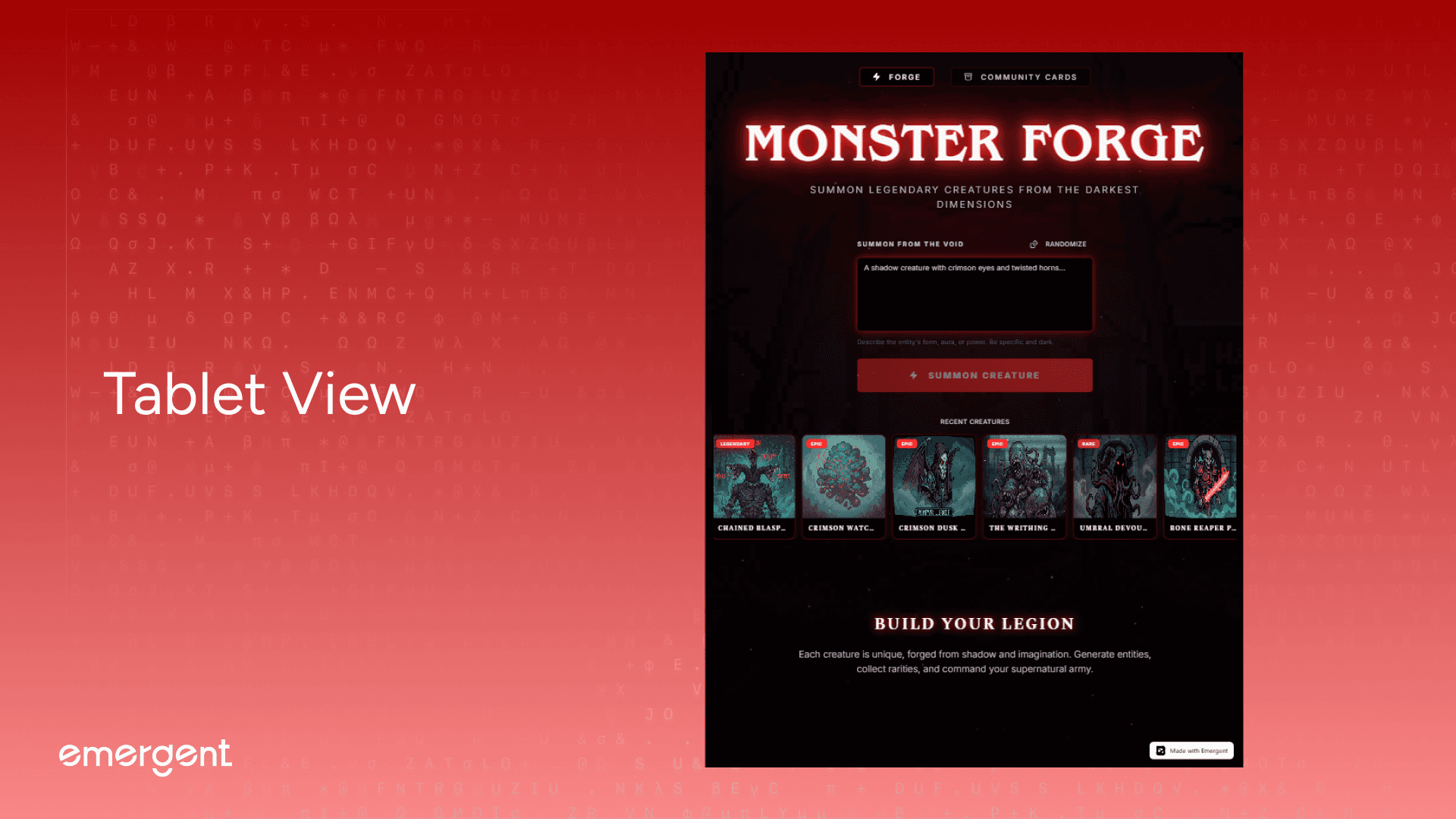
Tablet Landscape (768px-1024px with expanded navigation labels, 3-column gallery grid, and visible carousel controls.
Desktop Standard (1280px-1920px with three-column layout—sample cards on sides, main content centered)
Ultrawide Desktop (1920px+ with sticky side panels showing 3 creatures left/right, 5-column gallery grid, and max-width constraints)
Logo Scaling (text-5xl on mobile → text-8xl on ultrawide using Tailwind's responsive modifiers)
Carousel Display (
xl:hiddenon desktop—auto-scrolling horizontal feed visible only on mobile/tablet with touch-pause interaction)Side panel cards appear automatically at 1280px breakpoint, positioned with
sticky top-24behavior that keeps recent creatures visible during scroll, while mobile users see the same content in a continuous horizontal carousel below the generation form.Gallery grids reflow instantly as viewport changes, transitioning from compact 2-column mobile layout (gap-3) to spacious 5-column desktop grid (gap-4) with Framer Motion staggered animations preserving visual hierarchy across all transitions.
Navigation adapts from icon-only buttons with tooltips on mobile to full-width labeled buttons with Lucide icons on desktop, glass-morphic background (
bg-black/40 backdrop-blur-md) maintaining transparency at all breakpoints while ensuring text readability.
Troubleshooting and Key Hurdles
Several real-world issues surfaced during development:
AI model errors fixed by verifying integration playbook names (
gemini-2.5-flash-image-preview→gemini-3-pro-image-preview)Image blur artifacts fixed by enforcing nearest-neighbor resampling (PIL's
Image.NEAREST+ CSSimage-rendering: pixelated)Modal misalignment fixed by hardcoding center positioning (Shadcn Dialog default
top-[50%] left-[50%] translate-x-[-50%] translate-y-[-50%])Carousel scroll jank fixed by requestAnimationFrame loops (replacing CSS animations with JavaScript-controlled smooth scrolling at 0.5px/frame)
Image loading delays fixed by implementing lazy loading (
loading="lazy"+ properwait_until="networkidle"in Playwright tests)Base64 token overflow prevented by strict logging rules (never log full base64 strings, only first 10 characters for debugging)
Side card refresh timing fixed by proper state management (re-fetching sample monsters after successful generation with
limit=6query)
Each issue reinforced the importance of testing after every feature.
Deployment
Deployment involved:
Building the React frontend with optimized production bundle
Running FastAPI with environment variables (EMERGENT_LLM_KEY, MONGO_URL, CORS_ORIGINS)
Mounting static file directories for monster image serving at
/api/static/monsters/Connecting MongoDB (local development or Atlas production cluster)
Testing AI generation pipelines (Gemini image + Claude lore in parallel)
Verifying download functionality (html2canvas rendering and PNG export)
Testing responsive layouts across mobile, tablet, and desktop breakpoints end-to-end
A final code health check removed console logs, validated APIs, and confirmed integration stability.
Here's a tutorial on deployment in particular.
Recap
You built an AI-powered creature generator that:
Orchestrates dual-AI pipelines for parallel image and lore generation
Preserves pixel-art integrity using nearest-neighbor resampling
Enforces Stranger Things aesthetics with complete design system
Shares all creatures globally in a community-first database
Exports collectible cards as high-resolution PNGs
Adapts to all devices with responsive desktop and mobile layouts
Handles real-world AI challenges including model migrations and quality preservation
Key Learnings
AI image generation is deceptively complex.
Aesthetics must be enforced systematically, not assumed.
Pixel-art preservation requires explicit resampling algorithms.
Parallel AI calls improve UX but increase error surface area.
Design systems should constrain creativity to maintain cohesion.
Community-first architecture changes user psychology and sharing behavior.
Polish and atmospheric effects matter as much as AI capabilities.
Extension Ideas
Future improvements could include:
User authentication with personal creature collections
Search and filtering by rarity, stats range, or lore keywords
Pagination for galleries with 100+ creatures
Social sharing with Twitter/Discord card embeds
Animation export for creature GIFs with particle effects
Creature battles comparing stats head-to-head
Advanced prompt templates for specific monster archetypes
Analytics dashboards showing popular rarities and generation trends
Rate limiting to prevent API abuse
Remix functionality allowing users to regenerate with modified prompts
Final Demo
You can access the link (and use it) here.
If you’ve tried it out, share feedback or reach out and we’ll give you access to more behind-the-scenes builds and experiments.