




Introduction
This project documents the journey of building RetroBoards, a nostalgia-fueled social pinboard app. What began as a desire to break away from sterile, corporate productivity tools evolved into a warm, interactive digital canvas. It allows users to create polaroid-style photos, pin sticky notes, and share boards with friends - all wrapped in a cozy 90s aesthetic.
The result is a fully functional, drag-and-drop experience that handles authentication, real-time positioning, and media integration seamlessly.
Final Tech Stack:
Although you just have to prompt Emergent in Natural Language and it does everything listed below for you, it never hurts to know what stack the final app is using:
- Frontend: React, Shadcn UI, Tailwind CSS
- Backend: FastAPI (Python)
- Database: MongoDB (via Motor)
- Interaction: @dnd-kit for drag-and-drop, HTML5 GeUserMedia for camera
- Integrations: Giphy SDK for animated stickers
The app features a 3000x2000px zoomable canvas, optimistic UI updates for smooth dragging, and a robust invite-code system for sharing.
Problem Statement and Proposed Solution
Our Vision
Most collaboration boards (like Miro or Trello) focus purely on productivity. They feel utilitarian and rigid. We wanted a digital space that felt like a messy, personal corkboard in a teenager's bedroom from 1999.
Problems with existing whiteboarding apps:
- They lack "soul" or aesthetic customization.
- They often require complex enterprise logins.
- They don't support "fun" media types like stickers or polaroids natively.
The Proposed Solution
A browser-based app that prioritizes "vibes" over strict productivity. (but is still useful)
- Styling: Cork, Ocean, and Sunny textures with glassmorphism UI.
- Mechanics: Physics-free drag-and-drop, but with z-index layering (stickies over photos).
- Simplicity: 8-character invite codes for instant sharing.
Key elements defined early:
- Styling: cartoon-like water and clean 3D grids
- Gameplay: classic 10x10 grid and 5 ships
- Multiplayer: WebSockets for real-time state sync
- Simplicity: no login system, just invite codes
- Interaction: click-to-place and click-to-attack mechanics
Well, with that, we can begin to understand the process behind vibe-coding our way to the final app as show below!
Step 0: Prerequisites
What We Had?
An Emergent environment with React, FastAPI, and MongoDB initialized, and an empty text box to put in your first, detailed prompt!
What Was Needed?
- A decision on the coordinate system (infinite canvas vs. fixed large canvas).
- Asset style guide (Google Fonts: Cormorant Garamond & Caveat).
- Auth strategy (JWT vs. Session).
After confirming these, we were ready to send the initial prompt into Emergent.
Step 1: Initial Prompt and Requirement Gathering
Our First Message
I want to build a social image sharing site. The idea is:

- User interacts with a retro camera (i will provide image asset) and the camera takes a polaroid style image.

- The image can then be dragged and dropped on a pinboard canvas style site. You can add handwritten style captions that show up on the polaroid.

- The user can change the pinboard colour, and share access to their pinboard with an invite code. Other friends can add post - it notes with comments about a fun picture they remember.
Agent’s Clarification Questions:
- Camera functionality
- User authentication
- Pinboard structure
- Image storage & persistence
- Post-it notes
- Design preferences
Our Answers
- Both Options - Upload pictures and capture from webcam
- JWT Auth
- Each user creates their own private board. Future feature is that users can create shared boards for friends or trips etc.
- Yes save to db
- Independent sticky notes.
- Retro aesthetic. Pinboard should look very realistic, along with the polaroid pics generated. I can provide the camera PNG - make the button interactive (bright red button)
Step 2: UI and 3D Improvements
Our Request
We need users to switch between boards and have edits save automatically without a "Save" button.
Agent’s Interpretation
- Dashboard view created to list all boards.
- Invite code logic (generate 8-char string) added to Board model.
- Debounce logic added to prevent API flooding.
Step 3: Troubleshooting: A Network Error Occurred
Our Report
Again, it's important to note that opening the inspect pane and searching for errors in red popping up on the console or network tabs is one of the best ways to troubleshoot complicated apps. Here's the error we found:
The frontend is throwing a 'Network Error' when trying to log in, even though the backend is running.
The console says Access-Control-Allow-Origin is missing.
Agent’s Fix
- Added the
CORSMiddlewareto FastAPI with explicit origin whitelisting
This change in code fixed the frontend issues and allowed the app to load properly.
Step 4: The Canvas & Drag-Drop Conflict
Our Request
We want a large canvas you can pan around (like Google Maps) but also items you can drag.
Currently, the UX is broken. When I try to drag a sticky note, the whole canvas moves instead.
I can't interact with the items.
Agent’s Fix
- Used
PointerSensorfor dnd-kit. - Added an activation constraint. The mouse must move 8px before an item drag registers.
- Added
stopPropagationon text inputs so typing doesn't trigger canvas panning.
Step 5: Integrations (Giphy) & Data Validation
Our Request
Let users search Giphy and add animated stickers to the board.
What APIs do I need and where do I get it?
Agent’s Reply
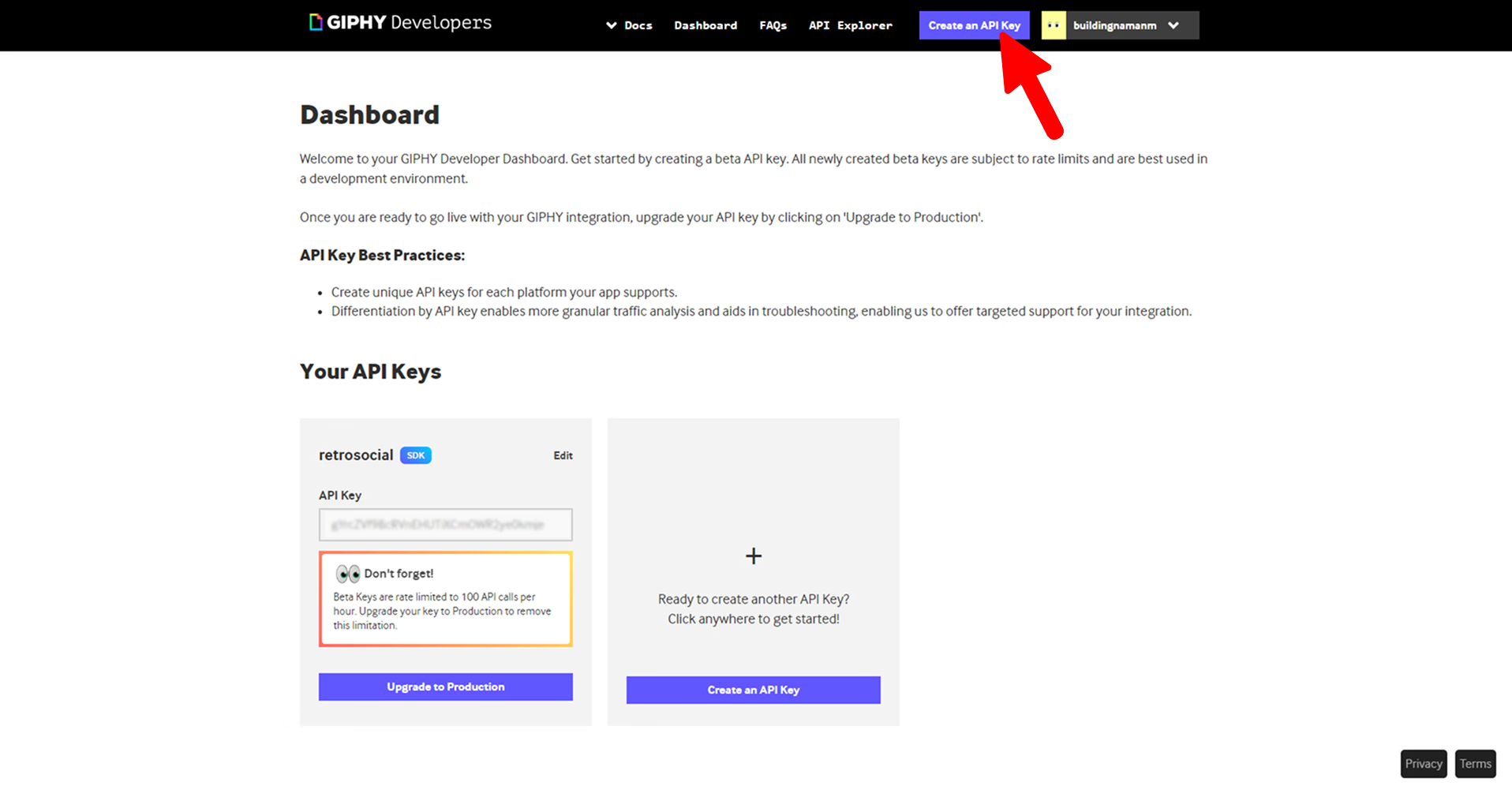
- You can apply for a GIPHY API key at https://developers.giphy.com/dashboard/
- It offers a free tier for testing the service - capped at 100 API calls per hour
Common Issues
During testing we faced some issues:
- Z-Index Layering: Sticky notes would hide behind photos.
- Emergent's Fix: Logic added:
zIndex = type === 'sticky' ? 100 : 10.
- Emergent's Fix: Logic added:
- Mobile UI: The menu bar buttons overlapped on small screens.
- Emergent's Fix: Created two distinct headers-one with text labels for Desktop, one with icon-only buttons for Mobile.
- Items Spawning Off-Screen:
- Emergent's Fix: Constrained random spawn coordinates to
x: 100-1400,y: 100-700to ensure visibility.
- Emergent's Fix: Constrained random spawn coordinates to
For troubleshooting your app:
- Describe what you see
- Take a screenshot
- Open browser console and check for red errors
- Share both with the agent
- Iterate until resolved
Deploying Your App
Preview Your App

Use the Preview feature in Emergent and test the following:
- Drag and Drop of elements
- Clickable buttons throughout the app
- Stickers loading and persisting on reloads
- Upload images and webcam captures working
- Sharing features working
Fix Any Issues
Send findings to the agent for quick iteration.
Deploy the Application

Click Deploy, wait for Emergent to finalize the hosting and use the final production URL to share the app with others!
If you still have issues, consider reading our How-To Guide on Deployment on Emergent.
Wrapping Up
You now have a fully interactive, retro-styled collaboration tool.
Features:
- Authentic Feel: CSS filters and font choices create a specific mood.
- Robust Drag-and-Drop: Optimized for touch and mouse, resolving complex event conflicts.
- Secure: JWT authentication and ownership checks on every API endpoint.
- Optimistic UI: The app feels instant because it updates the screen before waiting for the server.
Possible Upgrades:
- Real-time Cursors: See where your friends are pointing using WebSockets.
- Image Compression: Integrate Cloudinary to speed up load times for large photos.
- Export: Generate a single PNG image of your entire board to share on Instagram.
If you're interested to try this app out, tweet at us on X or reach out on Discord and we'll give you access to try it out and share it with friends!
Emergent turns your idea into a full-stack web or mobile app, no coding required.
 No coding required
- Web & mobile apps
- Deploys instantly

on Emergent today



