Introduction
BoredomBuster - A social crowdsourcing platform designed to cure boredom. Users share activity ideas (from "Build a blanket fort" to "Visit a local museum"), vote on the best ones, and join local communities.
While it runs in the browser, the goal was to make it feel indistinguishable from a native iOS or Android application.
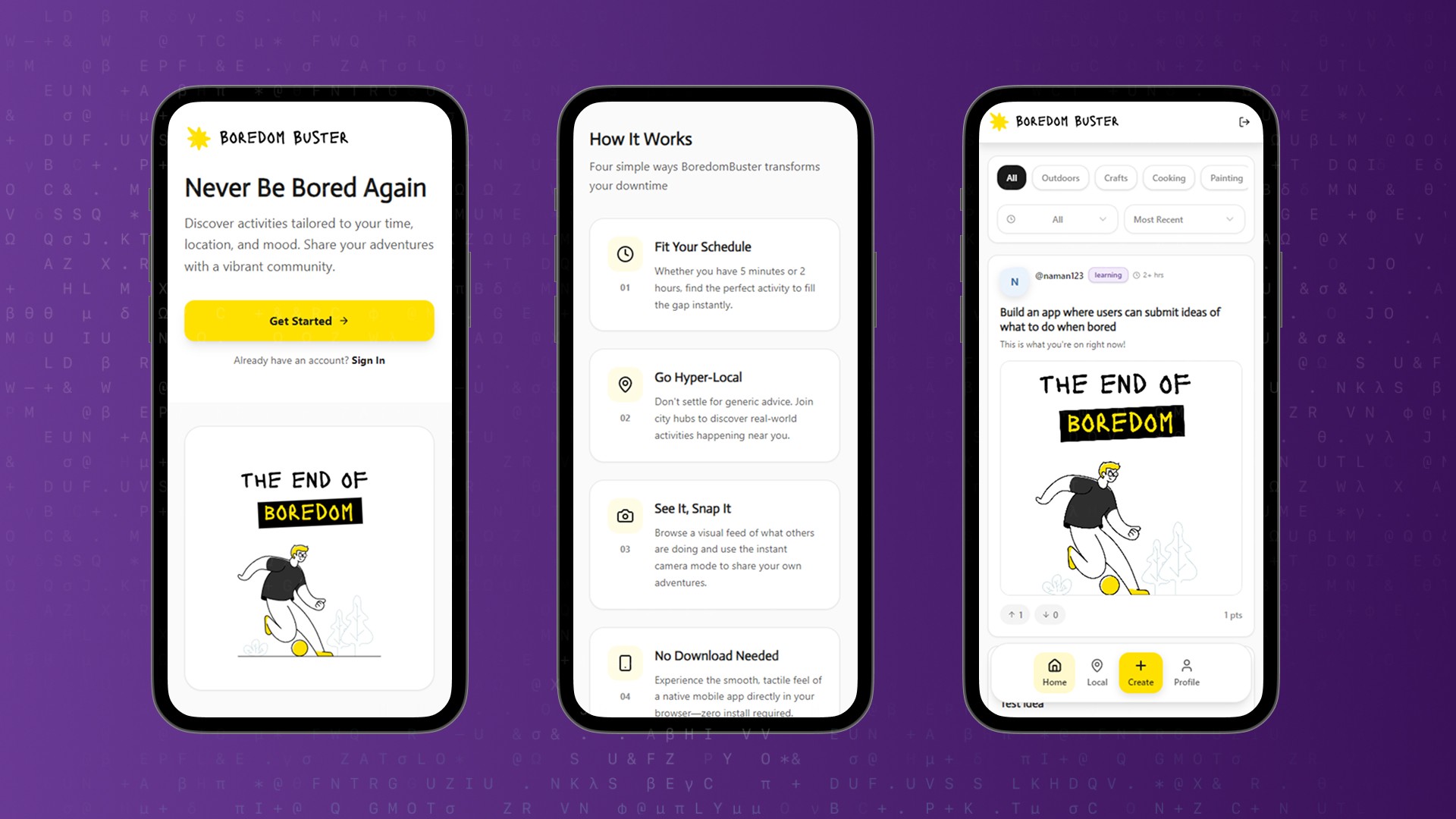
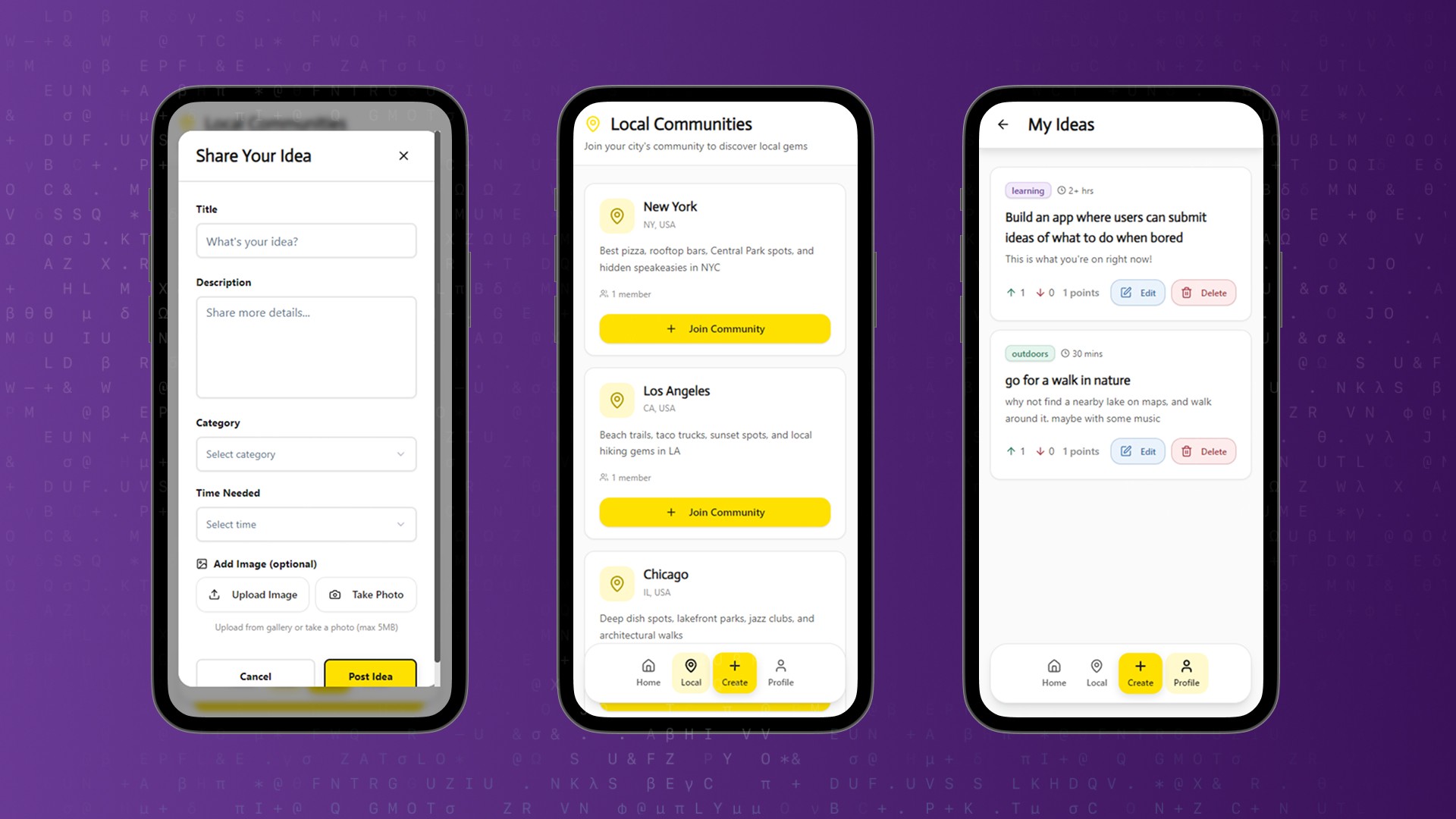
The Challenge: Most web apps feel like "websites" on mobile-clunky navigation, small buttons, and page reloads. We needed to build an experience that prioritized touch interactions, bottom-navigation, and hardware access (camera).
Final Tech Stack:
Although you just have to prompt Emergent in Natural Language and it does everything listed below for you, it never hurts to know what stack the final app is using:
Backend: FastAPI (Python) + MongoDB
Frontend: React + Tailwind CSS + shadcn/ui
Mobile UX: Framer Motion (animations), React Webcam (hardware access)
Design System: "Sleek & Muted" (Baloo 2 typography, soft grays)
Problem Statement and Proposed Solution
Our Vision
We’ve all been there: you have 15 minutes to spare, you pick up your phone, and you end up "doomscrolling" on social media for an hour. Existing solutions like Pinterest are too broad, and Google searches just return generic "Top 10 Hobbies" SEO spam. We wanted a tool that answers the question: "What can I do right now, right here, with the time I have?"
Problems with existing whiteboarding apps:
They promote passive consumption (watching videos) over active doing.
They lack local context (suggesting hiking when you live in a concrete jungle).
They require app store downloads just to view simple content.
They don't account for time constraints (e.g., "I only have 10 minutes").
The Proposed Solution
A "native-quality" web application that runs in the browser but feels like a premium mobile app. It crowdsources specific, actionable ideas filtered by time and location.
Key elements defined early:
Styling: "Sleek & Muted" aesthetic (soft grays, clean typography) to reduce visual fatigue.
Architecture: Mobile-First Web App (PWA feel) to avoid App Store friction.
Discovery: Smart "Time Filters" (5m, 15m, 1hr) to fit the user's schedule.
Interaction: Floating bottom navigation and horizontal "pill" filters for thumb-friendly use.
Proof: Native camera integration to encourage users to "snap and share" their activities.
Well, with that, we can begin to understand the process behind vibe-coding our way to the final app as shown below!
Step 0: Prerequisites
What We Had
An Emergent environment with React, FastAPI, and MongoDB initialized, and an empty text box to put in your first, detailed prompt!
What Was Needed
Before asking the AI to build anything, we needed to lock down the core "feel" of the app to ensure it wouldn't just look like a generic website.
Architecture Strategy: Agreement on a "Mobile-First" approach (Bottom navigation, touch targets) rather than a desktop layout.
Design Language: A "Sleek & Muted" palette (Soft grays #F7F7F7 with Electric Yellow #FFE100 accents).
Typography: Selection of Baloo 2 for playful headings vs. System Sans for readable body text.
Auth Strategy: A decision to use Managed Google Auth (cookies) to avoid the complexity of handling tokens on mobile browsers.
After confirming these, we were ready to send the initial prompt into Emergent.
Step 1: Initial Prompt and Requirement Gathering
Our First Message
build me an app that crowdsources ideas for what to do when bored.
Make it distinctive based on categories of the idea (outdoors, crafts, cooking, painting, etc) and time needed to do it (5 mins, 15 mins, 30 mins, 1 hr, 1-2 hrs, 2+ hrs)

All ideas submitted by users goes to a global feed where users can vote (upvote,downvote) ideas they like or not.
Feed is filterable by category and time needed
build me an app that crowdsources ideas for what to do when bored.
Make it distinctive based on categories of the idea (outdoors, crafts, cooking, painting, etc) and time needed to do it (5 mins, 15 mins, 30 mins, 1 hr, 1-2 hrs, 2+ hrs)

All ideas submitted by users goes to a global feed where users can vote (upvote,downvote) ideas they like or not.
Feed is filterable by category and time needed
build me an app that crowdsources ideas for what to do when bored.
Make it distinctive based on categories of the idea (outdoors, crafts, cooking, painting, etc) and time needed to do it (5 mins, 15 mins, 30 mins, 1 hr, 1-2 hrs, 2+ hrs)

All ideas submitted by users goes to a global feed where users can vote (upvote,downvote) ideas they like or not.
Feed is filterable by category and time needed
build me an app that crowdsources ideas for what to do when bored.
Make it distinctive based on categories of the idea (outdoors, crafts, cooking, painting, etc) and time needed to do it (5 mins, 15 mins, 30 mins, 1 hr, 1-2 hrs, 2+ hrs)

All ideas submitted by users goes to a global feed where users can vote (upvote,downvote) ideas they like or not.
Feed is filterable by category and time needed
Agent’s Clarification Questions:
Before I dive into building your bored activity crowdsourcing app, I need to clarify a few things:

User submissions - Should users: a. Submit ideas anonymously (no accounts needed) b. Create accounts to submit and track their ideas

Idea management - Can users: a. Only submit ideas (no editing/deleting) b. Edit or delete their own submitted ideas

Visual style preference - What vibe should the app have? a. Playful and colorful (fun, energetic feel) b. Clean and minimal (simple, focused) c. Creative/artistic (bold, expressive)

Categories - Are the categories you mentioned (outdoors, crafts, cooking, painting) complete, or should I add more common ones like: social, exercise, learning, entertainment, relaxation?

Sorting options - Besides filtering, how should ideas be sorted in the feed? a. Most upvoted (popular first) b. Recent (newest first) c. Both options available to user
Before I dive into building your bored activity crowdsourcing app, I need to clarify a few things:

User submissions - Should users: a. Submit ideas anonymously (no accounts needed) b. Create accounts to submit and track their ideas

Idea management - Can users: a. Only submit ideas (no editing/deleting) b. Edit or delete their own submitted ideas

Visual style preference - What vibe should the app have? a. Playful and colorful (fun, energetic feel) b. Clean and minimal (simple, focused) c. Creative/artistic (bold, expressive)

Categories - Are the categories you mentioned (outdoors, crafts, cooking, painting) complete, or should I add more common ones like: social, exercise, learning, entertainment, relaxation?

Sorting options - Besides filtering, how should ideas be sorted in the feed? a. Most upvoted (popular first) b. Recent (newest first) c. Both options available to user
Before I dive into building your bored activity crowdsourcing app, I need to clarify a few things:

User submissions - Should users: a. Submit ideas anonymously (no accounts needed) b. Create accounts to submit and track their ideas

Idea management - Can users: a. Only submit ideas (no editing/deleting) b. Edit or delete their own submitted ideas

Visual style preference - What vibe should the app have? a. Playful and colorful (fun, energetic feel) b. Clean and minimal (simple, focused) c. Creative/artistic (bold, expressive)

Categories - Are the categories you mentioned (outdoors, crafts, cooking, painting) complete, or should I add more common ones like: social, exercise, learning, entertainment, relaxation?

Sorting options - Besides filtering, how should ideas be sorted in the feed? a. Most upvoted (popular first) b. Recent (newest first) c. Both options available to user
Before I dive into building your bored activity crowdsourcing app, I need to clarify a few things:

User submissions - Should users: a. Submit ideas anonymously (no accounts needed) b. Create accounts to submit and track their ideas

Idea management - Can users: a. Only submit ideas (no editing/deleting) b. Edit or delete their own submitted ideas

Visual style preference - What vibe should the app have? a. Playful and colorful (fun, energetic feel) b. Clean and minimal (simple, focused) c. Creative/artistic (bold, expressive)

Categories - Are the categories you mentioned (outdoors, crafts, cooking, painting) complete, or should I add more common ones like: social, exercise, learning, entertainment, relaxation?

Sorting options - Besides filtering, how should ideas be sorted in the feed? a. Most upvoted (popular first) b. Recent (newest first) c. Both options available to user
Our Answers
create accounts
can edit and delete
Playful and fun (I will finetune the visuals later)
add more common ones
option c
Step 2: UI and Design Improvements
Our Request
Use the following colors for the entire app look and feel:

primary: "#FFE100"

primaryDark: "#000000"

grayDark: "#1A1A1A"

gray: "#3C3C3C"

grayLight: "#E6E6E6"

surface: "#FAFAFA"

accentRed: "#FF4757"

accentCyan: "#00E5FF"

accentGreen: "#2DFF72"

accentViolet: "#5D2EFF"

radii:

small: "4px"

medium: "8px"

large: "16px"

shadows:

soft: "0 4px 12px rgba(0,0,0,0.12)"

hard: "0 2px 8px rgba(0,0,0,0.25)"

Use the shadcn library and framer motion to make the UX feel great
Use the following colors for the entire app look and feel:

primary: "#FFE100"

primaryDark: "#000000"

grayDark: "#1A1A1A"

gray: "#3C3C3C"

grayLight: "#E6E6E6"

surface: "#FAFAFA"

accentRed: "#FF4757"

accentCyan: "#00E5FF"

accentGreen: "#2DFF72"

accentViolet: "#5D2EFF"

radii:

small: "4px"

medium: "8px"

large: "16px"

shadows:

soft: "0 4px 12px rgba(0,0,0,0.12)"

hard: "0 2px 8px rgba(0,0,0,0.25)"

Use the shadcn library and framer motion to make the UX feel great
Use the following colors for the entire app look and feel:

primary: "#FFE100"

primaryDark: "#000000"

grayDark: "#1A1A1A"

gray: "#3C3C3C"

grayLight: "#E6E6E6"

surface: "#FAFAFA"

accentRed: "#FF4757"

accentCyan: "#00E5FF"

accentGreen: "#2DFF72"

accentViolet: "#5D2EFF"

radii:

small: "4px"

medium: "8px"

large: "16px"

shadows:

soft: "0 4px 12px rgba(0,0,0,0.12)"

hard: "0 2px 8px rgba(0,0,0,0.25)"

Use the shadcn library and framer motion to make the UX feel great
Use the following colors for the entire app look and feel:

primary: "#FFE100"

primaryDark: "#000000"

grayDark: "#1A1A1A"

gray: "#3C3C3C"

grayLight: "#E6E6E6"

surface: "#FAFAFA"

accentRed: "#FF4757"

accentCyan: "#00E5FF"

accentGreen: "#2DFF72"

accentViolet: "#5D2EFF"

radii:

small: "4px"

medium: "8px"

large: "16px"

shadows:

soft: "0 4px 12px rgba(0,0,0,0.12)"

hard: "0 2px 8px rgba(0,0,0,0.25)"

Use the shadcn library and framer motion to make the UX feel great
Agent’s Interpretation
Updated the entire design system with our new color palette featuring yellow primary and bold accents
Step 3: Troubleshooting: A Pro Tip
Our Report
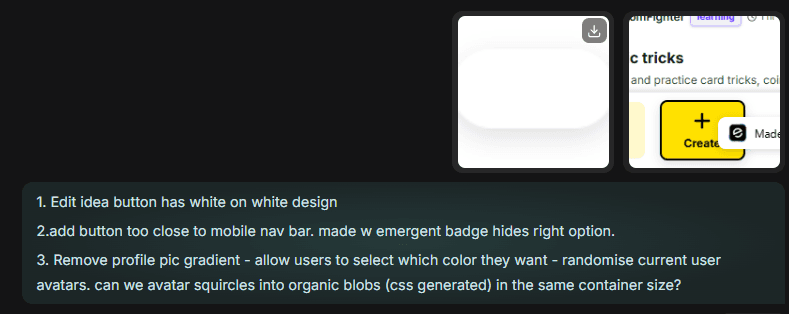
Before heading to the console tab to debug your app, its advisable to just take a screenshot of the issue(s) and describe it in simple, pointed language. For example, here is the error we reported to the agent:
Agent’s Fix
Checked contrast issue across app
Added bottom padding to the bottom nav bar on mobile view (although this will prove to be a recurring issue that we solved later)
Added organic shape blobs as profile pictures.
This change in code fixed the frontend issues.
Step 4: The Canvas & Drag-Drop Conflict
Our Request
Can we add Google Auth login now? Also change the font pairing to Quicksand and Actor from Google Fonts
Can we add Google Auth login now? Also change the font pairing to Quicksand and Actor from Google Fonts
Can we add Google Auth login now? Also change the font pairing to Quicksand and Actor from Google Fonts
Can we add Google Auth login now? Also change the font pairing to Quicksand and Actor from Google Fonts
Agent’s Fix
Used Emergent's managed social login for Google Auth
Installed the necessary fonts.
Step 5: Adding more features
Our Request
1. Users should be able to attach images to their ideas as optional.

2. Users can follow other users - these followed users should show up in the sidebar on desktop view and as a custom feed option on bottom nav bar on mobile
1. Users should be able to attach images to their ideas as optional.

2. Users can follow other users - these followed users should show up in the sidebar on desktop view and as a custom feed option on bottom nav bar on mobile
1. Users should be able to attach images to their ideas as optional.

2. Users can follow other users - these followed users should show up in the sidebar on desktop view and as a custom feed option on bottom nav bar on mobile
1. Users should be able to attach images to their ideas as optional.

2. Users can follow other users - these followed users should show up in the sidebar on desktop view and as a custom feed option on bottom nav bar on mobile
Agent’s Reply
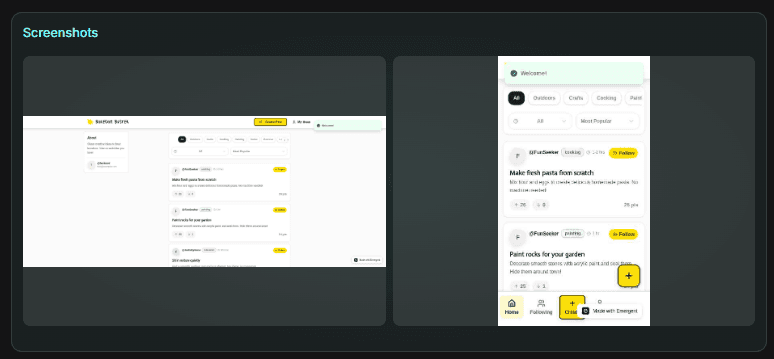
The agent added these features and ran a thorough test to check functionality.
Attached the following screenshots to show added features:
Our 2nd Request
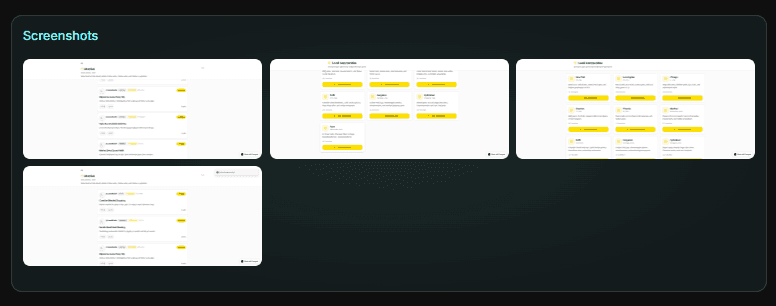
add a key feature: user can join local communities for his city. There, only ideas pertinent to that city can be added - with places to visit, parks to go to, restaurants, cafes, hidden gems etc.

1. Add local communities for indian cities and US cities - 5 biggest each and populate with local activity recommendations

2. Add the join community option on the desktop - left sidebar under following tab
add a key feature: user can join local communities for his city. There, only ideas pertinent to that city can be added - with places to visit, parks to go to, restaurants, cafes, hidden gems etc.

1. Add local communities for indian cities and US cities - 5 biggest each and populate with local activity recommendations

2. Add the join community option on the desktop - left sidebar under following tab
add a key feature: user can join local communities for his city. There, only ideas pertinent to that city can be added - with places to visit, parks to go to, restaurants, cafes, hidden gems etc.

1. Add local communities for indian cities and US cities - 5 biggest each and populate with local activity recommendations

2. Add the join community option on the desktop - left sidebar under following tab
add a key feature: user can join local communities for his city. There, only ideas pertinent to that city can be added - with places to visit, parks to go to, restaurants, cafes, hidden gems etc.

1. Add local communities for indian cities and US cities - 5 biggest each and populate with local activity recommendations

2. Add the join community option on the desktop - left sidebar under following tab
Agent’s Reply
The agent added these features and ran a thorough test to check functionality.
Attached the following screenshots to show added features:
Common Issues
During testing we faced some issues:
The "100vh" Mobile Bug
Problem: On mobile browsers, 100vh includes the URL bar, causing content to be cut off at the bottom.
Fix: We avoided strict 100vh on the main container and used flexible layouts that scroll naturally within the "Safe Area."\
Authentication Redirect Loops
Problem: Custom Google OAuth redirects felt jarring and were buggy (infinite loops).
Fix: Switched to Emergent's managed auth. It uses cookies (standard for web) but provides a persistent session that feels like a permanent app login.
A recap: Troubleshooting your app
Describe what you see
Take a screenshot
Open browser console and check for red errors
Share both with the agent
Iterate until resolved
Deploying Your App
Preview Your App
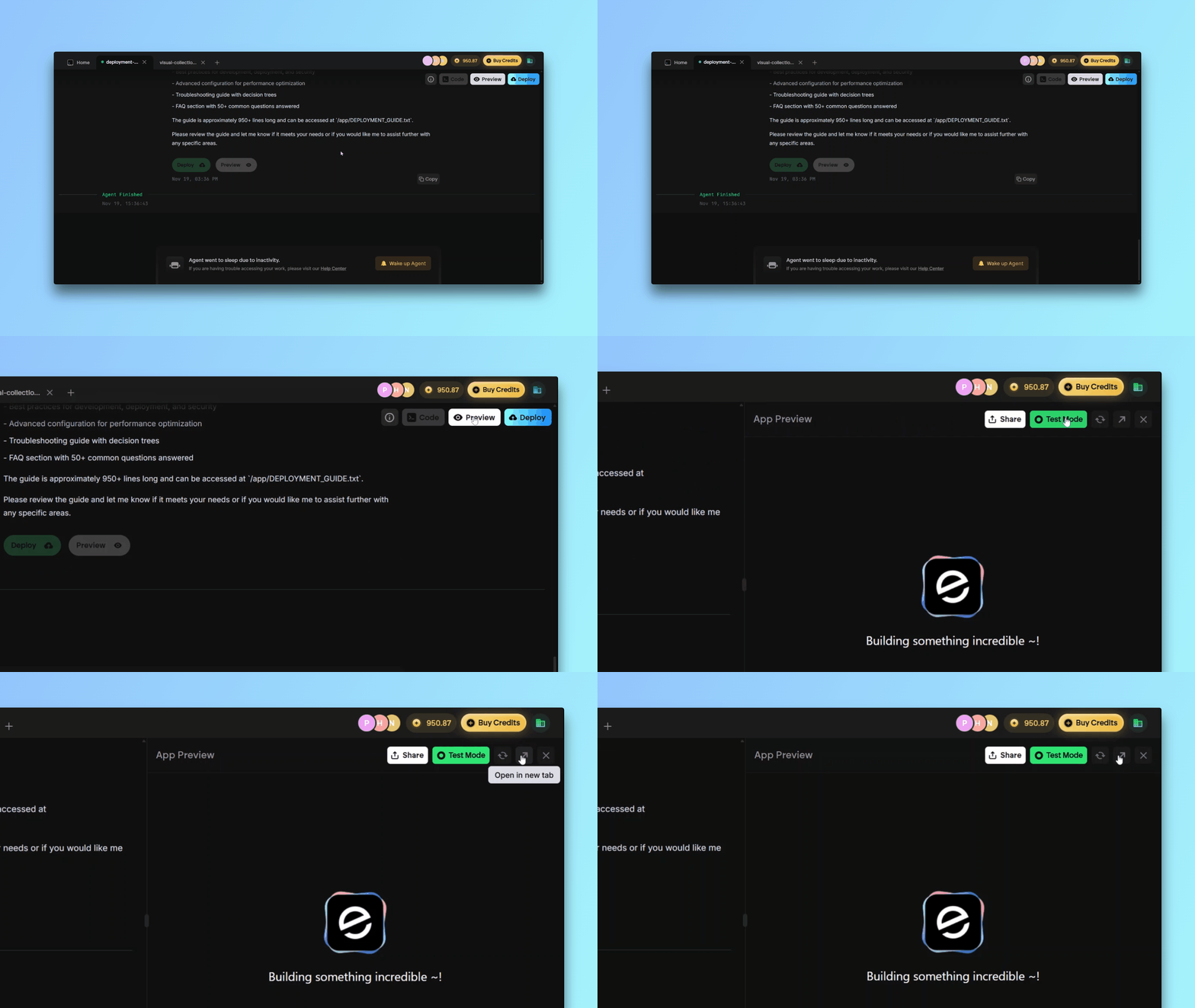
Use the Preview feature in Emergent and test the following:
✅ Thumb Zone: Can I reach the "Create" button with one hand?
✅ Tap Accuracy: Are the "Delete" and "Edit" buttons far enough apart to prevent mis-clicks?
✅ Input Focus: Does the keyboard cover the input field when typing a description? (Fixed via auto-scroll).
✅ Camera Permissions: Does the browser ask for permission gracefully?
Fix Any Issues
Send findings to the agent for quick iteration.
Deploy the Application

Click Deploy, wait for Emergent to finalize the hosting and use the final production URL to share the app with others!
If you still have issues, consider reading our How-To Guide on Deployment on Emergent.
Wrapping Up
You now have a fully functional social utility app that successfully bridges the gap between a website and a native mobile application. Try out our finished version over at https://funfinder-7.emergent.host/
Features:
Native-Web Experience: Floating bottom navigation, haptic feedback, and "thumb-zone" layouts make it feel like an App Store download.
Smart Discovery: Time-based filtering (5m, 15m, 1hr) solves the specific problem of "filling the gap" in a user's schedule.
Hardware Integration: Seamless camera access allows users to capture and upload proof of their activities directly from the browser.
Hyper-Local Context: The Communities feature anchors content to real-world cities, making the ideas actionable rather than generic.
Possible Upgrades:
PWA Support: Add a manifest.json and Service Workers so users can "install" the app to their home screen and receive Push Notifications.
Gamification: Add "Boredom Streaks" or badges for users who try a new activity every day to boost retention.
AI Suggestions: Implement a "Surprise Me" button that uses an LLM to generate a custom activity based on the weather, time of day, and user location.
If you've tried this app out, tweet at us on X or reach out on Discord and we'll give you access to more fun, behind the scenes apps and games that we've built!