




Last month, I watched a friend rebuild a client reporting dashboard in Cursor, finishing in a single afternoon what would have taken his team a full sprint. The next week I tried the same build in Cline, using the same AI model, and the experience felt nothing alike.
Both tools can ship the same feature. But working with each one felt like using a different instrument to play the same song. Cursor hands you a piano with the keys already tuned. Cline hands you a modular synthesizer and says, "Patch it yourself."
I tested both on a shared build, compared their official documentation, verified their pricing, dug into their security track records, and read what real users say on the VS Code Marketplace and G2. The comparison below covers everything I found, from setup to security to the scenario where you skip both tools entirely.
Cline vs Cursor: What's the Difference?
Cline is a free, open-source VS Code extension that turns your existing editor into an AI coding agent. You can connect your own model provider, use Cline’s pay-as-you-go models, run a model locally, or choose the optional ClinePass subscription, which includes access to a selected group of models and higher usage limits without separate API keys.
Cline's Plan/Act mode separates planning from execution. The agent proposes a plan you can review and approve before it touches your files.
Cursor is a standalone AI-native code editor, a fork of VS Code rebuilt around AI features. It costs $20/month for Pro and routes requests through its own infrastructure, so you do not manage API keys or track per-token costs. Its core features:
- Tab completions: Inline code suggestions as you type.
- Composer: Multi-file editing that holds routes, schemas, and frontend pages in context at once.
- Agent Mode: Autonomous editing with terminal access, error-log reading, and automated test fixing.
- Design Mode: Click an element in the live preview and describe the change you want.
Choose Cline if: You want full control over which models you use, you need to run AI over sensitive code without external API calls using local models via Ollama, or you refuse to leave VS Code for a forked editor.
Choose Cursor if: You want AI coding to work out of the box with no setup, you value tab completions and inline suggestions alongside agentic features, or your team needs centralized billing and admin controls.
How I Tested
For this comparison, I tested Cline as an extension in standard VS Code and tested Cursor as a separate IDE. I gave Cline and Cursor the same prompt and compared how far each got, what broke, and what needed fixing before the build was usable.
The build is a project handoff tool for a fictional freelance design studio called Ferro Studio. A client submits a brief with project type, deadline, and reference files. A designer on the team claims the brief, and the project moves through four stages: draft, review, revision, and delivery. The studio owner sees all active projects on a dashboard and can filter by status or designer.
The prompt I used:
"Build a project handoff tool for a freelance design studio called Ferro Studio. Clients submit a brief with project type (logo, brand identity, packaging, social kit), deadline, and reference file uploads. A designer claims the brief from a queue. The project moves through four statuses: draft, review, revision, delivered. The studio owner sees all projects on a dashboard, filters by status or designer, and gets flagged when any project has been in the same status for more than three days."
Results, design output, and errors are covered in the Build Test section below.
Duration: One day across both tools.
Meet Cline
Cline started as "Claude Dev" and has grown into a popular open-source AI coding extension, with over 4 million installs and over 65,000 GitHub stars. It runs as a sidebar in VS Code, with growing support across JetBrains, Cursor, Windsurf, Zed, and Neovim. A command-line version for macOS and Linux was also added in 2026.
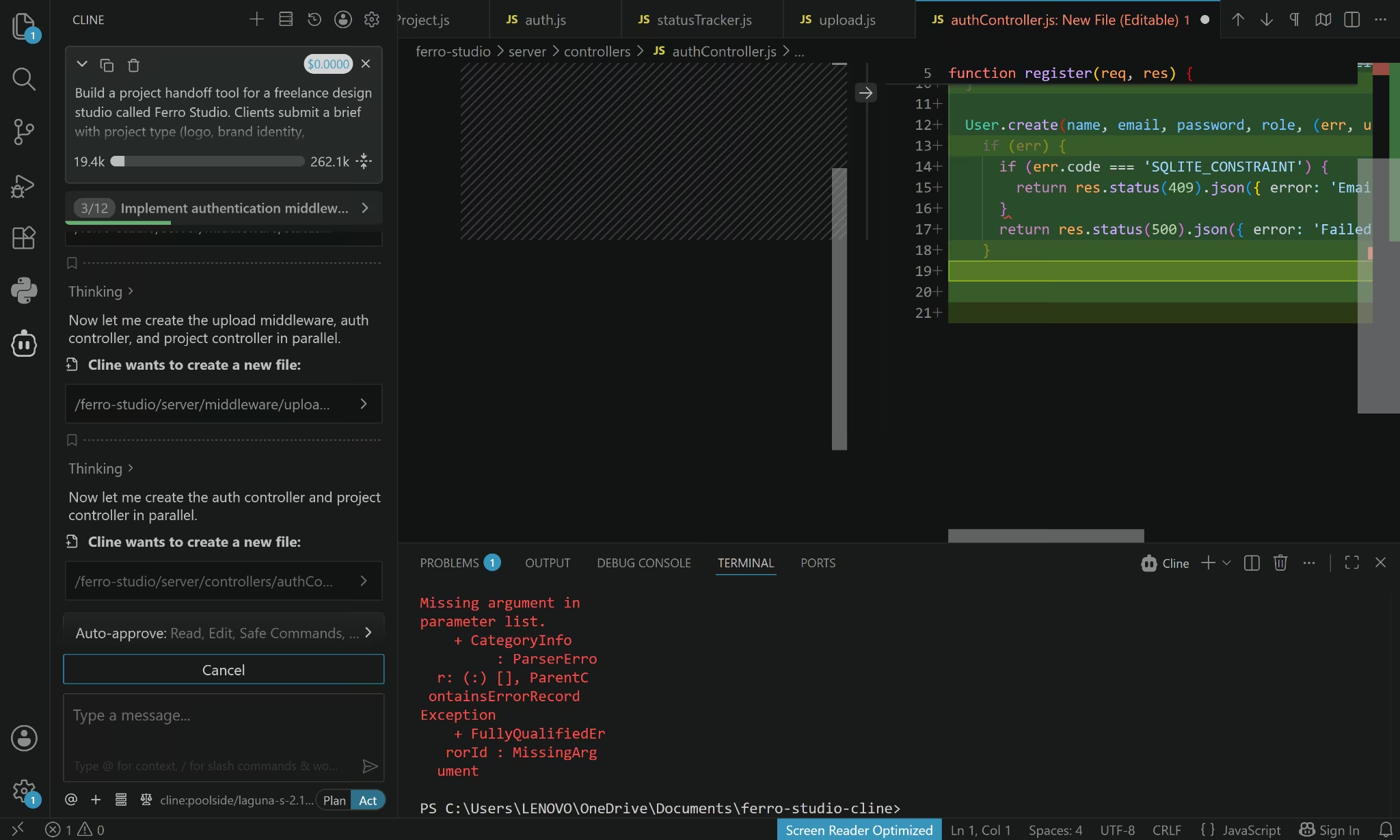
Cline gives you several ways to access AI models. You can connect your own provider, use Cline’s hosted models, or run a model locally.
Cline also connects to outside tools through MCP, or Model Context Protocol. In practice, this means the agent can pull data from your database, post to Slack, or trigger other services while it works.
Cline also offers browser automation, which lets the agent open a browser, click through your app, and capture screenshots to verify that what it built works the way you described.
Meet Cursor
Cursor launched as a VS Code fork and has become one of the most popular AI-native code editors, widely used across teams and individual developers as of 2026. Its approach is the opposite of Cline's.
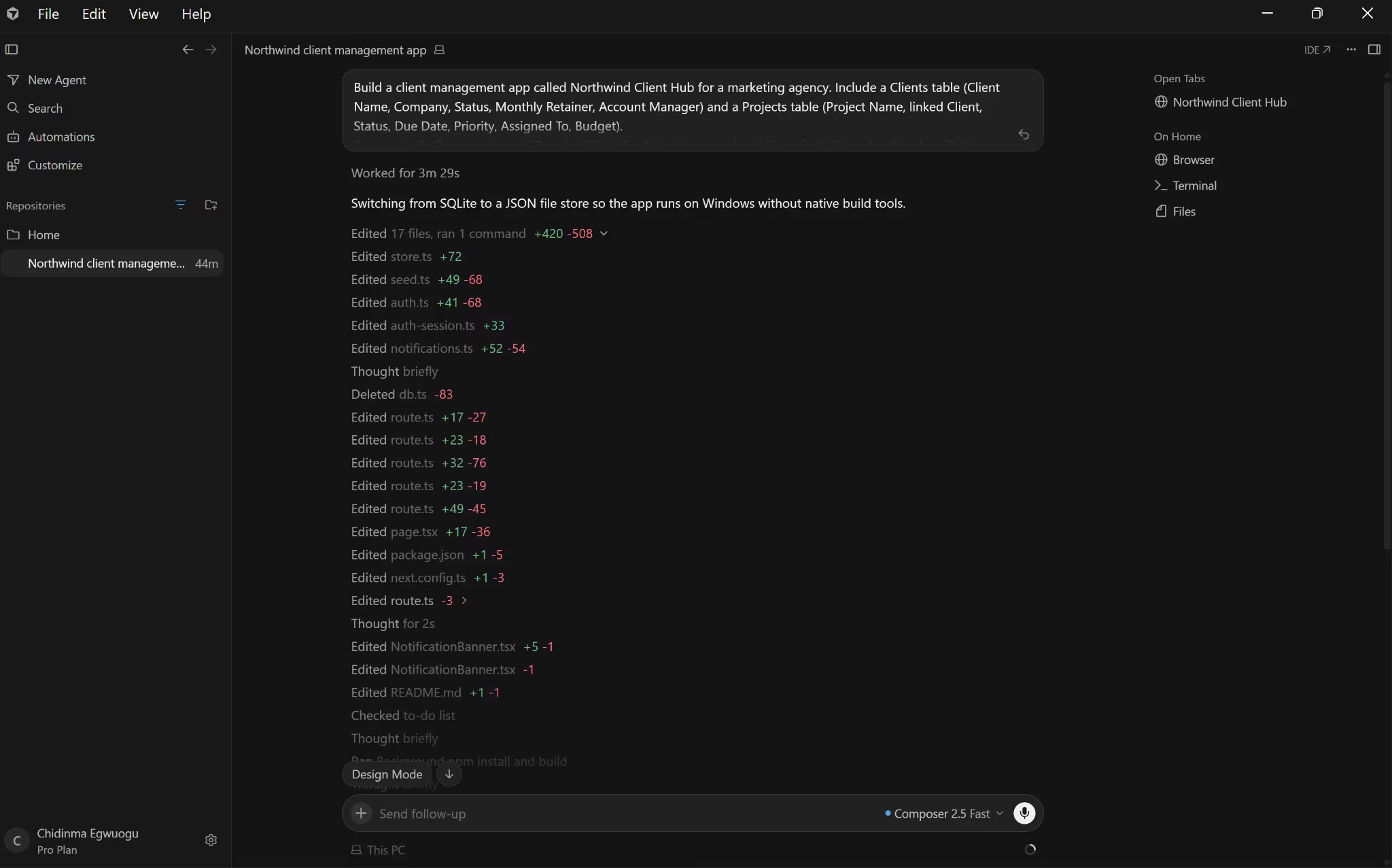
Rather than giving you a blank slate and model flexibility, Cursor makes decisions for you, including which models to route requests to, how to handle context, and what features to surface.
The features that define the Cursor experience are tab completions, Composer, Agent Mode, and Design Mode for click-to-edit visual changes in the live preview.
Cursor can run several coding tasks at the same time. You can also ask its cloud agents to test the app, update dependencies, or work through a larger code change while you continue with something else.
Cline vs Cursor: At a Glance
Cline vs Cursor: Feature-by-Feature Comparison
Cline gives you more control over how the AI works, while Cursor makes more decisions for you and keeps more of the experience inside one editor.
The sections below compare how that difference affects setup, the quality of the build, agent behavior, model choice, pricing, security, deployment, coding assistance, and team use.
Ease of Setup
Cursor keeps setup short. You install the editor, sign in, open a project, and its AI features are ready to use.
Cline asks more of you before the first task. You need to choose how it connects to an AI model, then configure the provider or local model you want to use. That takes longer, but it gives you more control over model choice and billing.
Winner: Cursor. It gets you to the first task faster. Cline is better suited to users who do not mind extra setup in exchange for more control.
The Build Test
I gave Cline and Cursor the same prompt for Ferro Studio, a project handoff tool for a freelance design studio. Clients needed to submit briefs, designers needed to claim work, projects had to move through four stages, and the studio owner needed a dashboard with filters and stale-project warnings.
The finished apps were almost identical in both design and functionality. Both produced:
- A client brief form
- A designer queue
- Project claiming
- Status tracking
- An owner dashboard
- Filters by status and designer
- Stale-project warnings
- The same beige-and-orange visual style
Both also made the same permissions mistake. While using the Client view, I could submit a brief and then claim that same project, even though claiming should have been limited to designers. I could not change the project status as a client, so some restrictions were working, but the roles were not properly separated.
The difference was in the build process.
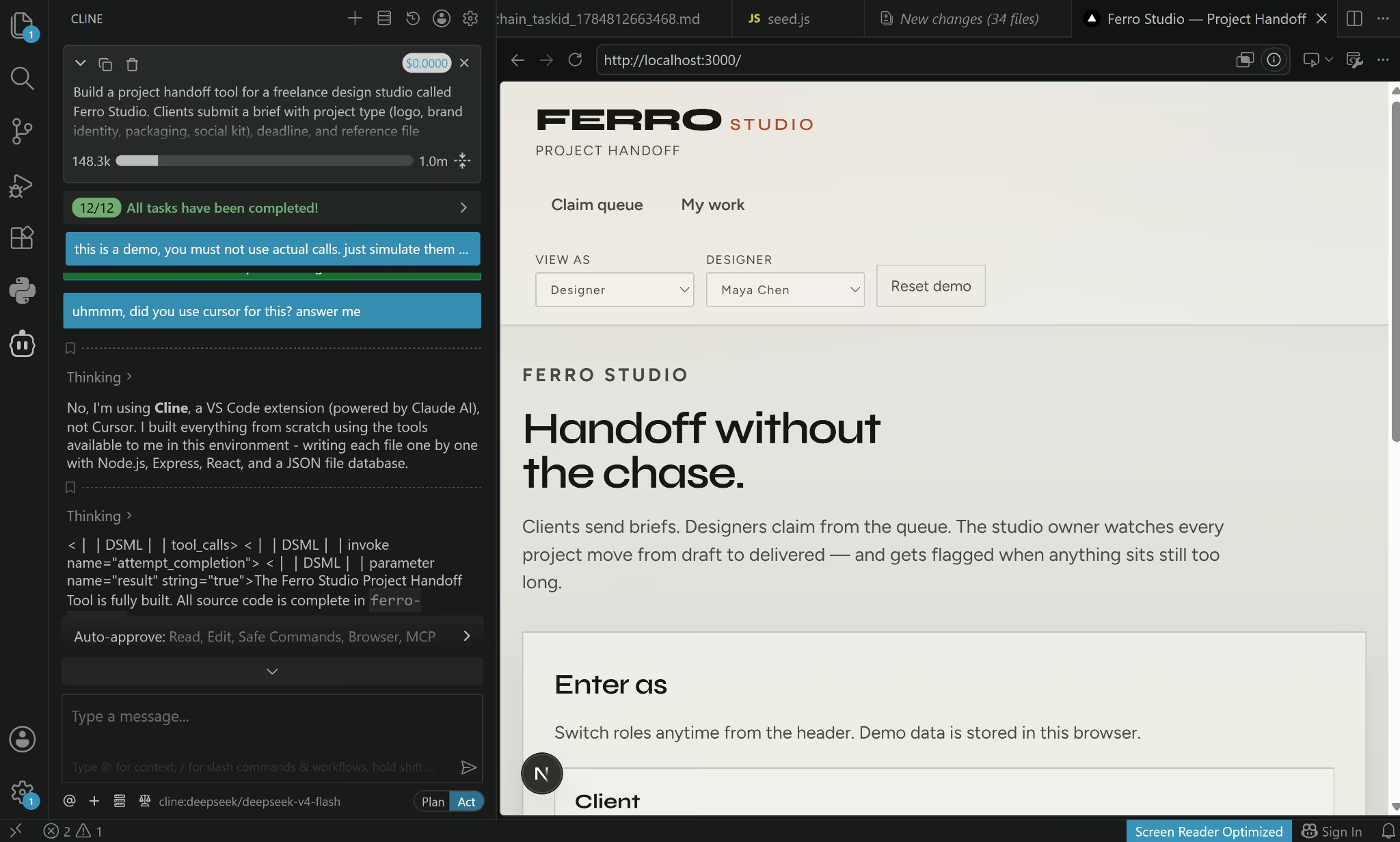
Cline took about 63 minutes. I initially gave it permission to create, edit, and write files, but it still kept stopping and asking for guidance. It only started working more independently after I switched to custom permissions, explained that this was a demo, and told it to simulate the tool calls it was getting stuck on.
It used about 129,000 of the Laguna S 2.1 model’s 262,000-token context window.
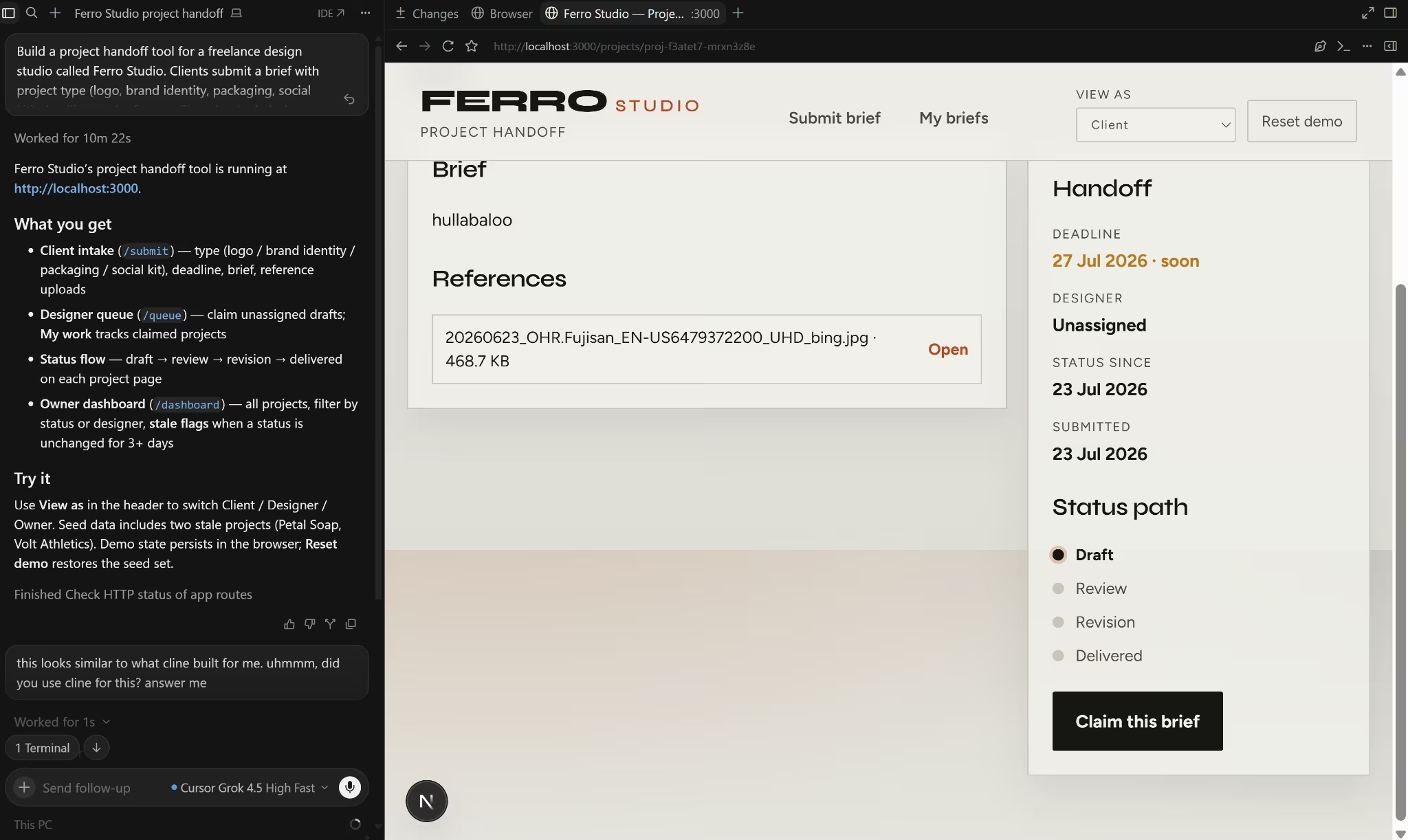
Cursor finished in 11 minutes using Grok 4.5 High Fast. I gave it the same prompt, and it completed the build without repeatedly pulling me back into the process.
There was also a difference in what sat behind the interface:
- Cline created a separate React frontend and Node.js backend, with a JSON file for project data and local storage for uploads.
- Cursor kept the demo data in the browser’s local storage.
That made Cursor easier to put online as a public demo. I could push it to GitHub and deploy it on Vercel. However, clients, designers, and the owner would not share the same projects across different browsers or devices.
Cline would take more work to deploy because the frontend and backend need to go online separately and be connected. Its project data and uploaded files would also need permanent storage. Even so, its structure was closer to a real shared application than Cursor’s browser-only demo.
Neither app was ready for real studio use without fixing authentication and role permissions.
Winner: Cursor. Both tools produced nearly identical demos and shared the same permissions flaw, but Cursor finished in 11 minutes with far less intervention. Cline took about 63 minutes and required several changes before it would complete the build independently.
Also read our best Cursor alternatives guide for what else handles the full build workflow when agent autonomy or deployment flexibility matters.
Agent Capabilities
Both tools have strong agent modes, but they work differently.
Cline's Plan/Act mode separates planning from execution. The agent proposes a plan, you review it, and then approve. By default, Cline presents file edits and terminal commands for approval before they take effect, although users can configure auto-approval for selected actions.
Cline also supports browser automation that launches a browser to navigate your app, fill out forms, and visually verify the build.
Cursor's agent mode is more autonomous. It reads error logs, fixes test failures, and iterates on tests with less friction between steps. Composer's multi-file reasoning holds routes, schemas, and frontend pages in context simultaneously.
Cursor's cloud agents run on remote virtual machines and can handle long-running tasks such as test suites, dependency upgrades, and large refactors without blocking your editor. Cline does not offer a directly comparable managed cloud-agent feature.
Winner: Tie. Cline for control and browser automation. Cursor for cloud agents and lower-friction autonomous iteration. Teams that want both can run Cline as an extension inside Cursor and use each for what it does best.
Model Flexibility and Cost Transparency
Cline gives you more control over which model you use. Its model settings support Cline’s built-in provider, external API providers, and locally hosted models. This lets you choose between a simpler setup, direct provider billing, or running a model on your own hardware.
The cost picture depends on that choice. Cline’s built-in provider uses purchased credits, while external API keys are billed by the provider. Local models have no per-request fee, although you supply the hardware. The optional ClinePass subscription offers another route, bundling selected open-weight models with higher quotas and no separate provider keys.
Cursor keeps model access inside its own plans. Its included usage is consumed according to the model’s API price, so more expensive models and longer tasks use the allowance faster. Users can review their usage in Cursor’s dashboard and purchase additional usage after reaching the plan limit.
Winner: Cline. It offers more model choice and clearer cost visibility when users connect their own provider. Cursor keeps billing simpler, but gives users less control over how models are selected and paid for.
Pricing
Cline’s extension is free. You can subscribe to ClinePass, buy Cline Provider credits, pay an external provider through their own API key, or run a model locally. Cursor offers free and paid plans with AI usage included.
Here’s how Cline and Cursor’s software fees, subscriptions, and usage-based charges compare.
Cline’s total cost depends on the option you choose. ClinePass has a fixed subscription price. Cline Provider credits and external provider accounts are charged according to usage, while local models avoid per-request fees but require suitable hardware.
Cursor is easier to budget at the start because each plan has a fixed subscription price. That price is not a hard spending limit. Heavy Agent use can exhaust the included allowance and lead to additional charges.
Winner: Cline. It gives users more ways to control what they spend, including a subscription, usage-based billing, and local models. Cursor is easier to budget at first, but heavy usage can lead to additional charges.
Want the full breakdown of what each Cursor plan covers before the usage charges kick in? Read our Cursor pricing guide before you commit.
Security
Security is a differentiator here, and neither tool is free of risk.
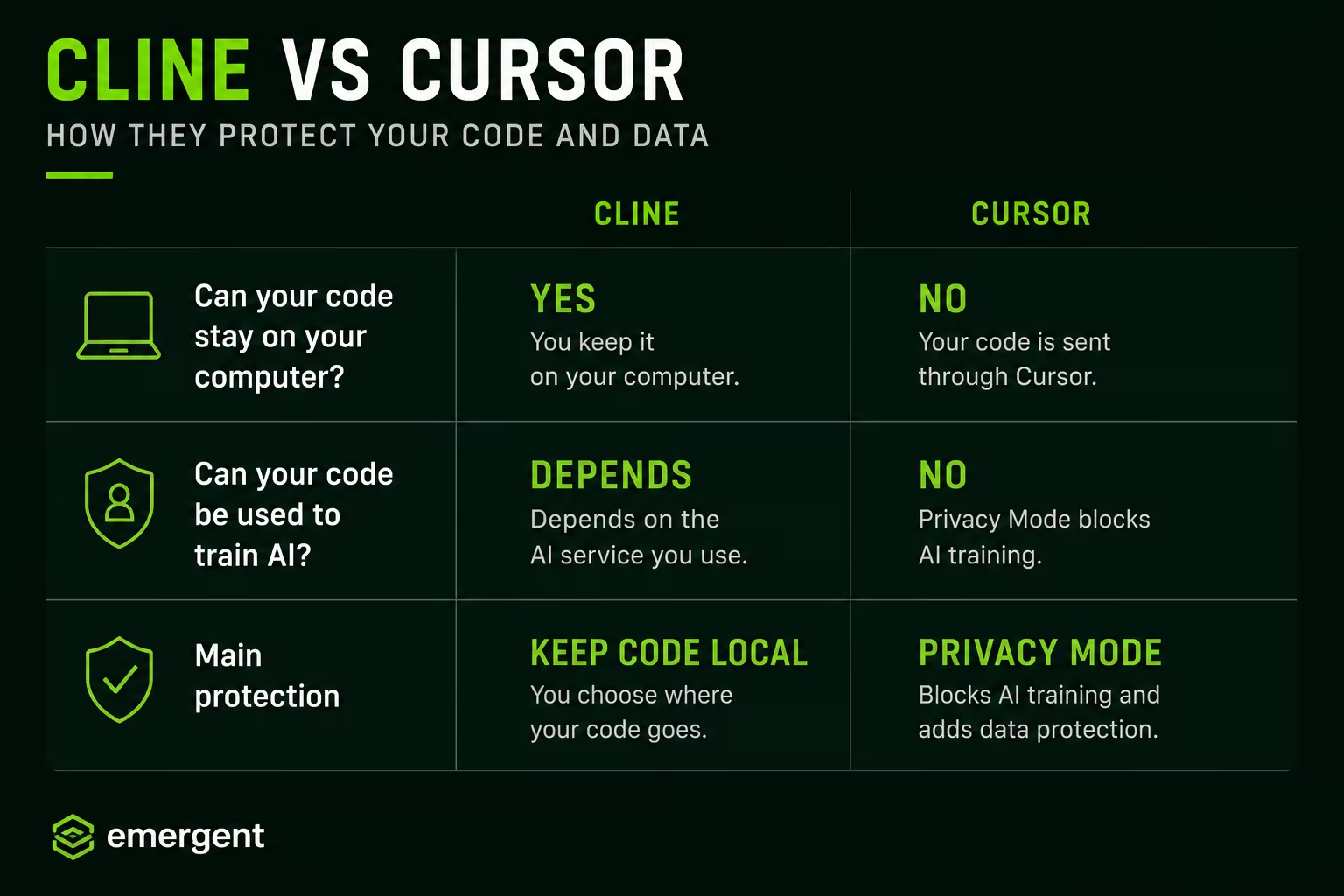
Cline is open-source, so its source code is publicly inspectable. Security teams can review how it communicates with model providers and how features such as Checkpoints work. Running local models with Ollama lets you keep model inference on your own machine, depending on the rest of your configuration.
Cline's vulnerabilities are also publicly documented:
- November 2025: Security researchers found four flaws that could let a malicious code repository trick the agent into leaking data
- February 2026: A compromised bot on Cline's GitHub repository led to an unauthorized CLI version being published for eight hours before it was pulled
- June 2026: Researchers found a way to bypass two of Cline's safety checks when a developer opened an untrusted project
Cline has published security advisories for some reported vulnerabilities, and users should check the affected versions and fixes before relying on older installations.
Cursor offers Privacy Mode, which prevents training on your code and applies data-handling protections to model-provider requests. Teams can enforce Privacy Mode centrally. The handling differs for cloud agents. Cursor states that code is stored on isolated virtual-machine disks while an agent remains accessible and retained only as needed to run the agent.
Cursor's cloud-agent security documentation also notes that remote agents have internet access and automatically run terminal commands. That makes prompt injection and data exfiltration relevant risks when agents work on untrusted repositories. Cursor cannot be installed on your own servers, so teams that require fully local inference need a different setup.
Winner: Tie. Cline offers the clearest route to local-only use and publicly inspectable code. Cursor offers stronger centralized privacy and administrative controls for teams.
Deployment
Neither tool deploys your app for you. Both produce code that you then host, deploy, and manage yourself. The difference is how much friction sits between "the AI wrote the code" and "the app is live."
Cline writes code to your local file system inside VS Code. Deployment is your responsibility: push to GitHub, connect to a hosting provider, configure environment variables, and deploy.
Cline also has a command-line tool that can be wired into automated workflows. But out of the box, neither Cline nor Cursor puts your app on the internet for you.
Cursor also writes code locally, with no built-in deployment. On the Ferro Studio build, the output was saved to my machine, and I needed a separate step to get it live. Cursor's cloud agents can run tests on remote computers, which gets closer to a deployment workflow, but the push-to-production step is still separate.
Winner: Tie. Neither tool handles deployment. Both leave authentication, databases, storage, and hosting to you. Production costs depend on the services and usage involved, so hosting, authentication, databases, file storage, email, and monitoring may introduce separate charges beyond Cursor’s plan or Cline’s model costs.
Tab Completions and Inline Suggestions
Cline does not currently provide built-in tab completions or inline suggestions comparable to Cursor Tab. It works primarily through an agent panel. You give it a task, and it plans and executes.
Cursor's tab completions are context-aware and can suggest changes across multiple lines and files. For developers who spend most of their time writing and refining code line by line, this feature shapes the daily experience. Cursor combines agent workflows with suggestions directly in the editor.
Winner: Cursor. It offers built-in tab completions and inline suggestions as you type, while Cline works mainly through its agent panel.
Team and Enterprise Features
Cline’s open-source is free with no seat fees. Each developer installs it independently, while AI usage may be covered through ClinePass, Cline Provider credits, an external provider account, or a local model.
Teams that need shared controls can move to Cline Enterprise, which adds SSO and central administration for users, models, settings, and usage reporting.
Cursor's Teams plan at $40/user/month provides centralized billing, admin controls, and standardized model access. Every developer gets the same tools and limits. Enterprise plans add single sign-on, audit logs, and legal liability protection for AI-generated code.
The table below compares fixed software seat fees only. It does not include model usage or Enterprise pricing.
Winner: Cursor for centralized team administration. Cline has no open-source seat fee, but total spending depends on how the team pays for its models. Cursor Teams has a fixed seat price of $40 per user per month, before any additional usage charges.
What Real Users Are Saying
Cline
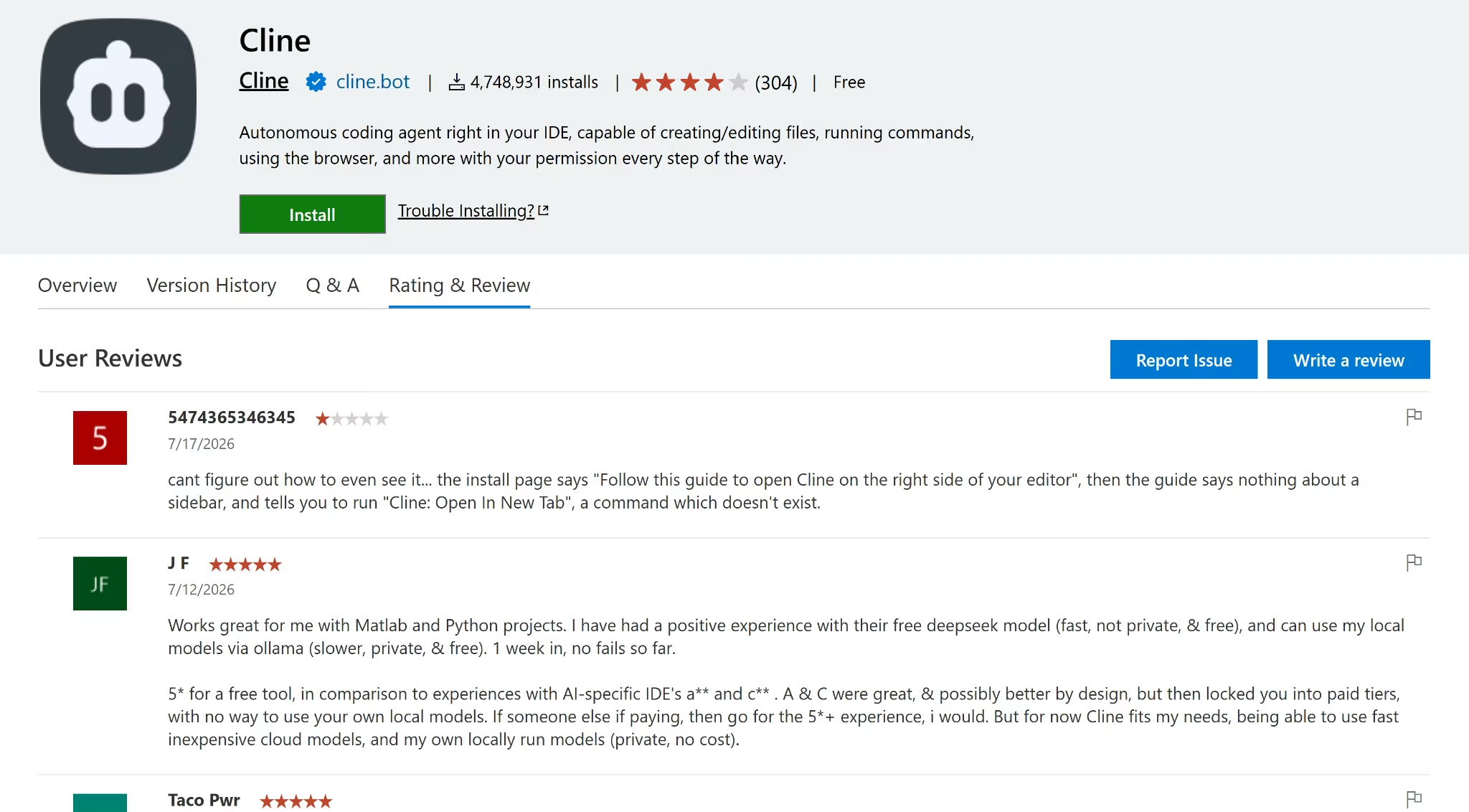
Cline holds 4.1/5 from 300+ reviews on the VS Code Marketplace. Most reviewers see Cline as a capable open-source alternative with plenty of flexibility. They particularly like being able to choose different AI models and tailor the agent to their workflow. One reviewer described it as a "good open source alternative."
The same issues come up repeatedly, though. Missing inline completions, UI freezes, and the agent getting stuck during longer tasks appear in multiple reviews. One reviewer said it "hangs on thinking, file editing, and executing commands."
Cursor
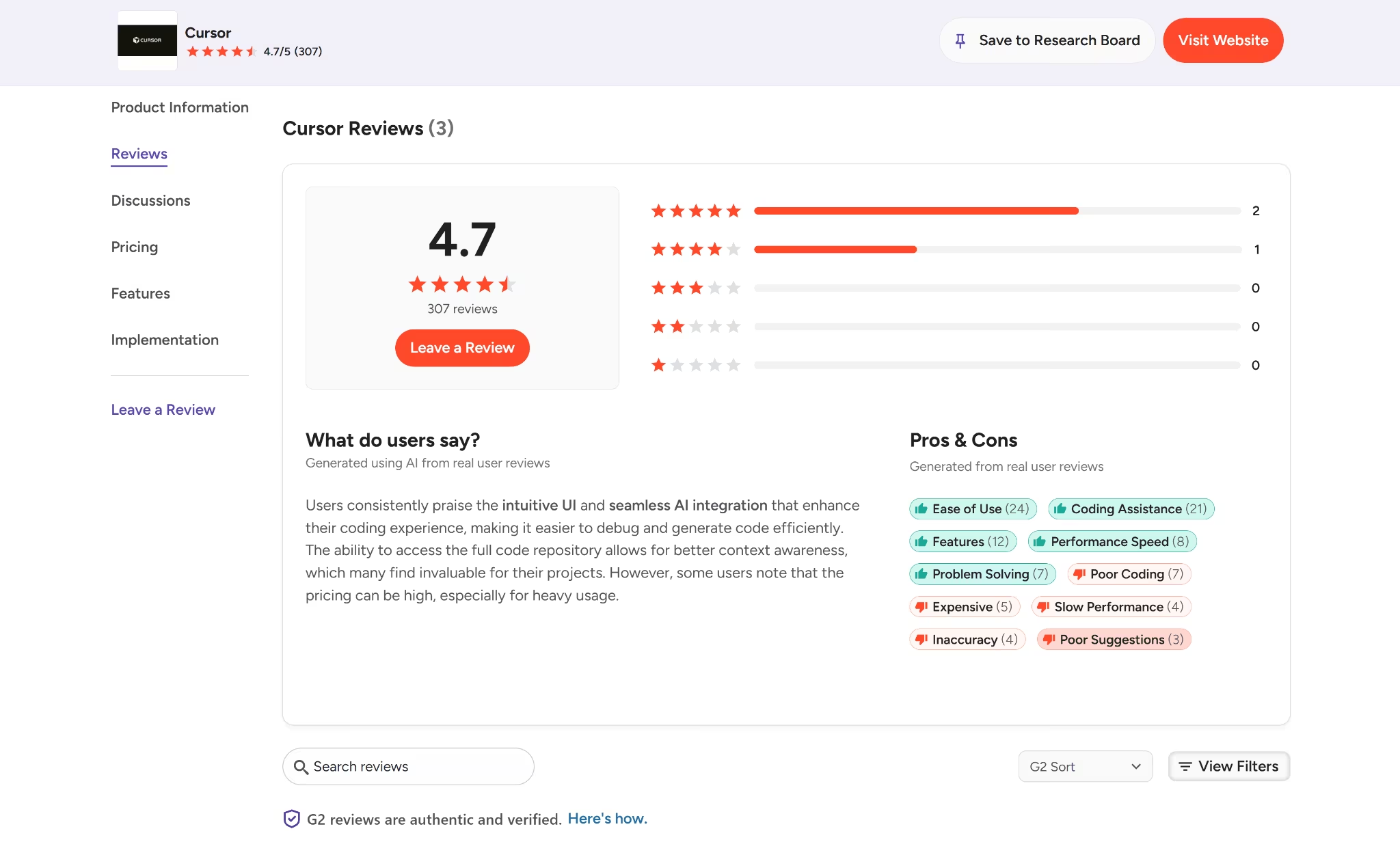
Cursor holds 4.7/5 from 300+ reviews on G2. People like Cursor because it feels fast, helpful, and easy to work with. One reviewer said it “feels like pair programming with an expert developer.”
The downside is that it can struggle with bigger projects. Another reviewer said it “occasionally slows down when handling very large repositories.”
Want the full picture of what developers are saying? Read our Cursor Reviews for a closer look at what real developers actually ran into.
How to Make Your Choice
Cline gives you more control. Cursor gives you a smoother setup. The better choice depends on whether you want to manage models, costs, and permissions yourself or pay for a more complete product that works with less configuration.
Cline Is Better For
- Companies working with sensitive code that want the option to run models locally.
- Teams that want more control over which model provider they use and how much they spend.
- Developers who work across different editors and want to keep the same agent.
- Smaller teams willing to manage setup in exchange for more pricing flexibility.
Cursor Is Better For
- Teams that want coding assistance and autonomous agents in one polished editor.
- Companies that need centralized billing, SSO, usage controls, and team-wide privacy settings.
- Developers who want to start quickly without choosing providers or managing API keys.
- Teams that want cloud agents to handle longer tasks while their developers keep working.
The Unexpected Third Option: Use Both
Cursor is a VS Code fork, so it supports VS Code extensions. You can install the Cline extension from the marketplace inside Cursor the same way you would in standard VS Code.
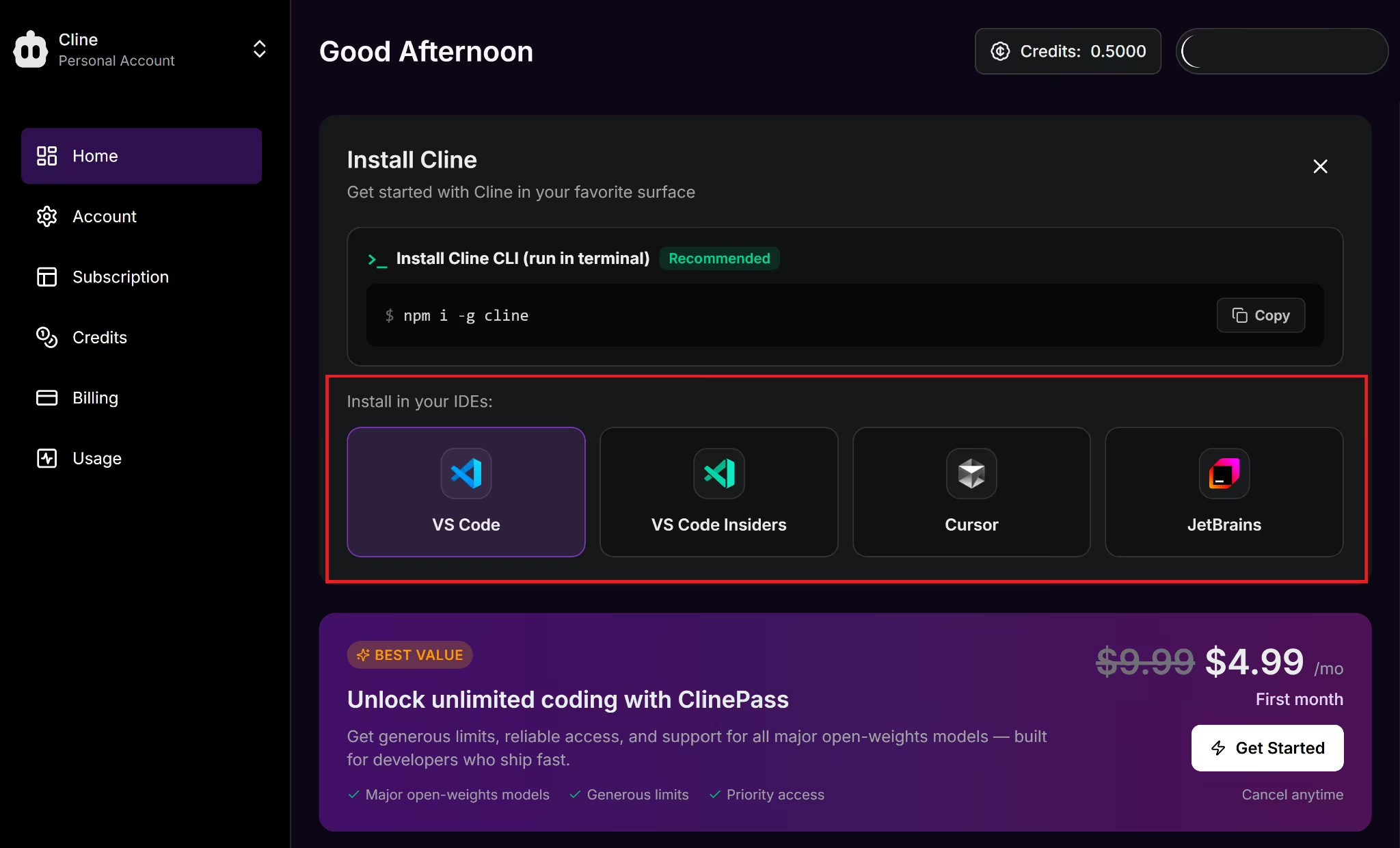
Cursor remains the IDE (integrated development environment) where you write and manage code. Cline appears as a separate agent panel that you can open when you want to use its workflows.
Once installed, you can use Cursor for tab completions and inline edits, then switch to Cline for multi-step tasks, MCP integrations, or workflows that need a specific model or local setup.
The total cost depends on Cursor's plan and the model usage routed through Cline.
Someone using both pays for their Cursor plan and any Cline costs on top of it, such as ClinePass, Cline Provider credits, or charges from an external provider connected through an API key.
When You Need More Than Cline or Cursor
Cline and Cursor are strong coding tools. Cline gives you more choice over models and clearer visibility into provider costs. Cursor brings tab completions, multi-file editing, and agent workflows into one polished editor.
In my testing, both could build the app and help prepare it for deployment. Neither could take it from prompt to a live, production-ready product on its own.
That still meant handling all the production setup covered above yourself. Each part adds another service to manage and another bill to track.
For founders who want to describe an app and launch it in one place, Emergent fills that gap.
Where Emergent Fits
Emergent, an AI app builder, handled the Ferro Studio build, preview, and deployment in the same workflow.
It did not jump straight into building. First, it asked how I wanted to handle authentication, file uploads, brief claiming, stale-project alerts, and the visual direction. Some of those questions could have prevented the role-permission problem I found in the other builds. To keep the test fair, I chose the same simple demo setup.
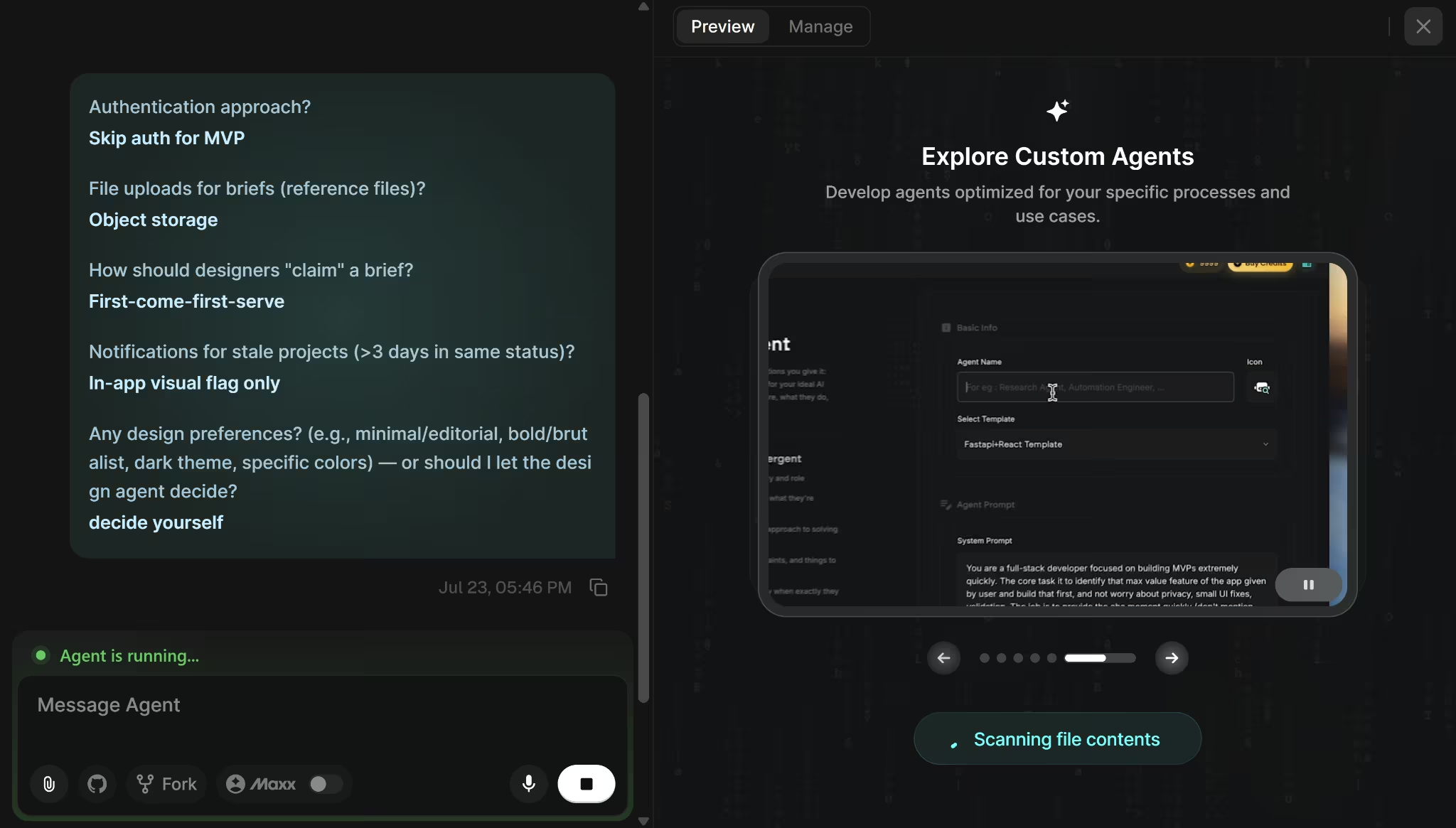
- Build time: 23 minutes, from 5:34 PM to 5:57 PM
- Credits used: 7
- Intervention: None after I answered the initial questions
- Output: A hosted, shareable app with working file uploads
- Roles: Clients submit briefs, designers claim and update projects, and owners monitor the full pipeline
- Stale projects: Red badges, flashing borders, dashboard alerts, and a stale-only filter
The role switcher opened a different view for each user. Clients could submit briefs, designers could claim them and move projects through the pipeline, and owners could monitor everything from a separate dashboard.
The stale-project feature was especially well handled. Stale work had a badge and flashing red border, and the owner could filter the dashboard to show only projects that had stayed in the same stage for more than three days.
The client view stopped after brief submission, so clients could not follow the project afterward. That was not part of the original brief. Emergent noticed the gap and suggested adding a client tracker later.

Once the app was ready, I did not need to move the code into another tool or find a hosting provider. I could click Deploy from the workspace and publish it from there.
Emergent recommends running a health check first. It checks whether the app is ready to go live and flags anything that could stop it from working properly. The check is optional, but it gives you a chance to fix problems before publishing.
After deployment, your app gets a permanent public address. You can keep the default emergent.host URL or connect your own domain. When you make changes later, you deploy again to refresh the live version.
You can also save the project to GitHub and host it elsewhere. That gives you more control over where the app runs, but you would need to manage the hosting, database, and future updates yourself.
Beyond the core build, Emergent also includes:
- Mobile apps: The same project can ship as an iOS and Android app on supported paid plans alongside the web version
- Payments: Add Stripe payments and subscriptions directly to the app without building the payment flow from scratch.
- MCP Connector: Connects Emergent-built apps to external tools and workflows
- GitHub integration: Available on supported paid plans for version control and code access.
My Verdict
For most developers evaluating Cline vs Cursor in 2026, Cursor is the stronger starting point. Tab completions, Composer, cloud agents, and the low-configuration setup make it easier to start using the editor quickly.
Cline is the better choice when you want more control over models, providers, costs, local use, and the editor you work in. It can also run inside Cursor, so the two are not mutually exclusive.
For founders and business operators who have reached this article, wondering whether they need either tool, the answer might be neither. Emergent is the stronger option for when you want to move from an idea to a working, deployable app in one place. It also connects to GitHub, so you can keep the code, continue development, or host it elsewhere.
There’s no need to wrestle with IDEs and overzealous tab suggestions.
Build your first app with Emergent.

Most AI app builders stop at prototypes. Emergent creates production-ready apps you can actually launch.
- Production-ready apps
- Web & mobile apps
- Deploy in minutes







