



TL;DR
Here's the current Thunkable pricing lineup, from the free sandbox up to Advanced. Accelerator is the cheapest paid plan, while Builder is the first tier that can publish a live app.
| Plan | Price | Best For |
|---|---|---|
| Free | $0 | Learning and testing |
| Accelerator | $19/month ($18/month, billed annually) | Solo makers iterating |
| Builder | $59/month ($37/month, billed annually) | Shipping one live app |
| Advanced | $189/month ($99/month, billed annually) | Multiple live apps or a team |
| Enterprise | Custom | Compliance-focused orgs and large teams |
| Education | Custom | Students, teachers, and districts |
Thunkable restructured its plans in October 2024. The old Starter, Pro, and Business plans are no longer offered to new subscribers. Existing users keep the legacy pricing only if their subscription has stayed active without a break, so those tier names may still apply to grandfathered accounts.
Thunkable lists four tiers, each with its own price. The number that really decides your bill is which cap you slam into first and the pricing page won't show you that. Two weeks of building did.
I spent two weeks testing Thunkable pricing the only way that means anything: by building a test app on every tier and watching where it broke. I built the Recipe Box, a five-screen recipe app, with Thunkable's AI Builder.
Then I carried it up through Free, Accelerator, and Builder, upgrading each time a cap stopped me cold. Advanced, I priced out on paper, since a single app never needs everything that tier unlocks.
Free killed a sixth screen mid-build without so much as a warning. Accelerator gave me all the room to build, with publishing still locked behind a higher tier. Builder turned out to be the real starting line, and the monthly price wasn't close to the full bill once Apple and Google got involved.
By the end of this, you'll know what each plan buys you and which cap forces the next upgrade. You'll also know what it actually costs, subscription plus store fees, to get an app live in the App Store and Google Play.
Plan-By-Plan Breakdown
Each Thunkable tier gives you more room, then stops at a specific limit. Here's what you get at every level, based on where the Recipe Box test hit each cap.
Free: $0/month
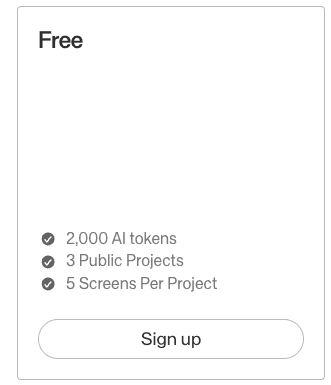
The free tier is where I started the Recipe Box, since it's the only way to see Thunkable's AI Builder before you hand over a card number. I opened the AI Builder and gave it one prompt:
"Build a simple recipe box app where I can save recipes with a photo, ingredients, and steps, mark favorites, and add ingredients to a shopping list."
It drafted a working first version in a couple of minutes, faster than I expected. The recipe list, detail view, add-recipe form, and shopping list all came back wired together, with navigation between them already working.
I'd planned five screens (recipe list, recipe detail, add recipe, shopping list, and favorites), and Free caps you at five screens per project. When I went to add a sixth screen, a meal planner, Free blocked it outright, refusing to save any partial progress or even warn me before shutting the door.
Refining what I had turned out to cost more than building it. Getting the favorites screen to filter correctly, and getting the shopping list to merge duplicate ingredients pulled from two different recipes, took three separate rounds of re-prompting.
Each round chewed into the 2,000 monthly AI tokens. By the time the shopping list worked the way I wanted, I had a few hundred tokens left for the month, a thin margin for a build that was still finding its shape.
Free can't publish a live app either. Once the Recipe Box worked, there was nowhere for it to go beyond my own phone through the companion app. That's the tier's real ceiling, more than the five screens.
Free works as a product tour of the AI Builder and shows where the limits sit before you incur a cost. Treat it as your app's first draft, and the screen and token caps can interrupt the build before it is ready.
What's included: 2,000 AI tokens per month, three public projects, up to five screens per project, and device testing through the companion app.
Best for: Learning the editor, drafting an idea, and testing on your phone before you spend a cent.
Pros: It's a full visual app-building environment at no cost, the AI Builder drafts a first version fast, and device testing works even here.
Cons: Five screens per project is tight, the 2,000 tokens drain quickly, and you can't publish a live app.
Accelerator: $19/month ($18/month, billed annually)
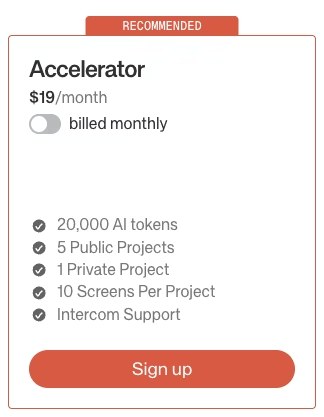
Accelerator is the first paid step, and I kept building the same Recipe Box there as a bigger sandbox, without starting a new project. Moving up unblocked the meal planner screen Free had refused. Building it out (a weekly grid with recipes dragged in from the recipe list) still left four screens of headroom before the 10-screen cap.
The 20,000 AI tokens, 10 times Free's allowance, meant I could iterate on that meal planner's logic without doing token math after every prompt. I rebuilt the drag-in behavior twice and refined the weekly-grid layout three times, and still had thousands of tokens left over at the end. That's a different experience from watching Free's 2,000 disappear inside three rounds of prompting.
The private project kept the Recipe Box out of the wider Thunkable community while I tested half-finished screens I did not want strangers copying.
Accelerator still gives you zero live published apps, so the extra room helps only while you're building and testing.
Accelerator earns its $19/month price when you want more tokens, screens, and a private project before deciding whether the app is ready to ship. If it is, jump to Builder. For about $40 more, it adds tokens plus the live-app slot Accelerator never gives you.
What's included: 20,000 AI tokens per month, five public projects, one private project, 10 screens per project, and Intercom support.
Best for: Solo makers who want more tokens and screens to iterate, and who aren't ready to publish.
Pros: 10 times the tokens of Free, a private project so your work isn't public, and double the screen cap.
Cons: You still can't publish a live app, so it's a build tier with shipping still locked.
Builder: $59/month ($37/month, billed annually)
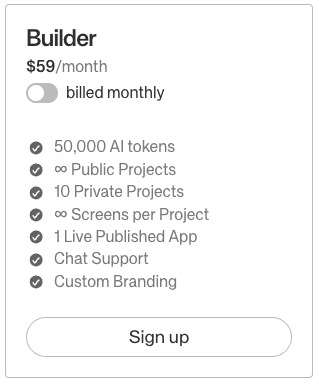
Builder is the tier that turns on live publishing.
Once I was on Builder, I worked through Thunkable's submission tools up to the final submit step, without clicking submit. I named the app, added an icon and screenshots, and filled out the store-listing fields Apple and Google require of every app, regardless of which builder made it.
That took under an hour of my time, and almost all of it went to those listing fields rather than anything specific to Thunkable.
Unlimited screens meant the meal planner from Accelerator and the two additional screens I added, a grocery-export view and a settings screen, never hit Free's five-screen limit.
Builder also raised the allowance to 50,000 AI tokens, two and a half times Accelerator's limit. I completed every refinement for those screens and still had tokens left when the Recipe Box was ready to submit.
The catch is the one-live-app limit. Builder gives you one live published app at a time. A second live app running alongside it requires Advanced.
I stopped short of actually publishing the Recipe Box, so this cap never came up in testing. One app doesn’t require more than the one live slot Builder gives you. The cap becomes a real limit only when you're running a second app, experiment, or rebuild live at the same time.
What's included: 50,000 AI tokens per month, unlimited screens, unlimited public projects, 10 private projects, one live published app, chat support, and custom branding.
Best for: Anyone ready to publish a single app to the App Store or Google Play.
Pros: Publishing becomes possible here, screens go unlimited, and you can remove the Thunkable branding.
Cons: You're capped at one live app at a time, so a second live app forces an upgrade.
Advanced: $189/month ($99/month, billed annually)
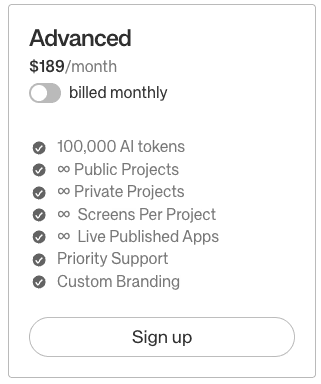
Advanced keeps screens unlimited, removes the private-project and live-app caps, and doubles the AI allowance from 50,000 to 100,000. The token allowance still has a hard limit. Storage also becomes unlimited, which helps when an app's asset library grows beyond a single Recipe Box worth of photos.
I evaluated this tier on paper by pricing a second live app, a workout-log companion to the Recipe Box. Advanced would add $130/month over Builder for that second publishing slot because Builder already covered the Recipe Box's other needs.
For one app, Advanced is overkill. The $189 price makes sense when you're shipping several live apps at once, since Advanced is the only tier that lifts Builder's one-live-app cap.
Thunkable bills one flat rate per account, and Advanced runs $189/month whether one person or a whole team uses it. Real teams go through Thunkable's licenses-based Company Plan. A collaborator who needs to co-edit a private project just needs their own paid plan, and that can be a $19 Accelerator.
For Advanced, the deciding factor is simple: how many live apps you need running at the same time.
What's included: 100,000 AI tokens per month, unlimited public and private projects, unlimited screens, unlimited live published apps, and priority support.
Best for: Makers or teams running several live apps at once.
Pros: Unlimited public and private projects, screens, and live apps, plus 100,000 AI tokens, priority support, and custom branding.
Cons: At $189/month, it's a big jump from Builder that only pays off once you're running several live apps.
Enterprise and Education: Custom Pricing
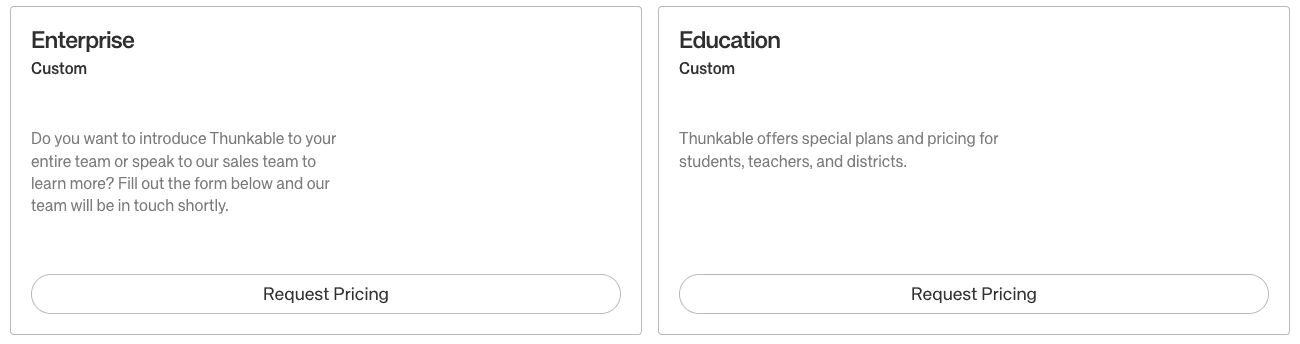
Enterprise and Education both sit outside the public price list. Enterprise is where service level agreements (SLAs) and compliance conversations (HIPAA, SOC 2, ISO 27001) happen, and the price is sales-negotiated. Education covers student, teacher, and district plans through an application.
What's included: Everything in Advanced plus team rollout, a negotiated SLA, and compliance discussions (Enterprise), or discounted student, teacher, and district access (Education).
Best for: Organizations that need to discuss SLA or compliance requirements with Thunkable, or schools rolling the platform out to classes.
Pros: Enterprise carries over Advanced features and adds a negotiated SLA and dedicated support. Education gives schools and districts an application path to volume pricing that is not listed publicly.
Cons: Neither tier publishes a number, so you can't budget for either without a sales call, and even at Enterprise, those specific compliance certifications aren't publicly guaranteed. Confirming they apply to your deployment still takes a direct conversation with Thunkable's sales team.
Thunkable's Hard Caps and Limits: What Each Plan Won't Let You Do
Thunkable enforces every limit as a hard cap. There are no token top-ups or storage add-ons, and you can't buy a second published app on its own. Hit a limit, and you upgrade the whole plan. That's why the caps set your cost.
| Limit | Free | Accelerator | Builder | Advanced |
|---|---|---|---|---|
| AI tokens per month | 2,000 | 20,000 | 50,000 | 100,000 |
| Private projects | 0 | 1 | 10 | Unlimited |
| Screens per project | 5 | 10 | Unlimited | Unlimited |
| Live published apps | 0 | 0 | 1 | Unlimited |
| Public projects | 3 | 5 | Unlimited | Unlimited |
In the Recipe Box test, I hit three walls in order.
The five-screen cap came first. Free's own limit stopped the Recipe Box at five screens, the same wall I hit trying to add a sixth for a meal planner.
The 2,000 AI tokens came next. Drafting and refining with the AI Builder used most of the allowance before the app felt done. Tokens reset each month, and you cannot top them up during the cycle.
The publishing wall came last. Free gives you zero live published apps, and Accelerator does too. Your test downloads run on your own phone but expire after 72 hours. To put a live app in the stores, you need Builder.
Screens and tokens only slow the build down. Zero published apps stops it cold, which is the whole reason a live app starts with Builder.
Two more limits are easy to miss. There's no source-code export, so moving a build off Thunkable means rebuilding it from scratch. And there's no documented SLA or compliance certification below Enterprise.
The True Cost to Publish a Thunkable App
Publishing starts at the $59/month Builder price, then Apple and Google add their own fees to the total cost of creating an app.
You need a $99 yearly Apple Developer Program membership to publish to the App Store. Google charges a one-time Play Console fee of $25 to publish to Google Play. These fees come from Apple and Google, and both apply regardless of how you build the app.
Builder costs $59/month or $37/month when billed annually, before Apple's $99 yearly fee and Google's $25 one-time fee. The annual Builder subscription alone comes to roughly $444.
The subscription also excludes migration and outside-service costs. With no source-code export, moving away from Thunkable requires rebuilding elsewhere.
Any service you connect for data, logins, or file storage can add another recurring charge. Firebase runs free until you cross its usage quota. After that, it bills per read, write, and function call, with no spending cap of any kind.
A scaling app's bill often lands around $50 a month once traffic and inefficient queries start compounding, and there's no ceiling on how high it can climb.
Airtable charges per seat instead. A small team of five people pays about $100 a month on the Team plan, and a team of twenty-five can run as high as $500 (if billed annually).
Which Thunkable Plan Should You Choose?
The right tier comes down to one question. How close are you to shipping? Here's where each plan makes sense.
Choose Free if you:
- Only want to learn the editor or test an idea on your own phone
- Have no plans to publish an app yet
Choose Accelerator if you:
- Need more tokens and screens to keep building and iterating
- Want a private project but aren't ready to publish
Choose Builder if you:
- Want to publish one live app to iOS and Android
- Need unlimited screens or want to remove the Thunkable branding
Choose Advanced if you:
- Plan to run several live apps at the same time
- Require priority support
Choose Enterprise if you:
- Need to discuss a negotiated SLA or verify compliance requirements with Thunkable's sales team
- Are rolling Thunkable out to a large team and need dedicated account support
Choose Education if you:
- Are a student, teacher, or school district building apps for coursework
- Want discounted access through the application path, below the standard plan price
Is Thunkable Worth the Cost?
Thunkable earns its price when you need a custom mobile app with app-store distribution and direct device access. One project builds for both iOS and Android, so a single draft covers both stores without a separate rebuild for each.
You also get device features a web app cannot reach. The flat per-builder price stays predictable as your audience grows, while usage-based tools can bill more as activity rises.
Where it stings is paying $59/month before a single app is live. That feels steep if all you wanted was one small project. If that's you, the free tier's promise oversells what you can do without opening your wallet.
Thunkable is worth it if you:
- Need true cross-platform native mobile with device features like GPS, camera, and Bluetooth
- Want predictable flat pricing that doesn't spike as your user count grows
Skip Thunkable if you:
- Only need one small app and balk at $59/month to publish it
- Care about owning your source code (see the export limit under Hard Caps above)
- Need a documented SLA or compliance certification below the Enterprise tier
Thunkable Alternatives & Pricing Comparison
If Thunkable's price or publishing model doesn't fit, these Thunkable alternatives cover nearby ground. Here's how their cheapest paid plans line up.
| Tool | Starting Price | Best For |
|---|---|---|
| Thunkable | $19/month ($18/month, billed annually) | Cross-platform native mobile |
| Emergent | $20/month ($17/month, billed annually) | AI-generated web apps with logins and payments |
| Adalo | $45/month ($36/month, billed annually) | Visual native mobile apps |
| FlutterFlow | $39/month ($29.25/month, billed annually) | Visual native mobile with more control |
Adalo and FlutterFlow both build native mobile apps through visual editors. FlutterFlow charges per-seat pricing on its Growth tier and above, where each extra editor adds to a team's cost.
Emergent is an AI web app builder that turns plain-language descriptions into working apps, so it serves a different goal than store-native mobile.
Emergent vs Thunkable: Which Should You Choose?
These two tools solve different problems, so the choice comes down to which goal you have.
Emergent is better for: Turning a prompt into a working web app with logins and payments, when you want something you can share by link and export the code.
Thunkable is better for: Native mobile with direct hardware access, plus publishing to the App Store and Google Play.
One caveat: Emergent does not replace Thunkable for Apple Watch or iPad builds.
Start building on Emergent free to see what your first prompt produces, then decide if a web app or a native mobile build is the right call.
My Bottom Line on Thunkable Pricing
Thunkable pricing is fair for a predictable, flat cross-platform mobile plan. Free is a testing sandbox, so live publishing starts with Builder at $59/month. Apple's $99 yearly fee and Google's $25 fee raise the amount you need to budget.
Builder is the entry price for one live app with native device features. Free suits early testing and will likely stop the build around the fifth screen. Building is free, while publishing requires a paid plan.
Most builders stop at a prototype. Emergent ships real web and mobile apps, with accounts, databases, and payments included.
- Production-ready apps
- Web & mobile apps
- Deploy in minutes







