

Build a Digital Signage SaaS in Minutes With AI
Create your digital signage saas in minutes with AI. Add user accounts, billing, and backend from a prompt, and launch without coding.










Trusted by Builders Worldwide
Active Builders Worldwide
Apps Successfully Created
Countries Globally Reached



Build your digital signage SaaS in four steps
Put it in a sentence: your screen groups, content types, scheduling rules and offline behaviour.
Put it in a sentence: your screen groups, content types, scheduling rules and offline behaviour.
Your media storage connects, so content reaches screens without manual copying.
Add a screen group, a content type or a playback rule.
Pull a screen offline and check it kept playing the right content.
Emergent Key Features for Building a Digital Signage SaaS
A screen showing yesterday's content or a desktop error is worse than no screen, and nobody in the building will report it.
Players That Keep Playing Offline
Content is cached locally so a network drop shows the scheduled playlist rather than a connection error in front of customers.
Health Reported Back, Not Discovered
Screens report their state, current content and last check in, so a failure reaches you rather than waiting for a manager to mention it next week.
Scheduling by Location and Daypart
Different content by site, screen and time of day, because a breakfast menu on a screen at four in the afternoon is the most common signage failure.
Proof of Play for Paid Content
Records of what played, where and when, which is what advertisers and franchise partners require before they will pay for placement.
Fleet Wide Updates Staged
Content and software updates roll out in groups with success confirmed, since pushing a broken playlist to four hundred screens at once is unrecoverable remotely.
Templates Non Designers Can Use
Locked layouts where a local manager changes the price or the message but cannot break the brand, which is what keeps content current.
Digital Signage SaaS Use Cases You Can Build in Minutes
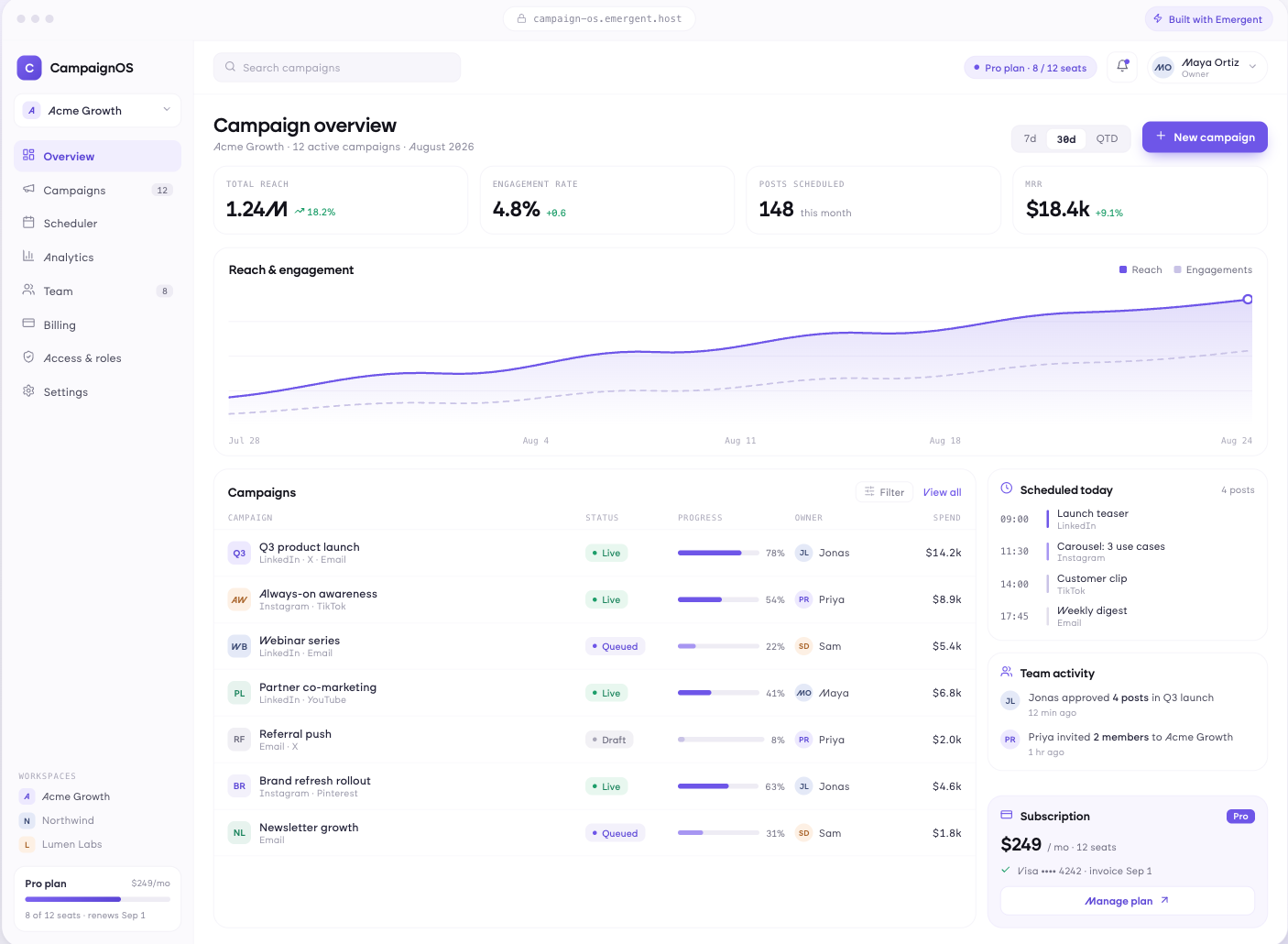
The Right Message at the Right Hour
Playlists scheduled by site, screen and daypart, campaigns with start and end dates, content targeted to store groups or regions, and priority messaging that interrupts the schedule when needed.
window.awbMockup = { contentScheduling: "Build a signage scheduling app with playlists assigned by site, screen and daypart, campaigns with start and end dates, content targeted to store groups or regions, and priority messaging that interrupts the schedule when something urgent needs to display.", fleetMonitoring: "Build a signage fleet monitor where every player reports its state, current content and last check in, showing screens offline or displaying the wrong playlist, displays that failed to update, and health grouped by site rather than by device.", localControl: "Build local content control for a signage network with locked brand templates containing editable fields, local content submitted for approval before display, permissions by site and role, and a record of what was changed locally and by whom.", advertisingAndProof: "Build proof of play reporting for advertising on a signage network showing what played on which screen at what time, impressions estimated from footfall where available, delivery against what was sold, and a report an advertiser can verify."};
Know a Screen Is Down Before They Do
Every player reporting state, current content and last check in, screens offline or showing the wrong playlist, displays that failed to update, and a health view by site rather than by device.
Let Managers Change Prices, Not Layouts
Locked brand templates with editable fields, local content submitted for approval, permissions by site and role, and a record of what was changed locally and by whom.
Evidence for Whoever Is Paying
Proof of play by screen, date and time slot, impressions estimated from footfall where available, campaign delivery against what was sold, and reporting a partner or advertiser can verify.
Every integration your
SaaS needs from day one
Email and calendar
Inbox and calendar sync both ways, so every reply, meeting and no-show lands on the contact record without anyone logging it.




Messaging and support
Conversations from chat, WhatsApp and your helpdesk attach to the right contact, so sales and support see the same history.




Payments and billing
Invoices, subscriptions and payment status flow back into the deal, so revenue and pipeline stay in one place.




If it has an API, your CRM can connect to it.
Emergent builds the connection against the API itself, including internal tools your team made. No closed ecosystem, no approved-partner list, no waiting for a connector to ship.


More things you can build
with Emergent
AI Website Builder
Build and publish responsive websites with AI — from landing pages to complete websites.
AI App Builder
Create and launch mobile apps with AI, without the complexity of traditional app development.
AI Web App Builder
Build and ship fully functional web apps with custom interfaces, logic, and workflows.
AI Dashboard Builder
Create interactive dashboards to visualize data, track KPIs, and manage business operations.
AI SaaS Builder
Build complete SaaS products with user accounts, subscriptions, dashboards, and core product workflows.
AI CRM Builder
Build custom CRMs for managing contacts, leads, pipelines, campaigns, and automated workflows.
AI Agent Builder
Create AI agents that can understand tasks, use tools, automate workflows, and work across your business.
Build Your Own
Start with any idea and build exactly what you need with AI — no templates or limits.

Why choose Emergent?
Most tools give you a demo you have to rebuild. Emergent gives you a product that is ready to run.
| Comparison | Other Tools |  |
|---|---|---|
| Built for | Demos and MVPs | Products you keep growing |
| What you get | Front end shell only | Full stack, wired end to end |
| Backend and database | Set it up yourself | Built and connected for you |
| Customization | Surface level styling | Deep workflow control |
| Integrations and APIs | Manual glue work | Connected from a prompt |
| Code ownership | Locked to the platform | Clean code you can export |
| Time to launch | Weeks of patching and setup | Live the same day |
Pick the Pricing Plan That Works for You
Choose the plan that fits your building ambitions. From weekend projects to enterprise applications, we've got you covered.
No credit card required*


Find the Right SaaS Builder
for Your Business
Frequently Asked Questions
Your Questions, Answered
Don't change this element unless you know what you are doing
on Emergent today




