

Build a Restaurant POS SaaS in Minutes With AI
Create your restaurant pos saas in minutes with AI. Add user accounts, billing, and backend from a prompt, and launch without coding.










Trusted by Builders Worldwide
Active Builders Worldwide
Apps Successfully Created
Countries Globally Reached



Build your restaurant POS SaaS in four steps
Just describe it: your menu, table plan, modifiers, service periods and payment methods.
Just describe it: your menu, table plan, modifiers, service periods and payment methods.
Card terminals and the kitchen display connect, so a table's order reaches the line as it is taken.
Add a modifier, a service period or a split bill option.
Run a busy service and check split bills and modifiers held up.
Emergent Key Features for Building a Restaurant POS SaaS
A till is judged on Friday at eight, when the room is full and every second at the terminal is a second not with a table.
Order Entry in the Fewest Taps
Modifiers, courses and covers entered quickly by someone who has learned the layout, because speed at the terminal is the entire experience for staff.
Keeps Trading When the Internet Drops
Orders taken and payments queued offline then reconciled, since a till that stops during service is worse than no till at all.
Bills Split Any Way a Table Asks
By cover, by item or by an arbitrary amount, which is the request that most often defeats a point of sale and holds up a table.
Courses Fired to the Kitchen Deliberately
Starters and mains sent when the table is ready rather than all at once, which is the difference between a kitchen that flows and one that shouts.
Tips Distributed by Your Own Rules
Service charge and tips allocated according to how you actually share them, and recorded properly for payroll and tax.
New Staff Productive in a Shift
A layout learnable quickly, because hospitality turnover means someone new is always on the terminal during service.
Restaurant POS SaaS Use Cases You Can Build in Minutes
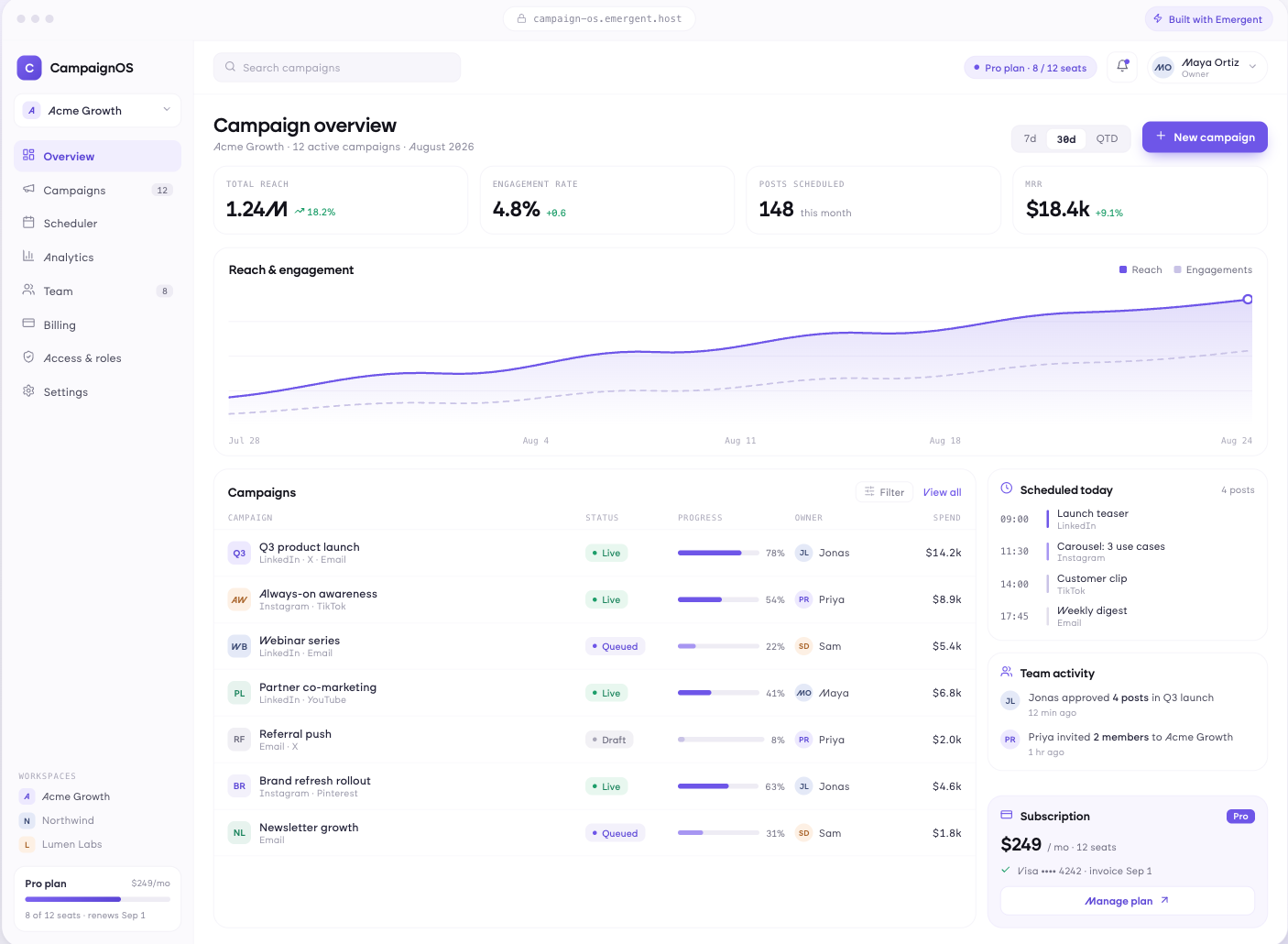
Fast Enough for a Full Room
Menu laid out for speed with modifiers and courses in the fewest taps, tables and covers managed, orders amended before firing, courses sent to the kitchen when the table is ready, and new staff productive within a shift.
window.awbMockup = { orderTaking: "Build a restaurant order entry screen laid out for speed with modifiers and courses reachable in the fewest taps, tables and covers managed, orders amended before firing, courses sent to the kitchen when the table is ready, and a layout new staff learn in a shift.", paymentAndBills: "Build a restaurant payment screen splitting bills by cover, by item or by arbitrary amount, accepting several payment methods on one table, handling tips and service charge by your own rules, recording voids and refunds with a reason, and issuing receipts by email or print.", offlineResilience: "Build offline resilience into a point of sale so orders are taken and payments queued when connectivity drops, kitchen tickets still print locally, everything reconciles when the connection returns, and staff are never told the system is unavailable mid service.", reportingAndControl: "Build a restaurant reporting app showing sales by hour, server and menu item, voids and discounts by staff member, average spend per cover, table turn times, cash reconciliation at close, and data feeding into stock and labour decisions."};
Split It However They Ask
Bills split by cover, by item or by arbitrary amounts, multiple payment methods on one table, tips and service charge handled by your rules, refunds and voids with a reason recorded, and receipts by email or print.
Service Does Not Stop for the Router
Orders taken and payments queued when connectivity drops, kitchen tickets still printing locally, everything reconciling when the connection returns, and staff never told the system is unavailable mid service.
What Happened During Service
Sales by hour, server and menu item, voids and discounts by staff member, average spend per cover, table turn times, cash reconciliation at close, and the data feeding stock and labour decisions.
Every integration your
SaaS needs from day one
Email and calendar
Inbox and calendar sync both ways, so every reply, meeting and no-show lands on the contact record without anyone logging it.




Messaging and support
Conversations from chat, WhatsApp and your helpdesk attach to the right contact, so sales and support see the same history.




Payments and billing
Invoices, subscriptions and payment status flow back into the deal, so revenue and pipeline stay in one place.




If it has an API, your CRM can connect to it.
Emergent builds the connection against the API itself, including internal tools your team made. No closed ecosystem, no approved-partner list, no waiting for a connector to ship.


More things you can build
with Emergent
AI Website Builder
Build and publish responsive websites with AI — from landing pages to complete websites.
AI App Builder
Create and launch mobile apps with AI, without the complexity of traditional app development.
AI Web App Builder
Build and ship fully functional web apps with custom interfaces, logic, and workflows.
AI Dashboard Builder
Create interactive dashboards to visualize data, track KPIs, and manage business operations.
AI SaaS Builder
Build complete SaaS products with user accounts, subscriptions, dashboards, and core product workflows.
AI CRM Builder
Build custom CRMs for managing contacts, leads, pipelines, campaigns, and automated workflows.
AI Agent Builder
Create AI agents that can understand tasks, use tools, automate workflows, and work across your business.
Build Your Own
Start with any idea and build exactly what you need with AI — no templates or limits.

Why choose Emergent?
Most tools give you a demo you have to rebuild. Emergent gives you a product that is ready to run.
| Comparison | Other Tools |  |
|---|---|---|
| Built for | Demos and MVPs | Products you keep growing |
| What you get | Front end shell only | Full stack, wired end to end |
| Backend and database | Set it up yourself | Built and connected for you |
| Customization | Surface level styling | Deep workflow control |
| Integrations and APIs | Manual glue work | Connected from a prompt |
| Code ownership | Locked to the platform | Clean code you can export |
| Time to launch | Weeks of patching and setup | Live the same day |
Pick the Pricing Plan That Works for You
Choose the plan that fits your building ambitions. From weekend projects to enterprise applications, we've got you covered.
No credit card required*


Find the Right SaaS Builder
for Your Business
Frequently Asked Questions
Your Questions, Answered
Don't change this element unless you know what you are doing
on Emergent today




