

Build a Food Ordering SaaS That Grows Your Sales with AI
Create your food ordering SaaS in minutes with AI. Show your menu, take orders, accept payments, and grow sales commission-free without coding.










Trusted by Builders Worldwide
Active Builders Worldwide
Apps Successfully Created
Countries Globally Reached



Build your email automation SaaS in four steps
Say it in your own words: your triggers, sequence logic, audience rules and sending limits per plan.
Say it in your own words: your triggers, sequence logic, audience rules and sending limits per plan.
Your sending infrastructure connects, so throttling and bounce handling are built in rather than bolted on.
Add a trigger type, a branching rule or a different sending limit.
Build one sequence with a condition and check it stopped when it should have.
Emergent Key Features for Building an Email Automation SaaS
Most automation platforms automate a list. Lifecycle messaging needs events, branching and a frequency limit that spans every sequence.
Triggered by What Someone Did
Sequences begin from a real action in your product or data rather than a list upload, which is the difference between lifecycle messaging and scheduled sending.
Exits That Actually Fire
Someone who converts on step two stops receiving steps three to six. Sequences that keep running after the goal is met are the fastest way to lose a subscriber.
One Frequency Cap across Everything
Sends are counted per contact across every sequence at once, which prevents four campaigns each behaving reasonably and one person receiving eleven emails.
A Single Contact Timeline
Every message someone received and what they did next sits on one record. Without it you cannot tell a sequence that works from one that is merely busy.
Deliverability as a First Class Concern
Authentication, bounce and complaint handling, suppression and engagement based sending. Reputation is the asset everything else depends on and it is lost quickly.
Reported Step by Step
Performance per step rather than per sequence, so you fix the message that loses people instead of rewriting all six.
Email Automation SaaS Use Cases You Can Build in Minutes
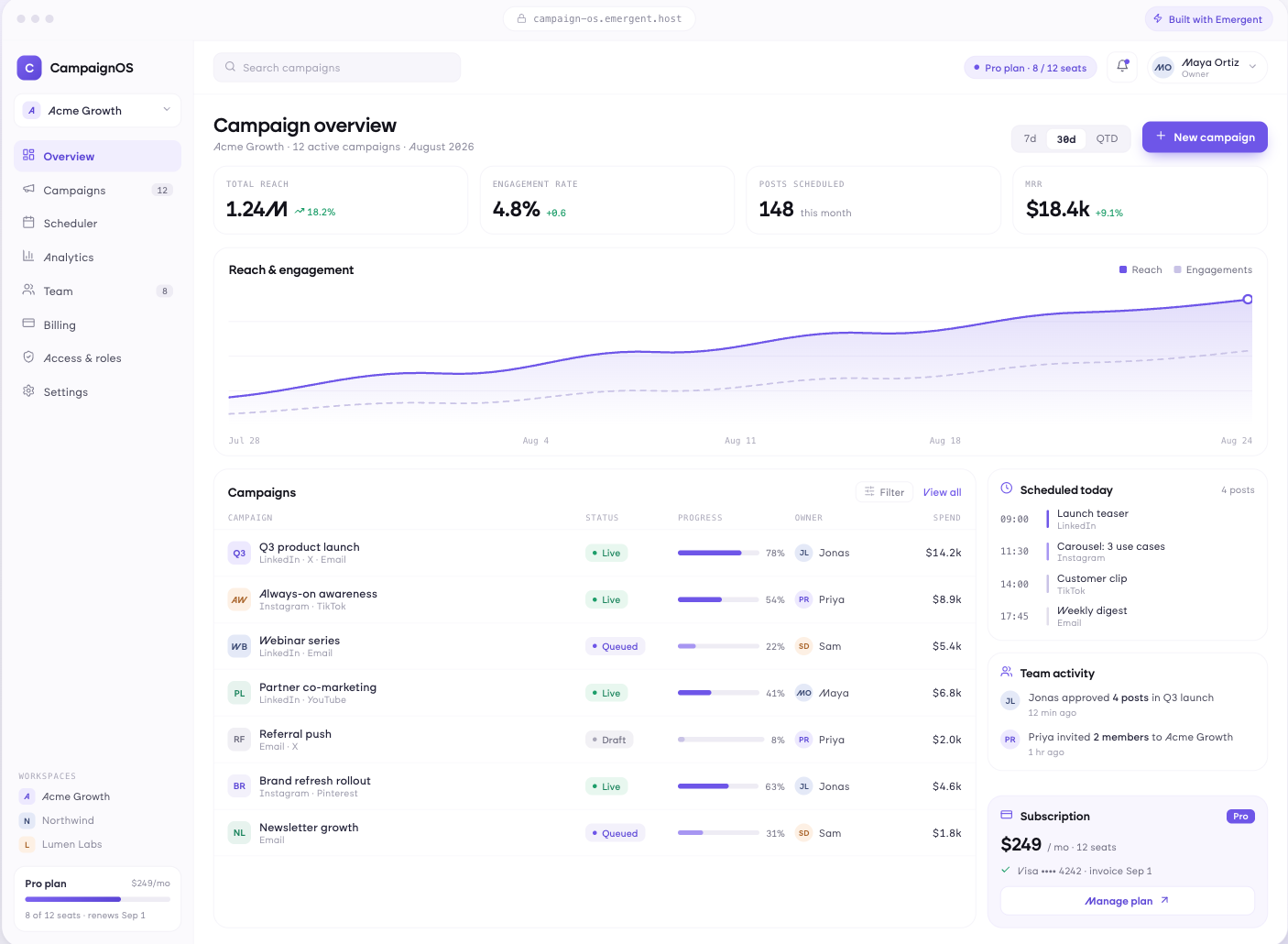
Messages That Follow Behaviour
Sequences starting from signup, activation or inactivity, with waits and conditions between steps and clean exits when someone converts. Who is currently in which sequence is always visible.
window.awbMockup = { lifecycleSequences: "Build an email automation app where sequences are triggered by real events from my product such as signup, activation or fourteen days of inactivity, with waits and conditional branches between steps, immediate exit when a contact converts, and a view showing exactly who is currently in which sequence and at which step.", onboardingFlows: "Build an onboarding email flow where each step is tied to a setup milestone and only sends if that step is still incomplete, high value accounts escalate to a human instead of another email after two unopened messages, and reporting shows which onboarding step most users stall at before going quiet.", winback: "Build a winback automation triggered by declining product usage rather than a fixed date, segmented by account value and tenure so the offer differs, suppressed for anyone already receiving another sequence, and measured on revenue actually recovered per flow rather than on open rate.", transactional: "Build transactional email sending for receipts, password resets, alerts and notifications with templates and merge variables, delivery status per individual message, automatic retry on failure, and a log searchable by recipient address so support can confirm whether something was sent and when."};
Only Nudge What Is Still Undone
Steps tied to setup milestones, so a message about connecting your data does not arrive after someone connected it. High value accounts escalate to a human instead of another email.
Reach Them Before They Have Decided
Triggered by declining usage rather than a date, segmented by value and tenure, suppressed for anyone already receiving something else, and measured on revenue actually recovered.
The Emails Users Are Waiting For
Receipts, resets, alerts and notifications with templates and variables, retry on failure, and a log searchable by recipient for the moment support asks whether it was sent.
Every integration your
SaaS needs from day one
Email and calendar
Inbox and calendar sync both ways, so every reply, meeting and no-show lands on the contact record without anyone logging it.




Messaging and support
Conversations from chat, WhatsApp and your helpdesk attach to the right contact, so sales and support see the same history.




Payments and billing
Invoices, subscriptions and payment status flow back into the deal, so revenue and pipeline stay in one place.




If it has an API, your CRM can connect to it.
Emergent builds the connection against the API itself, including internal tools your team made. No closed ecosystem, no approved-partner list, no waiting for a connector to ship.


More things you can build
with Emergent
AI Website Builder
Build and publish responsive websites with AI — from landing pages to complete websites.
AI App Builder
Create and launch mobile apps with AI, without the complexity of traditional app development.
AI Web App Builder
Build and ship fully functional web apps with custom interfaces, logic, and workflows.
AI Dashboard Builder
Create interactive dashboards to visualize data, track KPIs, and manage business operations.
AI SaaS Builder
Build complete SaaS products with user accounts, subscriptions, dashboards, and core product workflows.
AI CRM Builder
Build custom CRMs for managing contacts, leads, pipelines, campaigns, and automated workflows.
AI Agent Builder
Create AI agents that can understand tasks, use tools, automate workflows, and work across your business.
Build Your Own
Start with any idea and build exactly what you need with AI — no templates or limits.

Why choose Emergent?
Most tools give you a demo you have to rebuild. Emergent gives you a product that is ready to run.
| Comparison | Other Tools |  |
|---|---|---|
| Built for | Demos and MVPs | Products you keep growing |
| What you get | Front end shell only | Full stack, wired end to end |
| Backend and database | Set it up yourself | Built and connected for you |
| Customization | Surface level styling | Deep workflow control |
| Integrations and APIs | Manual glue work | Connected from a prompt |
| Code ownership | Locked to the platform | Clean code you can export |
| Time to launch | Weeks of patching and setup | Live the same day |
Pick the Pricing Plan That Works for You
Choose the plan that fits your building ambitions. From weekend projects to enterprise applications, we've got you covered.
No credit card required*


Find the Right SaaS Builder
for Your Business
Frequently Asked Questions
Your Questions, Answered
Don't change this element unless you know what you are doing
on Emergent today




