

Build a Hospital SaaS in Minutes With AI
Create your hospital saas in minutes with AI. Add user accounts, billing, and backend from a prompt, and launch without coding.










Trusted by Builders Worldwide
Active Builders Worldwide
Apps Successfully Created
Countries Globally Reached



Build your hospital SaaS in four steps
Describe it in plain English: your departments, patient pathways, roles and reporting obligations.
Describe it in plain English: your departments, patient pathways, roles and reporting obligations.
Your patient administration system connects, so records are referenced rather than copied into a second place.
Add a department, a pathway stage or a role.
Follow a patient through a pathway and check every handover was recorded.
Emergent Key Features for Building a Hospital SaaS
The whole site runs on bed availability, and by the time a ward is full the decisions that would have prevented it have passed.
Capacity Forecast, Not Reported
Expected admissions against planned discharges projects the bed position hours ahead, which is when escalation can still change the outcome.
Discharge Delays Attributed to Cause
Waits grouped by whether they are clinical, social care, transport or pharmacy, because each requires a completely different intervention.
Theatre Time Recovered
Session utilisation, start and finish times against schedule, turnaround between cases and on the day cancellations with reasons, which is where capacity already exists.
Patients Boarding Made Visible
Those with a decision to admit still waiting for a bed, with time elapsed and the specialty required, since this is the pressure that determines the whole site.
Staffing against Acuity
Planned and actual staffing compared with recorded dependency rather than bed numbers, which is what makes a safe staffing figure meaningful.
One Position for the Site Meeting
Beds, emergency arrivals, staffing gaps and escalation level in one view, so an operations meeting starts from agreement rather than from three conflicting reports.
Hospital SaaS Use Cases You Can Build in Minutes
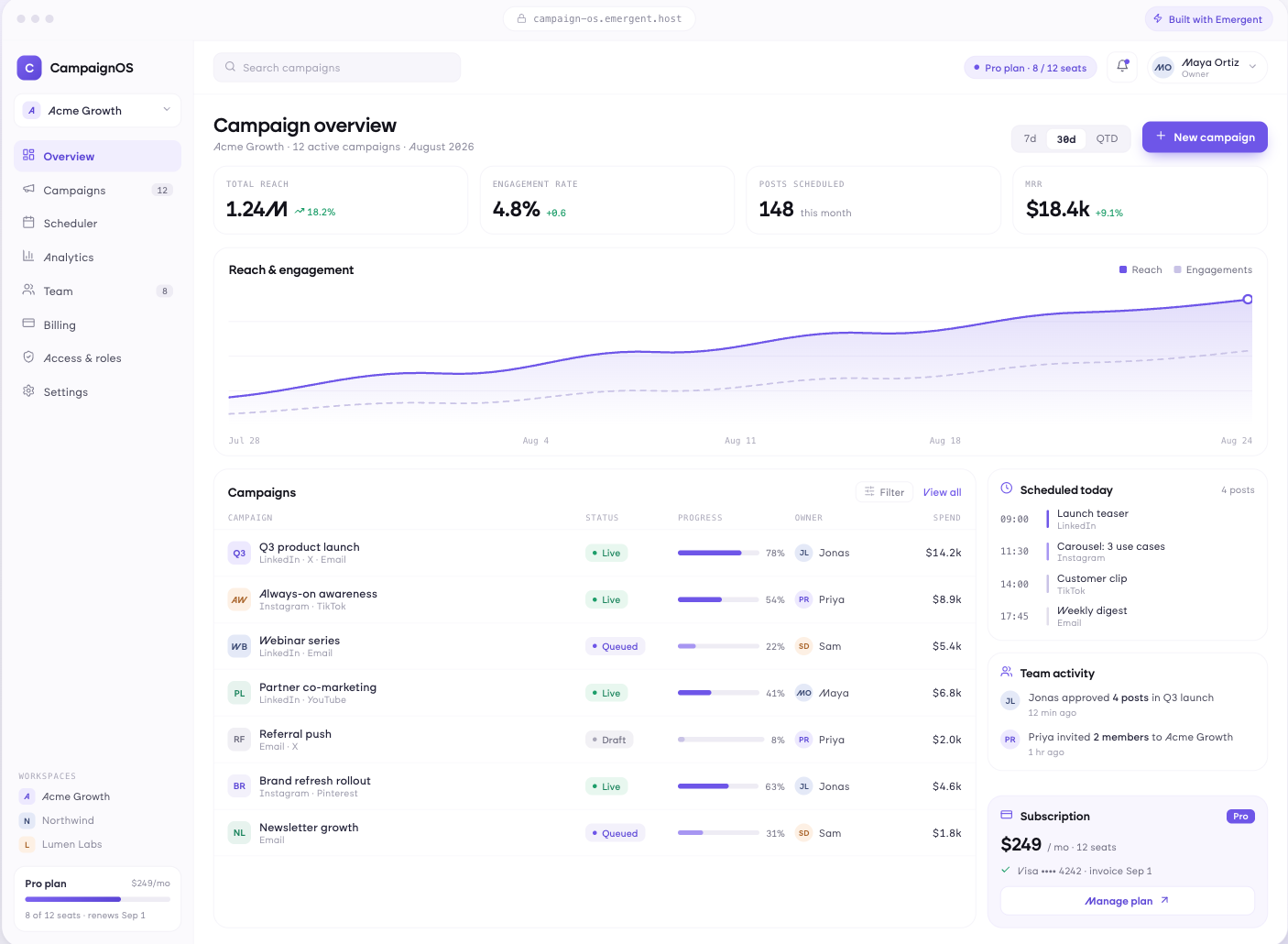
See the Afternoon Before It Arrives
Occupied and available beds by ward and specialty, patients awaiting admission with waiting time, planned discharges against completed, and a projected position several hours ahead based on expected arrivals.
window.awbMockup = { bedAndCapacity: "Build a bed capacity app showing occupied and available beds by ward and specialty, patients awaiting admission with waiting time, planned discharges against completed, and a projected bed position several hours ahead based on expected arrivals and discharges.", patientFlow: "Build a patient flow app showing admissions and discharges by hour, length of stay against expected by specialty, patients exceeding expected stay, discharge delays grouped by cause such as social care or transport, and weekend discharge rates against weekday.", theatreUtilisation: "Build a theatre utilisation app showing scheduled against actual utilisation per theatre and list, session start and finish against planned, turnaround between cases, cancellations on the day with reasons, and lists consistently running under capacity.", siteOperations: "Build a hospital site operations view showing the current bed position, emergency arrivals in the last four hours, patients boarding beyond target, staffing gaps for the coming shift, the current escalation level and the actions that level triggers."};
Escalate at the Blockage
Admissions and discharges by hour, length of stay against expected by specialty, patients exceeding expected stay, discharge delays grouped by cause, and weekend discharge rates against weekday.
Capacity You Already Have
Scheduled against actual utilisation per theatre and list, session start and finish against planned, turnaround between cases, cancellations on the day with reasons, and lists running under capacity.
One Version for the Operations Meeting
Current bed position, emergency arrivals in the last four hours, patients boarding beyond target, staffing gaps for the coming shift, escalation level against your capacity plan, and the actions that level triggers.
Every integration your
SaaS needs from day one
Email and calendar
Inbox and calendar sync both ways, so every reply, meeting and no-show lands on the contact record without anyone logging it.




Messaging and support
Conversations from chat, WhatsApp and your helpdesk attach to the right contact, so sales and support see the same history.




Payments and billing
Invoices, subscriptions and payment status flow back into the deal, so revenue and pipeline stay in one place.




If it has an API, your CRM can connect to it.
Emergent builds the connection against the API itself, including internal tools your team made. No closed ecosystem, no approved-partner list, no waiting for a connector to ship.


More things you can build
with Emergent
AI Website Builder
Build and publish responsive websites with AI — from landing pages to complete websites.
AI App Builder
Create and launch mobile apps with AI, without the complexity of traditional app development.
AI Web App Builder
Build and ship fully functional web apps with custom interfaces, logic, and workflows.
AI Dashboard Builder
Create interactive dashboards to visualize data, track KPIs, and manage business operations.
AI SaaS Builder
Build complete SaaS products with user accounts, subscriptions, dashboards, and core product workflows.
AI CRM Builder
Build custom CRMs for managing contacts, leads, pipelines, campaigns, and automated workflows.
AI Agent Builder
Create AI agents that can understand tasks, use tools, automate workflows, and work across your business.
Build Your Own
Start with any idea and build exactly what you need with AI — no templates or limits.

Why choose Emergent?
Most tools give you a demo you have to rebuild. Emergent gives you a product that is ready to run.
| Comparison | Other Tools |  |
|---|---|---|
| Built for | Demos and MVPs | Products you keep growing |
| What you get | Front end shell only | Full stack, wired end to end |
| Backend and database | Set it up yourself | Built and connected for you |
| Customization | Surface level styling | Deep workflow control |
| Integrations and APIs | Manual glue work | Connected from a prompt |
| Code ownership | Locked to the platform | Clean code you can export |
| Time to launch | Weeks of patching and setup | Live the same day |
Pick the Pricing Plan That Works for You
Choose the plan that fits your building ambitions. From weekend projects to enterprise applications, we've got you covered.
No credit card required*


Find the Right SaaS Builder
for Your Business
Frequently Asked Questions
Your Questions, Answered
Don't change this element unless you know what you are doing
on Emergent today




