

Build an Inventory Management SaaS in Minutes With AI
Create your inventory management saas in minutes with AI. Add user accounts, billing, and backend from a prompt, and launch without coding.










Trusted by Builders Worldwide
Active Builders Worldwide
Apps Successfully Created
Countries Globally Reached



Build your inventory management SaaS in four steps
Tell Emergent, plainly: your stock structure, locations, reorder rules and valuation method.
Tell Emergent, plainly: your stock structure, locations, reorder rules and valuation method.
Your sales channels connect, so stock moves as orders arrive.
Add a location, change a reorder point or switch the valuation method.
Sell across two channels and check stock stayed accurate in both.
Emergent Key Features for Building an Inventory Management SaaS
Stock reports are easy. Producing a purchase order somebody will actually sign off is what an inventory system is for.
Reorder Points from Real Consumption
Thresholds calculated from actual usage and supplier lead time rather than a number set once in a spreadsheet and never revisited.
Purchase Suggestions, Not Alerts
The output is a recommended order quantity respecting minimum order rules and the date you must order by, which is a decision rather than a warning.
Available Netted Properly
Committed and incoming quantities are deducted, so the figure used for promising and for buying is the same one and both are correct.
Capital Tied up in Slow Stock
Items with no movement for ninety or one hundred and eighty days are valued, turning dead stock from a vague suspicion into a disposal list.
Count Variance Where It Repeats
Cycle count discrepancies are tracked by item and location, since the same few lines usually cause most of the inaccuracy and can be fixed.
Lead Times from Receipts
Planning uses what suppliers actually deliver rather than what they quote, which is the single most common cause of avoidable stockouts.
Inventory Management SaaS Use Cases You Can Build in Minutes
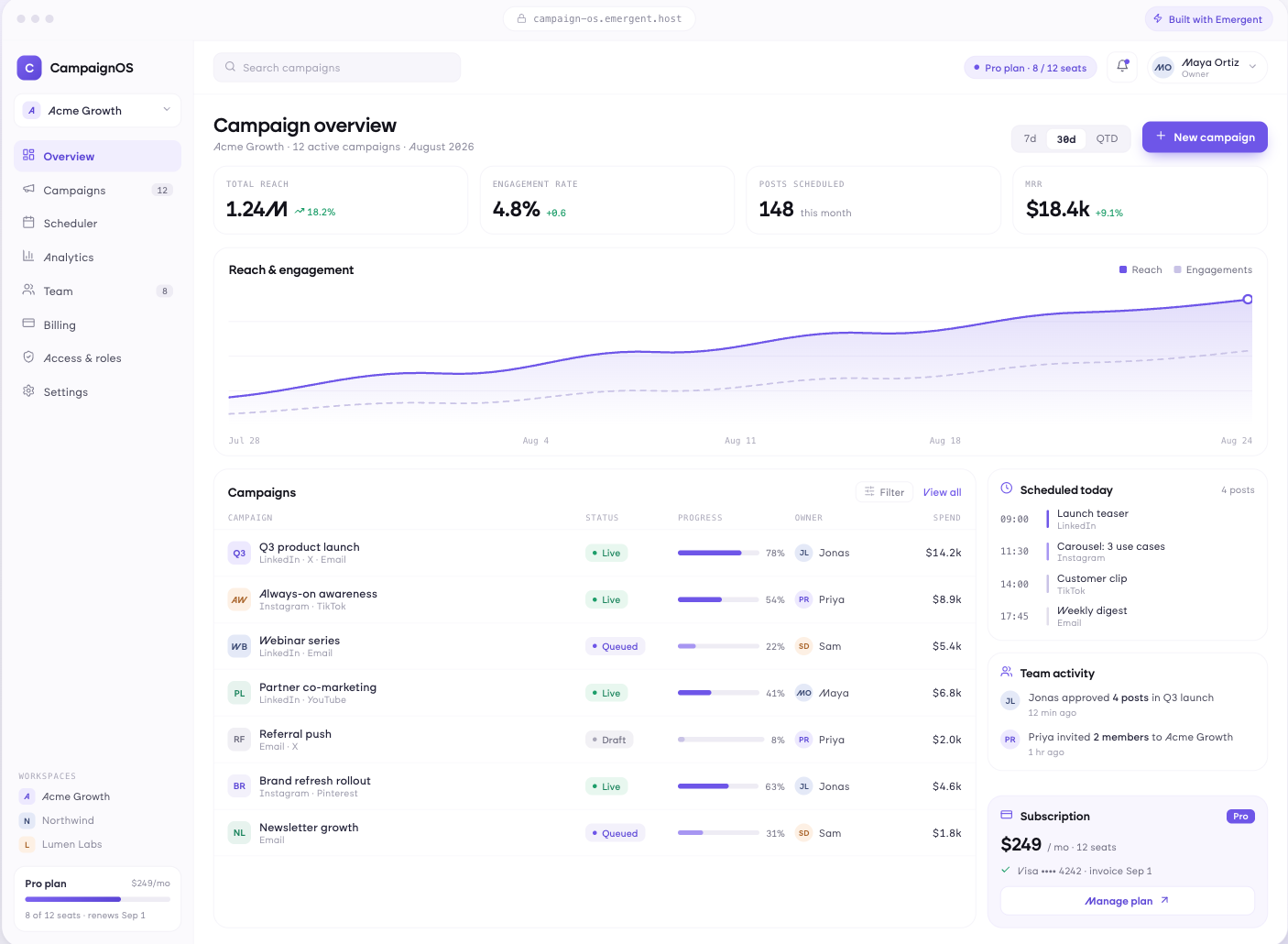
A Purchase Order, Not a Warning
Items below reorder point with consumption rate, days of cover, supplier lead time and a recommended quantity respecting minimum order rules, plus the date the order must be placed by.
window.awbMockup = { replenishment: "Build a replenishment app listing items below reorder point with consumption rate, days of cover, supplier lead time and a recommended order quantity that respects minimum order rules, plus the date the order must be placed by to avoid a stockout.", stockAccuracy: "Build a stock accuracy app scheduling cycle counts by value and movement, showing variance between counted and system quantity by item, location and zone, accuracy trends by area, and items with repeated discrepancies flagged for investigation rather than adjustment.", multiLocation: "Build a multi location stock view showing imbalances where one site is out of an item while another holds surplus, recommending transfers with quantities, tracking stock in transit, and showing true availability across the whole network.", workingCapital: "Build a working capital view showing stock turns by item and category, capital tied up by stock age band, items with no movement in six months valued at cost, and a disposal list ranked by the money each line is currently holding."};
Fix the Lines That Cause the Errors
Cycle counts against schedule, variance between counted and system quantity by item and location, accuracy by zone, and items with repeated discrepancies flagged for investigation rather than adjustment.
Move What You Already Own
Stock by location with imbalances identified where one site is out while another holds surplus, transfer recommendations with quantities, stock in transit, and availability across the whole network.
Put a Number on Dead Stock
Stock turns by item and category, capital tied up by age band, items with no movement in six months valued at cost, and a disposal list ranked by the money each line is holding.
Every integration your
SaaS needs from day one
Email and calendar
Inbox and calendar sync both ways, so every reply, meeting and no-show lands on the contact record without anyone logging it.




Messaging and support
Conversations from chat, WhatsApp and your helpdesk attach to the right contact, so sales and support see the same history.




Payments and billing
Invoices, subscriptions and payment status flow back into the deal, so revenue and pipeline stay in one place.




If it has an API, your CRM can connect to it.
Emergent builds the connection against the API itself, including internal tools your team made. No closed ecosystem, no approved-partner list, no waiting for a connector to ship.


More things you can build
with Emergent
AI Website Builder
Build and publish responsive websites with AI — from landing pages to complete websites.
AI App Builder
Create and launch mobile apps with AI, without the complexity of traditional app development.
AI Web App Builder
Build and ship fully functional web apps with custom interfaces, logic, and workflows.
AI Dashboard Builder
Create interactive dashboards to visualize data, track KPIs, and manage business operations.
AI SaaS Builder
Build complete SaaS products with user accounts, subscriptions, dashboards, and core product workflows.
AI CRM Builder
Build custom CRMs for managing contacts, leads, pipelines, campaigns, and automated workflows.
AI Agent Builder
Create AI agents that can understand tasks, use tools, automate workflows, and work across your business.
Build Your Own
Start with any idea and build exactly what you need with AI — no templates or limits.

Why choose Emergent?
Most tools give you a demo you have to rebuild. Emergent gives you a product that is ready to run.
| Comparison | Other Tools |  |
|---|---|---|
| Built for | Demos and MVPs | Products you keep growing |
| What you get | Front end shell only | Full stack, wired end to end |
| Backend and database | Set it up yourself | Built and connected for you |
| Customization | Surface level styling | Deep workflow control |
| Integrations and APIs | Manual glue work | Connected from a prompt |
| Code ownership | Locked to the platform | Clean code you can export |
| Time to launch | Weeks of patching and setup | Live the same day |
Pick the Pricing Plan That Works for You
Choose the plan that fits your building ambitions. From weekend projects to enterprise applications, we've got you covered.
No credit card required*


Find the Right SaaS Builder
for Your Business
Frequently Asked Questions
Your Questions, Answered
Don't change this element unless you know what you are doing
on Emergent today




