

Build a Subscription Management SaaS in Minutes With AI
Create your subscription management saas in minutes with AI. Add user accounts, billing, and backend from a prompt, and launch without coding.










Trusted by Builders Worldwide
Active Builders Worldwide
Apps Successfully Created
Countries Globally Reached



Build your subscription management SaaS in four steps
Put it in a sentence: your plans, upgrade and downgrade rules, trials and cancellation flow.
Put it in a sentence: your plans, upgrade and downgrade rules, trials and cancellation flow.
Stripe connects, so plan changes and failed payments are handled properly.
Add a plan, change trial length or adjust the cancellation flow.
Downgrade mid cycle and check the credit and access change correctly.
Emergent Key Features for Building a Subscription Management SaaS
Signing someone up is one screen. What decides revenue is everything that happens when they want to leave, pause or change plan.
Cancellation as a Conversation
The moment someone clicks cancel is the highest intent point in the whole lifecycle, so it offers pause, downgrade or a reason capture rather than a confirmation button.
Pause Instead of Losing Them
A subscriber who pauses for two months returns far more often than one who cancels and is winbacked, but only if pausing is actually offered before the exit.
Plan Changes Without Support Tickets
Upgrades, downgrades, quantity changes and add ons are self serve with the price effect shown before confirmation, which removes the most common reason people contact you.
Reasons Captured Where They Are Honest
Exit reasons collected at cancellation rather than in a survey a week later, grouped so a product problem becomes visible rather than anecdotal.
Involuntary Churn Treated Separately
A customer who left because their card expired is a different problem from one who chose to go, and merging them hides the cheapest revenue you can recover.
Lifecycle Visible per Subscriber
Trial, activation, plan changes, payment failures and support contacts on one timeline, which is what makes a retention pattern something you can see rather than infer.
Subscription Management SaaS Use Cases You Can Build in Minutes
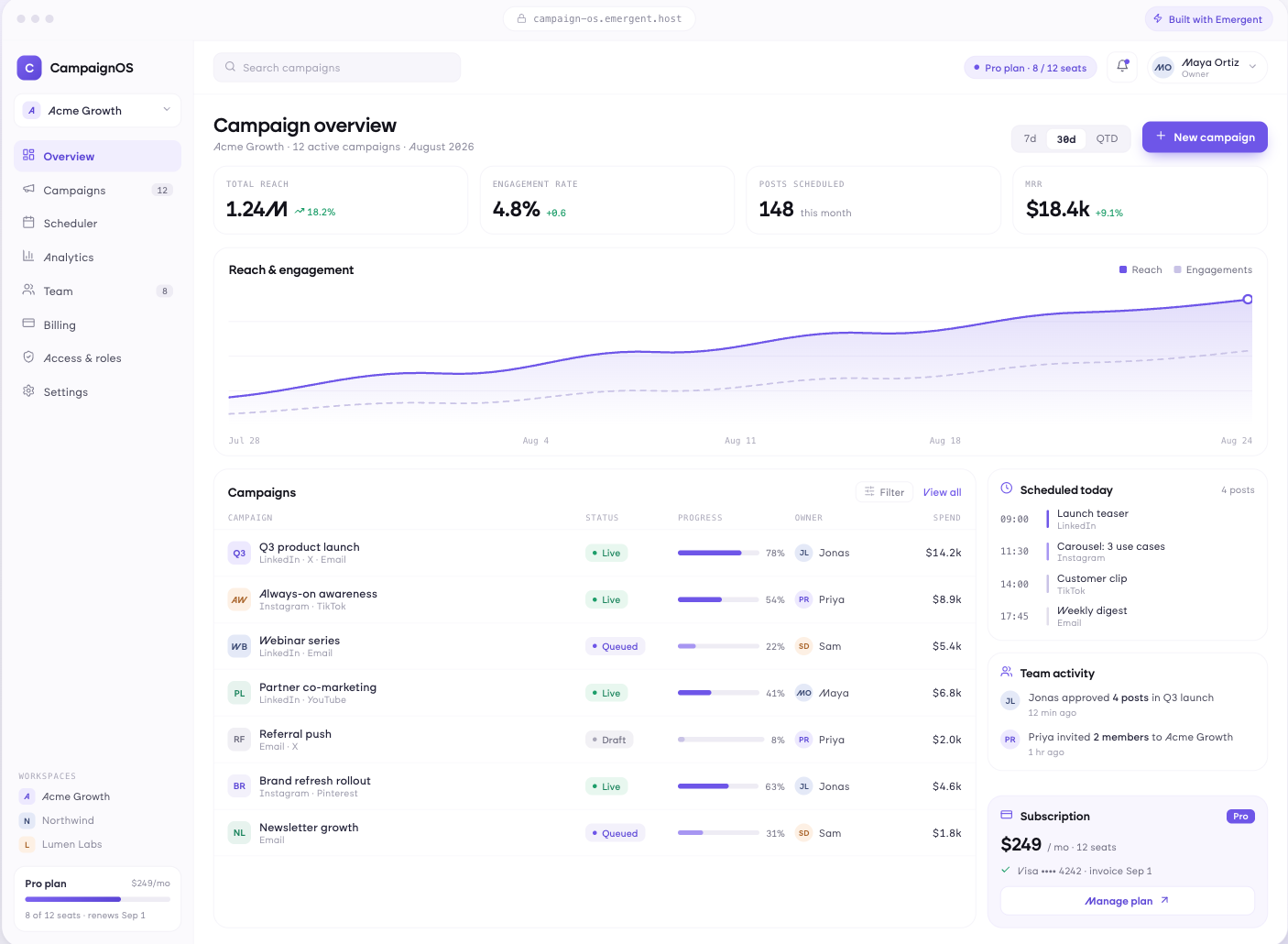
Everything They Currently Email You About
Change plan, adjust quantities, update payment details, view invoices and see exactly what the next charge will be. Each of these is a support ticket that stops arriving the day it exists.
window.awbMockup = { selfServeManagement: "Build a self serve subscription area where a customer can change plan with the price effect shown before confirming, adjust seat quantities, update their payment method, view and download invoices, and see exactly what the next charge will be and when it will be taken.", retentionFlows: "Build a cancellation flow that appears when someone clicks cancel, offering a pause with a chosen return date, a downgrade to a smaller plan, and an offer that varies by tenure and account value, capturing a reason either way and recording which offer was accepted.", trialConversion: "Build a trial conversion app showing each trial with days remaining, which setup steps have been completed, prompts tied to the actions that historically predict conversion, and a list of trials heading for expiry without activation while there is still time to intervene.", churnAnalysis: "Build a churn analysis view reporting voluntary and involuntary churn separately, retention by signup cohort and plan tier, cancellation reasons grouped into themes, and the product behaviours that appeared in the four weeks before someone cancelled."};
The Screen After Someone Clicks Cancel
Pause options with a return date, downgrade to a smaller plan, targeted offers by tenure and value, and a reason captured either way so the exit still teaches you something.
Convert Before the Trial Ends, Not After
Trial progress with what has been set up and what has not, prompts tied to the actions that predict conversion, and trials heading for expiry without activation flagged while there is still time.
Separate Who Left From Who Was Lost
Voluntary and involuntary churn reported apart, retention by cohort and plan, cancellation reasons grouped by theme, and the behaviours that appeared in the weeks before someone left.
Every integration your
SaaS needs from day one
Email and calendar
Inbox and calendar sync both ways, so every reply, meeting and no-show lands on the contact record without anyone logging it.




Messaging and support
Conversations from chat, WhatsApp and your helpdesk attach to the right contact, so sales and support see the same history.




Payments and billing
Invoices, subscriptions and payment status flow back into the deal, so revenue and pipeline stay in one place.




If it has an API, your CRM can connect to it.
Emergent builds the connection against the API itself, including internal tools your team made. No closed ecosystem, no approved-partner list, no waiting for a connector to ship.


More things you can build
with Emergent
AI Website Builder
Build and publish responsive websites with AI — from landing pages to complete websites.
AI App Builder
Create and launch mobile apps with AI, without the complexity of traditional app development.
AI Web App Builder
Build and ship fully functional web apps with custom interfaces, logic, and workflows.
AI Dashboard Builder
Create interactive dashboards to visualize data, track KPIs, and manage business operations.
AI SaaS Builder
Build complete SaaS products with user accounts, subscriptions, dashboards, and core product workflows.
AI CRM Builder
Build custom CRMs for managing contacts, leads, pipelines, campaigns, and automated workflows.
AI Agent Builder
Create AI agents that can understand tasks, use tools, automate workflows, and work across your business.
Build Your Own
Start with any idea and build exactly what you need with AI — no templates or limits.

Why choose Emergent?
Most tools give you a demo you have to rebuild. Emergent gives you a product that is ready to run.
| Comparison | Other Tools |  |
|---|---|---|
| Built for | Demos and MVPs | Products you keep growing |
| What you get | Front end shell only | Full stack, wired end to end |
| Backend and database | Set it up yourself | Built and connected for you |
| Customization | Surface level styling | Deep workflow control |
| Integrations and APIs | Manual glue work | Connected from a prompt |
| Code ownership | Locked to the platform | Clean code you can export |
| Time to launch | Weeks of patching and setup | Live the same day |
Pick the Pricing Plan That Works for You
Choose the plan that fits your building ambitions. From weekend projects to enterprise applications, we've got you covered.
No credit card required*


Find the Right SaaS Builder
for Your Business
Frequently Asked Questions
Your Questions, Answered
Don't change this element unless you know what you are doing
on Emergent today




