




TL;DR
- Bolt.new: fastest route from prompt to a running preview, if you can manage a token budget.
- Emergent: widest coverage after one follow-up, from working logins to a phone-usable view.
- Base44: reliable on straightforward builds when every constraint is spelled out.
- Lovable: the best-looking first screen before you ask for a single tweak.
- Google AI Studio: the browser-based official path, with Firebase wiring handled for you.
- Google Antigravity: the code-first official path, running locally on one machine.
- Supabase: Postgres in place of Firestore, with documented migration guides.
- Appwrite: the whole open-source server on infrastructure you control.
I opened Firebase Studio to check on an old workspace and got a banner, a sunset date, and two buttons pointing at tools I'd never touched. I closed the tab. Reopening it a minute later didn't change the date, which is roughly the extent of my crisis planning.
If you're here, you've probably seen the same banner, or you're trying to figure out how much time you have left.
So I spent 16 days testing Firebase Studio alternatives: the official Google paths, and the AI app builders people are switching to instead. Six tools ran the exact same brief from one identical prompt. Where I could only check one of the three criteria on a given tool, I say so in its section.
The last two don't generate an app at all, so they're judged on the narrower job of replacing what sat underneath your workspace.
By the end, you'll know which of these holds up under real use, and which one fits how you used Firebase Studio in the first place.
Why You Need a Firebase Studio Alternative Right Now
Nobody was rushing to leave Firebase Studio. You opened a browser tab and were building in minutes, and you could pick the same project up from whatever machine was nearest, phone included. The decision to leave is being made for you anyway.
The Shutdown Timeline Leaves No Room to Wait
Firebase Studio sunsets on March 22, 2027. New workspace creation and signup have been disabled since June 22, 2026, so if you never started a workspace before that cutoff, you can't start one now.
Google's own migration timeline is blunt about the sunset date itself. Firebase Studio shuts down and all remaining data is permanently deleted, with no recovery. Anything already deployed to App Hosting keeps running, and core Firebase services are untouched.
No SLA, No Deprecation Policy
Firebase Studio could land with so little protection because it was always labeled a Preview product, which meant no service level agreement (SLA) and no deprecation policy.
Your Prompts and Code Feed Model Training by Default
Your prompts and code also feed model training by default. You keep code out by turning off code completion and indexing in your Firebase Studio settings, and you keep prompts out by skipping both the App Prototyping agent and the Gemini assistance features.
Where Displaced Firebase Studio Users Are Being Pointed
Google's migration messaging points existing users toward two official paths, Google AI Studio and Google Antigravity. It lists criteria for choosing between them. It never says how far either one lands from what Firebase Studio itself did.
Three reader situations, three different answers:
- Staying inside Google's ecosystem: Google AI Studio and Google Antigravity cover that path directly, and both are ranked below.
- Wanting the job Firebase Studio did: The AI app builders here are the closer match. You describe an app in ordinary sentences and get working software back, an approach also known as vibe coding.
- Only ever using the Firebase integration: Supabase and Appwrite cover that narrower job on its own terms, which is why they sit in seventh and eighth.
How I Tested and Ranked These Eight
Testing ran across 16 days, evenings and weekends, inside each tool's own account and, for Google Antigravity, its local desktop install.
Six of the eight ran the same brief: Signal Board, a small internal tool for logging and reviewing weekly status updates. In short, Contributors log a weekly update and can only see their own, a Lead sees everyone's and gets an automatic status tag per update, and once submitted an update locks after 24 hours.
It also had to hold up on a phone. The same brief, word for word, went to all six tools.
Three things in that brief carried the most weight in the ranking below, each from a spot where these tools are known to break:
- Permission split: Access rules are where prompt-built apps fail without looking broken, so I counted the follow-up prompts where I could.
- The 24-hour edit lock: A constraint buried in plain prose, never spelled out as its own numbered instruction. It tests whether a tool reads a brief or skims it.
- The phone view: A dashboard that stacks into an unreadable column on a narrow screen isn't finished, and checking a build from a phone is the exact habit people are losing.
I checked the edit lock on Bolt.new, Emergent, and Base44, and the phone view on Emergent. Antigravity is local-only, so there was no phone to check it from, which is its own finding. Where a section doesn't mention one of the three, I didn't get to it.
The two official Google paths carried one extra criterion: how closely each replicates the browser-based, work-from-anywhere workflow. I also weighed how much file-level control each hands back once a project exists.
Supabase and Appwrite sit here on a different basis. Neither turns a prompt into an app, so there was nothing to build for them. They're judged on the job they replace (data and logins), the difficulty of migrating off Firebase, the point where the free tier stops, and the upkeep of running it yourself.
Four tools came out of the running, and one never got in:
AWS Amplify wires together AWS's own Cognito, AppSync, and S3 services for teams already committed to that ecosystem. Backendless pairs a drag-and-drop builder with a hybrid SQL and NoSQL database.
Neither is one of the AI app-building tools that make up most of this ranking, and the two data-layer slots went to Supabase and Appwrite.
GitHub Copilot and v0 by Vercel were cut for the same reason: Copilot assists inside an editor rather than building an app from a brief, and v0 generates interface components without the logins and data this brief needed.
Replit's Agent 4 is a comparable AI app builder, but it sits inside a wider development environment. That wider scope makes it unfair to compare its output from a single brief against tools built specifically for prompt-to-app work.
If you're weighing these two directly, our Firebase Studio vs Replit comparison breaks down how they differ on setup speed, deployment, and pricing.
8 Best Firebase Studio Alternatives: At a Glance
How the eight stack up by job:
| Platform | Best For | Price |
|---|---|---|
| Bolt.new | AI app builder: Fastest first working preview | $25/month ($18/month, billed annually) |
| Emergent | AI app builder: Widest coverage | $20/month ($17/month, billed annually) |
| Base44 | AI app builder: Literal, step-by-step builds | $20/month ($16/month, billed annually) |
| Lovable | AI app builder: Visual polish on the first pass | $25/month ($21/month, billed annually) |
| Google AI Studio | Google path: Browser-based, Firebase wiring included | Free, Gemini API billed per token |
| Google Antigravity | Google path: Code-first, local workflow | Free Individual plan; $19.99/month via Google AI Pro for higher limits |
| Supabase | Firebase layer swap: Postgres data and logins | $25/month, no annual discount |
| Appwrite | Firebase layer swap: Self-hosted on your servers | From $25/month, no annual discount |
Pricing correct as of August 2026.
How to Evaluate Firebase Studio Alternatives
Three more questions decide whether a replacement covers what Firebase Studio did for you, and popularity answers none of them:
- Code ownership: Emergent and Base44 offer GitHub paths, Google AI Studio exports a ZIP, and Antigravity keeps files on your disk. Supabase and Appwrite are open source with a documented Docker route.
- Pricing model fit: Credit, token, and pay-as-you-go billing behave differently once logic enters a build. A daily token ceiling can stop a session before the monthly allowance runs out, while a rollover credit pool carries unused credits forward.
- Migration urgency: Workspace creation closed on June 22, 2026, and the sunset lands March 22, 2027. With an active workspace, you have runway to test.
The 8 Best Firebase Studio Alternatives
The first six ran the same Signal Board brief. The last two replace the layer underneath and generate no app at all, so they're covered on documented capability with no build result to report.
1. Bolt.new: Best for the Fastest First Working Preview
Nine minutes after the prompt went in, Signal Board was running in a live preview. Nothing else that ran the brief got there faster, and the dashboard rendered cleanly on that first pass with no cleanup needed.
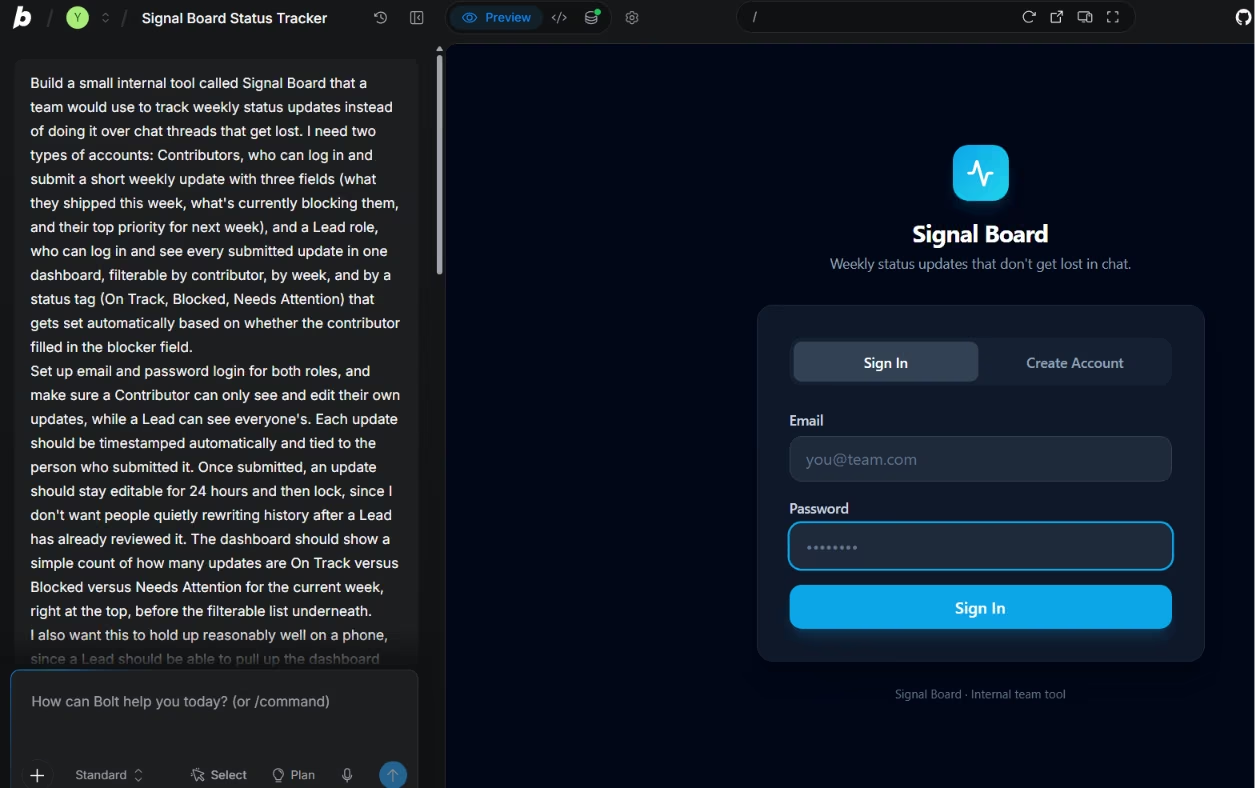
Bolt.new runs the app inside the browser itself, in what it calls a WebContainer. There's no separate server to spin up before you see something. For the first ten minutes, that felt like a straight upgrade over waiting for a workspace to boot.
Then the brief reached the line these tools trip over: "a Contributor can only see and edit their own updates." That took a second prompt.
The second prompt is where the token math stopped being abstract. The free tier hands you a million tokens a month, which sounds generous until you watch it move. By the time the login flow and the 24-hour edit lock both worked, roughly two thirds of the monthly allowance was gone, and I hadn't touched the phone layout yet.
Bolt.new meters usage in two layers, and the second one is the one that bites:
- Monthly pool: 1,000,000 tokens on the free tier, the number the marketing leads with.
- Daily cap: A separate ceiling underneath it. A single heavy session on one stubborn feature can hit the daily cap while the monthly number still looks healthy.
With a third of the month's tokens left and a daily cap under them, I moved to the Pro plan. Two caps to budget against at once is a cost of working here, and the headline number hides it.
Bolt.new is fast early and expensive once logic enters the picture. It's the tool I'd hand someone who needs a working thing to show a colleague this afternoon, and it's also the one I'd steer you away from if you're planning to iterate all week for free.
Key Features
- In-browser runtime: The build runs directly in the browser, with no separate server to configure.
- Live preview: The app updates as each prompt lands.
- Token rollover: Unused monthly tokens roll over on the paid tiers, though not on the free one.
- Provider choice: The paid tier lets you pick your database provider.
Pros
- Reached a running preview in about nine minutes.
- Rendered a clean first-pass dashboard with no manual cleanup.
- The login flow and the 24-hour edit lock both worked, once fully prompted.
Cons
- Token usage climbs fast once logins and roles enter the build.
- The daily cap can stop a session while the monthly allowance still looks fine.
Best For
- Builders who want something running in minutes before committing further.
- Anyone comfortable paying once an early concept proves out.
Pricing
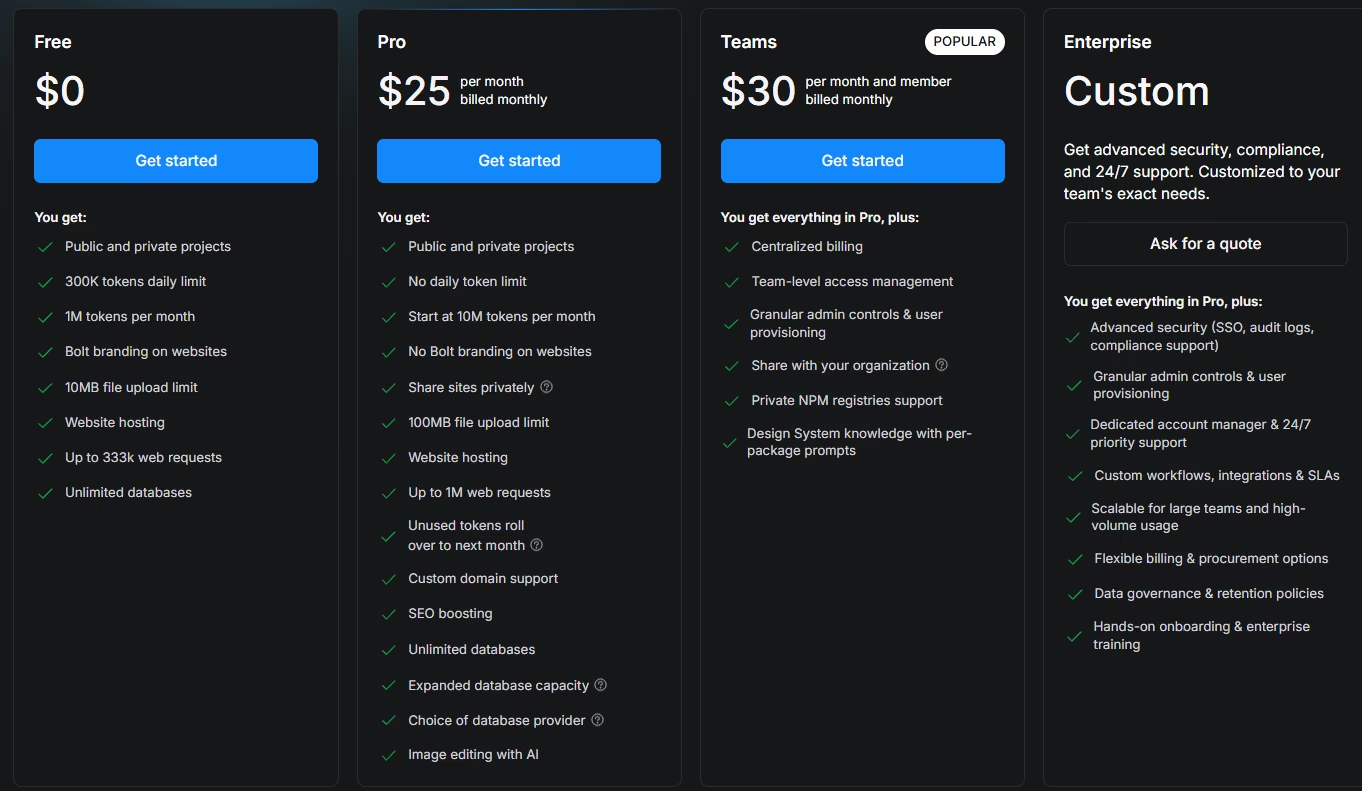
Bolt.new pricing splits into a free tier and a single paid plan. The free tier gives you 300,000 tokens a day and 1,000,000 a month, with a 10MB upload limit. The Pro plan is $25/month ($18/month, billed annually). It drops the daily cap, starts you at 10,000,000 monthly tokens, and raises the upload limit to 100MB, with unused tokens carrying forward.
2. Emergent: Best for the Widest Coverage
The clause I expected to lose was this: "an update should stay editable for 24 hours and then lock." It sits mid-paragraph, phrased as a reason. Base44 was the one that missed the edit lock, and it took two more prompts to stick. Emergent built it on the first pass.

The rest of the first draft held up too:
- Working email and password login
- The Contributor and Lead split behaving correctly
- The filterable dashboard, with three status counts tallying right at the top
The ranking came down to which pieces landed together, more than any raw feature count. Logins, stored data, and a working dashboard usually arrive in separate rounds across these tools, each prompted for after the last one breaks. Here they arrived as one thing, closer to how the old workspace felt than anything else in the field.
The stumble showed up on my phone. The status counts and the filter row crowded into an unreadable stack on a narrow screen. That undercuts the one thing a browser-based workspace made effortless, checking a dashboard during a stand-up.
One follow-up prompt describing the overlap fixed it.
Total spend across both prompts: 17 credits and 19 minutes.
The tally makes the case. Emergent combined a working web build, a usable phone view, and a GitHub export path in the same run, though it needed a second prompt to make the phone view readable.
That export path is worth more than its one-line feature bullet shows. Whatever you build here isn't stranded, and that portability is useful when a Google product's shutdown is the reason you're reading this at all. If your Firebase Studio routine depended on a project staying reachable from wherever you last left it, this is the one I'd try first.
Key Features
- Role-based dashboards: A Lead sees every update in one place without asking each Contributor.
- GitHub export: Pull the generated code out and keep building elsewhere.
- Mobile-usable preview: The live build renders on a phone, though the first pass needed cleanup to be usable there.
- Managed hosting: Apps deploy to Emergent's own infrastructure, with no server to configure.
Pros
- Matched the access split, the 24-hour edit lock, and the automatic status tagging, all without extra prompting.
- Finished the whole build in 17 credits and 19 minutes across two prompts.
- Exports cleanly to GitHub, so the code isn't locked inside the platform.
Cons
- The first phone layout needed a follow-up prompt to fix a display bug.
- Credits burn faster once you layer complex logic onto a first draft.
Best For
- Teams whose Firebase Studio workflow leaned on checking projects from a phone.
- Anyone who'd rather write one long brief than a dozen short follow-ups.
Pricing
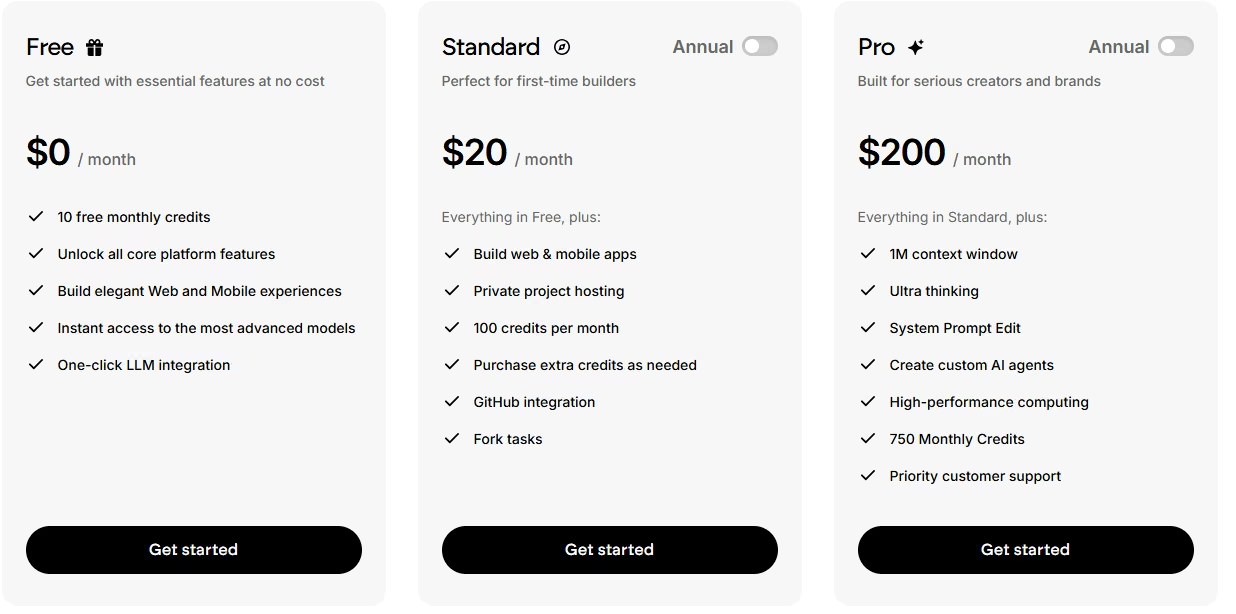
The free plan gives you 10 monthly credits, enough to poke at a small build. The $20/month ($17/month, billed annually) Standard plan is where a build like Signal Board happens, with 100 monthly credits, private project hosting, and GitHub integration.
A Pro tier at $200/month ($167/month, billed annually) raises that to 750 monthly credits and adds a 1M context window, system prompt editing, and custom agents.
3. Base44: Best for Straightforward Builds With a Literal Prompt
Base44 got the skeleton right immediately. The login flow and submission form were built cleanly on the first prompt, using a little over half the free plan's monthly message allowance. The dashboard counts for On Track, Blocked, and Needs Attention tallied correctly without a nudge.
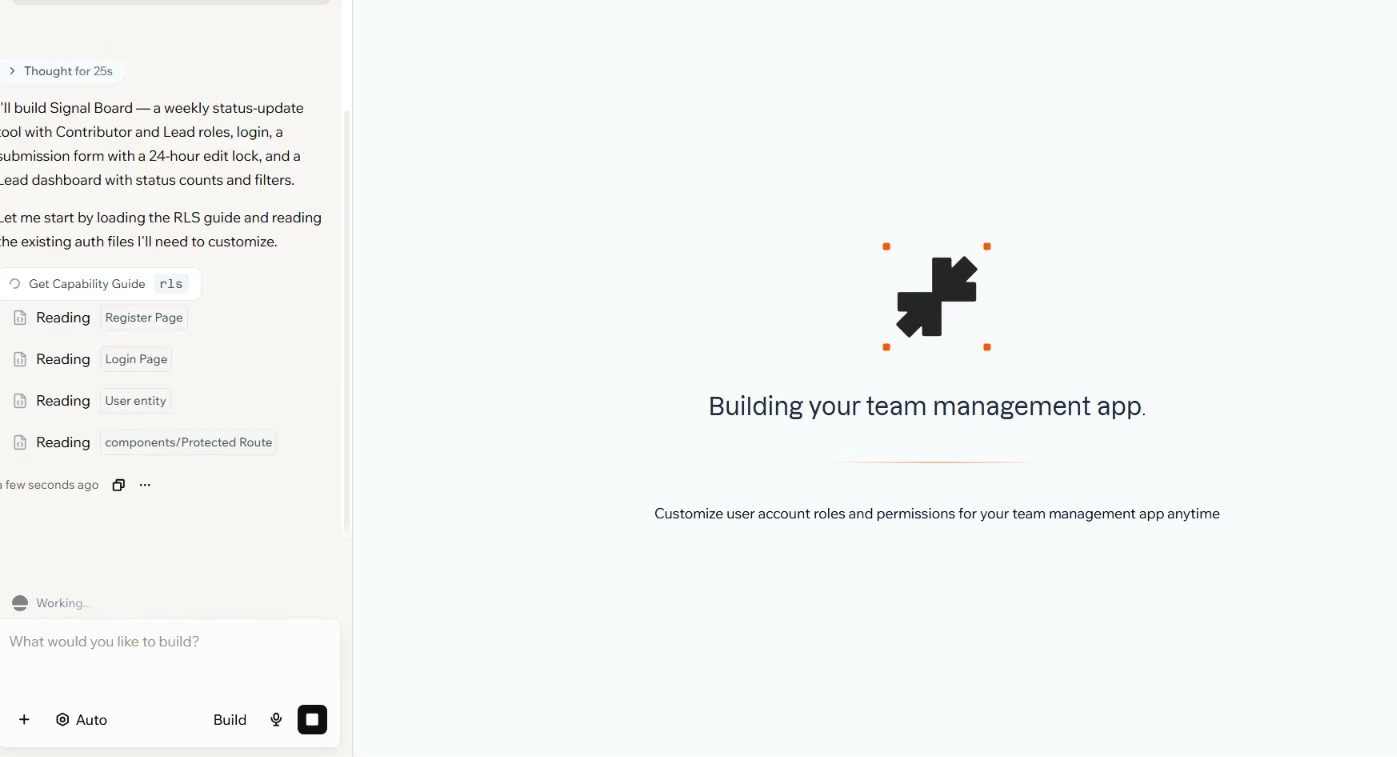
I checked the edit lock next, and it wasn't there. Updates stayed editable forever.
The brief asked for automatic status tagging and a time-based edit lock. Base44 built the status tag but dropped the time-based edit lock.
The miss stands out because of what the constraint was. An edit lock is an access rule: it governs who can change what, and when.
Access rules are the class of thing that fails without warning, since nothing looks broken on screen and nobody notices until the wrong person changes something.
Two more prompts got the lock behaving. End to end, the build ran 20 message credits and about 22 minutes. The verification step cost me more than the credits did.
The miss came down to how the constraint was written:
- Written as a reason, it gets treated as context.
- Written as a step, it gets built.
Base44 handles broad strokes well on a first pass, and it needs a more literal, step-by-step prompt than the others here to catch a specific rule the first time.
So the recommendation splits cleanly. If you already brief tools with a numbered list, you'll barely notice the difference and you'll get a tidy build for your money. If you describe what you want in general terms, budget an extra prompt for the rule you'd least like to discover missing, then go verify that one yourself.
Key Features
- Message-credit pricing: Message and integration credits are tracked separately.
- Two-way GitHub sync: Export the source and keep syncing changes in both directions, from the Builder plan up.
- Status auto-tagging: Dashboard counts computed correctly from submitted data.
- In-app code edits: Every paid tier lets you edit generated code inside the platform.
Pros
- Login flow, submission form, and dashboard built cleanly on the first prompt, using a little over half the free plan's monthly message allowance.
- Even with the edit-lock miss, the full build, skeleton plus fix, ran 20 credits and about 22 minutes.
- The automatic status tag came out correct on the same first pass that missed the edit lock.
Cons
- Missed the 24-hour edit lock on the first pass, and needed two more prompts to fix it.
- Needs a numbered, step-by-step brief. A rule written as prose gets read as background.
Best For
- Builders who write detailed, step-by-step prompts and want them followed closely.
- Straightforward internal tools without much edge-case logic.
Pricing
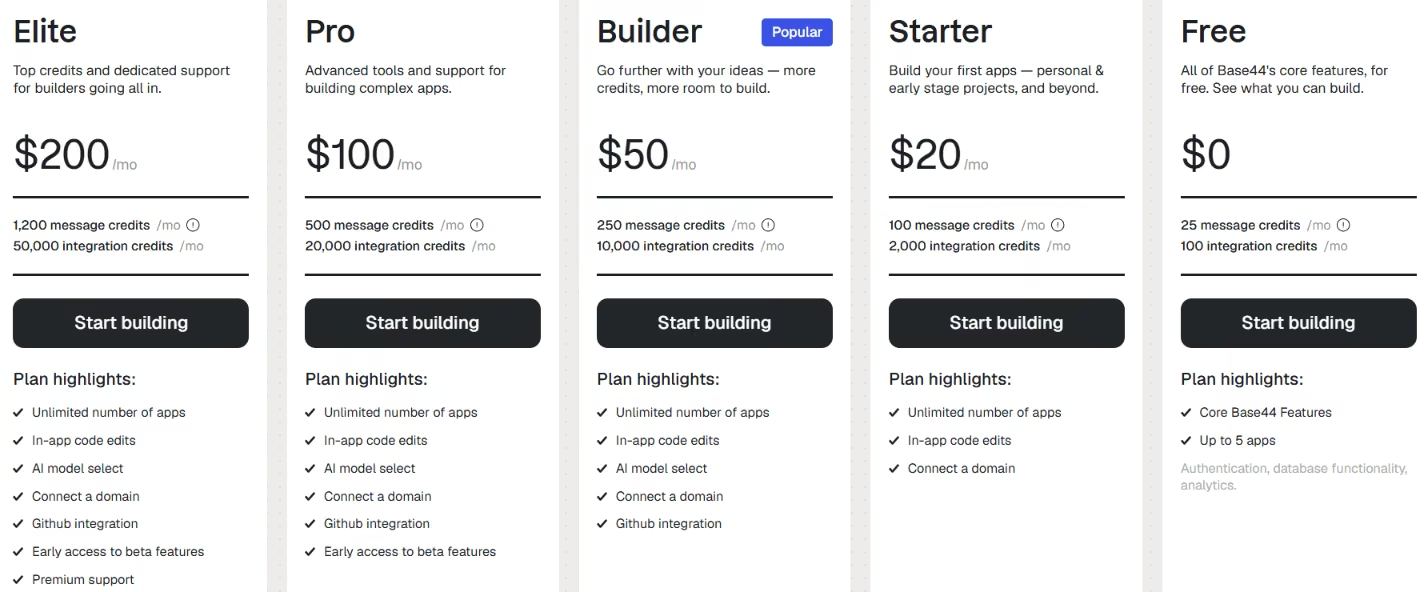
Base44 pricing runs from a free plan up through paid tiers. The free plan includes 25 monthly message credits and 100 monthly integration credits, capped at five apps. The Starter plan, $20/month ($16/month, billed annually), raises that to 100 monthly message credits and 2,000 monthly integration credits, with unlimited apps. Builder runs $50/month ($40/month, billed annually).
4. Lovable: Best for Visual Polish on the First Pass
Lovable's first screen looked genuinely designed, with sensible spacing and a clear hierarchy. The login form and dashboard could sit in front of a colleague without an apology. That happened before I asked for a single adjustment, and none of the other five got close on a first pass.

Then I logged in as a second user. The brief says "a Lead can see everyone's," and Lovable's build showed both roles the same shared view. The screen looked normal and threw no error. It showed the wrong data to the wrong person anyway.
The permission issue took three follow-up prompts to resolve. Each round looked plausible until I logged back in as the other role.
The numbers spell out what that swap cost:
- Time: Roughly 27 minutes.
- Credits: 41 of the 100 monthly.
Most of both went toward permissions, with pixels barely touched. The design arrived free and the correctness got expensive.\n\nThat inversion is dangerous. A build that looks finished doesn't invite scrutiny, so the thing you're least likely to re-check is the thing most likely to be wrong. Lovable's strength works against your instinct to test.
Use it where the look carries weight, showing an idea to a team, pitching a direction, making something feel real early. That's a legitimate job, and Lovable wins it outright, with nothing else here coming close. Treat the first pass as a mockup that happens to run, and spend the prompts you saved on design going through the permission logic role by role.
Key Features
- Polished interface out of the box: Layouts, spacing, and hierarchy came out clean unprompted.
- Fast visual iteration: Design changes reflected quickly across follow-up prompts.
- Credit rollover: Unused monthly credits carry forward, with top-ups available on demand.
- Working app output: Beyond the interface, it produces login and data logic.
Pros
- Delivered the best-looking first pass of the six, with no design prompting.
- The permission logic was fixable through follow-up prompts, without starting the build over.
- The full build, design plus permission fixes, cost 41 of the plan's 100 monthly credits.
Cons
- Role-based permission logic needed three follow-up prompts to work correctly.
- More of the credit and time budget went to fixing logic than to design.
Best For
- Builders who care most about how the first version looks and feels.
- Anyone willing to spend extra prompts confirming the logic matches the brief.
Pricing
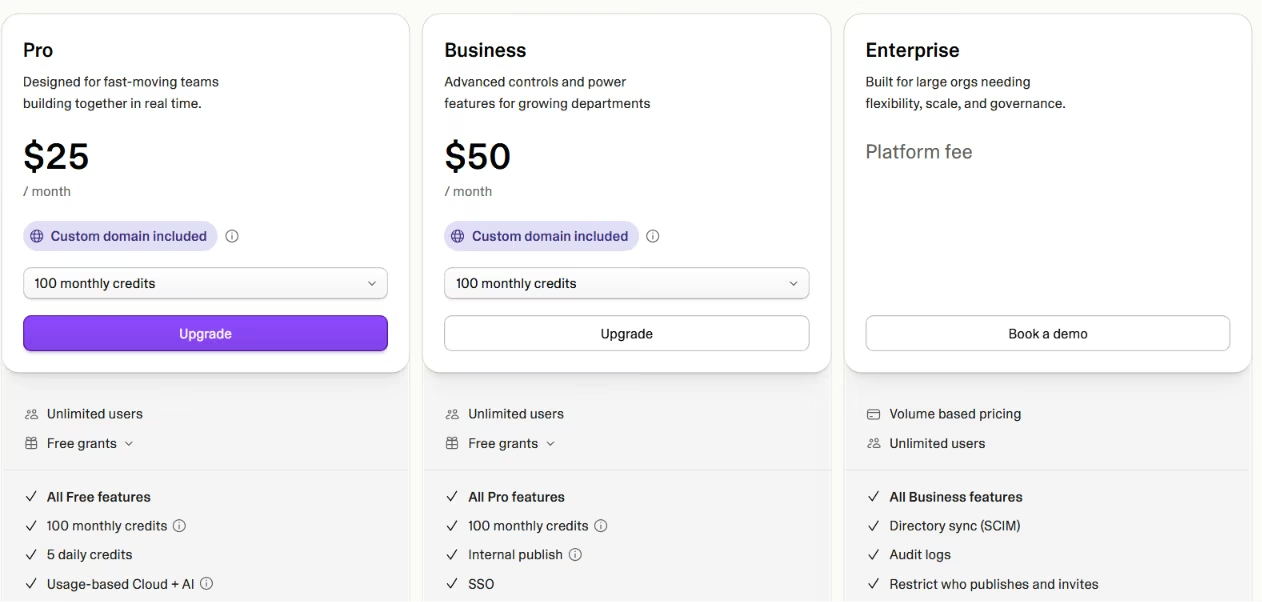
Lovable pricing starts free and scales up from there. Lovable's free plan costs nothing, but your projects are public. The Pro plan, $25/month ($21/month, billed annually), unlocks private projects along with 100 monthly credits with rollover, custom domains, and user roles. Signal Board needed that tier to run in full. Business adds single sign-on and workspace controls at $50/month.
5. Google AI Studio: Best for Staying Inside Google's Ecosystem
Google AI Studio is one of the two places Google is pointing displaced workspaces toward, and it has changed since that notice went up.
Build mode now runs on the same agent that powers Antigravity, and it produces a running web app with a React interface and a Node.js runtime behind it.

The Signal Board brief gave me a working early build in about 11 minutes. It included a login form, a submission form, and a first pass at the Lead dashboard before I opened the Code tab. Faster than I expected from something billed as a surface for early-stage builds. I didn't get to the permission split, the edit lock, or the phone view on this one.
Your Firebase wiring is the first question anyone leaving Firebase Studio has to answer. AI Studio provisions two Firebase services for you, Cloud Firestore and Firebase Authentication, sets them up, and writes the calling code into the app. Those two were the whole dependency for the Signal Board build, and both survive the move without being rewired by hand.
File control is where expectations need adjusting. AI Studio keeps Gemini keys server-side in the Settings menu. Apps built before May 14, 2026, get auto-upgraded to that approach, so any write-up describing an exposed or editable key is already stale:
- What you can do: Open the Code tab and edit generated files live.
- What you can't do: Treat every piece of the build as a file. Your Gemini API key and secrets live in a Secrets panel, injected into the server-side runtime and deliberately kept out of anything the browser sees.
It's sensible security, but a change of habit if you were used to opening an environment file and typing.
Collaboration has a similar shape. You can share a build for viewing and forking, or share it with edit permission so someone else can change the code. Firebase Studio's shared workspaces went further, with real-time co-editing.
For anyone whose Firebase Studio habit was a browser tab and a prompt box, this is the closer of the two official paths. You give up the full virtual machine underneath, but for most workspace projects, the automatic Firebase provisioning you gain is worth that trade.
Key Features
- In-browser code panel: Edit generated files in the Code tab, with a live preview beside them.
- Automatic Firebase setup: Provisions Cloud Firestore and Firebase Authentication and writes the calling code.
- No subscription for the interface: The Studio itself carries no monthly fee.
- Export routes out: Download the project as a ZIP, push it to GitHub, or deploy it to Cloud Run.
Pros
- Shipped a login form, a submission form, and a first-pass Lead dashboard before I opened the Code tab.
- Fast first pass, running in about 11 minutes.
- Firestore and Firebase Authentication covered the whole Signal Board build, with nothing needing to be rewired by hand.
Cons
- Secrets and service keys live inside a dedicated panel, so old habits built around an editable file don't transfer.
- Gemini API usage beyond the free interface bills separately, so costs aren't fixed.
Best For
- Firebase Studio users who want to stay inside Google without switching vendors.
- Projects that leaned on automatic Firestore and Authentication provisioning.
Pricing
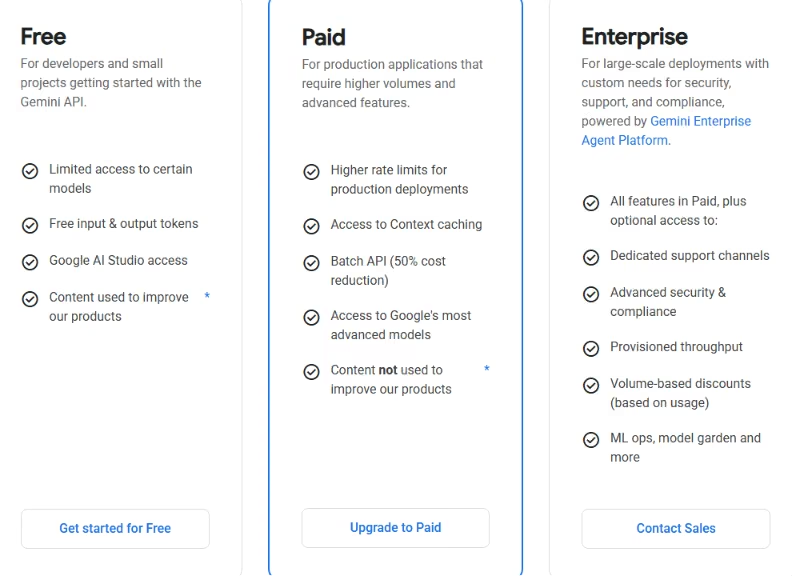
Google AI Studio charges no subscription for the interface, which is free to use in every available region. Gemini API usage beyond the free allowance is billed pay-as-you-go, per token. Deploy to Cloud Run and you're billed on Google Cloud's own usage rates.
6. Google Antigravity: Best for a Code-First, Local Agentic Workflow
Antigravity is the other official path, and the first thing it asks for is a download. Six minutes of install on my laptop before I could type the Signal Board prompt at all. That's a strange opening for a tool replacing something that lived in a browser tab.
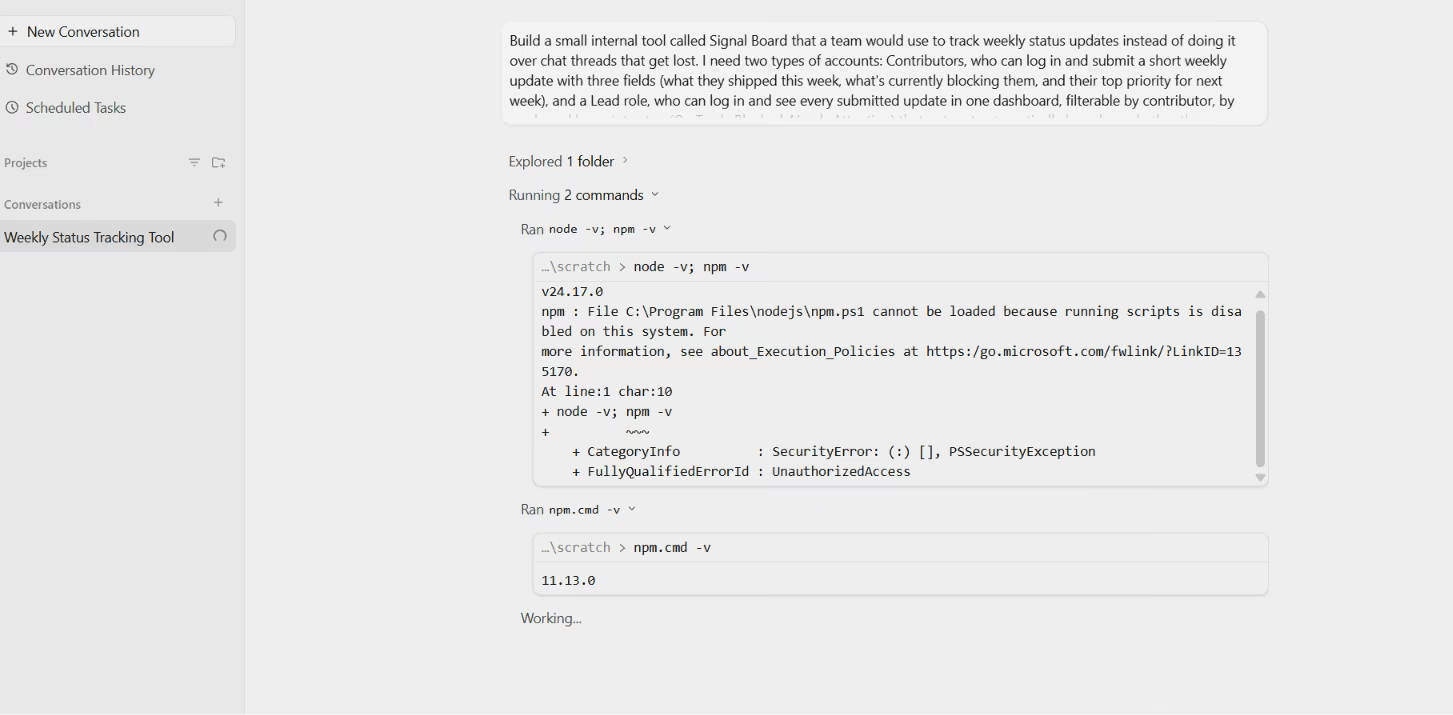
The build repaid the wait. A 24-minute run produced a working Signal Board with the Contributor and Lead split handled correctly and the automatic status tagging in place, both clean on the first attempt with no follow-up prompt needed.
It's built for a different way of working. You're alongside an editor and a terminal, watching the agent work in real time. The agent can:
- Reads files
- Runs terminal commands
- Drives a browser to check its own output
The model roster is broad too, spanning several current Gemini models plus Claude and an open-weights option.
That capability comes with a ramp. If your whole history with this category is a prompt box, Antigravity's interface is a step up in complexity before it's a step up in power.
The bigger cost is mobility, and it decides this section. "A Lead should be able to pull up the dashboard during a stand-up" was in the brief. I could test that against the build, but not against Antigravity itself. There's no link to open on another machine, and a second computer needs its own install.
For a developer working from one machine who wants an agent with reach into a project, this is the strongest option in the whole list. For anyone whose habit was opening a project from whatever device was nearest, it solves the wrong problem well. Once you know which of those two people you are, the choice settles in seconds.
Key Features
- Local agentic editor: Runs as a downloaded application, outside the browser entirely.
- Multi-model access: One agent with access to several current frontier models in a single workflow.
- Browser-driving agent: The agent can open a page, read what's rendered, and act on it.
- Free Individual tier: No subscription required to start, at basic weekly rate limits.
Pros
- Handled the Contributor and Lead split plus automatic status tagging on the first build.
- Produced a working Signal Board in a single 24-minute run, no follow-up prompt needed.
- The Individual plan costs $0/month, so nothing is owed to start.
Cons
- Local-only, so there's no picking a project up from another device or a phone.
- The agent-first interface takes orientation time if you're coming from a prompt box.
Best For
- Developers who want a code-first, editor-like workflow on one machine.
- Anyone who already works primarily from a single laptop or desktop.
Pricing
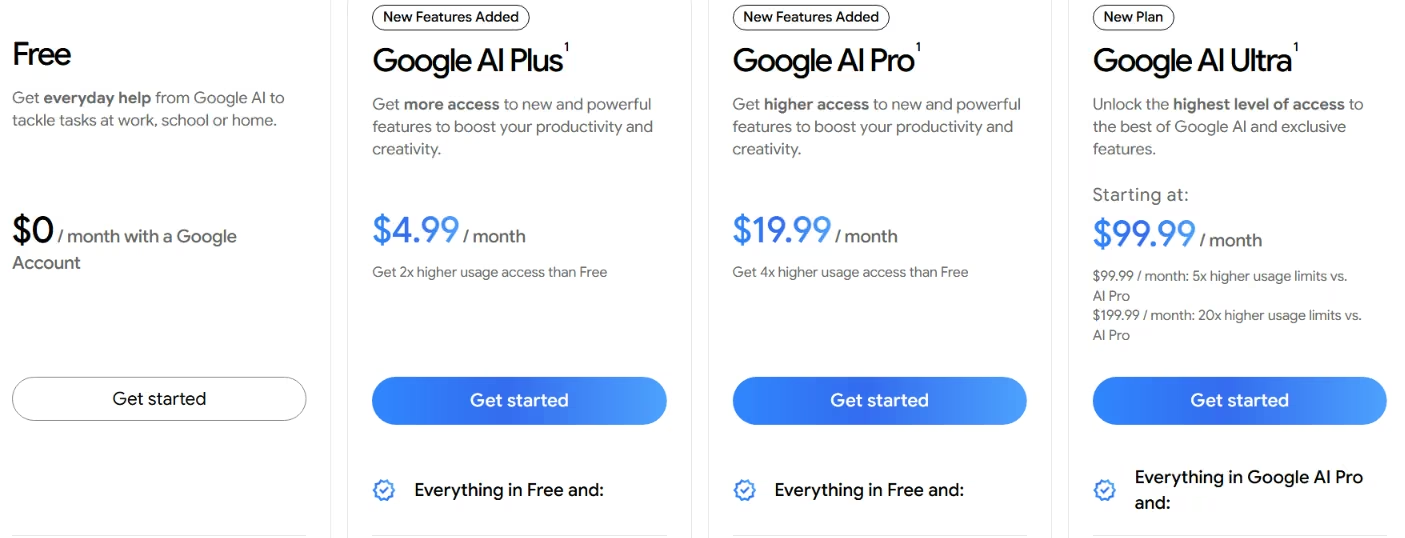
Antigravity's Individual plan costs $0/month with no subscription, running at basic weekly rate limits.
Higher limits come from a wider Google AI subscription: Google AI Pro at $19.99/month (billed monthly or annually), or Google AI Ultra from $99.99/month. Teams get a fourth route, an Organization plan sold through Google Cloud and billed by consumption.
Both consumer tiers cover far more than Antigravity, from the Gemini app to Google Flow, so you're buying a broad subscription that includes Antigravity access.
7. Supabase: Best for Replacing Firebase's Data and Login Layer
Supabase replaces the Firebase project that sat behind your workspace and generates no interface at all. You draw the screens yourself, which sounds like a downgrade until you ask what your workspace was doing for you.
If you mainly used the workspace to keep Firestore, Firebase Authentication, and Firebase Storage wired up and reachable in a few clicks, Supabase rebuilds that layer and is the closest match here.
The core difference sits in the database. Firestore is a document store with its own query model, so relational data gets flattened to fit. Supabase runs Postgres, so joins, foreign keys, and transactions behave the way a relational schema expects. Row-level security policies live on the table itself, with no separate rules file to keep in sync.
To see how far that actually stretches, I built the piece of Signal Board that lives entirely in the data layer. The table holds a contributor ID, a status, and a submission timestamp. Then I wrote the same access split the brief asked for: Contributors log a weekly update and can only see their own, and a Lead reads every row.
That took two policies, one checking the contributor ID and one checking a Lead role, both written as plain SQL on the table itself. The 24-hour edit lock took a third policy, comparing the submission timestamp against the current time. Total setup: about 14 minutes across three policies, no interface to show for it.
The real risk here is forgetting to turn RLS on at all. On many Supabase projects, a new table stays reachable through the API by default until you flip that switch, which is how a live project can end up with a table sitting wide open. Signal Board's own updates table would have been just as exposed if I'd shipped the schema without that step.
Budget time for that. The migration cost people underestimate is remodeling a document structure into tables, and it lands before you write a line of interface code.
Around the database sit the pieces Firebase bundled:
- Hosted logins with OAuth providers
- File storage
- Realtime subscriptions on table changes
- Edge Functions for server-side code
Separate migration guides cover logins, Firestore data, and storage, so the exit follows a documented path from the start.
Free projects pause after one week of inactivity, which is the actual problem, since the storage and usage limits themselves are generous. The free tier includes 500 MB of database, 50,000 monthly active users, 5 GB of egress, and 1 GB of file storage across two projects.
If you're rebuilding a side project you open every few weeks, this is the wrong shape for you. Paid projects never pause. The workarounds people rig up to keep a free one awake are something you set up once and then stop trusting.
Start here if you're losing Firebase itself and the workspace was incidental. Plan around the pause and budget for the schema rework.
Key Features
- Postgres at the core: Relational data with joins, foreign keys, and transactions.
- Row-level security: Access rules live as policies on the table, enforced on every query.
- Documented Firebase migration: Guides cover logins, Firestore data, and storage.
- Realtime and Edge Functions: Subscriptions fire on table changes, with built-in server-side functions.
Pros
- Relational data behaved the way a schema expects, instead of getting flattened to fit a document store.
- The full permission split, including the 24-hour edit lock, took three RLS policies and about 14 minutes to write directly on the table.
- The free tier covers 50,000 monthly active users and 500 MB of database across two projects.
- Paid projects never pause, so a slow-moving project stays awake.
Cons
- RLS is opt-in per table, not on by default, so on many projects a table you forget to lock down is reachable through the API from the moment you create it.
- Free projects pause after a week of inactivity, which catches slow-moving side projects.
- Self-hosting drops branching, managed backups, point-in-time recovery, and advanced metrics.
Best For
- Anyone whose workspace was mostly a thin shell over Firestore and Firebase Authentication.
- Apps with relational data that never fit comfortably into a document store.
Pricing
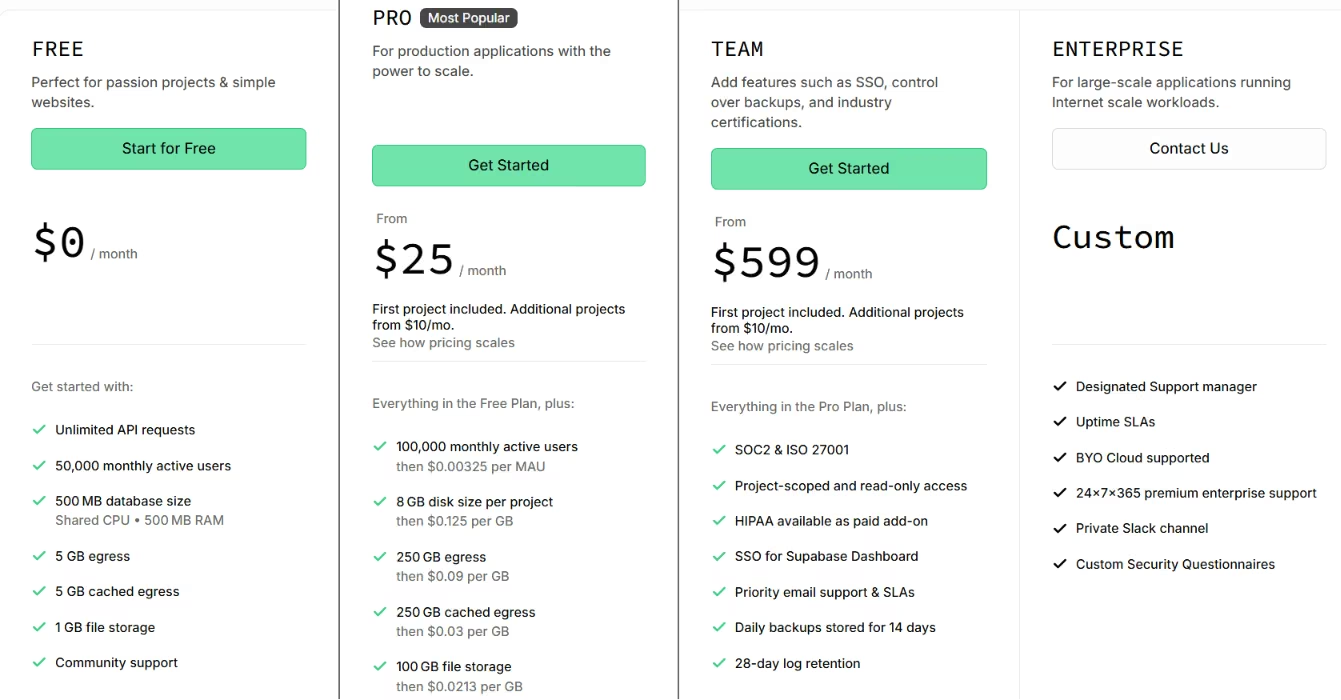
The free plan covers two active projects, 500 MB of database, and 50,000 monthly active users. The Pro plan, $25/month, raises that to 100,000 monthly active users, 8 GB of disk per project, and 250 GB of egress.
It also folds in $10/month of compute credits and seven-day backups. Team starts at $599/month, and Supabase publishes one rate per plan with no annual discount.
8. Appwrite: Best for Running the Whole Server on Your Own Infrastructure
Appwrite is the only entry here built primarily to run on hardware you own. Supabase can be self-hosted too, but it gives up platform features in doing so, while a self-hosted Appwrite instance gets the same feature set as Appwrite Cloud.
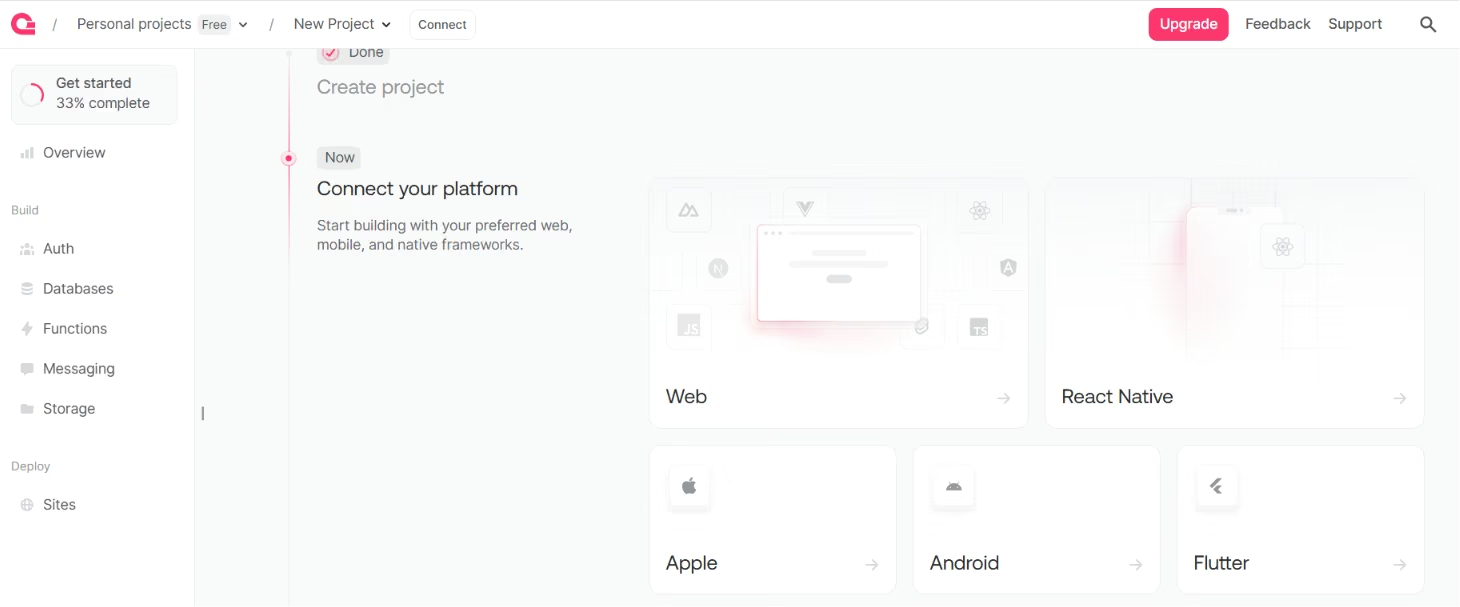
When the server can't sit on somebody else's cloud, that need gets answered here in full. Appwrite covers roughly the same ground as Firebase, including a database, logins, file storage, functions, messaging, and real-time. It ships as Docker containers you run wherever you want.
Wherever you want can mean a laptop, a rented box, or a rack inside a jurisdiction whose data-residency rules made Firebase a non-starter. There's a hosted option too, Appwrite Cloud, for teams that want the feature set without owning the machine.
The migration story is the strongest here, and it's built in. Point Appwrite at a Firebase project and it automatically migrates accounts, some database records, and storage files. Read the fine print, though: functions still move by hand, and creation timestamps don't always survive.
Logins are where the resemblance to Firebase Authentication is closest:
- Email and password with Argon2 hashing
- Phone logins over SMS
- Magic links
- One-time codes
- Anonymous sessions
- Passkeys, multi-factor authentication, and OAuth across 30+ providers.
Permissions run through teams and labels, so granting a role is a membership edit with no redeploy attached.
I set up the same access split on an Appwrite table. Row-level permissions restrict a Contributor to the rows they created, and a team role gives a Lead read access across every row, set directly on the table and each row rather than in a separate rules file.
That took about 8 minutes across both patterns, faster than the equivalent Supabase policies, since assigning a role is closer to checking a box than writing SQL.
The 24-hour lock is where the model runs out. Appwrite's permission roles cover who (a user, a team, or a label) and what (read, create, update, or delete). The Lead's full read access and the automatic status tag both came from that same setup, but nothing on the list is time-based, so nothing native stops an edit after 24 hours.
The only documented way to add that is an Appwrite Function: a small piece of server-side code triggered on the update event, which puts you back in a code editor for the rule that carried the most weight in the brief.
That's a real gap. The two pieces of Signal Board's permission logic that looked identical on paper needed two different approaches here: one a checkbox, one a function you write yourself.
The most useful thing Appwrite publishes is an argument against itself. Its own self-hosting page names saving money as a reason not to self-host, since it usually costs more once you count time and expertise.
The same page hands you backup strategy, log management, health checks, and update management. Neither Firebase nor Appwrite Cloud puts that on you.
Cloud's free tier is unusually large, covering 75,000 monthly active users, 5 GB of bandwidth, 2 GB of storage, and 750K function executions across two projects, with the same one-week pause on inactive projects as Supabase. It stops at one organization member, so the moment a second person needs console access, you're paying.
Appwrite fits a compliance requirement well, but it's a poor fit for anyone chasing convenience. If nobody wants to be paged when a container falls over, most of the value disappears.
Key Features
- Docker-based self-hosting: The server runs on any machine with a Docker CLI.
- Built-in Firebase migration: Automatically moves accounts, some database records, and storage files; functions still move manually.
- Deep authentication options: Covers Argon2 hashing, SMS and magic-link logins, passkeys, multi-factor, and OAuth.
- Teams and labels for permissions: Access is granted by membership, with no rules file to redeploy.
Pros
- Role-based access for Contributor vs. Lead took about 8 minutes to set up as declarative permissions, without writing any SQL.
- Self-hosting puts data location and compliance under your own control.
- Open source, so the exit cost is migration time with no vendor negotiation.
- A self-hosted instance gets the same feature set as Appwrite Cloud.
Cons
- There's no time-based permission primitive, so a rule like a 24-hour edit lock needs a custom Function instead of a checkbox.
- Self-hosting hands you backups, monitoring, scaling, and patching that a host absorbs.
- The free tier allows one organization member, so a second person means paying regardless of usage.
Best For
- Teams with data-residency or compliance requirements that rule out a shared cloud.
- Anyone who wants Firebase's feature set without Firebase's hosting arrangement.
Pricing
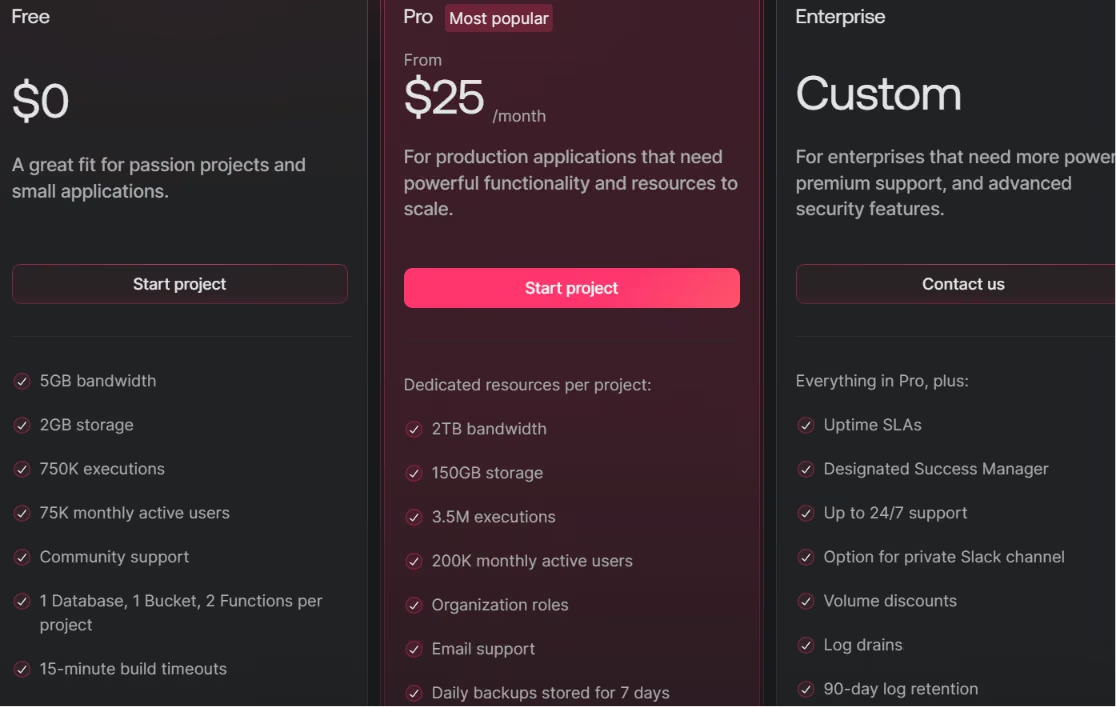
The server is open source under a BSD-3-Clause license, so there's no license fee, though self-hosting still costs machine capacity, time, and expertise. On Appwrite Cloud, the free plan covers two projects on shared resources, 75,000 monthly active users, and 750K executions, capped at one organization member.
The Pro plan starts at $25/month on dedicated resources, with extra projects at $15/month each. That covers 200,000 monthly active users, 2 TB of bandwidth, and 150 GB of storage. Appwrite offers no annual-billing discount on any tier.
Which Firebase Studio Alternative Should You Choose?
The short version, tool by tool:
- Bolt.new: Choose it if a first preview in minutes tops your list, and you can keep watching the token budget.
- Emergent: Fits a build that needs logins, data, and a phone-usable view together, with exportable code.
- Base44: Works best if your briefs come as numbered lists. Skip it if you describe things in general terms.
- Lovable: Fits projects where the first screen has to look finished. Skip it if permission logic is your main concern.
- Google AI Studio: Keeps you inside Google and handles Firebase wiring automatically.
- Google Antigravity: Fits builders working from one machine. Skip it if checking builds from your phone is part of your routine.
- Supabase: Use it if the Firebase project underneath was your main dependency and you want relational data.
- Appwrite: Use it if compliance requires server control and someone can own the upkeep.
- Keep your current workspace: Do this if you created one before June 22, 2026. It runs until March 22, 2027.
What to Do With the Workspace You Already Have
You'll find picking a replacement is the easier half. The harder half is the code sitting inside a workspace that gets deleted on the sunset date, along with anything you never copied out.
Getting Your Project Out Before the Workspace Closes
An existing workspace carries a Move now button at the top, and it opens three routes. Two of them hand the project straight to the official paths: preparing it and moving it into Google AI Studio, or exporting it for Antigravity.
The third, Zip and Download, is the one to take if you're heading anywhere other than those two, since it produces a standard web project you can open in whatever you like.
Google's own migration instructions also cover pushing a workspace to GitHub, which is the tidier option when you want the commit history to travel with the files. Read four details on that page before you click anything, because each one bites after the fact:
- Agent chat history: It isn't part of the exported zip. Prompts and responses sit in the workspace's own /home/user/.idx/ai directory and need a separate download.
- Shared workspaces: Only the person who created one can use Move now. If a workspace was shared with you, duplicate it under your own account first, or run the Zip and Download command from the command palette in Code view.
Either way, the exported config still points at the original owner's Firebase project and keys, so you'll be standing up your own project and resetting environment variables.
- A stalled export: Almost always a size problem. Deleting node_modules, large media, and build folders usually clears it, and a heavy .git history is the one people forget to check.
- Your existing address: Keeping it takes manual work. Firebase Studio pulled your Gemini API key out of the .env file and set it as an App Hosting environment variable for you, and nothing does that automatically after the move. You set it in the Firebase console yourself and publish through a GitHub sync. Take the one-click Cloud Run route instead, and you land on a new address, with custom-domain mapping running up to 24 hours and some downtime in the middle.
None of that touches Firestore, Authentication, or App Hosting themselves. The data and the logins carry on regardless of where the editing happens, which is why swapping only the layer underneath counts as a real move in its own right.
What Replaces the Android Emulator and the Phone Check
Firebase Studio previewed more than web output. Its workspaces ran Android emulators alongside the Chrome web preview, though only in Flutter workspaces, and a QR code opened the running preview on your own phone. Nothing in this list rebuilds that arrangement, and each piece of it lands somewhere different instead.
The six that ran the brief all produce web output, so the mobile question turns into how a build behaves in a phone browser.
Emergent is the one tool I confirmed on a phone. It returned a phone-usable dashboard, and even that took a follow-up prompt before its counts and filters stopped crowding into a single stacked column on a narrow screen.
Antigravity is the closest structural match for anyone whose workspace involves Android work, and it does so by moving the problem onto your own machine. The project lives on your disk with an editor and a terminal beside it, so you can install and run emulators and device tooling.
Google's path expects Node.js 20 or higher and the Firebase CLI at 15.10.0 or higher before you start.
If what you were building is genuinely native, the piece that transfers cleanly is the data and login layer, and that's where the last two entries earn their place:
- Supabase: Publishes quickstarts for Android Kotlin, Flutter, and iOS SwiftUI.
- Appwrite: Ships official client SDKs for Android, Flutter, and Apple, plus a React Native SDK still in beta.
Your screens move to whatever toolchain runs on your machine, and what sits behind them keeps working through the switch.
How Emergent Helps Displaced Firebase Studio Users Rebuild Faster
Every builder above got judged on one build, a first version tested once and then set aside. That's a fair way to pick a starting point and a poor way to predict month six.
What happens when you come back and ask for a feature that didn't exist yet, a new role, or a change touching five files at once? A ranked list can't answer that, and it's the question that decided whether people stayed in Firebase Studio.
Firebase Studio's strength was staying usable as a project grew. Emergent is built around that same problem. Say what you want changed in plain sentences, and it scopes the work and builds it end to end. Then it checks the result against the rest of the app before finishing the build.
The payoff from that checking step takes months to show up. It's the difference between adding a feature and adding a feature plus two regressions you find later.
The scope goes past a first draft, too. All of this comes out of the same build you started with one prompt:
- A working database
- Logins
- Third-party services like Stripe
- Managed hosting
Where Emergent Isn't the Right Fit
None of that makes it the answer to every use case here. If your project leaned on native Apple Watch or iPad support, or needed heavy PDF report generation, Emergent is weaker at both. Lovable will also give you a better-looking first screen out of the box.
Most of what displaced Firebase Studio users are rebuilding is a working app with logins and data, usable on the web and on a phone. That's squarely inside what Emergent does well, and wiring it into tools you already use runs through its MCP connector, short for Model Context Protocol.
If you want to see where you'd land, it starts the way every builder above did: one detailed prompt. Start building on Emergent and give it the brief you'd have given Firebase Studio.
Firebase Studio's Shutdown Isn't Waiting for You to Decide
March 22, 2027 is fixed. If you had a workspace before June 22, 2026, you have runway to pick a next step, and no reason to panic into picking the first tool you see recommended.
Your Firebase Studio workflow should decide the choice. A feature list won't tell you that. If browser access and checking in from a phone were part of that workflow, that alone rules out a local-only tool.
If all you need is the database and login layer, the seventh and eighth entries cover that without an app-generation layer on top.
If you want the fastest path, that's Bolt.new. If you want the most covered in one brief, that's Emergent. Whichever of these Firebase Studio alternatives you land on, test it against something real first, the way I tested six of them against one shared brief.
A tool can look right on a comparison table and still fall short on the second feature you ask for.

Every alternative has trade-offs. Emergent just builds production-ready apps from one prompt.
- Production-ready apps
- Web & mobile apps
- Deploy in minutes







