




Softgen has gained attention as a modern AI-assisted development platform by making it easier for teams to design and deploy applications through visual workflows, automation, and low-code tooling. For startups and businesses looking to move fast without heavy engineering investment, it presents an accessible path from idea to working application.
However, as products evolve beyond early prototypes, many teams begin to experience friction. Limitations around backend flexibility, integration depth, performance optimization, and enterprise-grade deployment often surface as projects grow in complexity. Builders who need deeper control, scalable infrastructure, or long-term ownership of their applications frequently find these constraints difficult to work around.
As AI-driven development continues to mature, teams are increasingly evaluating next-generation platforms that go beyond traditional low-code approaches. In this guide, we explore the 5 best Softgen alternatives and competitors in 2026, comparing platforms that offer stronger automation, real-time collaboration, exportable code, and production-ready infrastructure for building scalable applications without compromise.
List of TOP 5 Softgen Alternatives and Competitors
Here’s the list of 5 best Softgen alternatives and competitors to overcome the above challenges.
- Emergent (Best overall Softgen alternative for full-stack AI development)
- Bubble (Best for visual no-code web applications)
- Gilde (Best for data-driven internal tools)
- Adalo (Best for mobile-first consumer apps)
- Softr (Best for portals and spreadsheet-backed apps)
1. Emergent
Emergent is a full-stack, AI-powered “vibe coding” platform that enables founders, startups, and product teams to build production-grade applications using natural language prompts. It automates the entire lifecycle, frontend, backend, hosting, authentication, databases, testing, deployment, and cloud infrastructure, all inside the browser. Instead of manually setting up environments or connecting multiple tools, Emergent lets users go from idea to launch in one unified workspace.
Key Features of Emergent
1. Multi-Agent Development Orchestration
Emergent’s AI agents, Builder, Designer, Quality, Deploy, and Ops, collaborate in real time, handling everything from UI generation to deployment. Each agent specializes in a role, executing modular tasks in parallel and ensuring clean, stable builds without backend complexity.
2. Prompt-to-Production Code Generation
Users can describe any feature in plain language, and Emergent instantly creates the UI, backend logic, APIs, database schema, and deployment configuration. This drastically reduces development time while maintaining transparency and full code editability.
3. Cloud-Hosted Full-Stack Workspace
All development happens in the browser, within secure, isolated containers orchestrated on Kubernetes. This eliminates local setup issues, dependency conflicts, and environment drift while enabling real-time collaboration.
4. Exportable, Standards-Based Code Output
Emergent generates production-grade React/Next.js frontends and Python/Node.js backends. Users can export or self-host their code anytime, maintaining full ownership and avoiding platform lock-in.
5. Integrated Testing, Debugging, and Monitoring
AI-driven quality assurance automatically detects regressions, enforces best practices, and provides real-time error detection. Performance logs and uptime analytics keep applications stable and reliable in production.
6. Rapid Deployment with Secure Hosting
The Deploy Agent handles SSL, routing, domain binding, and version control automatically. Teams can ship production builds or updates in seconds, simplifying continuous delivery workflows.
Unique Features of Emergent
1. Enterprise-Grade Security and Isolation
Every project operates in its own sandboxed VM with end-to-end encryption, granular RBAC, and detailed audit trails. This provides strong compliance for sensitive or enterprise-level apps.
2. Custom AI Agent Configuration and Role Assignment
Teams can choose specific AI models like GPT-4/5, Claude, or Llama for specialized roles. This enables fine-tuned control over cost, speed, and output style.
3. Adaptive Learning Engine for Personalized Development
Emergent continuously learns each team’s naming conventions, design preferences, and architecture patterns, becoming faster and more context-aware with every project.
4. Model Context Protocol (MCP) for External Integrations
The platform connects directly with tools like GitHub, Notion, and Figma, letting teams pull data, documentation, or assets straight into builds.
5. AI-Driven Multimedia and Next-Gen App Support
Emergent supports image, audio, video, and AR/VR components, enabling creation of generative or immersive apps in the same workflow as standard web builds.
Advantages of Emergent
- Fully automates the app lifecycle from prompt to deployment
- Produces real, editable code suitable for scaling and compliance
- Eliminates DevOps and infrastructure setup with built-in orchestration
- Adaptive AI learning accelerates development over time
- Enables deep integration with external design and dev tools
- Offers enterprise-grade data security and isolation
Limitations of Emergent
- Complex enterprise-grade apps may still require manual tuning
- Offline development is not supported due to cloud dependency
- Pricing can increase with high compute or multi-agent workloads
- Plugin marketplace and community templates are still expanding
- May require onboarding time to leverage all AI orchestration features effectively
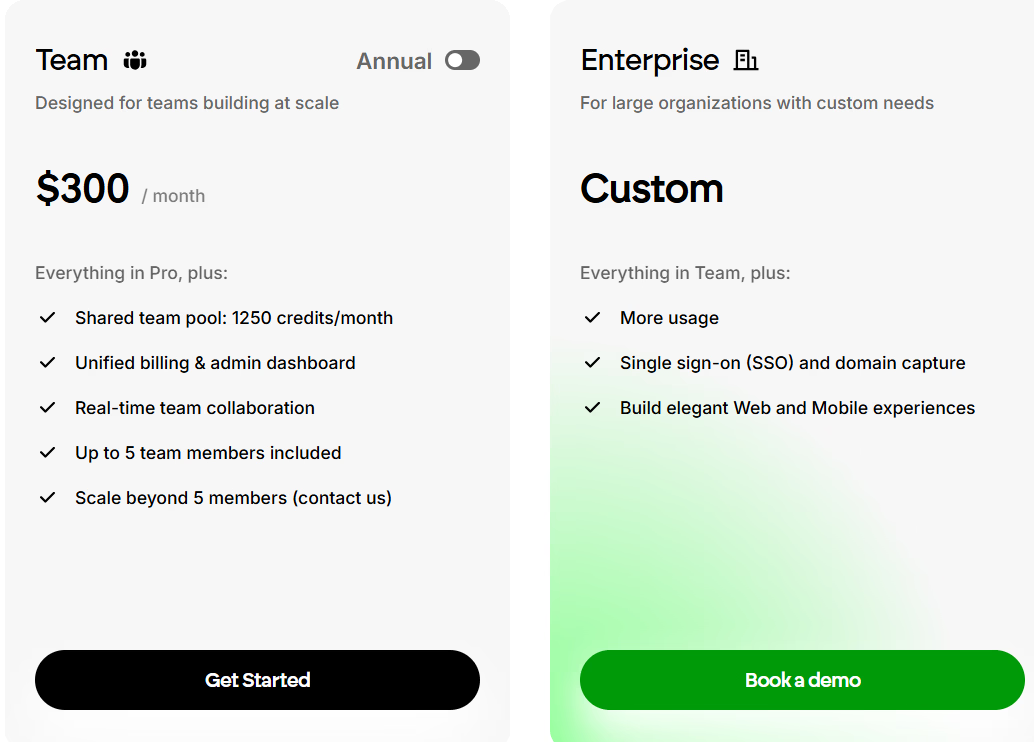
Pricing
.avif)
2. Vitara
Vitara is an AI-assisted full-stack development platform designed to help teams generate and deploy applications quickly using natural language prompts. It blends low-code development with AI automation to simplify building modern web apps without deep technical setup. Vitara handles backend generation, frontend scaffolding, and deployment orchestration, allowing startups and developers to focus more on product design and user experience.
Read More About: 5 Best Vitara Alternatives and Competitors
Key Features of Vitara AI
1. AI-Powered Full-Stack Code Generation
Vitara transforms user prompts into deployable codebases covering both frontend and backend. It generates UI layouts, routes, APIs, and data models automatically, reducing repetitive coding and manual configuration work.
2. Drag-and-Drop UI Builder with Smart Components
Its intelligent visual builder offers pre-trained AI components that adapt dynamically to content and layout context. Developers can customize visual elements while maintaining responsiveness and consistency.
3. Real-Time Collaboration Environment
Vitara’s live editing environment supports multiplayer development, letting team members build, review, and test in parallel. Changes are reflected instantly, streamlining teamwork and version control.
4. Integrated DevOps and CI/CD Pipeline
Built-in deployment automation ensures applications move smoothly from testing to production. Vitara configures hosting, builds containers, and manages rollout processes automatically.
5. AI Debugging and Code Review Assistance
Vitara identifies performance bottlenecks, syntax issues, and logic errors automatically. Its AI assistant provides detailed explanations and fix suggestions to improve code quality and maintainability.
6. Cloud-Native Workspace for Simplified Setup
The entire development process runs in a cloud-hosted environment, removing dependency conflicts, local installations, and setup friction for distributed teams.
Unique Features of Vitara AI
1. Prompt-Based Custom Workflow Automation
Developers can create automation pipelines using natural language. The system can manage build triggers, data migrations, and deployment schedules through conversational inputs.
2. Multi-Model AI Collaboration
Vitara uses a hybrid AI model approach, combining multiple LLMs for frontend design, API structuring, and testing. This ensures more reliable and context-aware results compared to single-model systems.
3. Auto-Scaling Infrastructure Management
Vitara automatically provisions and scales hosting resources based on live traffic patterns, enabling teams to handle unpredictable load spikes without manual configuration.
4. Smart API and Integration Assistant
Its AI agent assists in connecting external APIs or services like Stripe, Firebase, or Supabase, generating integration-ready code instantly and managing authentication securely.
5. Pre-Trained App Templates and Blueprints
Vitara provides ready-to-use app templates for dashboards, SaaS tools, and eCommerce platforms that can be modified through prompts or the visual builder to reduce setup time.
Advantages of Vitara AI
- Accelerates app creation with AI-driven code generation
- Combines visual building and prompt-based development seamlessly
- Enables team collaboration in real time via shared cloud workspaces
- Auto-manages hosting and scaling through integrated infrastructure
- Offers intuitive debugging and review assistance using AI
- Reduces time to production with ready-made app blueprints
Limitations of Vitara AI
- Generated code may require optimization for large-scale enterprise systems
- Limited control over fine-grained infrastructure compared to manual DevOps setups
- Offline development or self-hosted IDE support is not available
- Occasional dependency mismatches during multi-agent code merges
- Fewer third-party integrations compared to mature developer ecosystems
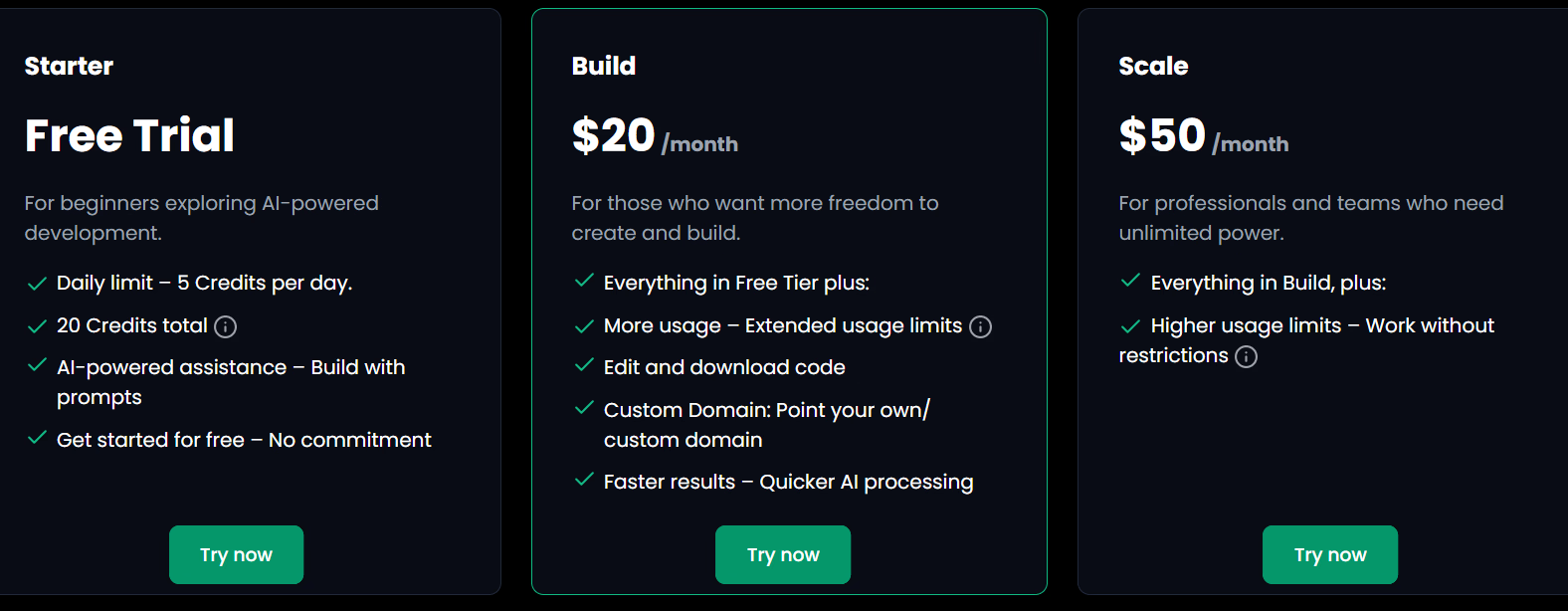
Pricing
3. Bubble
Bubble is one of the most well-known no-code platforms for building full-stack web applications. It enables founders, startups, and small teams to create production-ready apps visually, without writing code. With its drag-and-drop interface, integrated database, and workflow-based logic system, Bubble allows users to launch interactive web apps, marketplaces, and SaaS products quickly. However, while it empowers non-developers, it can be technically demanding at scale, requiring a strong grasp of workflows and performance optimization.
Read More About: 6 Best Bubble Alternatives and Competitors
Key Features of Bubble
1. Visual Drag-and-Drop Builder for UI Creation
Bubble’s core strength lies in its visual editor, allowing users to design fully responsive user interfaces without needing to code. It includes grids, inputs, conditionals, and reusable elements for fast layout design.
2. Powerful Workflow Automation Engine
Users can create dynamic logic, triggers, and database operations using visual workflows. This feature enables apps to perform complex actions like payments, user authentication, and notifications without code.
3. Integrated Database and Backend System
Bubble comes with a built-in database that connects directly to front-end components, letting users store, query, and update data visually. It also supports dynamic expressions for real-time data rendering.
4. Plugin Marketplace for Extensibility
With thousands of plugins for APIs, UI components, and services like Stripe or Google Maps, Bubble can be expanded to handle advanced use cases. Developers can also create custom plugins for deeper control.
5. Role-Based User Authentication and Access Control
Bubble provides tools to set up user accounts, manage permissions, and control data visibility based on user roles. This simplifies building secure apps with personalized experiences.
6. Integrated Hosting and Versioning Environment
Apps built on Bubble are hosted automatically with SSL, backups, and deployment controls. Built-in version management allows developers to stage and test before pushing updates live.
Unique Features of Bubble
1. Fully Visual Logic Builder
Unlike most platforms that limit workflows to pre-built actions, Bubble lets users design complex multi-step logic visually, connecting UI actions directly to backend data.
2. Plugin Editor for Custom Integrations
Advanced users can build their own API connections or plugins using JavaScript, allowing full extensibility beyond Bubble’s standard components.
3. Responsive Engine for Mobile-Optimized Layouts
Bubble’s newer responsive engine enables fluid layouts that adapt to all screen sizes, ensuring web apps perform well across desktop and mobile devices.
4. Real-Time Collaboration and Editing
Multiple users can edit an app simultaneously, track version history, and merge changes seamlessly, similar to collaborative cloud IDEs.
5. API Connector for External Integrations
The API Connector allows integration with almost any third-party REST API, making it easy to extend app functionality beyond Bubble’s native ecosystem.
Advantages of Bubble
- Mature ecosystem with a vast plugin marketplace and community support
- Handles frontend, backend, and database all in one unified environment
- Supports dynamic workflows and complex logic visually
- Hosting, backups, and deployment included in all plans
- Offers scalability through API extensions and custom code
- Enables launching functional MVPs quickly without a development team
Limitations of Bubble
- Performance slows down with large datasets and complex workflows
- Steep learning curve for non-technical users despite being no-code
- Limited control over hosting environment and infrastructure
- Pricing increases significantly as app usage and traffic grow
- Offline development and code export are not supported
- Customization beyond Bubble’s visual limits often requires JavaScript expertise
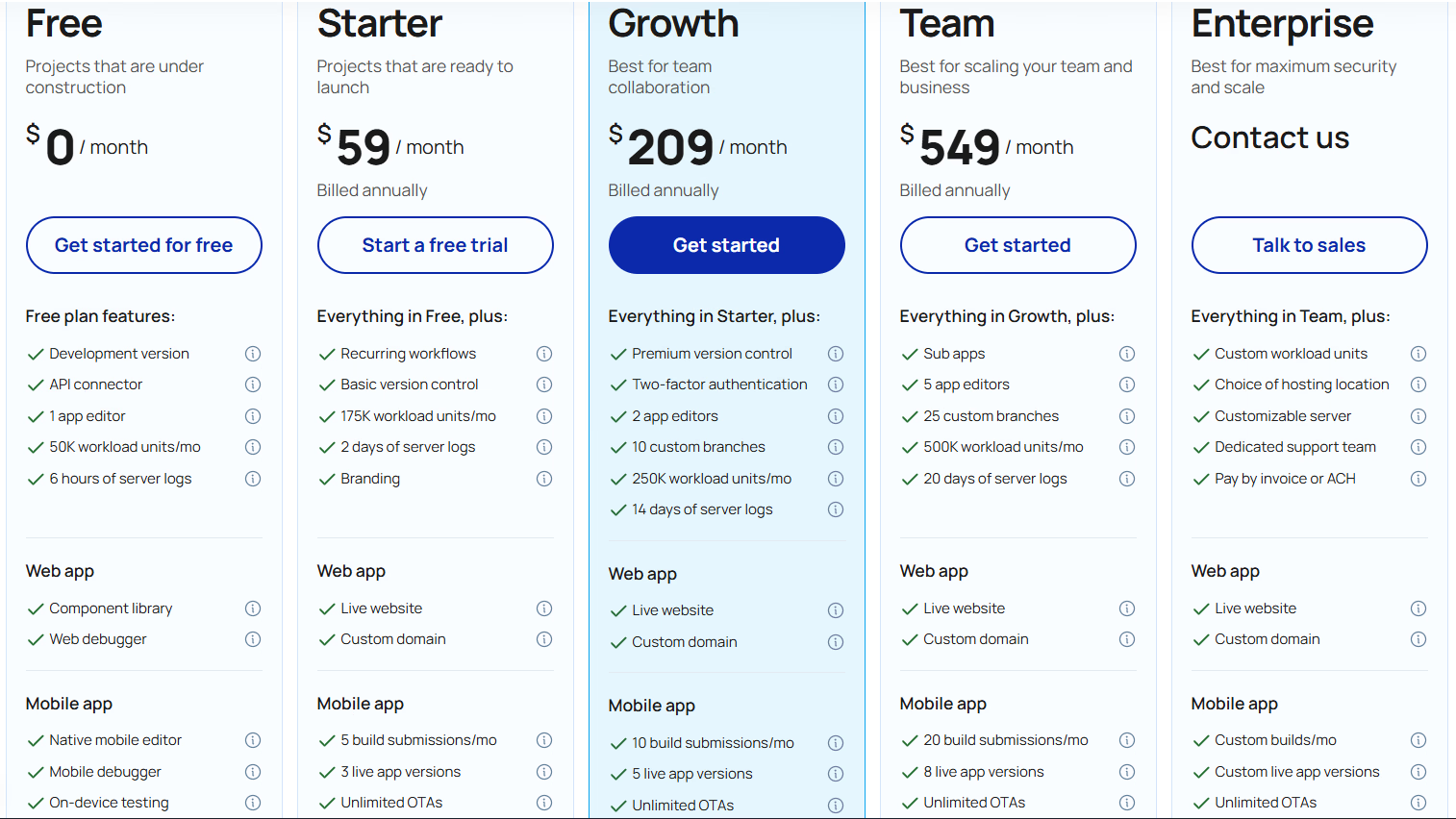
Pricing
4. Glide
Glide is a modern no-code platform that turns spreadsheets into visually polished mobile and web applications. Built for speed and simplicity, Glide enables entrepreneurs, teams, and small businesses to build internal tools, CRMs, and client portals without writing code. By connecting to data sources like Google Sheets, Airtable, or Glide Tables, it allows instant app creation and live updates whenever data changes.
Glide focuses on usability, design polish, and scalability for non-technical builders, making it ideal for quickly launching business workflows, dashboards, and customer-facing apps.
Key Features of Glide
1. Spreadsheet-to-App Conversion
Glide automatically converts spreadsheet data into interactive mobile or web apps. Each column becomes a field, and updates in the spreadsheet instantly sync to the live app, eliminating data duplication.
2. Glide Tables for Performance and Scalability
Beyond spreadsheets, Glide Tables provide a faster, cloud-native database layer designed for larger datasets and better app performance. They support relational data and advanced logic within Glide itself.
3. Pre-Built UI Components and Templates
Glide offers a large collection of layout templates, blocks, and components for dashboards, CRMs, and portals. Users can quickly customize design, style, and workflows without touching code.
4. Role-Based Access Control and Permissions
Apps can be configured with tiered access levels for different users, such as admins, employees, or clients. This ensures sensitive data is only visible to authorized people.
5. Real-Time Sync with Data Sources
Any update made in Google Sheets, Airtable, or Glide Tables reflects instantly in the app. This real-time synchronization allows teams to manage live data across systems efficiently.
6. Built-In Automations and Workflows
Glide lets users set up automations triggered by events like form submissions or data updates. These can send notifications, update records, or connect with external tools.
Unique Features of Glide
1. Native Mobile App Deployment
Glide apps are optimized for mobile devices out of the box and can be installed as PWAs (Progressive Web Apps). This gives users near-native app experiences without app store submissions.
2. AI-Powered Data Mapping and Field Detection
Glide intelligently detects column types, relationships, and potential actions automatically when you import a spreadsheet. This drastically cuts down setup time and configuration complexity.
3. Design-First Builder Interface
Glide’s interface emphasizes visual aesthetics, letting users customize color themes, icons, fonts, and layouts. It’s designed for creating modern-looking apps without a designer.
4. Team Workspaces for Shared Development
Multiple users can collaborate on the same app with edit permissions, version tracking, and centralized data control, making it great for teams managing shared resources.
5. Integration with Business Tools
Glide connects easily with services like Zapier, Make, and webhooks, enabling integrations with CRMs, payment processors, and other automation tools for advanced workflows.
Advantages of Glide
- Extremely easy for non-technical users to build polished apps quickly
- Real-time syncing keeps apps and data sources always aligned
- Native mobile-first performance with modern UI templates
- Fast and reliable with Glide Tables replacing external sheet lag
- Built-in access controls for secure multi-user applications
- Suitable for small businesses, startups, and internal team tools
Limitations of Glide
- Limited backend logic and database depth compared to pro-code tools
- Custom workflows or APIs require third-party integration via Zapier or Make
- Apps depend heavily on Glide’s cloud and data infrastructure
- Lacks direct code export, restricting advanced custom development
- Can become costly when scaling user count or workflow automations
- Offline functionality is limited for field or remote use cases
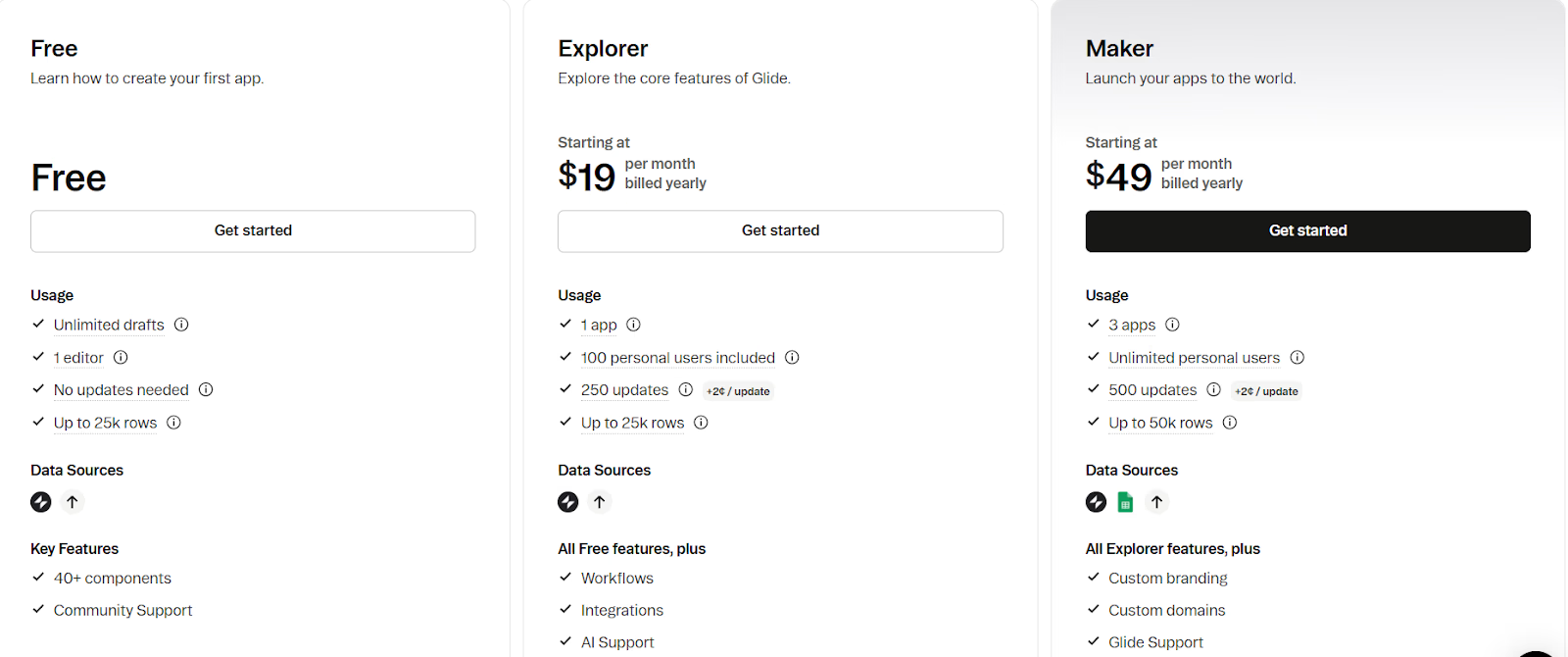
Pricing
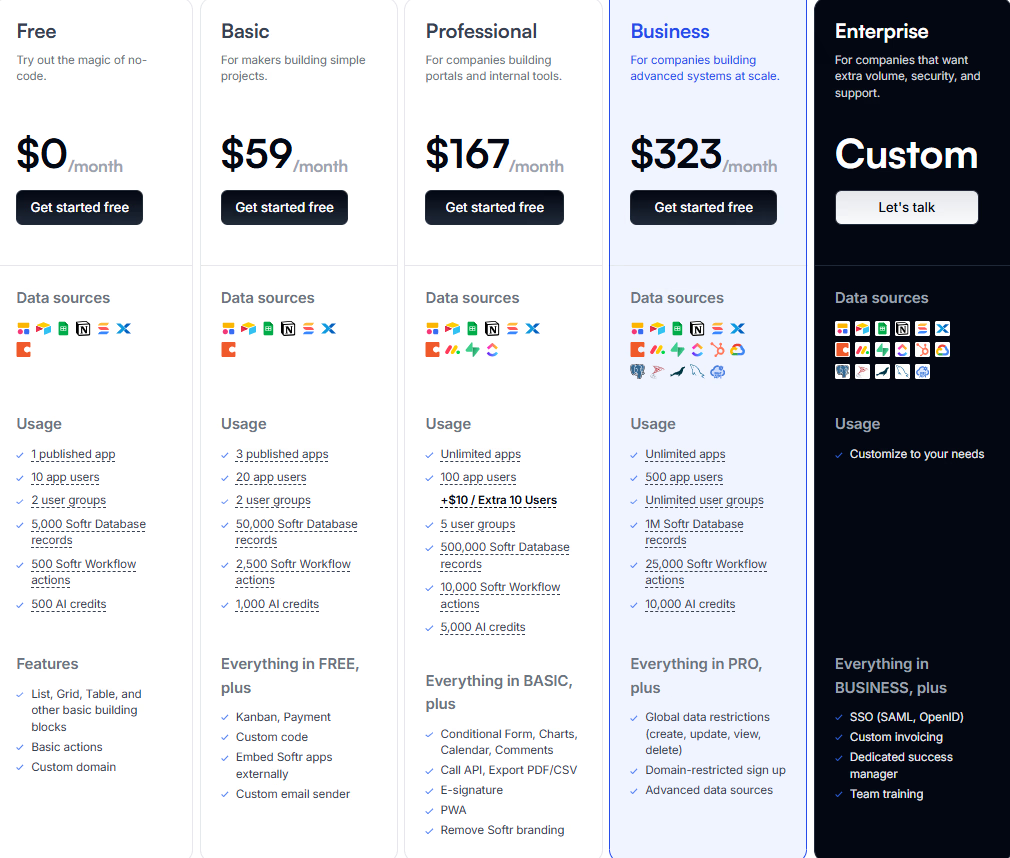
5. Softr
Softr is a powerful no-code platform that transforms data from sources like Airtable, Google Sheets, and Notion into fully functional web apps, client portals, and internal tools. Designed for business users and makers, it helps turn structured data into dynamic user experiences with authentication, payments, roles, and responsive layouts, all without writing code.
Softr is particularly popular among small businesses and startups for building secure, data-driven applications in minutes, offering deep integrations and flexible customization through prebuilt blocks and logic rules.
Key Features of Softr
1. Data-to-App Integration with Airtable and Google Sheets
Softr directly connects to Airtable, Google Sheets, Notion, and other sources, allowing users to convert spreadsheets into working web applications instantly. Real-time syncing keeps apps continuously updated with minimal maintenance.
2. Modular Building Blocks and Pre-Made Templates
The platform provides hundreds of ready-to-use building blocks, including lists, tables, forms, charts, and dashboards. These can be easily rearranged or styled to create custom workflows without technical complexity.
3. User Authentication and Role-Based Access Control
Softr enables secure login systems with personalized experiences for users, clients, or teams. Different user roles can control what data is visible or editable, supporting advanced access management.
4. Workflow Automations and Custom Logic
Users can automate key actions, such as form submissions, updates, or status changes, using conditional logic. Softr also integrates with Zapier, Make, and native automations to streamline operations.
5. Responsive Design for Web and Mobile
Apps automatically adjust to desktop and mobile devices, ensuring a polished and user-friendly interface across all screens without extra configuration or code.
6. Embedded AI Tools and Custom Integrations
Softr recently introduced AI-powered workflows and integrations with GPT-based systems, enabling smarter form handling, recommendations, and custom content generation within apps.
Unique Features of Softr
1. Multi-Source Data Management
Unlike most no-code platforms, Softr allows combining data from multiple sources such as Airtable, Notion, Xano, and SmartSuite within one app. This flexibility makes it suitable for complex business processes.
2. Granular Permissions and Data Filtering
Admins can define highly specific visibility rules, letting users see only filtered data relevant to them. This is ideal for client portals, HR tools, or sales dashboards with sensitive information.
3. E-Commerce and Membership Capabilities
Softr supports payments via Stripe and integrates with subscription tools, enabling builders to launch membership sites, digital marketplaces, or SaaS-style portals without external plug-ins.
4. Custom Domains and Branding Control
Users can apply custom domains, colors, logos, and typography, ensuring their apps match company branding. The option to remove Softr branding adds a professional finish for client-facing projects.
5. Integration with Business Tools and APIs
Through native integrations and REST API support, Softr connects to CRMs, project tools, and marketing platforms. It also supports data export and automation with webhooks for more advanced use cases.
Advantages of Softr
- Extremely beginner-friendly with zero technical setup required
- Seamless integration with Airtable, Google Sheets, and Notion for live data apps
- Prebuilt blocks save hours of design and configuration work
- Robust permission settings support secure team and client workflows
- Built-in support for payments, memberships, and custom branding
- Works well for internal dashboards, CRMs, and client portals
- AI workflow and automation updates add intelligence to business apps
Limitations of Softr
- Lacks fine-grained backend control for advanced logic or database customization
- Apps are tied to Softr’s cloud ecosystem with limited export options
- Complex apps may require multiple external integrations for scalability
- Performance can slow with very large datasets or high user concurrency
- Offline support is minimal, making it unsuitable for field operations
- Advanced automation and API access often require higher-tier plans
- Limited versioning and rollback options for larger development teams
Pricing
How to Choose the Right Softgen Alternative?
Finding the best Softgen alternative depends on how your team builds, deploys, and maintains applications. Each platform in this list offers a distinct advantage, from AI-assisted full-stack automation to flexible no-code interfaces for non-developers. Here’s what to consider before making a decision:
1. Define Your Team’s Technical Skill Level
If your team prefers natural language prompts and wants AI to handle code generation, Emergent is a top choice. For visual app builders or non-technical creators, platforms like Softr and Glide make the process faster and more intuitive.
2. Evaluate Scalability and Infrastructure Requirements
For startups expecting growth, choose a platform that offers backend flexibility, hosting control, and exportable code. Base44 and Replit excel here, enabling developers to maintain scalability without vendor lock-in.
3. Look for Real Code Access and Extensibility
Tools like Bolt.new and Appsmith offer more customization freedom for professional developers who want to tweak logic, APIs, or front-end design beyond preset templates.
4. Prioritize Collaboration and Workflow Efficiency
If your workflow involves multiple editors, designers, and product leads, select a tool with real-time collaboration and version control. Emergent and Replit both provide powerful multi-user environments for seamless teamwork.
5. Check Pricing Flexibility and Support
Review the cost-to-feature ratio, especially for growing teams. While free tiers are great for testing, long-term scaling often requires paid plans with better API, data, and performance support. Choose one that balances affordability and reliability.
Conclusion
Softgen makes it easier to get started with application development, but many teams encounter its limits as requirements grow around performance, integrations, backend flexibility, and long-term scalability. For products that move beyond simple workflows or early prototypes, these constraints can slow innovation and increase technical debt.
Modern alternatives now offer a more balanced approach, combining speed with real engineering capability. Platforms like Emergent enable full-stack automation with exportable code and scalable infrastructure, while tools such as Bubble, Glide, Adalo, and Softr continue to serve specific no-code use cases effectively.
Choosing the right Softgen alternative depends on where your product is headed. For teams planning to scale, retain ownership, and build production-ready systems, selecting a platform aligned with long-term flexibility and control can make a meaningful difference in how efficiently software is built and maintained

Every alternative has trade-offs. Emergent just builds production-ready apps from one prompt.
- Production-ready apps
- Web & mobile apps
- Deploy in minutes







