



TL;DR
- Keep the first website small: Give it one goal, use three to five pages, choose one builder, and publish once the main path works.
- Start from one template or one clear prompt: Your first version needs useful content, simple navigation, and one main action.
- Test before you publish: Click every link, submit every form, read every page, and check the site on mobile.
- My test took about 30 active minutes: I built and published a four-page Northstar Ops website with Emergent. The first usable preview took about 15 minutes, and the full build used 13 credits.
If you're wondering how to build a simple website, start smaller than you think. A clear goal, a few useful pages, and one working contact path are enough for a first version.
For my test, I kept the scope tight: one service business, four pages, and one goal for visitors.
I built Northstar Ops, a consulting business I invented for this test, on Emergent from a blank prompt to a published site.
The first preview came back in about 15 minutes. This guide shows you the same 10-step process, including the small mistakes I found before publishing.
What You'll Need Before Starting
You can prepare most of your first website before you open a builder.
Have these ready:
- One goal: Decide what you want a visitor to do.
- A short page list: Three to five pages is enough for this guide.
- Basic copy: Write down what you offer, who you help, and how people can contact you.
- A website builder: Choose one platform and stay with it through your first build.
- Fake test details: Use a test name and email when you check forms.
- One afternoon: My Northstar Ops build took about 30 active minutes of hands-on work, plus extra time for manual checks.
If you use Emergent, its Free plan includes 10 credits a month. Standard costs $20/month ($17/month billed annually) and includes 100 credits per month. My test used 13 credits, so this exact build went past the Free plan allowance.
How to Build a Simple Website Step by Step
Step 1: Give Your Website One Clear Goal
Start with the action you want someone to take after visiting your site.
Northstar Ops had one goal: get small service business owners to request a 20-minute intro call. That goal shaped the homepage, Services page, Contact form, and every main button.
Use this sentence to plan yours:
This website helps [audience] understand [offer] and take [main action].
For a consultant, that action could be requesting a call. For a photographer, it could be viewing a portfolio and sending an inquiry.
If you're creating a personal website, your main action could be viewing your work, downloading your resume, or contacting you.
Note: Pick one main action for the first version. Add a second goal after you have a clear reason for it.
Step 2: Pick One Website Builder
I picked one platform before I started the build and stayed on it through publishing.
Pick a builder that can do the three jobs your first site needs: create three to five pages, run a contact form, and publish the site without moving it somewhere else.
I used Emergent for this test because I wanted to see how far one written brief could get me. Its AI website builder creates pages, navigation, forms, and other site elements from plain-language prompts.
Check these three things:
- Pages: Can it create the three to five pages you need?
- Contact: Can you add and test your contact path?
- Publishing: Can you put the finished site live from the same builder?
A simple site is where AI builders do their best work. Our best AI website builders guide covers the field.
Step 3: Use the Builder's Web Address for Now
Skip the custom domain for now. Publish on the address your builder gives you, like the emergent.host address I used for Northstar Ops. Connect your own domain once the pages, form, and main button all work.
Domain registration and hosting get more room in the complete website-from-scratch guide.
Also read our how to build a website from scratch guide if a builder won’t give you what you need.
Step 4: Choose Three to Five Pages
Your first site needs enough pages to explain the offer and help someone act.
I gave Northstar Ops four pages.
Here was the structure:
- Home: Explain the business, audience, services, and next action.
- Services: Give each main service enough space to make sense.
- About: Tell visitors who runs the business and give them useful context.
- Contact: Give visitors a simple way to request the intro call.
A designer could swap Services for Portfolio. A restaurant might use Menu. A local contractor could use Service Areas.
Keep the page test simple: Every page should answer a question a visitor is likely to have.
You can add a blog, store, member area, or resource library later. Those additions create more writing, testing, and upkeep.
Step 5: Write One Detailed Prompt
If your builder uses templates, pick one that is already close to what you need and move on. With Emergent, I skipped the template search and started with one detailed prompt.
With Emergent, I started with a prompt. Its current website builder creates sites from plain-language instructions instead of starting from a template library.
If the blank prompt box slows you down, Emmy can help inside Emergent's web app. Emmy is a free chat assistant that can ask questions about your idea and turn the conversation into a build-ready prompt. Talking to Emmy uses no credits. Emergent's July 2026 launch post says Emmy is web-only for now, so use a desktop browser for this part.
I already knew the site I wanted, so I sent this prompt myself:
Build a simple, professional 4-page website for Northstar Ops, a solo operations consultant in Austin, Texas. Northstar Ops helps small service businesses simplify client onboarding and repetitive admin workflows.
The audience is owners of small service businesses. The goal of the website is to get visitors to request a 20-minute intro call.
Create these pages only: Home, Services, About, and Contact.
On the Home page, include a clear headline that explains what the business does, a short supporting paragraph, three service summaries, and one primary CTA: “Book a 20-minute intro call.”
On Services, include three services: client onboarding setup, workflow cleanup, and automation planning. Describe each in simple, outcome-focused language.
On About, include a short founder bio using clearly marked placeholder information.
On Contact, include a simple working form with name, email, and message fields plus a confirmation state. Use the simplest built-in approach and don't add third-party services.
Keep the design clean and minimal. Use one sans-serif font family, a light neutral background, one dark accent color, generous whitespace, and simple navigation. Make it responsive on mobile.
Do not add a blog, ecommerce, logins, payments, dashboards, extra pages, elaborate animations, or unnecessary functionality. Do not invent testimonials, client logos, awards, customer counts, or business claims.
Build the complete first version in one pass and show me the preview.
That prompt gave the builder four useful constraints: the business, the audience, the page list, and the action I wanted visitors to take.
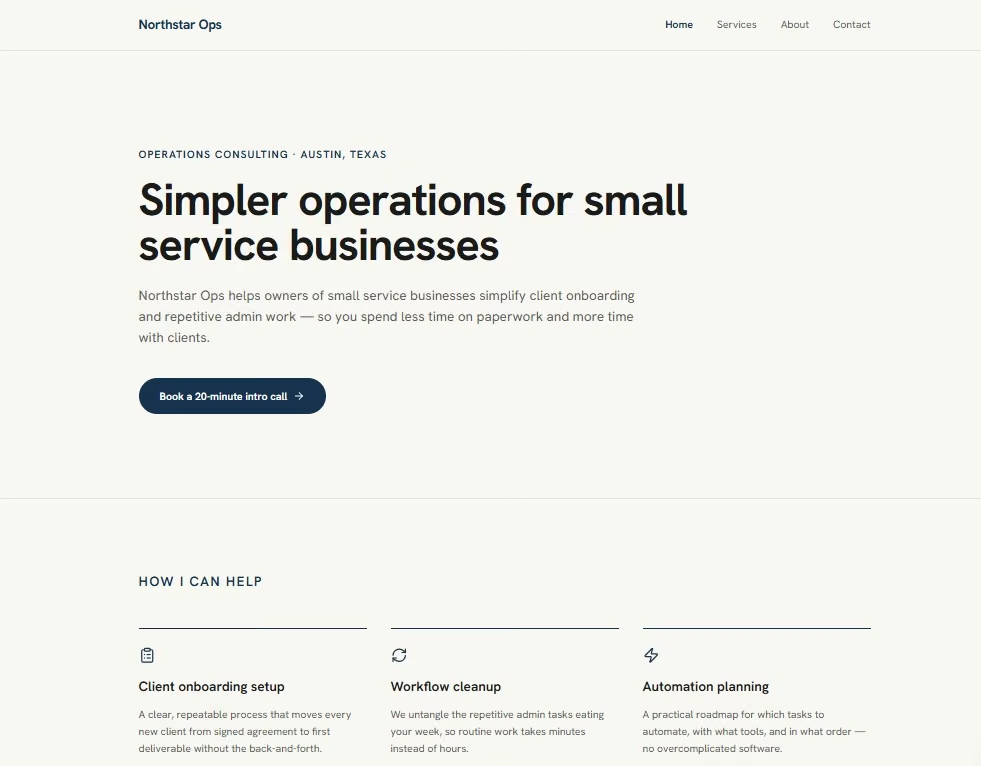
The first usable preview appeared in about 15 minutes. All four requested pages were already there.
Step 6: Keep the Design and Features Small
A simple first website needs a visual system you can repeat without thinking about every section from scratch.
The first version already followed the simple visual direction in my prompt, so I left the overall look alone.
Use these limits for your first site:
- Fonts: One font family is enough.
- Colors: Start with a background color, a text color, and one accent.
- Navigation: Show the few pages visitors need.
- Buttons: Keep the wording consistent when buttons lead to the same action.
- Images: Use them when they explain the business or help build trust.
- Features: Add the contact path your goal needs. Leave extra functions for a later round.
For Northstar Ops, the key function was a contact form. I left out scheduling software, payments, accounts, email alerts, a blog, and analytics.
That kept the test focused on one question: could a visitor understand the business and request an intro call?
Step 7: Review the First Version Before You Add Anything
The Northstar Ops site looked finished on the first try. A closer read exposed three problems.
Here's what needed fixing:
- About-page placeholders: The founder name, experience, and background still showed placeholder labels.
- Call-to-action (CTA) wording: “Book a 20-minute intro call” opened a contact form.
- An invented response promise: The Contact page said Northstar Ops would reply “usually within one business day.” I never gave Emergent that information.
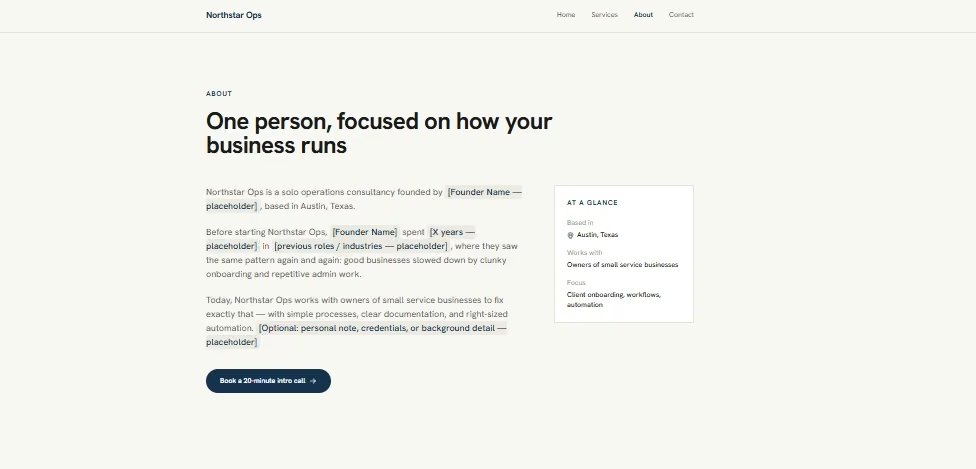
The third one was the easiest to miss. It sounded like ordinary business copy and looked fine on the page.
That's why I read AI-generated website copy line by line before publishing it.
I sent one focused correction with three instructions.
I asked Emergent to fix:
- About page: Replace the placeholders with Maya Chen, seven years of operations experience, and a background in small service businesses.
- Call-to-action wording: Change “Book a 20-minute intro call” to “Request a 20-minute intro call” throughout the site.
- Contact copy: Remove the one-business-day response promise.
The corrections worked without changing the overall design.

I also tested the Contact form with valid details. It sent successfully and showed a “Message received” screen.
I tested the form again with empty and partly filled fields. Browser validation blocked both submissions.
Note: Read your site as a customer would. Check names, prices, response times, locations, guarantees, credentials, testimonials, and any other statement someone could rely on.
Step 8: Check the Website on Mobile
Open the mobile version and use it.
I checked Northstar Ops at 360px, 375px, and 390px widths. None of the pages had horizontal overflow or clipped content.
The Home, Services, and About pages already stacked in a sensible order. The mobile review still found four small usability issues.
Emergent fixed these four details:
- Hamburger button: Emergent enlarged the tap area without moving the icon.
- Mobile menu links: Emergent added more padding around each link.
- Footer links: Emergent enlarged their tap areas on mobile.
- Contact fields: Emergent increased the form text from 14px to 16px on mobile to help prevent iPhones from zooming when a visitor taps a field.
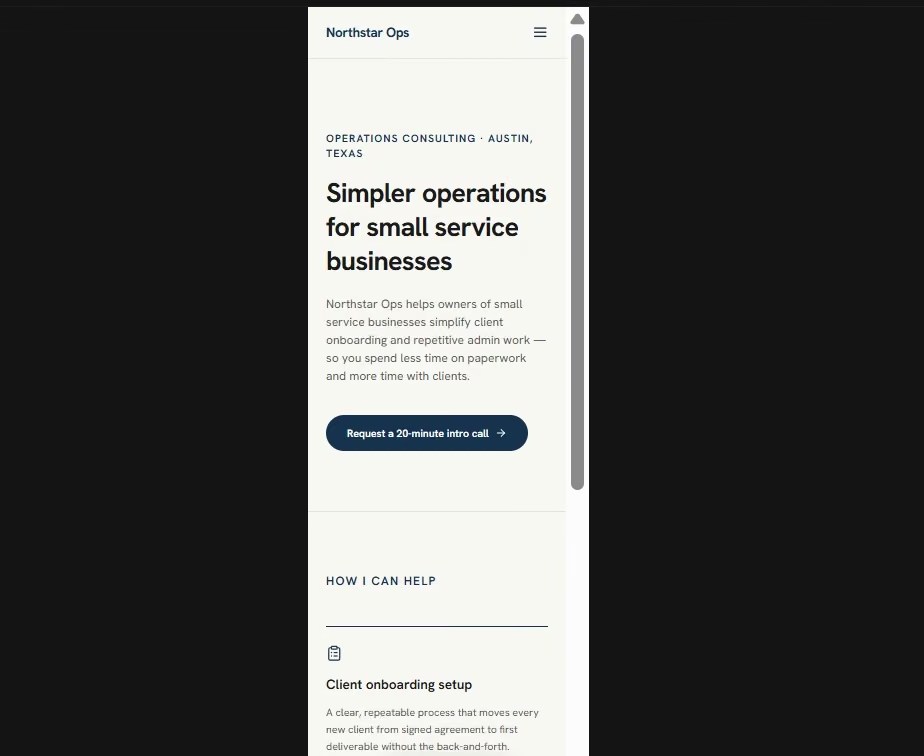
I opened the menu, moved through the pages, filled in the form, and checked the confirmation state again.
This step is worth doing even when the layout looks fine. Google uses the mobile version of a site's content for indexing and ranking. It recommends responsive web design because it's the easiest design pattern to implement and maintain.
Step 9: Run a Final QA Check and Fix Page Metadata
Before publishing, I ran one last Northstar Ops check at 1920px desktop and 375px mobile.
I checked four areas:
- Links: Every header link, footer link, and the Services detail link.
- Buttons: All three “Request a 20-minute intro call” buttons.
- Form: Empty, partly filled, and valid submissions, plus the “Send another message” reset.
- Mobile and content: The menu, horizontal overflow, clipped content, leftover placeholders, and unsupported business claims.
Every visitor-facing check passed.
The one failure was in the browser metadata. The tab title still said “Emergent | Fullstack App,” and the search description still used template text.
I had Emergent replace the default title and description, then give Home, Services, About, and Contact their own titles and descriptions.
Google recommends descriptive, concise titles for each page. It may also use a meta description when that description gives a more accurate summary than the page content it would otherwise use for the search snippet.
Note: Look at the browser tab before you publish. A finished homepage can still carry a builder's default page title.
Step 10: Publish and Check the Live Site Yourself
After QA passed, I published Northstar Ops.
The finished site went live at onboarding-setup-6.emergent.host, which was public when I completed this test.
I opened it in an incognito window so I could see the public version without relying on my logged-in preview. I clicked through Home, Services, About, and Contact again.
My final test numbers:
- First usable preview: About 15 minutes
- Active build time to publication: About 30 minutes
- Pages: 4
- Credits used: 13
- Structural rebuilds: 0
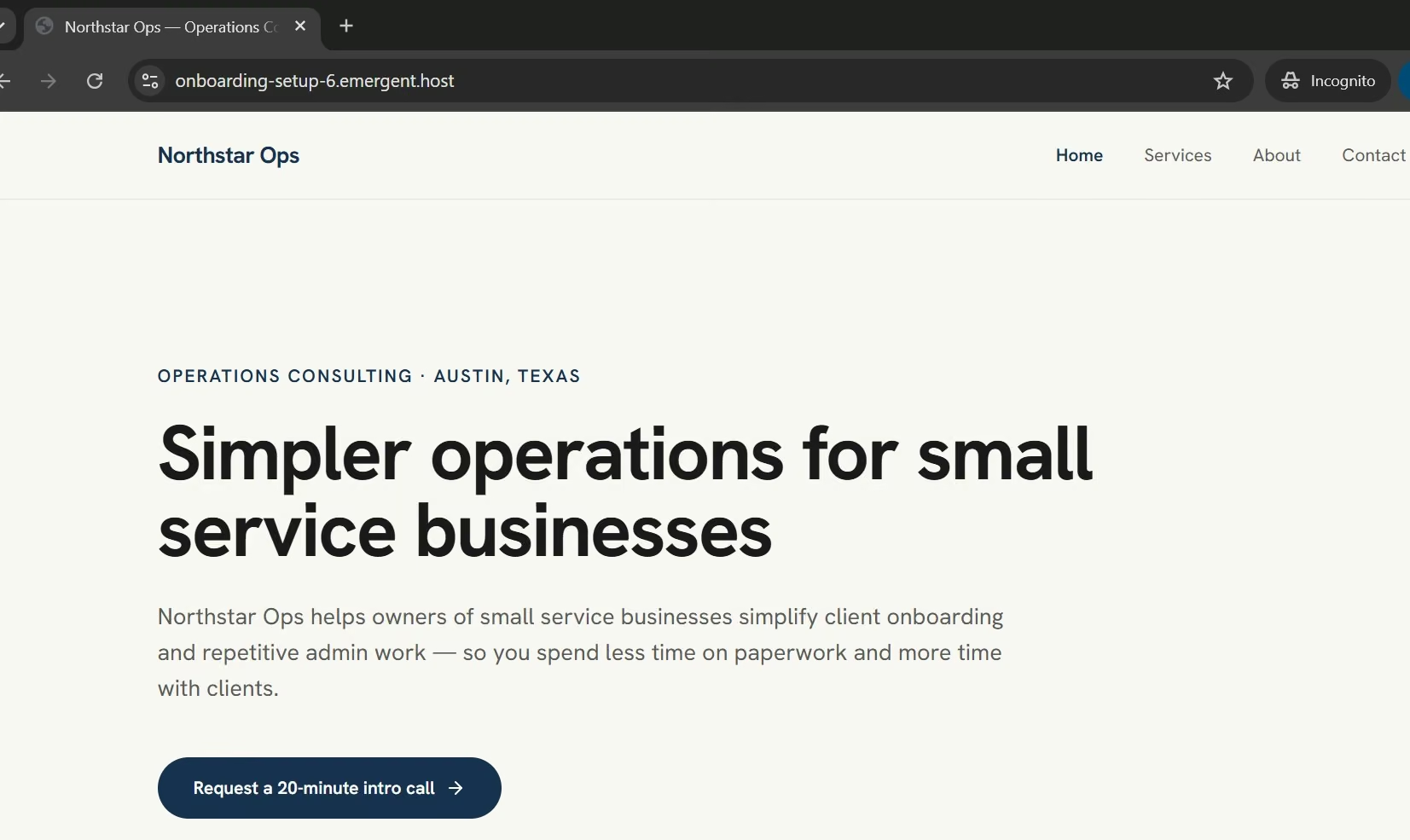
Those are results from this specific test. A store, member area, booking system, or site with custom business workflows creates a larger build.
Common Mistakes to Avoid
My test left me with three mistakes worth avoiding on any first website.
Watch for these:
- Publishing generated copy without reading it: My first version invented a one-business-day response promise. Check every claim before it goes live.
- Changing too much in one correction: Keep revision prompts focused so you can see what changed and whether the fix worked.
- Treating the preview as the finished site: Open the published version in a private browser and run the main visitor path again.
Taking Your Simple Website Further
Once the website is live, use real visitor needs to choose the next change.
You might add a custom domain, original photos, form notifications, analytics, another service page, or online booking. Pick the change that solves a clear problem.
This is also the point where a simple site can turn into a larger website project. If you want to plan hosting, domains, site structure, deeper SEO work, and more advanced features from the start, read How to Build a Website from Scratch: A Complete Guide instead. That is the complete version of this process.
Keep the simple version alive while you improve it. One useful update is easier to test than a large redesign.
How Emergent Handled This Simple Website Build
Emergent fit this test because I could build, edit, test, and publish Northstar Ops inside the same project.
I didn't have to rebuild individual page layouts after every correction. I described the change, checked the result, and moved to the next test.
For a beginner, the useful part is the short feedback loop. You describe the first version, review what came back, fix one clear issue, test it, and publish when the main path works.
If you get stuck while writing the prompt or using the product, Emmy can answer questions inside the web app without using your credits.
Start building with Emergent.
Final Takeaway on How to Build a Simple Website
The fastest way to build a simple website is to keep the first version focused.
Give the site one goal. Pick one builder. Choose three to five pages. Start from one template or one detailed prompt. Read every line, test every action, check mobile, fix the page metadata, and open the public version yourself.
The first version already had the right structure. Most of my work went into small details that a quick visual check could have missed.

Describe what you want and Emergent builds it. A real, production-ready app you can launch the same day.
- One prompt to build
- Zero code required
- Deploy in minutes







