



Squarespace Review: TL;DR
- What it does best: Squarespace helps you publish a polished portfolio, blog, service site, or small online store without managing web hosting or software updates yourself.
- Its biggest drawback: The price is high for a simple website, and you can't move the full site design to another host later.
- Choose it if: You value design, built-in business tools, and having most website tasks in one account.
- Skip it if: You need advanced workflows, phone support, full design portability, or a large set of specialized extensions.
- Overall verdict: Squarespace remains a strong choice for design-led small businesses. The new price is harder to defend when you only need a basic brochure site.
Squarespace is easy to admire before you reach the checkout point. The templates look polished, the sales pitch feels simple, and then the plan list makes you weigh how much of the price is the website itself and how much is business tools you may never use.
For this Squarespace review, I examined the current plans, official help documents, support rules, customer feedback, and most recent price changes on Squarespace so you don’t have to.
By the end of this article, you’ll know which plan makes sense, what fees sit outside the subscription, and whether Squarespace fits your site better than a more flexible option.
How I Researched This Review
I reviewed Squarespace’s current US pricing, plan comparison, payment fees, editor guides, support hours, cancellation rules, export limits, and AI tools. I also checked the current Trustpilot feedback and a Reddit discussion titled “Squarespace: would you recommend it?”
This review draws on that research rather than a hands-on account, so it focuses on what the plans and fees actually cost you.
What Is Squarespace?
Squarespace is a hosted website builder for creating business sites, portfolios, blogs, online stores, courses, and membership content. It handles hosting, templates, security, and software updates, so you don’t have to set up those parts on separate services.
Its core value is simple. You get a guided path from an empty page to a professional-looking site, with selling and marketing tools available in the same account. All current paid plans support products, services, invoices, courses, memberships, and unlimited product listings.
Squarespace is built for people who want a conventional website they can manage without a developer. It becomes less attractive when the project needs custom account rules, complex data, advanced internal tools, or workflows that go far beyond pages and products.
Squarespace’s Main Features
Website Setup and Fluid Engine
Fluid Engine is Squarespace’s main page editor for version 7.1 sites. It uses a visible grid and lets you drag, resize, and position content blocks within each page section.

That gives you more control than an editor that locks every item into a fixed row. You can build a portfolio grid, service page, restaurant menu, landing page, or product layout without writing code.
This freedom comes with more responsibility. Moving blocks around doesn’t guarantee that every page will look balanced. You still need to check spacing, text length, image crops, and how the page appears on smaller screens.
Recent customer discussions reflect this split. Some people describe the setup as straightforward once they learn the editor. Others report that simple layout changes take more work than expected. These are individual experiences, but the pattern shows that “drag and drop” does not always mean instant.
Key Takeaways
Fluid Engine suits you when you want design control without starting from an empty code file.
Templates and Design Control
Squarespace’s templates give you a sharp, image-led starting point. They are especially well-suited to photography, consulting, restaurants, personal brands, creative services, and businesses that rely on strong images.
Version 7.1 handles templates differently from older Squarespace sites. You cannot switch your site to another named template after you begin. Every version 7.1 site shares the same main features and style options, though, so you can change colors, fonts, page types, and layouts without starting again.
Your first template is just a starting design, and every version 7.1 site shares the same features underneath.
The limit appears when you want full control over the underlying structure. Squarespace gives you many style choices, but the platform still guides how pages, blocks, and site-wide settings work.
Core and higher plans add advanced code blocks and site-wide code injection for businesses that need more control.
Key Takeaways
Squarespace gives you a strong design base, but it does not give you the same freedom as a custom-coded site.
Blueprint AI
Blueprint AI uses artificial intelligence to create a starting site from information about your business, goals, and preferred style. You can use the guided Blueprint AI Builder, AI-generated templates, or Squarespace’s ChatGPT connection to begin the process.
The tool can generate draft text, images, page choices, and style settings. That can reduce the blank-page problem when you know what your business does but don’t know how to organize the website.
Treat the output as a first draft. You still need to check business claims, replace generic copy, review images, and make sure each page gives visitors a clear next step.
AI use is now tied to credits. Basic includes 10 one-time starter credits. Core includes 20 credits each month, Plus includes 40, and Advanced includes 120. Monthly credits reset and do not roll over.
Key Takeaways
Blueprint AI can speed up the first draft, but your own edits will decide whether the site feels specific to your business.
Ecommerce, Payments, and Transaction Fees
Every current Squarespace website plan supports online selling. You can sell physical goods, services, subscriptions, courses, videos, blog access, and memberships. You can also send invoices and proposals.
The plan you choose changes how much Squarespace takes from each sale.
Basic charges a 2% online store transaction fee and a 7% fee on digital content and memberships.
Core removes the store transaction fee but charges 5% on digital products. Plus lowers the digital fee to 1%. Advanced removes both platform transaction fees.
Those charges sit on top of payment processing. For standard US cards, Squarespace Payments costs 2.9% plus $0.30 on Basic and Core, 2.7% plus $0.30 on Plus, and 2.5% plus $0.30 on Advanced. International cards add 1.5%, and currency conversion adds 1%.
The fee math can help you choose a plan. Core costs $10 more per month than Basic when both are billed annually. Basic’s 2% store fee reaches $10 at $500 in monthly physical-product sales.
Once you regularly pass that amount, Core can cost less overall before you count its added tools.
A similar calculation applies to digital products. Plus costs $20 more per month than Core on annual billing. It reduces the digital product fee from 5% to 1%. That four-point saving covers the plan difference at about $500 in monthly digital sales.
Key Takeaways
Core is the practical starting point for a physical-goods store. Plus becomes easier to justify when digital sales reach about $500 per month.
Blogging, SEO, and Analytics
Squarespace covers the main technical parts of SEO. It creates and updates your sitemap, uses static page addresses, adds structured data, redirects extra domains to the main domain, and produces mobile-friendly pages.
It also gives you fields for page titles, search descriptions, image text, and other details search engines use to understand a page. Version 7.1 includes an SEO report that can find missing page descriptions and image text.
These tools give you a good technical base. They do not choose your keywords, write useful articles, earn links, or guarantee that a page will rank. Your content and page structure still do most of that work.
Squarespace also states that its support team cannot provide an SEO strategy or promise ranking changes.
The blogging tools fit individuals and small businesses that need a normal publishing workflow. You can combine blog content with products, membership areas, email collection, and site analytics without running a separate content system.
Key Takeaways
Squarespace is good enough for most small-business SEO. Your strategy and content remain more important than the website builder.
Scheduling, Marketing, and Integrations
Squarespace combines forms, newsletter signups, pop-ups, analytics, customer accounts, invoicing, and selling tools. Core and higher plans add integrations such as Mailchimp and Zapier, along with advanced code options and deeper commerce reports.
This setup works well when you want a small set of connected tools. A consultant could collect an inquiry, send a proposal, issue an invoice, and direct the client to a booking page.
Several related services cost extra. Acuity Scheduling, Email Campaigns, Google Workspace, domains, and other Squarespace services use separate subscriptions, billing cycles, and invoices. Canceling the website does not automatically cancel every added service.
Squarespace also provides fewer outside extensions than open platforms such as WordPress. That keeps the setup more controlled, but it gives you fewer choices when you need a niche business tool.
Key Takeaways
The built-in tools reduce setup work, but the real monthly cost can rise once you add scheduling, email, and business accounts.
Domains, Hosting, Support, and Export
All Squarespace website plans include managed cloud hosting, unlimited bandwidth, and Secure Sockets Layer (SSL) protection. An eligible annual plan includes one custom domain free for the first year.
Each website needs its own paid subscription. Squarespace does not have a public multi-site plan, even when you manage every site through the same account.
Squarespace offers 24/7 email support, with English live chat available during extended weekday hours, but it does not offer phone support.
Portability is a bigger limitation. While you can export some pages, text, images, and blog content, much of your site’s design and functionality won’t transfer. This includes store and portfolio pages, custom CSS, drafts, headers, footers, and certain content blocks, which can make moving to another platform more difficult.
You own the content you upload, but you cannot download the full Squarespace design and install it with another hosting company. Moving later usually means rebuilding at least part of the site.
Key Takeaways
Squarespace removes hosting work, but leaving the platform takes more effort than changing a normal web host.
Squarespace Reviews: What Real Users Are Saying
What Customers Like
Recent Squarespace reviews often praise the visual quality of its templates and the speed of getting a basic site online. Customers also describe positive support experiences where an advisor explained a problem clearly or fixed it quickly.
I saw a similar theme in the Reddit discussion “Squarespace: would you recommend it?” Several commenters liked the easy setup, low maintenance, and decent starting templates. One commenter preferred letting Squarespace handle hosting problems instead of managing plugins, server updates, and backups.
These comments support the platform’s plainest value. Squarespace works well when you would rather manage pages and content than manage website software.
What Frustrates Customers
Customer feedback becomes far more mixed around support access, billing, domains, and advanced editing. Trustpilot showed a 3.4 rating from 4,607 reviews at the research cutoff. Its recent review summary highlighted both helpful staff and complaints about slow responses, difficulty reaching a person, confusing domain controls, and limited building options.
This Reddit discussion also includes concerns about moving a site elsewhere, layout behavior, Google Workspace problems, and the lack of phone support. These reports describe individual experiences. They do not prove that every customer will face the same issue.
Price has become another complaint. In July 2026, annual equivalents rose from $16 to $19 for Basic, $23 to $29 for Core, and $39 to $49 for Plus. Advanced stayed at $99. Monthly Core rose from $36 to $39, while monthly Plus rose from $56 to $65.
The customer split is clear: Squarespace feels convenient when its standard tools match your business. It feels expensive and restrictive when they do not.
Squarespace Pros and Cons
At a Glance:
| Pros | Cons |
|---|---|
| Strong templates and visual controls | Higher 2026 prices |
| Hosting and security are included | No permanent free plan |
| All paid plans support selling | Basic charges platform transaction fees |
| Useful blogging and SEO basics | Limited full-site export |
| Email support is available every day | No phone support |
| Good fit for portfolios and service sites | Add-on subscriptions raise the total cost |
| Core adds code and key integrations | Complex workflows need another solution |
My Take on Squarespace
Squarespace is still one of the safer choices for a clean, conventional website. It keeps hosting, security, design, blogging, products, and basic business tools under one roof.
That convenience is the reason to choose it. It is also the reason the price can feel steep. You pay for the managed setup and the growing list of business features, even when your site only needs five pages and a contact form.
I would choose Basic for a portfolio, personal site, blog, or very small service website with one or two contributors. I would not choose it for a store with steady sales because the 2% platform fee can erase the savings.
I would choose Core for most active small businesses. It removes the physical store transaction fee, allows unlimited contributors, and adds custom code, premium integrations, better reports, and more sales tools.
Plus is aimed at businesses selling digital products or processing enough card sales to benefit from lower fees. Advanced is for stores with higher volume, large video needs, or a strong reason to pay for the lowest public processing rates.
My recommendation is: Choose Squarespace when design and low upkeep are your main goals. Skip it when custom behavior or full portability is central to the project.
Is Squarespace Right for You?
Choose Squarespace If
- You need a portfolio, service site, blog, restaurant site, or small online store.
- You want hosting, security, and software updates handled for you.
- Strong images and well-designed pages are central to your brand.
- You prefer a guided editor to a blank design canvas.
- You want products, invoices, memberships, and content in one account.
- You are comfortable using email or weekday live chat for support.
- You do not expect to move the full site design to another host.
Skip Squarespace If
- You only need a cheap one-page site.
- You need a permanent free plan.
- You require phone support.
- You plan to run several sites and want one shared subscription.
- You operate a complex international store.
- You rely on many specialized third-party tools.
- You need full control over your site’s code and hosting.
- You want custom dashboards, account rules, data tools, or business workflows.
The Best Squarespace Alternative: Emergent
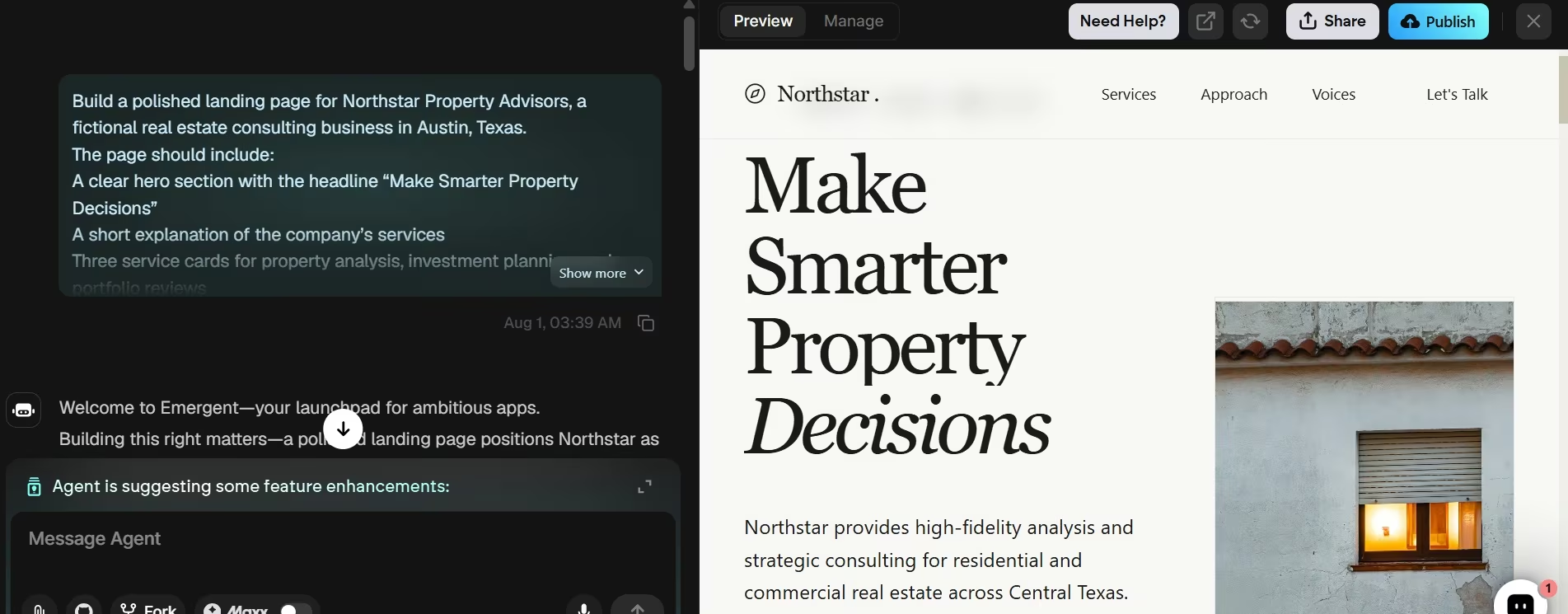
Emergent is the stronger alternative when your project needs to behave more like custom software than a standard website.
Squarespace is built around pages, templates, products, blogs, and guided business features. Emergent’s AI website builder lets you describe a website, application, dashboard, or business tool in plain language.
That difference is important for a client portal, lead-routing tool, property dashboard, quote generator, custom booking flow, or internal system. Those projects can outgrow a normal site builder because the business rules are specific to your company.
For a photographer’s portfolio or a five-page restaurant site, Squarespace is the simpler route, since those projects fit its normal page and store structure.
Choose Squarespace for a standard, design-led website. Choose Emergent when the website needs custom logic, stored data, or workflows built around your business.
Also read our best Squarespace alternatives guide for what else is worth trying when the template structure or page-based logic reaches its limits.
Squarespace Pricing
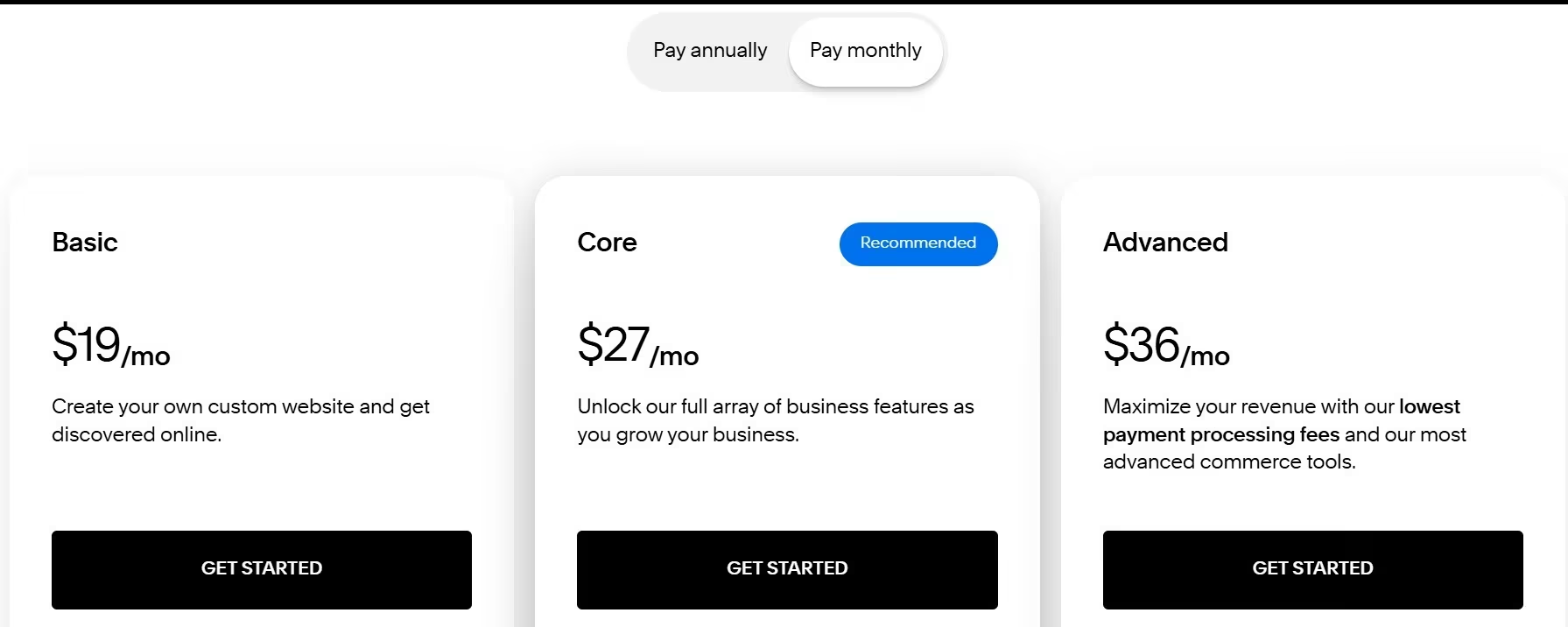
Basic: $25/month ($19/month billed annually). Core: $39/month ($29/month billed annually). Plus: $65/month ($49/month billed annually). Advanced: $139/month ($99/month billed annually).
Premium uses custom pricing. Squarespace has no permanent free plan, but every normal website starts with a 14-day trial that does not require a credit card.
Annual billing requires paying for the full year in advance. That comes to $228 for Basic, $348 for Core, $588 for Plus, and $1,188 for Advanced. Paying month-to-month costs $300, $468, $780, and $1,668 per year if you remain subscribed for all 12 months.
What the Subscription Price Does Not Cover
Your website plan is only one part of the bill.
- Separate websites: Each site needs its own paid plan.
- Domain renewal: An eligible annual plan includes a domain for one year. The domain then renews as its own subscription.
- Business email: Google Workspace is a separate service. Core includes one eligible inbox free for the first year.
- Scheduling: Acuity Scheduling uses a separate subscription.
- Email marketing: Email Campaigns has its own plans and billing.
- Payment processing: Card and automated clearing house (ACH) debit fees apply to sales.
- Platform transaction fees: Basic charges 2% on store sales and 7% on digital content. Higher plans reduce or remove these fees.
- Automated tax calculations: Core, Plus, and Advanced can add plan-based calculation fees of 0.15%, 0.10%, and 0.05%, capped per transaction.
- Taxes: Your checkout total can include sales tax, value-added tax, or another local tax based on your billing address.
These subscriptions and fees renew or bill separately. Review every active service before canceling a site or changing plans.
Annual website subscriptions qualify for a full refund when canceled within 14 days of the first payment. Squarespace does not give website-plan refunds after that window, for monthly plans, or for renewal payments. An annual cancellation takes the site offline immediately. A monthly cancellation ends service after the current billing cycle.
Want the full breakdown of what each plan actually covers beyond the subscription price? Read our Squarespace pricing guide before you commit.
Final Verdict
This Squarespace review left me with one main conclusion: Squarespace is worth it in 2026 for design-led businesses that will use its built-in tools, but it’s harder to justify for a basic website at its new price.
It’s best for portfolios, service businesses, blogs, restaurants, creators, and smaller stores that value strong design and managed hosting.
Skip Squarespace if you need predictable costs, phone support, full design portability, or custom business logic. Emergent is the stronger alternative for custom workflows, client portals, or app-like features that a template-led builder can’t handle.

Emergent designs, writes, and publishes your whole site from one prompt. No templates, no drag-and-drop.
- Full site from one prompt
- Custom design, real pages
- Publish in minutes







