



I signed up for Squarespace expecting to pay the $25 a month that the plan page advertised. My first real month, once I'd switched on selling and the free-domain year started ticking down, the number I was actually on the hook for looked nothing like that.
So I built a small handmade-candle site and ran it from a brochure page up to a working store across all four plans, tracking every transaction fee, card rate, and renewal at each tier. By the end of this breakdown, you'll know how Squarespace pricing really breaks down once the fees, domain, and add-ons stack on top of the sticker price, and which tier fits what you sell.
Squarespace Pricing Plans: At a Glance
Squarespace pricing runs $25 to $139/month across four plans. The plan that fits you depends on what your site sells, so match the plan to that before you compare prices. Core is the safe pick for most.
Here's the lineup I used on the candle site before I get into how each tier felt in practice.
Read the transaction fee column on Squarespace's plans before you read the sticker price. That fee column is where the cheapest plan stops being the cheapest the second you start selling.
| Plan | Billed monthly | Price (billed annually) | Transaction fees (physical/digital) | Best for |
|---|---|---|---|---|
| Basic | $25/month | $19/month | 2% / 7% | Portfolios, brochure and service sites, light selling |
| Core | $39/month | $29/month | 0% / 5% | Most small businesses and small stores |
| Plus | $65/month | $49/month | 0% / 1% | Digital sellers, creators, memberships, courses |
| Advanced | $139/month | $99/month | 0% / 0% | High-volume stores wanting the lowest fees |
The baseline across all four tiers is generous. Every Squarespace plan includes hosting, SSL, mobile-ready templates, blogging, analytics, video storage, and a free custom domain for the first year on annual billing.
You can also accept payments and sell products or services on every plan. The plans start to differ when you look at transaction fees, code access, contributor limits, analytics depth, and the commerce tools that unlock as you move up.
Annual billing is a lot cheaper than monthly. Squarespace knocks up to 36% off when you pay yearly. If you already know you're committing, pay annually and skip the monthly tax.
Squarespace Pricing Plans Breakdown
The table covers the prices. Here's what changes as you move up a tier.
Here's what each plan gave the candle site as I pushed it from a portfolio into a small store, plus the catch I hit on each one.
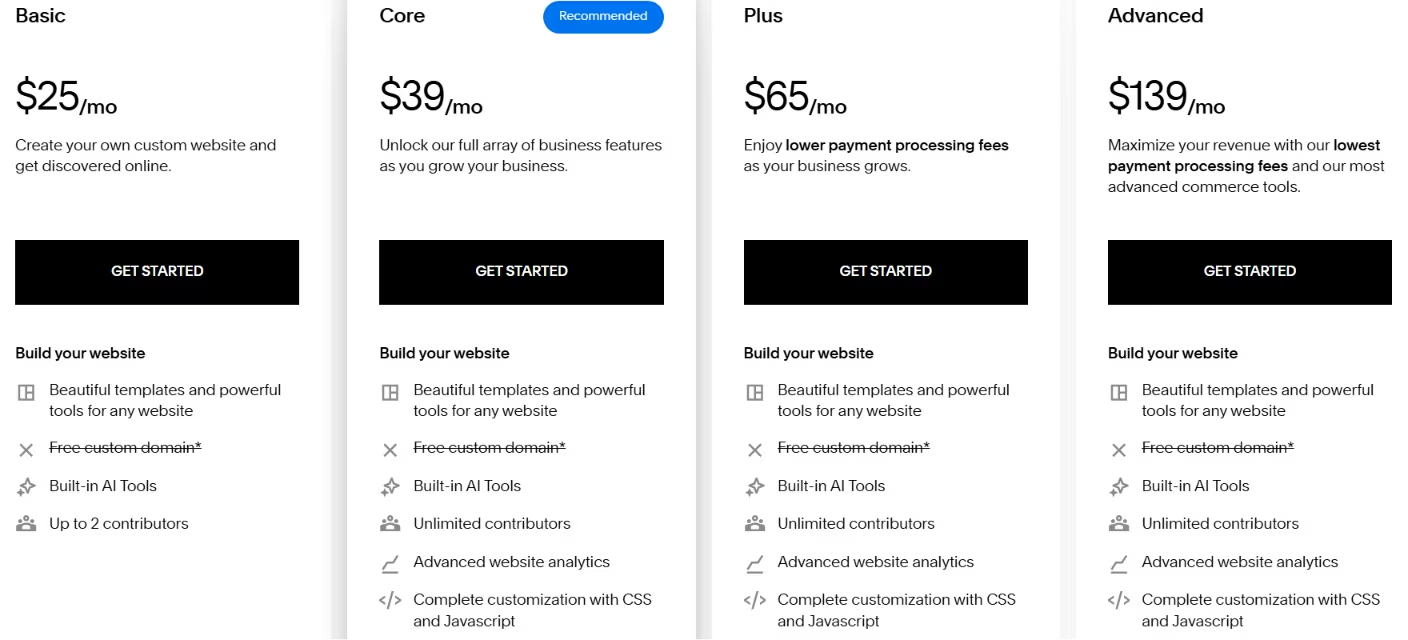
Basic: $25/month
I had the candle site live and looking professional in an afternoon on Basic. Then the 2% physical and 7% digital fees showed up the moment I switched to selling.
Basic is the entry plan, but it is broader than a simple brochure site. You still get hosting, a free custom domain for the first year on annual billing, unlimited bandwidth, and enough built-in selling tools to run a small shop, gated content, memberships, invoices, or subscription products.
You can sell on Basic, but the 2% commerce fee and 7% digital fee make the plan expensive once orders start coming in.
The problem is the fee layer. Basic still charges a 2% Squarespace transaction fee on physical products and 7% on digital ones, on top of card processing. That fee sits in the background until you sell and then eats into every order.
What's included: Hosting, a free first-year domain on annual plans, unlimited bandwidth, core site tools, and basic selling features like products, memberships, subscriptions, invoices, and customer accounts.
Best for: Portfolios, brochure sites, service businesses, and very small stores that can absorb the fees.
Pros: Cheapest entry point, fast to launch, no maintenance.
Cons: The 2% physical and 7% digital fees make it a poor home for a working store, and there's no code injection.
If your site is mostly a window and an "email me" button, Basic is the right amount of plan. Once selling becomes the point, run the fee math before you stay here.
Core: $39/month
When I moved the candle store to Core, the 2% physical-goods fee disappeared, and I finally had code injection. That's the upgrade most small stores feel.
Core is where Squarespace starts feeling like a real business plan. You get unlimited contributors, code injection, deeper commerce analytics, promotional pop-ups, announcement bars, shipping labels, carrier-calculated shipping, and integrations like Mailchimp, Google Shopping, and Zapier.
If you never touch custom code or outside tools, that may not matter. If you run campaigns, tracking, or team workflows, Core feels like the first fully operational tier.
The fee change is the real upgrade here. The physical transaction fee drops to 0%, while the digital fee drops to 5%.
Having a 0% physical transaction fee is noteworthy, and on the candle site, it paid for the upgrade from Basic faster than I expected.
Roughly $8,400 a year in physical sales is the point where Core's higher subscription is already cheaper than Basic's fee, and most stores clear that early.
What's included: Everything in Basic, plus code injection, customer discounts, real-time shipping estimates, and Google Shopping.
Best for: Most small businesses and small stores selling physical goods.
Pros: No physical transaction fee, real store features, the best price-to-capability balance.
Cons: The 5% digital fee is still steep if you sell downloads or memberships.
For the majority of sellers reading this, Core is the answer. It's the plan I'd put a physical-goods store on without overthinking it.
Plus: $65/month
I put the downloadable candle-care guide on sale to test the digital fee. Going from Core to Plus dropped it from 5% to 1%, the fastest cost change I hit.
Plus makes the most sense for digital sellers. It drops the digital and membership fee from 5% to 1%, lowers the card-processing rate to 2.7% + $0.30, and raises video storage from 5 hours to 50 hours.
If you sell courses, gated tutorials, or membership content with a lot of video, that storage jump can matter almost as much as the fee drop.
That 1% digital fee changes the math earlier than the $26/month price jump suggests.
Around $7,800 a year in digital sales, the fee you save on Plus already covers the step up from Core. If downloads, courses, or memberships are your business, you should look at Plus well before you feel ready for it.
What's included: Everything in Core, plus a 1% digital fee, a 2.7% + $0.30 card rate, advanced commerce tools, and expanded video.
Best for: Digital sellers, creators, course makers, and membership sites.
Pros: The 1% digital fee, the lower card rate, and stronger selling tools.
Cons: Overkill for a plain physical store that doesn't sell digital goods.
If you sell anything downloadable at volume, Plus pays for itself. If you don't, the extra spend buys features you won't touch.
Advanced: $139/month
I ran the candle store's numbers on Advanced, and the lower card rate never paid back the jump in subscription. The volume wasn't there.
Advanced zeroes out every Squarespace transaction fee, physical and digital, and drops the card rate to its lowest tier at 2.5% + $0.30.
Advanced keeps the full commerce toolkit in place and suits stores already doing enough volume to benefit from the lower fee structure.
The subscription jump is the hard part. At $139/month, it's several times the price of Core, and the fee savings only catch up when you're moving serious volume.
For digital sellers, Plus to Advanced doesn't break even on fees alone until you hit $88,800 a year in sales. Below that, you're paying for headroom you don't use.
What's included: Everything in Plus, plus 0% transaction fees, a 2.5% + $0.30 card rate, abandoned-cart recovery, subscriptions, and advanced discounts and shipping.
Best for: High-volume stores that need the lowest fees and advanced commerce features.
Pros: Zero transaction fees, the lowest card rate, the full commerce toolkit.
Cons: The price only makes sense at serious volume, and it's wasted money below it.
Advanced is a volume plan. If the fee savings do not clearly cover the jump in subscription cost, stay on a lower tier.
A Note on Legacy Plans and Annual vs Monthly Billing
When I checked the renewal math a year out, the plan I'd pick on day one wasn't the one I'd want by month twelve.
Two billing details decide what you pay, and Squarespace won't nudge you about either one.
The first billing detail is legacy plans. If you signed up years ago on Personal, Business, Basic Commerce, or Advanced Commerce, you're likely still on the old fee structure. Those older fees can run higher than today's equivalent, with some older digital-product setups reaching around 9%.
New users get Basic, Core, Plus, and Advanced. Switching can save money, so re-check your plan against the current lineup once a year.
The second billing detail is annual versus monthly billing. Annual billing is materially cheaper across every tier. Squarespace offers a 14-day free trial with no card required instead of a permanently free website plan. If you cancel an annual plan, refunds only land within 14 days of purchase, so the trial is your window to back out clean.
The True Cost of Squarespace Beyond the Sticker Price
When I added a custom domain and looked at email, the candle site's monthly cost stopped matching the plan price I'd budgeted.
The plan price is the part everyone sees first, but it stops being the whole number once you start selling.
Card fees, transaction fees, renewals, and add-ons can push the real cost higher than the sticker price suggests.
Two payment layers: When a customer pays, two charges can apply: The card-processing rate and a separate Squarespace transaction fee. Card processing runs 2.9% + $0.30 on Basic and Core, 2.7% + $0.30 on Plus, and 2.5% + $0.30 on Advanced. The transaction fee is Squarespace's own cut on top, and it's the one that changes most by plan.
Here's what that looks like on $10,000 in sales (100 orders of $100, U.S. standard cards, before taxes, refunds, and discounts). On physical products, total fees land around $520 on Basic versus $320 on Core. On digital products, it's roughly $1,020 on Basic versus $400 on Plus. The plan you pick moves hundreds of dollars, sometimes more than the subscription itself.
The domain is a separate line: Your first-year domain is free on annual plans, then it renews as its own charge. Domain pricing here can run higher than at a standalone registrar. Transfers also carry a forced waiting period, so moving a domain in or out isn't instant. Budget for the domain as a recurring cost after the free first year.
The add-ons add up: Domains, Email Campaigns, Google Workspace, and Acuity Scheduling all sit outside the website plan and bill separately.
Third-party extensions for shipping, accounting, inventory, or marketing can add their own monthly costs too, so the website plan is only the base layer.
Squarespace Payments can affect cash flow: Payouts can be delayed, and Squarespace can place holds or reserves on funds.
A new store counting on fast access to revenue can't absorb a payout delay.
To price Squarespace properly, add the plan, the card rate, the transaction fee for what you sell, the domain renewal, and any add-ons. Your Squarespace cost is the total of those charges.
Which Squarespace Plan Should You Choose?
Based on running the candle site across tiers, here's the plan I'd hand each kind of seller.
Let what your site does decide the plan instead of your budget. A plan mismatch usually costs more in fees than it does in subscription price.
- Choose Basic if you: Want a portfolio, brochure, or service site with little or no selling, and you can live with high fees on the rare sale.
- Choose Core if you: Run a small business or small store selling physical goods, and want the 2% physical fee gone. This is the safe pick for most people.
- Choose Plus if you: Sell digital products, memberships, or courses. The drop to a 1% digital fee changes your math fast, often before the extra cost feels justified.
- Choose Advanced if you: Run a high-volume store that needs zero transaction fees, the lowest card rate, and advanced commerce tools you've done the math to justify.
If you're stuck between two tiers, use the fee on the thing you sell most to make the decision instead of the monthly price. That's the number that compounds.
Is Squarespace Worth the Cost?

After running the candle site end to end, the plan price was the easy part. The fees, the domain, and the renewal math were what decided the cost.
Squarespace earns its price when you value getting a polished, low-maintenance site live fast over squeezing the last dollar out of fees.
The templates look sharp out of the box, and Squarespace handles hosting and updates for you. You do not lose weekends to plugin conflicts. For a simple store or a portfolio, that trade is easy to make.
- Squarespace pricing is worth it if you: Want a clean site live quickly, keep your selling straightforward, and would rather pay a bit more than manage infrastructure.
- Skip Squarespace if you: Need multi-currency selling, customer-specific tax exemptions, or custom commerce logic that goes past the built-in plan rules.
The storefront supports a single currency, and the platform gets harder to stretch once your business depends on customer-specific rules or heavier customization.
Know which camp you're in before you pay for a year.
Also read our guide on the best online store website builders to see how Squarespace compares against the full field before you commit to a year.
Squarespace Alternatives and Pricing Comparison
For context, here's how Squarespace's entry price sits next to the builders I could've used instead.
| Tool | Starting price | Best for |
|---|---|---|
| Squarespace | $25/month | All-in-one polished sites and simple stores |
| Wix | $17/month, billed annually | Flexible drag-and-drop design freedom |
| Shopify | $39/month ($29/month billed annually) | Serious physical-product stores |
| WordPress.com | $9/month | Maximum control with more setup work |
Wix publishes no standalone monthly rate on this plan, so the $17 figure is the annual-prepay price, not a true month-to-month cost.
Starting prices leave out the limits and features that change the comparison. Wix can look cheaper, but lower tiers come with storage limits that Squarespace does not. For physical-product stores doing real fulfillment volume, Shopify's shipping discounts can make it cheaper despite the higher starting price.
Squarespace usually wins when you want a polished site and a simpler setup. When store operations are the main job, Shopify usually wins.
The prices look close at the bottom, but they buy different things. Squarespace and Wix land near each other on polish and ease. Shopify costs more up front because it's a store engine first and a website second.
WordPress.com starts cheapest, but the control comes with setup and upkeep you handle yourself. Choose based on how much building you want to do instead of the entry number.
For all the price-per-feature math, the reason people stick with Squarespace usually comes down to how the finished site looks and how little fuss it takes to run.
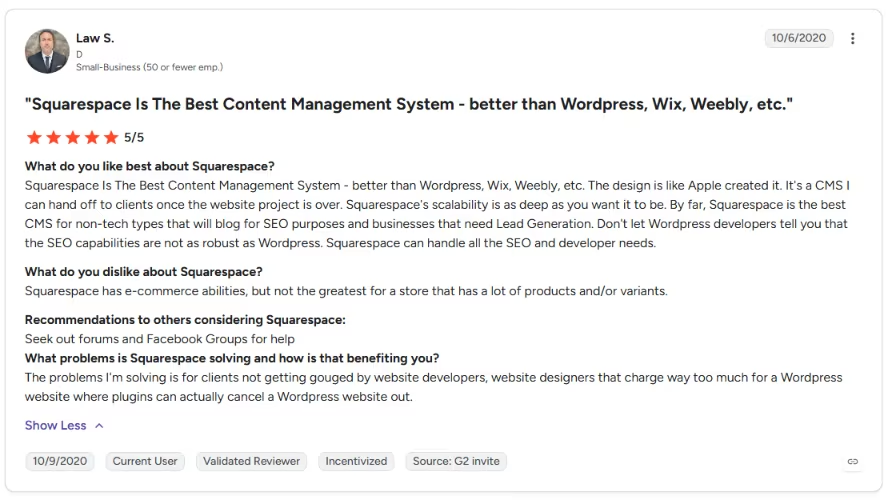
That is the note the reviews keep hitting. One G2 reviewer put it: “Squarespace Is The Best Content Management System - better than WordPress, Wix, Weebly, etc. The design is like Apple created it. It's a CMS I can hand off to clients once the website project is over.”
Also read our best Squarespace alternatives guide to see what else delivers the same polish with more flexibility.
Where Emergent Fits Alongside Squarespace
Squarespace works well when you need a polished brochure site, portfolio, or straightforward store live fast. It handles hosting, updates, and design for you.
The limits show up when your business needs something outside the built-in plan rules, like single-currency limits, customer-specific tax edge cases, or custom pricing logic. Moving to a higher Squarespace tier may not solve that.
That is where Emergent fits better as a helper than a direct replacement. If Squarespace covers the public-facing site you need, Emergent can handle the app-like layer underneath, including custom workflows, logins, payment rules, portals, and other logic Squarespace is not built to manage.
Use Squarespace when the job is a website. Use Emergent when the job starts acting more like a product or internal system. You can also use both together if you want Squarespace for the public-facing site and Emergent for the custom functionality behind it.
My Bottom Line on Squarespace Pricing
Squarespace pricing is worth it for most simple sites and small stores, and Core at $39/month is the plan I'd point most people to. Focus on the digital and transaction fees because that's where the cost adds up. Move to Plus earlier than the sticker-price difference suggests if you sell downloads or memberships.

Emergent designs, writes, and publishes your whole site from one prompt. No templates, no drag-and-drop.
- Full site from one prompt
- Custom design, real pages
- Publish in minutes







