

Build Document Automation for What You Send and Receive
Describe the templates you fill by hand and the PDFs people send you. Emergent builds document automation that drafts from your data and reads every upload into fields.
Build document automation for the contracts and quotes my team writes every week.
Trusted by Builders Worldwide
Active Builders Worldwide
Apps Successfully Created
Countries Globally Reached



What Your Document Automation Includes
Start with the parts your first document needs. The rest are ready when a second document calls for them.
Templates from the files you already use
Start from a Word or Google Docs file your team sends today. Fields fill where they sit in the text, and the line-item table grows to fit a one-line quote or a forty-line one.
Drafts filled from your own data
Pull values from a submitted form or any tool with an API, HubSpot deals included. A value missing at the source stops the draft, and the app names the field that came back empty.
AI reading for PDFs and scans
Read a policy number or an expiry date straight from an uploaded file into a named field. Any field the model is unsure of waits for a person to confirm it before the next step runs.
Checks against your thresholds
Set the rules each value must pass: a discount above 15% fails, as does a contract with no signature page. Failures go to the named reviewer in Slack or email, file attached.
A table row for every document
Write each drafted or received document to a database you own, with the record it came from and who reviewed it. Find a file by client or vendor instead of searching drives.
Code you can take anywhere
Export the templates and the rules behind them to your GitHub on paid plans, along with the database. Keep changing them by prompting, or hand the code to any developer to extend.
Documents Teams Automate First
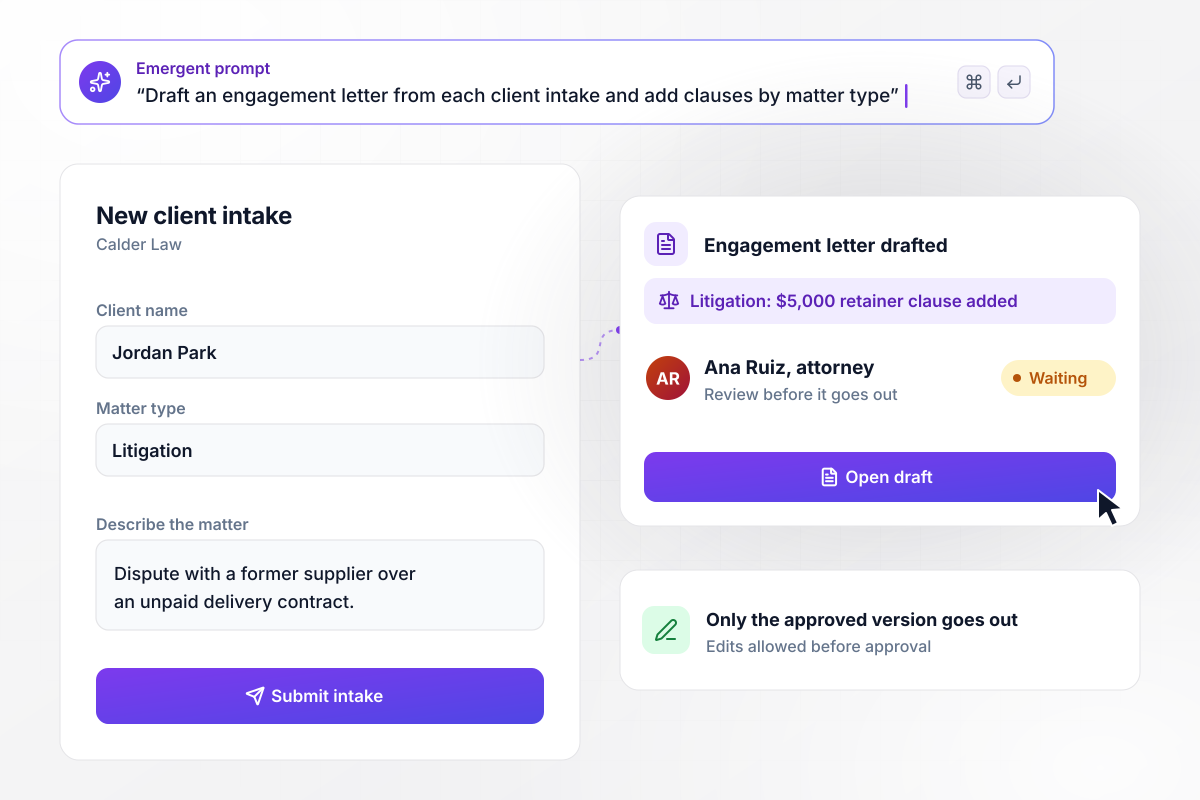
Turn a client questionnaire into an engagement letter draft
Every answer in Calder Law's intake form fills a field in the engagement letter, such as the matter type and the fee basis. Because this matter is litigation, the draft adds the $5,000 retainer clause. Ana Ruiz, the responsible attorney, can edit any clause before approving it, and only the approved version goes out.
window.awbMockup = { engagementLetters: "Build document automation for my law firm's new clients. A prospective client fills in an intake questionnaire with their name, contact details, matter type and a short description. The answers fill our engagement letter template. If the matter type is litigation, add the $5,000 retainer clause. Send the draft to the responsible attorney for review before it goes out.", salesQuotes: "Build a quote generator for my sales team. When a deal moves to the Proposal stage in HubSpot, copy its line items into our quote template and save the quote as a PDF. Any quote over $25,000 needs approval from the sales director in Slack before the rep can send it.", vendorCertificates: "Build a vendor portal where contractors upload their certificates of insurance. Read the insurer, policy number, expiry date, and per-occurrence limit from each PDF. If the limit is under the $1,000,000 in their contract or the policy has expired, email the vendor asking for an updated certificate and put their job on hold until a valid one is uploaded.", offerLetters: "Build offer letter automation for my company's hiring team. When a candidate moves to Offer in our hiring tracker, fill the offer letter template with the role, start date, manager and base salary. Send it to the hiring manager for approval, then send the candidate a link to sign on their phone." };
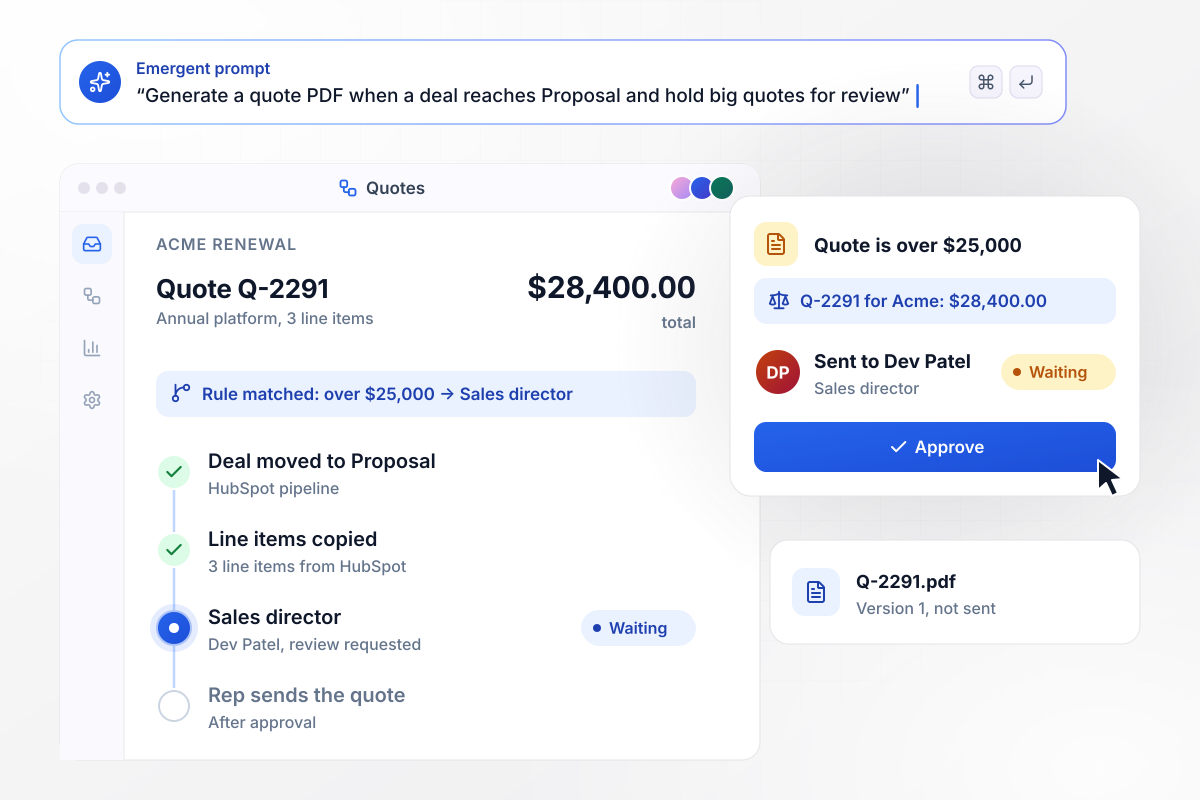
A priced quote the moment a deal reaches Proposal
When the Acme renewal moves to the Proposal stage in HubSpot, its line items are copied into the quote template. That quote, Q-2291, comes to $28,400. Any quote over $25,000 waits for Dev Patel, the sales director, before the rep can send it.
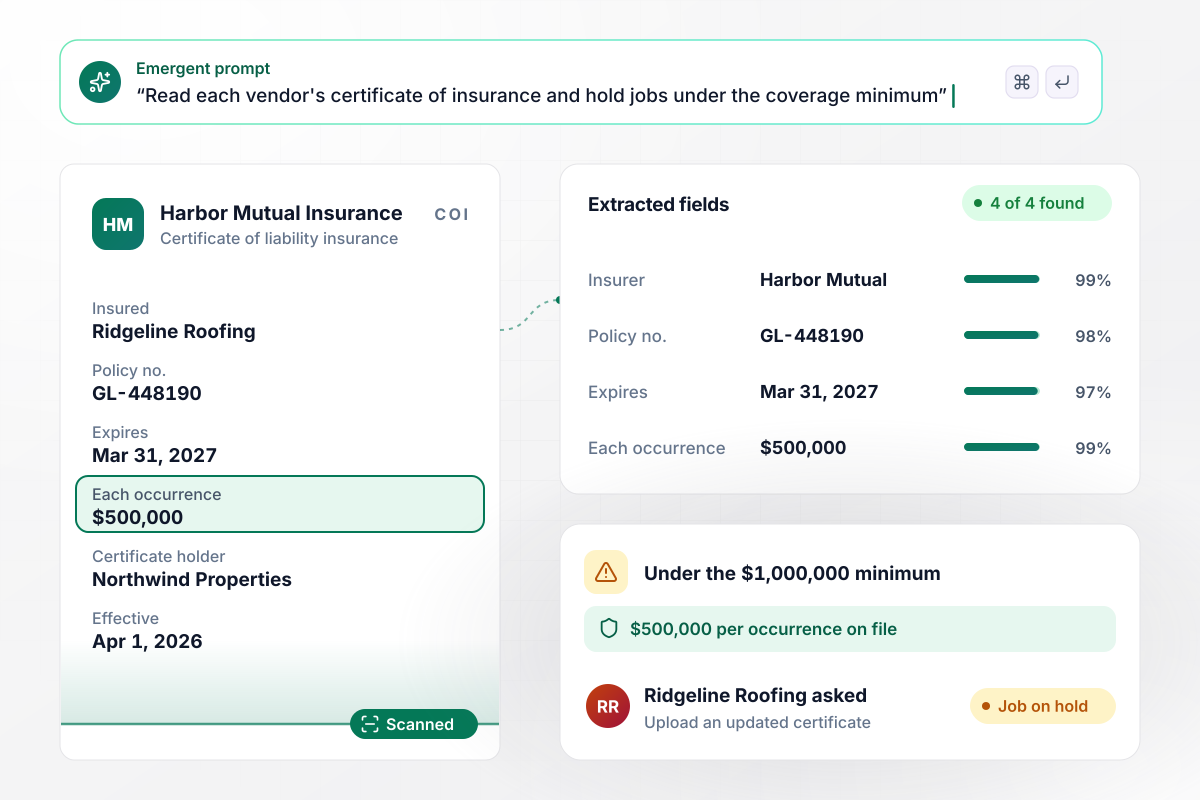
Catch an underinsured vendor before the job starts
Vendors upload insurance certificates to Northwind Properties, and the app reads the policy number, expiry date and per-occurrence limit. Ridgeline Roofing's certificate lists $500,000 per occurrence, under its contract's $1,000,000 minimum. The vendor is asked for a new one, and the job stays on hold until one passes.
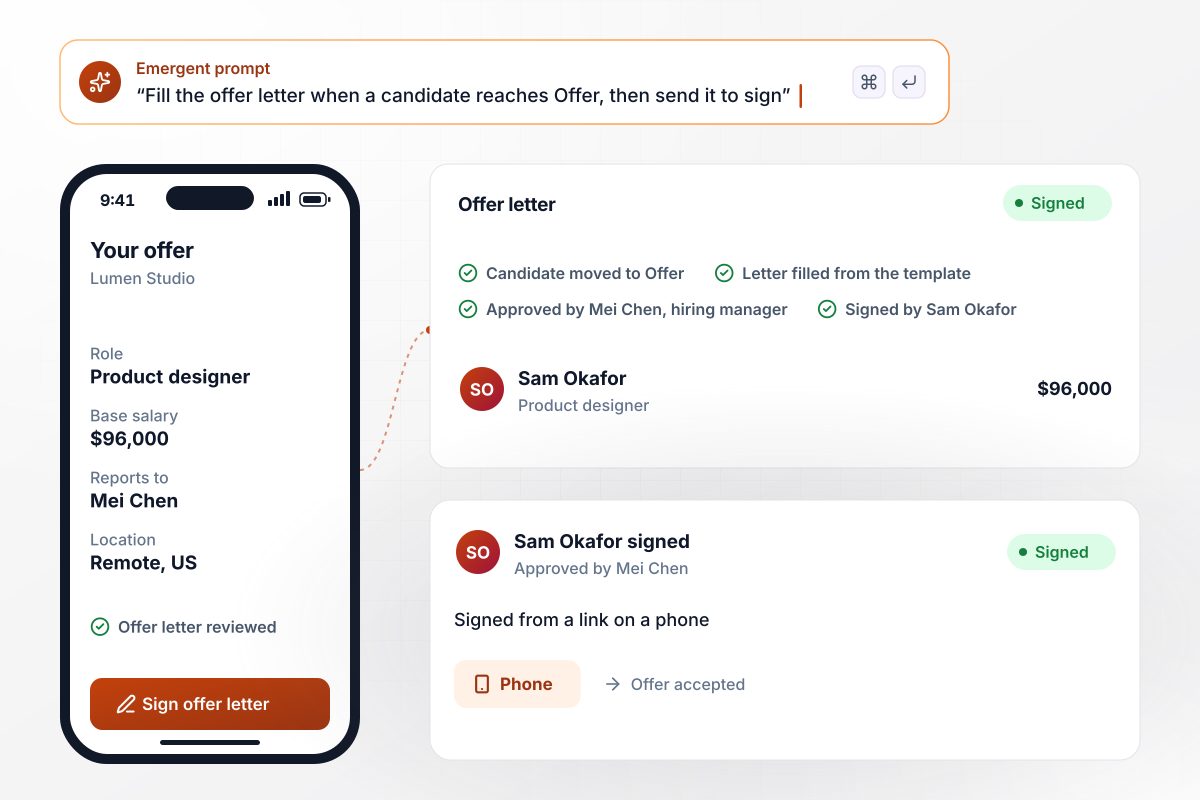
Offer letters that go out once the hiring manager signs off
Moving a candidate to Offer in Lumen Studio's hiring tracker fills the offer letter template from the hiring record. Sam Okafor's letter carries a $96,000 base salary and goes to Mei Chen, the hiring manager, for approval. Sam then signs from a link on a phone.






How to Build Document Automation
Keep last month's files open while you work through these. Each step settles one decision the app needs, and the last one tests those decisions on real requests.
Collect ten recent copies of each document your team sends or receives every week. Mark which parts change and which never do, and note where the changing data lives today. A file with a stable structure and different names and amounts each time is the right place to start.
Take the latest version your lawyers or managers signed off on and replace each changing value with a named field. Keep their wording exactly as it is. Any clause that appears only sometimes gets its own field for now; the next step decides when it appears.
For every optional clause, write the condition that adds it: a multi-year deal gets a price escalator, and a remote hire gets the equipment policy. Plain sentences are enough. A rule nobody can explain to a new hire needs rewriting before it reaches the template.
List the documents people send you and the fields you need from each one. Name the check that matters most for each one, then mark the fields a person must always confirm. A supplier's changed bank account belongs on that list every time.
Not every draft needs a human, and some always do. Draw the line in one sentence per document: every letter to a new client gets a reviewer, and a renewal at last year's price does not. Name a second reviewer as well, for the weeks the first one is away.
Signed and approved PDFs can go to Google Drive, back to the CRM record, or into the app's own database. Pick one home per document type. Decide too whether rejected drafts are kept beside the approved ones or deleted.
Turn on one document type for one team and let real requests through for a week. Compare every draft with what the team would have written by hand. Adjust the template or the rules by prompting, then add the next document type once the first runs clean.
Why Build Document Automation With Emergent?
Zapier fills a Google Docs template when an app sends data. Emergent builds the app around the document, intake form included.

|
Zapier | Make (Integromat) | n8n | |
|---|---|---|---|---|
| How you build | Prompt for the workflow and the app around it | Templates and editor, AI copilot | Visual canvas | Visual canvas, self-hosted or cloud |
| What you get | Workflow + trigger form + database + dashboard, as code you own | Zaps, plus Tables and Interfaces inside Zapier | Scenarios inside Make | Workflows inside n8n |
| Behavior at cap | Keeps running, no task cap | Overage billed at up to 1.25× the base rate | Runs pause | Cloud workflows stop until the reset or an upgrade |
| AI and agent steps | Native, share the same credit pool | Priced by model tier, drawn from the task pool | AI modules cost variable credits | Bring your own model API key, billed by the provider |
| Code ownership | Full code export to GitHub on paid plans | None | None | Yes on Community Edition |

Pick the Pricing Plan That Works for You
Choose the plan that fits your building ambitions. From weekend projects to enterprise applications, we've got you covered.




Find the right workflow automation
for you and your business
Frequently Asked Questions
Your Questions, Answered
Don't change this element unless you know what you are doing
More things you can build
with Emergent









on Emergent today




