

Build a Custom SEO Dashboard Using AI in Minutes
Describe your SEO Dashboard in plain English and create a production-ready build, from design and development to deployment, in minutes. No code needed.










Trusted by Builders Worldwide
Active Builders Worldwide
Apps Successfully Created
Countries Globally Reached



Build a custom SEO dashboard in 4 simple steps
Bring Search Console, GA4 and your rank tracker into one live view instead of rebuilding the same report every month.
Describe the report you send now. Clicks, impressions, position, indexed pages, whichever numbers your clients actually read.
Search Console, GA4, Ahrefs and your keyword sheet arrive already joined, so one query does not contradict another.
Ask for branded traffic split out or a competitor column added. That part rebuilds while everything else stays put.
Publish to your domain with your logo and send one link. It refreshes on its own between calls.
Emergent Key Features for Building an SEO Dashboard
Every dashboard is real, deployable software wired to your own search data, not a chart library you have to assemble.
Page and Query Level Joins
Search Console and GA4 data are joined at URL and query level, so you can see which specific search terms drive the sessions and conversions on any individual page.
Rank Movement Tracking
Positions are stored over time from day one, giving you 7, 30 and 90 day movement without waiting months for a third party tool to build history.
Branded and Unbranded Splits
Define your brand terms once and every traffic chart can be filtered to unbranded demand, which is the number that actually shows whether your SEO work is compounding.
Automatic Data Refresh
Connections stay live on a schedule you set, so the dashboard is current when a client opens it rather than current when you last remembered to update it.
White Label Client Views
Your logo, palette, domain and access rules are applied per dashboard, which lets one build serve every client account without any of them seeing another.
Change It by Describing It
Ask for a new metric, a different breakdown or an extra filter in plain language and Emergent rebuilds that part of the dashboard, so the report evolves with the retainer.
SEO Dashboard Use Cases You Can Build in Minutes
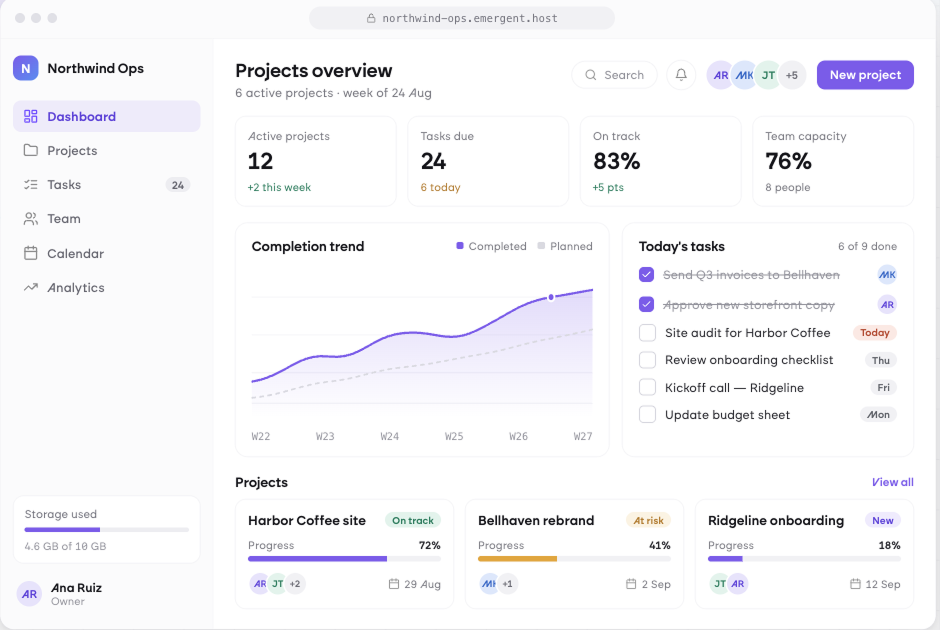
Send Clients One Link Instead of a Monthly Report
Give every client a branded view of their own organic performance that updates on its own. Clicks, positions and conversions stay current, so the monthly reporting build disappears and account managers spend their time on the work rather than describing it.
window.awbMockup = { clientReporting: "Build a white label SEO reporting dashboard for agency clients with a monthly summary of clicks, impressions, average position and CTR from Search Console, organic sessions and conversions from GA4, a top movers table for pages and queries, and a commentary block the account manager can edit before sharing.", keywordRankTracking: "Build a keyword rank tracking dashboard that reads a keyword list from Google Sheets, shows current position, position change over 7 and 30 days, search volume and the ranking URL for each term, groups keywords by topic cluster, and highlights any term that dropped out of the top 10.", technicalSEOHealth: "Build a technical SEO health dashboard combining a crawl export with Search Console coverage data, showing indexed versus submitted pages, broken links, redirect chains, missing titles and descriptions, duplicate canonicals and Core Web Vitals by template, with a prioritised issue list sorted by traffic at risk.", contentPerformance: "Build a content performance dashboard that scores every published URL on clicks, impressions, average position, engagement time and conversions, flags pages that are decaying quarter over quarter, separates branded from unbranded queries, and suggests which posts to refresh first based on traffic loss."};
Watch Every Keyword Move, Not Just the Wins
Track current position, movement over seven and thirty days and the ranking URL for each term in your list. Keywords grouped by cluster show whether a topic is gaining ground, and anything dropping out of the top ten surfaces immediately.
Find the Technical Issues Costing You Traffic
Combine crawl data with Search Console coverage to see indexation gaps, broken links, redirect chains and missing metadata in one place. Issues are ranked by the traffic at risk behind them, so the fix list is ordered commercially.
Know Which Content to Refresh before It Decays
Score every published URL on clicks, positions, engagement and conversions, then see which pages are losing ground quarter over quarter. Refreshing decaying content is usually faster growth than publishing something new.
Every integration your
Dashboard needs from day one
Email and calendar
Inbox and calendar sync both ways, so every reply, meeting and no-show lands on the contact record without anyone logging it.




Messaging and support
Conversations from chat, WhatsApp and your helpdesk attach to the right contact, so sales and support see the same history.




Payments and billing
Invoices, subscriptions and payment status flow back into the deal, so revenue and pipeline stay in one place.




If it has an API, your CRM can connect to it.
Emergent builds the connection against the API itself, including internal tools your team made. No closed ecosystem, no approved-partner list, no waiting for a connector to ship.


More things you can build
with Emergent
AI Website Builder
Build and publish responsive websites with AI — from landing pages to complete websites.
AI App Builder
Create and launch mobile apps with AI, without the complexity of traditional app development.
AI Web App Builder
Build and ship fully functional web apps with custom interfaces, logic, and workflows.
AI Dashboard Builder
Create interactive dashboards to visualize data, track KPIs, and manage business operations.
AI SaaS Builder
Build complete SaaS products with user accounts, subscriptions, dashboards, and core product workflows.
AI CRM Builder
Build custom CRMs for managing contacts, leads, pipelines, campaigns, and automated workflows.
AI Agent Builder
Create AI agents that can understand tasks, use tools, automate workflows, and work across your business.
Build Your Own
Start with any idea and build exactly what you need with AI — no templates or limits.

Why choose Emergent?
Most tools give you a demo you have to rebuild. Emergent gives you a product that is ready to run.
| Comparison | Other Tools |  |
|---|---|---|
| Built for | Demos and MVPs | Products you keep growing |
| What you get | Front end shell only | Full stack, wired end to end |
| Backend and database | Set it up yourself | Built and connected for you |
| Customization | Surface level styling | Deep workflow control |
| Integrations and APIs | Manual glue work | Connected from a prompt |
| Code ownership | Locked to the platform | Clean code you can export |
| Time to launch | Weeks of patching and setup | Live the same day |


Pick the Pricing Plan That Works for You
Choose the plan that fits your building ambitions. From weekend projects to enterprise applications, we've got you covered.




Find the Right Dashboard Builder
for Your Business
Frequently Asked Questions
Your Questions, Answered
Don't change this element unless you know what you are doing
on Emergent today




