



Most people with a product idea get stuck on the same question: what comes first? Starting an ecommerce business from scratch means testing demand, handling the legal basics, building a store, taking payments, and shipping orders.
To test the process, I built a store for a fictional small-batch hot sauce brand on Emergent. I started with a pre-launch waitlist page, then turned it into a full store with product pages, a cart, a Stripe checkout, and an admin panel for orders. The build and its iteration took 12 minutes and 18 minutes, respectively.
By the end of this guide, you'll know the seven steps in order, the prompts I used for each build, the problems I ran into, and what to check before you start taking orders.
What You'll Need Before Starting
- An Emergent account: You'll build both the waitlist page and the store here.
- A product idea with costs: You need to know what you're selling and roughly what each unit costs you to make or buy.
- Your real store policies: Shipping regions, delivery times, and returns. AI builders fill gaps with their own text, so have yours ready before you prompt.
- A Stripe account for live payments: Emergent sets up a Stripe test sandbox for you, so you only need your own account when you're ready to take real money.
- About 30 minutes of build time: The legal and tax paperwork in step three happens outside the build and takes longer, so you’ll need to account for that too.
Emergent's Free plan includes 10 monthly credits, and the Standard plan costs $20/month with 100 credits. My full build used 19.85 credits: 5.94 for the waitlist page, 11.31 for the store, and 2.6 for a follow-up question.
That's more than the Free plan's monthly allowance, so budget for Standard if you want a complete store with payments and an admin panel. The Free plan's credits are enough to build and test a waitlist page on its own.

How I Built a Hot Sauce Store With Emergent
I built one store in two stages for Cinder, a made-up hot sauce brand with three sauces at three heat levels. The first prompt created a one-page pre-launch site with a waitlist form and a password-protected admin page.
The second prompt turned that site into a store with product pages, a cart, a Stripe checkout in test mode, and an orders section in the admin panel.
I signed up to the waitlist with test names and placed a test order with Stripe's test card, so every screenshot below comes from a store I ran end to end. The minutes and credits for each stage are in steps two and four.
How to Start an Ecommerce Business From Scratch: Step-by-Step
Step 1: Pick a Product in a Category You Know
For Cinder, I picked small-batch hot sauce: three bottles at three heat levels, from a mild smoked jalapeño to a ghost pepper reserve. Hot sauce is easy to describe, simple to split into a range, and cheap to sample, which kept the catalog small enough for a first build.
I priced the range from $12 to $18 per 150ml bottle, with the price rising alongside the heat. A clear ladder like that gives first-time buyers an obvious starting point and gives regulars something to trade up to.
The strongest product ideas usually come from categories you already buy in. You know which products have let you down, what people complain about in reviews, and what you'd pay for a better version. Reading the one-star reviews of the top sellers in your category is the fastest way to find a gap you can fill.
Keep your first range small. Three products are enough to learn which one sells, and every extra product means more photos, descriptions, and stock to manage. If you'd rather avoid shipping physical goods at all, a digital business follows many of the same steps without inventory.

Step 2: Test Demand With a Waitlist Page
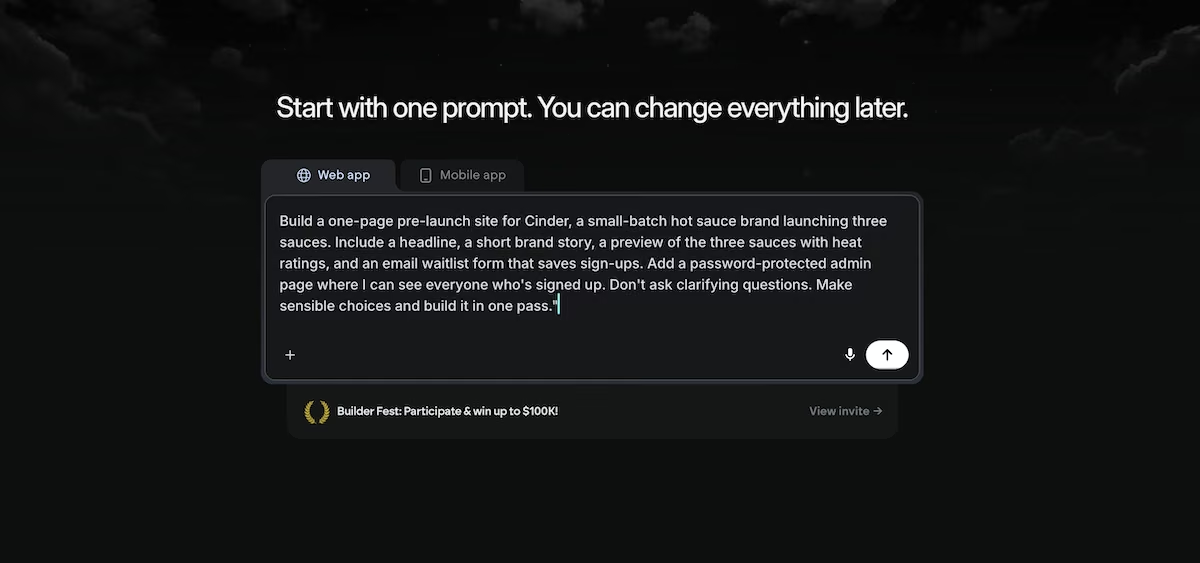
Before building a store, I built a one-page pre-launch site to find out which sauce people wanted the most. Here’s the prompt I gave:
"Build a one-page pre-launch site for Cinder, a small-batch hot sauce brand launching three sauces. Include a headline, a short brand story, a preview of the three sauces with heat ratings, and an email waitlist form that saves sign-ups.
Add a password-protected admin page where I can see everyone who's signed up. Don't ask clarifying questions. Make sensible choices and build it in one pass."
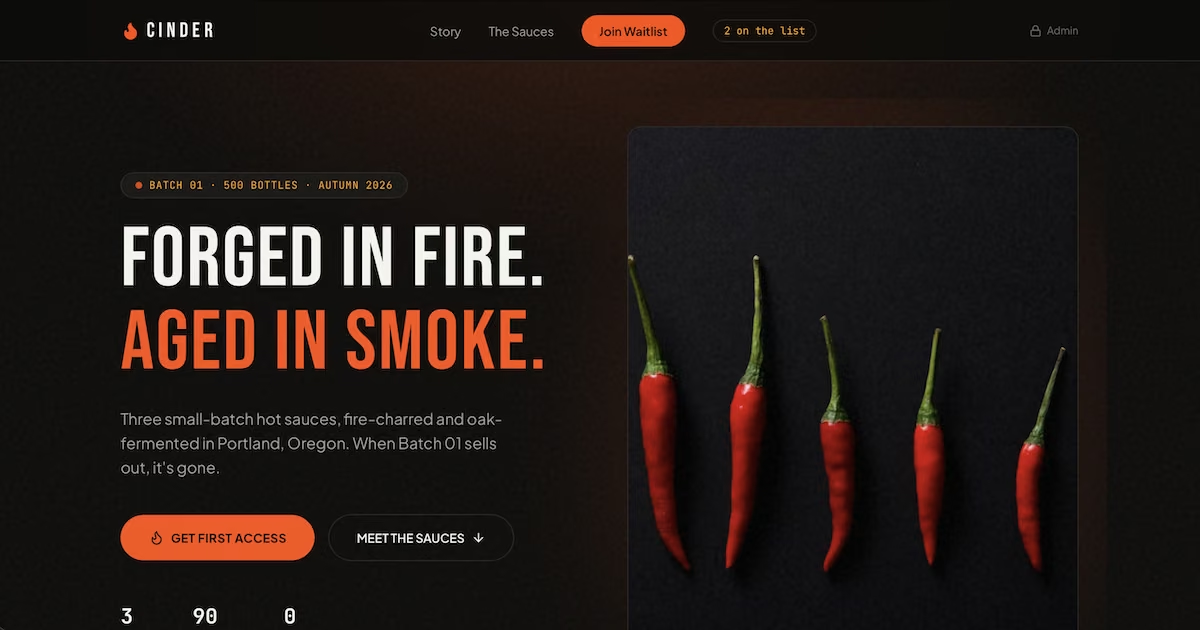
The build took 12 minutes and 5.94 credits. Partway through, Emergent flagged that the hero image showed a Nando's bottle and one sauce card showed Tabasco, both the wrong brands for Cinder, and replaced them. Its testing agents also checked the sign-up form and the admin password before the build finished.
The finished page had a bold hero section, a brand story, the three sauces with heat ratings, and a waitlist form with a live sign-up counter. Emergent also added a "sauce you're eyeing" dropdown to the form, which wasn't in my prompt, and the admin page broke sign-ups down by sauce.
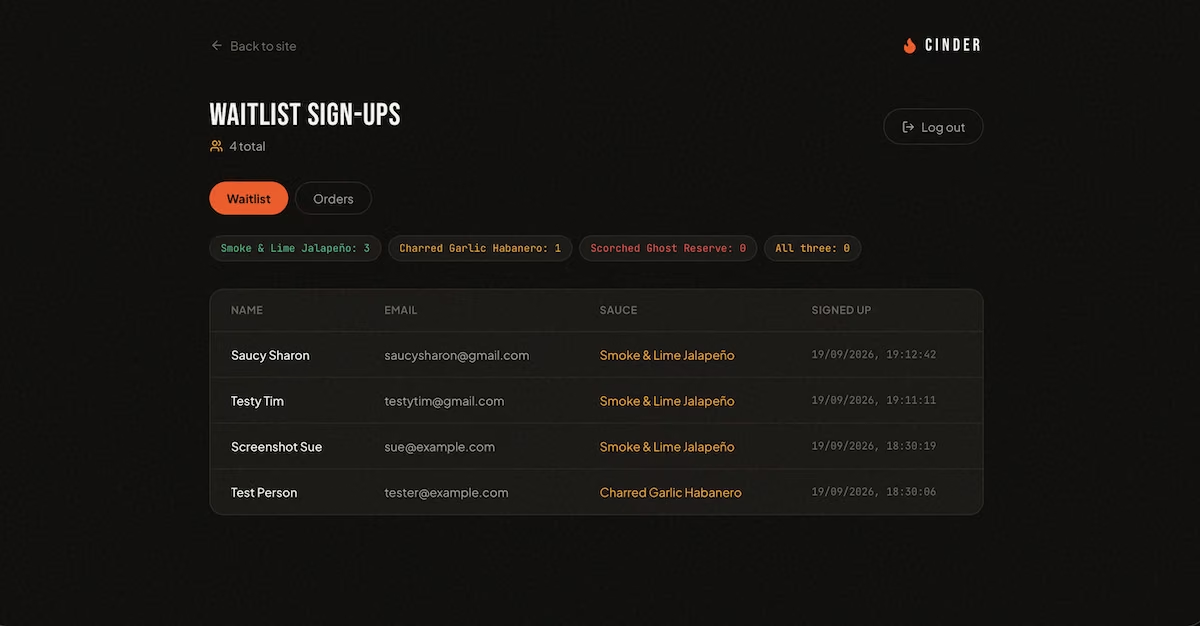
After four test sign-ups, the admin page showed three votes for the jalapeño, one for the habanero, and none for the ghost pepper. Use that split to size your first order. If real sign-ups broke down the same way, you'd buy more of your mild sauce and fewer bottles of the expensive one before launch day.
The confirmation message told people Cinder would email them when the first batch dropped, but the build wasn’t designed to send emails yet. Emergent listed welcome emails as a next step in its summary. Make sure to add them before you promote your store.
Step 3: Sort Out Your Business Structure and Sales Tax
Two of the decisions in this guide happen outside the builder: how you register your business, and how you collect sales tax. Emergent asks about the second one during the store build, so it pays to have your answer ready before you get there.
The first decision is your business structure. If you start selling without registering anything, you're a sole proprietor by default. That's the simplest setup, but your personal savings and property are exposed if the business runs up debts or gets sued.
A limited liability company (LLC) keeps business debts separate from your personal assets, and the Small Business Administration says one can be a good choice for medium- or higher-risk businesses.
Food products come with more liability than something like digital downloads. So I'd form an LLC before I started selling. Food businesses also need to check state rules for making and selling food, since requirements vary from state to state.
You’ll next need to acquire an employer identification number (EIN), your business's federal tax ID. The Internal Revenue Service (IRS) issues EINs for free online, usually within minutes, and recommends forming your LLC with your state before you apply. Ignore any site that charges a fee for an EIN.
Then decide how you'll handle sales tax. Stripe Tax calculates the rate at checkout for you, while handling it yourself means you’d need to set your own rates and track where you owe tax. My test order showed $0.00 in tax, so check the checkout screen again once your tax settings are final.
Step 4: Build Your Online Store
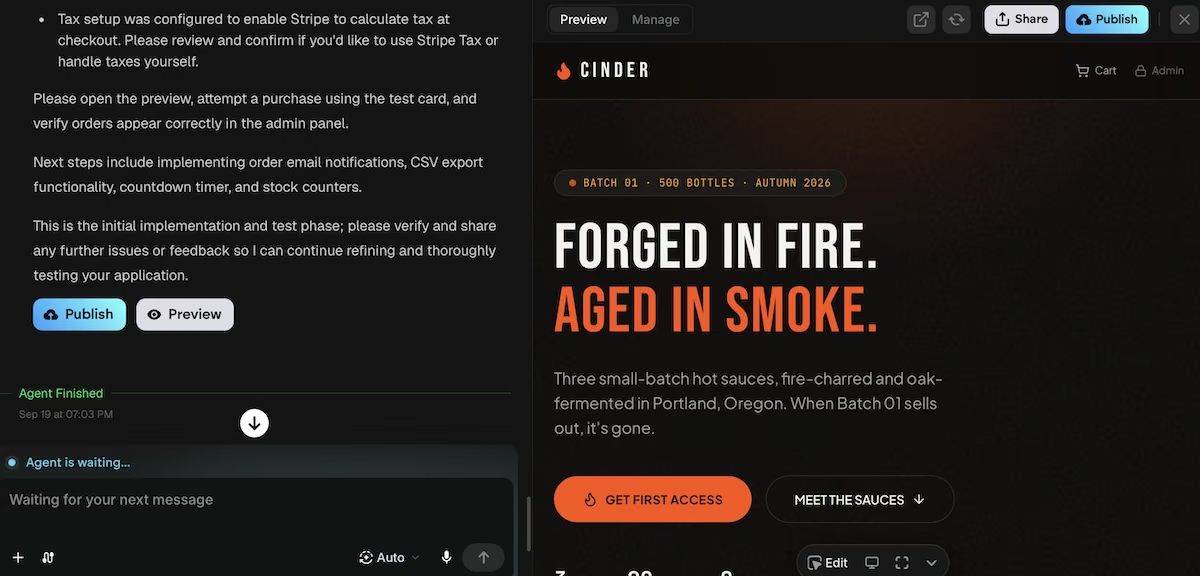
With demand tested, I asked Emergent's AI website builder to turn the waitlist page into a full store:
"Turn this into a working store for Cinder's three sauces. Give each sauce its own product page with price, description, heat rating, and an add-to-cart button, plus a cart page.
Connect Stripe checkout in test mode using Emergent's built-in Stripe test keys, and show an order confirmation page after payment.
Add an orders section to the admin page showing each order's items, customer email, shipping address, and a status I can switch from 'new' to 'shipped'. Keep the waitlist form on the homepage. Don't ask clarifying questions. Make sensible choices and build it in one pass."

The build took 18 minutes and 11.31 credits. Each sauce displayed a price, a description, a heat rating, and a quantity picker. The navigation included a cart icon with a badge that updated as I added bottles.
The homepage cards showed both a View & Buy button and a Waitlist button, so the pre-launch sign-up still worked for future batches.

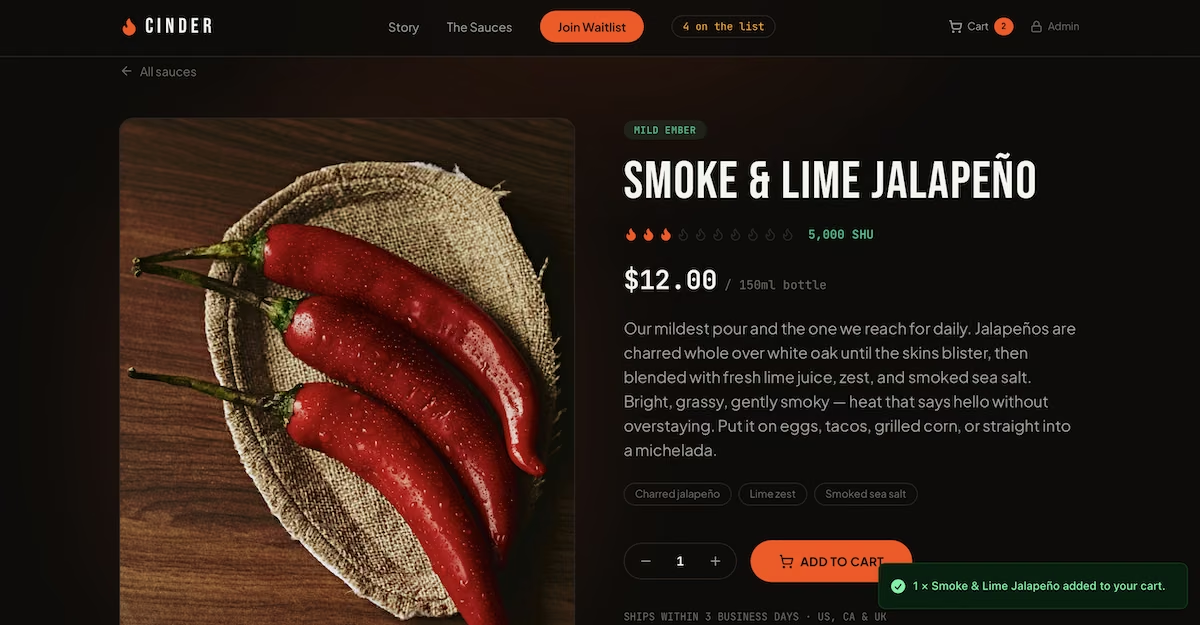
Emergent also included details that weren't in either prompt: a Portland, Oregon origin story and a 500-bottle first batch. Each product page also promised shipping within 3 business days to the US, Canada, and the UK.
A made-up brand story is harmless placeholder copy, but a shipping time sets an expectation for the customer.
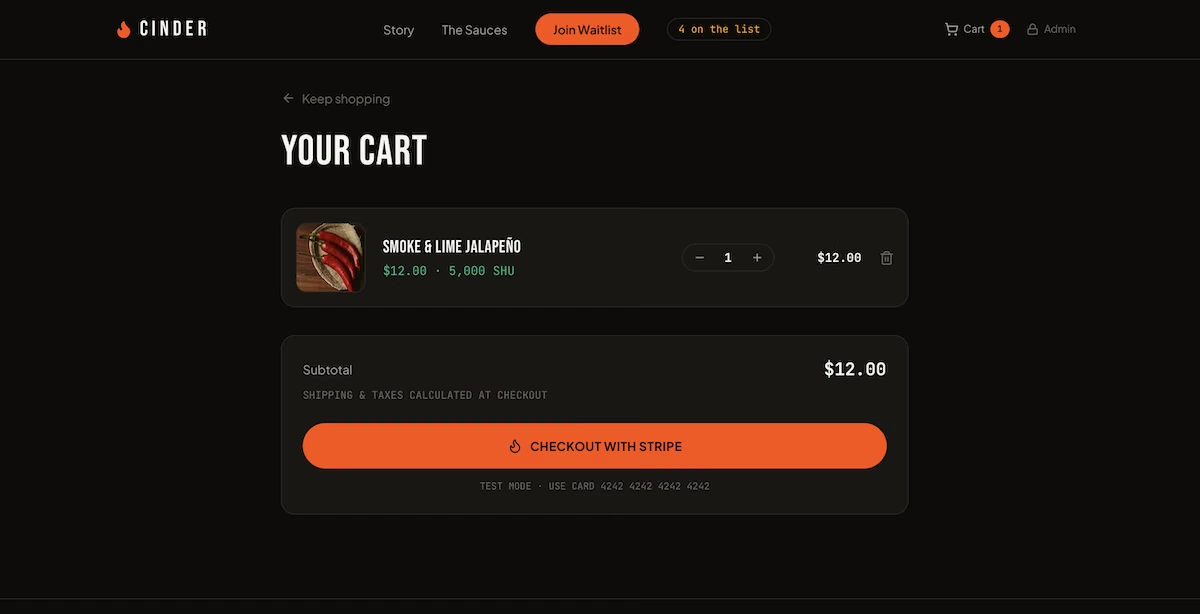
Read every page of the finished store as if you were a customer, and rewrite anything you didn't write yourself. A generated shipping window or return promise is a commitment you'll be held to. If you want to compare other store builders before you commit, do it at this stage, since your product list and policies will work on any of them.
Step 5: Set Up Payments and Run a Test Order
Emergent handled the payment setup inside the store build. It created a Stripe sandbox for the project, and Stripe emailed me to confirm the sandbox existed, explaining that I'd need to finish setting up a Stripe account to take real payments. Emergent's Stripe integration means you don't need your own keys to test.

Stripe's email confirming a new test sandbox for the Cinder project.
Before the build finished, Emergent's testing agents placed their own test order with Stripe's test card. They checked the total on the confirmation page, confirmed the cart cleared, and checked that the order showed up in the admin panel with a full address.
Then I ran my own: one bottle of the jalapeño for $12.00, shipped to a test address in Los Angeles. Checkout opened on Stripe's hosted page, clearly marked as a sandbox, with Apple Pay and Amazon Pay buttons above the card form. I paid with Stripe's test card, 4242 4242 4242 4242, and returned to Cinder's confirmation page with the order number and total.

Stripe's hosted checkout in sandbox mode, with a test card and a Los Angeles shipping address filled in.
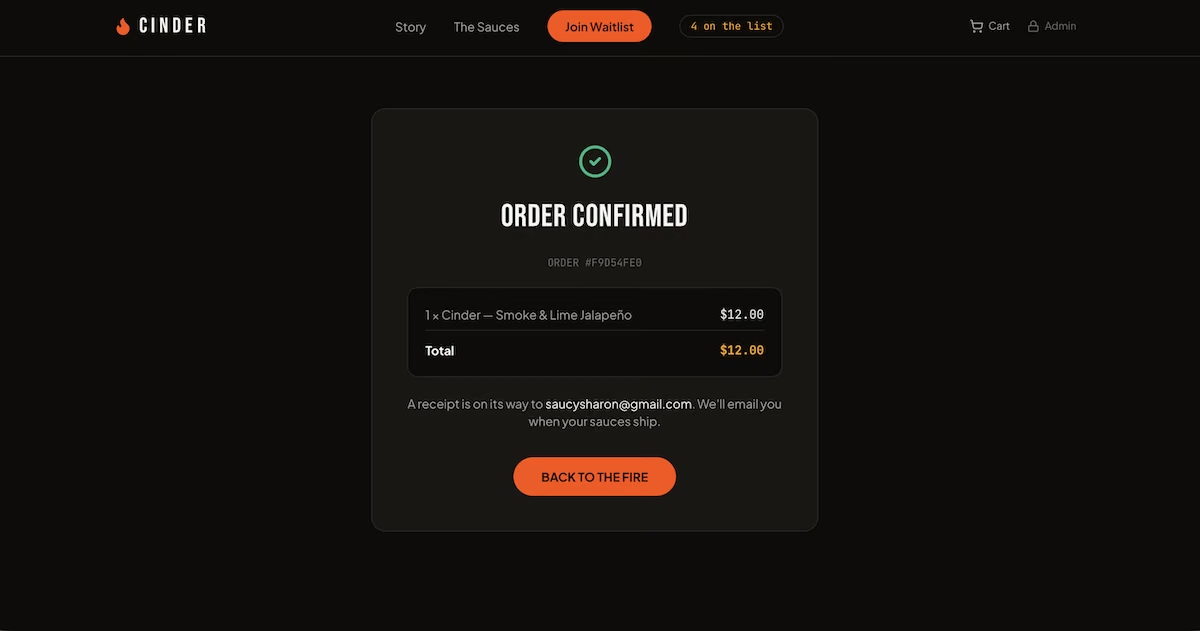
The confirmation page told the customer a receipt was on its way and that Cinder would email them when their sauces shipped. Emergent's summary said Stripe's customer receipts weren't tested and listed order emails as a next step. So make sure to check every line on that page before you launch.
Step 6: Plan Shipping and Order Handling
Orders appeared in a new Orders tab in the admin panel, next to the waitlist. Each order showed the customer's name, email, full shipping address from Stripe, the items, the total, and a status.
Signing into that panel cost me an extra step. Emergent's summaries didn't include the admin password because it had saved the login in a project file, so I asked for it in the chat. That one question cost 2.6 credits, which you can avoid by asking for the login in your original prompt.

Now check your shipping promise. If you state a delivery time, the Federal Trade Commission's mail order rule says you need a reasonable basis for it. If you don't state one at all, you have to be able to ship within 30 days.
If you can't ship on time, you have to get the customer's consent to the delay or refund them. That's why I'd replace the generated "3 business days" line unless you're sure you can meet it consistently.
Hot sauce also ships in glass, so mail a few test packages to friends before launch to see how your packaging holds up.
Step 7: Launch to Your Waitlist First
When your store is ready, Emergent's Publish button makes it live, and you can buy a domain through Emergent's IONOS integration without leaving the project, and the registration is free for the first year. IONOS renewal pricing applies after that. Before you publish, swap the Stripe sandbox for your live account, replace any generated policies, and confirm your tax settings.

Launch to your waitlist before anyone else. They’re the people who’ve already said they want the product. Use the sauce counts from step two to determine which one to feature in your launch email.
Emergent's summaries suggested a comma-separated values (CSV) export for sign-ups, a countdown timer, and stock counters as next steps. The export feature would be a nice addition, since you'll need your list in an email tool.
After launch, pick one marketing channel and give it a month before you add another. AI tools for ecommerce can take on some of the repetitive work on product descriptions, ads, and customer support once orders start coming in.
Common Mistakes to Avoid
- Buying inventory before testing demand: It's tempting to order inventory as soon as you have a product idea. Run a waitlist or pre-order page first, so your first order size is based on real interest.
- Publishing copy you didn't write: Templates and AI builders fill gaps with placeholder stories, shipping times, and guarantees. Replace them with your real policies.
- Leaving sales tax until after the first sale: Tax you forget to collect still has to be paid. Decide how you'll handle it before your checkout goes live.
- Skipping your own test order: A checkout that works in a demo can still show the wrong total or send people to a broken page. Place a test order yourself before launch.
- Launching to an empty list: A store without an audience won’t give you any orders. Build your email list during the pre-launch stage so you have people to sell to on day one.
Emergent Makes Starting an Ecommerce Business Easier
Starting an ecommerce business from scratch still takes product, legal, and shipping decisions that only you can make. Emergent turns the store itself into a prompt, so you can spend your time on those decisions.
Here's how Emergent helps with starting an ecommerce business:
- Pre-launch pages in minutes: Describe your product and get a waitlist page with sign-up tracking, so you can test demand before you buy inventory.
- Payments ready to test: Emergent sets up a Stripe sandbox with test keys, so you can run full checkouts before you connect your own Stripe account.
- Order management included: Product pages, a cart, a checkout, and an admin panel for orders all come from the same build.
- Testing agents that check the work: Emergent's agents test flows like sign-ups and checkout and fix problems before the build finishes.
You'll still need to add your own policies and customer emails, since those depend on how your business runs. Emergent's Free plan includes 10 monthly credits to try a first prompt, and Standard includes 100 credits for $20/month, enough for a full store build like this one. Try Emergent and start building your first store.

Most AI app builders stop at prototypes. Emergent creates production-ready apps you can actually launch.
- Production-ready apps
- Web & mobile apps
- Deploy in minutes







