

Build a Custom Construction Company Dashboard Using AI in Minutes
Turn a plain-English description of your Construction Company Dashboard into a production-ready build, from design to deployment, in minutes. No code needed.










Trusted by Builders Worldwide
Active Builders Worldwide
Apps Successfully Created
Countries Globally Reached



Build a custom construction company dashboard in 4 simple steps
See every project, the order book and cash position as one business.
Name what a director reviews. Order book, project margin, cash, retentions, forecast workload.
Your project and accounting systems connect, so project margin is real rather than estimated.
Request a new project, a different margin basis or results by client.
Open one view where the business is visible, not one project at a time.
Emergent Key Features for Building a Construction Company Dashboard
Tender pipeline, forward order book and utilisation, which is the business beyond the projects on site.
Order Book Profiled Forward
Secured work is shown by month ahead against required turnover, so the point where workload thins is known in advance.
Win Rate by Segment
Tender success is broken down by client, work type and value, showing where you genuinely compete rather than where you bid most.
Resource Demand from the Programme
Labour and plant requirements are derived from secured work, so a shortfall or idle period is identified before it arrives.
Overhead Recovery per Contract
Each contract is assessed on its contribution to overhead, which is the measure that determines whether winning it helped.
Lost Tender Intelligence
Losing prices and reasons are recorded, building a picture of where your pricing sits against the market.
Bid Decisions against Capacity
Pipeline is compared with available resource, so a bid is submitted knowing whether the work could actually be delivered.
Construction Company Dashboard Use Cases You Can Build in Minutes
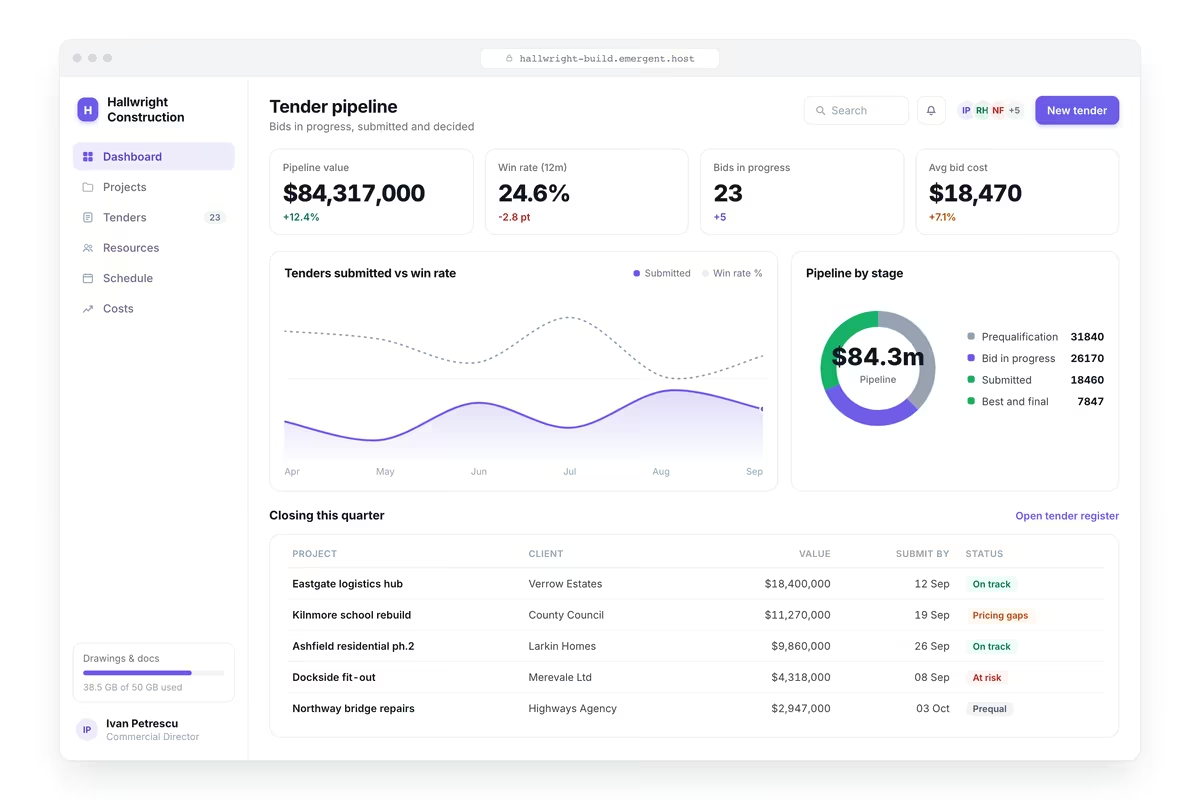
Bid Where You Actually Win
Opportunities by stage from enquiry through prequalification, tender and decision, value and expected start date per opportunity, win rate by client, work type and value band, tenders lost with reasons and winning prices, and pipeline against the workload gap.
window.awbMockup = { tenderPipeline: "Build a construction tender dashboard showing opportunities by stage from enquiry through prequalification, tender and decision, value and expected start date per opportunity, win rate by client, work type and value band, tenders lost with reasons and the winning price where known, and pipeline value against the workload gap it needs to fill.", orderBook: "Build a construction order book dashboard showing secured work by month for the next 24 months against your target turnover, the gap between secured and required workload by period, work secured against work currently being delivered, contracts awarded but not yet started, and the point ahead where the order book runs thin.", resourceUtilisation: "Build a construction resource dashboard showing directly employed labour allocated against available by trade and week, plant utilisation against ownership or hire cost, resources committed to projects not yet started, periods where demand exceeds available labour, idle plant with its standing cost, and the subcontract requirement implied by the current programme.", overheadAndMargin: "Build a construction business dashboard showing overhead cost against turnover with recovery per contract, margin by work type, client and region, contracts contributing below the overhead recovery required, the turnover needed to cover current overhead, and margin trend by work type over eight quarters."};

See the Thin Period While You Can Fill It
Secured work by month for the next twenty four months against your target turnover, the gap between secured and required workload by period, work secured against work being delivered, contracts awarded but not started and where the order book runs thin.

Match Resource to the Programme Ahead
Directly employed labour allocated against available by trade and week, plant utilisation against ownership or hire cost, resources committed to projects not yet started, periods where demand exceeds labour, idle plant with standing cost and subcontract requirement.
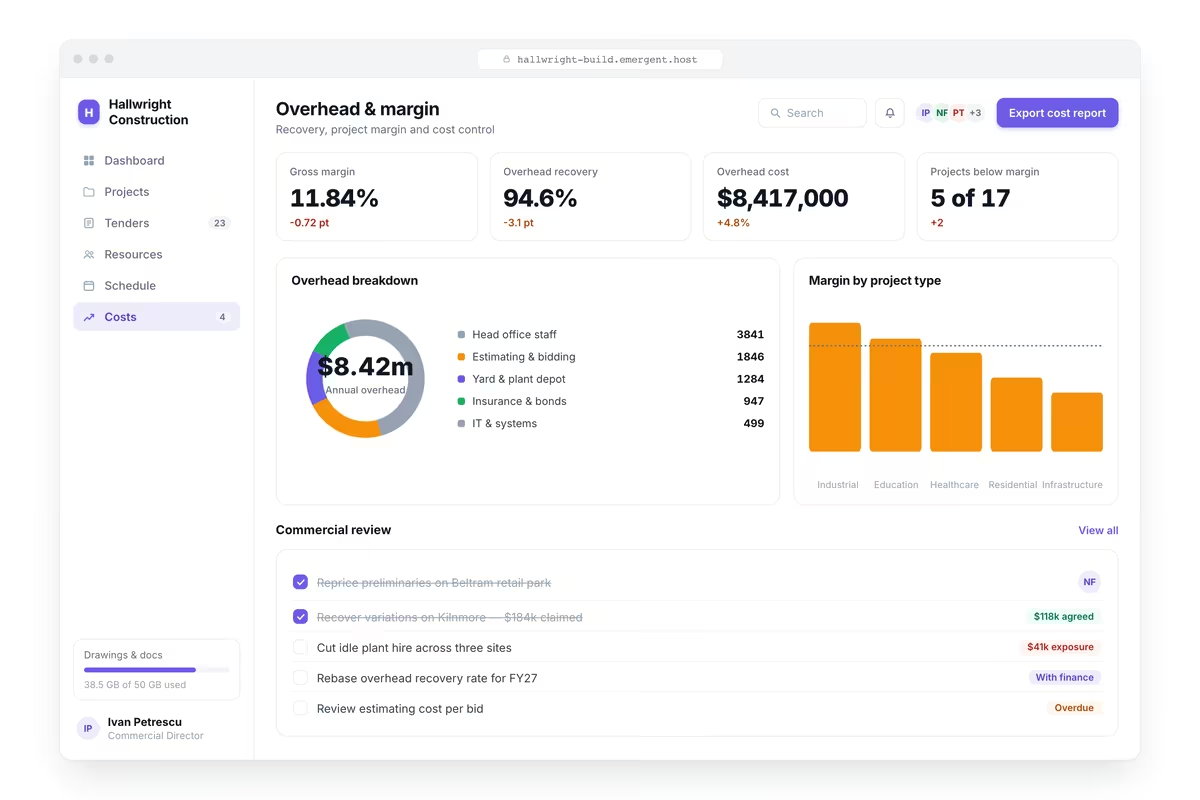
Judge Contracts on Overhead Recovery
Overhead cost against turnover with recovery per contract, margin by work type, client and region, contracts contributing below the required recovery, the turnover needed to cover current overhead and margin trend by work type over eight quarters.
Every integration your
Dashboard needs from day one
Email and calendar
Inbox and calendar sync both ways, so every reply, meeting and no-show lands on the contact record without anyone logging it.




Messaging and support
Conversations from chat, WhatsApp and your helpdesk attach to the right contact, so sales and support see the same history.




Payments and billing
Invoices, subscriptions and payment status flow back into the deal, so revenue and pipeline stay in one place.




If it has an API, your CRM can connect to it.
Emergent builds the connection against the API itself, including internal tools your team made. No closed ecosystem, no approved-partner list, no waiting for a connector to ship.


More things you can build
with Emergent
AI Website Builder
Build and publish responsive websites with AI — from landing pages to complete websites.
AI App Builder
Create and launch mobile apps with AI, without the complexity of traditional app development.
AI Web App Builder
Build and ship fully functional web apps with custom interfaces, logic, and workflows.
AI Dashboard Builder
Create interactive dashboards to visualize data, track KPIs, and manage business operations.
AI SaaS Builder
Build complete SaaS products with user accounts, subscriptions, dashboards, and core product workflows.
AI CRM Builder
Build custom CRMs for managing contacts, leads, pipelines, campaigns, and automated workflows.
AI Agent Builder
Create AI agents that can understand tasks, use tools, automate workflows, and work across your business.
Build Your Own
Start with any idea and build exactly what you need with AI — no templates or limits.

Why choose Emergent?
Most tools give you a demo you have to rebuild. Emergent gives you a product that is ready to run.
| Comparison | Other Tools |  |
|---|---|---|
| Built for | Demos and MVPs | Products you keep growing |
| What you get | Front end shell only | Full stack, wired end to end |
| Backend and database | Set it up yourself | Built and connected for you |
| Customization | Surface level styling | Deep workflow control |
| Integrations and APIs | Manual glue work | Connected from a prompt |
| Code ownership | Locked to the platform | Clean code you can export |
| Time to launch | Weeks of patching and setup | Live the same day |

Pick the Pricing Plan That Works for You
Choose the plan that fits your building ambitions. From weekend projects to enterprise applications, we've got you covered.




Find the Right Dashboard Builder
for Your Business
Frequently Asked Questions
Your Questions, Answered
Don't change this element unless you know what you are doing
on Emergent today




