

Build a Custom Marketing Dashboard Using AI in Minutes
Describe your Marketing Dashboard in plain English and Emergent creates a production-ready build — design, development, and deployment — in minutes. No code needed.










Trusted by Builders Worldwide
Active Builders Worldwide
Apps Successfully Created
Countries Globally Reached



Build a custom marketing dashboard in 4 simple steps
Put paid, organic, email and CRM numbers on one screen so you can see what each channel returned this week.
Name the numbers leadership asks about. Spend, CPL, CAC, ROAS, pipeline contribution, in the words your team uses.
Google Ads, Meta, LinkedIn, GA4 and HubSpot come in with field names normalised, so channels compare properly.
Add a platform, change the attribution window or break results out by region. Applied across every view at once.
One link for leadership that updates itself, with budget pacing visible whenever somebody asks rather than on Fridays.
Emergent Key Features for Building a Marketing Dashboard
Your channels arrive on one comparable model, so spend and return can finally be judged side by side rather than platform by platform.
Cross Channel Normalisation
Spend, clicks and conversion fields from every ad platform are mapped to a shared schema, so channel comparison is a real calculation rather than a visual guess across four widgets.
Attribution Views You Choose
Compare first touch, last touch and platform reported conversions in the same dashboard, which lets you show why the ad account numbers differ from the CRM before someone asks.
Campaign Level Drilldowns
Every top line number opens into campaign, ad set and creative detail, so a rising cost per lead becomes an identified line item in one click.
Goal and Pacing Logic
Enter targets for spend, leads or revenue and the dashboard tracks pace against them daily, turning a static report into an operating tool the team acts on.
Scheduled Refresh and Alerts
Data updates on the cadence you set and you can flag threshold breaches, so budget overspend or a stalled channel gets noticed the day it happens.
Role Based Access
Give executives a summary view and channel owners the detail behind it from the same build, without maintaining separate copies for each audience.
Marketing Dashboard Use Cases You Can Build in Minutes
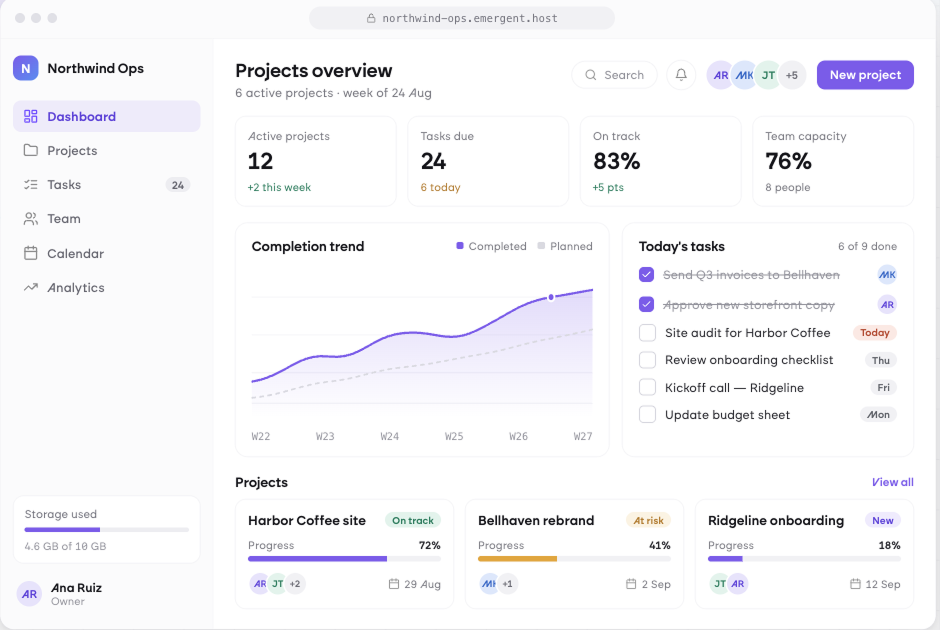
Compare Every Paid Channel on the Same Terms
Put Google, Meta and LinkedIn side by side on spend, cost per lead and return, with campaign level detail underneath. Budget conversations run on comparable numbers rather than on whichever platform reports most generously.
window.awbMockup = { paidChannelPerformance: "Build a paid media dashboard comparing Google Ads, Meta and LinkedIn side by side on spend, impressions, clicks, CPC, CPL, conversions and ROAS, with a campaign level table sortable by cost per acquisition, week over week deltas, and a flag on any campaign whose CPL rose more than 20 percent.", fullFunnel: "Build a funnel dashboard tracking visitors, leads, MQLs, opportunities and closed won from GA4 and the CRM, showing conversion rate and average time between each stage, segmented by source and campaign, plus a cohort view of how last quarter's leads progressed.", budgetPacing: "Build a budget pacing dashboard that compares planned monthly spend against actual spend by channel, projects end of month spend at the current daily rate, shows remaining budget in days of runway, and highlights any channel pacing more than 10 percent over or under plan.", lifecycleAndEmail: "Build a lifecycle marketing dashboard reading from the email platform and CRM, showing list growth, open and click rates by campaign and segment, unsubscribe rate, revenue attributed to email flows versus broadcasts, and which onboarding sequence step loses the most subscribers."};
Follow Leads All the Way to Closed Revenue
Track visitors through leads, qualified leads, opportunities and closed business with conversion and timing at every step. Segmented by source and campaign, it shows exactly where the funnel leaks and which channels produce customers.
Catch Overspend While the Month Is Still Open
Compare planned against actual spend by channel, project where the month will land at the current daily rate, and flag any channel pacing more than ten percent off plan. Budget is corrected mid month rather than explained afterwards.
See What Email Actually Contributes
Track list growth, engagement by segment and revenue from automated flows against broadcasts. Onboarding sequences show where subscribers drop out, so lifecycle marketing is improved on evidence rather than on open rates alone.
Every integration your
Dashboard needs from day one
Email and calendar
Inbox and calendar sync both ways, so every reply, meeting and no-show lands on the contact record without anyone logging it.




Messaging and support
Conversations from chat, WhatsApp and your helpdesk attach to the right contact, so sales and support see the same history.




Payments and billing
Invoices, subscriptions and payment status flow back into the deal, so revenue and pipeline stay in one place.




If it has an API, your CRM can connect to it.
Emergent builds the connection against the API itself, including internal tools your team made. No closed ecosystem, no approved-partner list, no waiting for a connector to ship.


More things you can build
with Emergent
AI Website Builder
Build and publish responsive websites with AI — from landing pages to complete websites.
AI App Builder
Create and launch mobile apps with AI, without the complexity of traditional app development.
AI Web App Builder
Build and ship fully functional web apps with custom interfaces, logic, and workflows.
AI Dashboard Builder
Create interactive dashboards to visualize data, track KPIs, and manage business operations.
AI SaaS Builder
Build complete SaaS products with user accounts, subscriptions, dashboards, and core product workflows.
AI CRM Builder
Build custom CRMs for managing contacts, leads, pipelines, campaigns, and automated workflows.
AI Agent Builder
Create AI agents that can understand tasks, use tools, automate workflows, and work across your business.
Build Your Own
Start with any idea and build exactly what you need with AI — no templates or limits.

Why choose Emergent?
Most tools give you a demo you have to rebuild. Emergent gives you a product that is ready to run.
| Comparison | Other Tools |  |
|---|---|---|
| Built for | Demos and MVPs | Products you keep growing |
| What you get | Front end shell only | Full stack, wired end to end |
| Backend and database | Set it up yourself | Built and connected for you |
| Customization | Surface level styling | Deep workflow control |
| Integrations and APIs | Manual glue work | Connected from a prompt |
| Code ownership | Locked to the platform | Clean code you can export |
| Time to launch | Weeks of patching and setup | Live the same day |

Pick the Pricing Plan That Works for You
Choose the plan that fits your building ambitions. From weekend projects to enterprise applications, we've got you covered.




Find the Right Dashboard Builder
for Your Business
Frequently Asked Questions
Your Questions, Answered
Don't change this element unless you know what you are doing
on Emergent today




