

Build Ecommerce Automation for the Work Behind Every Order
Describe the order and customer work your team repeats each day. Emergent builds each workflow and the database it writes to, as code you own with no task cap.
Build ecommerce automation that sends each paid Shopify order to the supplier who stocks it and saves the tracking number.
Trusted by Builders Worldwide
Active Builders Worldwide
Apps Successfully Created
Countries Globally Reached



What Ecommerce Automation Handles
Ecommerce automation takes the order-by-order steps that repeat all day. Pricing and product decisions stay with you.
Starts on the store event you pick
Connects to Shopify, WooCommerce or BigCommerce through their APIs. A paid order or a new customer signup starts each run, and every run is saved as a row you can search.
Rules written the way you say them
Describe the condition in a sentence, such as no reorder email to anyone who bought in the last 30 days. Emergent writes the check and the skip, and you change either by prompting.
Supplier and SKU records you own
Keeps your supplier table and SKU list in a database that belongs to you. Every workflow reads the same tables, and a new supplier means one new row, not a rebuilt workflow.
Alerts where your team already works
Sends a Slack message or an email when a run needs a person to decide. A reminder goes out if nobody answers, and an unanswered hold escalates to the next name on the list.
No task cap during a sale week
Runs every order through the same steps on the busiest day of your year. There is no task cap, and a flash sale with four times the usual orders never pauses a workflow halfway.
Code in your own GitHub repo
Exports the full codebase to your GitHub repo on paid plans. Anyone with access can read every rule or add a carrier, and the app runs wherever the rest of your stack is hosted.
Where Online Stores Automate First
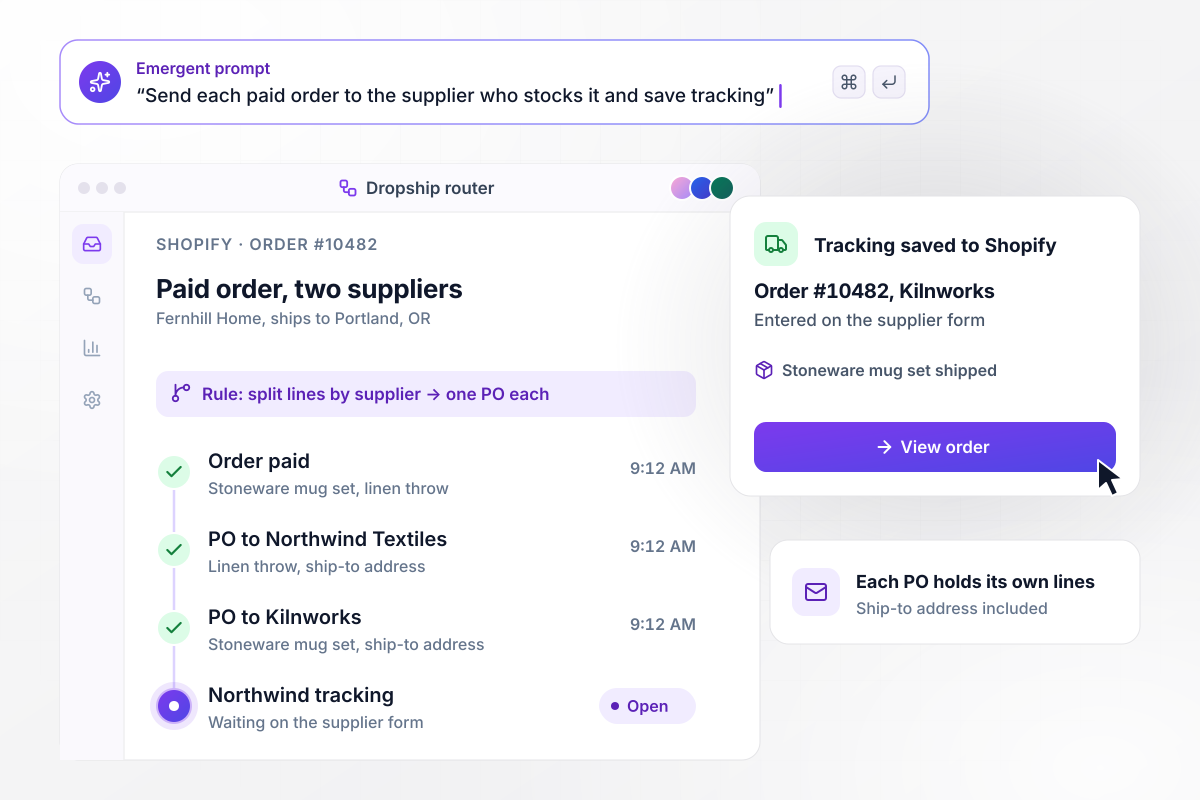
Each paid order goes to the supplier who stocks it
Fernhill Home sells through Shopify and holds no stock. When an order is paid, the app splits its lines by supplier: order #10482 becomes a purchase order for Kilnworks and another for Northwind Textiles, each with the ship-to address. The tracking number a supplier enters is written back to the Shopify order.
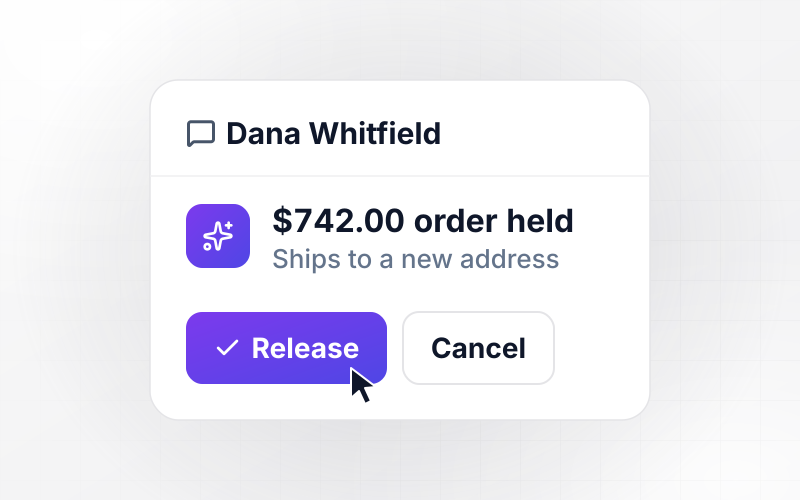
window.awbMockup = { dropshipOrders: "Build dropship order routing for my home goods store on Shopify. When an order is paid, split its lines by supplier using our SKU table and email each supplier a purchase order with only their items and the ship-to address. Give suppliers a form to enter the tracking number and write it back to the Shopify order.", winbackEmails: "Build winback emails for my store. Every morning, find customers whose last order was 90 days ago. If they are still subscribed, send a winback email with the code COMEBACK10 for 10% off their next order. Skip anyone who unsubscribed. Log each send on the customer's record and mark them won back when they order with the code.", orderRiskHolds: "Build a hold for risky orders in my Shopify store. When a paid order is over $500 and the shipping address differs from the billing address, keep it out of the warehouse queue and send our ops lead Dana Whitfield a Slack direct message with both addresses and past orders. Release sends it to packing; Cancel closes it in Shopify with her reason.", marginReport: "Build a weekly margin report for my store. Every Monday at 7:00 AM, roll up last week's Shopify orders by SKU: units, revenue, product cost from our SKU table and shipping. Work out margin after cost and shipping as a share of revenue, flag any SKU under 20% and email the table to me, Sam Ortega." };
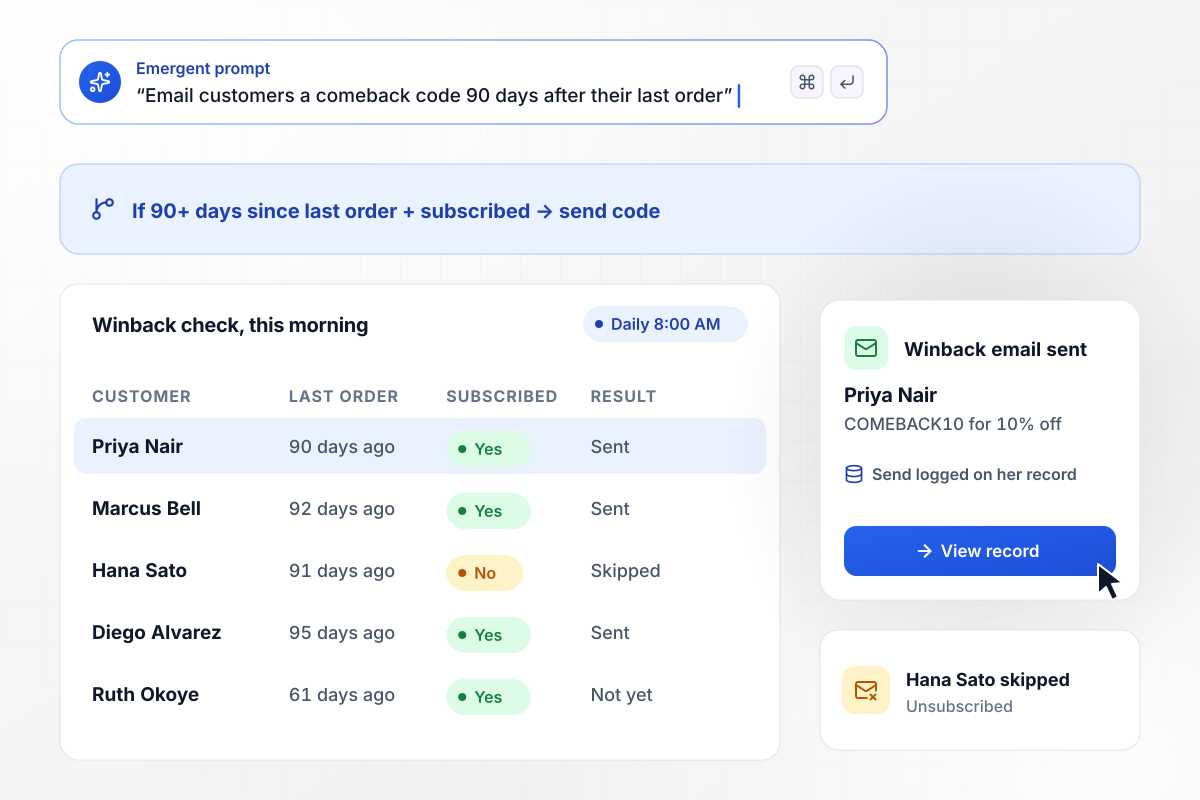
When a customer goes quiet for 90 days
Customers who have not ordered in 90 days get a winback email the next morning with COMEBACK10, a code for 10% off. The app reads the subscription field first and skips anyone who unsubscribed. Each send is logged on the customer's record, and an order placed with the code counts as won back.
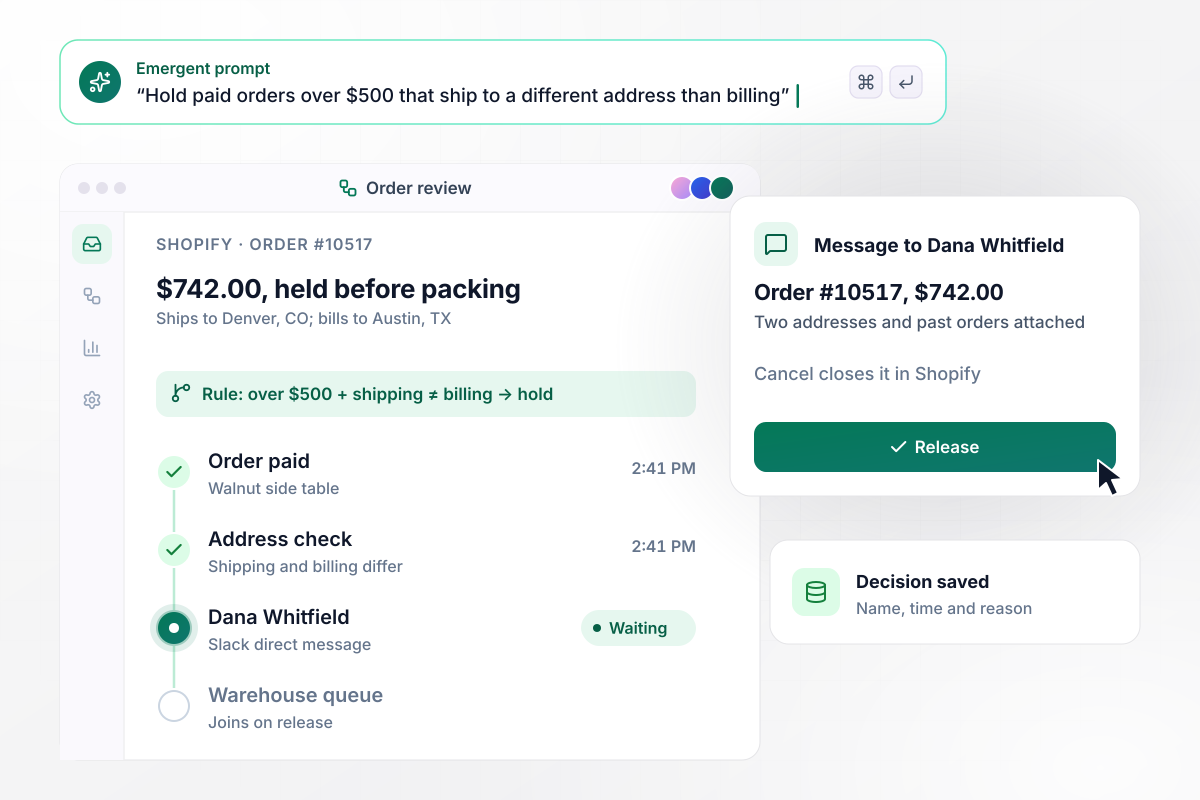
Hold the $500 order that ships somewhere new
Any paid order over $500 whose shipping address differs from the billing address stops before the warehouse queue. Dana Whitfield, the ops lead, gets a Slack direct message with both addresses and the customer's past orders. Release sends it to packing. Cancel closes it in Shopify and saves her reason.
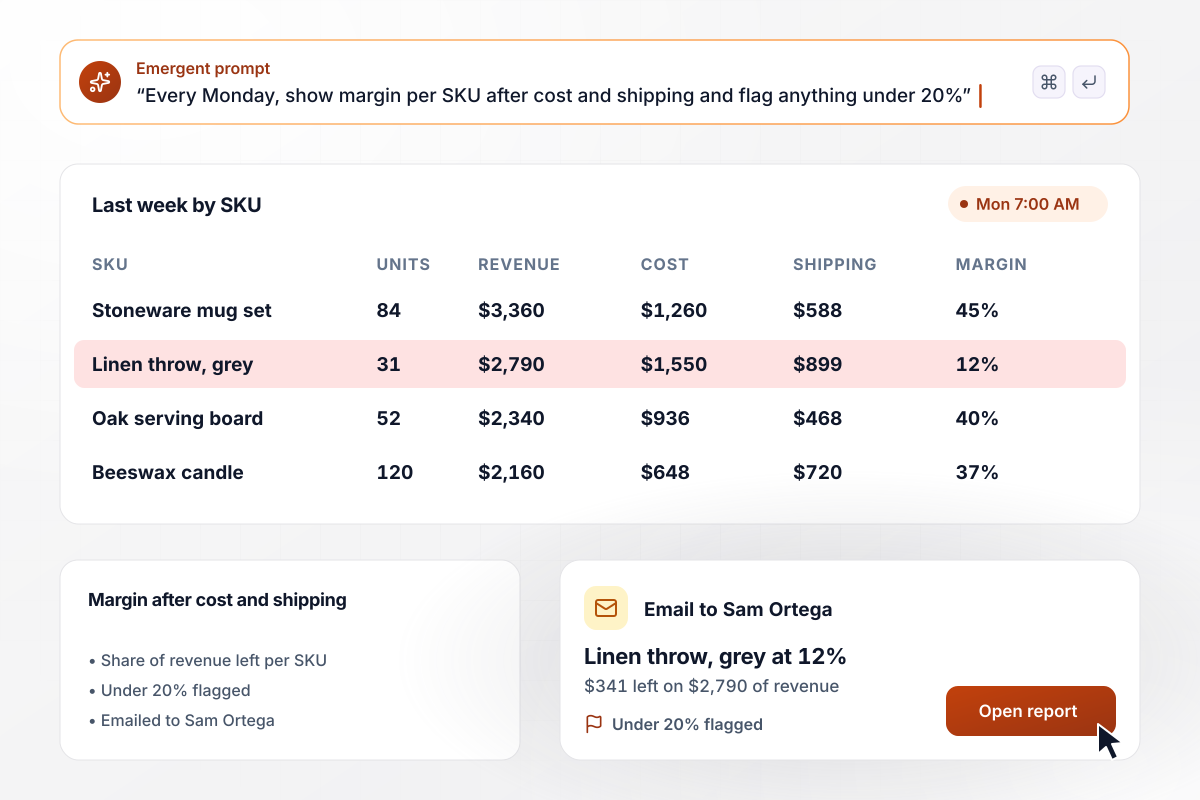
Margin per SKU after shipping, every Monday
Every Monday at 7:00 AM, the app pulls last week's Shopify orders and rolls them up by SKU. Each row carries units, revenue, product cost, and shipping. Margin is what is left after cost and shipping, as a share of revenue. Any SKU under 20% is flagged, and the report goes to Sam Ortega, the founder, by email.






How to Build Ecommerce Automation
Start with one store event and one rule. Connect the store once the logic reads right, then run it next to the manual process before it takes over.
Write down the jobs someone on your team repeats for every order or customer: forwarding orders, chasing tracking numbers, checking large orders, building the weekly numbers. Note how often each one happens and who does it today.
Choose one store event to start with, such as a paid order, and the rule that follows it. Write the rule with its numbers and names: which supplier, what amount, who gets the message, and what happens when nobody replies.
Put every SKU in one sheet with its supplier, the supplier's order inbox and the unit cost. Workflows that route orders or report margin read from this table, and any SKU missing a supplier is flagged for you instead of guessed.
Tell Emergent what starts the workflow and what each run should write, naming the people who decide. Emergent builds the workflow and its database tables with a dashboard on top, and you adjust any step by prompting again.
Point the app at a development store or replay last month's orders before it touches live ones. Compare each result, order by order, with what your team did by hand that day. Include a busy sale day in the replay to see the app handle a real peak.
Keep doing the work by hand for the first week while the app logs what it would have done. Every mismatch between the two becomes a change to the rule, and you switch over once a full week matches.
Build the second workflow on the data the first one already uses. The supplier table behind dropship routing is the table the Monday margin report reads, and each new workflow starts with less setup than the one before it.
Why Build Store Automation With Emergent?
Emergent builds the workflow and the app around it, on a database you own, and runs it with no task cap.

|
Zapier | Make (Integromat) | n8n | |
|---|---|---|---|---|
| How you build | Prompt for the workflow and the app around it | Templates and editor, AI copilot | Visual canvas | Visual canvas, self-hosted or cloud |
| What you get | Workflow + trigger form + database + dashboard, as code you own | Zaps, plus Tables and Interfaces inside Zapier | Scenarios inside Make | Workflows inside n8n |
| Behavior at cap | Keeps running, no task cap | Overage billed at up to 1.25× the base rate | Runs pause | Cloud workflows stop until the reset or an upgrade |
| AI and agent steps | Native, share the same credit pool | Priced by model tier, drawn from the task pool | AI modules cost variable credits | Bring your own model API key, billed by the provider |
| Code ownership | Full code export to GitHub on paid plans | None | None | Yes on Community Edition |

Pick the Pricing Plan That Works for You
Choose the plan that fits your building ambitions. From weekend projects to enterprise applications, we've got you covered.




Find the right workflow automation
for you and your business
Frequently Asked Questions
Your Questions, Answered
Don't change this element unless you know what you are doing
More things you can build
with Emergent









on Emergent today




