

Build a Custom Automation Dashboard Using AI in Minutes
Turn a plain-English description of your Automation Dashboard into a production-ready build, from design to deployment, in minutes. No code needed.










Trusted by Builders Worldwide
Active Builders Worldwide
Apps Successfully Created
Countries Globally Reached



Build a custom automation dashboard in 4 simple steps
See what your automations ran, what they saved and what quietly failed.
Describe what you automate and what a failure looks like when one happens.
Your automation tools connect, so runs and failures are reported rather than discovered later.
Say you want a new workflow, a different failure rule or results by system.
Open one view where silent failures surface, which is the main risk with automation at all.
Emergent Key Features for Building an Automation Dashboard
Checks against the systems your workflows are meant to change, catching runs that succeed and produce nothing.
Outcome Checked, Not Just the Run
The target system is inspected for the records a workflow should have created, catching runs that report success while producing nothing.
Missing Runs Detected
Workflows that have stopped triggering are flagged against their expected interval, because silence is the most common automation failure.
Partial Completion Identified
Runs that stopped midway are surfaced with the inconsistent records they left, which is where data problems usually originate.
Error Grouping by Cause
Failures are grouped by message and origin, separating an upstream outage from a genuine fault in your logic.
Maintenance Cost against Value
Time saved is compared with the effort a workflow consumes, identifying automations no longer worth keeping.
Orphan Automation Detection
Workflows still running after being superseded are found, which is a frequent and quietly expensive form of technical debt.
Automation Dashboard Use Cases You Can Build in Minutes

Notice the Workflow That Stopped Running
Every workflow with its schedule, last successful run, success rate over thirty days, average duration and current state, workflows that have not run within their expected interval, workflows failing repeatedly and any disabled without a reason.
window.awbMockup = { workflowHealth: "Build an automation dashboard showing every workflow with its schedule, last successful run, success rate over 30 days, average duration and current state, workflows that have not run within their expected interval, workflows failing repeatedly, and any workflow disabled without a recorded reason.", failureAnalysis: "Build an automation failure dashboard grouping errors by workflow and message, showing failure count and first occurrence, failures caused by an upstream system against those in the workflow logic, runs that partially completed and left records in an inconsistent state, and failures retried successfully against those abandoned.", silentFailure: "Build an automation verification dashboard comparing what each workflow should have produced against what actually exists in the target system, records expected but missing, duplicates created by repeated runs, fields left unpopulated, and workflows reporting success while producing no output at all.", automationValue: "Build an automation value dashboard showing runs completed per workflow and the manual time each replaces, total hours saved per month, workflows saving less time than they cost to maintain, workflows superseded but still running, and the processes still handled manually that run most frequently."};
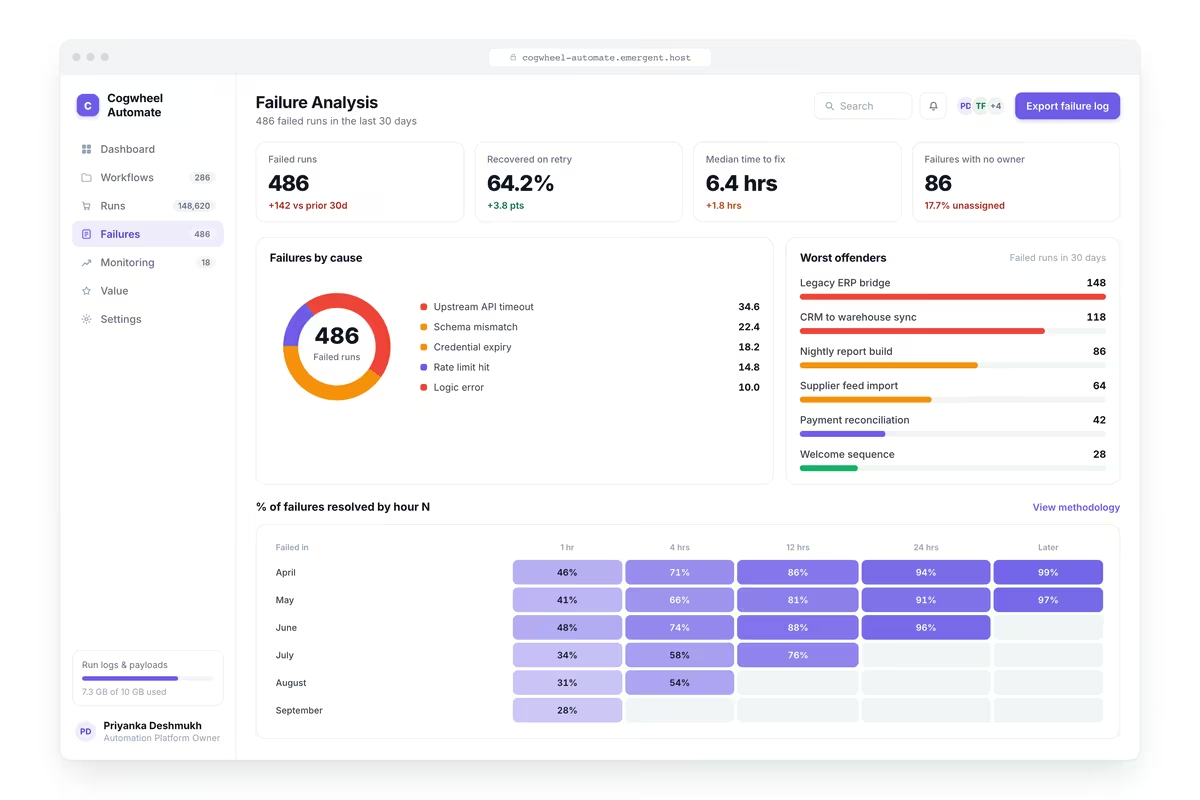
Tell an Upstream Outage from Your Own Logic
Errors grouped by workflow and message with failure count and first occurrence, failures caused by an upstream system against those in the workflow itself, runs that partially completed leaving records inconsistent and retries that succeeded.

Check the Target System, Not the Run Log
What each workflow should have produced compared against what actually exists in the target system, records expected but missing, duplicates created by repeated runs, fields left unpopulated and workflows reporting success with no output.

Retire the Automations Costing More Than They Save
Runs completed per workflow and the manual time each replaces, total hours saved per month, workflows saving less time than they cost to maintain, workflows superseded but still running and the manual processes still run most often.
Every integration your
Dashboard needs from day one
Email and calendar
Inbox and calendar sync both ways, so every reply, meeting and no-show lands on the contact record without anyone logging it.




Messaging and support
Conversations from chat, WhatsApp and your helpdesk attach to the right contact, so sales and support see the same history.




Payments and billing
Invoices, subscriptions and payment status flow back into the deal, so revenue and pipeline stay in one place.




If it has an API, your CRM can connect to it.
Emergent builds the connection against the API itself, including internal tools your team made. No closed ecosystem, no approved-partner list, no waiting for a connector to ship.


More things you can build
with Emergent
AI Website Builder
Build and publish responsive websites with AI — from landing pages to complete websites.
AI App Builder
Create and launch mobile apps with AI, without the complexity of traditional app development.
AI Web App Builder
Build and ship fully functional web apps with custom interfaces, logic, and workflows.
AI Dashboard Builder
Create interactive dashboards to visualize data, track KPIs, and manage business operations.
AI SaaS Builder
Build complete SaaS products with user accounts, subscriptions, dashboards, and core product workflows.
AI CRM Builder
Build custom CRMs for managing contacts, leads, pipelines, campaigns, and automated workflows.
AI Agent Builder
Create AI agents that can understand tasks, use tools, automate workflows, and work across your business.
Build Your Own
Start with any idea and build exactly what you need with AI — no templates or limits.

Why choose Emergent?
Most tools give you a demo you have to rebuild. Emergent gives you a product that is ready to run.
| Comparison | Other Tools |  |
|---|---|---|
| Built for | Demos and MVPs | Products you keep growing |
| What you get | Front end shell only | Full stack, wired end to end |
| Backend and database | Set it up yourself | Built and connected for you |
| Customization | Surface level styling | Deep workflow control |
| Integrations and APIs | Manual glue work | Connected from a prompt |
| Code ownership | Locked to the platform | Clean code you can export |
| Time to launch | Weeks of patching and setup | Live the same day |


Pick the Pricing Plan That Works for You
Choose the plan that fits your building ambitions. From weekend projects to enterprise applications, we've got you covered.




Find the Right Dashboard Builder
for Your Business
Frequently Asked Questions
Your Questions, Answered
Don't change this element unless you know what you are doing
on Emergent today


