

Build a T-shirt Order Form That Counts Every Size
Add your shirt styles and prices, then pick a close date. Emergent builds the T-shirt order form and hands you a count per size the moment orders close.
Build a T-shirt order form for my school that counts sizes for the printer.
Trusted by Builders Worldwide
Active Builders Worldwide
Apps Successfully Created
Countries Globally Reached



Everything Between the Link and the Print Run
Six parts that turn scattered size requests into one order a print shop can run.
A size grid for every style
Emergent lays out a grid for each shirt and color, with youth and adult sizes side by side. Buyers set a quantity per size, and the total updates before they pay or submit.
One count per size for the printer
When the form closes, every order rolls up into a single count per size and color. Send that sheet to the print shop as a CSV instead of tallying paper slips at the kitchen table.
Upcharges for big sizes and extras
Price 2XL and up a few dollars higher, and charge separately for a name on the back. Each line of the order shows what the buyer added, and the total always matches the lines.
Card payment before anything prints
Connect Stripe, and each buyer pays by card on submit. The order row records the charge and whether it went through. No one hands the organizer an envelope of cash at pickup.
A deadline that shuts the form
Pick a close date and time. Once it passes, the link shows a closed notice instead of the form, and late requests join a waitlist you can open again if a second print run happens.
Your domain, your source code
Publish the form on your school or shop domain, or embed it in a page you already run. The full source exports to your GitHub on paid plans whenever a developer wants to extend it.
Shirt Orders for Four Kinds of Groups
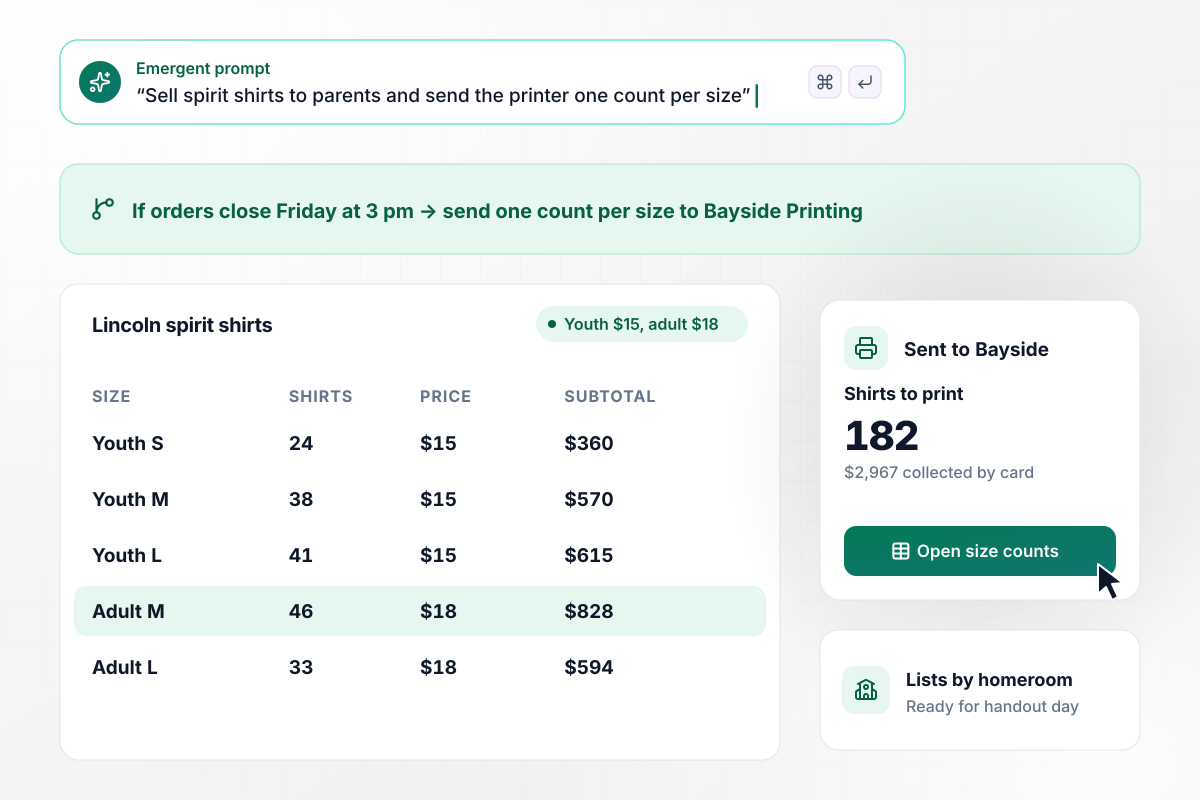
The printer gets one count per size, not a pile of slips
Lincoln Middle School's PTO opens the form ahead of spirit week. Parents choose youth shirts at $15 or adult shirts at $18 and pay by card. Orders close Friday at 3 pm. Bayside Printing receives one count per size, and each shirt is listed under its homeroom for handout day.
window.awbMockup = { schoolSpiritWear: "I run the PTO at Lincoln Middle School and we sell spirit shirts: youth sizes at $15 and adult sizes at $18. Build an order form where parents pick a size and quantity, enter the student's homeroom and pay by card. Close it Friday at 3 pm, email Bayside Printing one count per size, and give me a handout list grouped by homeroom.", reunionShirts: "I'm organizing the Delgado family reunion and 41 relatives are coming. Build a shirt order form with navy or heather gray at $20, a size, and an optional name on the back for $5. Everyone pays by card. Out-of-state relatives enter a mailing address and everyone else picks up at the welcome table. Show me both groups in one table.", printShopOrders: "My shop, Inkwell Print Co., prints team shirts. Give each team captain a link for their design where players enter a name and size. Add $3 to every 2XL or larger shirt. Hold any group under 24 shirts and show the captain how many more are needed. When a group reaches 24, email me so I can send the art proof.", newHireKits: "My people team at Northwind sends new hires a welcome kit. Build a form linked from the offer letter where each new hire picks a shirt size, a classic or relaxed fit, and confirms a shipping address. No payment. Every Monday, email our fulfillment vendor the week's list as a CSV and post a Slack message naming anyone who has not answered." };
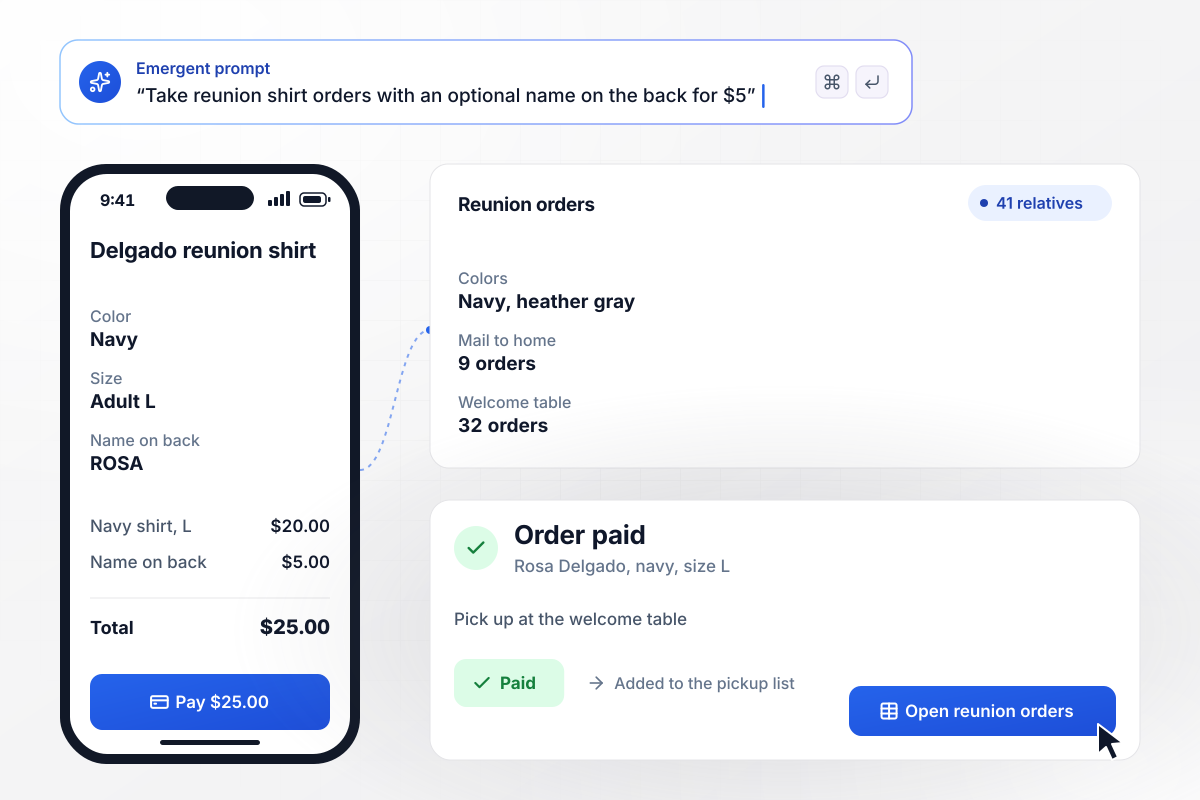
Printing a name on back adds $5
The Delgado family reunion has 41 relatives coming this summer. Each picks a navy or heather gray shirt at $20, adds a name on the back for $5 and pays by card. Cousins out of state enter a mailing address. Everyone else collects at the welcome table, and the organizer sees both groups in one table.
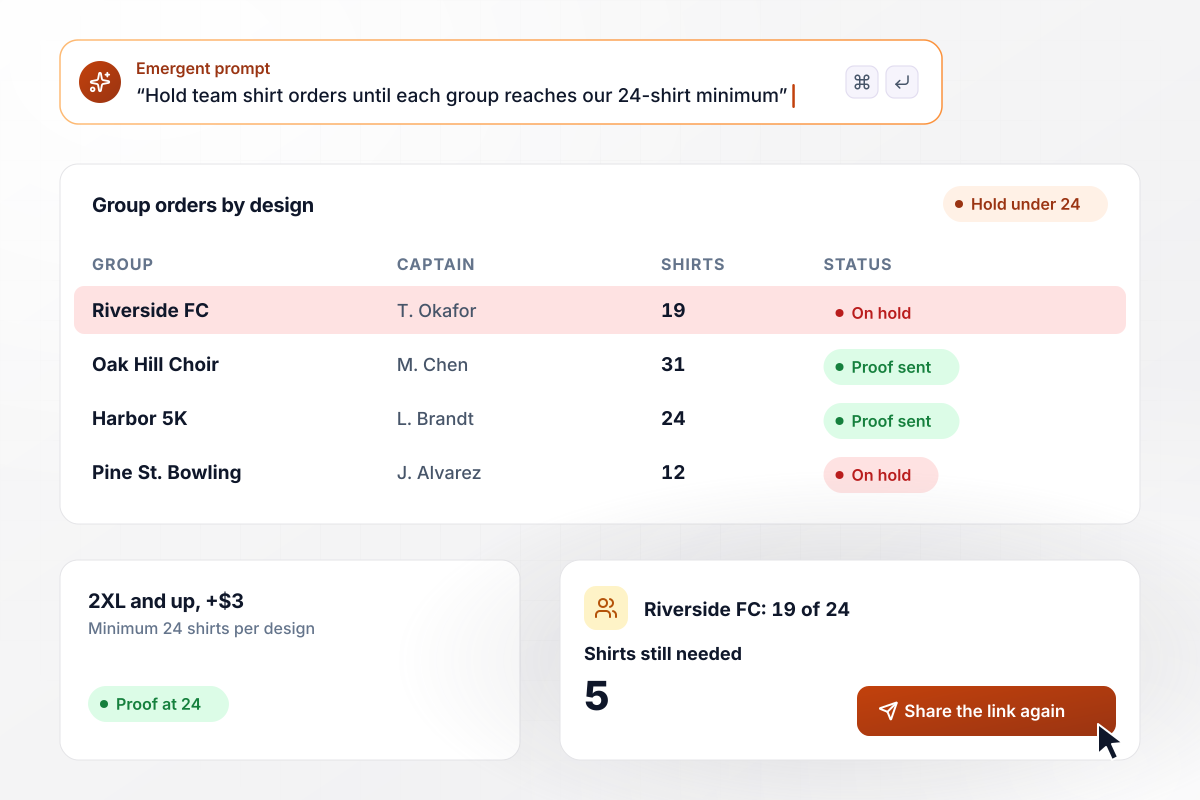
Groups under 24 shirts wait for more names
Inkwell Print Co. sends each team captain a link for their design. Players enter a name and a size, and every 2XL or larger shirt adds $3. A group with fewer than 24 shirts stays on hold while the captain sees how many are still needed. At 24, the shop sends the art proof.
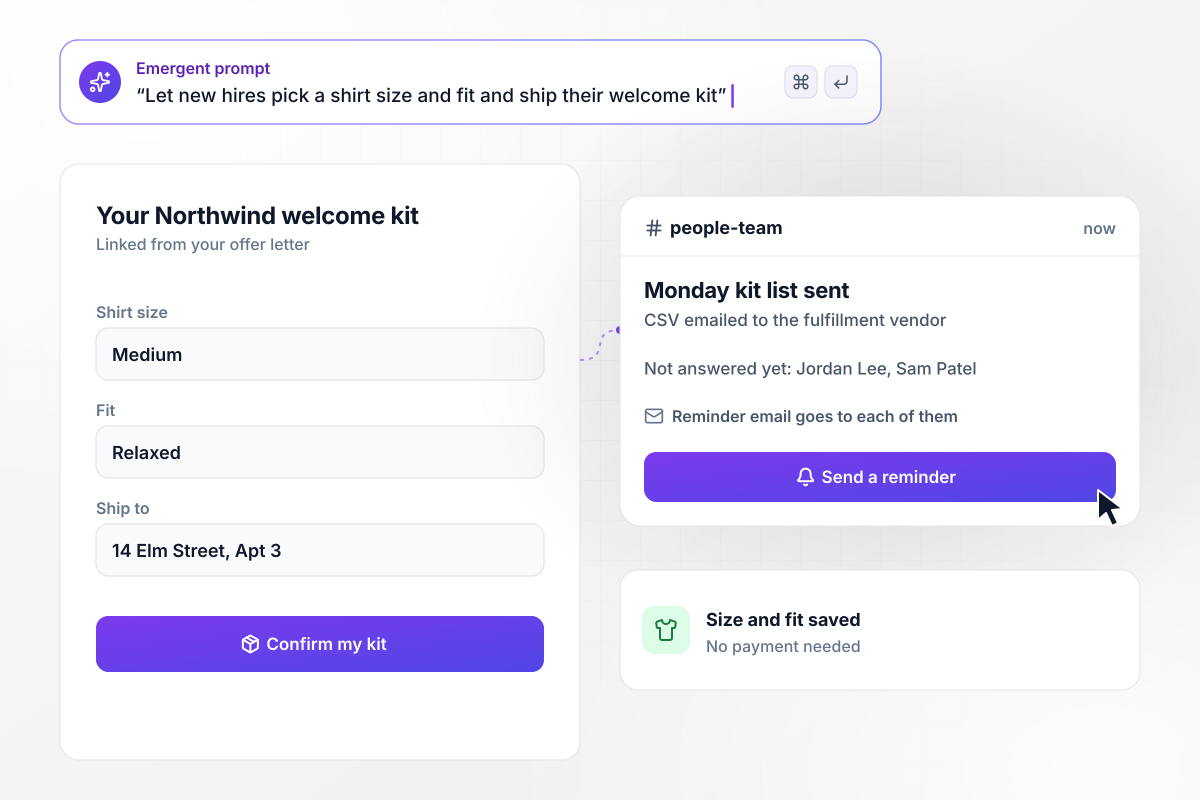
Welcome shirts ship in the right size
New hires at Northwind get a welcome kit link with their offer letter. Each picks a size, a classic or relaxed fit, and confirms a shipping address. Nobody pays. Every Monday the fulfillment vendor receives the week's list as a CSV, and the people team gets a Slack message naming anyone who has not answered.






How to Make a T-shirt Order Form
Agree on the shirt and the deadline with your printer before you write the prompt.
Settle the garment first: the brand and style your printer stocks, the colors you offer and whether youth sizes are included. A shirt that changes after orders open means asking every buyer who already ordered to choose again.
Ask the printer for its minimum per design and the price difference for 2XL and larger. Many printers charge more for bigger sizes because they take more fabric. Put both numbers in the prompt and the form prices them for you.
Write down every size you will print, youth and adult, and whether a fitted or relaxed cut is on offer. Link a size chart next to the size field. Put the chart where buyers choose, not on a separate page.
Count back from the day the shirts are needed: the printer's quoted turnaround plus a few days for delivery. Take card payment at submit through Stripe. A shirt with a name printed on it cannot go back on the shelf.
Paste the styles, prices and close date into the prompt in plain English. Emergent builds the form and the orders table behind it. A new color or a later deadline is one more sentence in the same chat.
Name who hears about it when the form closes: the print shop by email, or the organizer in Slack. The message carries a link to the orders table, where anyone can filter by size or by pickup group without asking for a fresh export.
Order one youth medium and one 2XL as a buyer, then pay with a test card. Open the orders table and check the upcharge and the size counts against what you bought. Then refund the test charge and share the link.
Why Build T-shirt Order Forms With Emergent?
Printable templates leave someone tallying sizes by hand. Emergent builds a form that totals each size while orders come in.

|
Jotform | Google Forms | Typeform | |
|---|---|---|---|---|
| How you build | Describe it in plain English | Templates, editor, AI generator | Manual, field by field | Templates, editor, AI assist |
| Response limits | No response caps | Monthly submission caps by plan; the form stops at the cap | No limit | Monthly response caps by plan; the form closes at the cap |
| Payments in the form | Through your own Stripe account | Included, metered per plan | No | Paid plans |
| Where responses live | A database table you own, plus any integration | Jotform account | Google Sheets | Typeform account |
| Code ownership | Full code export to GitHub on paid plans | None | None | None |

Pick the Pricing Plan That Works for You
Choose the plan that fits your building ambitions. From weekend projects to enterprise applications, we've got you covered.




Find the right form
for whatever you're collecting


Frequently Asked Questions
Your Questions, Answered
Don't change this element unless you know what you are doing
More things you can build
with Emergent









on Emergent today




