

Build a Webinar Landing Page That Gets People to Show Up
Describe the session and where it runs. Emergent builds the webinar landing page and registers each sign-up with your webinar tool. Every registrant also lands in a table you own.
Build a landing page for my weekly product demo that shows the start time in the visitor's time zone and registers each sign-up in Zoom.
Trusted by Builders Worldwide
Active Builders Worldwide
Apps Successfully Created
Countries Globally Reached



What Webinar Landing Pages Need to Work
The page sells the session. What sits behind the form decides whether the people who register get a link and turn up.
A personal join link for every sign-up
The form sends each registration to Zoom, or to any webinar tool with an API, and stores the join link it returns. The confirmation email carries that link and nobody else's.
A calendar file on the confirmation
Ask for an .ics file on the confirmation email, with the join link written into the event notes. Opening the file adds the session to the registrant's calendar, link and all.
Reminders timed to the start
Reminder emails go out a day before and an hour before, each with the same personal link. Anyone who registers after the first send still gets the hour-before email.
A registrant table you can query
Every sign-up becomes a row with the name, work email, join link and time of registration. Filter it before the session, or sync new rows to HubSpot or any CRM with an API.
Date changes made by message
Tell Emergent the session moved to next Thursday, and the page and its reminder schedule both change. People who already registered get an email with the new start time.
Page and registrants exported as code
The page, its form, and the registrant table export to your GitHub on paid plans. Publish on Emergent under a custom domain, which uses credits, or host the code yourself.
Webinar Pages for Four Kinds of Session
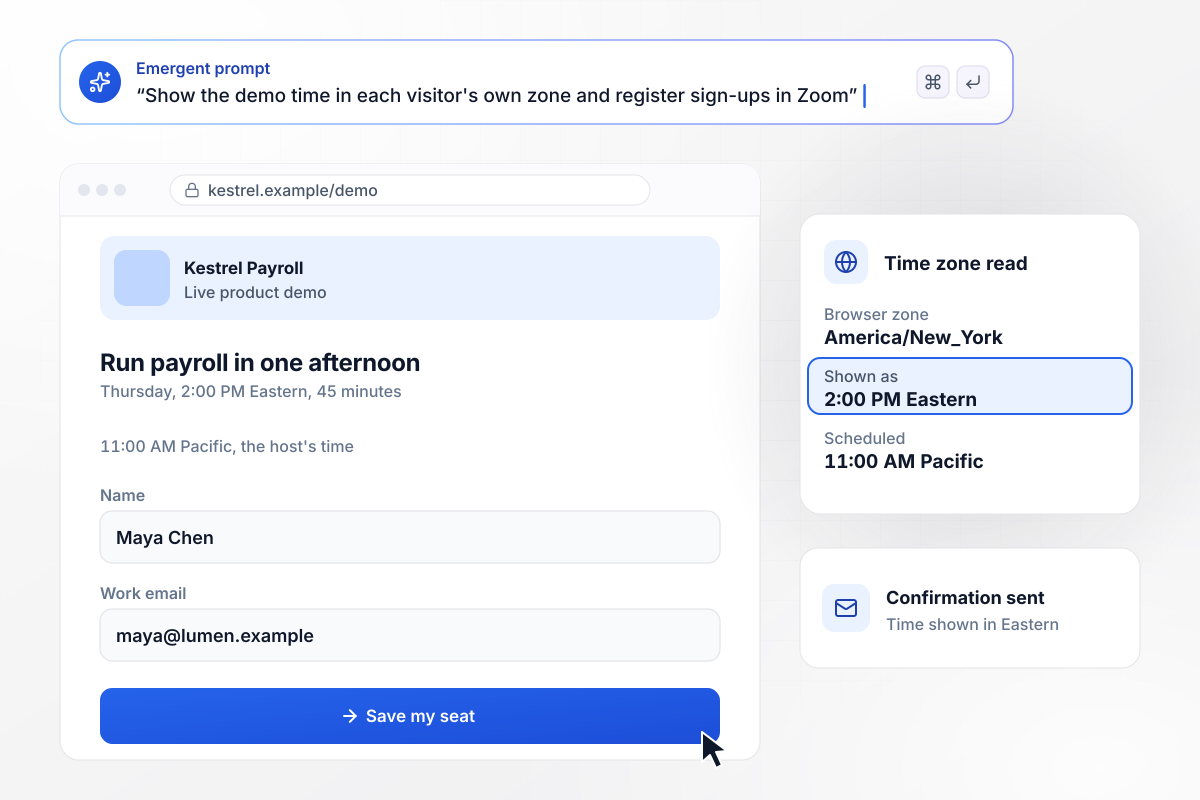
The start time, read in each visitor's own zone
Kestrel Payroll schedules its product demo for Thursdays at 11 AM Pacific. A finance lead who opens the page in New York sees 2:00 PM Eastern, taken from her browser, with the Pacific time in small type underneath. Her confirmation email repeats the time in Eastern.
window.awbMockup = { liveProductDemo: "Build a registration page for our weekly product demo at Kestrel Payroll, every Thursday at 11 AM Pacific. Show the start time in each visitor's own time zone, with Pacific underneath. Ask for a name and a work email. Register each sign-up in Zoom through its API, then email the personal join link with a calendar file attached.", onDemandReplay: "My team ran a live webinar on survey design for 412 registrants. Now that it has ended, change the headline to Watch the Recording and keep the same form. Tag every new sign-up as replay in the registrant table, email each one the recording link, and show me live and replay counts side by side.", trainingSeries: "Build one landing page for our four-session onboarding series for new bookkeeping customers. List the sessions with checkboxes so each customer picks the ones they need. Cap every session at 100 seats. When a session fills, change its checkbox to Join the Waitlist and save waitlist sign-ups separately. Send one confirmation with a join link for each session picked.", panelDiscussion: "Build a registration page for our HR panel on hiring without a recruiter. Add an optional field where each registrant asks the panel one question. Group the questions by topic with a count for each. At 8 AM on the day of the panel, send the grouped list to our moderator, Lena Okafor, as a direct message in Slack." };
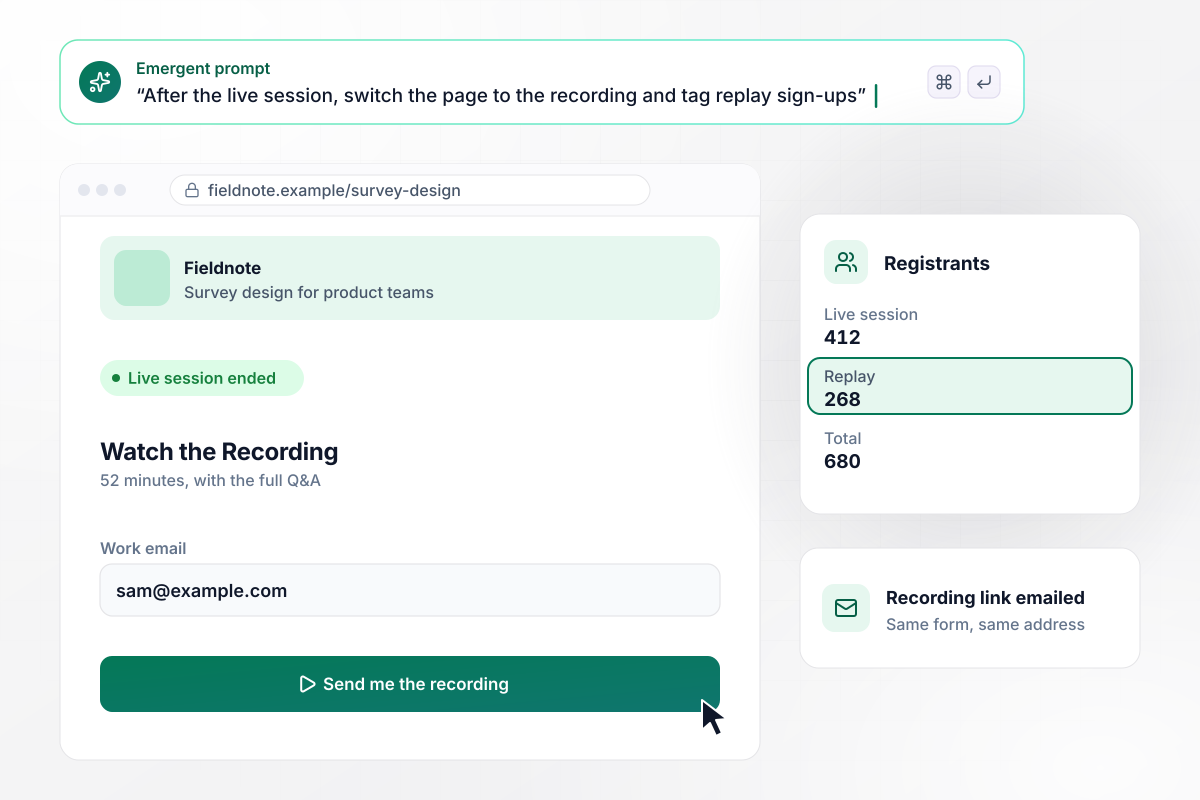
When the live hour ends, the recording takes its place
Fieldnote ran its survey design session live for 412 registrants. Once the hour was over, the headline switched to Watch the Recording, with the form left where it was. Another 268 people have signed up since then, each tagged replay in the table and emailed the recording link.
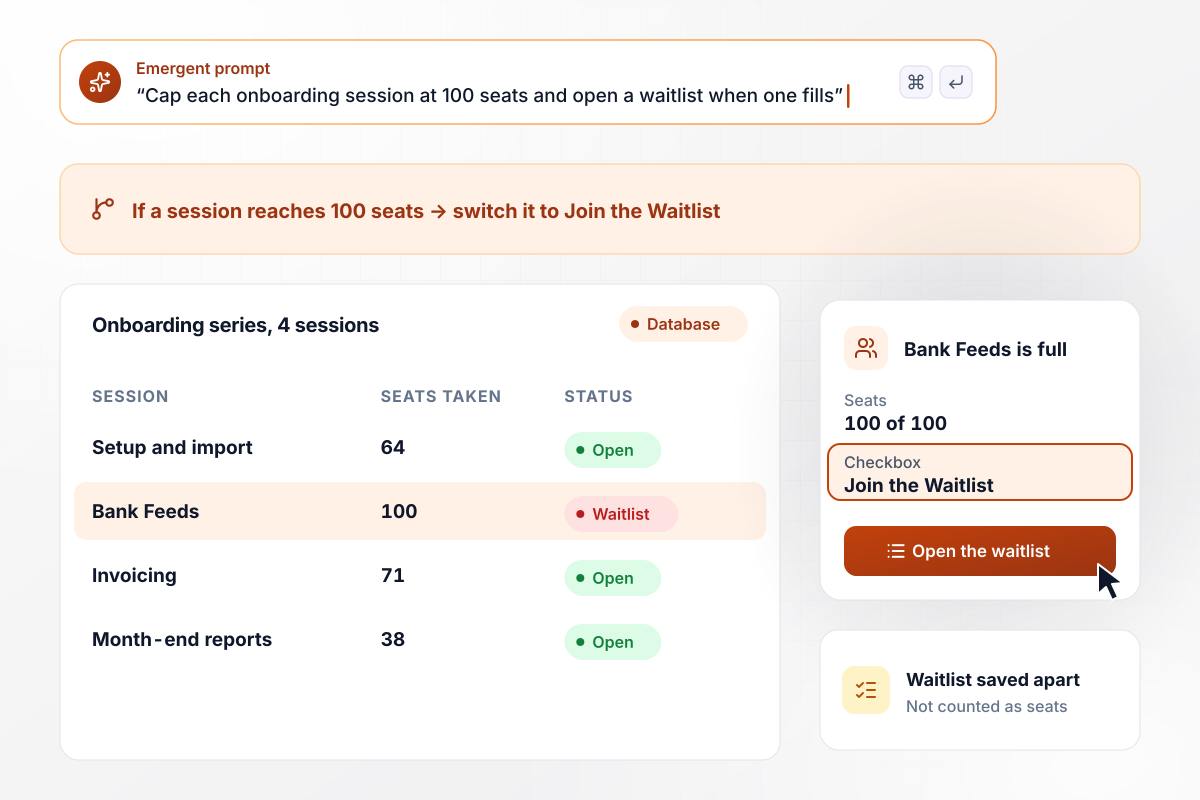
Four sessions on one form, each with its own seat count
New Plumtree customers learn the bookkeeping app in four weekly sessions and tick only the ones they need. Each session caps at 100 seats. Bank Feeds filled first, and its checkbox now reads Join the Waitlist, with waitlist sign-ups saved apart from confirmed seats.
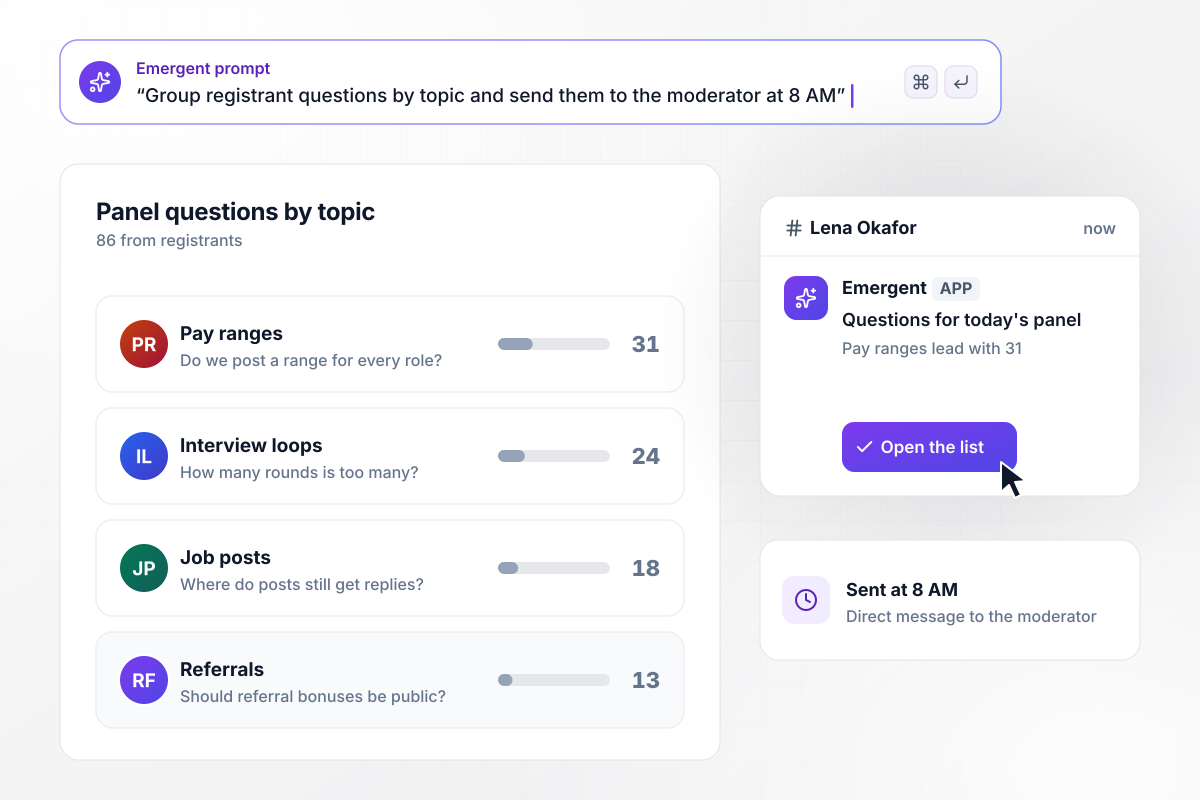
86 questions, grouped by topic for the moderator
Every registrant for Northwind People's panel on hiring without a recruiter can ask one question on the form. By the morning of the panel, 86 had come in. At 8 AM, the moderator, Lena Okafor, gets a direct message in Slack with them grouped by topic. Pay ranges lead with 31.






How to Build a Webinar Landing Page
A webinar page asks a busy person to give up an hour on a fixed day. These steps cover the pitch first, then the form and the tracking that tell you whether it worked.
Write the headline as the result of the hour: close the books in two days, not the name of the series. A subhead names who the session is for, such as finance leads at companies with one bookkeeper, which lets the wrong visitors leave early.
Visitors check the slot before anything else. Show the weekday, the start time and the length next to the headline, and say whether there is live Q&A. If a recording will follow, say so there for the people who cannot make it.
Give each speaker a photo and one line on what they will cover. An agenda with minute marks, such as open questions at minute 40, tells a visitor whether the hour is worth it and when it is safe to join late.
A name and a work email are enough to send a join link. Add a field only when something depends on it, such as company size deciding which rep follows up. Fields nobody reads after the session belong off the form.
Speakers and partners will paste the page into posts and emails. Fill the Open Graph tags: og:title with the headline, og:image with a card that carries the speaker's photo and the start time. A shared link then shows the session instead of a bare URL.
Add utm_source and utm_campaign to each link pointing at the page, the speaker's LinkedIn post included. Saving those values with each registrant shows which channel filled the seats, instead of a single total that hides where people came from.
After the session, export attendance from the webinar tool and match it to the registrant table by email. Show-up rate per channel matters more than sign-ups: a list that registers well and never attends needs a different reminder or a different offer.
Why Build a Webinar Page With Emergent?
A template gives a webinar a layout. Emergent builds the page from a prompt and connects its form to your webinar tool.

|
Landingi / Leadpages / Instapage | Unbounce | Wix | |
|---|---|---|---|---|
| How you build | Prompt for a campaign page | Templates and drag-and-drop, AI assist | Templates and drag-and-drop, AI copy assist | Prompt for a full site |
| Where submissions go | A database table you own, plus integrations | Vendor lead storage and integrations | Unbounce lead storage and integrations | Basic contact form to email |
| Visitor limits | No per-visitor pricing | Tiered by traffic on most plans | Monthly visitor caps by plan | Site plan bandwidth |
| A/B testing | Generate variants by prompt | Higher plans | A/B testing on higher-tier plans only | Limited or add-on |
| Code ownership | Full code export to GitHub on paid plans | Hosted only | Hosted only | Hosted only |

Pick the Pricing Plan That Works for You
Choose the plan that fits your building ambitions. From weekend projects to enterprise applications, we've got you covered.




Find the right
landing page for you
Frequently Asked Questions
Your Questions, Answered
Don't change this element unless you know what you are doing
More things you can build
with Emergent









on Emergent today




