



TL;DR
- Airtable: Choose it when your team manages connected records, recurring processes, forms, approvals, content pipelines, or project data that needs several views.
- Google Sheets: Choose it when your work centers on formulas, financial models, ad hoc analysis, charts, or sharing a familiar spreadsheet with little setup.
My overall recommendation is simple: use Google Sheets to calculate and explore information, and use Airtable to organize work around information.
A tracker that begins as a clean sheet can turn into a maze of formulas, duplicate tabs, and edits nobody owns. The choice between Airtable vs Google Sheets comes down to one question: are you calculating data or running a repeatable workflow?
I reviewed current product documentation, standard pricing, user discussions, and the 2026 search results for this comparison. I didn’t run a fresh hands-on test, so the recommendations below are based on documented capabilities, current costs, and clear workflow fit.
Google Sheets is my pick for formulas, budgets, analysis, and quick collaboration. Airtable is my pick for linked data, repeatable processes, forms, and role-specific views.
Airtable vs. Google Sheets: What’s the Difference?
Airtable is a relational database and app-building platform with a spreadsheet-style grid. Google Sheets is a cloud spreadsheet built around cells, formulas, calculations, and real-time editing.
A relational database connects one set of records to another. For example, an agency can store clients in one table, projects in another, and invoices in a third. Airtable’s linked-record fields keep those relationships connected in both directions. Google Sheets can recreate parts of that setup with formulas, named ranges, and scripts, but it has no native linked-record field.
Choose Airtable if:
- You manage a content calendar, sales pipeline, project portfolio, hiring process, inventory system, or customer relationship management (CRM) workflow.
- The same records need calendar, Kanban, gallery, timeline, list, or filtered views.
- People need forms or focused screens without access to the full underlying table.
- You want trigger-based automation without writing scripts.
Choose Google Sheets if:
- You build budgets, forecasts, pricing models, reports, calculations, or quick lists.
- Your team already works in Google Workspace.
- Fast sharing and low training time are priorities.
- You need flexible formulas, pivot tables, charts, or access to BigQuery data.
When a Spreadsheet Stops Being Enough
Picture a five-person consulting agency tracking leads in Google Sheets. The first version has columns for company, contact, deal value, owner, and stage. It works.
Then the agency adds follow-up dates, proposals, meeting notes, project delivery, invoices, and several client contacts. One tab turns into six. Formulas copy data between them. Each teammate filters the same sheet differently. A change to one column breaks a reference elsewhere.
That workflow has outgrown a spreadsheet. Airtable handles it more cleanly because clients, contacts, proposals, and projects can live in separate linked tables while each person gets a view designed for their job.
The reverse problem also happens. A finance lead can force Airtable to calculate forecasts and scenario models, but Google Sheets gives you a more natural space for cell-by-cell calculations, flexible formulas, pivot tables, and charts.
Pick the tool that fits the job. If the work needs linked tables and role-based views, a familiar spreadsheet will only slow the team down.
Meet Airtable: Features and Pricing
Airtable combines tables, linked records, forms, views, automations, and interfaces in one workspace. Its grid feels familiar, but each column has a defined field type, such as text, date, attachment, collaborator, formula, or linked record.
A single table can appear as a grid, calendar, gallery, Kanban board, timeline, list, or Gantt chart. These views use the same underlying records, so changing a status in one view updates it everywhere.
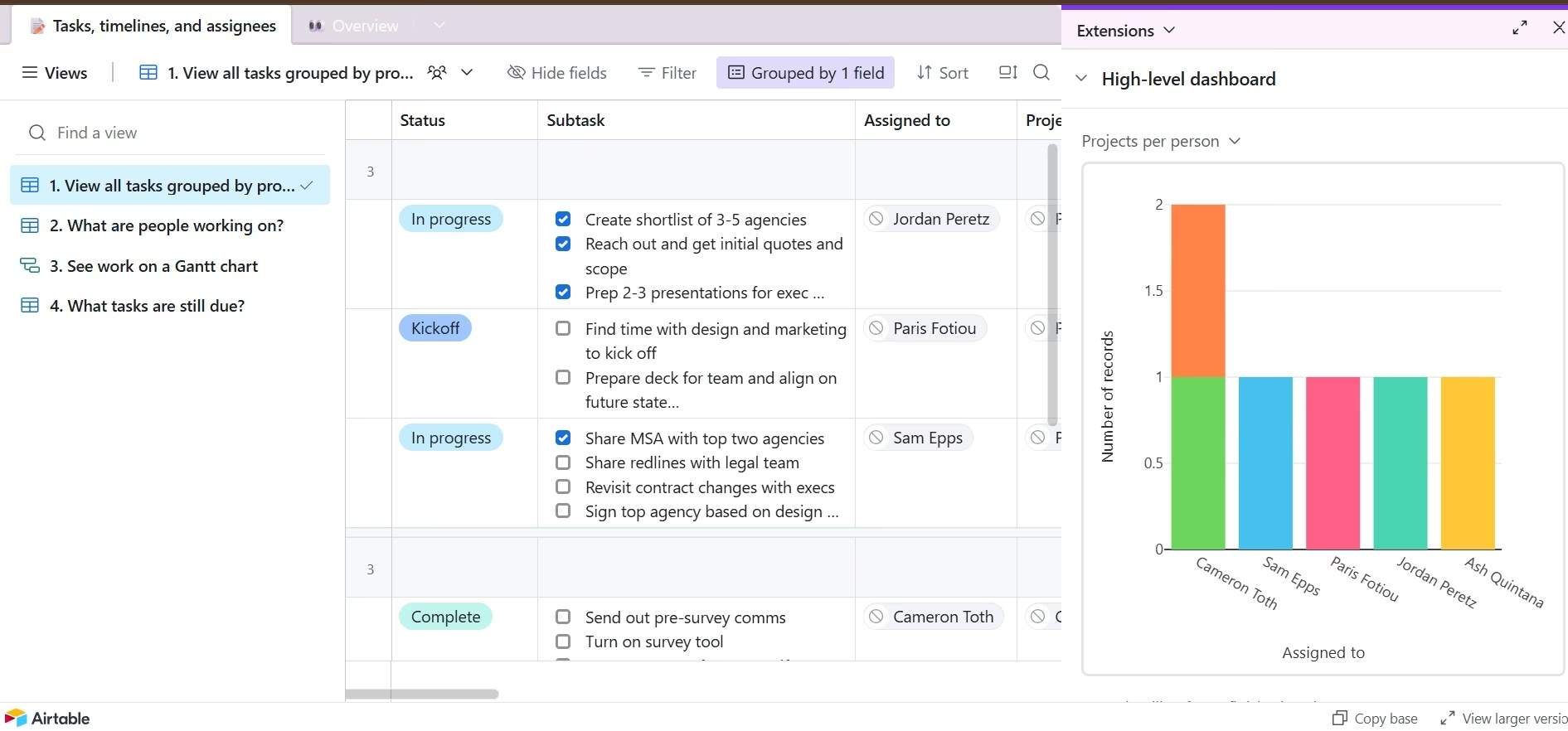
Airtable also supports forms that add submissions as records, trigger-and-action automations, and Interface Designer screens for dashboards or focused workflows. Its application programming interface (API) lets other software read and update records.
Airtable Pricing
Airtable Free costs $0/month. Team costs $24/seat/month ($20/seat/month billed annually), Business costs $54/seat/month ($45/seat/month billed annually), and Enterprise Scale uses custom pricing.
Free includes 1,000 records per base. Team raises that limit to 50,000 records per base, while Business supports 125,000 records per base. Airtable bills Team collaborators with Commenter access or higher and Business collaborators with Editor access or higher.
Meet Google Sheets: Features and Pricing
Google Sheets is a browser-based spreadsheet for formulas, tables, charts, filtering, analysis, and live collaboration. Anyone with a personal Google Account can create a spreadsheet without buying Google Workspace.
Sheets supports comments, task assignment, version history, filter views, smart chips, conditional notifications, offline editing, and simultaneous co-editing across desktop and mobile devices. You can also open and edit Microsoft Excel files. Pivot tables let you group and summarize a larger data set without changing the source rows.
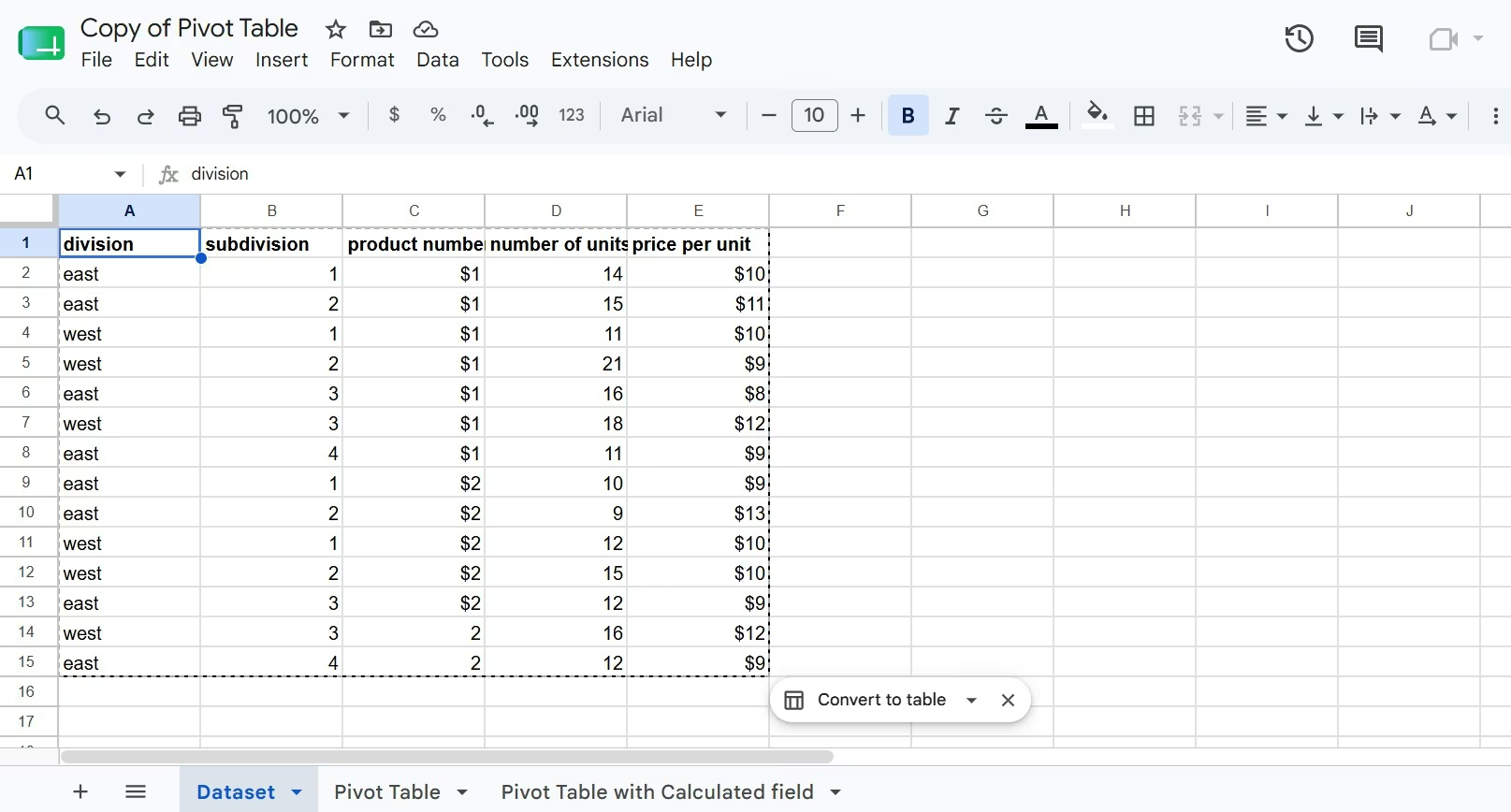
For larger analysis jobs, Connected Sheets lets you work with BigQuery data through familiar spreadsheet tools such as pivot tables, formulas, charts, and extracts. The source data stays in BigQuery while Sheets provides the analysis interface.
Google Sheets Pricing
Google Sheets is free with a personal Google Account.
Google Workspace Business Starter costs $8.40/user/month ($7/user/month with a one-year commitment), Standard costs $16.80/user/month ($14/user/month with a one-year commitment), Plus costs $26.40/user/month ($22/user/month with a one-year commitment), and Enterprise requires you to contact sales.
These subscriptions cover the wider Google Workspace suite, including Gmail, Drive, Meet, Docs, and Sheets. Business Starter includes 30 GB of pooled storage per user, Standard includes 2 TB, and Plus includes 5 TB.
How I Compared Airtable and Google Sheets
I compared the two products across the work people commonly expect them to handle:
- Data structure and relationships
- Formulas and analysis
- Views and project tracking
- Collaboration and sharing
- Forms and automation
- Artificial intelligence (AI)
- Plan limits and team cost
- Suitability for client-facing or internal business tools
I used official documentation and standard list prices available on July 27, 2026. Temporary introductory discounts were excluded because they vary by account, region, and sign-up date.
I also reviewed the r/Airtable thread and current ranking articles to identify the questions people keep asking. The recurring confusion is that Airtable and Google Sheets look similar at first, even though they solve different classes of work.
Airtable vs. Google Sheets at a Glance
The quick comparison:
| Area | Airtable | Google Sheets |
|---|---|---|
| Best for | Structured team workflows | Formulas and analysis |
| Core model | Relational database | Spreadsheet |
| Linked data | Native linked records | Formula or script setup |
| Calculations | Field formulas | Flexible cell formulas |
| Views | Grid, Kanban, calendar, timeline, and more | Grid and filter views |
| Automation | Native trigger-action builder | Apps Script and add-ons |
| Focused app screens | Interfaces | Spreadsheet tabs |
| Offline work | Limited workflow fit | Native offline editing |
| Free plan | Free: $0 | Free with a Google Account |
| Starter paid plan | Team: $24/collaborator/month ($20/collaborator/month billed annually) | Business Starter: $8.40/user/month ($7/user/month with a one-year commitment) |
| Main drawback | Per-collaborator cost | Complex workflows get harder to govern |
Pricing reflects the standard USD list prices as of July, 2026. Airtable’s Team plan includes 50,000 records per base, 100,000 API calls per workspace each month, 20 GB of attachments per base, and one year of revision history.
Airtable vs. Google Sheets: Feature-by-Feature Comparison
Data Structure and Relationships
Airtable wins in data structure because linked records are a core part of the product. You can connect a project to one client, several contacts, assigned employees, related tasks, and attached files without copying the same details into every table.
Lookup, rollup, and count fields can then pull information through those links. A project record could show its client’s industry, the total value of related invoices, and the number of unfinished tasks. Changes to a linked record flow through the connected base.
Google Sheets can connect tabs through functions such as XLOOKUP, FILTER, QUERY, and IMPORTRANGE. That works well for analytical models. It requires careful references, consistent identifiers, and extra checks as the workbook grows.
Winner: Airtable.
Formulas and Data Analysis
Google Sheets wins formulas and analysis. Its cell-based model lets you combine values freely, build scenarios, copy formulas across ranges, create pivot tables, and turn results into charts.
That flexibility fits cash-flow forecasts, campaign analysis, commission calculators, price comparisons, budgets, and statistical work. Connected Sheets also extends the same interface to BigQuery data when a normal spreadsheet file is too small for the source dataset.
Airtable formulas operate within records and fields. They’re useful for due-date logic, text formatting, status checks, elapsed time, and calculated values. They’re less natural for open-ended financial modeling where calculations move across arbitrary cells.
Winner: Google Sheets.
Views and Workflow Management
Airtable wins when several people need different ways to work with the same records. A marketing lead can use a calendar; a writer can use a filtered grid; a designer can use a gallery; and a manager can use a dashboard.
The underlying records stay shared. You don’t need to create duplicate tabs for each role. Airtable supports grid, form, calendar, gallery, Kanban, timeline, list, and Gantt views, with some options limited by plan.
Interface Designer goes further by turning base data into focused screens. You can create a dashboard, record-review page, approval queue, or role-specific workspace without exposing every field and table.
Google Sheets offers filters, filter views, tables, protected ranges, and separate tabs. Those tools handle straightforward collaboration, though they stop short of a purpose-built operational interface.
Winner: Airtable.
Also read our guide on how to build your own CRM with AI to see how Airtable and Sheets fit into a broader custom workflow.
Collaboration and Sharing
Google Sheets wins for general collaboration because most people already know how to enter data, write formulas, comment on cells, or share a file.
Several people can edit at once, assign tasks in comments, review version history, and create personal filter views. Sheets also works offline after offline access is enabled.
Airtable provides comments, sharing, revision history, and permission levels. Its advantage appears when collaboration needs more structure. You can give someone a focused interface or view instead of asking them to navigate an entire spreadsheet.
Airtable’s billing needs closer attention. On Team, commenters and higher permission levels are billable. Read-only collaborators, form submissions, and shared links don’t create paid seats.
Winner: Google Sheets for everyday collaboration. Airtable wins when access needs to follow a defined process.
Forms and Automation
Airtable wins no-code workflow automation. An Airtable automation starts with a trigger and runs one or more actions. A status change can create a record, send a notification, update another field, or pass information to a connected service.
Its forms write submissions directly into a table, which makes them useful for creative requests, job applications, lead intake, incident reports, or content briefs. The submitted record can immediately enter an automation or review queue.
Google Sheets supports automation through macros, add-ons, integrations, and Google Apps Script. Apps Script gives developers more freedom because it uses JavaScript, but it asks you to write, review, and support code.
Winner: Airtable for nontechnical teams. Google Sheets is stronger when a developer wants full scripting control.
Artificial Intelligence
Airtable and Google Sheets approach AI from different directions.
Airtable’s Omni AI can build parts of an app, research information, analyze documents, answer questions about a base, and create or update records. Omni is available across Airtable plans, with monthly credit allowances tied to the plan and collaborator level.
Gemini in Sheets can create formulas, build tables, generate visualizations, and help analyze spreadsheet data.
Premium Gemini features across Sheets and other Workspace apps are included from Business Standard upward. Business Starter includes Gemini in Gmail and access to the Gemini app, but the pricing comparison places broader in-app Workspace AI on Standard.
Choose Omni when AI needs to work with records and workflows. Choose Gemini when AI needs to help calculate, organize, or interpret spreadsheet data.
Winner: Tie. The right choice follows the task.
Limits, Scale, and Team Cost
Airtable has explicit record limits. Free supports 1,000 records per base, Team supports 50,000, and Business supports 125,000. Team also includes 25,000 automation runs per month, while Business includes 100,000.
Google Sheets gives you more freedom to place and calculate raw values, and Connected Sheets provides a path to BigQuery for larger analytical sources. As formulas, scripts, and cross-tab references multiply, a workbook takes more work to audit and update.
Airtable also costs more for a group of active collaborators. Ten Team collaborators cost $240/month ($200/month billed annually). Ten Google Workspace Business Starter accounts cost $84/month ($70/month billed annually). Workspace includes other Google business tools, while Airtable Team is a specialized workflow subscription.
Winner: Google Sheets on price and analysis volume. Airtable wins when its structure replaces manual coordination or several disconnected trackers.
What Real Users Are Saying
The r/Airtable thread “Why would I choose Airtable over Google Sheet?” repeatedly frames the comparison as a spreadsheet versus a relational database. Commenters favor Google Sheets for accounting-style work and calculations, while Airtable gets support for linking records, filtering data, creating views, and automating workflows.
Airtable
What people like:
- Linked records reduce repeated data.
- Calendar, Kanban, gallery, and filtered views support different roles.
- Forms and automations turn a table into an operating process.
- Attachments and typed fields keep records consistent.
What can frustrate you:
- You need to plan tables and relationships before the base feels organized.
- Per-collaborator billing can become expensive.
- Record, automation, and attachment limits vary by plan.
- Advanced calculations feel less flexible than a spreadsheet model.
Google Sheets
What people like:
- The interface is familiar.
- Personal use is free.
- Formulas, charts, pivot tables, and quick calculations are easy to start.
- Sharing and live editing require little training.
What can frustrate you:
- Related information gets copied across tabs.
- Different people create their own versions of the same tracker.
- Formula references and scripts take more work to audit as a workbook expands.
- A grid remains visible even when someone needs a focused task screen.
How to Choose Between Airtable and Google Sheets
Choose based on the primary action people perform each day.
Choose Airtable If You Run a Repeatable Process
Pick Airtable when records move through defined stages and several people interact with them.
Strong Airtable use cases include:
- Editorial calendars
- Sales pipelines
- Project portfolios
- Hiring processes
- Product roadmaps
- Event planning
- Inventory tracking
- Creative request queues
- Client onboarding
- Lightweight CRM systems
Airtable is also the stronger pick when one data source needs calendar, Kanban, gallery, timeline, and dashboard views.
Choose Google Sheets If You Calculate or Explore Data
Pick Google Sheets when people need freedom to enter values, write formulas, test assumptions, and build charts quickly.
Strong Google Sheets use cases include:
- Budgets and forecasts
- Financial models
- Pricing calculators
- Campaign analysis
- Survey summaries
- Commission calculations
- Ad hoc reporting
- Data cleanup
- Scenario planning
- Shared lists with simple ownership
Google Sheets also wins when outside collaborators need immediate access and already understand spreadsheets.
Use Both When Calculations Feed a Workflow
Airtable and Google Sheets can complement each other.
A team can manage projects and approvals in Airtable, then move summarized data into Google Sheets for forecasting or deeper analysis. Airtable supports synced data sources on paid plans, while integrations and APIs can move information between both products.
Keep one tool as the source of truth for each data set. Two-way editing without clear ownership creates conflicts and duplicate updates.
When Neither Tool Fits: Build a Custom App
Choose a custom app when people need a branded portal, tailored screens, custom permissions, or a workflow that a grid can’t express clearly.
Examples include:
- A client portal where customers upload files and review project status
- A contractor app where field staff log jobs from their phones
- A property management dashboard with separate owner, tenant, and staff access
- A lead qualification tool that scores inquiries and assigns follow-up
- A reporting portal that pulls data from several business tools
Emergent can build applications around either data source. Its official Airtable integration supports apps and workflows connected to Airtable records, while its Google Sheets integration can read and write spreadsheet ranges, formulas, and related data.
This route lets you keep Airtable or Google Sheets behind the scenes while giving employees or customers an interface built around the exact action they need to complete.
Also read our guide on how to create a business app in an afternoon to see how fast you can go from spreadsheet workflow to a working custom interface.
Final Verdict
In the Airtable vs Google Sheets comparison, Google Sheets is the better choice for formulas, budgets, forecasts, charts, quick analysis, and broad collaboration.
Airtable is the better choice for linked records, structured processes, forms, automations, project views, and operational work shared across several roles.
Choose Google Sheets when the central action is calculation. Choose Airtable when the central action is moving records through a workflow. Choose a custom app when employees or customers need purpose-built screens instead of direct access to a table.

Most AI app builders stop at prototypes. Emergent creates production-ready apps you can actually launch.
- Production-ready apps
- Web & mobile apps
- Deploy in minutes







