



Can ChatGPT build an app? The answer is yes. I built a full client tracker with just ChatGPT Plus. It got me most of the way there, then left the login and deployment for me to wire up by hand. Here's the exact process.
Can ChatGPT Build an App?
Yes, ChatGPT can build an app, but not on its own. Through Codex and Canvas, it now writes, runs, and debugs real code, and it's genuinely strong at planning and starter code. What it won't do for you is turn that into a finished product: authentication, a database, hosting, and deployment are still yours to wire together and test before you ship.
The real test in 2026 is not whether ChatGPT can produce code, but whether the app it helps you build survives real users, real data, and the gap between a working demo and something you'd ship.
The rest of this guide walks through the full six-step build, including the parts ChatGPT leaves to you.
What You'll Need Before Starting
Prerequisites:
- ChatGPT Plus ($20/month). The free tier only gives limited access to GPT-5.5 Instant. Codex and Canvas are on every plan, but free limits are too low for a real build, and Agent Mode needs Plus. Plus lifts those limits and adds Agent Mode, which makes building practical.
- A written app brief, one paragraph minimum, in a document, not your head. What the app does, who uses it, and what the core screens are. This becomes the foundation for every prompt you write.
- A place to run your code, Replit works for beginners with no local setup. If you're comfortable with Git, a GitHub repo connected to Vercel or Railway gives you more control and a cleaner commit history.
- A test data set, a spreadsheet of dummy users, fake entries, or sample records. Real-looking data catches problems that a blank interface never will.
Time required: Four to six hours for a simple app with two to three features. Add roughly two hours per additional feature. The first build always takes longer than you expect.
How to Build an App With ChatGPT: Step-by-Step
Step 1: Write Your App Brief Before You Open ChatGPT

Open a document and write out exactly what your app needs to do. For my client project tracker (I called mine MondayProof): a dashboard showing active clients, project statuses, and deadlines, with a login so clients could check progress without emailing me every Monday.
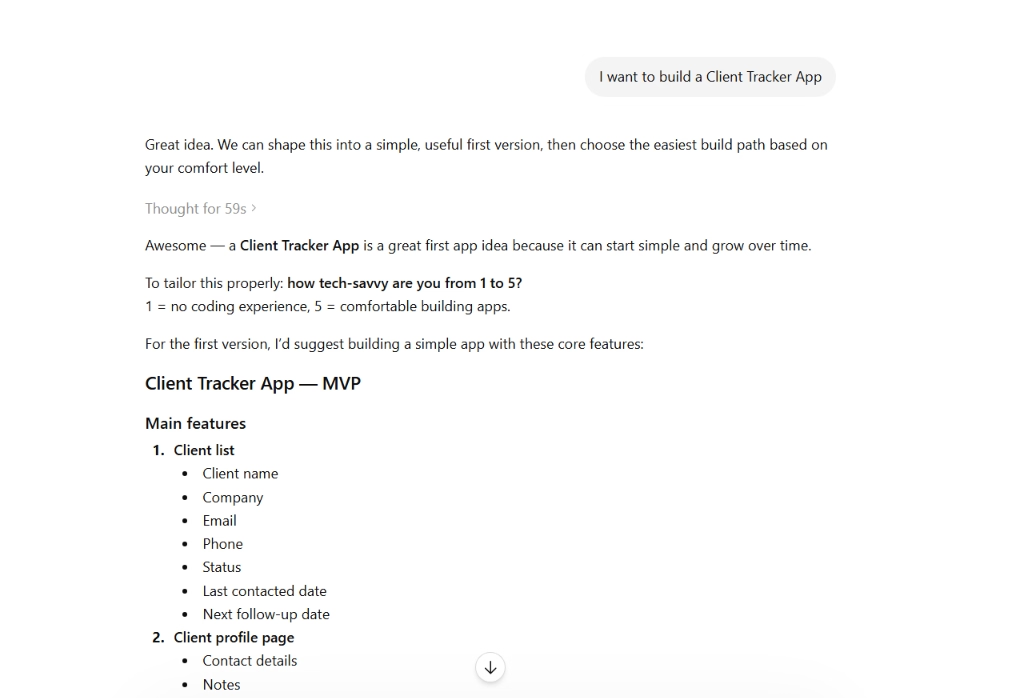
Don't skip this. ChatGPT mirrors whatever clarity you bring to the prompt. A vague brief produces vague code.
Pro tip: Include what the app does NOT need to do. Scope creep in the brief becomes scope creep in the build.
Step 2: Use ChatGPT to Write Your PRD
Paste your brief into ChatGPT and use this prompt:
"You are a product manager. Based on this brief, write a Product Requirements Document. List the core features, user flows, data structure, and any technical dependencies. Then tell me what I should cut to keep this simple."
Read what comes back. Push back on anything too complex for a first version. My tracker originally included email notifications and CSV exports. I cut both. Neither was essential.
Why this matters: The PRD becomes your source of truth for every prompt after this. It stops ChatGPT from going off-script mid-build.
Pro tip: Save the PRD in a separate document. Paste the relevant section into every new ChatGPT session so context doesn't reset.
Step 3: Build One Feature at a Time
Don't ask ChatGPT to build the full app in one prompt. You'll get code that looks complete, runs locally, and falls apart the moment anything changes.
Start with the most basic feature. For the tracker, that was the client list: a simple table showing client names and project statuses, no login yet. This feature-by-feature approach is the core principle behind vibe coding, and it's why your workflow matters more than your prompt.
Use this prompt structure:
"Build only the client list feature. Use [your stack, e.g., React and a local JSON file]. Do not add anything else. Show me the code and explain what each section does."
Test it. Make sure it works before moving on.
Pro tip: State your stack in every prompt. Without it, ChatGPT will quietly switch frameworks between sessions and break everything.
Step 4: Test Before You Build the Next Feature
Run the code. Click through every state. Try to break it. I tested the client list with one entry, then 20, then with a missing field in the data. It broke on the missing field, which ChatGPT had not handled.
Paste the error directly back in:
"I got this error: [paste error]. Here is the code: [paste code]. Fix only this issue. Do not change anything else."
That last line matters. Without it, ChatGPT rewrites sections you didn't ask it to touch.
Why this matters: An error caught at the single-feature stage takes 10 minutes to fix. The same error buried inside a complete app takes hours.
Pro tip: Ask ChatGPT to list what the feature should do before it writes any code. Use that list as your manual test checklist.

Step 5: Add Authentication Last
Auth is where most ChatGPT-built apps break. The problem is edge cases: Two users logged in at once, sessions that don't expire, password reset flows that half-work.
Build every other feature first. Add login when the core app is stable.
For the tracker, I used this prompt:
"Add a simple login system using Supabase. Users should only see their own clients. Do not change any existing features. Walk me through each change before writing the code."
The "walk me through before writing" instruction catches misunderstandings before they become bugs.
Pro tip: Use a pre-built auth service like Supabase, Firebase Auth, or Clerk rather than asking ChatGPT to write auth from scratch. Pre-built auth handles edge cases. Custom auth code usually doesn't.
Step 6: Save Your Code After Every Working Feature
Every time a feature works, save it somewhere you can return to. GitHub is the right answer. At a minimum, paste the working code into a dated document.
ChatGPT will change things you didn't ask it to change. When it does, you need a version to roll back to.
Why this matters: I lost 90 minutes on the tracker because ChatGPT rewrote the dashboard layout while fixing an unrelated status badge bug. No saved version meant rebuilding from memory.
Pro tip: Start every new session with: "Here is the current working code. Do not change anything outside the feature I'm about to describe."
Common Mistakes to Avoid
- One-shotting the app is the most common reason builds fail. One big prompt produces code that looks complete but skips error handling, edge cases, and anything that only surfaces with real data. Build one feature, test it, then move forward.
- Skipping the PRD leaves ChatGPT to fill gaps with assumptions. It adds features you didn't ask for, drops ones you expected, and shifts the data structure mid-build without flagging it. The PRD keeps every prompt aligned.
- Treating the demo as the product, a demo is like a show home: it looks perfect until someone tries to live in it. My tracker worked flawlessly in testing. When two users logged in simultaneously, sessions collided, and the dashboard showed the wrong client data. Local testing only catches local problems.
- Not specifying your stack lets ChatGPT drift. I started with React and a local JSON file. Two sessions later, it introduced a Node backend I hadn't asked for. State your stack every time.
- Over-broad fixes are the quiet ones. "Fix this bug" can turn into "rewrite three components," so add "do not change anything outside of this specific issue" to every fix request. If you're comparing which of the best AI coding tools handle this better than others, the options in 2026 are worth looking at before you commit to a workflow.
Advanced Tips for Better Builds
- Keep a running architecture doc so you can re-anchor each session. Update it after every session with your current file structure and feature list, then paste it into each new ChatGPT session so it doesn't rebuild context from scratch.
- Ask for the test list first, before any code. Have ChatGPT spell out what the feature should do, then use that as your manual checklist. Five minutes per feature catches a real share of bugs before they exist.
- Tighten your prompts as the app grows. A bigger codebase means each request carries more context, so vague asks get expensive and error-prone. Name the exact file and feature you're changing every time.
- Commit after every working feature, not after two, and not at the end of the session. After each one. The time it costs is nothing next to rebuilding from memory.
Ready to put these into practice on a real build? Our guide on how to create a business app walks you through the whole process in an afternoon.
What Real Users Are Saying
I pulled feedback from G2, Trustpilot, and Reddit to get past the marketing and see what people run into once they try to build something real with ChatGPT.
ChatGPT
Pros: G2 rates ChatGPT 4.6/5 across 2,600+ reviews, with users repeatedly praising ease of use, quick answers, coding help, and time saved across work tasks.
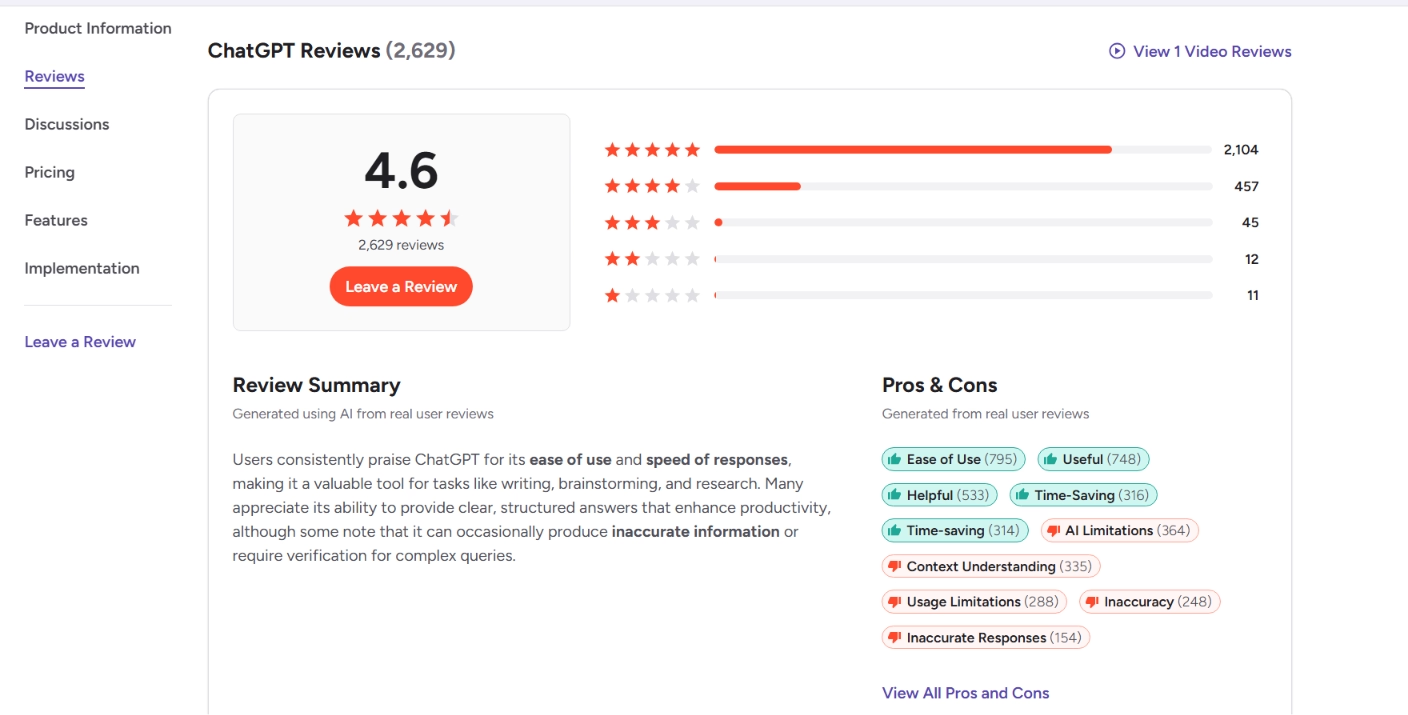
One G2 reviewer summed up the coding use case as asking questions about "coding, documentation, or emails" and getting clear responses quickly.
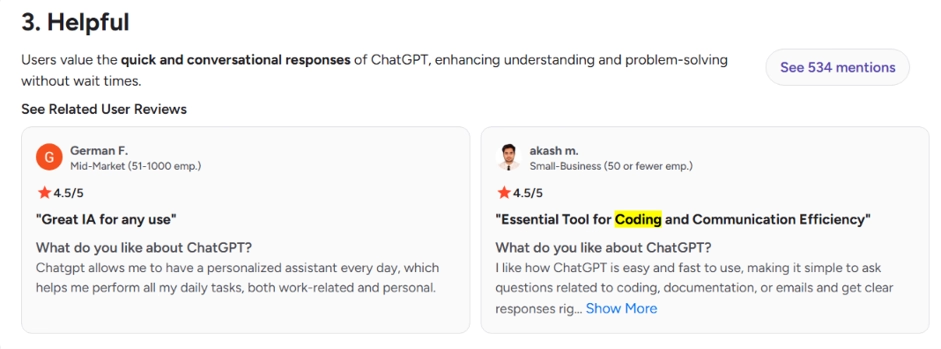
One reviewer said it helps with "brainstorming new ideas, learning new skills, and solving technical problems." Another reviewer said ChatGPT "saves me a significant amount of time” by giving clear explanations and practical suggestions.

Cons: The reviews also point to ChatGPT’s biggest app-building weakness: vague or context-misaligned answers. The reviewer said responses can be "too general" and may "misunderstand the context of a question." That matches the broader pattern across these reviews.
The honest read: ChatGPT is useful for planning, starter code, debugging, and explaining technical problems. It is not reliable enough to treat as a fully autonomous app builder, especially once the project involves auth, payments, databases, deployment, or production security.
Emergent Takes Care of the Parts Where ChatGPT Struggles
Everything in this guide works, but it takes four to six hours and leaves the unglamorous infrastructure, auth, hosting, database, and deployment for you to assemble and maintain. That's the gap Emergent is built to close.
Here's how Emergent handles what ChatGPT leaves incomplete:
- Auth is built in, so multi-user login is part of the build, not a Supabase setup you debug by hand.
- Hosting and deployment are included, so your app goes live inside Emergent, with no separate Vercel or Railway account.
- The database is automatic, Emergent structures and connects your data; you don't write a schema.
- State persists between sessions, so it tracks what exists and builds on it, and you're not re-pasting context every time.
You don't even have to leave ChatGPT to get this. Emergent recently launched an MCP connector that links ChatGPT directly to your Emergent account. Instead of asking ChatGPT for code you then assemble, you describe the app in the chat and Emergent's agents build the real thing in the background, with the database, login, and a live preview link ready to test. You get a working preview link back in the chat, not a snippet to paste into an editor. Setup is a two-minute, one-time connection, and it works in Claude, too.
I connected it and asked ChatGPT to build the same client tracker through Emergent instead of by hand. A few minutes later, I had a live preview link to a working tracker with the login and database already wired in: no Supabase setup, no deployment config.
Here's the honest boundary: the connector handles building and previewing, while deployment to a custom domain still happens inside Emergent.
Emergent isn't the right call for everything: Heavy PDF reporting, apps that need extreme scale, or databases that diverge after a few deploy cycles can still hit limits. But for the auth, hosting, and database overhead this guide describes, it removes the manual setup.
For builders who want less infrastructure work, Emergent is the cleaner path than managing auth, hosting, and database setup across separate tools.

Describe what you want and Emergent builds it. A real, production-ready app you can launch the same day.
- One prompt to build
- Zero code required
- Deploy in minutes







