

Build a Banking CRM Using AI in Minutes
Describe your Banking CRM in plain English and create a production-ready build, from design and development to deployment, in minutes. No code needed.










Trusted by Builders Worldwide
Active Builders Worldwide
Apps Successfully Created
Countries Globally Reached



Build your banking CRM once. Improve it forever.
No hunting for plugins or add-ons. Everything a banking team needs to build, launch, and run its CRM is included from the start.
Customer & Account Management
Capture and organize customers, accounts, and relationship records with custom fields, views, and complete history. Describe what your team tracks and the screens are generated to match.
Onboarding-to-Relationship Pipeline
Move customers from onboarding through deepening relationships through stages you define, with statuses and handoffs enforced. Describe your process once and the pipeline is generated.
Relationship Review Cycles
Run periodic reviews with prep tasks, agendas, and outcomes logged per customer. All generated from a plain-language prompt.
Onboarding Step Follow-Up Automation
Set up triggers for onboarding steps, review reminders, and cross-sell touches in plain English. The builder turns them into automations that run without manual work.
Banking Tool Integrations
Connect email, calendars, and document systems, plus anything with an API. Integrations are wired up by describing what should stay in sync.
Customer Onboarding Steps
Run KYC, documentation, and account setup as tracked steps per customer. Describe your onboarding checklist and the flow appears ready to use.
Built for the way lending teams actually work
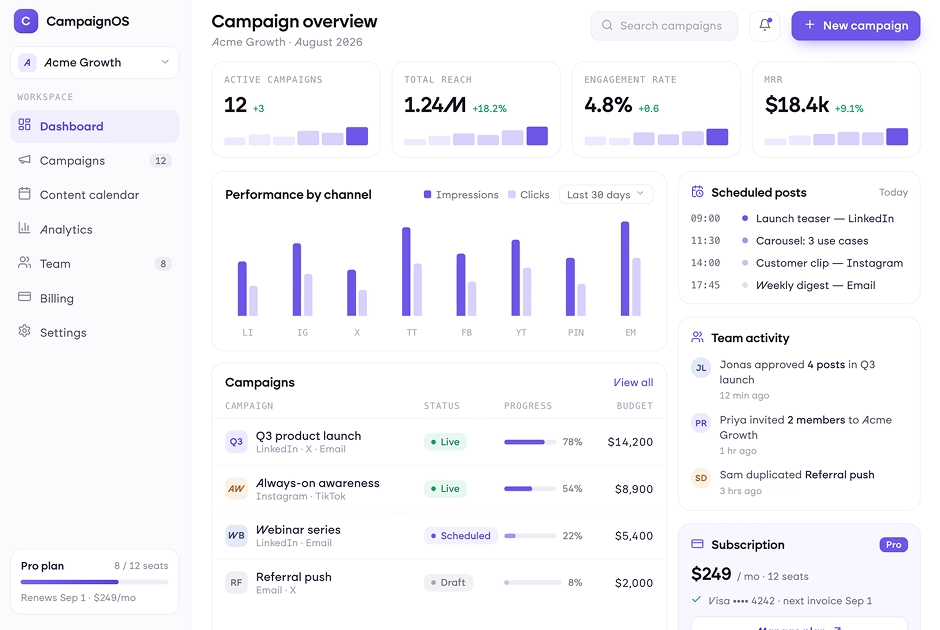
Capture every enquiry and referral
Pull leads from your site, partners, and campaigns into one place. A CRM you shape around your own process that shows which referral sources actually convert.
window.awbMockup = { leadsReferrals: "Build a banking CRM that tracks borrowers and referral partners with full history.", applicationPipeline: "Build an application pipeline that moves every file from enquiry to funded.", followUps: "Build a document chaser that reminds borrowers about missing items automatically.", reporting: "Build a volume dashboard that reports applications, approvals, and funding by source." };
Move files from enquiry to funded
Track each application through stages with documents and tasks attached. When you build a banking CRM with AI, bottlenecks surface before they cost a deal.
window.awbMockup = { leadsReferrals: "Build a banking CRM that tracks borrowers and referral partners with full history.", applicationPipeline: "Build an application pipeline that moves every file from enquiry to funded.", followUps: "Build a document chaser that reminds borrowers about missing items automatically.", reporting: "Build a volume dashboard that reports applications, approvals, and funding by source." };
Keep every file moving
Automate document chases and milestone updates inside the CRM you create, so borrowers stay informed and files stay on track.
window.awbMockup = { leadsReferrals: "Build a banking CRM that tracks borrowers and referral partners with full history.", applicationPipeline: "Build an application pipeline that moves every file from enquiry to funded.", followUps: "Build a document chaser that reminds borrowers about missing items automatically.", reporting: "Build a volume dashboard that reports applications, approvals, and funding by source." };
Know your volume and your sources
Track applications, approval rates, and funded volume by source in real time.
window.awbMockup = { leadsReferrals: "Build a banking CRM that tracks borrowers and referral partners with full history.", applicationPipeline: "Build an application pipeline that moves every file from enquiry to funded.", followUps: "Build a document chaser that reminds borrowers about missing items automatically.", reporting: "Build a volume dashboard that reports applications, approvals, and funding by source." };
How to Build a Banking CRM With AI in Four Steps
Skip the templates and setup. Explain your borrowers, loan types, application stages, and follow-up rules in plain language, and everything from UI to database to automations is generated, and it is live the same day.
Type out your borrowers, loan types, application stages, and follow-up rules in a sentence or two. That prompt is the whole setup.
Seconds later there is a real CRM on screen, with the borrowers, applications, referral partners, and milestones you asked for already in place.
Want a different pipeline, a new field, or a cleaner view? Just say so. Every banking workflow tweak happens through conversation.
Open it up to the team, wire in your tools, and start running the day in it. It scales as your loan volume does.
More things you can build
with Emergent
AI Website Builder
Build and publish responsive websites with AI from landing pages to complete websites.
AI App Builder
Create and launch mobile apps with AI, without the complexity of traditional app development.
AI Web App Builder
Build and ship fully functional web apps with custom interfaces, logic, and workflows.
AI Dashboard Builder
Create interactive dashboards to visualize data, track KPIs, and manage business operations.
AI SaaS Builder
Build complete SaaS products with user accounts, subscriptions, dashboards, and core product workflows.
AI CRM Builder
Build custom CRMs for managing contacts, leads, pipelines, campaigns, and automated workflows.
AI Agent Builder
Create AI agents that can understand tasks, use tools, automate workflows, and work across your business.
Build Your Own
Start with any idea and build exactly what you need with AI no templates or limits.

Why Choose Emergent for Building Your Banking CRM?
Build a banking CRM around your unique workflows, with the flexibility to customize, scale, and adapt as your business grows.
| Other Tools |  | |
|---|---|---|
| Built for | Demos and MVPs | Products you keep growing |
| What you get | Front-end shell only | Full stack, wired end to end |
| Backend and database | Set it up yourself | Built and connected for you |
| Customization | Surface-level styling | Deep workflow control |
| Integrations and APIs | Manual glue work | Connected from a prompt |
| Code ownership | Locked to the platform | Clean code you can export |
| Time to launch | Weeks of patching and setup | Live the same day |
Pick the Pricing Plan That Works for You
Choose the plan that fits your building ambitions. From weekend projects to enterprise applications, we've got you covered.
No credit card required*


Find the Right CRM for
Your Business
Frequently Asked Questions
Your Questions, Answered
Don't change this element unless you know what you are doing
on Emergent today




