

Build a Custom AI Assistant Dashboard Using AI in Minutes
Describe your AI Assistant Dashboard in plain English. Emergent handles design, development, and deployment, giving you a live build in minutes. No code needed.










Trusted by Builders Worldwide
Active Builders Worldwide
Apps Successfully Created
Countries Globally Reached



Build a custom AI assistant dashboard in 4 simple steps
See what your assistant handled, what it escalated and what it got wrong.
Name what success looks like. Resolution rate, escalation rate, satisfaction, cost per conversation.
Your assistant platform connects, so conversations and outcomes arrive rather than being sampled.
Add a new intent, a different escalation rule or results by channel.
Open one view where the questions it consistently fails surface, which sampling never catches.
Emergent Key Features for Building an AI Assistant Dashboard
Containment, answer quality and coverage gaps joined to what actually happened after each conversation.
Resolution Verified Downstream
Conversations marked resolved are checked against later support contact, which distinguishes genuine resolution from an abandoned user.
Rephrasing Detected
Users asking the same question repeatedly are identified, which is the clearest behavioural signal that an answer did not land.
Coverage Gaps Ranked
Questions with no confident answer are grouped by volume, giving the content team a prioritised list rather than a general instruction.
Contradiction Flagged
Responses conflicting with documented sources are surfaced, which is the quality failure most damaging to trust in an assistant.
Cost per Conversation
Resource use is costed per conversation and intent, so the saving is net of escalations rather than assumed from volume.
Human Review Captured
Sampled conversations reviewed by a person are recorded with their assessment, giving a quality baseline that automated measures cannot provide.
AI Assistant Dashboard Use Cases You Can Build in Minutes

Tell Real Resolution from an Abandoned User
Conversations handled, resolved without human involvement, escalated and abandoned mid conversation, containment rate by intent and channel, escalation reasons, conversations followed by a support ticket despite being marked resolved and twelve week trend.
window.awbMockup = { containmentAndEscalation: "Build an AI assistant dashboard showing conversations handled, resolved without human involvement, escalated to a person and abandoned mid conversation, containment rate by intent and channel, escalation reasons, conversations followed by a support ticket within 24 hours despite being marked resolved, and containment trend over 12 weeks.", answerQuality: "Build an assistant quality dashboard showing conversations where the user rephrased the same question repeatedly, responses users marked unhelpful, answers where the assistant stated it could not help, responses contradicting a documented source, conversations reviewed by a human with their assessment, and intents with the lowest quality scores.", coverageGap: "Build an assistant coverage dashboard showing the questions arriving most often, questions with no confident answer available, topics escalated most frequently, questions where the underlying documentation does not exist, new question themes appearing this month, and the content additions that would resolve the most volume.", costAndEfficiency: "Build an assistant efficiency dashboard showing conversation volume and cost per conversation, average tokens or requests per conversation, cost against the human handling cost avoided, conversations consuming unusually high resource, cost by intent, and the net saving after escalations that still required a person."};
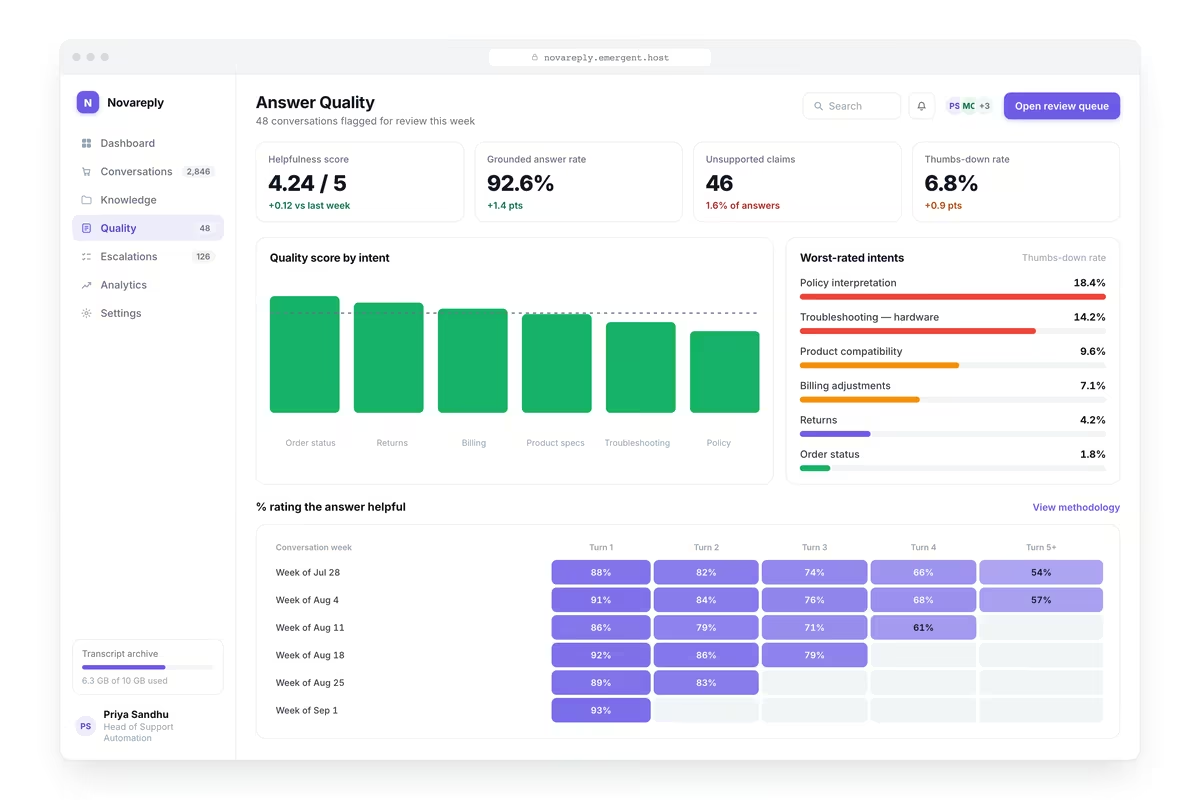
Hear the Answers That Did Not Land
Conversations where the user rephrased the same question repeatedly, responses marked unhelpful, answers where the assistant said it could not help, responses contradicting a documented source, human reviewed conversations and the weakest intents.
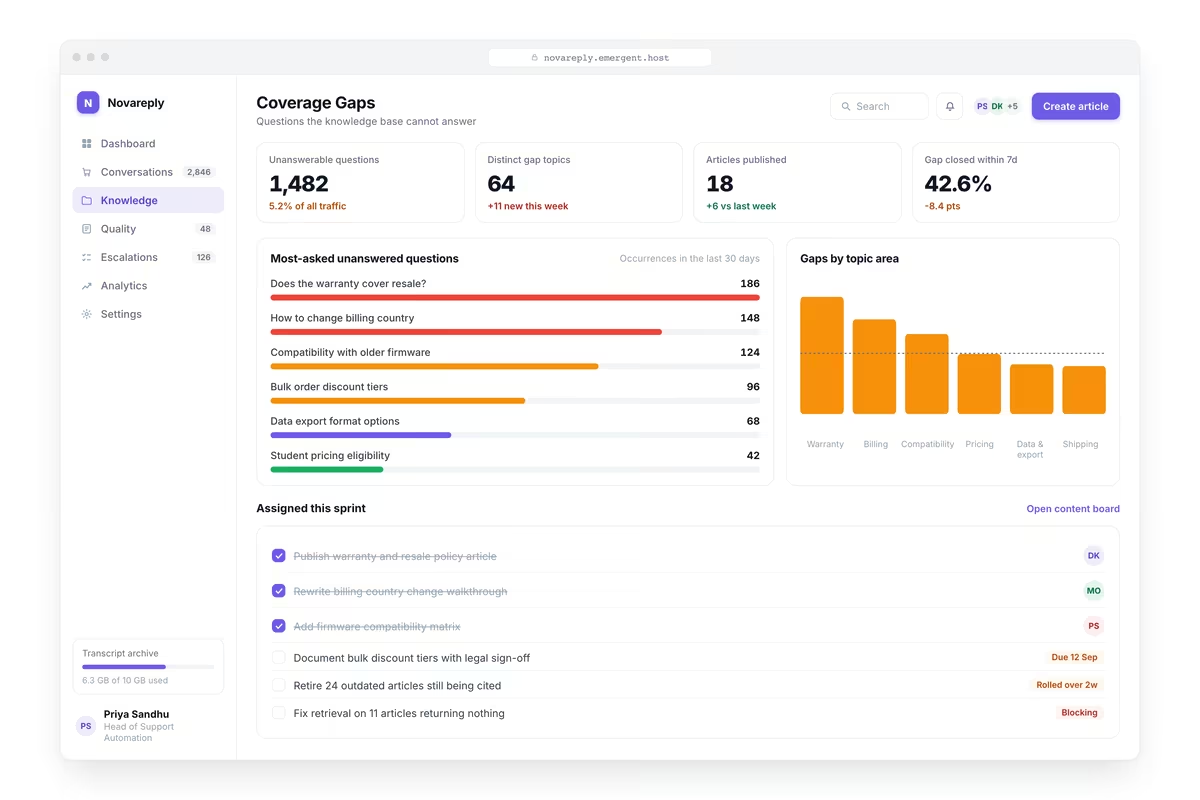
Turn Gaps into a Content Backlog
The questions arriving most often, questions with no confident answer available, topics escalated most frequently, questions where the underlying documentation does not exist, new question themes this month and the additions that would resolve most volume.

Report the Saving Net of Escalations
Conversation volume and cost per conversation, average tokens or requests per conversation, cost against the human handling cost avoided, conversations consuming unusually high resource, cost by intent and the net saving after escalations.
Every integration your
Dashboard needs from day one
Email and calendar
Inbox and calendar sync both ways, so every reply, meeting and no-show lands on the contact record without anyone logging it.




Messaging and support
Conversations from chat, WhatsApp and your helpdesk attach to the right contact, so sales and support see the same history.




Payments and billing
Invoices, subscriptions and payment status flow back into the deal, so revenue and pipeline stay in one place.




If it has an API, your CRM can connect to it.
Emergent builds the connection against the API itself, including internal tools your team made. No closed ecosystem, no approved-partner list, no waiting for a connector to ship.


More things you can build
with Emergent
AI Website Builder
Build and publish responsive websites with AI — from landing pages to complete websites.
AI App Builder
Create and launch mobile apps with AI, without the complexity of traditional app development.
AI Web App Builder
Build and ship fully functional web apps with custom interfaces, logic, and workflows.
AI Dashboard Builder
Create interactive dashboards to visualize data, track KPIs, and manage business operations.
AI SaaS Builder
Build complete SaaS products with user accounts, subscriptions, dashboards, and core product workflows.
AI CRM Builder
Build custom CRMs for managing contacts, leads, pipelines, campaigns, and automated workflows.
AI Agent Builder
Create AI agents that can understand tasks, use tools, automate workflows, and work across your business.
Build Your Own
Start with any idea and build exactly what you need with AI — no templates or limits.

Why choose Emergent?
Most tools give you a demo you have to rebuild. Emergent gives you a product that is ready to run.
| Comparison | Other Tools |  |
|---|---|---|
| Built for | Demos and MVPs | Products you keep growing |
| What you get | Front end shell only | Full stack, wired end to end |
| Backend and database | Set it up yourself | Built and connected for you |
| Customization | Surface level styling | Deep workflow control |
| Integrations and APIs | Manual glue work | Connected from a prompt |
| Code ownership | Locked to the platform | Clean code you can export |
| Time to launch | Weeks of patching and setup | Live the same day |

Pick the Pricing Plan That Works for You
Choose the plan that fits your building ambitions. From weekend projects to enterprise applications, we've got you covered.




Find the Right Dashboard Builder
for Your Business
Frequently Asked Questions
Your Questions, Answered
Don't change this element unless you know what you are doing
on Emergent today




