

Build a Custom Executive Dashboard Using AI in Minutes
Describe your Executive Dashboard in plain English. Emergent handles design, development, and deployment, giving you a live build in minutes. No code needed.










Trusted by Builders Worldwide
Active Builders Worldwide
Apps Successfully Created
Countries Globally Reached



Build a custom executive dashboard in 4 simple steps
Give the leadership team the handful of numbers that matter, current, rather than a monthly pack.
Name what the executive team asks about first. That short list becomes the board, nothing else.
Finance, sales and operational systems connect, so one figure does not contradict another across departments.
Ask for a new metric, a segment split or a different comparison period.
Share one link the executive team opens directly, current at the moment they look rather than as at last Friday.
Emergent Key Features for Building an Executive Dashboard
A summary layer that reports by exception across functions, with every number opening into its source detail.
Exception First Reporting
Metrics off target are surfaced ahead of the rest, so a leadership team reads what needs a decision instead of scanning forty tiles.
One Function per Owner
Each metric carries the executive accountable for it, which turns the meeting from a review of charts into a conversation with named owners.
Summary to Source Drilldown
Any headline opens into the underlying function detail, so a challenge to a number is answered in the meeting rather than taken as an action.
Single Reporting Calendar
Every function is aligned to the same period logic, ending the situation where sales and finance present the quarter as different lengths.
Commentary Alongside Data
Sponsors record the reason behind a variance in the dashboard, keeping the explanation attached to the number rather than living in a deck.
Access Controlled by Seniority
Board, executive and function views come from one build with permissions, so sensitive detail stays with the people entitled to it.
Executive Dashboard Use Cases You Can Build in Minutes
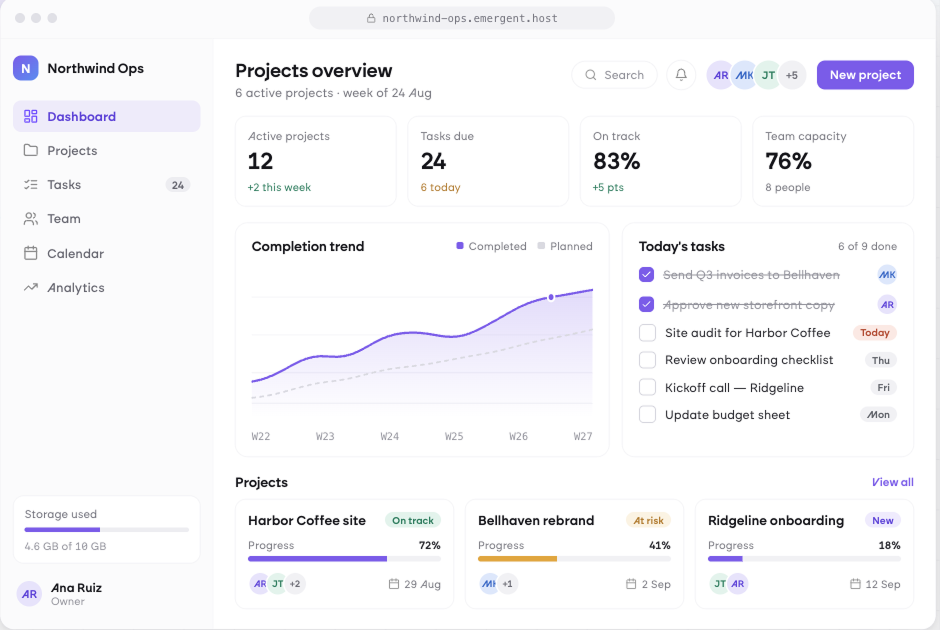
Report by Exception, Not by Tile
One tile per function covering revenue, margin, retention, delivery and headcount with variance to target and direction, plus an exceptions panel listing only what is currently off track and who owns it.
window.awbMockup = { leadershipSummary: "Build an executive summary dashboard with one tile per function covering revenue, gross margin, customer retention, delivery performance and headcount, each showing current value, variance to target and direction of travel, plus an exceptions panel listing only the metrics currently off target with their owner.", boardReporting: "Build a board reporting dashboard covering the quarter with revenue and margin against plan, cash and runway, customer growth and churn, pipeline coverage for next quarter, headcount against hiring plan, and a commentary field per section that leadership completes before circulation.", strategicInitiative: "Build a strategic initiative dashboard tracking each major company initiative with its executive sponsor, target outcome and measure, current progress against the expected pace, budget consumed, blocking dependencies, and a confidence rating the sponsor updates monthly.", crossFunctionalRisk: "Build an executive risk dashboard consolidating the top risks from every function with likelihood, business impact, owner and mitigation status, showing an aggregate exposure score, risks that worsened this month, overdue mitigation actions, and concentration by function."};
A Board Pack That Maintains Itself
Revenue and margin against plan, cash and runway, customer growth and churn, pipeline coverage and headcount against hiring plan, with commentary fields leadership completes before circulation.
Keep Strategy Visible Between Board Meetings
Each major initiative with its executive sponsor, target outcome and measure, progress against expected pace, budget consumed, blocking dependencies and a monthly confidence rating from the sponsor.
See Risk across Every Function at Once
Top risks from each function with likelihood, business impact, owner and mitigation status, an aggregate exposure score, risks that worsened this month and overdue mitigation actions.
Every integration your
Dashboard needs from day one
Email and calendar
Inbox and calendar sync both ways, so every reply, meeting and no-show lands on the contact record without anyone logging it.




Messaging and support
Conversations from chat, WhatsApp and your helpdesk attach to the right contact, so sales and support see the same history.




Payments and billing
Invoices, subscriptions and payment status flow back into the deal, so revenue and pipeline stay in one place.




If it has an API, your CRM can connect to it.
Emergent builds the connection against the API itself, including internal tools your team made. No closed ecosystem, no approved-partner list, no waiting for a connector to ship.

More things you can build
with Emergent
AI Website Builder
Build and publish responsive websites with AI — from landing pages to complete websites.
AI App Builder
Create and launch mobile apps with AI, without the complexity of traditional app development.
AI Web App Builder
Build and ship fully functional web apps with custom interfaces, logic, and workflows.
AI Dashboard Builder
Create interactive dashboards to visualize data, track KPIs, and manage business operations.
AI SaaS Builder
Build complete SaaS products with user accounts, subscriptions, dashboards, and core product workflows.
AI CRM Builder
Build custom CRMs for managing contacts, leads, pipelines, campaigns, and automated workflows.
AI Agent Builder
Create AI agents that can understand tasks, use tools, automate workflows, and work across your business.
Build Your Own
Start with any idea and build exactly what you need with AI — no templates or limits.

Why choose Emergent?
Most tools give you a demo you have to rebuild. Emergent gives you a product that is ready to run.
| Comparison | Other Tools |  |
|---|---|---|
| Built for | Demos and MVPs | Products you keep growing |
| What you get | Front end shell only | Full stack, wired end to end |
| Backend and database | Set it up yourself | Built and connected for you |
| Customization | Surface level styling | Deep workflow control |
| Integrations and APIs | Manual glue work | Connected from a prompt |
| Code ownership | Locked to the platform | Clean code you can export |
| Time to launch | Weeks of patching and setup | Live the same day |

Pick the Pricing Plan That Works for You
Choose the plan that fits your building ambitions. From weekend projects to enterprise applications, we've got you covered.




Find the Right Dashboard Builder
for Your Business
Frequently Asked Questions
Your Questions, Answered
Don't change this element unless you know what you are doing
on Emergent today


