



Hiring frontline cleaning staff at volume is relentless, and a US-based hospitality and commercial cleaning company was doing it without any in-house development team. The business hires housekeeping and cleaning staff across the United States, where turnover is high and roles need filling constantly. Staffing gaps cost the business work. Most careers pages in the sector are a single email link or a one-box contact form, which brings in unqualified applicants and leaves recruiters chasing basic details by phone.
Using Emergent's form app builder, the team built a branded careers page and a seven-step job application that collects everything needed to screen a candidate in one pass, from personal details through work authorization, experience, availability, and preferences. It replaced the generic contact form with a structured intake that asks the gating questions up front, so recruiters open a submission already knowing whether a candidate clears the basics. The entire tool went from concept to a live application in a single build session.
Challenges
A plain contact form brings in volume but no signal
A careers page with a name field, an email field, and a free-text box tells the recruiter almost nothing. It does not capture whether an applicant is authorized to work, can do weekends, when they can start, or whether they have handled commercial cleaning environments before. So the recruiter collects the same details by phone, one applicant at a time, and half those calls are with people who were never a fit. The fix is not simply a longer form. Ask for everything a screen needs on one page, from employment history to availability to an optional resume, and applicants abandon it, especially frontline candidates applying on a phone between shifts. Getting recruiter-grade detail without losing the applicant needs a multi-step flow, which a static form does not provide.
Work authorization and background questions get skipped or asked too late
For frontline hospitality staff, work authorization is a gate, not a nice-to-have, and roles that go into occupied hotel rooms and commercial premises need a background declaration on record. A plain contact form can hold those questions, but it treats them like any other field: nothing is required, nothing branches on the answer, and nothing stops a non-qualifying applicant from moving forward. So authorization and background either get buried in a long flat form that applicants half-complete, or dropped and chased later by phone. By then the recruiter has already spent time on a candidate who may not clear the basics. Asking these as structured, gated questions up front is what filters out non-starters before anyone picks up the phone.
Applicants and recruiters do not share a first language
Commercial cleaning and hospitality workforces are often multilingual, and many strong applicants are more comfortable applying in a language other than English. A careers page written only in English quietly filters out capable candidates before they start. The business needed the page and the application to be available in more than one language, with a visible language switch that applicants can use themselves. Building multilingual support into a form by hand, with every field label and prompt translated and switchable, is not something a template contact form offers.
Solution
Seven short steps, not one long form
The application splits the full questionnaire into seven labelled steps: Personal Info, Employment History, Authorization, Experience, Availability, Preferences, and Additional. A progress bar across the top numbers each step and marks completed ones with a tick, so the applicant always sees where they are and how much is left. Each screen asks only a handful of questions. Personal Info covers name, email, phone, city, and languages spoken. Employment History captures the most recent job, why they left, whether they are currently working, the position they are applying for, and how they heard about the role.
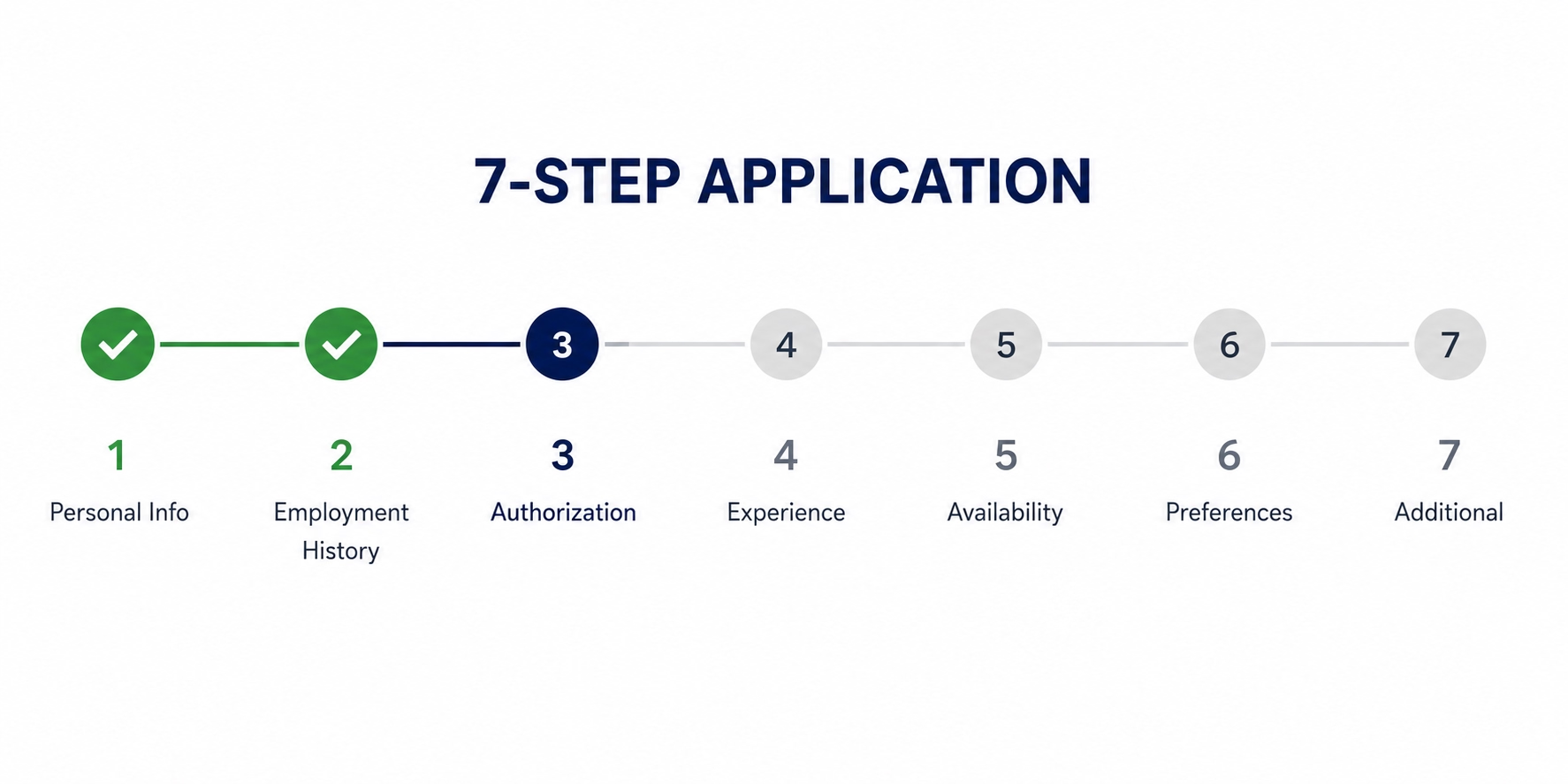
Back and Next buttons move the applicant through the flow, and the final step swaps Next for a Submit Application button. Breaking one long form into short, numbered screens is the design decision that keeps a phone-based applicant moving to the end instead of dropping off halfway.
The gating questions live inside the form
The application asks the questions a recruiter would otherwise chase by phone, and it asks them up front. Four of the seven steps do the screening:
- Authorization: whether the applicant is authorized to work, with options for citizen, permanent resident, or work permit, plus a background question with a short clarifying line beneath it.
- Experience: whether they have prior cleaning or hospitality experience, with a box to describe it.
- Availability: available days, full-time or part-time or custom hours, and when they can start.
- Preferences: reliable transport, weekend work, and full-time availability.
Collecting these inside the form means the recruiter opens a submission already knowing whether the candidate clears the basics, can work the needed hours, and can start when required.
Also read: How a Local Service Contractor Built a Lead Pipeline CRM for Their Own Business.
A branded careers page with a built-in language switch
The applicant journey starts on a full careers landing page, not a bare form. It leads with a hero section headed "Join Our Hospitality Team," a short line about hiring, and an Apply Now button, followed by a "Flexible Job Opportunities" section that sets out schedule flexibility, multiple locations, immediate start dates, and the type of work. A language selector sits in the top corner of both the landing page and the application itself, so an applicant can switch languages before or during the process.
The Additional step closes the application with a free-text box and an optional resume upload that accepts PDF, DOC, or DOCX files up to 5MB. On submit, the applicant sees a confirmation screen headed "Thank you for applying!" with a note that the company will review and be in touch, plus a toast confirming the application went through. The applicant gets a clear end to the process, and the recruiter gets a complete, structured submission.
Conclusion
A business that hires frontline staff every week understands exactly what it needs to know before it picks up the phone, which makes it the right party to design its own application. The company described the hiring funnel it wanted in plain English on Emergent, and the finished tool, a branded careers page, a seven-step application with a progress bar, work authorization and background screening, experience and availability capture, a language switch, optional resume upload, form validation, and a confirmation screen, went from prompt to a live, publicly reachable application in a single build session.
If you are an operator or business owner sitting on a process that a better tool would fix, Emergent can take you from description to deployment in the same session.
Emergent turns your idea into a full-stack web or mobile app, no coding required.
 No coding required
- Web & mobile apps
- Deploys instantly


on Emergent today




