



JobCost was built by a general contracting business in the Pacific Northwest with no in-house development team. The company runs small crews across residential and commercial projects, from kitchen remodels to warehouse roofing to office renovations. The problem they faced was simple: they had no live view of how much money was being burned on any given job until the invoices were already in. Receipts piled up in truck consoles, labour hours lived in text messages, and budget reconciliation happened after the fact on a spreadsheet no one updated in real time.
Using Emergent's construction job app builder, the team built JobCost, a field ledger that lets a foreman or owner open a job, set a budget, log every material purchase and labour hour as it happens, and watch the burn rate move in real time. The entire product went from concept to a live, deployed application in under an hour.
Challenges
Contractors do not know their margin until the job is already over
Most small general contractors running residential and light commercial work discover their actual profit margin weeks after a job closes. The final accounting happens when someone sits down with a stack of receipts, a pile of timesheets, and a spreadsheet that has not been updated since the job started. By then, there is nothing to do about a blown budget except absorb the loss. The core frustration is straightforward: if you could see your margin moving while the job is still active, you could make adjustments before it is too late. But without a tool purpose-built for field-level cost tracking, that kind of real-time visibility simply does not exist for crews running two to five jobs at a time.
Material costs are tracked on receipts, not in systems
On a typical renovation or commercial job, materials are purchased throughout the project from multiple vendors. A framing crew picks up lumber from one supplier. The GC grabs plumbing fittings from another. Specialty items get ordered online. Each purchase generates a paper or digital receipt that ends up in a glovebox, a pocket, or a text thread. None of it flows into a single ledger in real time. The contractor who needs to know whether a kitchen remodel budget is still on track after a week of lumber runs and hardware store trips has no way to check without manually tallying every receipt to date. That tallying rarely happens mid-job, which means budget overruns accumulate silently.
Labour hours are the hardest line item to capture accurately
Labour is typically the largest cost on any contracting job, and it is also the hardest to track in real time. Hours are logged at the end of the week, if they are logged at all. A framing crew works eight hours on Monday, a plumber comes for three hours on Wednesday, and the GC spends half a day on site Thursday. Each of those entries has a different rate. Tracking them means recording the worker or crew name, the hourly rate, the number of hours, and the date, then multiplying it out and adding it to a running total. Most small contractors do not have a system that handles this. They have a notebook, or a group chat, or nothing at all.
Existing construction software is built for companies, not crews
Enterprise construction management platforms offer job costing features, but they are designed for firms running dozens of projects with dedicated office staff handling data entry. A two-person contracting operation running kitchen remodels, warehouse roofing jobs, and office renovations does not need a platform with subcontractor portals, RFI management, and Gantt charts. They need something they can open on a phone, punch in a material purchase, and see the budget update. The gap between what enterprise software offers and what a small crew actually needs is wide enough that most small contractors default to spreadsheets or nothing.
Solution
A command center that shows every job's budget health at a glance
The JobCost dashboard gives the contractor a single screen with all the numbers that matter. Four summary cards across the top show Active Jobs, Total Budget, Total Spend, and Variance.

Below that, each job gets its own card with the client name, job name, a status badge (Active or On Hold), a spend-versus-budget bar, and the spent and remaining dollar amounts. The bar stays green when spend is under budget. When it turns red, the job needs attention.
Every job also has a burn rate bar that updates the moment a material or labour entry is logged. The foreman does not need to run a report or open a spreadsheet. The bar moves, the numbers change, and the contractor can see mid-job whether the budget is holding or drifting.

Creating a new job takes one form and under a minute. The foreman enters a job name, client, budget, start date, and a status (Active, On Hold, or Completed) so jobs waiting on permits do not clutter the active view. There is also a scope field for noting the work involved. One tap on "Create Job" and it appears on the dashboard with its own budget card, burn rate bar, and logging tabs ready to go.
Logging materials and labour from the field, line by line
Each job has two tabs: Materials and Labour. The Materials tab has a log entry form on the left and a running table of entries on the right.
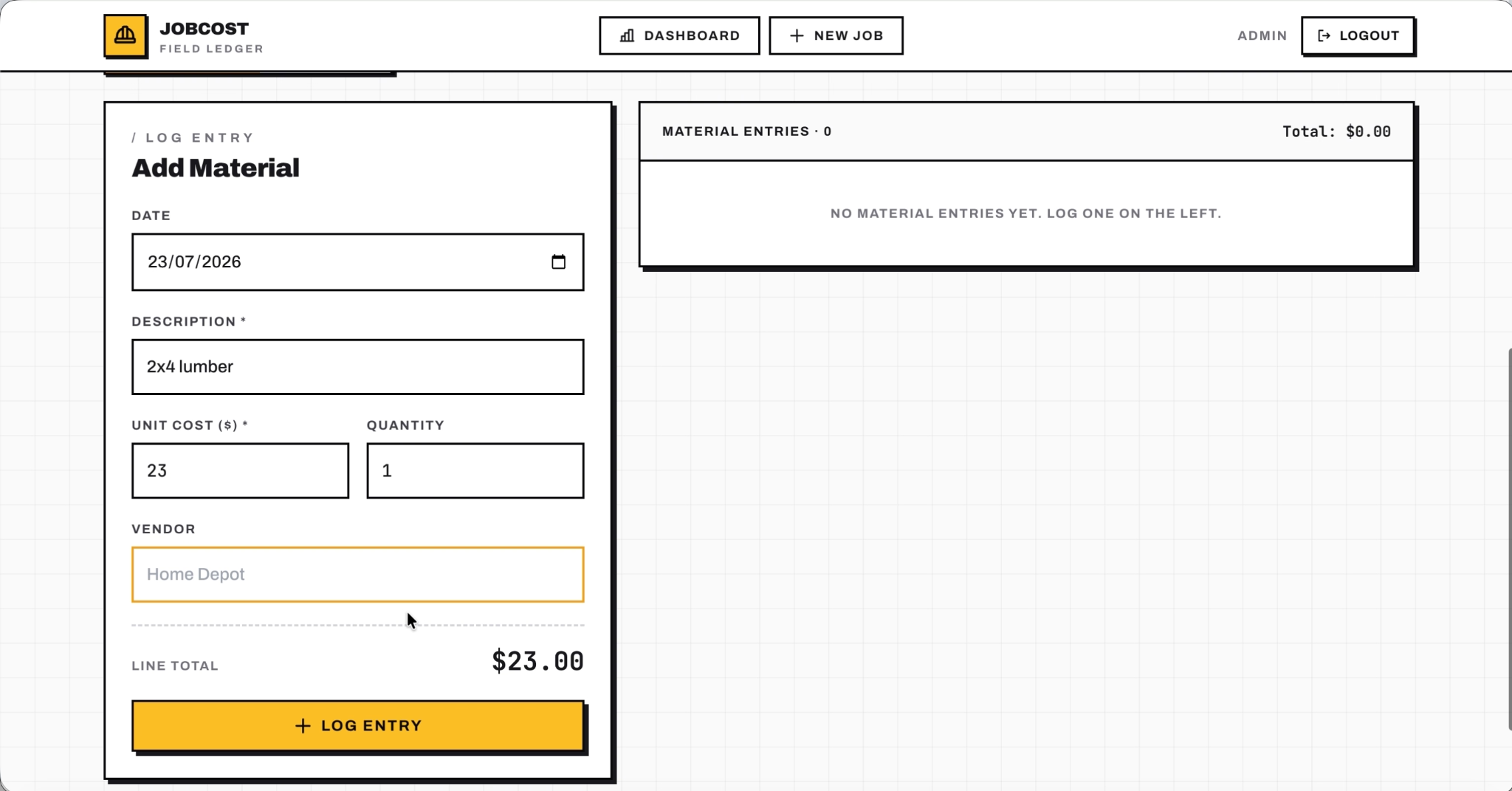
The foreman types in a description, a unit cost, a quantity, and optionally a vendor name. The line total calculates on the fly. One tap on "Log Entry" saves it, and the job's budget numbers update instantly.
The Labour tab works the same way. It captures a description of the work, an hourly rate, the number of hours, and an optional worker or crew name.

Rate times hours gives the line total. Every entry feeds back into the job's spend figures and the dashboard totals, so the contractor always has a current picture of where the money is going.
Outcomes
95% of material and labour costs now captured in real time
Before JobCost, cost data lived in receipts, text messages, and end-of-week timesheets. The contractor now captures roughly 95% of material and labour costs in the system as they happen. The remaining 5% accounts for occasional receipts logged at the end of the day or petty cash runs entered the next morning. That shift means budget decisions are based on current numbers, not memories of what was spent last Tuesday.
10 active jobs tracked from a single dashboard
The contractor currently manages up to 10 jobs per week across residential and commercial projects, all visible from one dashboard. Each job carries its own budget, spend total, and burn rate bar, so the foreman can scan the full book of work in seconds and know which jobs need attention without opening a single spreadsheet.
Margin visibility moved from weeks after completion to same-day
The most significant change is when the contractor sees margin data. Before JobCost, margin was a number calculated weeks after the final invoice landed. Now it updates with every material purchase and labour entry logged from the field. The contractor knows whether a job is profitable while the job is still active, early enough to adjust scope, push back on change orders, or reallocate crew hours before the budget is gone.
Conclusion
JobCost replaced a workflow that depended on receipts, text messages, and post-job spreadsheets with a single app that tracks every dollar as it is spent. The contractor who built it went from discovering margin after the final invoice to monitoring it in real time across 10 active jobs per week. The finished product, a multi-job dashboard with live variance tracking, line-item material and labour logging, and a visual burn rate indicator, went from a plain-English description on Emergent's construction job app builder to a live, publicly accessible application in under an hour.
If you are a contractor or trades operator sitting on a product idea that solves a clear problem in your industry, Emergent can take you from description to deployment in the same session. Start building on Emergent.

Emergent turns your idea into a full-stack web or mobile app, no coding required.
 No coding required
- Web & mobile apps
- Deploys instantly


on Emergent today




