



A small maintenance contracting firm manages recurring service jobs for commercial and residential clients. They handle HVAC servicing, filter replacements, safety checks, and similar work on monthly, quarterly, and annual cycles, all without an in-house development team. As their client list grew, tracking which jobs were due for which client across spreadsheets and calendar reminders stopped working. Jobs slipped, clients noticed before the team did, and the existing tools could not keep up with the volume.
Using Emergent's construction job app builder, they built UpKeep OS, a dashboard that holds every client, schedules recurring jobs by frequency, and rolls the next due date forward automatically when work is marked done. The entire product went from concept to a live, deployed application in one session..
Challenges
Recurring jobs kept falling through the cracks
The team handled the same jobs on repeat for every client: HVAC filter replacements every month, AC services every quarter, safety checks on a fixed cycle. It was all routine work, but tracking when each job was next due across a growing client list was a different story. Every client had a different frequency and a different start date, and those schedules lived across separate calendars, spreadsheet rows, and sometimes just memory. None of it added up to one clear answer to the question that mattered every morning: what needs doing this week. A busy week would bury a due date, and the first person to notice was usually the client, calling to ask why the filter never got changed.
Finished jobs never rescheduled themselves
When the team completed a quarterly AC service, the next one was due three months later. Someone had to remember to add it. In their spreadsheet, finishing a job and creating its next occurrence were two separate steps, and the second one was easy to skip on a full workday. A recurring schedule that was supposed to run indefinitely would quietly stop after one cycle because nobody rolled it forward.
Enterprise tools were overkill, spreadsheets were not enough
The team looked at field-service management platforms, but those were built and priced for companies with dozens of crews and hundreds of jobs. Way more than they needed. What they needed was simple: a list of clients, the recurring jobs each one required, and a view of what was due this week. But a spreadsheet could not auto-schedule the next job or flag an overdue one, and they had no developers on staff to build something custom.
Solution
UpKeep OS is a two-screen application: a dashboard that shows what needs doing now, and a client directory where each account holds its own recurring jobs. One screen shows what is due, the other organizes clients and their jobs. The three capabilities below cover the full workflow.
A control room dashboard built around what is due now
UpKeep OS opens on a dashboard headed "What needs doing," with a top row of counters for total clients, active jobs, jobs due this week, and overdue jobs. Below that, a "Due This Week" list shows each job with its client, frequency, and due date, flagging items that are late or due today directly in the row.
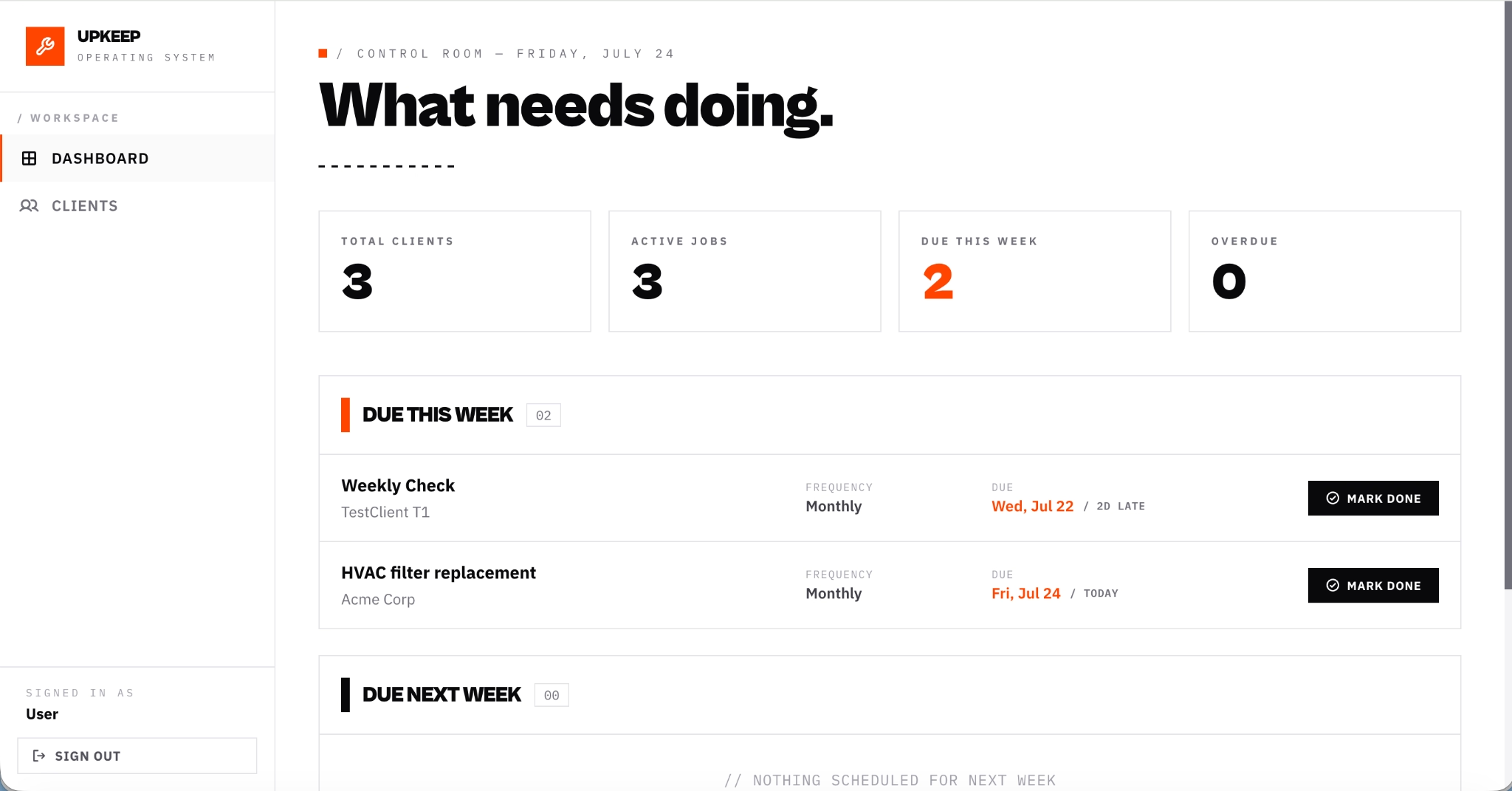
The contractor's first screen answers their most immediate question without any navigation. Overdue and due-today jobs are marked in the list itself, and a separate "Due Next Week" section shows what is coming, so the near-term workload is visible at a glance rather than reconstructed from scattered sources.
A client directory where every recurring job lives under the account it belongs to
The Clients tab opens a directory of every account the firm serves, each displayed as a card with a name and address. Clicking into a client record shows that client's recurring jobs in one place, with the job title, frequency, next due date, and completion count visible in each row.
From the client record, the contractor can mark a job done directly, and the result reflects back on the dashboard: the "Due This Week" count decreases and the job moves out of the current list. Because jobs are organized under the client they belong to rather than in a flat list, the contractor sees each account's full maintenance commitment at a glance without filtering or searching.
Recurring job scheduling with frequency and due date controls
From any client record, the contractor creates a new recurring job by entering a title, selecting a frequency of monthly, quarterly, or annual, and setting a first due date. The form states plainly that the next due date will auto-roll forward as jobs are marked done.
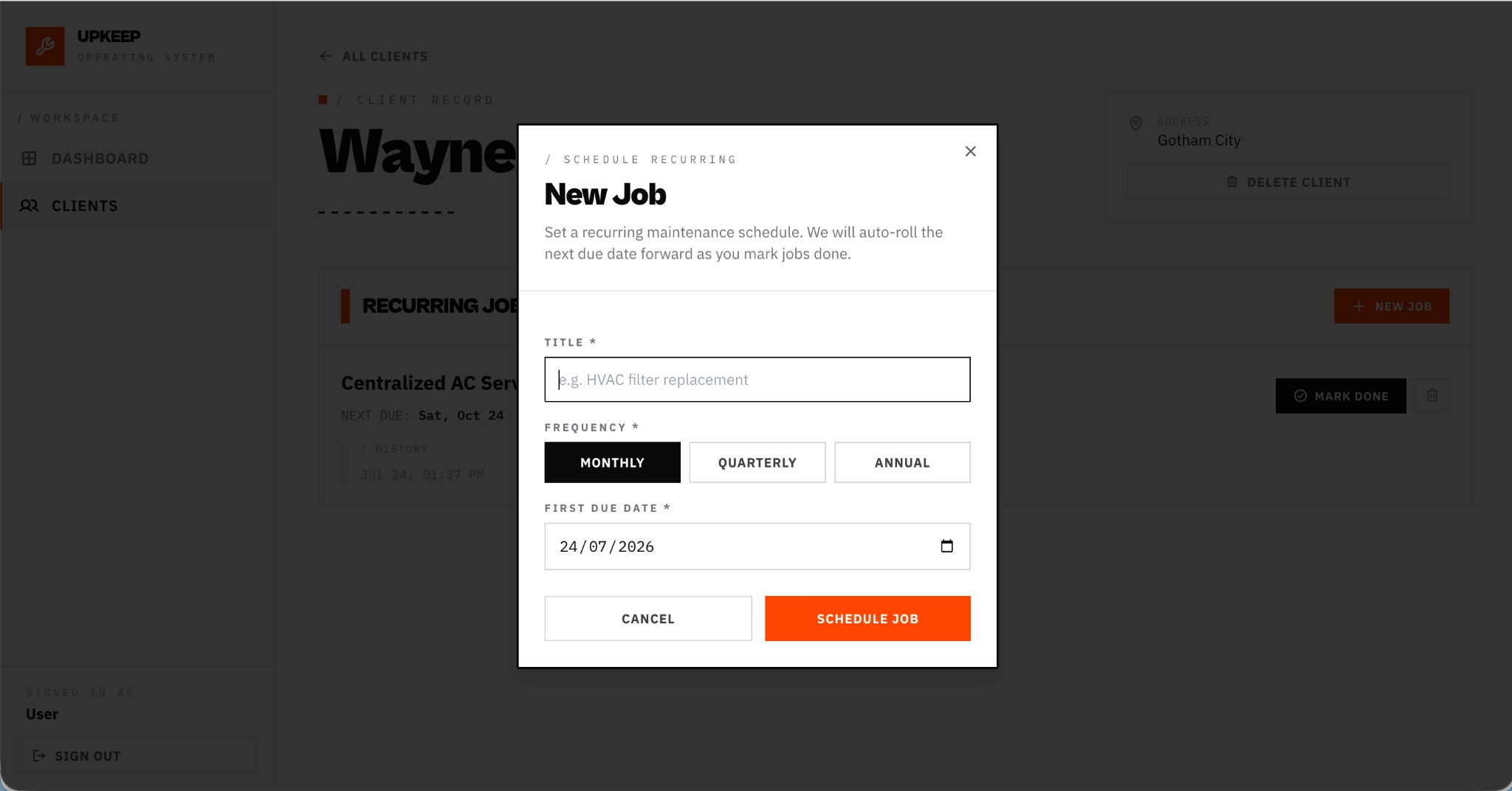
Because each job is created under a specific client, the contractor always sees that client's full maintenance commitment in a single view. The client record holds every recurring job with its frequency, next due date, and completion history, so adding a second or third job to the same client takes one click from the same screen.
Outcomes
90% fewer missed or late jobs per month
Before UpKeep OS, the team relied on spreadsheets and memory to track due dates, and jobs slipped without anyone noticing until a client called. With every job's due date, frequency, and overdue status visible on the dashboard, the team cut missed and late jobs by 90%. The "Due This Week" and "Overdue" counters give them a daily check they never had.
5 hours saved per week on scheduling and follow-up
The team used to reconstruct their weekly workload by hand each morning, cross-checking calendars and spreadsheets to figure out what needed doing. UpKeep OS eliminates that step entirely. The dashboard assembles the week's work automatically, and marking a job done rolls the next occurrence forward without a second entry, saving the team roughly 5 hours per week.
25+ active clients managed from a single tool
Each client's recurring jobs, frequencies, due dates, and completion history now live under one record instead of scattered across separate files. The team manages over 25 active clients from one directory, with no limit on the number of jobs per account.
Conclusion
The team that built UpKeep OS did not hire developers or buy an enterprise platform. They described what they needed on Emergent and had a working product in one session. That product now handles over 25 active clients, cuts missed jobs by 90%, and saves the team 5 hours a week they used to spend on manual scheduling. A dashboard with overdue flagging, a client directory with per-account job records, recurring scheduling with monthly, quarterly, and annual frequency options, and automatic rollover on completion, all built by someone who understood exactly how maintenance work falls through the cracks.
If you are a contractor or service operator sitting on a product idea that solves a clear problem in your business, Emergent can take you from description to deployment in the same session. Start building on Emergent.
Emergent turns your idea into a full-stack web or mobile app, no coding required.
 No coding required
- Web & mobile apps
- Deploys instantly

on Emergent today




