




TL;DR
- Notion and workspace template packs: Best for organized people who already build systems for themselves.
- AI prompt packs and prompt libraries: Best for specialists whose prompts save other people hours.
- Design asset packs: Best for working designers with a back catalog to license.
- Digital planners and printables: Best for High-Volume Sellers
- Single-purpose paid micro-tools: Best for people who keep rebuilding the same fix for themselves.
- Paid membership libraries: Best for people with an audience that wants predictable monthly income.
- Certification and exam prep: Best for qualified professionals in a field with a hard exam.
- Ebooks and paid guides: Best for writers with expertise but no audience yet.
- Paid research reports and benchmark data: Best for operators with access to industry numbers others don't have.
- Spreadsheet models and calculators: Best for finance-minded consultants who already model for clients.
Search for digital product ideas and you'll find the same five suggestions every time, and in roughly the same order. You'll see ebooks, courses, templates, printables, and presets. Yes, all of these sell well, but what happens once you've made a sale?
Getting paid is where these stall. Whether an idea earns depends on what your store can handle: licenses, version updates, gated access, recurring subscriptions. So I picked the 10 strongest ideas, then used Emergent to build a storefront for each one.
By the end of this article you'll know what each of these ideas needs before it can sell anything, which ones keep earning after the first sale, and how much work is required.
How I Tested These Digital Product Ideas
I started with more than 40 digital product ideas pulled from marketplace listings and creator forums, then cut the list to the 10 that one person could realistically sell and support. I cut stock media libraries because a new seller now competes with AI generation that produces an unlimited supply at no cost. I cut AI-generated wall art for the same reason.
NFTs and Web3 collectibles ask a mainstream buyer to learn a payment system before they can click Buy. Paid video series run up hosting costs long before the first sale. And mobile app source-code templates sell to developers, who mostly build it themselves.
I judged the 10 ideas that made it on the following criteria:
- Work before launch: How long it takes to make something you can sell.
- Build difficulty: How much of the store you have to specify yourself.
- Repeat revenue: Whether a customer buys once or comes back.
- Defensibility: How hard it is for the next person to copy you.
For each one I described the storefront, paywall, or tool it needs in a single prompt, and let Emergent build it. Every build seeded itself with demo data so the dashboards had something to display. Those figures are invented by the builder, so I've used them to show what each store can track, not to demonstrate results.
1. Notion and Workspace Template Packs: Best for Organized People
What it does: You sell prebuilt Notion, Airtable, or ClickUp workspaces that solve one job, like a content calendar or a client CRM, and buyers duplicate them into their own account.
Best for: People who already build elaborate systems for themselves and are asked how they're set up.
Template packs top this list because the product usually exists before you decide to sell it, and because they're the fastest of these ideas to a second sale from the same buyer. Buyers pay for the finished setup, already worked out.
That's why a system built for one job outsells a general-purpose one. The narrower the job, the more a buyer will pay to skip building it. I wanted to see what that machinery looks like, so I described the shop in one prompt:
"Build a template shop for a solo creator trading as Stackwell, selling Notion and workspace templates.
Visitors browse a grid of templates with a cover image, category, price, and short description, and open a detail page with a preview gallery and a what's included list.
Buying with Stripe delivers a license key and a template access link on a confirmation page, and the buyer can log in later to see their purchases and any updated versions. Each template has a version number and a changelog.
Add an owner dashboard showing total revenue, sales by template, and buyers on outdated versions. Seed 12 templates across four categories and around 40 purchases."
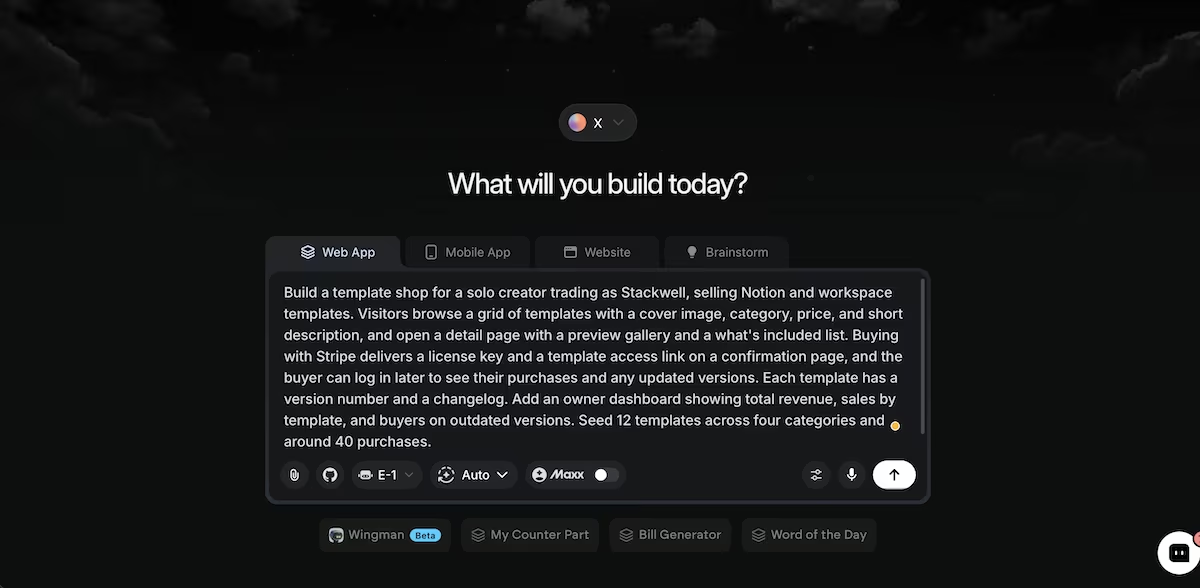
The Stackwell prompt, before the build started.
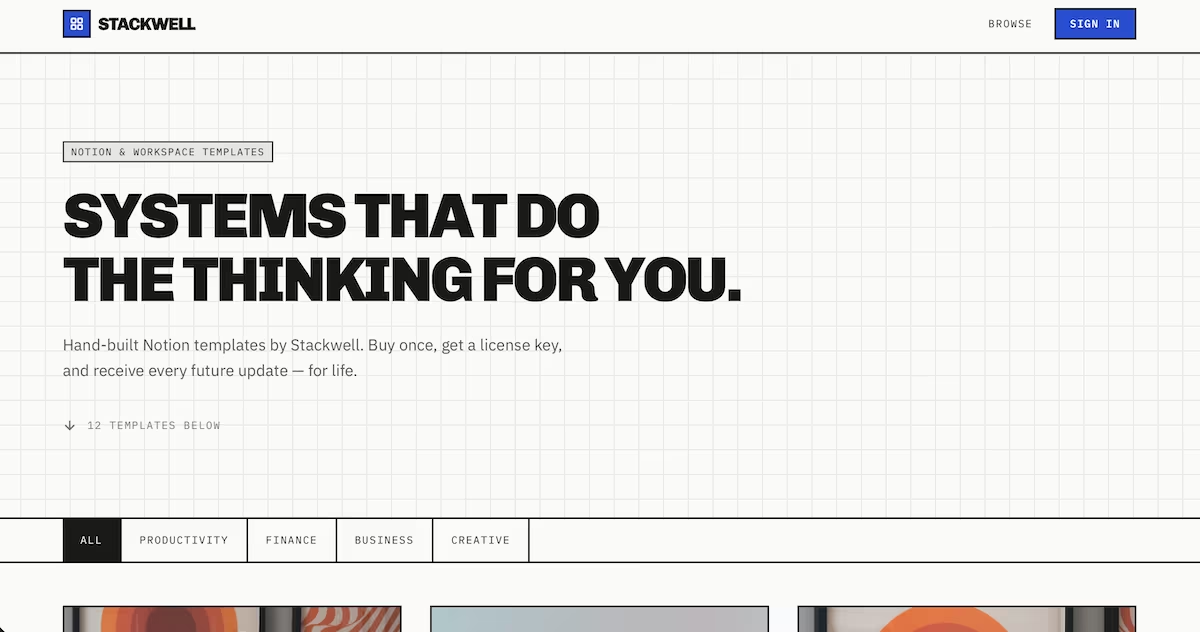
The Stackwell storefront, with 12 templates across four categories.
Stackwell existed 58 minutes later, for 57.65 credits. Version tracking came out complete and the dashboard listed every buyer on an old release with their license key and the version they owned beside the current one.
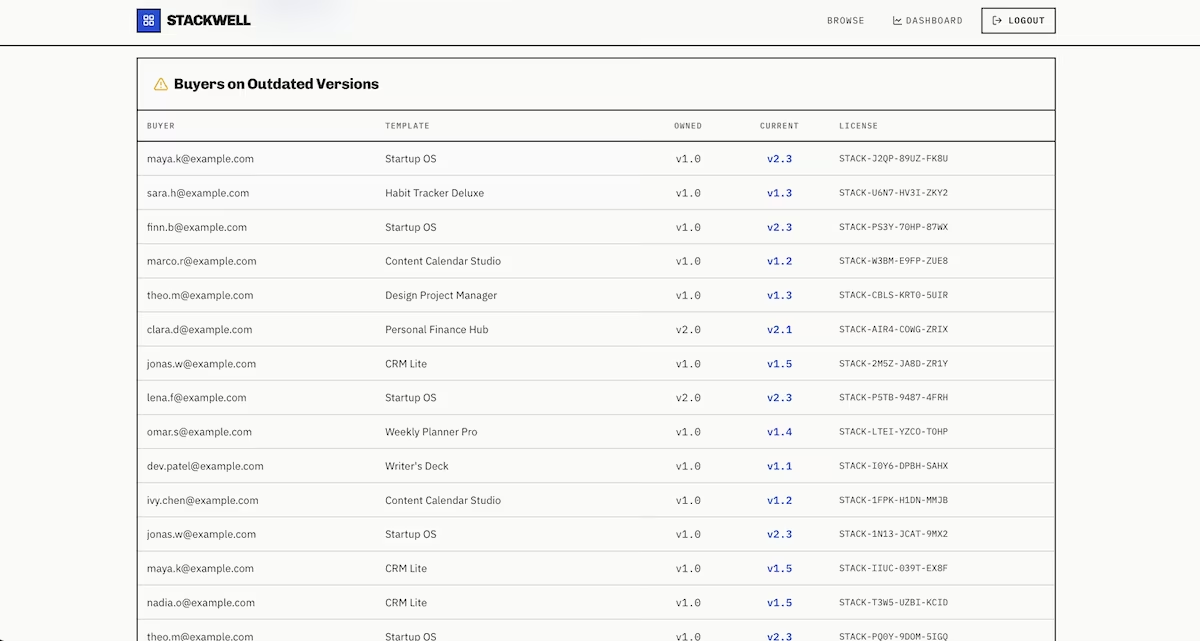
The outdated versions table, with owned and current version numbers side by side.
Buyers who trust one of your systems tend to work through the rest of the catalog, so the second template is easier to sell than the first. Providing templates in bundles takes advantage of that. That list is the business. Those people have paid once, they liked it, and a v2 announcement is the cheapest sale you'll ever make.
Each template had its own version number and a changelog, so buyers could see what changed before deciding whether they wanted the update. A version number on its own would have told them nothing.
What limits you here is your own eye for design. Most buyers decide from the preview image alone, so a well-built system that looks unattractive won't sell.
Key Features
- Instant duplication: Buyers copy your workspace into their own account in one click, so there's nothing to install or configure.
- Version updates: Existing buyers receive improved updates, which turns a single sale into a relationship.
- Category range: One system idea usually splits into several sellable variants for different professions.
Pros and Cons
Pros:
- You've likely built the product already as a byproduct of your own work.
- Buyers who trust one template tend to buy the next one.
- Production costs are close to zero once the system exists.
Cons:
- The platforms change, and templates need maintenance to keep functioning.
- Free templates are everywhere, so yours has to be visibly better.
- Buyers judge on screenshots, which means design skill matters as much as system design.
Pricing
Build costs: Your time, a domain, and a hosting plan. Monetization: One-off template sales, bundles, or a paid pack subscription. Running costs: Very low, mainly hosting and payment processing.
Bottom Line
This is the one to pick if you already build systems like this for yourself.
2. AI Prompt Packs and Prompt Libraries: Best for Specialists
What it does: You sell curated collections of prompts for a specific job, organized by use case and tuned to particular models.
Best for: Specialists whose prompts reflect real expertise, like a recruiter's screening prompts or a lawyer's contract review set.
Prompt packs are the newest idea here. The buyer knows their job and doesn't want to spend a two weeks learning how to ask a model for help with it, so they're paying for your trial and error.
That makes the pricing awkward to get right. A one-off pack is a single transaction, while a library someone subscribes to earns repeatedly, because prompts go stale as models change. Staying current is the service.
The store has to support both models before you can decide between them, so that's what I asked Emergent for: a pack sale, a subscription, and a way for visitors to sample the writing before either:
"Build a paid prompt library for a brand called Cuebase. Prompts are organized by pack, category, and tag, and each has a title, the prompt text, a use case note, and a model it works best with.
Visitors can search and filter, and read three free prompts before hitting a paywall.
Stripe checkout unlocks either a single pack or a full library subscription. Logged-in buyers get a copy button, a favorites list, and a personal collection they can add prompts to.
Add an owner dashboard showing subscribers, revenue by pack, and the most copied prompts. Seed six packs with around 90 prompts and 60 users."
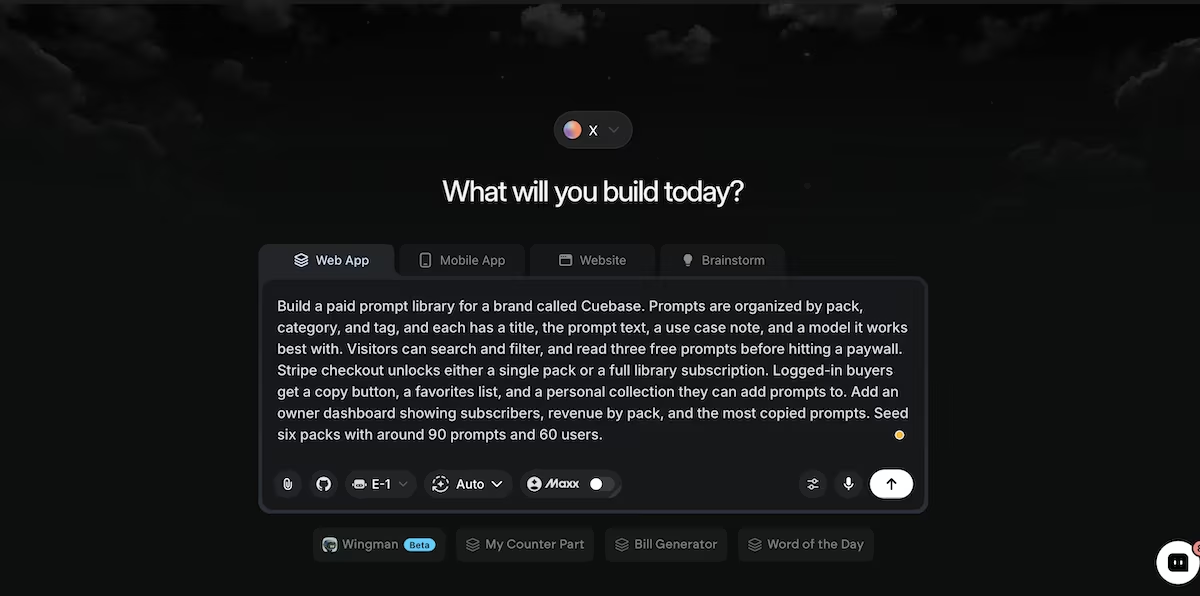
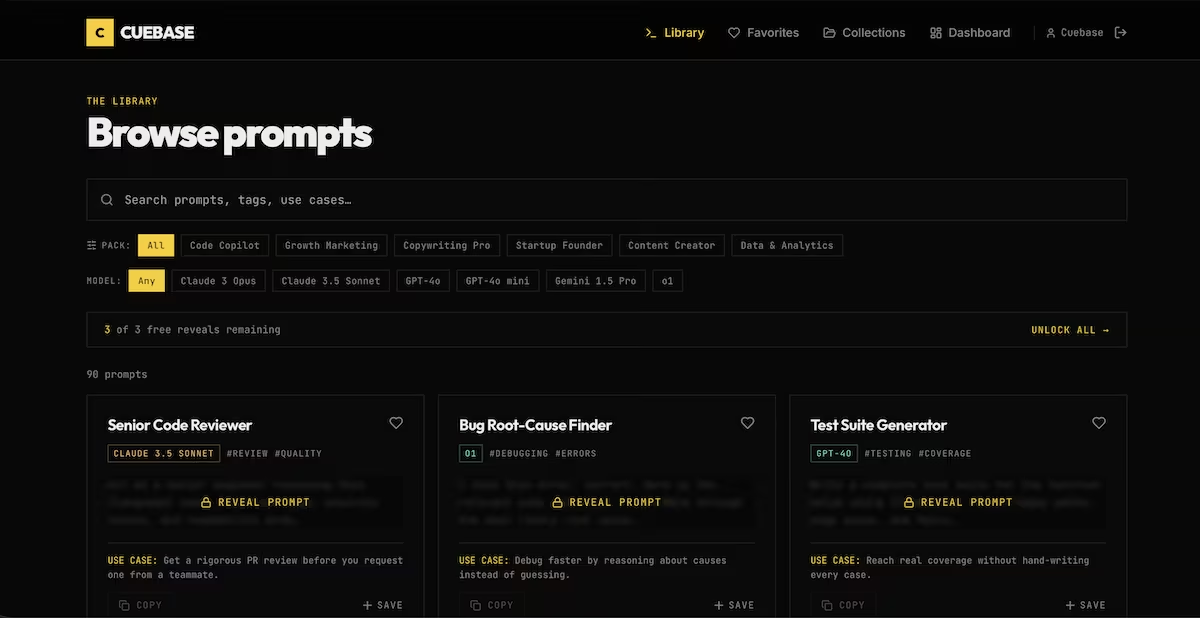
Thirty-two minutes and 43.51 credits produced six packs and 90 prompts, with three free reveals before the rest blur behind an unlock button. The dashboard splits earnings by pack and by full library subscription, which is the comparison that would tell you how to price.
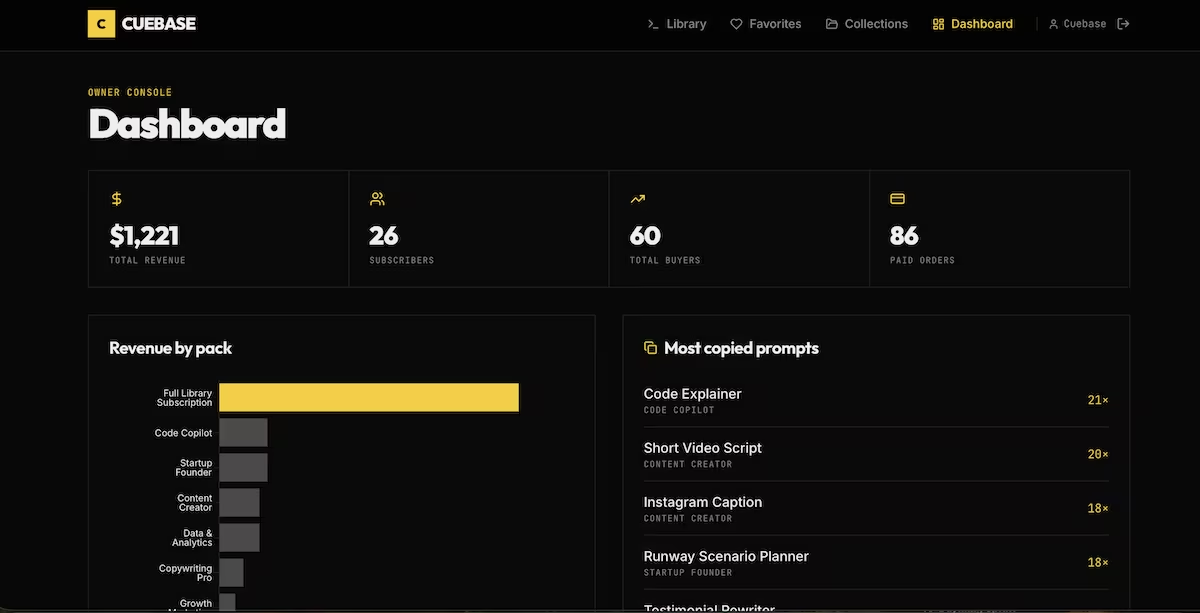
Sell packs and you compete on price with a thousand marketplace listings. Sell access to something you keep updating and you have recurring revenue.
Specialists win this because a prompt written by someone who does the job beats a generic one that reads well. Recruiters, lawyers, and analysts all recognize the difference immediately, and they'll pay for a library aimed squarely at their work rather than a general purpose collection.
The honest problem is that prompts are text, and text gets copied. Your protection is the same thing that makes the subscription work, which is that a pack bought in March is half-obsolete by fall.
Key Features
- Model-specific tuning: Prompts labeled for the model they perform best on save buyers a round of testing.
- Searchable organization: Tags and categories let buyers find the right prompt when they need it.
- Copy and save: One-click copying and personal collections make the library part of a daily workflow.
Pros and Cons
Pros:
- Almost every profession has repetitive work an expert prompt can shorten.
- Production is fast, since the product is text you refine rather than design.
- A subscription model fits naturally because the content needs updating anyway.
Cons:
- Prompts are trivially easy to copy and redistribute.
- The category is filling up fast with low-effort collections.
- Keeping a library current as models change is ongoing work.
Pricing
Build costs: Your time plus hosting. Monetization: One-off pack sales, a library subscription, or both together. Running costs: Low, though the writing never stops.
Bottom Line
The subscription version of this beats the pack version by a distance. Build a library you update, price it monthly, and use the packs as the entry point.
3. Design Asset Packs: Best for Working Designers
What it does: You sell fonts, interface kits, mockups, or presets to other creative professionals, typically under a license that determines what buyers can do with them.
Best for: Working designers with unreleased work in a folder.
Design assets rank this high because the same file sells at two prices, depending on what the buyer is allowed to do with it. They sell to a professional market, and professionals pay professional prices. The buyer is usually billing the font or the UI kit to a client or claiming it back from their employer, so the price matters less to them than it would to a consumer.
The reason prices work is licensing. A freelancer and a 40-person agency need different permissions from the same file, and a store with one price charges the agency exactly what it charges the hobbyist.
Two tiers means two prices, two sets of permissions, and a record of which one each buyer holds. I wanted to know how much of that came out of a single description, so I asked Emergent for all of it:
"Build an asset library for a small studio called Nightshift selling font, UI kit, and mockup packs. Each pack has a preview gallery, a file list with formats and sizes, and two license tiers, personal and commercial, at different prices.
Buyers pick a tier at Stripe checkout, and their account shows purchased packs, the license tier held, and a downloadable license certificate with their name and purchase date. Add an owner dashboard showing revenue split by license tier, sales per pack, and total downloads.
Seed 10 packs across three categories and around 55 purchases with a mix of both license tiers."
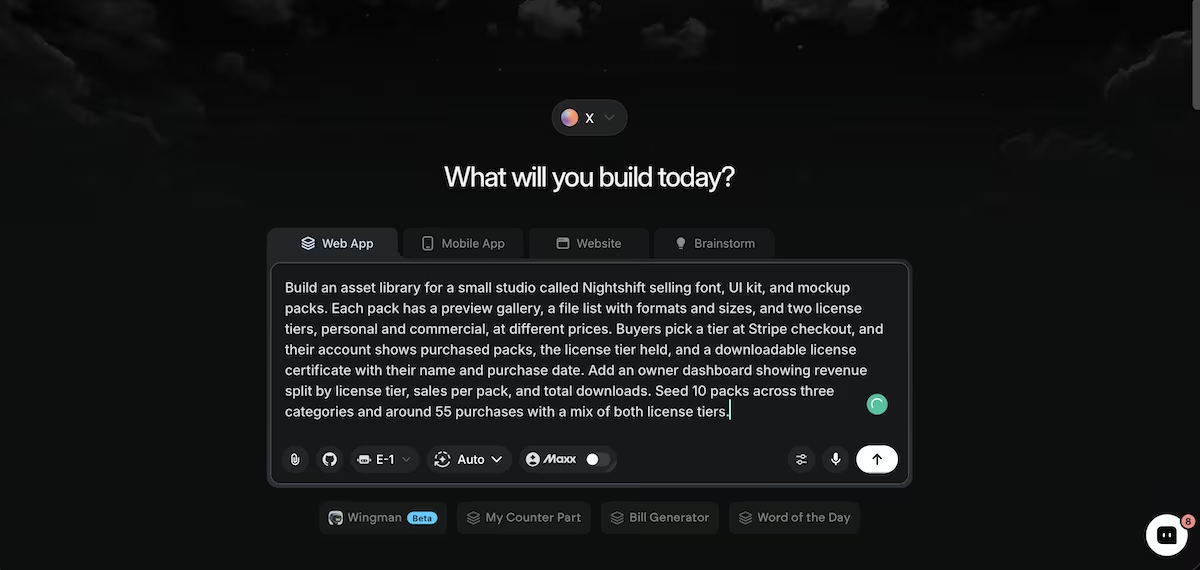
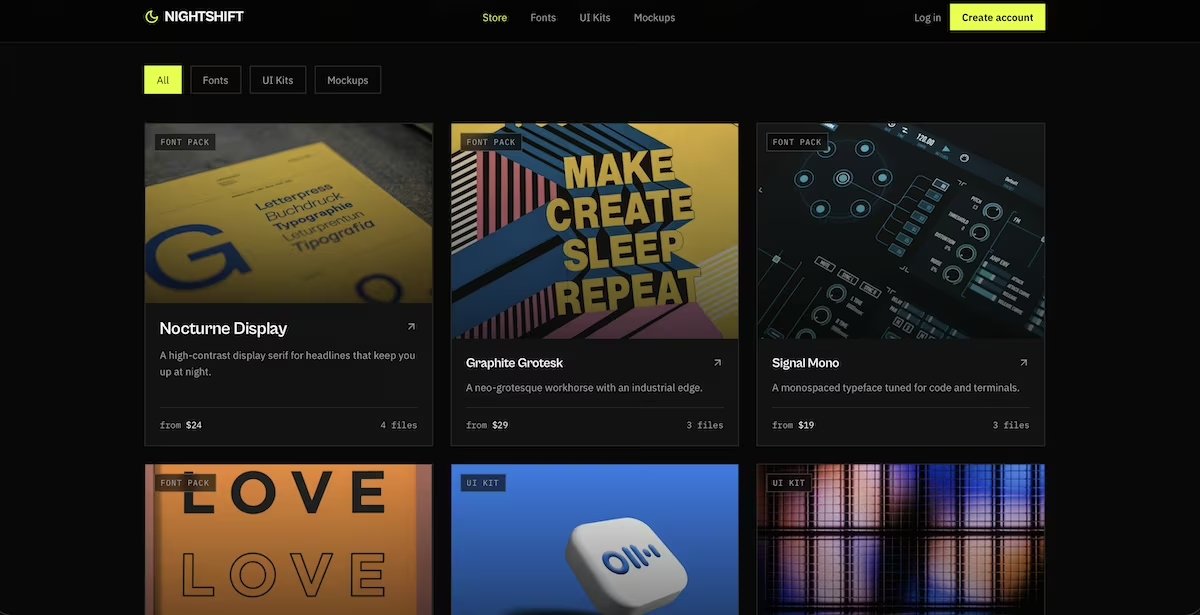
Thirty minutes and 35.52 credits produced the store, tier selection at checkout, and a certificate naming the buyer and the purchase date. The dashboard reports the two tiers separately, so you can see which one your customers actually pick instead of guessing.
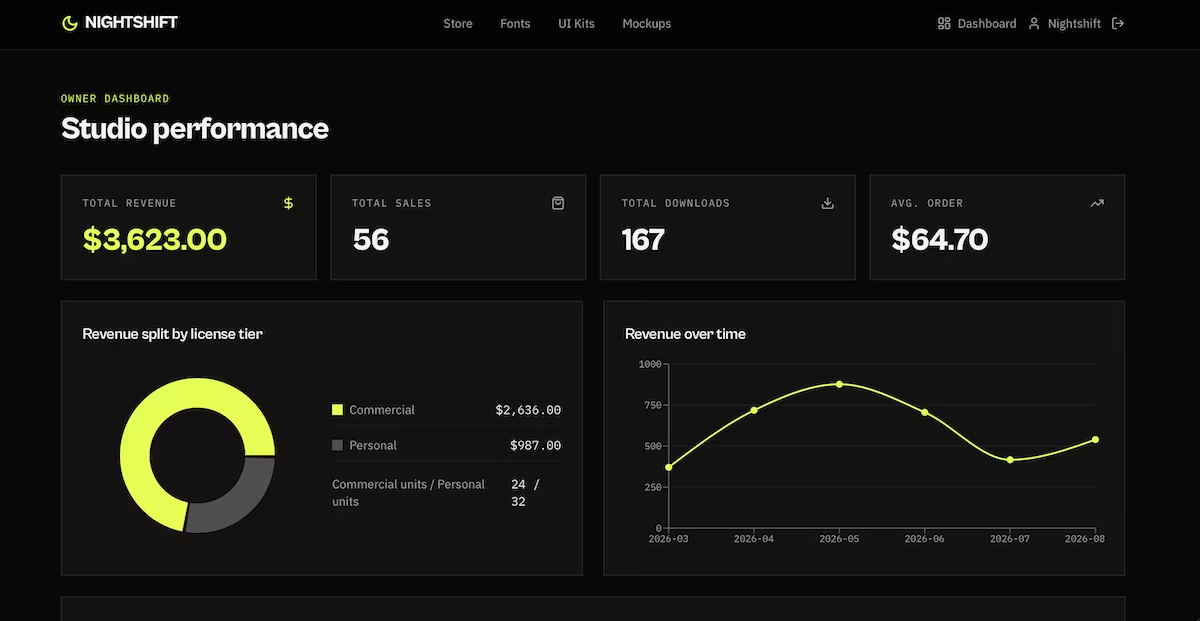
That split is the one to watch. The tier structure lets the people with a budget position themselves in the higher bracket without you having to ask. Design buyers rarely negotiate, though they do check what they're allowed to do with a file before a client project starts.
That's why the certificate matters. Team buyers need something to file when procurement asks, and it makes the commercial tier feel like a different product rather than the same files at a higher price.
Demand is narrower than for the consumer ideas above and below, since your customers are other designers. They buy repeatedly, though, and they understand why good work costs money.
Key Features
- Tiered licensing: Personal and commercial pricing captures more value from professional buyers.
- Preview galleries: Designers buy on close inspection, so detailed previews do most of the selling.
- License certificates: A documented license removes a purchasing obstacle for team buyers.
Pros and Cons
Pros:
- Licensing gives you a second price for the same file.
- Existing unreleased work can often be packaged with little extra effort.
- Designers return to a style they trust.
Cons:
- The customer base is smaller than for consumer products.
- Enforcing license terms is nearly impossible in practice.
- Standing out demands real craft, not just competence.
Pricing
Build costs: Design tools you already own, plus hosting. Monetization: Tiered one-off licenses, bundles, or an all-access pass. Running costs: Low, rising with file storage.
Bottom Line
Two license tiers from day one. The single-price version of this store leaves the best customers underpriced.
4. Digital Planners and Printables: Best for High-Volume Sellers
What it does: You sell downloadable planners, trackers, and worksheets that buyers either print or annotate on a tablet.
Best for: Designers who'd rather sell low-cost items in high volume than a few expensive ones.
Printables is the most volume-friendly idea on this list. Individual prices are low, buyers decide in seconds, and demand spikes every January, every back-to-school, and every new tax year.
At those prices one product is a hobby. The business is a catalog and an average order value above the sticker price, which is why bundling is key here.
So I asked Emergent for a store built around bundling:
"Build a printables store for a brand called Paperline selling digital planners, trackers, and printable packs. Products have a cover image, a page count, a format label (PDF, GoodNotes, A4, US Letter), and a price.
Add a bundle builder where a customer picks any three or more products and gets a percentage discount applied automatically at checkout.
Pay with Stripe, and deliver instant download links that expire after 72 hours and can be re-issued from the buyer's account. Add an owner dashboard showing revenue, average order value, bundle versus single sales, and top sellers.
Seed 20 products and around 70 orders including bundles."
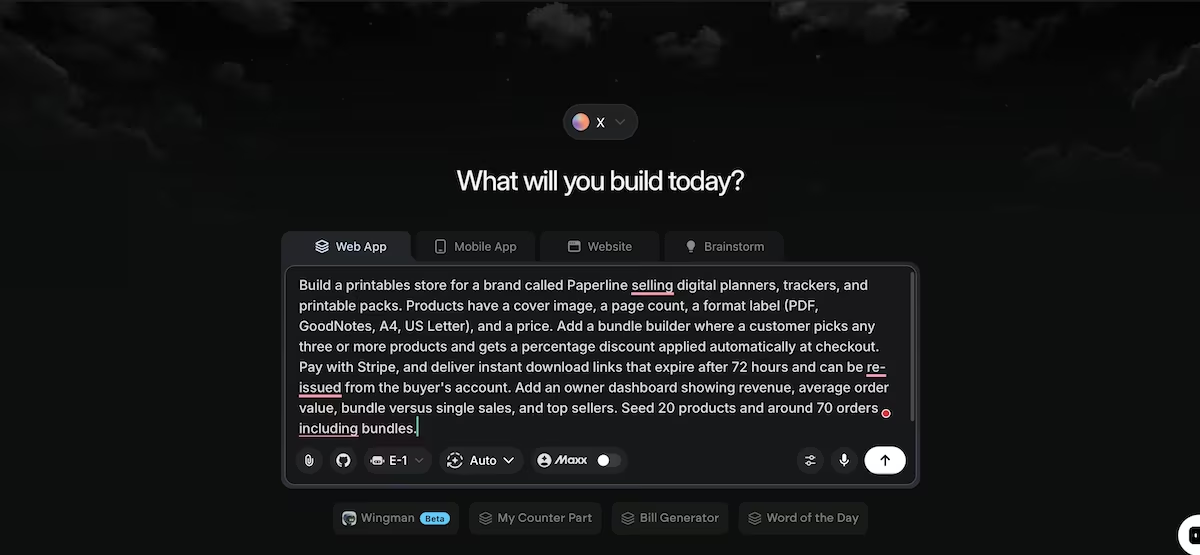
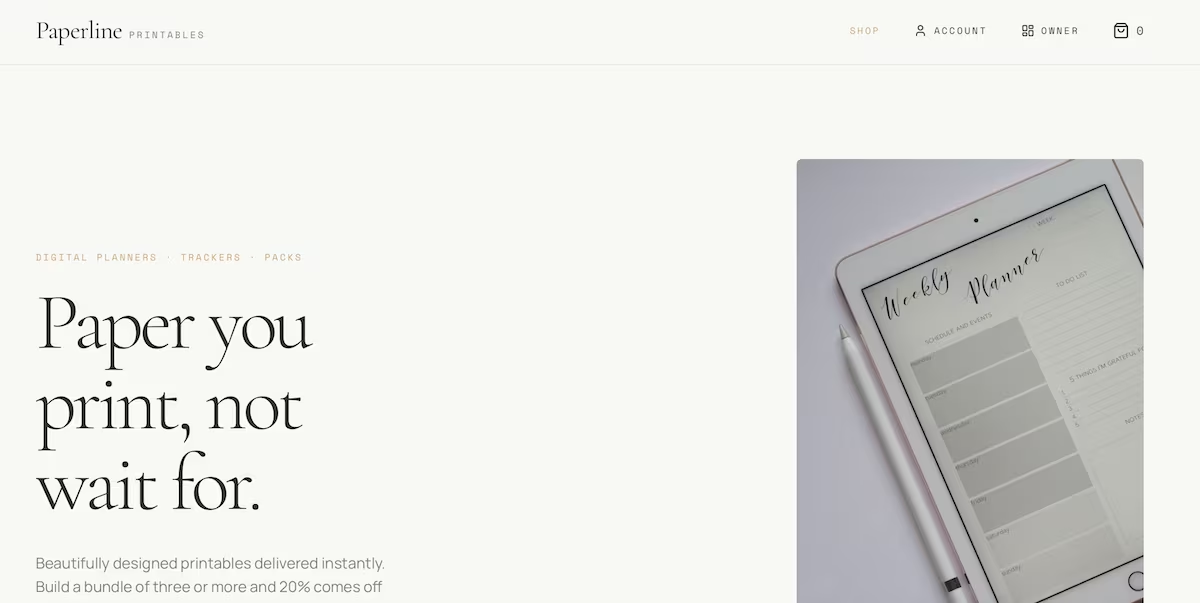
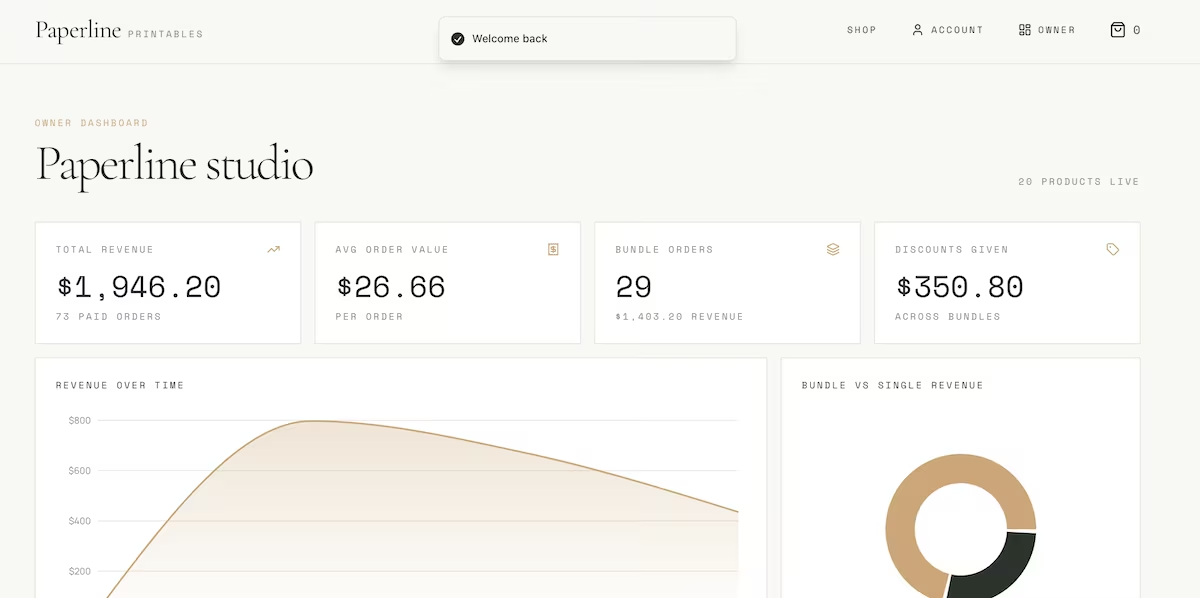
Paperline took 26 minutes and 26.02 credits, the cheapest build of the 10, and the bundle mechanic worked without any prompting from me. Adding a third item applied 20% off, with the subtotal struck through.
The dashboard separates bundle orders from single ones and reports average order value, which is the split you'd want to watch if you sold these.
The product cards showed page count next to price, which does more work than it looks. At these prices buyers decide in seconds, and page count is the fastest signal of whether something is worth the money.
Expiring links are the other piece. Files sold as permanent downloads circulate, and a 72-hour window with re-issue protects the product without punishing a buyer who lost the email. Seasonal demand is also an advantage. Planners, trackers, and budget sheets all have a calendar attached, which gives you a reason to launch something four or five times a year.
Each launch reaches the buyers who already own something of yours, and that repeat audience is where most of the volume comes from. What this idea asks of you is production volume. Thirty planners across a few niches is weeks of design work before you start earning.
Key Features
- Multiple formats: Offering PDF, tablet-app, and paper-size variants of the same file widens the buyer pool.
- Bundle pricing: Automatic discounts at three or more items lift order value on low-priced products.
- Instant delivery: Buyers receive files immediately, which suits the impulse nature of the purchase.
Pros and Cons
Pros:
- Production cost per product is close to nothing once you have a template style.
- Impulse pricing means buyers rarely deliberate.
- Seasonal demand gives you a reason to launch products multiple times a year.
Cons:
- Low prices mean you need real volume to make meaningful money.
- Files are shared freely once they leave your store.
- The market is crowded and competes heavily on aesthetics.
Pricing
Build costs: Design software and your time. Monetization: Individual sales, bundles, and seasonal packs. Running costs: Very low, mostly file storage and payment fees.
Bottom Line
This works if you enjoy the design and can sustain a release schedule. Build the bundle mechanic before you build the thirtieth planner.
5. Single-Purpose Paid Micro-Tools: Best for Repeat Problem-Solvers
What it does: You build one small web tool that solves a single recurring annoyance, give away a limited free version, and charge for removing the limits.
Best for: People who keep hacking together the same fix and notice colleagues asking for it.
This idea is different from every other one here. There's no file to make, because the product and the software are the same thing, which means the entire business is one recurring subscription.
The candidates are unglamorous by design. Something you've hacked together for yourself three times, that colleagues ask you for, and that people will pay a small monthly fee to use without limits.
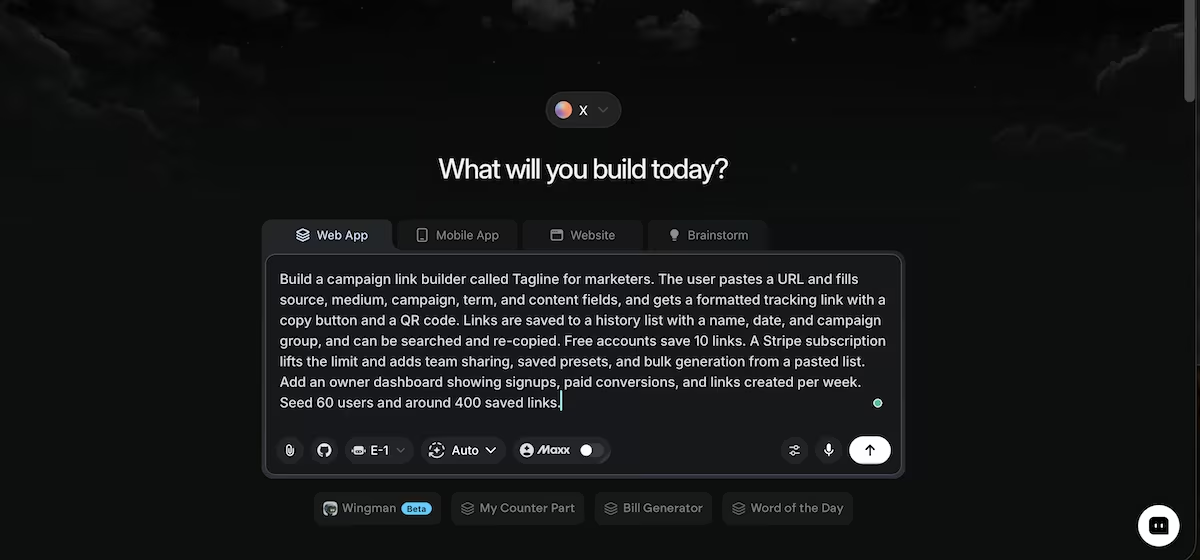
I built Tagline to test how the free tier converts:
"Build a campaign link builder called Tagline for marketers. The user pastes a URL and fills source, medium, campaign, term, and content fields, and gets a formatted tracking link with a copy button and a QR code.
Links are saved to a history list with a name, date, and campaign group, and can be searched and re-copied.
Free accounts save 10 links. A Stripe subscription lifts the limit and adds team sharing, saved presets, and bulk generation from a pasted list. Add an owner dashboard showing signups, paid conversions, and links created per week.
Seed 60 users and around 400 saved links."
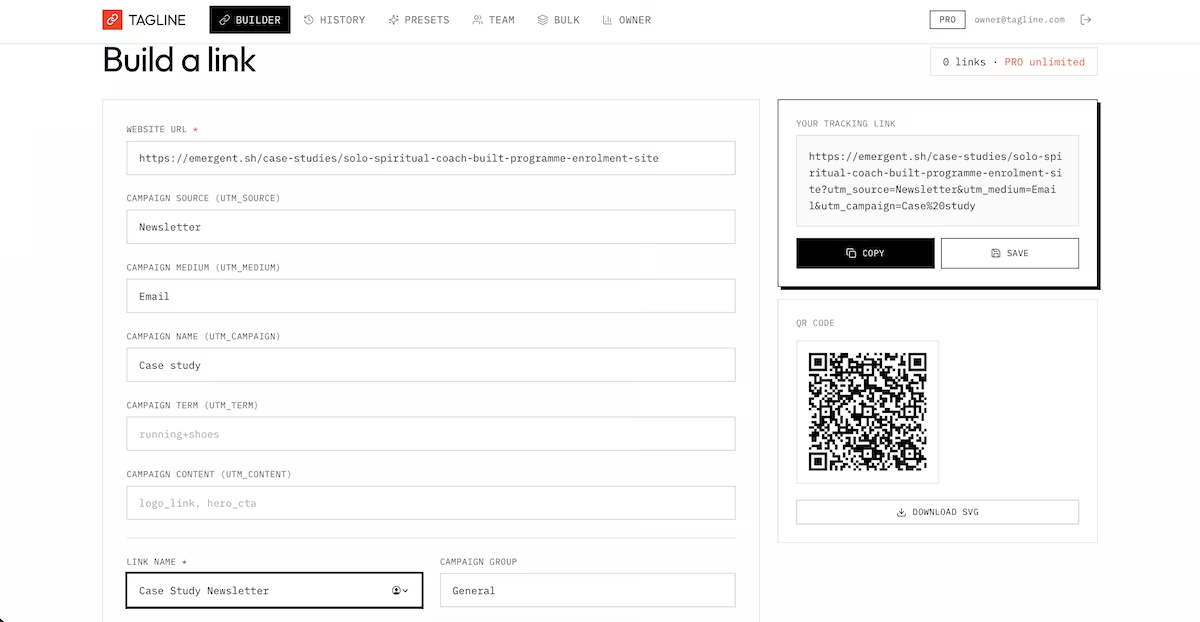
Twenty-four minutes and 31.38 credits produced the builder, QR generation, a searchable history, and a hard cap of 10 saved links. This was also the only build of the 10 that stumbled visibly, throwing a compile error on two unresolved imports before recovering on its own.
The dashboard tracks paid accounts against total signups, which is an important metric for a freemium tool.
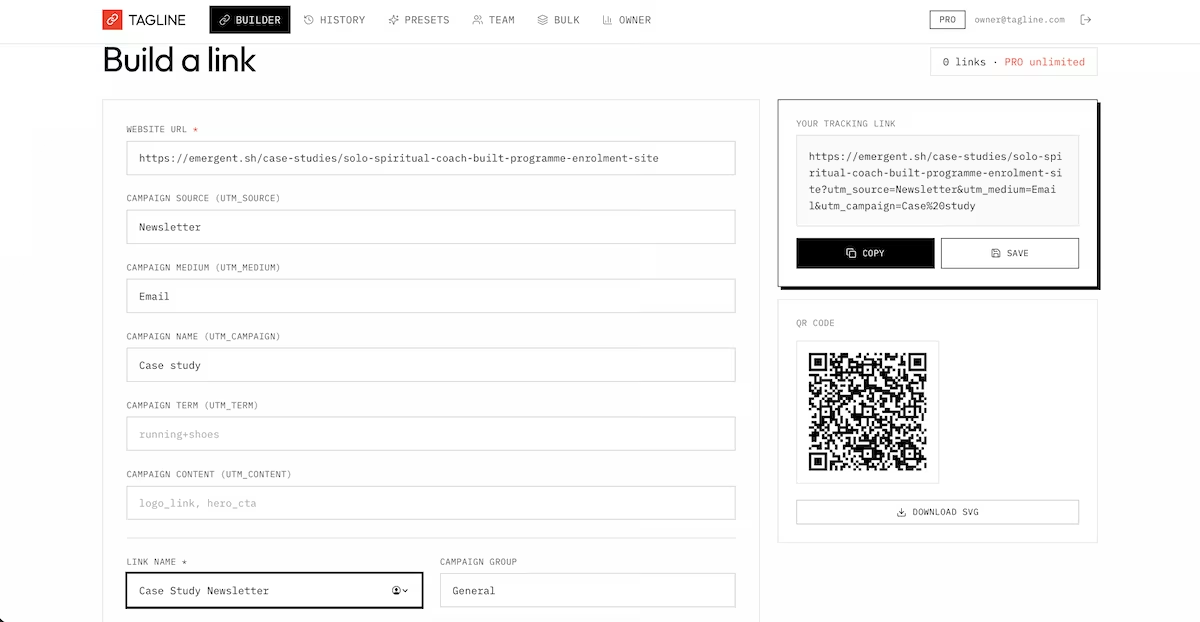
Ten saved links is the entire business model. It proves the tool works and won't run a campaign, so anyone who needs it will quickly hit the wall. Distribution is unusually cheap, because a free tool spreads through the exact audience that will pay for it.
Team features change the buyer too. A shared workspace moves the purchase from a personal card onto a company one, which raises what people will pay and makes the account harder to cancel. The risk is that a simple tool is simple to rebuild. The saved history protects you, as it makes leaving cost your users time.
Key Features
- A hard free limit: A cap that bites at the right moment converts better than a time-limited trial.
- Saved history: Accumulated user data makes switching to a rival unappealing.
- Team features: Shared access moves you from personal spend to a company card.
Pros and Cons
Pros:
- A subscription earns from the same user month after month.
- Free users market the tool for you without any spend.
- A narrow scope means you can support it alone.
Cons:
- Anyone can copy a simple tool once it's public.
- You're responsible for uptime, which never stops.
- One tool has a revenue ceiling until you build another.
Pricing
Build costs: Hosting and your time. Monetization: A monthly subscription, including team plans. Running costs: Moderate, since usage scales with hosting.
Bottom Line
This is the one to pick if you've already fixed the same problem for yourself more than once.
6. Paid Membership Libraries: Best for People With an Audience
What it does: You charge a monthly or annual fee for access to a growing library of lessons, files, and live sessions, plus the other members.
Best for: People with an existing audience looking for a monthly income stream.
A membership pays you monthly. Launches pay you in spikes. The trade is that you owe those members something new indefinitely, and the model depends on a number most people don't look at until it's too late.
Churn is the number in question, and you only see it if the store tracks members over time rather than counting signups. I asked Emergent for a membership site that reports it alongside everything else:
"Build a membership site for a brand called Studio Circle, giving paying members access to a resource library and a member area. The library holds videos, downloads, and written lessons, organized by collection, with new items marked and a saved-for-later list.
Members get a directory of other members and a monthly live session listing with signups. Billing is a recurring Stripe subscription with monthly and annual tiers, and members can see their plan, renewal date, and billing history.
Add an owner dashboard showing active members, monthly recurring revenue, churn, and most-viewed resources. Seed 40 library items and around 80 members across both tiers."
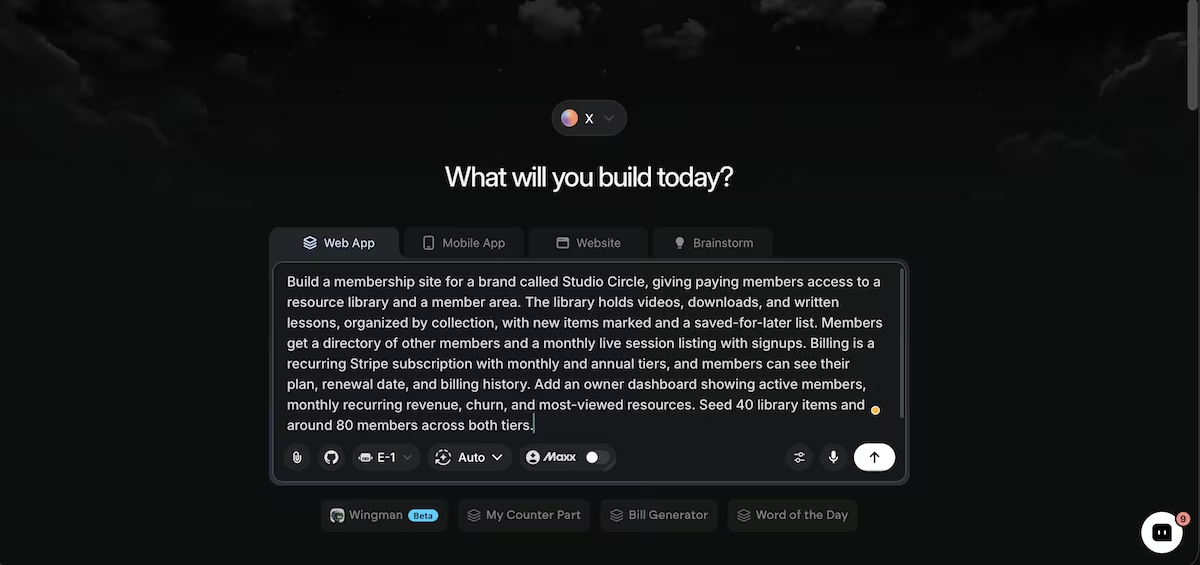
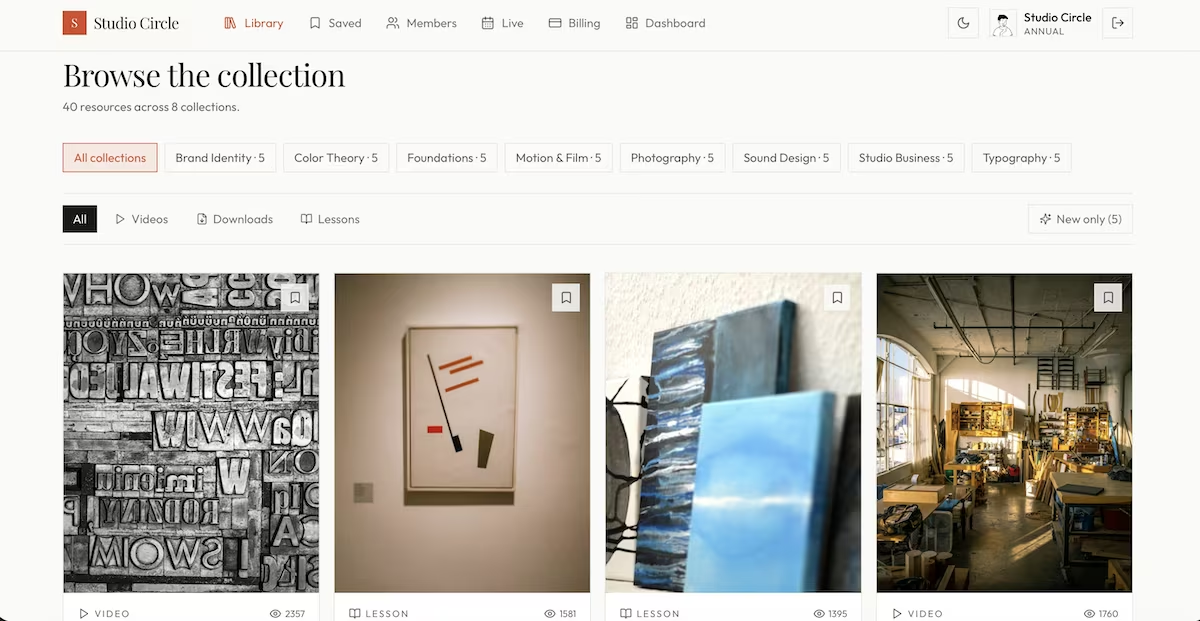
Studio Circle took 30 minutes and 41.5 credits. Recurring billing was the piece I most expected to be half-finished, but both tiers worked, with plan and renewal date on the member's billing page.
Members could also see their billing history without having to ask, which on a subscription product is the difference between a quiet month and a month spent answering billing emails. The overview tracked recurring revenue, the monthly-to-annual split, and churn on one screen.
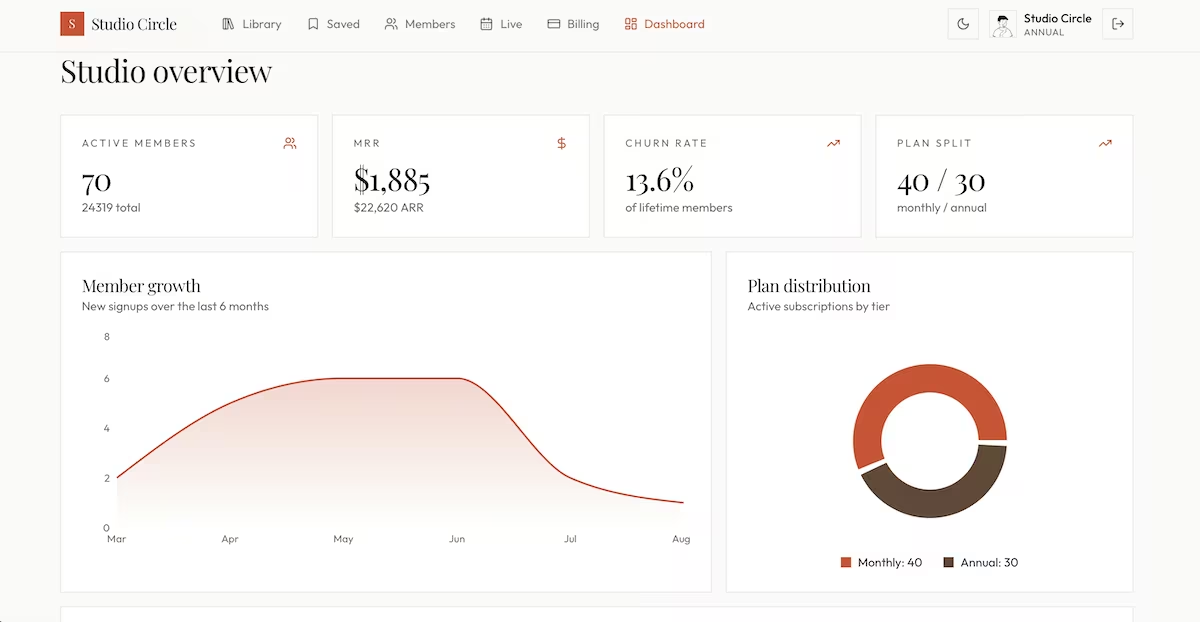
Churn is the figure that decides whether a membership is a real business or not. The annual tier is the only real counterweight, which is why moving people onto it is more important than the monthly price. Pricing tends to settle within a narrow band in any given niche, so buyers compare on what's inside, not on cost.
Live sessions and a member directory do more for retention than the content does, because people stay for the other members long after they've stopped using the library. Build the community side early. Treating it as an add-on costs you members.
Thirty people from an audience you already have makes this workable in month one, and the software is the quick bit.
Key Features
- Growing library: New monthly resources give members a reason to keep paying.
- Live sessions: Scheduled calls create a deadline that pulls lapsing members back.
- Member directory: Access to peers often outlasts interest in the content.
Pros and Cons
Pros:
- Income arrives on a schedule instead of in launch spikes.
- Members tell you what to make next, so content decisions get easier.
- Annual plans give you cash up front to reinvest.
Cons:
- You owe members something new every month, forever.
- Churn undoes your growth in the background if you stop watching it.
- Without an audience, finding your first members could be a slow process.
Pricing
Build costs: Hosting plus whatever your content requires. Monetization: Monthly and annual subscriptions, with tiers if you add coaching. Running costs: Moderate, mostly video hosting and payment fees.
Bottom Line
Attract an audience and this is the best model. Can’t attract one and you'll spend a year talking to an empty library.
7. Certification and Exam Prep: Best for Qualified Professionals
What it does: You sell practice questions, mock exams, and progress tracking to people studying for a professional qualification.
Best for: Anyone who has passed a hard industry exam and remembers what it asked.
Exam prep products have motivated buyers built-in. Someone sitting a licensing exam has a career riding on the result and has already paid to sit it, so the price of practice questions makes sense.
The market renews every year. A new cohort takes the same qualification, and they find you by searching the exam's name.
Electricians seemed like a fair test, since the qualification is hard, the syllabus is fixed, and nobody sits it for fun. Here's what I asked Emergent for:
"Build an exam prep app called Circuit Prep for electricians studying for their qualification. It holds a question bank organized by topic, each question with four options, a correct answer, and an explanation shown after answering.
Users take practice sets by topic or a timed mock exam of 60 questions, and see a score breakdown by topic with weak areas flagged.
Progress and past attempts are saved per user. Free accounts get one topic. Stripe unlocks the full bank and mock exams. Add an owner dashboard showing subscribers, average scores by topic, and questions most often failed.
Seed 150 questions across six topics and 45 users with attempt histories."
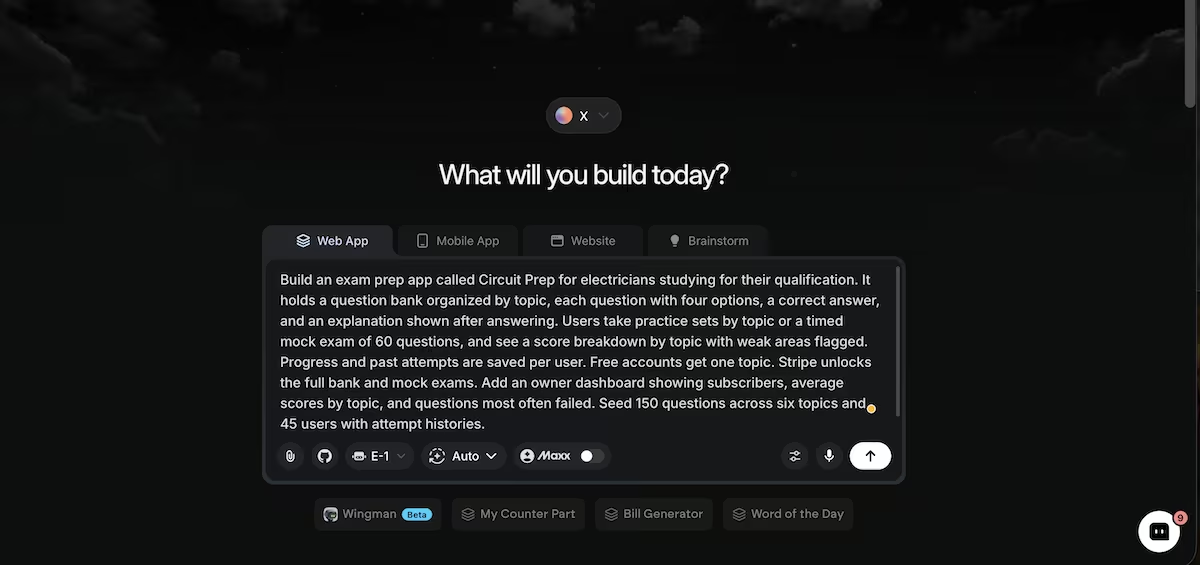
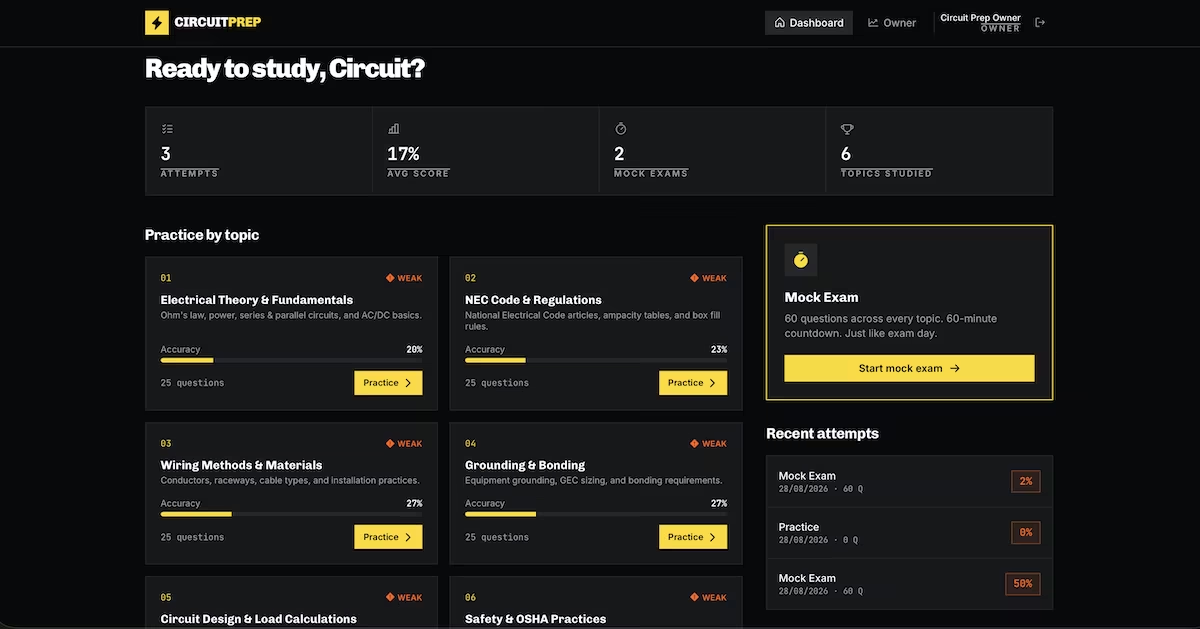
Thirty-one minutes and 34.63 credits produced 150 questions across six topics, timed mocks with a 60-minute countdown, and per-topic scoring that flags anything under 70%.
Every question held its explanation back until the student had answered, which is what separates a practice tool from a reference book, and the reason students come back to the app rather than reading their notes again. The owner dashboard adds a product roadmap and ranks questions by how often students get them wrong, reporting average scores by topic.
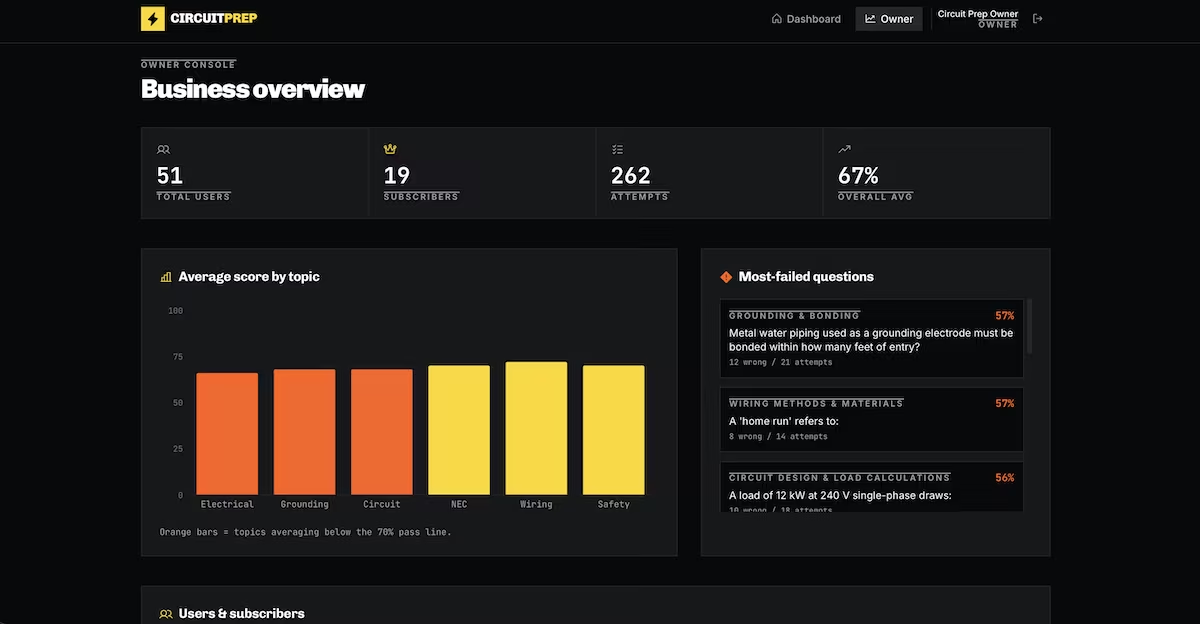
A question most students fail is either poorly written or covers something the training handles badly. Either way, you know what to fix. Students also have a deadline. They buy once the exam date is set instead of browsing for months, so the sales cycle is short.
Each qualification is its own market, though. Growth means building the second question bank rather than finding more buyers for the first, so the ceiling on a single exam is that year's cohort.
The barrier is the question bank: 150 solid questions with explanations takes weeks and real expertise. It's also why nobody can duplicate your business in a weekend.
Key Features
- Timed mock exams: Practicing under exam conditions is the feature students say they want.
- Weak area flagging: Per-topic scoring tells students where to spend their remaining time.
- Explanations with every question: The reasoning behind the answer is what people are paying for.
Pros and Cons
Pros:
- Buyers arrive motivated and with a date in the diary.
- Word of mouth spreads fast within trade and professional groups.
- The content stays valid for years between syllabus changes.
Cons:
- Building a credible question bank takes deep subject knowledge.
- Exam standards change and every change requires a content review.
- Each qualification is a separate market, so growth means starting again.
Pricing
Build costs: Your time writing questions, plus hosting. Monetization: One-off access or a subscription for the study period. Running costs: Low, aside from the content updates.
Bottom Line
This is the hardest idea here for a competitor to copy, but only if you've passed the exam yourself. If you haven't, don't fake it.
8. Ebooks and Paid Guides: Best for Writers
What it does: You write a practical guide on something you know and sell it, either as a file or as a reader that buyers log into.
Best for: Writers with real expertise who are starting without an audience.
Ebooks lead almost every list of digital product ideas because most people can write one. That's also why the category is brutal, since your guide competes in a crowded marketplace. The ones that sell are narrow, practical, and priced like a tool, not like a book.
You get paid once, the file gets passed around, and you never find out whether anyone read it. So instead of a download, I asked Emergent for a reader people have to log into, with the opening chapters free and the rest behind a paywall:
"Build a gated web reader for a paid guide sold under the name Bindery. The guide has chapters and sections with headings, images, and code or callout blocks, and a persistent contents sidebar. Non-buyers can read the first two chapters, then hit a paywall.
Stripe checkout gives lifetime access tied to a login, with reading progress saved, a resume button, and highlights the reader can save and revisit. Add an owner dashboard showing purchases, revenue, where readers stop reading by chapter, and completion rate.
Seed one full guide of 10 chapters with realistic body text, plus around 50 buyers with varied reading progress."
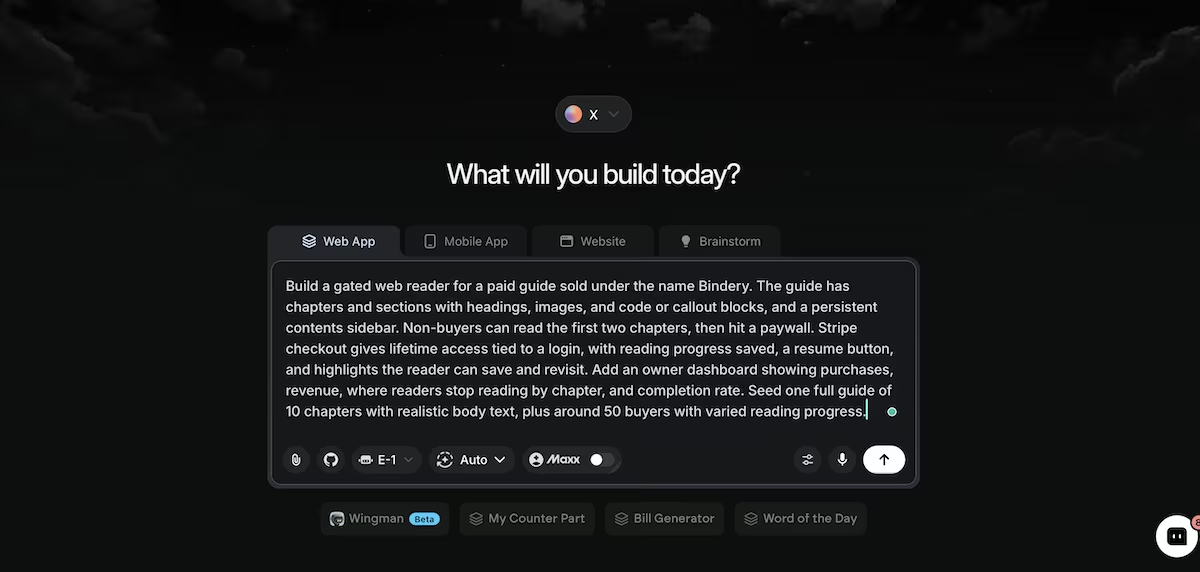
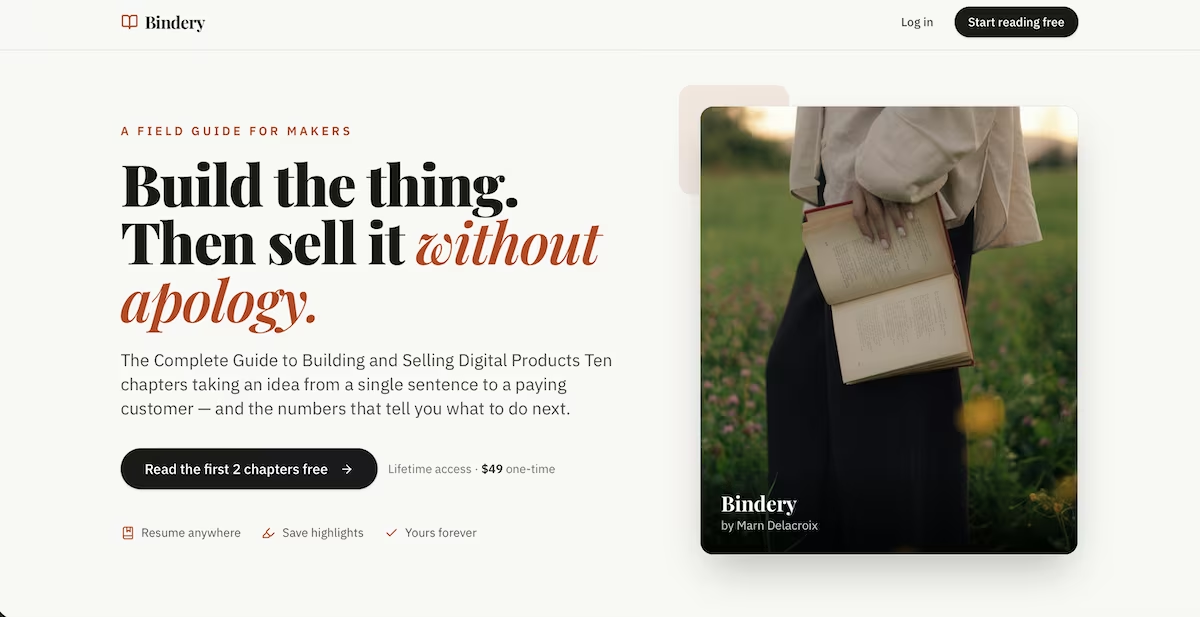
Twenty-four minutes and 30.52 credits later I had a 10-chapter reader with a contents sidebar, saved highlights, and a resume button. The dashboard reported where readers stop, chapter by chapter, alongside a completion rate.
Saved highlights and a resume button sound minor, but they're what gets someone to open the guide a second time, and a reader who comes back is the one who buys whatever you write next. The dashboard reported where readers stop, chapter by chapter, alongside a completion rate.
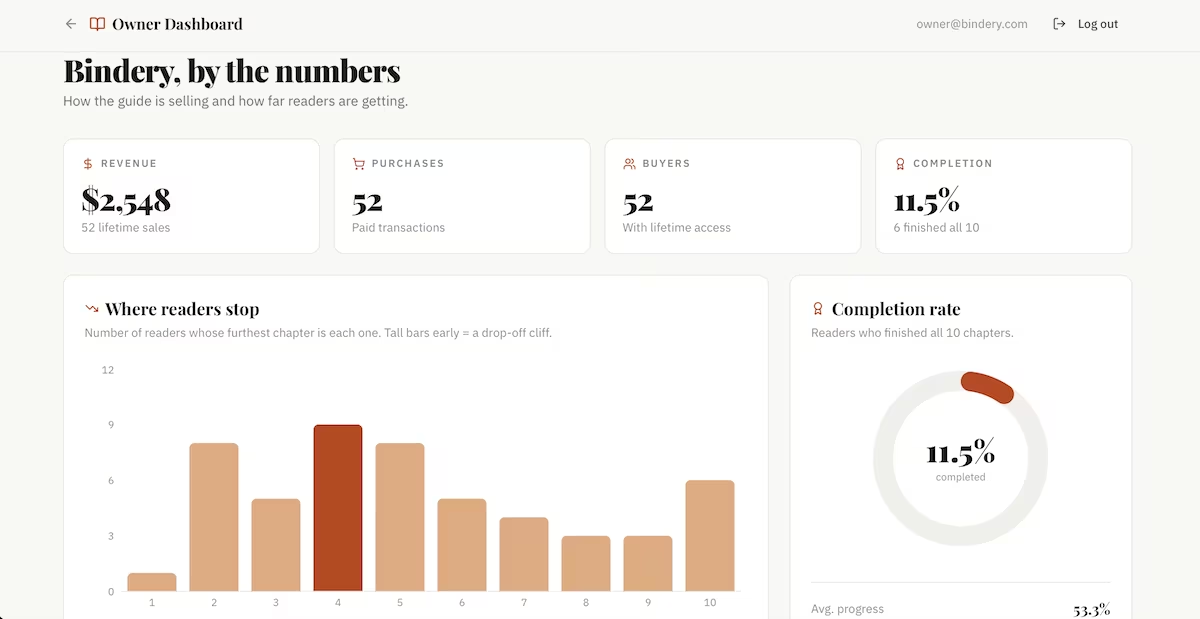
Knowing which chapter loses people tells you which one needs rewriting. The ones who finish are also those who are more likely to buy whatever you sell next.
A guide also does work that isn't measured in sales, since it establishes you as a subject expert. That makes everything else you sell easier to price, and plenty of people write one specifically to sell a template pack or a membership to the same audience.
This ranks where it does because of the revenue shape. With a single payment and no natural upsell, you're always selling to strangers.
Key Features
- Free opening chapters: A free preview converts far better than a sales page describing it.
- Reading progress: A saved place and a resume button increases the odds that people return.
- Lifetime access: Tying the guide to a login lets you improve it after publication.
Pros and Cons
Pros:
- The barrier to producing one is low.
- Writing establishes authority that sells your other products.
- Once you’ve written the guide, margins are close to 100%.
Cons:
- Revenue is one-off, so every sale needs a new customer.
- Files circulate freely unless you gate access.
- The market is saturated with free materials on almost every topic.
Pricing
Build costs: Your writing time and hosting. Monetization: A one-off purchase, or a bundle with templates or a course. Running costs: Very low.
Bottom Line
Sell it as a login rather than a file. You'll learn where readers give up, and that alone justifies the extra setup.
9. Paid Research Reports and Benchmark Data: Best for Industry Insiders
What it does: You gather numbers an industry can't find anywhere else, then sell access to them as a subscription, not a dated PDF.
Best for: Operators, consultants, or association staff with a route to exclusive data.
Benchmark data sells on an annual subscription because the buyer uses it to set their own prices, budgets, and headcount, and there's no substitute for numbers only you can offer. The format is as important as the data. A PDF report is out of date the day it’s published, while a dashboard where each quarter is a release is something people renew.
A live version means quarterly releases, an archive behind them, and a paywall that holds when someone goes looking for the locked figures. I asked Emergent for all three:
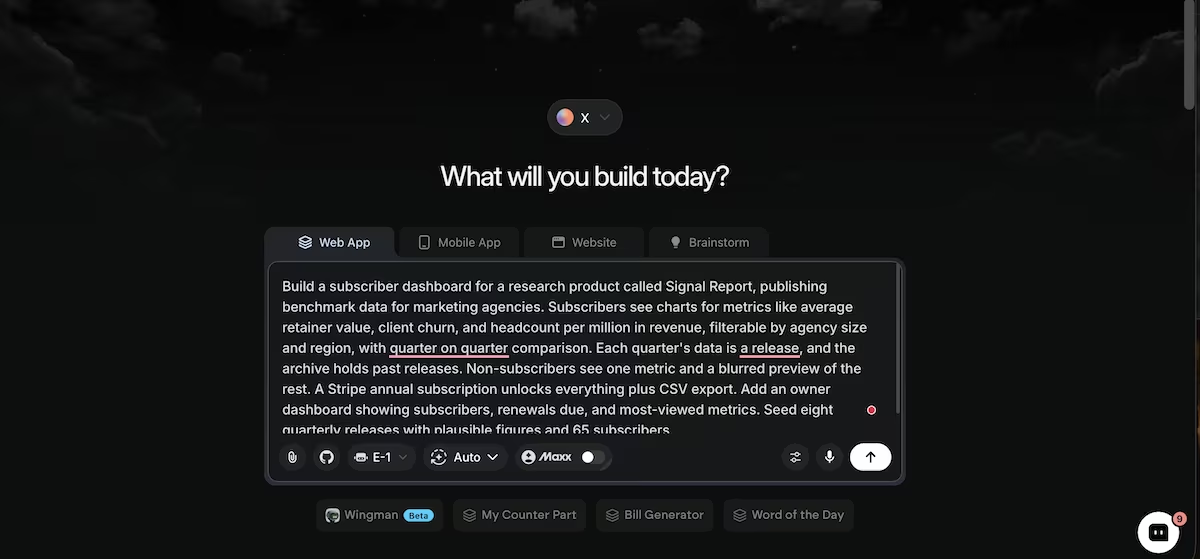
"Build a subscriber dashboard for a research product called Signal Report, publishing benchmark data for marketing agencies.
Subscribers see charts for metrics like average retainer value, client churn, and headcount per million in revenue, filterable by agency size and region, with quarter on quarter comparison.
Each quarter's data is a release, and the archive holds past releases. Non-subscribers see one metric and a blurred preview of the rest. A Stripe annual subscription unlocks everything plus CSV export.
Add an owner dashboard showing subscribers, renewals due, and most-viewed metrics. Seed eight quarterly releases with plausible figures and 65 subscribers."
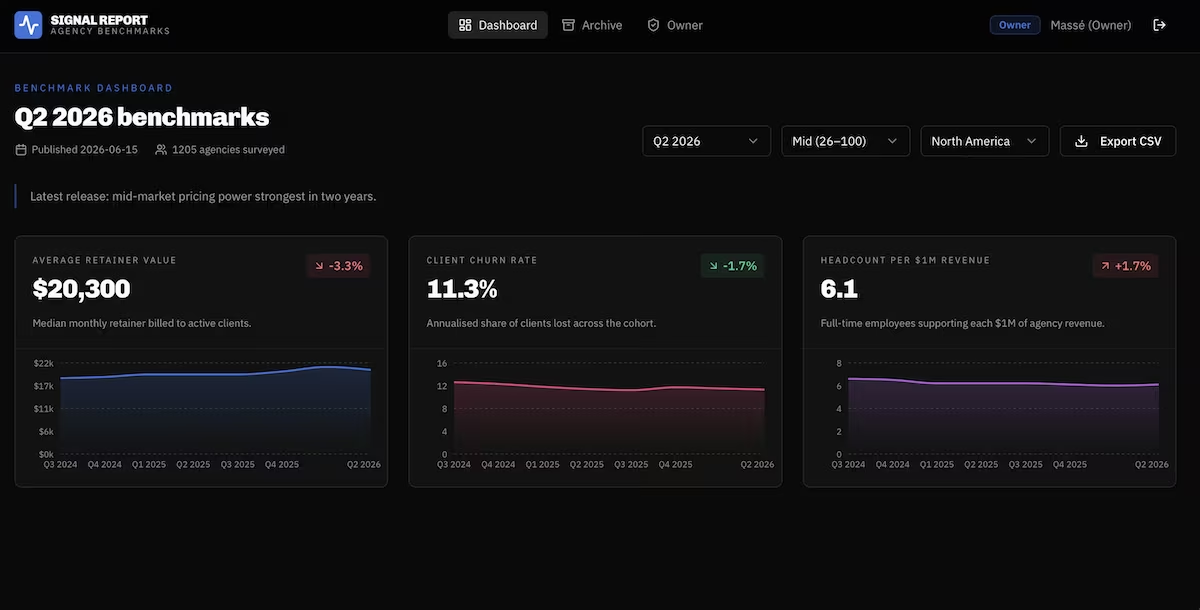
Twenty-six minutes and 38.94 credits produced eight quarterly releases running from Q3 2024 to Q2 2026, three metrics filterable by agency size and region, and a paywall enforced server-side so locked figures don't reach the browser.
Each metric showed quarter-on-quarter movement rather than a standalone figure. Subscribers care less about the number than about whether it moved and which way it went, and that comparison is what they renew for.
The owner console tracks subscribers alongside renewals due in the next 30 days, which is the pairing an annual product lives on.
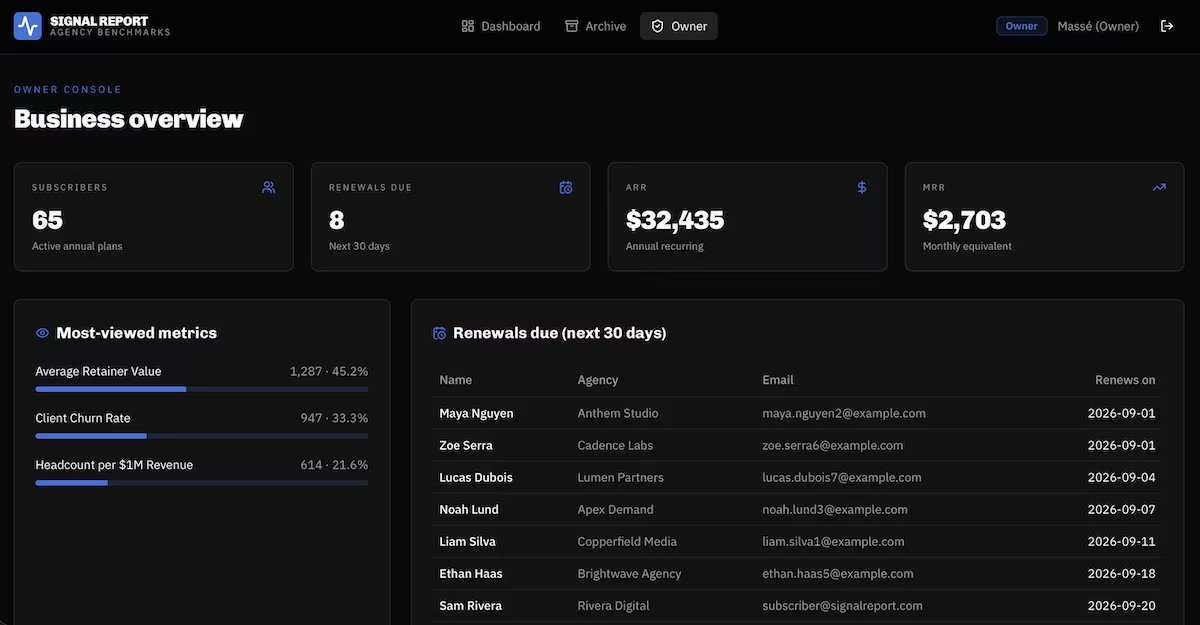
Renewal rates are what makes this model appealing. Once a client plans their year around your numbers, dropping the subscription means losing the comparison they've been tracking. The history behind that comparison is something a competitor can't hand them, however good the newer report looks.
The obstacle here is the obvious one. You need the data, and getting 1,200 agencies to provide retainer values and churn takes trust and a position in the industry.
Key Features
- Segmented filters: Buyers care about their own size and region, not the industry average.
- A release archive: Historical quarters turn a snapshot into a trend nobody else holds.
- Data export: Letting subscribers pull the numbers into their own models justifies the price.
Pros and Cons
Pros:
- Annual pricing suits data that updates on a schedule.
- Renewal rates are strong once the data is embedded in customer planning.
- Nobody can copy it without repeating the collection work.
Cons:
- Data collection requires industry access most people don't have.
- Each release is a fresh round of surveying and analysis.
- Credibility takes several releases to establish.
Pricing
Build costs: Survey tooling and hosting, plus significant research time. Monetization: Annual subscriptions, with enterprise tiers for larger firms. Running costs: Moderate, dominated by the collection effort.
Bottom Line
This has the best repeat revenue and the strongest defense on the list, and it's also the hardest to start. Most people reading this won't have the access they’d need.
10. Spreadsheet Models and Calculators: Best for Finance-Minded Consultants
What it does: You take a financial model you've built for clients and sell it as a web tool, where users enter their own numbers for a projection.
Best for: Consultants and fractional finance professionals who model for a living.
Consultants have been selling spreadsheet models for years as a locked .xlsx. The same logic priced as a web tool with saved scenarios pays you monthly instead of once, because you're selling a planning habit rather than a file.
It also sells to people who are used to paying for advice. A consultant with a dozen clients already has the audience, and the tool gives them something to sell between engagements.
A model priced as a subscription needs saved scenarios, a comparison view, and a free tier that shows enough to be useful. I described the whole thing to Emergent in one go:
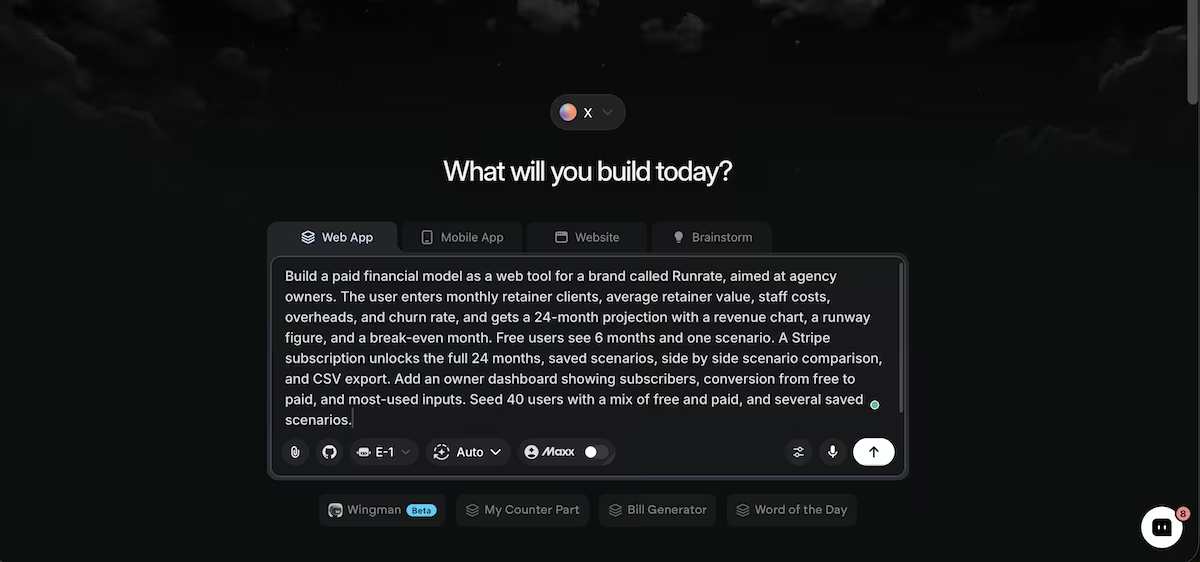
"Build a paid financial model as a web tool for a brand called Runrate, aimed at agency owners.
The user enters monthly retainer clients, average retainer value, staff costs, overheads, and churn rate, and gets a 24-month projection with a revenue chart, a runway figure, and a break-even month.
Free users see 6 months and one scenario. A Stripe subscription unlocks the full 24 months, saved scenarios, side by side scenario comparison, and CSV export. Add an owner dashboard showing subscribers, conversion from free to paid, and most-used inputs.
Seed 40 users with a mix of free and paid, and several saved scenarios."
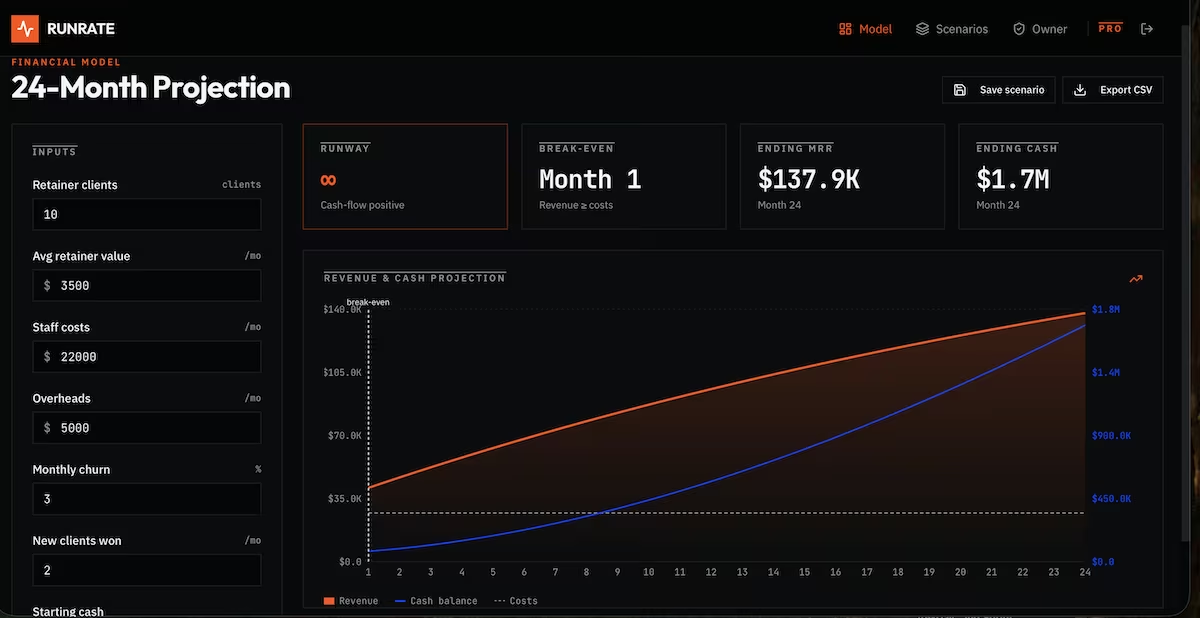
At 39 minutes and 55.55 credits this was the most expensive build after Stackwell, and it seemed worth it (at first). Live revenue and cash chart, runway, break-even, and a CSV export that opened cleanly with 24 rows.
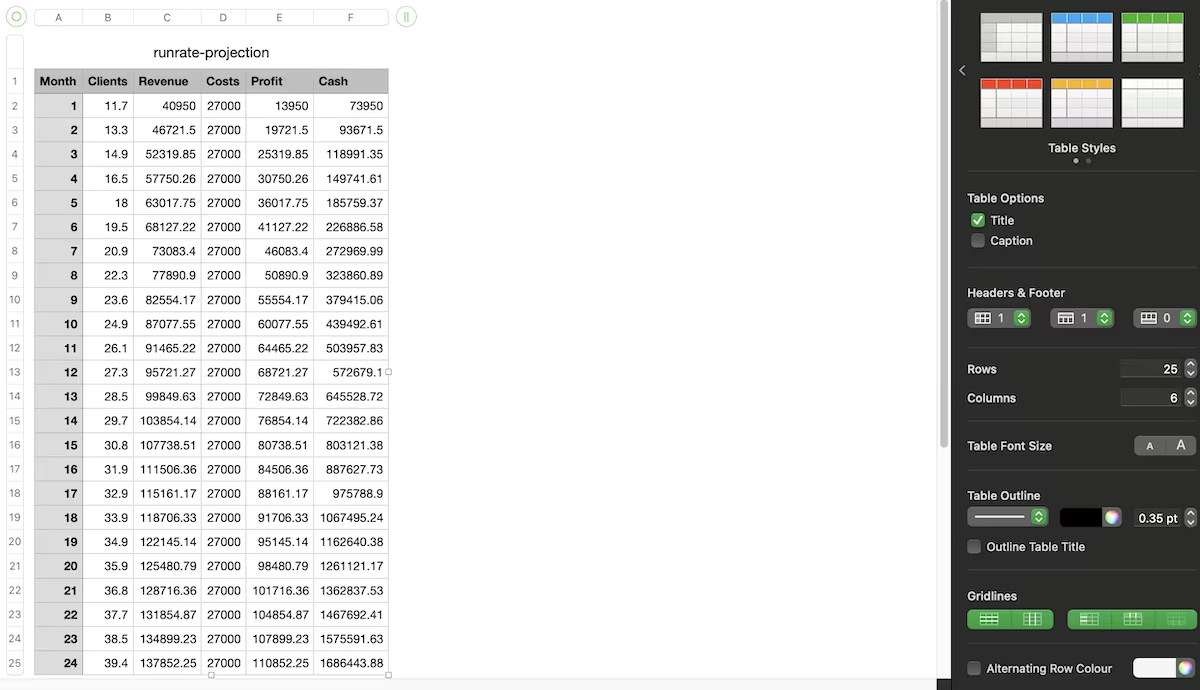
Then I read the output properly. Both headline figures were useless. With the default inputs of 10 clients at $3,500 against $27,000 of monthly costs, runway showed as infinite and break-even as month one, because the model starts cash-flow positive.
The build calculated exactly what I asked it to. I'd given it no starting figures, so it invented a business that was already profitable. Getting those defaults right is the work, because they're what the buyer is paying you for.
That's also what makes it sell. They're paying for your judgment about what belongs in the model. A consultant who already advises these people has that judgment on record.
Selling it cold is harder, which is why the people who do well with this tend to launch it to an existing client list first.
Key Features
- Scenario saving: Comparing a lean case against an aggressive one is what buyers use it for.
- Free preview window: A shortened projection proves the tool works before payment.
- Export options: Letting users pull results into their own reporting keeps the tool in the workflow.
Pros and Cons
Pros:
- Selling the logic as a tool lets you charge monthly rather than once.
- Subscription pricing fits because planning is a recurring activity.
- The logic transfers, so one model often becomes several for different industries.
Cons:
- Buyers need to trust your assumptions, which means trusting you first.
- Financial tools invite scrutiny and support questions.
- Sensible default values are surprisingly hard to choose.
Pricing
Build costs: Hosting, plus the time to get the model right. Monetization: A monthly subscription, or a one-off purchase per model. Running costs: Low, with support being the main ongoing cost.
Bottom Line
Sell this to people who already know your work. The model earns monthly, and the clients you've already advised are your lowest-hanging fruit.
Which Digital Product Idea Should You Choose?
The right digital product idea depends less on the market and more on what you already have. Match the idea to your unfair advantage, not to the revenue ceiling.
Choose templates, printables, or asset packs if you:
- Have design skills or existing work you can package.
- Want a first sale within weeks rather than months.
Choose a membership or exam prep if you:
- Already have an audience or a professional qualification.
- Want recurring revenue and can commit to ongoing content.
Choose a micro-tool or a model if you:
- Keep solving the same problem for yourself or for your clients.
- Are comfortable maintaining software indefinitely.
Skip digital products entirely if you:
- Want income with no ongoing work attached.
- Have no audience, no niche expertise, and no way to reach buyers.
Also read our guide on how to start a digital business for a tested step-by-step method before you commit to a product type.
Final Verdict
The most practical digital product ideas here are workspace templates, prompt packs, and design assets. Each one has a product you can put together from work you've already done, and a store you can set up in an evening.
Printables and micro-tools need more from you before launch, one in catalog volume and the other in ongoing maintenance, though both give the same customer a reason to buy again.
Memberships and exam prep are harder to start and harder to lose at. One asks for an audience and something new every month, the other for weeks of question writing, but both improve retention once they're running.
Research reports have the best position on the list and the highest barrier, since the data has to exist before the product does. Spreadsheet models ranked last because they need an existing client relationship before anyone will trust your assumptions. Get that right and the model earns monthly.
Across all 10 builds, delivery decided the outcome: licensing, gating, and knowing what buyers do after they pay. Delivery, licensing, gating, and knowing what buyers do after they pay separate a product that sells once from one that keeps selling. It's the same question you'd ask of any revenue model: what happens after the first payment?
How Emergent Fits In
Every store in this article started as a single paragraph. For each one, I assigned Emergent a brief, and it built me a store with a checkout, logins, a database, and an owner dashboard.
The selling machinery is where these businesses stall. Marketplaces take a cut and own your customer list. Website builders handle a simple download well and struggle with license tiers, expiring links, version tracking, or a metered paywall.
Emergent's AI app builder takes a plain description and coordinates a set of specialized agents across the planning, the interface, and the data, returning code you own and can keep changing. For a first digital product that's the difference between using a third-party storefront and having your own.
If you're starting a side hustle this year, or building a digital business around one of these ideas, start with Emergent for free and describe what you need.
Most builders stop at a prototype. Emergent ships real web and mobile apps, with accounts, databases, and payments included.
- Production-ready apps
- Web & mobile apps
- Deploy in minutes
Most builders stop at a prototype. Emergent ships real web and mobile apps, with accounts, databases, and payments included.
- Production-ready apps
- Web & mobile apps
- Deploy in minutes





