




TL;DR
- Make.com pricing starts free with 1,000 monthly credits, then runs $16 per month for Core, $28 for Pro, and $51 for Teams at the 10,000-credit tier, all cheaper on annual billing.
- What burns credits is scenario design, not the plan, since every module costs one credit per item and only the trigger is capped at one credit no matter how many rows it finds.
- Rescanning a whole 400-row sheet with four action modules costs 1,601 credits per run, while a "watch new rows" trigger picking up 20 rows drops that to 81, a fraction of the same work.
- Triggers spend a credit on every check even when nothing is new, so polling every minute burns 43,200 credits monthly, over four times Core's allowance, before a single item arrives.
- Make connects existing apps but cannot build a real database, an end-user login, a customer-facing UI, or a mobile app, so a workflow needing an actual application behind it outgrows the tool entirely.
A friend of mine picked Make's Core plan based on the monthly price, then watched a five-step scenario burn through their entire month's credits in six days. The cause: it rechecked all 400 rows in their spreadsheet every day instead of only the new ones.
How many credits a scenario burns depends on how many steps and loops it runs. The plan you're on affects it less. And none of this is obvious without breaking it down.
So I checked Make's pricing page for what each plan costs and includes, and how many credits a typical workflow needs before you commit to one.
You'll walk away knowing which plan fits, and how credits actually get used, the part that would have saved my friend that first month.
Make Pricing Plans at a Glance
All Make prices below are for the base credit tier, billed monthly, with the cheaper annual billing price shown in brackets. Every paid plan scales up from there as your credit needs grow.
| Plan | Price | Best For |
|---|---|---|
| Free | $0/month | Testing the visual builder before committing to anything |
| Core | $16/month ($12/month billed annually) | Solo builders running straightforward, scheduled workflows |
| Pro | $28/month ($21/month billed annually) | Teams that need priority execution and deeper debugging |
| Teams | $51/month ($38/month billed annually) | Multiple people building and sharing scenarios together |
| Enterprise | Custom pricing | Organizations that need SSO and audit-ready compliance controls |
Make Pricing Plans Breakdown
Free: $0/Month
What's included: 1,000 credits a month, the full no-code visual workflow builder, access to 3,000+ apps, routers and filters, and a 15-minute minimum interval between scenario runs.
Best for: Trying Make's interface before spending anything.
Pros:
- No credit card required to start.
- The same visual builder every paid plan uses, full-featured from the start.
- The free tier itself doesn't expire, unlike a typical trial period.
Cons:
- Two active scenarios is the cap, as Make's community forum shows.
- The 15-minute minimum interval rules out real-time workflows.
- Total data storage is capped at 1MB, room for exactly one data store.
I tested this limit by building three scenarios: a Google Forms automation, a Google Sheets automation, and a Gmail automation, then tried activating all three at once. Make blocked the third automation outright, and told me to upgrade my plan.

Core: $16/Month ($12/Month Annually)
What's included: Everything in Free, plus unlimited active scenarios, scheduling down to the minute, higher data transfer limits, and access to the Make API.
Best for: Solo builders or small teams running predictable, scheduled automations.
Pros:
- Unlimited scenarios remove the biggest Free-plan constraint.
- One-minute scheduling makes near-real-time automation possible.
- API access lets you start a scenario from a script or another app instead of clicking it inside Make.
Cons:
- No priority execution yet, so scenarios can queue during peak load.
- 10,000 credits disappear fast once a workflow loops over more than a handful of records at a time.
- Data storage tops out at 10MB, since Make gives 1MB of storage for every 1,000 credits, and Core includes 10,000.
Pro: $28/Month ($21/Month Annually)
What's included: Everything in Core, plus priority scenario execution, custom variables, and full-text execution log search.
Best for: Teams that need faster execution and better debugging visibility.
Pros:
- Priority execution means your scenarios skip the queue Core plans wait in during high-traffic periods.
- Full-text log search lets you search every past run's data at once, instead of opening each run to find what broke.
- Custom variables let you reuse a value across a scenario instead of typing it into every module.
Cons:
- Custom variables make a scenario easier to maintain, but running it still costs the same number of credits.
- No team roles or shared templates yet; those start at Teams.
- Priority execution only helps during busy periods, since scenarios run at normal speed the rest of the time.
Teams: $51/Month ($38/Month Annually)
What's included: Everything in Pro, plus team roles and the ability to create and share scenario templates.
Best for: Multiple people building and running automations together.
Pros:
- Shared templates cut down on rebuilding the same logic twice.
- Team roles give you some control over who can edit which scenarios.
- Multiple people can build inside one organization without stepping on each other's scenarios.
Cons:
- Adding more people who build scenarios doesn't come with more credits, so a bigger team burns through the same monthly allocation faster.
- The collaboration features add little if you're building solo.
- The jump from Pro to Teams is proportionally the steepest in the lineup, an 82% increase versus 75% from Core to Pro on monthly billing, even though team roles and templates are the only new features.
Enterprise: Custom Pricing
What's included: Everything in Teams, plus custom functions, enterprise app integrations, 24/7 support, access to Make's Value Engineering team, overage protection, and advanced security features.
Best for: Organizations with compliance, governance, or scale needs that the self-serve plans don't cover.
Pros:
- Overage protection removes the risk of scenarios stopping mid-month.
- Dedicated support pays off once automations are business-critical.
- Custom functions let you write reusable code blocks shared across scenarios.
Cons:
- No public pricing to compare before a sales call.
- Key features are gated behind a sales call, with no self-serve path onto Enterprise.
- Most of what Enterprise adds only becomes relevant once compliance or scale requirements kick in.
How Make Credits Work
The basic rule is that one module, when run on one data item, costs one credit. A module handling five separate items, like five new form responses, runs five times, so that's five credits.
The one exception: The trigger, which is the module that starts the scenario, always costs exactly one credit, no matter how many items it finds. Modules after the trigger don't get that break. Each one runs once per item, at one credit each.
My friend from the intro had a trigger plus four action modules, meaning four steps that each perform an action on a row, such as updating a CRM record or sending a notification. It checked a 400-row spreadsheet. Rescanning all 400 rows every run adds up like this:
- Trigger: 1 credit, no matter how many rows it finds.
- Each of the 4 action modules: 400 credits, one per row.
- Total per run: 1 + (4 × 400) = 1,601 credits.
- Run once a day for 6 days: 1,601 × 6 = 9,606 credits, nearly all of Core's 10,000-credit month.
The fix: Make's "Watch New Rows" trigger only picks up rows added since the last check, instead of the whole sheet.
This trigger is specifically for the Google Sheets version. Most Make triggers offer the same option under the "Choose where to start" prompt after you’ve set up your automation. Picking "From now on" instead of "All" will only trigger with new additions.
Now, if my friend had set this trigger to happen once a day and to scan only new rows, they’d have used a fraction of the credits. Let’s say they added 20 new rows to their Google Sheets file each day.
- Trigger: 1 credit.
- Each of the 4 action modules: 20 credits, one per new row.
- Total per run: 1 + (4 × 20) = 81 credits.
- Over 30 days: 81 × 30 = 2,430 credits, comfortably inside Core's 10,000.

Run frequency changes the bill too: Even with a correctly built scenario, running it more often costs more. Take a five-step scenario (1 trigger, 4 action modules), picking up 5 new items per run:
- Total per run: 1 + (4 × 5) = 21 credits.
- Running hourly: 21 × 24 runs × 30 days = about 15,100 credits a month, more than the base 10,000-credit tier.
- Running four times a day: 21 × 4 runs × 30 days = about 2,500 credits a month, comfortably inside the base tier.
Checking for data costs a credit even when it finds nothing. A trigger uses 1 credit every time it checks, whether or not it turns up new data. Set a trigger to check or poll every minute, and that alone adds up fast:
- Every minute: 60 × 24 × 30 = 43,200 checks a month, over four times Core's entire 10,000-credit allowance, before a single new item ever shows up.
- Every 15 minutes: 4 × 24 × 30 = 2,880 checks a month, well inside the base tier.
Core's 1-minute scheduling is an upgrade over Free's 15-minute interval, but setting it that fast only makes sense if new data shows up close to every minute. Otherwise, you're paying for empty checks.
Two more things can affect your bill:
- Going over your credit limit costs 25% more per credit, whether you buy a pack manually or through auto-purchasing.
- Make's built-in AI modules don't follow the flat one-credit rule; their cost depends on how much text or data they process, so they can cost more or less than a credit per run.
Make renamed its billing unit from "operations" to "credits" in August 2025. If you see "operations" in an older guide or inside your own Make run history, it's just a count of how many times your modules ran.
Which Make Plan Should You Choose?
Choose Free if you:
- Want to see how credits get consumed before spending anything.
- Run automations with no deadline pressure and no real-time need.
Choose Core if you:
- Run predictable, scheduled workflows with a known step count.
- Need unlimited active scenarios, but not priority execution.
Choose Pro if you:
- Run scenarios during peak hours and need them prioritized.
- Debug workflows often enough that full-text log search saves you time.
Choose Teams if you:
- Have more than one person building or running scenarios.
- Want shared templates instead of rebuilding the same logic per person.
Choose Enterprise if you:
- Need SSO, audit logs, or compliance sign-off before adoption.
- Run volume high enough that avoiding overage fees is worth paying for outright.
Is Make Worth the Cost?
Make earns its price when the work is steady, like scheduled reports and routine internal data syncs, where you know roughly how many steps run each month. At that volume, the entry-level plans are hard to beat on price.
Make is worth it if you:
- Run scheduled, predictable automations where step count doesn't swing month to month.
- Want visual control over exactly how each workflow branches.
Skip Make if you:
- Have spiky or unpredictable volume that makes credit planning a guessing game.
- Need customer-facing automations where a delay from queued execution costs you customers.
Make Alternatives & Pricing Comparison
Make isn't the only credit- or task-based automation tool worth pricing out. If Core's credit ceiling doesn't fit your volume, it's worth comparing with Zapier's task-based pricing, or browsing the full list of Zapier alternatives if you want the wider field.
| Tool | Starting Price | Best For |
|---|---|---|
| Make | $16/month ($12/month billed annually) | Visual, credit-based automation with granular branching control |
| Zapier | $29.99/month ($19.99/month billed annually) | The broadest app library and the simplest setup |
| n8n | $24/month ($20/month billed annually) | Technical teams that want execution-based pricing or self-hosting |
| Emergent | $20/month ($17/month billed annually) | Building the application your business runs on |
What Make Can't Build for You
Some workflows outgrow automation. A Make scenario can move a new lead from a form into a CRM. But it can't give that lead a place to log in or check an order status, because Make exists to connect the apps you already have.

Four other specific gaps show up once a workflow needs an actual application behind it:
- No real application database. Make caps every organization at 1,000 data stores of at least 1MB each, with total storage scaling at 1MB per 1,000 credits, so a Free account gets exactly one 1MB store, a small cache well short of a database for a growing customer list.
- No end-user login. Make's structure is built for the people who build and manage scenarios. It has no concept of a customer using a finished product. There's no feature for giving your app's customers an account to log into.
- No mobile app output. Make's plans don't include a way to build or publish a mobile app. The Make mobile app turns your phone's sensors, GPS, calls, photos, and contacts into triggers and actions inside a scenario, and lets you manually fire off an existing scenario with a button press. It isn't a tool for building an app that your customers use.
- No UI at all. Builders on Make's community forum have asked how to give a scenario a customer-facing front end, and the standard answer is to bring in a separate tool, since Make doesn't ship one.
Emergent fills those four gaps well.
Emergent is a vibe coding platform, meaning you build software by having a conversation rather than by writing code or placing elements on a canvas. What comes out of that conversation is the database and login system Make can't build, plus the UI itself.
I tested this against the same order-status problem from the Make section above. Emergent asked a clarifying question first: a custom email-and-password login, or Google social login. I picked the custom login.
It also asked whether I wanted separate customer and admin accounts. Staff need to update orders, and customers need to check on theirs, so this build needed both.
What came out the other side was a branded concierge portal, with a sign-in screen polished enough to pass for a real product. An admin can sign in and update an order's status directly on the dashboard behind it.
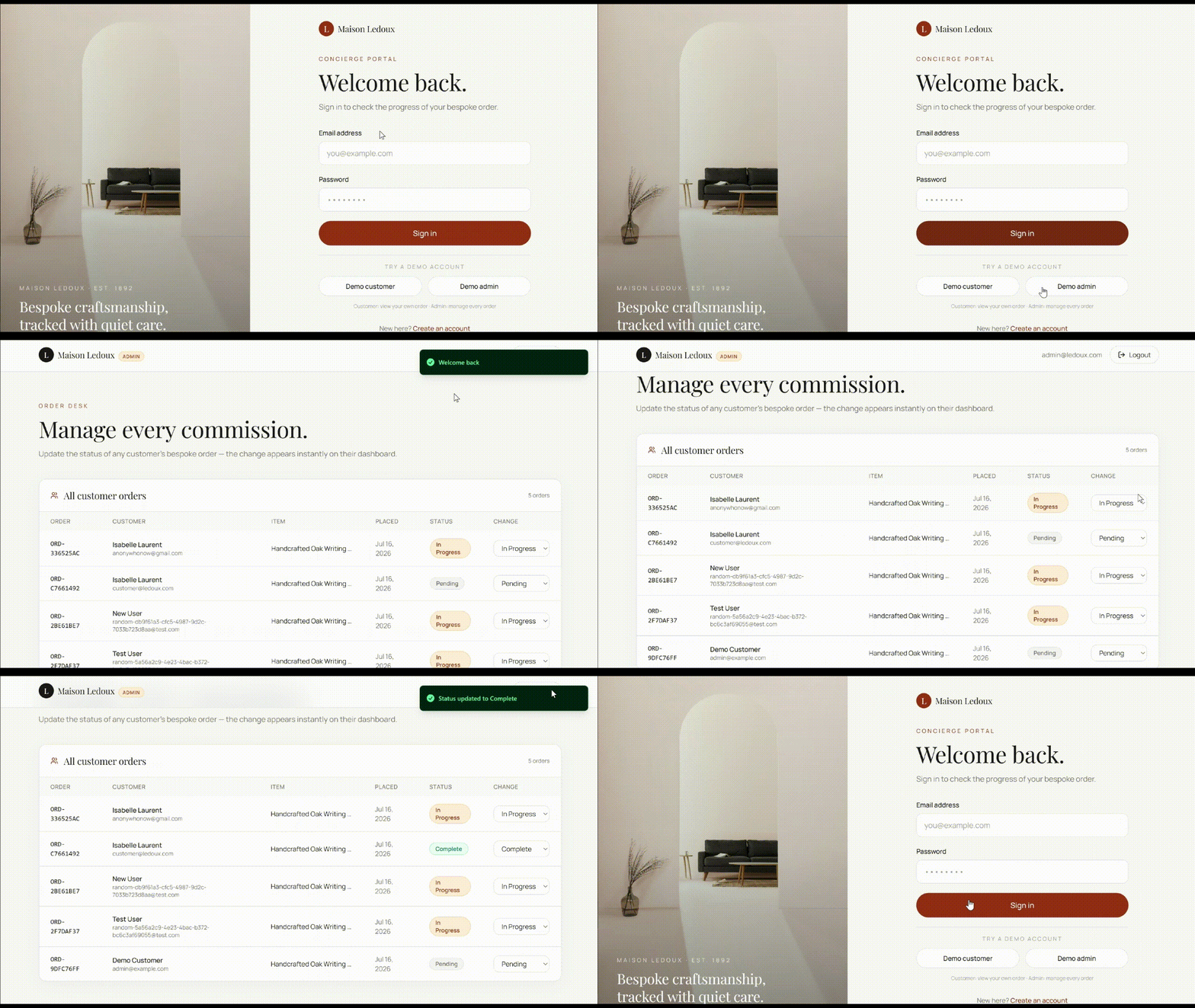
You don't have to choose between Make and Emergent. Keep Make running your CRM syncs and alerts, same as before, and build the customer-facing app in Emergent alongside it.
Emergent also integrates directly with other tools, including Stripe for payments, Slack for notifications, GitHub for code, and Salesforce for CRM data.
Pairing tools this way isn't unusual.
The typical small business already runs a median of five tools across functions like marketing and automation, so pairing Make with Emergent is just one more piece of that same stack.
My Bottom Line on Make Pricing
Make's pricing rewards discipline more than it rewards the plan you pick.
Get the trigger and schedule right, and Core covers most real workflows for $16 a month. Get it wrong, like rescanning a whole spreadsheet instead of watching for new rows, and even Teams won't save you from burning through credits fast.
I'd pick Core the moment I needed more than two scenarios running at once, and I'd only move to Pro or Teams once queue delays or team handoffs started slowing the team down.
What Make can't fix with a plan upgrade is the app layer itself. Fixing that takes a platform built to create applications.
If your Make scenarios already feed a CRM or spreadsheet, the next step is giving customers a place to log in and see their data. Emergent builds that database, login system, and UI from a conversation, and it runs alongside Make rather than replacing it.
Build the part Make can't. Start building on Emergent.

Emergent designs, writes, and publishes your whole site from one prompt. No templates, no drag-and-drop.
- Full site from one prompt
- Custom design, real pages
- Publish in minutes







