

Build a Custom Customer Journey Dashboard Using AI in Minutes
Turn a plain-English description of your Customer Journey Dashboard into a production-ready build, from design to deployment, in minutes. No code needed.










Trusted by Builders Worldwide
Active Builders Worldwide
Apps Successfully Created
Countries Globally Reached



Build a custom customer journey dashboard in 4 simple steps
Follow customers across the whole journey rather than reporting each stage separately.
Map the path a customer actually takes and where you believe they quietly give up.
Your analytics, CRM and support tools connect, so one person is followed across all three.
Say you want a new touchpoint, a longer window or journeys split by acquisition source.
Open one view showing where people leave, which stage by stage reporting never quite shows.
Emergent Key Features for Building a Customer Journey Dashboard
The transitions, paths and stall points customers actually take, not the journey drawn on a slide.
Transitions Rather Than Snapshots
Movement between stages is measured, so the dashboard shows a flow rather than a count of people currently sitting in each box.
Actual Paths Surfaced
The sequences customers really followed are reported, including the backwards steps and loops that a designed journey never anticipates.
Time in Stage Measured
Median duration per stage identifies stalling, which a conversion rate on its own completely conceals.
Stall Points Ordered by Size
Stages where customers stop progressing are ranked by how many are held there and how much of the pipeline sits behind them.
Cohort Progression Compared
Successive cohorts are compared, showing whether changes you made actually moved customers through faster.
Owned Stage by Stage
Each team sees the stages it is responsible for, which makes journey improvement assignable rather than a collective concern.
Customer Journey Dashboard Use Cases You Can Build in Minutes

Measure Movement, Not a Headcount per Stage
How many customers sit at each stage now, transitions between stages this month, conversion rate from each stage to the next, median time spent in each, customers stalled beyond typical duration and the transition with the largest drop off.
window.awbMockup = { stageTransition: "Build a customer journey dashboard showing how many customers sit at each stage now, transitions between stages this month, conversion rate from each stage to the next, median time spent in each stage, customers stalled beyond the typical duration, and the transition with the largest drop off.", actualPath: "Build a journey path dashboard showing the sequences customers actually followed rather than the intended route, the most common paths to purchase and to churn, customers who moved backwards through stages, paths involving repeated returns to an earlier stage, and how the common paths differ between retained and churned customers.", journeyStall: "Build a journey stall dashboard finding where customers stop moving forward, showing stages where time spent runs well past the median, customers who repeated a step or returned to an earlier stage, those who abandoned a process midway, what each group did next, and how many never resumed the journey at all.", cohortJourney: "Build a journey cohort dashboard grouping customers by the month they entered the journey and tracking how far each cohort progressed over the following year, the share reaching each stage, average time to reach purchase and to renewal, and whether recent cohorts progress faster or slower than earlier ones."};
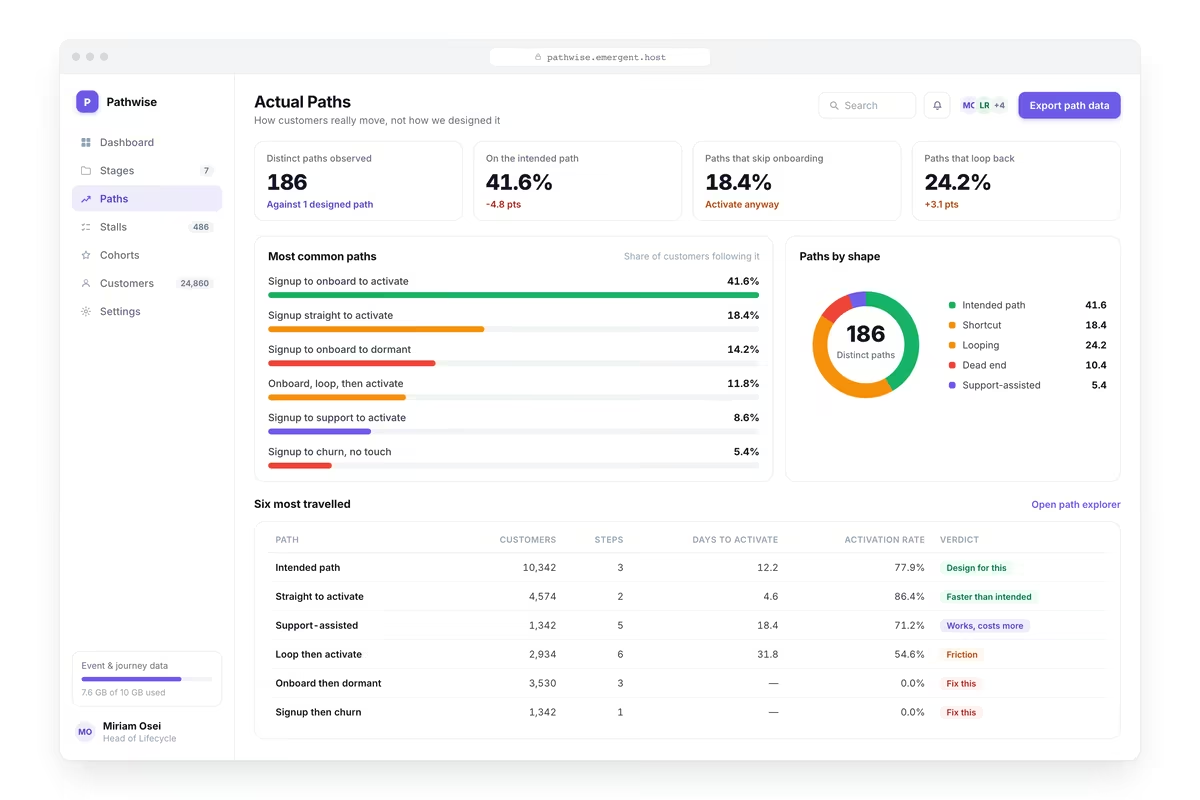
See the Path They Took, Not the One You Drew
The sequences customers actually followed rather than the intended route, the most common paths to purchase and to churn, customers who moved backwards, paths involving repeated returns and how paths differ between retained and churned.
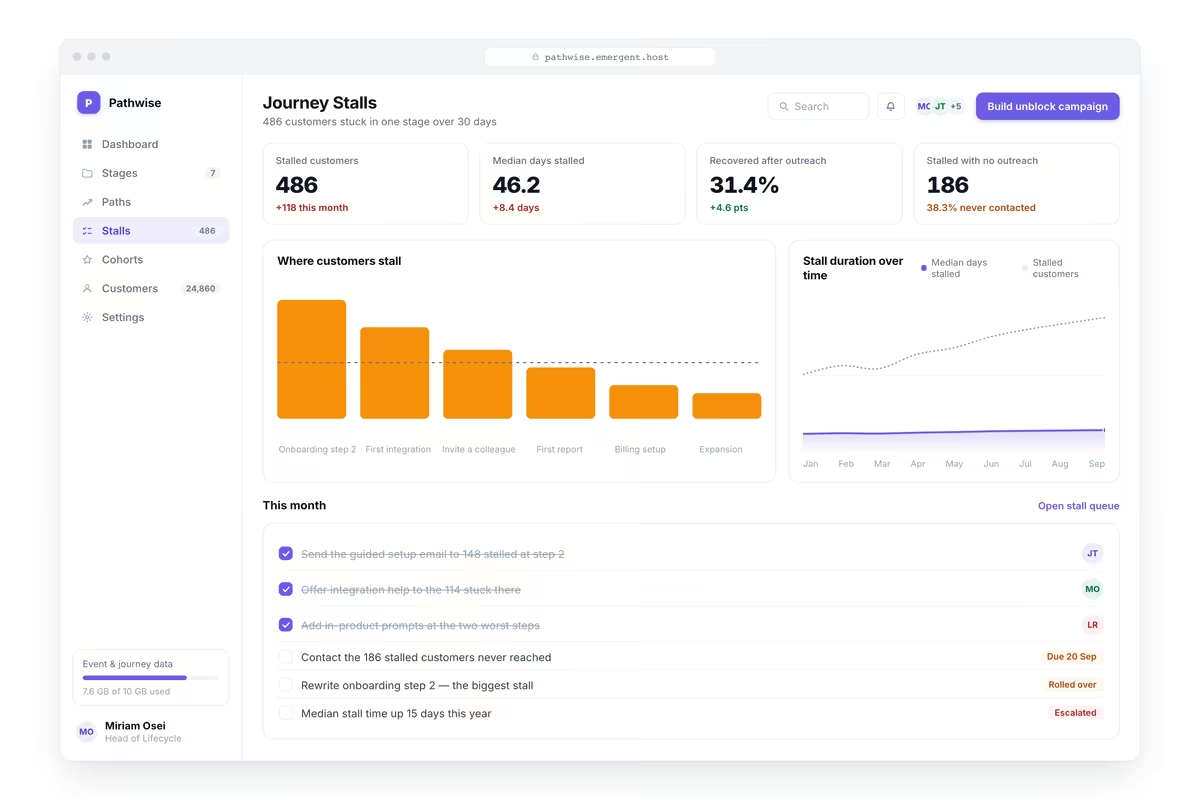
Find Where Customers Stop Moving Forward
Stages where time spent runs well past the median, customers who repeated a step or returned to an earlier stage, those who abandoned a process midway, what each group did next and how many never resumed the journey at all.
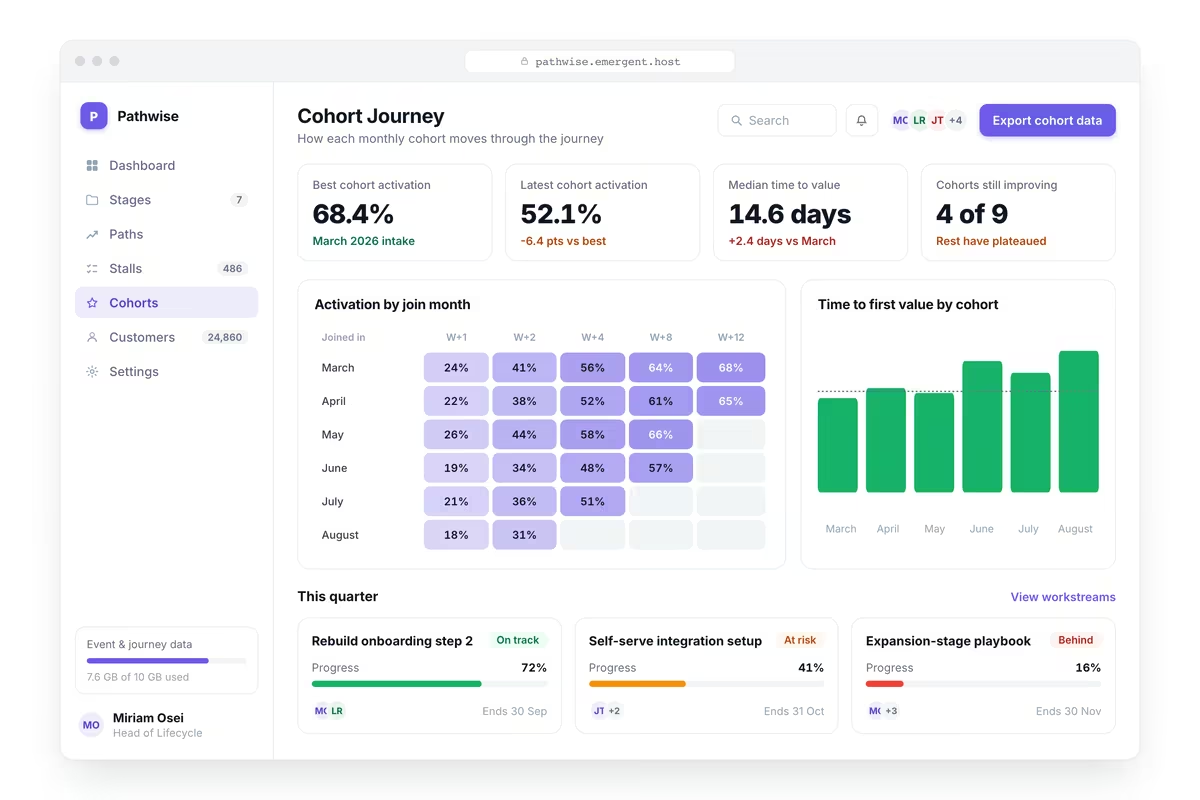
Prove the Change Moved Customers Faster
Customers grouped by the month they entered the journey and tracked over the following year, the share reaching each stage, average time to purchase and renewal and whether recent cohorts progress faster or slower than earlier ones.
Every integration your
Dashboard needs from day one
Email and calendar
Inbox and calendar sync both ways, so every reply, meeting and no-show lands on the contact record without anyone logging it.




Messaging and support
Conversations from chat, WhatsApp and your helpdesk attach to the right contact, so sales and support see the same history.




Payments and billing
Invoices, subscriptions and payment status flow back into the deal, so revenue and pipeline stay in one place.




If it has an API, your CRM can connect to it.
Emergent builds the connection against the API itself, including internal tools your team made. No closed ecosystem, no approved-partner list, no waiting for a connector to ship.


More things you can build
with Emergent
AI Website Builder
Build and publish responsive websites with AI — from landing pages to complete websites.
AI App Builder
Create and launch mobile apps with AI, without the complexity of traditional app development.
AI Web App Builder
Build and ship fully functional web apps with custom interfaces, logic, and workflows.
AI Dashboard Builder
Create interactive dashboards to visualize data, track KPIs, and manage business operations.
AI SaaS Builder
Build complete SaaS products with user accounts, subscriptions, dashboards, and core product workflows.
AI CRM Builder
Build custom CRMs for managing contacts, leads, pipelines, campaigns, and automated workflows.
AI Agent Builder
Create AI agents that can understand tasks, use tools, automate workflows, and work across your business.
Build Your Own
Start with any idea and build exactly what you need with AI — no templates or limits.

Why choose Emergent?
Most tools give you a demo you have to rebuild. Emergent gives you a product that is ready to run.
| Comparison | Other Tools |  |
|---|---|---|
| Built for | Demos and MVPs | Products you keep growing |
| What you get | Front end shell only | Full stack, wired end to end |
| Backend and database | Set it up yourself | Built and connected for you |
| Customization | Surface level styling | Deep workflow control |
| Integrations and APIs | Manual glue work | Connected from a prompt |
| Code ownership | Locked to the platform | Clean code you can export |
| Time to launch | Weeks of patching and setup | Live the same day |


Pick the Pricing Plan That Works for You
Choose the plan that fits your building ambitions. From weekend projects to enterprise applications, we've got you covered.




Find the Right Dashboard Builder
for Your Business
Frequently Asked Questions
Your Questions, Answered
Don't change this element unless you know what you are doing
on Emergent today


