



TL;DR
- No single build method wins outright: The right one depends on how custom your rules are and whether you're already running a POS. All four together took about 75 minutes to build and test, at entry prices from $16/app/month to $49/month per location.
- Emergent: The AI app builder for rules a template can't handle, tiers that expire, thresholds that change. It can also reach both app stores, but only after you download the code and finish the submission yourself through Expo's separate EAS toolchain.
- Loopy Loyalty: A digital stamp card running in about 12 minutes, with no app download for the customer.
- Square Loyalty: The least new setup if you already run Square for payments, but it ties your customer data to that POS.
- Appy Pie: A drag-and-drop builder that can publish a dedicated app to both app stores on its Platinum tier, though full white-labeling costs extra.
I was waiting in line at a coffee shop when I watched a regular dig through her bag for her paper loyalty card (the kind that gets a stamp with every visit), and it wasn't there.
It was the third time I'd seen it happen that month, and I got curious enough to stop reading about loyalty programs and start building one myself.
I ran the same hard test brief through four ways to build a loyalty app, about 75 minutes of hands-on building in total. Those four were an AI app builder, a wallet-pass tool, a POS-native extension, and a drag-and-drop app builder.
By the end of this guide, you'll know which build method fits your business, and what each one gets right and wrong. You'll also know how to dodge the mistakes that kill a loyalty program once the launch excitement wears off.
What You'll Need Before You Build a Loyalty App
Before you touch any tool, get three things settled:
- A defined reward structure: Know roughly what a customer earns and what those earnings get them. You'll firm up the exact numbers in Step 2.
- A way to identify a customer at checkout: A phone number, an email, an app login, or a wallet pass. Every method in this guide needs one.
- Square account access, if you're testing the POS route: Square Loyalty only works once you're already processing payments through Square on one of its paid plans.
A loyalty program is usually a feature you add to a bigger app. If you’re weighing a full store rebuild instead, you can build it with an ecommerce app builder. You can also check this comparison of ecommerce app builders before you commit to one path.
Time required: The two pure-dashboard methods, Loopy Loyalty and Square Loyalty, took under 15 minutes each to get a working version running. The drag-and-drop app builder took a little longer: an AI-generated start in under a minute, then about 15 minutes more to wire in the rest.
The custom build took longer, about 38 minutes once I added the rule a template can't give you for free. That's still short next to how long building a mobile app usually takes outside a guide like this one.
How to Build a Loyalty App: Step-by-Step
Step 1: Decide What Type of Loyalty Program You're Building
A loyalty program can take several shapes:
- Stamp cards work best for fast, low-ticket, frequent-visit businesses (a coffee shop, a car wash, a sandwich counter). The purchase happens often enough that "10 visits, one free item" feels achievable.
- Points work better when basket size varies a lot. A retail store where one customer spends $12 and another spends $200 needs a system tied to dollars. Visits alone would reward the wrong behavior.
- Tiered memberships add a second layer on top of either one. Square Loyalty, for example, supports up to six VIP tiers that adjust how fast a customer earns.
- Cashback, referral, and value-based or partner programs round out the list. A cashback model refunds a small percentage of every purchase, with no running count to track.
A referral program rewards a customer for bringing in someone new. A value-based or partner program ties the reward to something other than a discount, such as a charity donation attached to a purchase or a perk from a business you've teamed up with.
If your customers don't behave like frequent, low-ticket visitors or big-basket spenders, a cashback, referral, or value-based program can fit better.
For the test brief I ran through all four build methods, I picked a hybrid. A stamp card covered the base reward, with a stamp-based VIP tier layered on top for a business's heaviest customers. That combination put more pressure on the tools because each had to handle a base reward and a rolling VIP condition.
Step 2: Name the Program and Set Your Rules
Skip a generic name. "Rewards Program" tells a customer nothing. A name tied to your brand voice gets remembered and repeated. Real programs make the pattern obvious, from Starbucks Rewards and Sephora's Beauty Insider to AMC Stubs and Target Circle. Each one is short, and most work the brand's own name into it.
The part people skip is turning "we want repeat customers" into a specific rule before opening any tool. How many visits or dollars justify a reward? What's the reward worth to you? Do points ever expire, and if so, when?
That last one is easy to overlook and costly to get wrong. Square's own loyalty setup lets you set an expiration window on points, and it texts a warning 14 days before the balance disappears. That warning is the difference between a policy that feels fair and one that feels like a bait-and-switch.
Write your rules down as a short checklist before you move to Step 3. That's where the four build methods stop agreeing with each other.
Step 3: Choose Your Build Method
The four build paths I tested sit on a ladder. Each step up buys you more control over the rules and costs you more setup time.
How the four build methods stack up:
| Method | Best For | Starting Price |
|---|---|---|
| Emergent | Custom rules a template can't handle | $20/month ($17/month, billed annually) |
| Loopy Loyalty | A simple digital stamp card, no customer app download | $25/month ($20.83/month, billed annually) |
| Square Loyalty | Businesses already fully on Square | $49/month per location |
| Appy Pie | A branded Android app at the entry tier; both app stores need Platinum | $16/app/month |
Before you start building, here's the exact brief I ran through all four:
"I'm testing loyalty builds for a small two-location coffee shop. Build a customer loyalty program to these exact rules; the mechanics matter more than the general concept.
Customers earn one stamp per visit where they spend at least $5. A completed card is 10 stamps, and completing it unlocks one free drink worth up to $6. Only one stamp can ever be logged per checkout, no matter the order size, and there needs to be a real way to stop a customer from getting a second stamp by asking twice in one visit. The moment a reward is redeemed, the counter resets to zero immediately, not after a delay or a manual step.
Layer a second tier on top. Any customer who logs 15 stamps within a rolling 90 days moves to VIP status, dropping their earning threshold from $5 to $4. If their pace drops and they fall out of that window without hitting 15 again, VIP status comes off automatically; it never just stays on for good.
Staff at the register need a lookup flow showing a customer's current stamp count and tier in a few seconds, and the customer's own view, a phone lookup or a wallet pass, has to show the exact same numbers. They can never disagree.
Tell me plainly how this handles someone redeeming the same reward twice in one visit, and what happens to the full stamp history and contact list the day I export it and stop paying for the tool."
Loopy Loyalty and Square Loyalty skip prompts entirely. I configured that checklist by hand, rule by rule, in each tool's own dashboard. Appy Pie runs a short prompt first, then the same manual configuration for everything the brief needed beyond it. The AI app builder is the only one built entirely from a single pasted brief.
The two-location coffee shop is a test scenario I wrote for this guide, and there's no client behind it.
Emergent, the first method below, is the platform that publishes this blog article. I ran it through the same brief as the other three and reported where it fell short. Every build below stayed a working demo that was never turned on for customers.
Method 1: The AI App Builder (Emergent)

I opened a fresh Emergent project and pasted the brief above as one message, and that was the whole setup.
On the first pass (about 14 minutes and 11 credits), it built a working points ledger. That included the $5-versus-$4 earning logic, the 10-stamp reward trigger, and a rolling 90-day window that recalculated VIP status on its own. The merchant dashboard showed every customer's stamp count and tier next to their name, pulled from one shared record.
One gap survived the first pass. Nothing stopped a staff member from tapping "add stamp" twice for the same order. I sent one follow-up message asking it to reject a second stamp on the same order ID within 60 seconds.
That closed the gap in a second pass (about 24 more minutes and 23 more credits), bringing the total to 34 credits and 38 minutes. After the fix, the staff view and the customer's own view matched. Both read the same underlying record.
Double-stamping and double-redemption are two separate questions with two separate answers:
- Double-stamping: Blocked. A second "add stamp" tap on the same order ID within 60 seconds gets rejected.
- Double-redemption: The reward-trigger logic resets a customer's count to zero the instant a reward is redeemed, so there's nothing left to reclaim on that same visit until they earn all the way back to 10 stamps.
An AI app builder gives you exactly the rules you ask for, which cuts both ways. You get a rules engine that can express a tier that expires after 90 days. Neither dashboard tool below does that out of the box.
You have to remember to ask for the parts a template assumes you don't need, like fraud resistance. Emergent builds what you describe, though the double-stamp gap above is a reminder to check each rule once the build is done.
Emergent publishes five tiers:
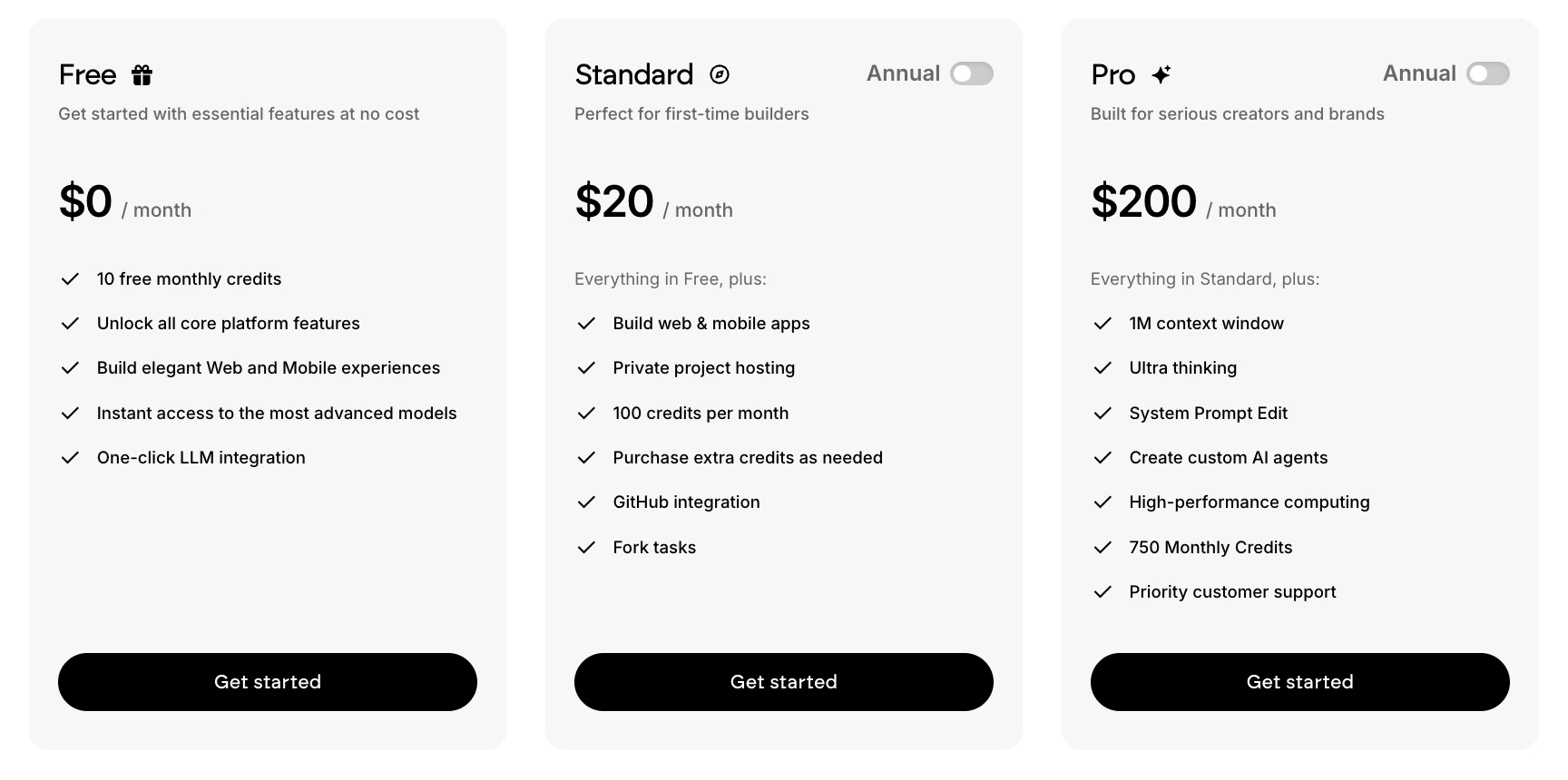
- Free: $0/month. A 10-credit monthly allowance with no deployments, so it's enough to explore the builder but not to put a loyalty app in front of customers.
- Standard: $20/month ($17/month, billed annually). Adds private project hosting so your app can actually go live, GitHub integration, fork tasks, and a 100-credit monthly allowance. This test's 34-credit build plus the 50 credits a month it costs to keep one app deployed still fit inside that allowance, with little room to spare.
- Pro: $200/month ($167/month, billed annually). A 750-credit monthly allowance, a 1M-token context window, and custom agents for a bigger, ongoing build.
- Business: No public price. A custom quote adding role-based access control, single sign-on, shared team workspaces, and real-time co-editing on top of Pro.
- Enterprise: No public price. A custom quote for larger, ongoing builds past what Business covers.
The loyalty program might be the first piece of a bigger storefront. If so, the guide on building an ecommerce store the same way is worth a look.
Method 2: The Wallet-Pass Tool (Loopy Loyalty)
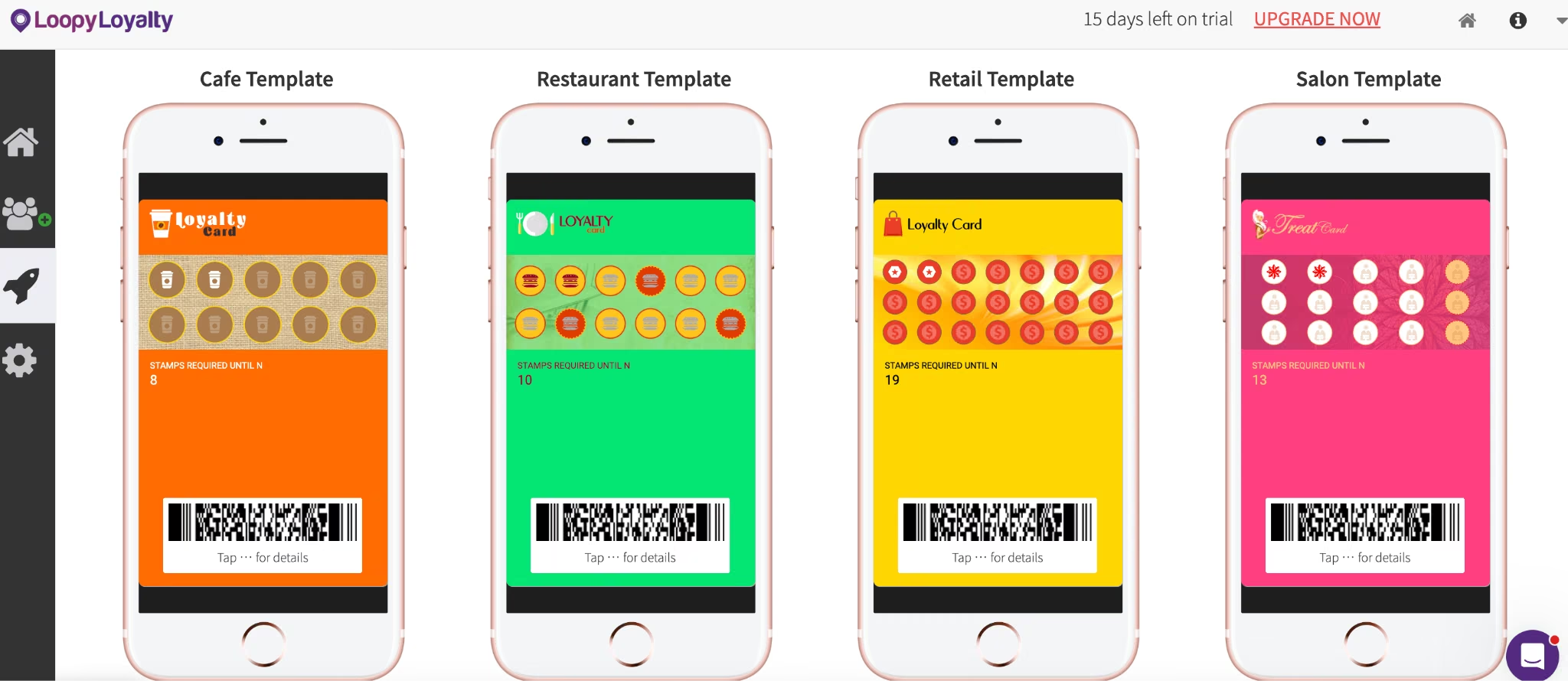
This method skipped prompts entirely. I filled in the card design, the stamp count, and the reward through Loopy Loyalty's visual card designer, without touching code or AI.
In about 12 minutes, I built a working 10-stamp digital card and confirmed it rendered correctly in both Apple Wallet and Google Wallet. I left it there as a test card only, never activated for real customers.
The card itself lives in the customer's own Apple Wallet or Google Wallet, the one already on their phone. Loopy Loyalty confirms customers don't need to install an app or create an account.
That detail matters more than it sounds. A branded loyalty app, including the one Appy Pie builds in Method 4, asks a regular to install something before they earn a single stamp, and plenty of them stop at that screen.
Of the six rules in the brief, the visual builder covered two natively and handled a third on its own trigger:
- Logs one stamp per qualifying visit
- Triggers the reward at 10 stamps
- Zeroes the stamp count at 10 stamps and holds the earned reward until it's redeemed, though the brief asked for the reset at redemption instead
The brief's staff/customer view-parity requirement doesn't need its own line in that list of six. The platform folds it in on its own. A staff-side Stamper App handles the scanning, and Loopy Loyalty documents it as showing the same balance the customer sees in their wallet pass. Nothing needs configuring separately, so the two views can't drift apart.
The other three rules needed more work:
- No native control stops a staff member from scanning the same card twice in one visit. The Stamper App's "Confirm Transaction" setting only catches an accidental tap inside one scan, so the brief's anti-double-stamp rule falls on staff training. Redemption is separate: The stamp count already went to zero at 10 stamps, and redeeming the reward clears it from the card, so there's nothing left to claim twice.
- The rolling 90-day VIP recalculation isn't built into the visual dashboard.
- Neither is the conditional $5-versus-$4 earn rate.
To add logic like that to the card, Loopy Loyalty points to Zapier and Make integrations you can set up without writing code, plus the Loopy Loyalty API for teams that have an engineer. That's a genuine extra step for anyone who isn't already comfortable wiring up an integration.
You're picking from a fixed set of card options, so once a rule needs a condition the designer has no field for, you're back to Zapier, Make, or the API from above.
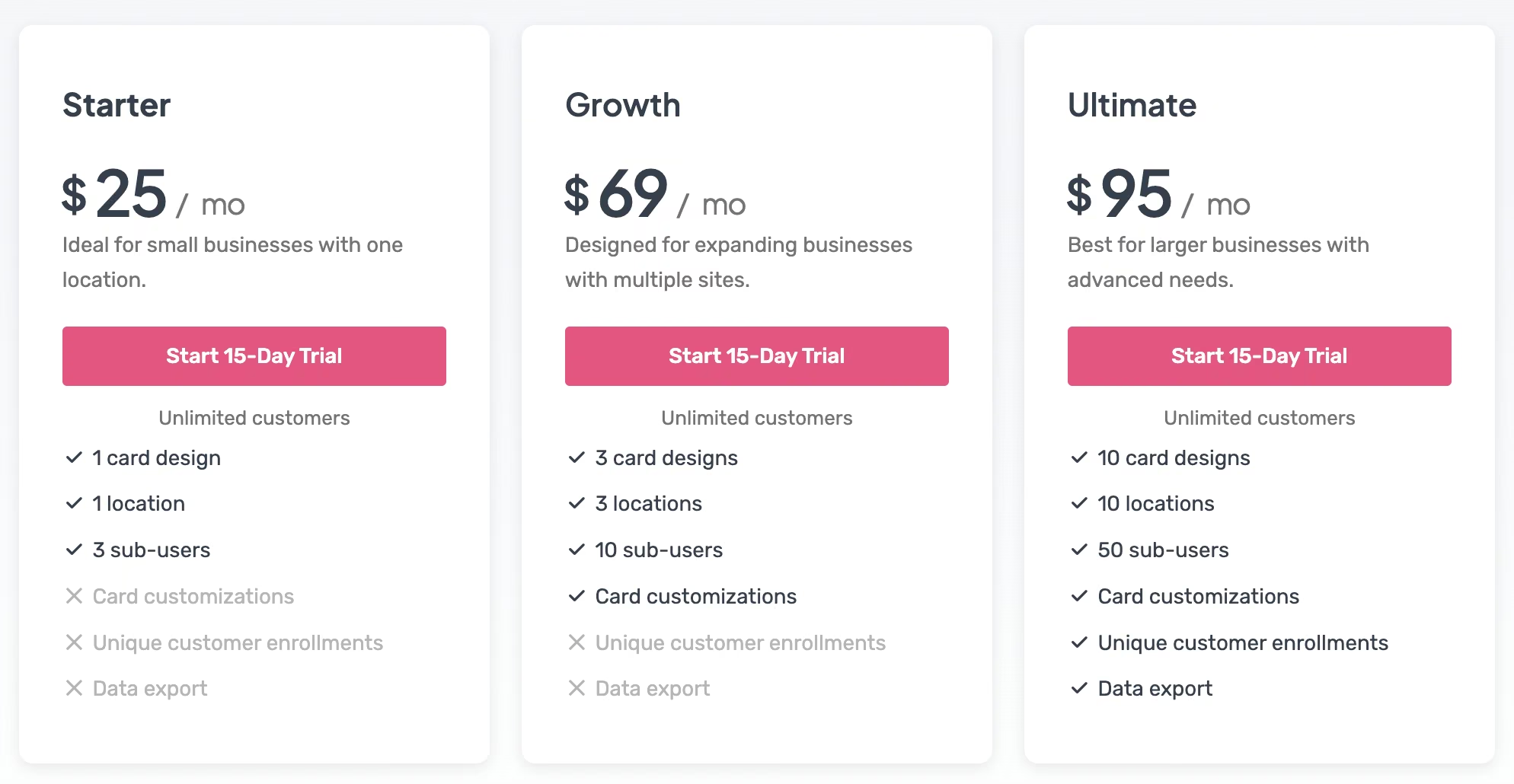
Loopy Loyalty's Starter plan runs $25/month ($20.83/month, billed annually), covering one location, one card design, and three staff logins for the Stamper App. Growth moves to $69/month ($57.50/month, billed annually) for three locations and three card designs.
Ultimate runs $95/month ($79.17/month, billed annually) for up to 10 locations. There's no permanent free tier, but a 15-day trial needs no card on file to start.
Method 3: The POS Extension (Square Loyalty)
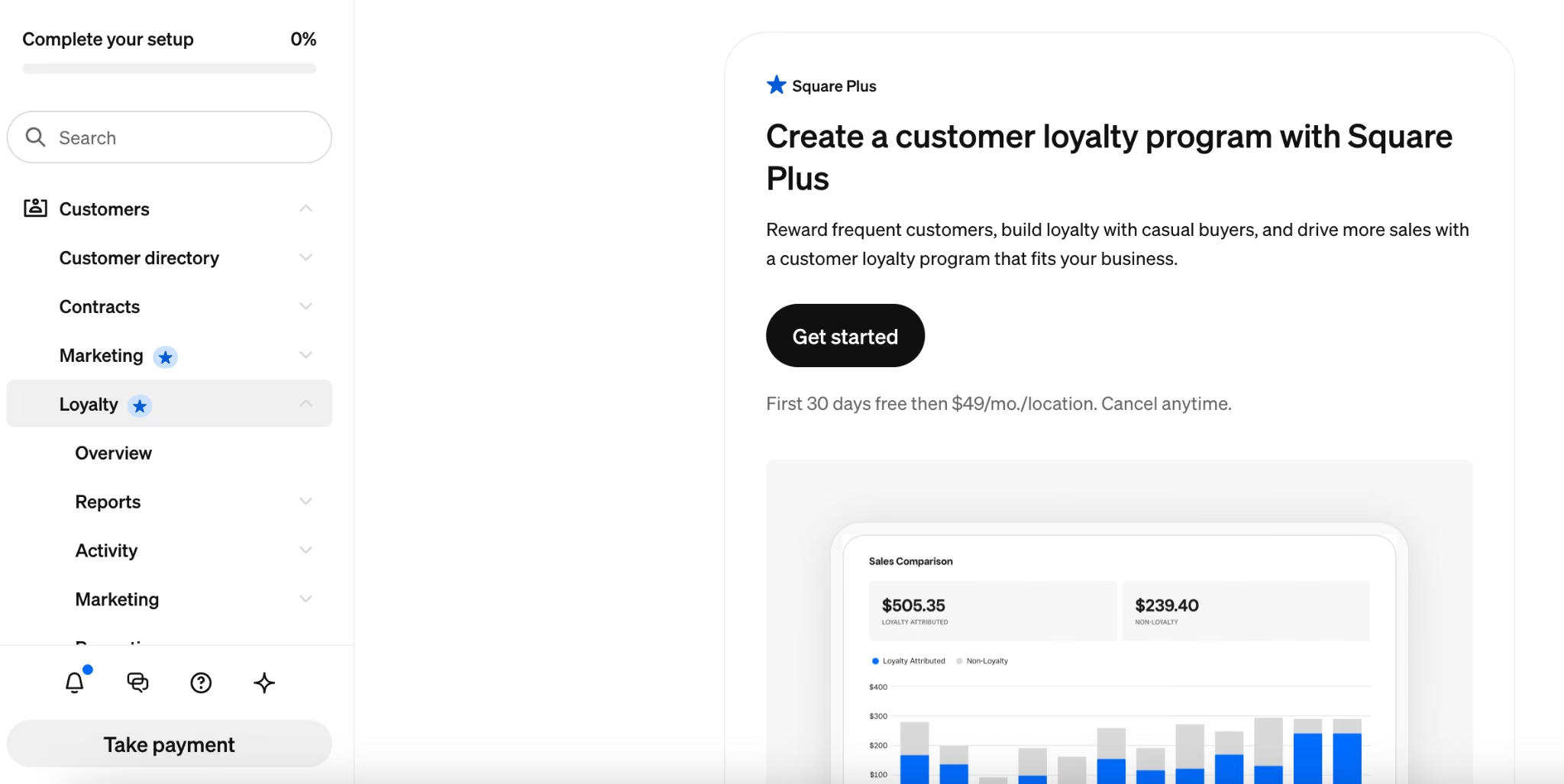
I followed Square's own three-task setup inside Square Dashboard, defining the terminology, deciding how customers earn a point, and picking the reward. I had a basic, visit-based program covering both locations running in about 9 minutes.
I stopped there on tiers: Square's tier window is fixed, so the brief's rolling 90-day VIP rule had nowhere to go. Everything below about how tiers behave comes from Square's documentation rather than from my build. Square Loyalty sits behind a paid Square plan. Unlike the other three routes, this one costs something before you configure anything.
I mapped the brief's own numbers onto Square's point system directly. A customer earns one point per visit after spending at least $5. The reward triggers at 10 points, and that reward is valued at $6.
Most of that time went to naming the reward. Square sets firm limits on rewards:
- Square caps reward names at 100 characters and recommends staying closer to 50 for how they display at checkout and on receipts.
- The program itself tops out at 15 rewards, after which you have to delete one to add another.
Square also supports spend-based programs, which let you exclude specific items or categories from earning points at all, deselected right in the Eligible Items and Categories settings. That option is off the table for visit-based, item-based, and category-based programs.
Square Loyalty does support a tier structure, up to six tiers deep, with VIP tiers that multiply how fast a customer earns the longer they keep visiting. Tiers move in both directions. Customers get an SMS notification when a tier status upgrades or downgrades.
Square Loyalty's limits show up in three places:
- The tier window is fixed: Square's tier eligibility runs on a fixed rolling 12-month basis, and that isn't a setting you get to pick. The brief's tighter 90-day VIP recalculation has no dial to turn here, either.
- Redemption is visible: It happens on the same screen a staff member already uses to ring up the sale. Square's documentation says a reward can't be applied to more than one sale once it's used, so the system blocks a second redemption outright. That single record covers the brief's view-parity rule too, since the staff checkout screen and the customer's own lookup both read from it.
- Leaving Square is the bigger risk: Loyalty data built inside a POS lives inside that POS. I didn't test a migration, so take this as reasoning rather than a measured result: Expect it to take a while, with a stretch where existing rewards can't be redeemed. A contact list is unlikely to carry its full value over to a different platform.
Square bundles Loyalty into a plan today rather than selling it on its own. Here's where it sits across the plans:
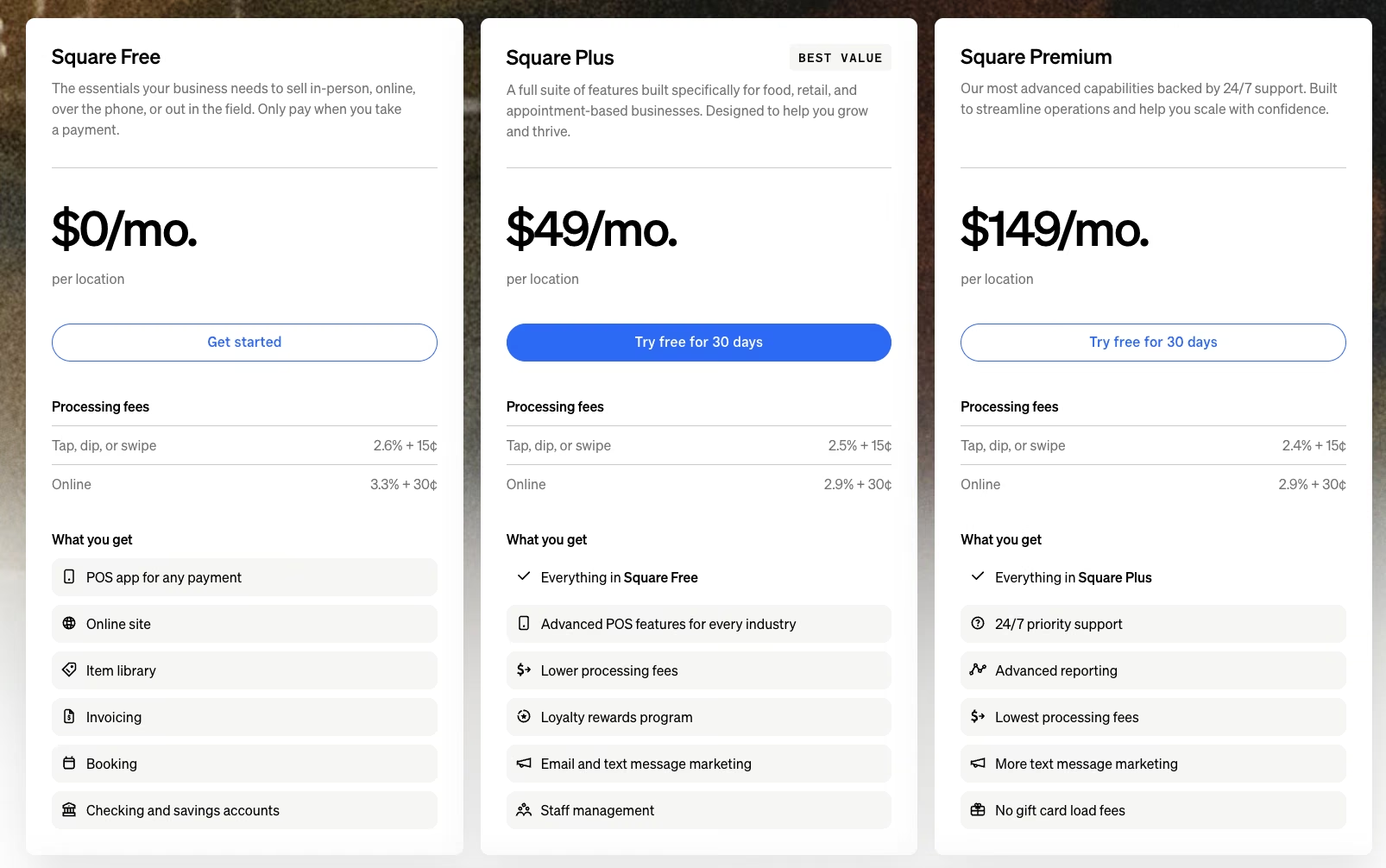
- Free: $0/month. Skips Loyalty entirely.
- Plus: $49/month per location. Includes the Loyalty rewards program along with lower processing fees and email and text marketing.
- Premium: $149/month per location. Adds 24/7 support and deeper reporting on top of everything in Plus.
- Pro: Square quotes this one custom, for businesses processing more than $250,000 a year.
Square doesn't publish an annual-billing discount. Pricing stays flat, per-location, and month to month.
Shopify is another POS worth comparing, though I didn't build on it for this guide. Unlike Square, Shopify doesn't ship native loyalty tools: you'd add a separate app such as Smile.io, Marsello, or LoyaltyLion, each with its own subscription.
Shopify's own guide to POS loyalty programs estimates a small program at $0 to $200/month before reward costs, climbing toward $1,000/month for advanced setups (an estimate not corroborated elsewhere). That's a second migration on top of the POS itself if you ever switch either one.
Method 4: The Drag-and-Drop App Builder (Appy Pie)
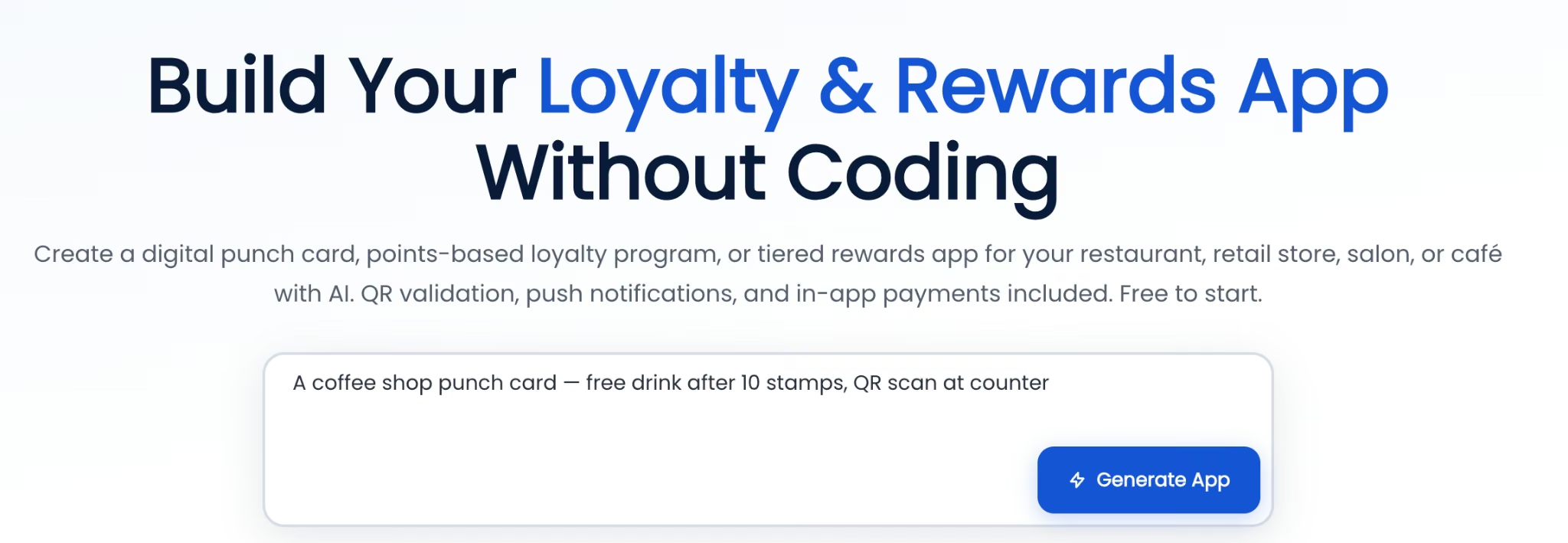
I took the same brief to Appy Pie too, in two parts: a short version into its prompt box first, then its drag-and-drop editor for everything the prompt didn't cover.
One line from the brief lands hardest here: the export question. It asks what happens to 'the full stamp history and contact list the day I export it and stop paying for the tool.'
The first pass came together fast. I typed a version of the brief's opening (a 10-stamp coffee-shop punch card with a free drink at completion) into the prompt box. Appy Pie generated a starting app, screens, stamp logic, and navigation in under a minute on my run, matching the under-60-second build it advertises. That's the AI step.
The brief needed more than a flat punch card. It needed the $5-versus-$4 earning switch, the rolling 90-day VIP window, and a way to block a second stamp in one visit. All of that came from the drag-and-drop editor afterward.
I spent about 15 minutes wiring the rest in through the drag-and-drop editor, and ran into gaps the panel doesn't close on its own:
- Punch-card and VIP modes don't stack: The Loyalty Settings panel keeps them as two separate, side-by-side modes. I built the base stamp card in punch-card mode and layered a second, VIP-only card on top. That's a manual workaround for a feature the panel doesn't have. The $5-versus-$4 earn switch landed on that same VIP-only card: I set its per-visit stamp value to $4 while the base card kept $5.
- The rolling 90-day recalculation isn't a setting: VIP status would need a manual check-in on a schedule I'd have to remember myself. View parity hit the same limit, because the VIP tier is split across two cards with no single native screen showing a customer's combined stamp count. Keeping the staff dashboard and the customer's app view lined up falls on that same manual check-in.
- Blocking a second stamp has the same gap: The QR scanner logs one stamp per scan, with nothing native stopping a second scan a minute later. Redemption works differently. Punch-card mode still resets a card to zero the moment a reward is claimed, but Appy Pie's dashboard didn't show whether it separately blocks a second redeem tap before that reset takes effect, so test it yourself before relying on it.
The publishing step is where this method earns its keep, and it's also the step I stopped short of. Publishing needs a paid plan, and my run stayed inside the free trial. Which app stores you reach depends on the tier.
Basic publishes to Google Play; reaching the Apple App Store too needs the Platinum tier. Either way, it puts an app under your own business name. That's the one thing a wallet-pass card or a POS extension can't offer.
Both building and testing stayed free during my test. Appy Pie's pricing page describes that window as a seven-day trial for personal, non-commercial development and testing, with a paid plan required to publish.
This is the method for a business that wants its own name on Google Play, or on the App Store too once it's on the Platinum tier. It's also the one where you're most on your own once the brief's specific traps show up. The VIP window and the double-stamp rule each needed their own manual workaround here.
The export question I leaned on hardest here never got a clean answer. Appy Pie's dashboard didn't surface an export option for stamp history or contact lists anywhere in the trial version I worked in, so that's a question to put to Appy Pie's support directly before you build a program you might need to move off the platform later.
Appy Pie prices per published app, so each additional one needs its own separate subscription. The pricing breaks down like this:
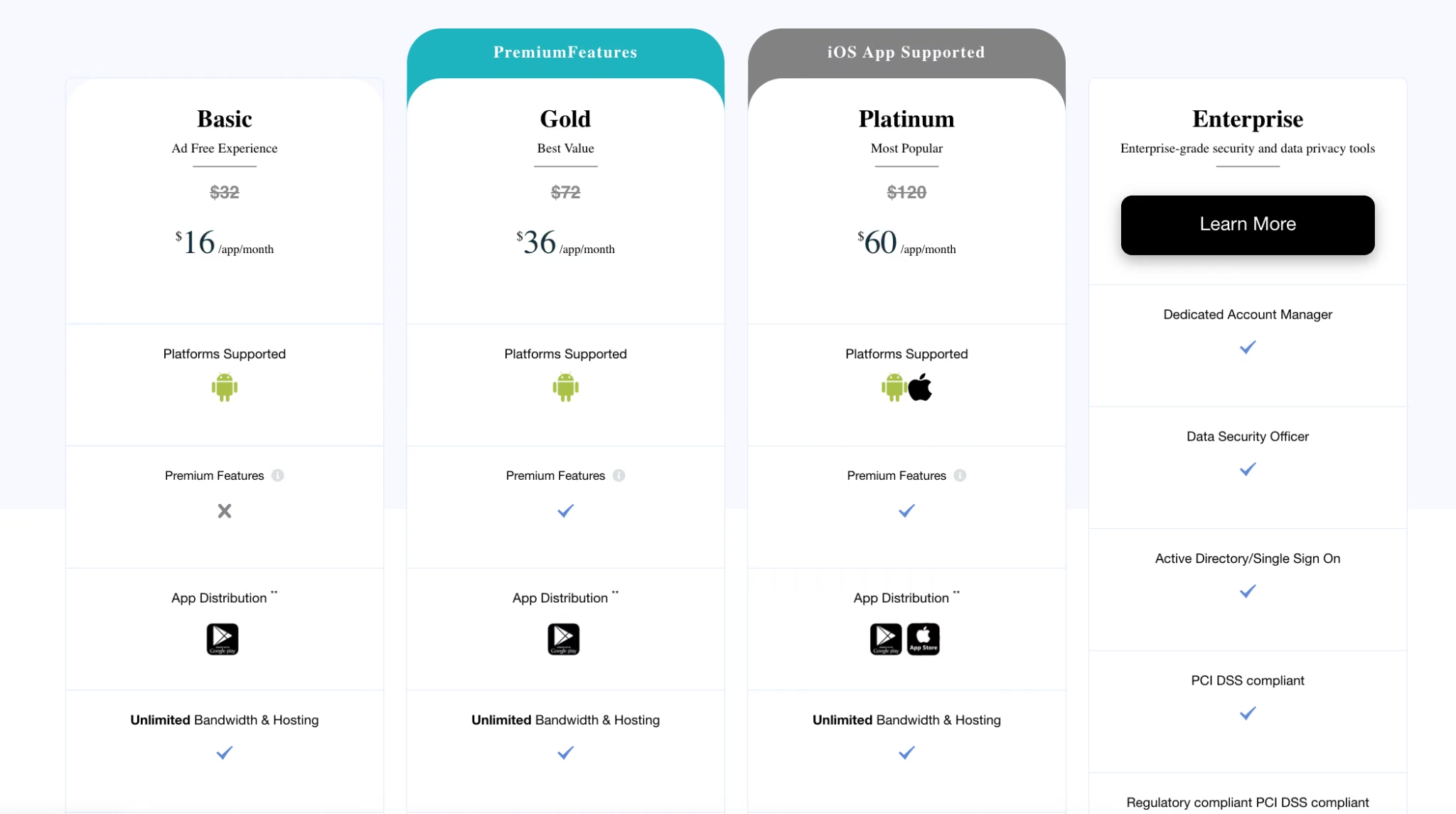
- Basic: $16/app/month billed monthly, shown against a struck-through $32/app/month list price on the same page. Covers one published app, push notifications, and up to 500 downloads a month before overage charges apply.
- Gold: $36/app/month. Covers 1,000 downloads and email-plus-chat support.
- Platinum: $60/app/month. Covers 2,000 downloads and phone support added in.
- Enterprise: No public price, available on request. Adds a dedicated account manager, single sign-on, and PCI DSS compliance.
- Add-On Package: Removes Appy Pie's own branding from the finished app, priced at twice whatever plan you're already on.
- Platform fees: Apple charges a $99 annual developer fee and Google a one-time $25 registration fee, on top of any Appy Pie plan. Every app-store publisher pays these same fees, regardless of which builder they use.
Appy Pie also bills annually, advertised on the pricing toggle as up to 20% off, though you have to flip the toggle to see the per-month figure.
Which Method Should You Choose?
Choose the AI app builder if your rules have a trap in them. Think of a tier that has to expire, a threshold that changes, or anything a template would flatten into "the customer earns points." You'll spend more time up front, and you own the fraud-resistance logic yourself.
Choose the wallet-pass tool if you want a digital card live today with zero integration work. It fits best when your rules are simple: "one stamp, one reward" covers the whole program.
Choose the POS extension if you're already running payments through a POS that offers one. A customer enrolls by entering one phone number at the register, with nothing to download or set up beforehand. The cost of ever leaving is real too.
Choose the drag-and-drop app builder if you want your own branded app on Google Play, with the Apple App Store available on a higher tier. The workarounds for the VIP window and the double-stamp rule are covered in Method 4, plus Apple's $99 annual fee and Google's one-time $25 fee once you publish.
Step 4: Build the Features That Make It Work
Every method above has to nail the same three things, even though they get there differently:
- QR codes, barcodes, or a phone lookup at checkout: Loopy Loyalty's Stamper App scans the customer's wallet-pass barcode to log a visit. Square looks the customer up by phone number entered at checkout. Appy Pie's QR scanner has the same repeat-scan gap described in Method 4. On Emergent, you have to specifically ask for whichever check-in method you want built.
- Push or text reminders: A reward sitting unused doesn't bring anyone back. Loopy Loyalty includes push messages and lock-screen notifications on iOS out of the box. Appy Pie includes push notifications in its own drag-and-drop panel too. Square ties reminders into its Marketing product. A custom build includes them when the brief names them.
- An analytics dashboard: Loopy Loyalty has its own Customer Insights & Reporting, Square has its own reporting dashboard, Appy Pie has its Analytics Dashboard, and an Emergent build shows whichever metrics you specify. That only helps if you open it.
Step 5: Test the Redemption Flow Before You Launch
Don't take a build's word for whether the rules hold. Before you put a loyalty program in front of real customers, run these checks:
- Try to double-redeem the same reward in one visit, on purpose, and confirm it's blocked.
- Pull up the staff view and the customer's own view side by side, and confirm the numbers match exactly.
- Push a test account past your VIP threshold, then let it sit idle long enough to fall back out. Confirm the tier moves up when the customer earns it and drops back down when they stop qualifying.
If any of those three fail without you noticing, you won't find out until a customer does.
Step 6: Launch, Track, and Iterate
For a real business, launching means turning the program on for actual customers, connecting a live payment processor, and pricing rewards you can afford to give away at volume. None of the four builds in this guide went that far, for the reason set out back in Step 3.
Once a program is live for real customers, watch the analytics dashboard from Step 4. Redemption rate tells you whether people use the rewards, and the count crossing into your top tier tells you whether the VIP threshold sits in the right place. Then iterate on what you find.
A loyalty program is one piece of a bigger retention picture. AI tools for ecommerce are worth knowing about too, so you're not relying on loyalty alone.
Common Mistakes to Avoid
These six mistakes can undermine an otherwise solid loyalty program:
- Building it and never training staff on it: A loyalty program only works if the people at the register mention it. Software gives you better data on how bad an adoption problem is, but fixing it is still a staff conversation.
- Stacking loyalty messaging on top of general marketing: Sending a discount text and a loyalty reminder in the same week trains customers to wait for a deal.
- Picking a tool before checking what happens if you leave it: Loyalty data tied to a single POS or platform is a migration headache later. Ask the export question before you ask the pricing question.
- Setting a threshold that loses money without you noticing: A reward that costs more to give away than the extra visits it earns back is a discount dressed up with extra steps.
- Skipping the fraud question entirely: A reward tied to a phone number can get claimed by the wrong person the moment that number is mistyped even once. Ask how a tool stops a duplicate claim before you pick it.
- Chasing signup volume over the customers worth keeping: A big enrolled-member count looks good on a dashboard, but it means nothing if most of those signups were never going to come back anyway. Set a goal around repeat-visit rate or redemption rate before you optimize for signups alone.
How Emergent Helps Small Businesses Build a Loyalty App Without Hiring a Developer

The other three methods above each leave a gap, and each one sits in a different place. A wallet-pass tool gets you live fast but caps out once your rules need a second condition. A POS extension ties your rules and your customer data to whatever that POS allows.
A drag-and-drop app builder can publish to both stores on the right tier, but it still needs manual workarounds for the brief's specific rules. Bending any of the three toward a rule you invented yourself means an integration, a manual workaround, or no route at all.
Emergent takes on that rule directly. Say what the loyalty program needs to do, in your own words, including tiers, expiration rules, and duplicate-redemption checks. Emergent scopes the request, builds the app end to end, and walks through its review and testing steps so you can confirm it behaves the way you asked.
Here's how Emergent helps you build a loyalty program without hiring a developer:
- The rule neither dashboard offered: On the first pass, Emergent built the $5 base threshold dropping to $4 at VIP, plus a rolling 90-day window that dropped customers out of VIP on its own.
- One shared record for both views: Staff and customers see the same underlying record, so nobody has to reconcile two systems that stopped matching.
- A fix in one follow-up message: When the first build missed the double-stamp check, one message and a second pass closed the gap, no developer hand-off required.
- Built from one pasted brief: The rules engine started from a single message, no manual field-by-field setup in a dashboard first.
The build can grow into the bigger app your loyalty program eventually lives inside, whether that means a booking flow, an ordering system, or a full storefront.
You can keep expanding the same project as the loyalty program grows. If you're already prompting from another AI chat client, Emergent's MCP connector brings that same build engine, with logins and a database included, straight into that conversation.
It won't hand you fraud resistance or a rolling-window tier system unless you ask for it by name, and the first pass here still needed one correction.
A digital stamp card with zero custom logic is faster on a wallet-pass tool, and that's the honest call if nothing in your rules needs a second condition.
Emergent is built for rules like the rolling 90-day VIP window or the double-stamp block, the kind no stamp-card dashboard has a setting for. It's free to start, then $20/month ($17/month, billed annually) once you outgrow the free plan's 10-credit monthly allowance.
If your own rules have a trap like that in them, describe your loyalty app to Emergent and see how it scopes the work. The free plan's 10 credits are enough to get a feel for it, though a full build like mine needs a paid plan's allowance.

Most AI app builders stop at prototypes. Emergent creates production-ready apps you can actually launch.
- Production-ready apps
- Web & mobile apps
- Deploy in minutes





