

Build a Custom Internal Dashboard Using AI in Minutes
Describe your Internal Dashboard in plain English. Emergent handles design, development, and deployment, giving you a live build in minutes. No code needed.


Trusted by Builders Worldwide
Active Builders Worldwide
Apps Successfully Created
Countries Globally Reached



Build a custom internal dashboard in 4 simple steps
Give the team one home page for the numbers they open four tools to find.
Say what each role checks daily, since finance and operations rarely want the same screen.
Your internal systems connect, so each team sees live figures rather than a weekly export.
Change it: add a team view, adjust a permission or drop a section nobody uses.
Roll it out with roles applied, so people land on their own view rather than a shared one.
Emergent Key Features for Building an Internal Dashboard
A real internal tool with authentication, roles and live company data, instead of another shared spreadsheet.
Reads Live Company Data
The tool queries your systems directly, so nobody maintains a copy and no one is working from last week's export.
Authentication and Roles Built In
Login and role based scoping are part of the generated build, so an internal tool is not accidentally reachable by anyone with the link.
Editable Where It Needs to Be
Status updates and notes can be written back, which makes it a working tool rather than a read only report.
No per Seat Licensing
Access is a web application rather than a licence, so giving the whole company visibility costs nothing per additional person.
Change History Recorded
Edits are logged with who made them, which is what a spreadsheet cannot offer and what makes shared data trustworthy.
Hosted on Your Infrastructure
The generated code runs in your own environment, so internal data never passes through a third party platform to be viewed.
Internal Dashboard Use Cases You Can Build in Minutes
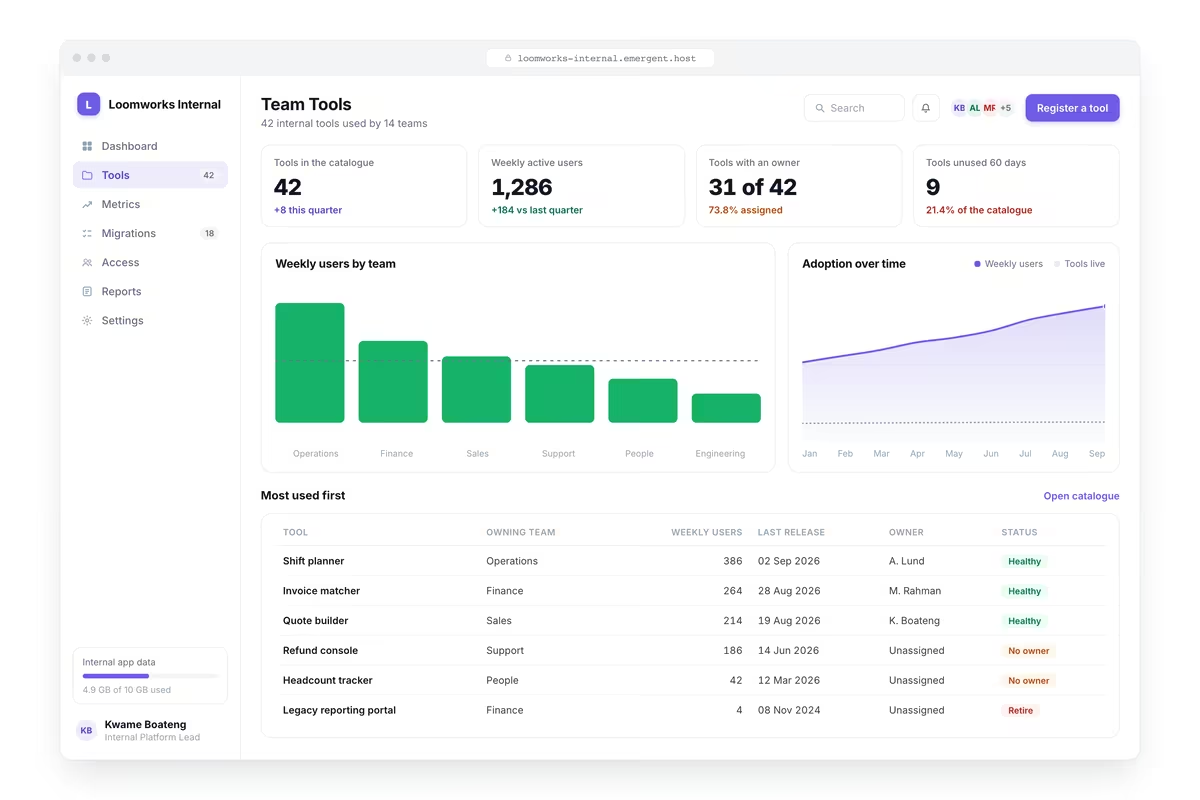
A Real Tool for One Team's Actual Job
The records that team works with in a searchable filterable table, the summary figures they report upward, the ability to update status and add notes against records, a personal view of what each user owns and a log of changes made.
window.awbMockup = { teamTool: "Build an internal dashboard for one team showing the records they work with in a searchable filterable table, the summary figures they report upward, the ability to update status and add notes against records, a personal view of what each user owns, and an activity log of changes made.", companyMetrics: "Build an internal company dashboard readable by every employee showing headline business metrics appropriate for wide sharing, progress against company goals, recent product and customer milestones, headcount and hiring, and a clear indication of when each figure last updated.", spreadsheetReplacement: "Build an internal tool replacing a shared spreadsheet by reading the same data from its source system, preserving the columns and grouping the team already uses, adding validation so invalid entries are rejected, recording who changed what, and removing the version confusion of a file several people edit.", roleBasedAccess: "Build an internal dashboard with distinct views by role, showing an operational view for the team, a summary for their manager and an administrative view for owners, with data scoped so each user sees only what their role permits, plus a user management screen and an access audit log."};

Something Everyone in the Company Can Open
Headline business metrics appropriate for wide sharing, progress against company goals, recent product and customer milestones, headcount and hiring, and a clear indication of when each figure last updated.

Better Than the Shared Spreadsheet
The same data read from its source system with the columns and grouping the team already uses, validation so invalid entries are rejected, a record of who changed what and none of the version confusion a shared file eventually produces.

One Build, The Right View per Role
Distinct views by role with an operational view for the team, a summary for their manager and an administrative view for owners, data scoped so each user sees only what their role permits, plus user management and an access audit log.
Every integration your
Dashboard needs from day one
Email and calendar
Inbox and calendar sync both ways, so every reply, meeting and no-show lands on the contact record without anyone logging it.




Messaging and support
Conversations from chat, WhatsApp and your helpdesk attach to the right contact, so sales and support see the same history.




Payments and billing
Invoices, subscriptions and payment status flow back into the deal, so revenue and pipeline stay in one place.




If it has an API, your CRM can connect to it.
Emergent builds the connection against the API itself, including internal tools your team made. No closed ecosystem, no approved-partner list, no waiting for a connector to ship.

More things you can build
with Emergent
AI Website Builder
Build and publish responsive websites with AI — from landing pages to complete websites.
AI App Builder
Create and launch mobile apps with AI, without the complexity of traditional app development.
AI Web App Builder
Build and ship fully functional web apps with custom interfaces, logic, and workflows.
AI Dashboard Builder
Create interactive dashboards to visualize data, track KPIs, and manage business operations.
AI SaaS Builder
Build complete SaaS products with user accounts, subscriptions, dashboards, and core product workflows.
AI CRM Builder
Build custom CRMs for managing contacts, leads, pipelines, campaigns, and automated workflows.
AI Agent Builder
Create AI agents that can understand tasks, use tools, automate workflows, and work across your business.
Build Your Own
Start with any idea and build exactly what you need with AI — no templates or limits.

Why choose Emergent?
Most tools give you a demo you have to rebuild. Emergent gives you a product that is ready to run.
| Comparison | Other Tools |  |
|---|---|---|
| Built for | Demos and MVPs | Products you keep growing |
| What you get | Front end shell only | Full stack, wired end to end |
| Backend and database | Set it up yourself | Built and connected for you |
| Customization | Surface level styling | Deep workflow control |
| Integrations and APIs | Manual glue work | Connected from a prompt |
| Code ownership | Locked to the platform | Clean code you can export |
| Time to launch | Weeks of patching and setup | Live the same day |

Pick the Pricing Plan That Works for You
Choose the plan that fits your building ambitions. From weekend projects to enterprise applications, we've got you covered.




Find the Right Dashboard Builder
for Your Business
Frequently Asked Questions
Your Questions, Answered
Don't change this element unless you know what you are doing
on Emergent today


