

Build a Custom User Profile Dashboard Using AI in Minutes
Describe your User Profile Dashboard in plain English and create a production-ready build, from design and development to deployment, in minutes. No code needed.










Trusted by Builders Worldwide
Active Builders Worldwide
Apps Successfully Created
Countries Globally Reached



Build a custom user profile dashboard in 4 simple steps
Give each user one view of their own account, activity and settings.
Say what a user should see about themselves and what stays internal.
Your systems connect, so a profile reflects live account state rather than a cached copy.
Request a new section, a different permission or activity history shown further back.
Give every user their own page from one build, rather than a support request to check something.
Emergent Key Features for Building a User Profile Dashboard
The validation, verification and edge cases behind a profile area, generated alongside the interface.
Scoped to the Signed in User
Data access is restricted to the user's own record in the generated code, so a profile area cannot become a route to someone else's account.
Verification on Sensitive Changes
Email and security changes require verification, which is the detail most commonly skipped and most commonly exploited.
Granular Notification Control
Preferences are offered per notification type and channel, which reduces unsubscribes from everything because one message was unwanted.
Session and Device Visibility
Active sessions are listed with the ability to end them, giving users a genuine security control rather than only a password field.
Self Service Subscription Changes
Plan, payment method and cancellation are handled by the user, which removes a large share of routine billing support requests.
Change History for the User
Recent account changes are visible to the user, which resolves most disputes about what was altered and when.
User Profile Dashboard Use Cases You Can Build in Minutes
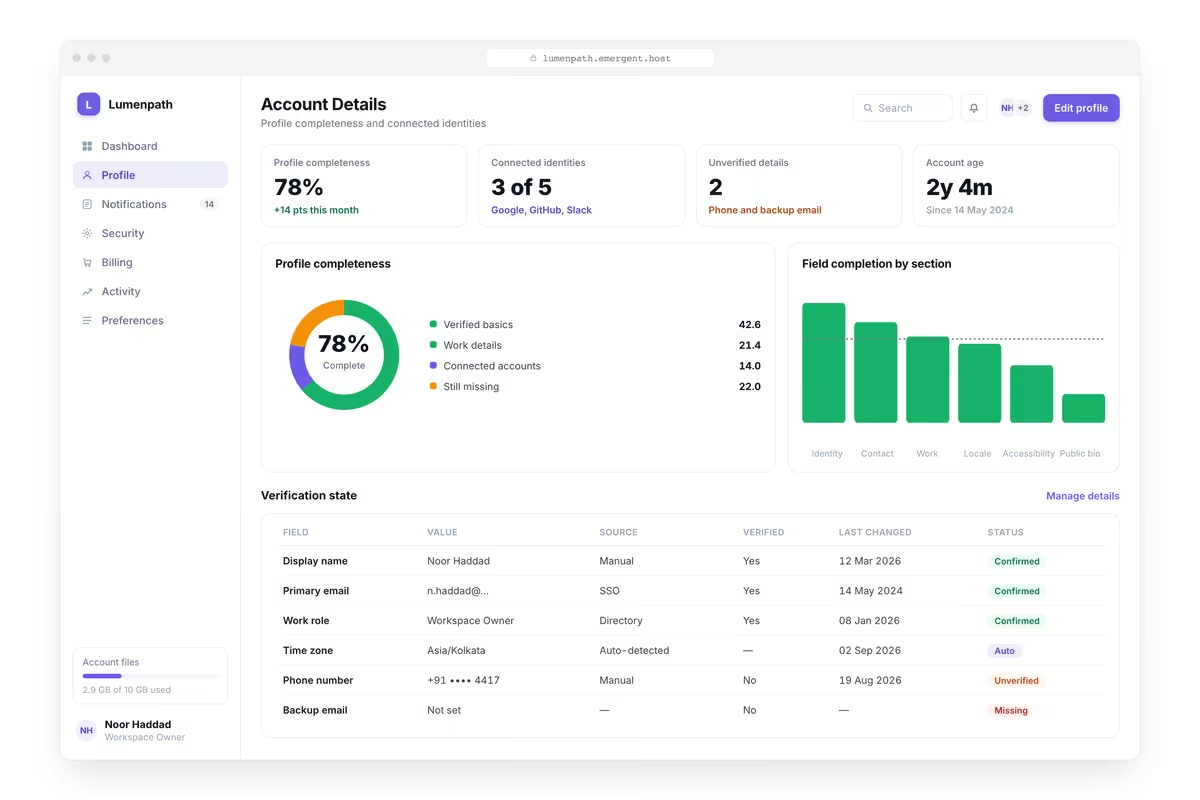
Let Users Fix Their Own Details
A user viewing and updating their name, email, phone, avatar, language and timezone with validation on each field, email changes requiring verification of the new address, a clear saved confirmation and a record of recent changes.
window.awbMockup = { accountDetails: "Build a user profile area where a user can view and update their name, email, phone, avatar, language and timezone, with validation on each field, email changes requiring verification of the new address, a clear saved confirmation, and a record of recent changes visible to the user.", notificationPreferences: "Build a notification settings area showing every notification type the product sends with channel options across email, in product and mobile, granular control per type rather than a single switch, a digest frequency option, quiet hours, an unsubscribe from non essential messages, and a clear indication of which messages cannot be turned off.", securitySettings: "Build a user security area showing password change with strength requirements, multi factor authentication setup and recovery codes, active sessions with device, location and last used time and the ability to end any of them, connected third party accounts with the ability to revoke, and a log of security events on the account.", subscriptionAndBilling: "Build a user subscription area showing the current plan with what it includes, usage against any limits, the next billing date and amount, payment method with the ability to update it, invoice history available for download, options to change or cancel the plan with what happens on cancellation, and any failed payment requiring attention."};

Stop Them Switching Everything Off
Every notification type the product sends with channel options across email, in product and mobile, granular control per type rather than one switch, a digest frequency option, quiet hours and a clear indication of what cannot be turned off.

Give Users Something Real to Do About Security
Password change with strength requirements, multi factor authentication setup and recovery codes, active sessions with device, location and last used time and the ability to end any of them, connected accounts to revoke and a security event log.

Remove the Routine Billing Tickets
The current plan with what it includes, usage against any limits, next billing date and amount, payment method with the ability to update it, invoice history for download, options to change or cancel with consequences stated and failed payments flagged.
Every integration your
Dashboard needs from day one
Email and calendar
Inbox and calendar sync both ways, so every reply, meeting and no-show lands on the contact record without anyone logging it.




Messaging and support
Conversations from chat, WhatsApp and your helpdesk attach to the right contact, so sales and support see the same history.




Payments and billing
Invoices, subscriptions and payment status flow back into the deal, so revenue and pipeline stay in one place.




If it has an API, your CRM can connect to it.
Emergent builds the connection against the API itself, including internal tools your team made. No closed ecosystem, no approved-partner list, no waiting for a connector to ship.


More things you can build
with Emergent
AI Website Builder
Build and publish responsive websites with AI — from landing pages to complete websites.
AI App Builder
Create and launch mobile apps with AI, without the complexity of traditional app development.
AI Web App Builder
Build and ship fully functional web apps with custom interfaces, logic, and workflows.
AI Dashboard Builder
Create interactive dashboards to visualize data, track KPIs, and manage business operations.
AI SaaS Builder
Build complete SaaS products with user accounts, subscriptions, dashboards, and core product workflows.
AI CRM Builder
Build custom CRMs for managing contacts, leads, pipelines, campaigns, and automated workflows.
AI Agent Builder
Create AI agents that can understand tasks, use tools, automate workflows, and work across your business.
Build Your Own
Start with any idea and build exactly what you need with AI — no templates or limits.

Why choose Emergent?
Most tools give you a demo you have to rebuild. Emergent gives you a product that is ready to run.
| Comparison | Other Tools |  |
|---|---|---|
| Built for | Demos and MVPs | Products you keep growing |
| What you get | Front end shell only | Full stack, wired end to end |
| Backend and database | Set it up yourself | Built and connected for you |
| Customization | Surface level styling | Deep workflow control |
| Integrations and APIs | Manual glue work | Connected from a prompt |
| Code ownership | Locked to the platform | Clean code you can export |
| Time to launch | Weeks of patching and setup | Live the same day |


Pick the Pricing Plan That Works for You
Choose the plan that fits your building ambitions. From weekend projects to enterprise applications, we've got you covered.




Find the Right Dashboard Builder
for Your Business
Frequently Asked Questions
Your Questions, Answered
Don't change this element unless you know what you are doing
on Emergent today


