You download a habit app on a Sunday night. You log three goals. By week three, the widget is still on your home screen, and you've stopped opening it. That's how most habit apps end up.
Solo founders miss check-ins because the tap takes too long between calls. Consultants lose the chain when they travel. Service owners start a team ritual, then realize the app only works for one person.
I installed six of these apps and ran the same routine through each; Streaks is Apple-only, so I assessed it from its own documentation and reviews instead. This list is sorted by the way habits break rather than by feature count. Pick the tool that fixes what will likely trip you up: too much friction, no data, no one watching, or habits living in a different app from your work.
How I Tested These Habit Building Apps
I scored them the way a busy person would: can you log a habit in seconds, can the schedule bend when your week breaks down, and will you still trust the product after month one?
I installed and used every app on this list except Streaks every day for seven days, then scored all seven, including Streaks, which I assessed from its own documentation and reviews since it's Apple-only. None got cut; each earned a distinct “best for” slot.
Here’s how I tracked my findings:
- Hands-on test: I'm a Samsung and Dell fanboy, so Android and Windows got the most real-world use.
- First check-in: Time from install to first completed habit. Account walls, onboarding quizzes, and hidden “create habit” buttons.
- Flexibility: Daily, weekly, skip days, negative habits, and custom targets. If a missed travel day wrecks the whole chain with no recovery path, the app failed this test.
- Integrations: Calendar, Health, widgets, Watch, Zapier/IFTTT, and export. Useful if your day already lives in a task app or calendar.
- Pricing transparency: Official pricing pages only. I flagged lifetime deals, habit caps on free plans, and paywalls that appear after you've already built a streak.
- Long-term use signals: App Store and Play Store reviews that mention 6–12 months of use, plus complaints about sync, nagging reminders, or abandoned support.
All seven cleared that bar, and each one clears it for a different person. That's how the table below is sorted.
7 Best Habit Building Apps in 2026: Quick Comparison
Match the “Best For” column to how your streak usually dies.
Prices come from official pages and store listings as of September 2026. Store regions can change the exact number.
1. Streaks: Best for Apple Users Who Want Automatic Tracking

What it does: Streaks tracks up to 24 daily habits on iPhone, Watch, iPad, and Mac, with a one-tap grid and Health auto-complete.
Best for: Apple-only founders who won't open a second productivity system.
Streaks only runs on Apple hardware.
Streaks works off a simple daily-checklist model: you pick up to 24 habits you're building or breaking, and each one gets a single tap to mark done for the day. A visual grid shows your unbroken run for each habit, so the core mechanic is what the name implies: keep the chain alive.
Habits linked to steps, workouts, or water intake can auto-complete using data Apple Health already tracks, and a handful can be checked off straight from the Watch without using your phone.
It also handles negative habits (things you're trying to quit), which most simple trackers skip. There's no account or cloud dependency for basic use. It stores data locally and syncs across your own devices through iCloud.
What stood out reading through App Store reviews is how often people mention the app just fitting into their day without extra setup.
That simplicity is also the complaint that shows up most, once someone wants more than a yes/no log.
Compared to the other six apps in this list, Streaks is the narrowest in scope: no cross-platform sync beyond Apple's own devices, no data export, and no way to share progress with anyone else.
For a solo Apple user who just wants the tap-and-done loop, reviewers consistently describe it as something that gets out of the way.
Reviewers call out the 24-habit limit as a leash, but it's a deliberate design choice. Whether that limit is freeing or restrictive on your own list is worth testing against the one-time $5.99 purchase before you commit.
Key Features
- No account required: everything lives on your device and in iCloud. The developer's privacy policy states no data is stored on Streaks servers, so there's nothing to sign up for.
- Watch tap-to-complete: mark a habit done from your wrist without pulling out your phone mid-meeting.
- Health-linked auto-tracking: steps, water, and workouts check themselves off using data your iPhone already collects.
- Negative habits: track things you want to quit, alongside the ones you want to build.
- iCloud sync: the same habit list follows you across iPhone, iPad, and Mac.
- Home screen widgets: see today's status without opening the app.
Pros and Cons
Pros:
- One-time $5.99. No subscription.
- Logging from the wrist means the phone never comes out, which is what keeps the habit alive on a meeting-heavy day.
- Cap of 24 habits stops list bloat.
Cons:
- Apple only.
- No deep analytics.
- Some users report widget and sync glitches.
- The 2-Day Rule only forgives one missed day, and pausing a task is a manual step you have to remember before you travel.
What users say
“Streaks seems to hit that perfect balance between simplicity and functionality” (colin514, Apple App Store)

"This is a good app and I've been using it for a long time but I don't understand why after years of updating the app the developers voluntarily limit the number of habits to 24." (Israel Hopkins, Apple App Store)

Pricing
Streaks is a one-time $5.99 purchase. There's no free plan and no subscription; you pay once and own it.
Bottom line
Buy Streaks if you live in Apple hardware and want the fastest tap. Skip it if you need Android, a team view, or charts you can export for a client.
2. Loop Habit Tracker: Best for Android Users Who Want Distraction-Free, Offline Tracking
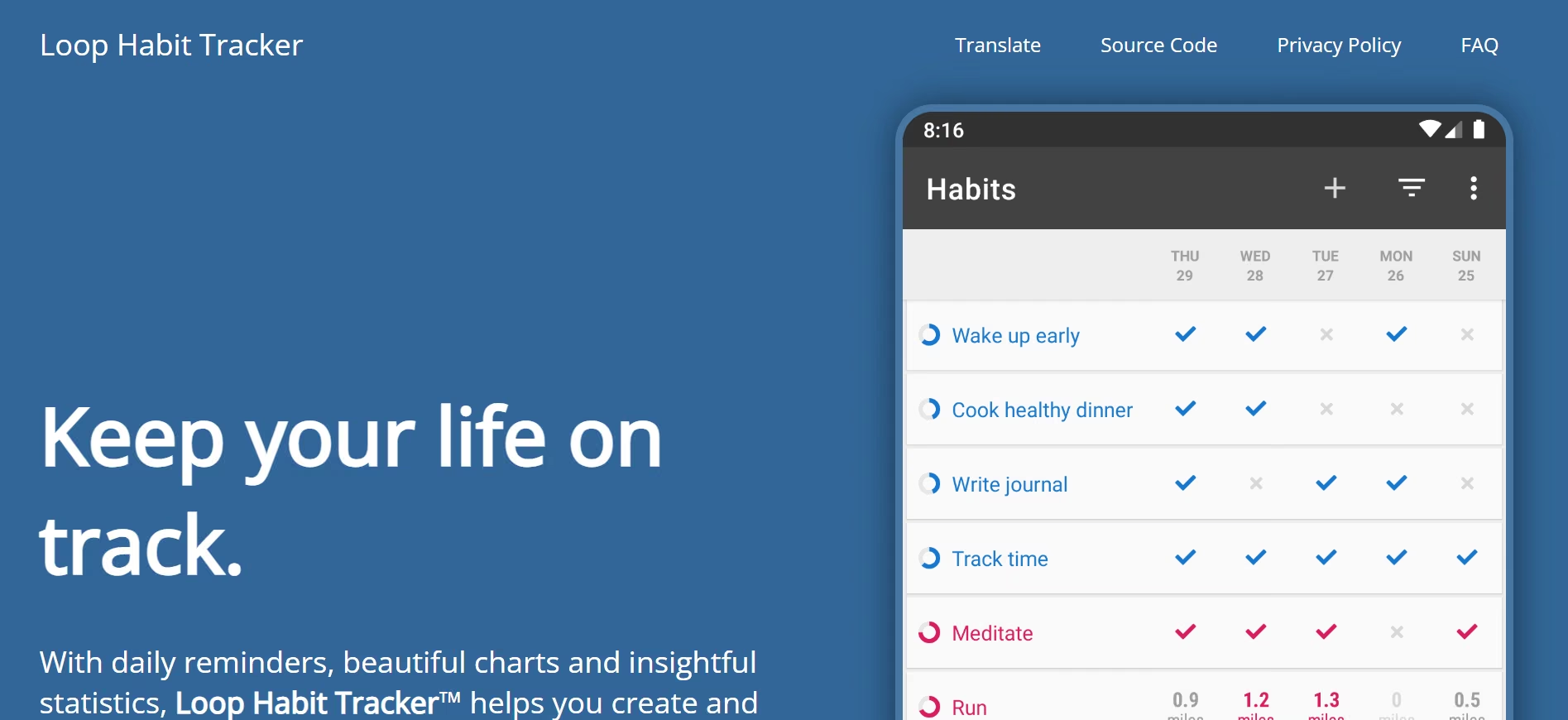
What it does: Loop Habit Tracker is an Android habit tracker with streaks, graphs, widgets, and local storage. There's no account, no ads, and no in-app purchases.
Best for: Android operators who want privacy and a $0 tool that doesn't nag.
I installed Loop Habit Tracker from the Play Store and started using it with no account. The app is completely free, so I had access to everything: unlimited habits, reminders, widgets, graphs, and exports.
Opening it the first time, I found an empty list. I tapped plus and made two kinds of habits: yes/no ones (morning walk, no phone in bed) and a measurable one (pages read). For each, I picked a color, a target, and a schedule.
I tinkered with “Three times a week” and “Every Week” but ultimately settled for and set both sets of habits to “Every day”, to push myself harder.
“Three times a week” and “Every Week” would work depending on your intensity, but the score treats those differently from daily habits. If you miss a day, it won't break your chain.
I kept my eyes on the habit score, determined not to skip a day, as it rose with check-ins and fell when I skipped. But who was I kidding? One very long day was all it took to break my chain.
I came home late and went to bed with my phone an inch away because I was expecting a late call. The next day, I was too tired to leave my bedroom, let alone take a walk.
Reminders are per habit. I set Walk at 6:30. The notification let me mark it done, snooze, or dismiss without opening the app.
To see your history (a calendar grid, frequency bars, and a trend), tap on the habit. Mine was paper-thin; I just started using the app. My colleague who convinced me to install the app has a history stretching back months.
I exported a CSV, opened it in a spreadsheet, and imported it again to test the features.
The app is lightweight and simple, but you'd likely run out of habits before you hit a cap. I doubt there's even one.
If you want Android tracking that's complete without paying, install the Loop Habit Tracker.
Key Features
- No account, no signup: open the app and add your first habit right away; nothing to create or verify before you start.
- Unlimited habits: no free-tier cap pushing you toward a paid plan.
- Flexible frequency: set a habit for 3 times a week or every other day instead of only daily.
- Habit strength score: a few missed days don't wipe out weeks of progress the way a broken streak does.
- CSV export: pull your data out any time, no lock-in.
- Home-screen widgets: check habits off without opening the app.
Pros and Cons
Pros:
- Full product for free.
- Works offline. Data stays on the phone.
- Graphs are clearer than most paid apps.
Cons:
- Official app is Android only.
- No live sync between devices. Android's own backup can move your data to a new phone, but the developers call it unreliable, so a manual export is the safe route.
- No party or coach features.
- It's community-maintained, so feature requests and bug reports can sit unaddressed for a long time.
What users say
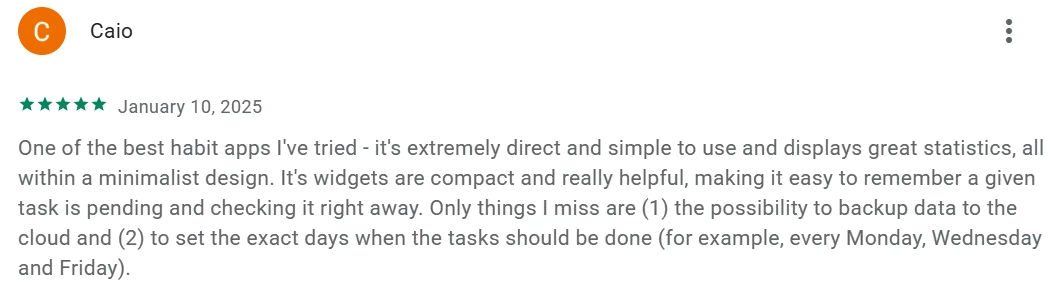
" It's extremely direct and simple to use and displays great statistics, all within a minimalist design." (Caio, Play Store)
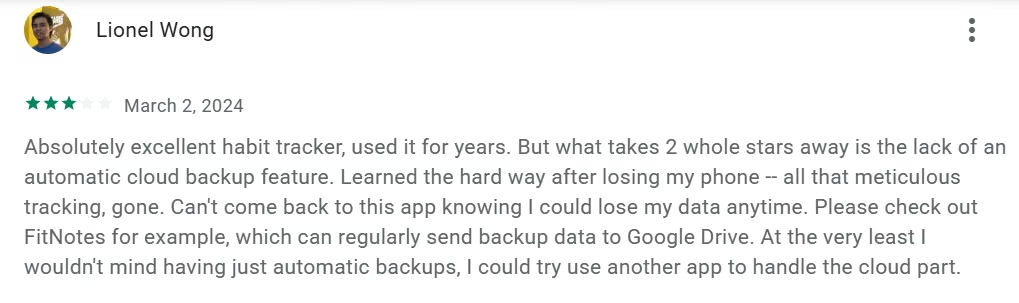
"What takes 2 whole stars away is the lack of an automatic cloud backup feature. Learned the hard way after losing my phone -- all that meticulous tracking, gone." (Lionel Wong, Play Store)
Pricing
Loop Habit Tracker is $0. There's no paywall and no in-app purchases, and the developers don't take donations either.
Bottom line
Use Loop if Android is your daily driver and you refuse another subscription. Don't pick it if you need iPhone, desktop, or automatic sync.
3. Habitify: Best for People Who Work Across Phone and Desktop and Want Trend Charts

What it does: Habitify is a multi-platform habit tracker with time-of-day lists, completion charts, and sync across phone, desktop, web, and watch.
Best for: People who check in on a laptop during the workday and on a phone at night.
I tested Habitify’s free plan and kept it to three habits, not on purpose, though: morning stretch, 20 minutes of reading, and a short evening walk.
Free is capped at three habits. I knew this (by reading the docs), but I tried anyway to add a fourth habit; the app blocked it and pointed me toward an upgrade. Three was enough for me to test the daily loop. Whether it's enough for you depends on how many habits you're actually running.
Setup was quick. Unlike Loop Habit Tracker, Habitify asks for an email. Otherwise, you're just a guest.
I gave each habit one time-based reminder. Stretch at 3:15 a.m. (I wake early), reading at 9:00 p.m., and walking at 6:30 a.m. No extra reminder types on the free plan, so those single alerts were my only shot. Missing them meant missing a day, and that had consequences: a painful slump in my streak number.
I hate to lose, so that number kept me going. Can't count how many times I tapped or swiped to check it. It became almost an obsession in that short period I had the app on my tablet.
Notes and mood (reflections) logging were helpful. After reading, I typed a sentence about what I finished and tapped a mood. Nothing fancy, but those entries help you understand yourself and your days better.
The free plan is restrictive, but if you pick three things you want to do, the check-in, reminder, notes, and calendar are enough to keep you going. That supposed limitation might even be a blessing in disguise; you won't have to invent habits just because the app can hold them.
Key Features
- Time-of-day grouping: habits sort into Morning/Afternoon/Evening blocks.
- Off mode for breaks (Premium): pause a habit for travel or illness without breaking your streak history.
- Health and calendar hooks: paid plans auto-log from Apple Health/Google Fit and line up habits against your calendar.
- Zapier and IFTTT on Premium: trigger habit check-ins from other apps you already use.
- Export-friendly stats: pull your trend data out for your own records.
Pros and Cons
Pros:
- Same log on iOS, Android, Mac, Windows, and web.
- Trend view shows which weekday you drop.
- Lifetime option if you hate monthly billing.
Cons:
- Free plan caps you at 3 habits.
- Users report widget, logout, and sync bugs after paying.
- Pricing pages and store SKUs don't always match.
- The free plan has no Apple Health, Google Fit or calendar integration, so nothing auto-logs until you pay.
What users say
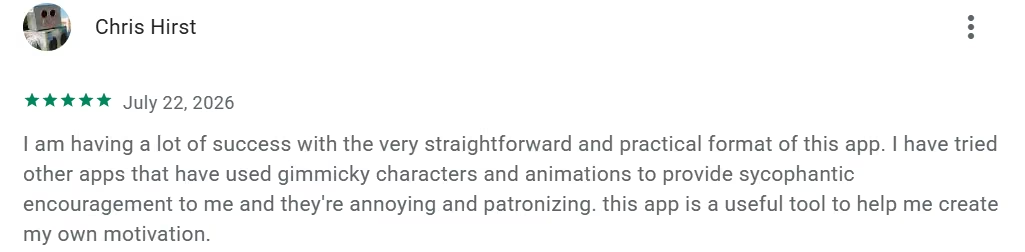
"I am having a lot of success with the very straightforward and practical format of this app." (Chris Hirst, Play Store)
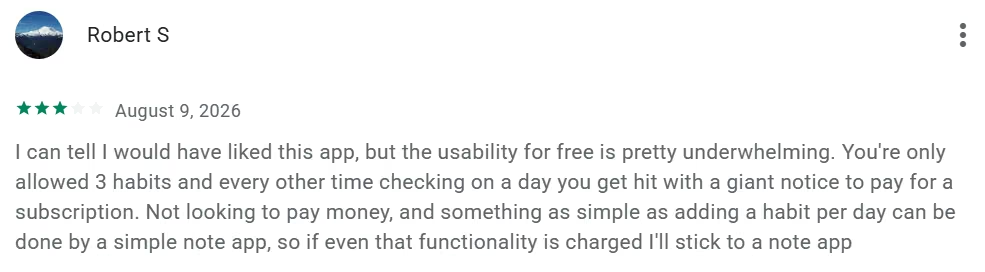
"I can tell I would have liked this app, but the usability for free is pretty underwhelming. You're only allowed 3 habits and every other time checking on a day you get hit with a giant notice to pay for a subscription" (Robert S, Google Play Store)
Pricing
Habitify's free plan caps out at 3 habits. Premium is $4.17 a month billed annually at $49.99 a year, or $119.99 as a one-time lifetime purchase.
Bottom line
Pick Habitify if you work across devices and want a dashboard you can read on a Monday morning. Test sync on every device you use before you buy a lifetime plan.
4. Way of Life: Best for Gathering Data and Spotting Patterns With a Color-Coded Log and Notes

What it does: Way of Life is a fast yes/no (green/red) habit journal with notes, tags, chains, and charts you can export.
Best for: Consultants who want a one-minute log plus a paper trail of why a day went red.
I used the free plan for Way of Life on my Samsung smartphone. The limit is three habits, so I kept it tight: morning walk, no late-night TV (I suck at this), and reading before bed. Three habits worked for me and made me focus more. They say less is more.
Setup was fast. You add a habit, decide whether “yes” or “no” is the “good” answer, and you’re tracking. Each day, you tap green for success, red for miss, or skip.
The color grid makes a lot of sense. After using the app for a while, I saw the pattern at a glance. My TV-watching row reflected what I've battled for ages: keeping my eyes away from late-night football (soccer, if you will).
It's football season, from League football to the European Champions League, so I had a red 4 nights straight.
I fared better on the other two, where I had green clusters. The chain view made that obvious. Breaking a green streak is slightly annoying in a useful way.
Reminders work on the free plan. I set one for 9:15 p.m. with a short custom line, and set it on repeat. It's flexible enough for weekdays only. Logging takes under a minute. Notes are there if you want context: (“walked after rain” or “studied for 22 minutes”) without turning the app into a journal.
Charts are available without paying. Pie slices and bar graphs with trend lines showed the month at a glance. The weekly scoreboard is blunt but useful.
Only two themes were available to me: Dark mode, which made me calm, and Light, which hurt my eyes. Backup and restore are free for everyone in current versions; they might come in handy if you ever swap phones.
On integrations, Way of Life is the weakest of the seven, lacking Health or Google Fit sync, calendar view, and Zapier or IFTTT hooks, so it's not something that plugs into the rest of your day.
What you don't get on Free is more than three items. For three habits, the free plan is complete enough to use daily.
Key Features
- No account required: add your first journal and start logging the same minute you install the app.
- Color-coded daily log: green, red, or skip at a glance, no interpretation needed.
- Diary notes on triggers: record why a day went red so patterns become visible over time.
- Pie and trend charts: see completion rate and trajectory without exporting anything.
- Chain view: see your unbroken run for each habit at a glance, so a broken streak is obvious without reading the grid.
- CSV/Excel export: pull your full history out any time.
- Passcode lock: keep a personal log private on a shared device.
Pros and Cons
Pros:
- Logging takes seconds.
- The log doubles as a record you can reread months later, not just a completion count.
- The developer still ships updates. Version 4.3.2 landed in April 2026.
Cons:
- Free plan is 3 habits, going by reviewers; the App Store listing marks “Unlimited items” as premium-only but never names the free limit.
- No multi-device sync at all, only a manual Backup and Restore. The developer said in March 2026 that sync and iPad support are in progress.
- Non-daily schedules feel awkward.
- The Android build has lagged since August 2025, while iOS shipped 4.3.2 in April 2026.
What users say
"Overall solid! I use it a lot to stay disciplined.." (David Rodriguez, Play Store)

"It would be just that much better if I could use on my iPad and phone. Please please please make it so it is easy to use on multiple devices!” (Zuzuzuzuzz, App Store)

Pricing
Way of Life is free for a limited number of habits. Premium is an in-app purchase, a one-off on Google Play at $4.99 to $6.49, while the App Store lists Premium at $4.99, $14.99 and $29.99 without printing a billing period.
Bottom line
Use Way of Life if you want a visual yes/no history and notes you can reread. Skip it if you need desktop sync or a shared client dashboard.
5. Habitica: Best for People Who Enjoy Gamification and Role-playing

What it does: Habitica turns habits, dailies, and one-off tasks into an RPG. You gain XP and gold when you finish work. You lose health when you skip. Parties and quests add social cost.
Best for: Solo founders who keep promises when a teammate can see a missed daily.
I used Habitica’s free plan, mostly on my phone with the website open on my laptop when I needed more room. It asks for email too. Setup was straightforward: you make an avatar, then add Habits (plus or minus buttons for things you do irregularly), Dailies that reset on a schedule, and one-off To-Dos.
I used Habits for “drink water” and “scroll social media,” Dailies for making the bed and a short walk, and To-Dos for errands. Completing them gave gold and experience; missing Dailies or tapping a bad Habit cost health. That “scare” made me take the walk more seriously.
Habitica is gamified; that's its selling point. I picked Warrior. Class skills and class-specific gear from the Rewards column and Market became available, all bought with gold I earned.
I hatched a few pets and later fed one into a mount. The Enchanted Armoire in Rewards sometimes gave extra gear when I spent gold.
Color-coded tasks and streak counters made it easy to see things at a glance.
I created a solo Party and started a quest scroll I already had. Unfinished Dailies hurt the party. Later I invited my brother and my colleague by username. I also joined a couple of public Challenges, which dropped ready-made task lists onto my board.
Tags, due dates, checklists, reminders, and the home-screen widget kept things usable day to day. Dark mode was a lifesaver (calmed my eyes) and device sync worked as advertised.
Habitica doesn't touch Health, Google Fit, or your calendar either; every check-in happens inside the app itself, which fits its game-first design but means nothing external feeds in or out.
Habitica’s core (tasks, leveling, gear, pets, parties, and Challenges) is fully usable. This is one of the few apps on this list I'll keep for quite some time.
Key Features
- Habits / Dailies / To-Dos: three task types instead of one flat list, matched to how often something repeats.
- Health damage instead of a reset: missing a daily costs your character HP, so a travel day is a setback you can heal from.
- Parties and quests: join a group where a missed daily on a boss quest damages the whole party, not you alone.
- Custom rewards: set your own real-world payoffs for hitting streaks.
- Cross-platform: the same character and task list on web, iOS, and Android.
- Optional group plans: add a paid tier if a team wants shared boards.
Pros and Cons
Pros:
- Free plan is usable. Pay only if you want gems and extra perks.
- Accountability comes from another person noticing, which works when a private checkbox hasn't.
- Tasks and habits live in one list.
Cons:
- The game layer steals time. Pets, gear, and loot can become the habit.
- Guild/community cuts leave some long-time users cold. Habitica removed the Tavern and all Guilds on 8 August 2023, and chat history wasn't recoverable.
- Pixel UI feels like a hobby app.
- Account and character creation come before your first habit: there's more setup than a plain checklist app, since you build a character before you can log anything.
What users say
"The XP rewards really make me want to complete the tasks, and the app sends reminders every time I need it." (Ayo Allen, Play Store)

"…my only problem is that there's no exp gain for partial task completion." (Aikatan, Play Store)

Pricing
Habitica's core habit tracking is free. An optional subscription runs $4.99 a month or $47.99 a year, and group plans start around $9 a month plus $3 per additional member.
Bottom line
Use Habitica if a private checkbox never sticks and you like games. Don't drop a client team in here unless they asked for an RPG.
6. TickTick: Best for Combining Daily Habits with Task Management

What it does: TickTick is a full to-do app with a built-in habit tracker, calendar, Pomodoro timer, and apps on phone, desktop, and web.
Best for: Operators who already live in a task list and refuse a second daily app.
I used the free plan on TickTick on my phone and laptop; I'd say it's good enough for a fairly ordinary personal setup if you stay within limits.
I made nine lists and stopped: Work, Home, Errands, Reading, Health, Admin, Weekend, Ideas, and Inbox. Each list held well under the 99-task cap. Adding a task is fast. Typing “call physiotherapist tomorrow 10 am” sets the date and time without extra taps.
Recurring tasks for weekly groceries and bills worked as expected. Priorities and tags made the lists much easier to read. Checklists under a task are 19 items max, which was still enough for the test.
Reminders are limited to just two per task. I used it for the physiotherapist and one bill. I could attach one file a day.
Habits are limited to five. I tracked water, stretching, reading, walking, and a short evening reset. Checking them off was easy; I felt a sense of achievement doing so.
The basic stats showed streaks without extra dashboards. The basic calendar view let me see due dates on a month grid; I didn't get extra week layouts or outside calendar subscriptions.
Widgets on the home screen showed today’s tasks and let me add one without opening the app. I easily synced between my Samsung phone and Dell PC. The interface is intuitive, except for the upgrade prompts that appear, but they're easy to ignore.
For someone with a handful of life interests, the free plan was usable every day. Nine lists, five habits, two reminders, and one attachment. I never came close to hitting the task-per-list limit, and I didn't feel I needed more features for this level of use either.
On long-term use, the signal is mixed: people who stick with TickTick tend to stick with it for the task list, and Reddit threads about the habit feature specifically tend to be from people troubleshooting bugs.
Key Features
- Habits next to Today tasks: check off a habit in the same view as your to-do list.
- Notes on each check-in: attach context to a completed or skipped habit.
- Lists and calendar views: see habits alongside deadlines and meetings.
- Reminders: get nudged the same way you get nudged for tasks.
- Collaboration on lists: share a list with someone else without leaving the app.
Pros and Cons
Pros:
- One inbox for client work and personal routines.
- Works on the computer you already use all day.
- Free plan is enough to test the habit tab.
Cons:
- Habit module is thinner than dedicated trackers. TickTick connects to Apple Health, but only to show health data in the calendar; habits are still checked off by hand.
- Premium is a subscription, not a one-time buy.
- Account required before your first habit, and there's no one-tap skip, though you can archive a habit to pause it, set a 3x-a-week frequency, or backfill a missed day from the monthly check-in calendar.
- The free plan caps you at 5 habits, well under what a dedicated tracker allows.
What users say
"A really well rounded, useful app, it's really flexible & customisable." (Bethan Woodley, Play Store)
"I wish you could link a countdown to a task, like you have 9 days left to check something off, or have to do something by the end of the month and then repeat." (Keara MacNeil, Play Store)

Pricing
TickTick's free plan covers 9 lists, 99 tasks per list. Premium is $49.99 a year for 299 lists, 999 Tasks per list.
Bottom line
Choose TickTick if habits must sit beside real work. Don't expect Streaks-level polish on the habit screen.
7. HabitNow: Best for Android Owners Who Want Habits, Routines, and Tasks in One Cheap App

What it does: HabitNow is an Android planner that mixes habits, recurring routines, to-dos, and reminders in one phone app.
Best for: Android service owners who want one cheap app and will pay once.
I used HabitNow’s free plan on Android before deciding whether I needed more. No account was required. Everything was on the phone, which I liked.
Setup is straightforward. I created seven habits, which were drink water (a numeric goal, which I sometimes forget), stretch (yes/no), read 20 minutes (time-based), walk, call my homies, write a short daily note, and a weekly review of my goals.
Habits can be daily, certain weekdays, or monthly. Tasks had due dates.
Reminders worked fine, going off at the set times. I used a morning alarm for 6:30 morning walks and a quieter notification for water.
The built-in timers worked well; I relied quite a lot on them. I checked items off in the daily list, then looked at the in-app calendar to see habits and one-off tasks on the same month view.
Streaks are easily visible; I opened the charts: completion rate, a simple weekly pattern. I failed to go for a walk for a day, and it broke the streak. I used notes to jot down why.
Remember the records are local (on your device), so a factory reset would wipe the history unless you export a backup file yourself. About the UI, themes and icons won't win any awards; they work though. Occasional ads appeared; they weren't enough to put me off.
For a small set of repeating habits plus a handful of tasks, the free plan was enough. You'll be fine so long as you don't go beyond the limit. Keep your credit card close if you plan on exceeding it.
Key Features
- No account needed to start: local storage means you can log your first habit without creating a login; an account only matters if you turn on cloud backup.
- Daily/weekly/monthly goals: set a habit's cadence to match how often it needs doing.
- Categories: group habits and chores so a long list stays navigable.
- Widgets and timers: check off habits or run a timed task from the home screen.
- Recurring routines and to-dos: track a weekly chore and a daily habit in the same list.
- Optional cloud backup on Premium: restore your habits after a phone swap.
Pros and Cons
Pros:
- One-time upgrade; you don't pay monthly.
- Habits and chores share the same list.
- 4.7 on the Play Store across 92.6K reviews.
Cons:
- It's Android only.
- Free tier caps habits and tasks.
- There's no device sync at all. Free keeps everything on the phone, and Premium adds an optional cloud backup you have to trigger yourself.
- The free tier's habit cap isn't clearly disclosed anywhere on the listing.
What users say
"Colorful enough to catch the eye while still being clean enough to easily identify the information." (Kora Key, Play Store)

“I wish that for time-based goals we could set the goal to be a certain amount per week.” (Parker Gordon, Play Store)

Pricing
HabitNow is free with limits. Premium is a one-time unlock, and Google Play lists its in-app purchases at $0.99 to $11.99 in the US, with regional pricing and frequent sales.
Bottom line
Buy HabitNow if your business phone is Android and you want tasks plus habits without another subscription. Skip it if you need a laptop view or a shared team board.
Which Habit App Should You Choose?
Pick by the way your streak dies:
- Choose Streaks: if you're on Apple hardware and will only log a habit that takes two seconds on a Watch.
- Choose Loop: if you're on Android, want $0, and accept local backups.
- Choose Habitify: if you bounce between phone and laptop and need charts you can read on Monday.
- Choose Way of Life: if you need a yes/no log plus a note on why the day went red.
- Choose Habitica: if a private checkbox never sticks and you'll join a party.
- Choose TickTick: if habits have to live next to client tasks.
- Choose HabitNow: if Android is your only device and you'll pay once.
- Skip this category: if you need a shared client portal, a coach dashboard, white-label branding, or handoff to an engineer. Consumer habit apps track one person. Running a program for a roster is a different thing entirely.
Final Verdict
The best habit-building app for you is on the list above. The fit matters more than the ranking.
If you only need your own chain to survive a busy week, start with Streaks on Apple or Loop on Android. If you need proof, use Habitify or Way of Life. If you need another human in the loop, use Habitica. If work and habits must share one list, use TickTick or HabitNow.
That's the trade-off: cheap, fast, and personal, but not built to run habits for clients or a team.
Where Off-the-Shelf Habit Apps Fall Short
The seven apps above do one job well, but that model breaks the moment the habit is a service you sell or a standard you run for other people.
A consultant can't put 20 clients into Streaks. A coach can't give each client a private log, a check-in reminder, and a weekly report from Loop.
A two-person agency can't brand Habitica and hand the code to a developer later. Client logins, permission levels, client data, and hosting all sit outside this category.
These tools were built for one person's streak. If that's all you need, stop here and pick from the table. If you need clients to log habits inside your product, you need an app you control: login, data, and a path to hand it off.
If you're at that point, it’s a good time to look into building AI apps. Emergent is one path to a real, working app with client logins and hosting when a generic productivity tool is the wrong fit.
Try Emergent today at zero cost.
Most builders stop at a prototype. Emergent ships real web and mobile apps, with accounts, databases, and payments included.
- Production-ready apps
- Web & mobile apps
- Deploy in minutes
Most builders stop at a prototype. Emergent ships real web and mobile apps, with accounts, databases, and payments included.
- Production-ready apps
- Web & mobile apps
- Deploy in minutes