



TL;DR
BigCommerce is built for merchants with B2B needs, wholesale pricing requirements, and multiple storefronts who want more built-in power without stacking apps to get there.
Shopify is built for direct-to-consumer (DTC) and business-to-consumer (B2C) brands that want a quick path to a clean, easy-to-run store. Thousands of third-party apps back it up.
- Choose BigCommerce if: You need native B2B features, wholesale pricing, or multiple storefronts and can accept a more involved setup.
- Choose Shopify if: Fast setup, ease of use, and a wide selection of add-on apps outweigh native B2B tooling for you.
These two lead the hosted-platform conversation for most merchants, ahead of options like WooCommerce and Wix.
Both platforms supported all 126 Bar Soap variant combinations without cutting any, so the clearest signal of that split showed up in what surrounded the product. BigCommerce's native wholesale pricing and multi-storefront tooling stood out against Shopify's cleaner day-to-day workflow.
Type "BigCommerce vs Shopify" into Google, and you'll land on the same two or three claims recycled across fifty different posts. BigCommerce has zero fees. Shopify caps you at 100 variants.
Both are wrong now, and it doesn't look like anyone repeating them has opened either platform in the last year.
I built the same store on both platforms myself. 14 scents of the same soap, in three sizes and three bases, added up to 126 variant combinations on one product alone. Both stores stayed in place for two weeks so I could see what happened after the first afternoon, not just during it.
A few things I went in expecting to confirm turned out flat wrong. Shopify raised its variant limit from 100 to 2,048 in October 2025. BigCommerce's "zero fees" claim isn't zero for most merchants anymore. The comparisons everyone keeps citing missed both changes.
Here's what two weeks of running a dense, real catalog on both platforms showed about catalog limits, SEO controls, and hidden costs, so you can see which platform holds up once your store gets past the demo stage.
BigCommerce’s "Zero Transaction Fees" Claim
I went into this build expecting to confirm the claim I'd read everywhere. BigCommerce charges zero transaction fees, and Shopify charges somewhere between 0.5% and 2%.
Pulling up BigCommerce's current pricing page, I found a tiered "Open Payment Provider Fee" instead. It starts at 2.0% on the entry plan, then drops to 1.0%, then 0.6%, then 0% once you're on a contract-level plan.
That fee only disappears if you route payments through one of BigCommerce's own embedded providers. Use anything else, and you're paying a fee that looks a lot like Shopify's.
Shopify's own fee tiers run 2%, 1%, 0.6%, and 0.2% across its four plans. Line the two structures up side by side, and they're now nearly the same shape, tier for tier.
The "BigCommerce has zero fees, period" claim now applies only to merchants already using one of BigCommerce's embedded payment providers.
Anyone weighing the two platforms today should budget for BigCommerce's tiered fee as they would for Shopify's, rather than assuming the old zero-fee claim still holds.
How I Tested BigCommerce and Shopify
I entered the same store-setup brief into both platforms' onboarding flows, using identical wording each time.
"I'm setting up a small batch soap and bath products shop selling bar soap, bath salts, and lip balm, made in small runs, sold online only."
From there, I built one catalog, identically, in both stores. The centerpiece was Bar Soap, deliberately sized at 14 scents, three sizes, and three bases, for 126 possible variant combinations. Bath salts and lip balm rounded out the catalog as simpler products meant to keep the build honest.
The Bar Soap product was the whole point. I sized it well past a typical demo catalog on purpose, because a toy example wouldn't have shown how each platform handled something real and complex.
I kept both test stores in place after the initial build sprint ended. That longer window exposed a few differences, like the auto-upgrade pricing mechanic and the app-cost creep, that only show up once a store's been sitting there for a while.
Ease of use came down to how many tasks needed a help-docs detour versus a single in-app action. For built-in versus app-dependent, I checked whether a feature, like tiered wholesale pricing, could ship natively or needed a paid app.
Catalog depth meant watching whether the full 126-variant product could ship without trimming. And cost covered the full monthly bill, plan, and any required apps together, beyond the advertised entry price alone.
Meet BigCommerce: Features & Highlights
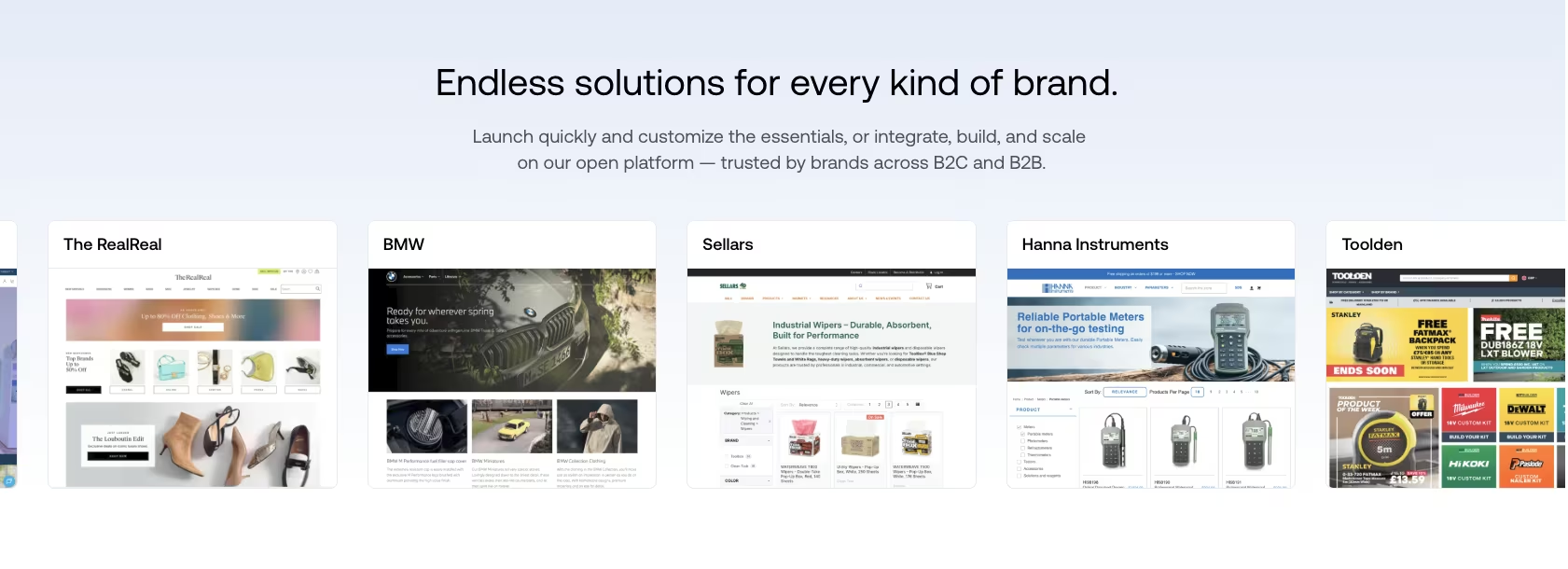
The first thing I noticed logging into BigCommerce's Core dashboard after entering the setup brief was how much more there was to configure right away. Shopify's equivalent screen asked for far less upfront. That's a fair preview of how the rest of the build went.
The setup checklist made the platform's priorities clear before I'd typed a single product name. Alongside the usual domain and payment steps, BigCommerce surfaced staff-account and customer-group settings during onboarding, so both were available without adding an app.
Every plan, including Core, ships with unlimited products and bandwidth, so catalog size alone never forces an upgrade.
That generosity on the infrastructure side didn't carry over to the editor. BigCommerce's Page Builder shows more settings on screen at once than Shopify's editor does. I've opened the help center mid-task more than once to find a setting I already knew was somewhere.
The platform packs more functionality onto fewer, denser screens, which is why more configuration occurs natively rather than through an app.
BigCommerce ships genuine B2B tooling without an app. Customer groups and tiered wholesale pricing require the Growth plan ($105/month), which is still well below the jump to Shopify Plus for the same features. Any single product can hold up to 600 variant stock keeping units (SKUs), plenty for most catalogs, even though Shopify's own per-product cap now sits higher.
Multi-storefront management is native too, with no separate platform tier required to run a second store, though each additional storefront carries its own fee: $30/month on Core, $50/month on Growth, or $100/month on Scale.
That extra native functionality shows up in BigCommerce's pricing structure, though not all of it on the entry tier. Core runs $39/month ($29/month, billed annually), but the wholesale customer-group pricing sits on Growth, at $105/month ($79/month, billed annually).
Every plan also carries a revenue threshold tied to trailing-12-month gross merchandise value (GMV), and crossing it auto-upgrades you to the next tier regardless of whether you need what that tier adds.
Meet Shopify: Features & Highlights

Shopify's setup flow felt noticeably faster from the first screen. Nothing in the dashboard made me stop and hunt for it. The drag-and-drop editor doesn't require much thought, and the library of apps and themes behind it covers a wide range of store features.
That impression held past the theme editor too. Adding the first product, uploading images, and setting a price all happened inside the same dashboard, without a detour to a separate settings area.
The Basic plan opens at $39/month ($29/month, billed annually). The product tools, built-in payment options, channel connections, and basic checkout branding I used stayed inside that starting tier.
Checkout is where that starting-tier openness ran into a real wall. Shopify's Basic plan let me drop the store's logo and brand colors onto the checkout page, and that was as far as customization went.
Editing the checkout layout or adding a custom field to the shipping step is gated behind Shopify Plus and its checkout extensibility framework. On a catalog this size, I never needed to reach past that ceiling, but not every checkout tweak is included by default.
What sold me fastest was Shopify Magic. I tested it using the same product-copy brief I planned to run on both platforms, with the full comparison in the AI Tooling section below.
Sidekick, Shopify's in-dashboard AI assistant, sits alongside it for general store questions, the type of thing that would otherwise mean a help-center detour the way BigCommerce sent me on more than once.
Shopify's core feature set stays deliberately lean. It relies on its app store for anything beyond the basics. It's strong on multichannel selling, supporting platforms like TikTok, Instagram, and Amazon through official channel integrations that sync products, inventory, and orders with Shopify.
BigCommerce vs Shopify: At a Glance
How they stack up at a glance:
| Feature | BigCommerce | Shopify |
|---|---|---|
| Best For | B2B, wholesale pricing, multi-storefront | DTC/B2C brands, fast launch |
| Pricing | $39/month ($29/month, billed annually) | $39/month ($29/month, billed annually) |
| Key Strength | Native B2B tools, multi-storefront support | Ease of use, wide app selection |
| Main Weakness | Steeper learning curve, revenue-tier auto-upgrades | B2B tools require apps or Shopify Plus, costs add up fast |
| Ideal Team Size | Small to mid-size teams with a B2B or wholesale side | Solo founders to mid-size DTC teams |
BigCommerce vs Shopify: Feature-by-Feature Comparison
Here's where the two platforms pulled apart, feature by feature, based on what happened building the same store on both.
Ease of Use & Setup
Shopify remained easier to use throughout the two-week test.
On Shopify, adjusting theme settings, adding a product image, and setting up a discount each followed a clear in-app path. Several of the same tasks on BigCommerce sent me to the help docs first.
Configuring the Bar Soap product page for all 126 variant combinations took longer on BigCommerce because the relevant settings were harder to find.
Both platforms started from the exact same setup brief, typed word for word into each onboarding flow. Shopify's flow turned that one paragraph into a configured theme and a product page inside a single sitting. BigCommerce's Core dashboard took the same brief and handed me a longer list of decisions before the store felt finished.
BigCommerce's page builder exposes more settings once you know where to find them. The learning curve shows up fastest on small, visual product pages, exactly the kind this store leans on. I was still finding new settings well into the second week, mostly harmless but a sign of how much depth the page builder has.
Shopify's onboarding flow also front-loads decisions in a sensible order: theme first, then products, then payments. BigCommerce's Core dashboard gives you more settings at once, right from the start, with no clear order to follow. For a solo builder, those extra setup decisions add more time to the build.
That gap held steady across the full two-week window, from the first afternoon through the last day I checked in. The same pattern showed up later setting up wholesale pricing, a task that ran long on BigCommerce precisely because the settings for it aren't grouped anywhere obvious.
Winner: Shopify.
Built-In Features vs. App Dependency
BigCommerce takes this one, and the difference showed up the moment I tried to set up wholesale pricing.
Building a "Wholesale" customer group with tiered, quantity-based pricing on the Bar Soap product took about 20 minutes on BigCommerce. It happened natively, with no third-party app, on BigCommerce's Growth plan. I picked the tier breaks, assigned the customer group, and the pricing logic worked.
Shopify requires a third-party app or Shopify Plus, which starts around $2,300/month, for the same tiered wholesale pricing. That is a large jump from a feature BigCommerce includes for $105/month on Growth.
That pattern repeats elsewhere. BigCommerce ships gift cards and advanced SEO tooling out of the box. Shopify keeps its core feature set lean by design and expects you to fill the gaps from its app store. The app store carries thousands of options and is generally well-curated, but every paid app you add is another line on the monthly bill.
That gap is the cost lever a sticker price alone won't show you. A store that needs three or four of the features BigCommerce ships natively ends up paying for three or four Shopify apps to catch up. Those subscriptions stack on top of the plan fee month after month.
I don't fault Shopify's app store for this. Most of what I looked for installed cleanly and worked on the first try.
But installing an app is still a decision, a monthly line item, and one more thing that can break during a theme update. BigCommerce's version of the same feature worked the moment I turned it on. Before you compare sticker prices between these two platforms, price the apps in too.
Winner: BigCommerce.
AI Tooling
I compared Shopify's built-in AI workflow with BigCommerce's default product editor, which requires an added app for AI copywriting. That app, BigAI Copywriter, is free, but I skipped installing it and wrote the lavender goat milk soap description by hand instead, to compare what ships by default rather than app-added tools.
I used the same brief every time, word for word: "Write a product description for a lavender goat milk bar soap in a small-batch soap line, highlighting natural ingredients and gift-ready packaging." That's the exact test, no edits after the fact.
Shopify Magic did what it had already shown me, delivering a usable, on-brief description in under a minute, with nothing new to install. Sidekick also answered general setup questions inside the dashboard.
On BigCommerce, I pulled up the ingredient list and drafted two versions before one felt gift-ready, which took a few minutes for one product. Repeating that manual process across all three products in this catalog would have added two more descriptions.
Shopify saved those few minutes in this test. That result doesn't support a claim about weekly time savings, since I didn't test BigAI Copywriter or a catalog with dozens of products.
If AI copywriting is already part of your daily workflow, having it built into the product editor by default is a point in Shopify's favor, separate from either platform's core storefront features. I'd lean toward Shopify on this feature alone if writing product copy took up much of my week.
Winner: Shopify, for built-in AI access.
Transaction Fees & Pricing Tiers
The two fee tables now follow nearly identical tiers, and both entry plans cost $39/month ($29/month, billed annually).
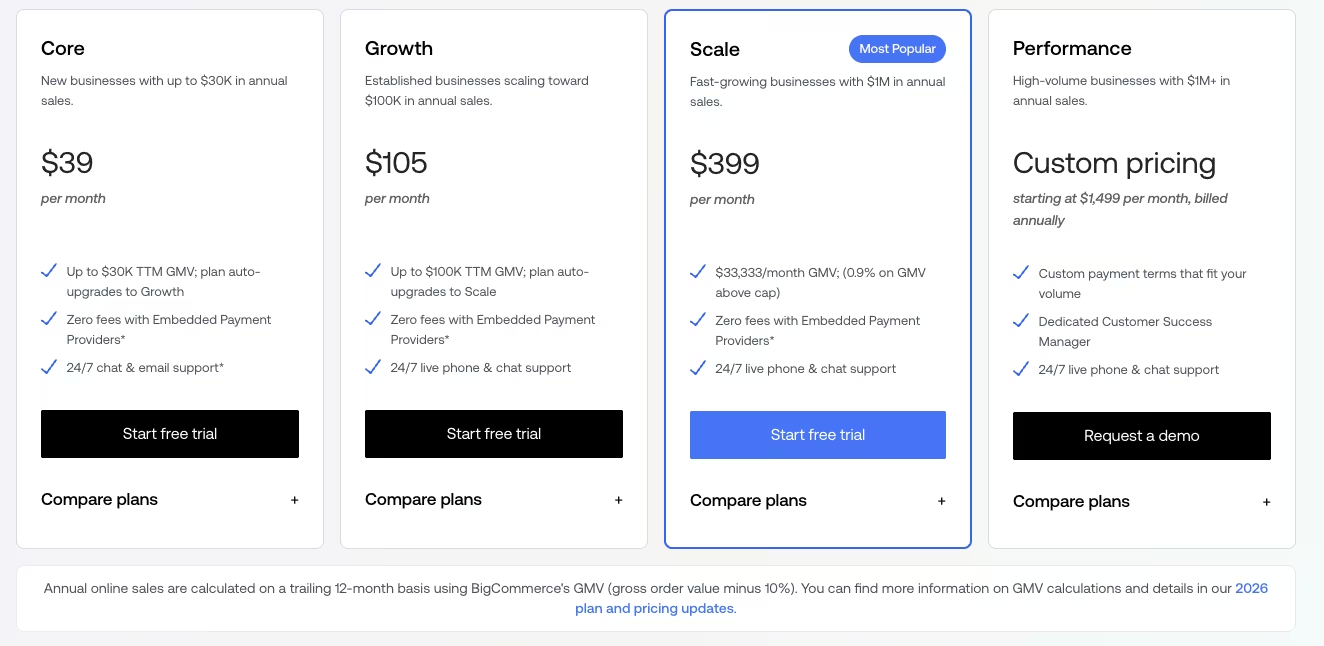
What none of that headline math shows is BigCommerce's revenue-threshold mechanic. Cross $30,000 in trailing-12-month GMV on the Core plan, and BigCommerce automatically bumps you to Growth, whether you wanted the next tier's features or not.
Growth caps at $100,000, then it's Scale. That auto-upgrade is one factor in BigCommerce's long-term cost, and the advertised starting price does not show when it will apply.
Scale carries its own separate mechanic beyond that tier ladder. It includes $33,333 in gross merchandise value (GMV) per month, before a 0.9% overage fee applies to the GMV above that limit. That's the number a growing store on Scale needs to watch, more than the sticker price on the plan you signed up for.
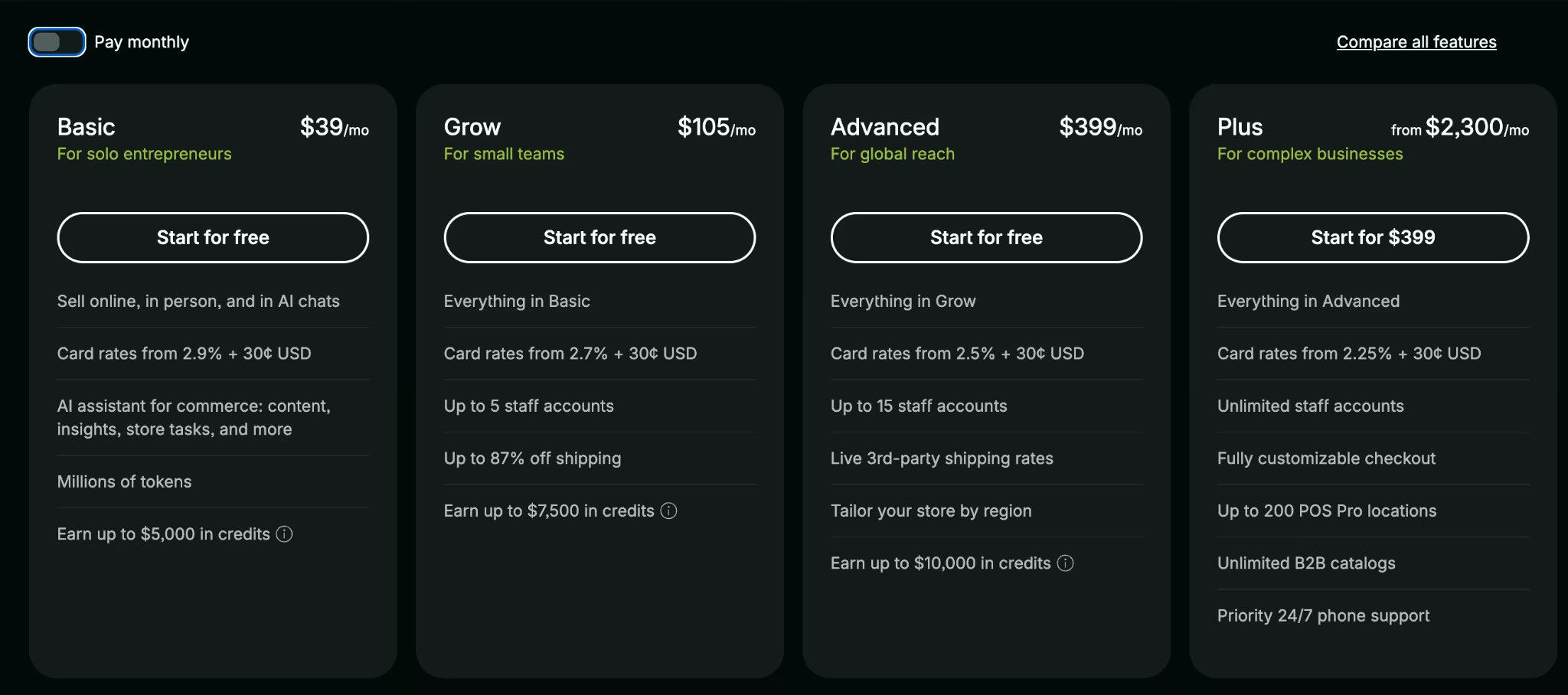
Both platforms also have a way around the fee entirely. Route payments through Shopify Payments or one of BigCommerce's own in-house payment providers, and the transaction fee disappears on either platform.
The catch is the same on both sides. Use a processor outside that list, for a niche category or a specific country, and you're paying the tiered fee either way.
If your revenue is climbing toward $30,000 or $100,000 in trailing-12-month GMV, budget for the upgrade now.
Winner: Tie.
Product Catalog & Variant Limits
Neither platform trimmed a single one of the 126 Bar Soap combinations, so the whole comparison came down to how each handled the setup.
On BigCommerce, the product went through in two passes. With 126 variant rows in one file, I split the import into two separate comma-separated values (CSV) batches to keep errors easy to trace.
Running the second batch added about 10 minutes to what should have been a single import. Slower, but nothing was cut and no scent, size, or base got dropped along the way.
On Shopify, the same 126 combinations went in through the product editor in one sitting, with no batching needed.
Shopify's variant cap used to sit at 100 per product. I expected that limit to still apply, but it doesn't.
Shopify raised its per-product variant limit to 2,048 variants in October 2025, available on every plan with no upgrade required. My 126-variant product never came close to testing that ceiling. It went in without a hitch.
Shopify's documented 2,048-variant cap offers more headroom than BigCommerce's 600-variant cap. My 126-variant product didn't push near either ceiling, but if your busiest product could realistically cross 600 variants, Shopify has more documented room to grow into.
BigCommerce's remaining catalog advantage comes from native wholesale pricing and multi-storefront support, separate from raw variant capacity.
Winner: Shopify, on raw variant capacity.
B2B & Multi-Storefront Capability
The wholesale customer group I set up on BigCommerce is the clearest evidence here, and the gap extends beyond pricing tiers.
BigCommerce's multi-storefront tooling is native, supporting a separate wholesale-only site alongside the retail one out of the box. Shopify requires Shopify Plus or workaround scripting on the lower tiers, with no native path on Basic or Grow.
I applied the quantity breaks to the Bar Soap product, and the storefront honored them across every scent, size, and base when a wholesale account logged in. BigCommerce used the existing checkout and did not require a separate rule for each variant.
Standing up that same second storefront on Shopify means the same jump to Shopify Plus, still around $2,300/month. The alternative is stitching together workaround scripting on the lower tiers, something BigCommerce doesn't ask for.
For a small business starting to take wholesale orders alongside retail ones, BigCommerce ships tiered wholesale pricing on the Growth plan, $105/month, and multi-storefront support on every plan, with each additional storefront billed separately.
BigCommerce is conditionally worth it for a small business. A small operation with an actual B2B or wholesale side gets BigCommerce's native tooling on the Growth plan, well short of an enterprise-tier upgrade. A simple, low-SKU DTC shop with no wholesale ambitions won't touch most of this, and would be paying for power it never uses.
Winner: BigCommerce, for stores that need native B2B or wholesale tools.
If BigCommerce still feels like more platform than you need, it's worth comparing it against the other website builders built specifically for B2B selling before you commit.
SEO & URL-Structure Control
BigCommerce gives you more control over the parts of SEO that Shopify keeps locked down.
BigCommerce lets you customize the URL structure. The URL Structure settings let you configure the path format for products, categories, and web pages, well past the platform's own default.
Editing robots.txt is as direct. It's a plain text field under General Settings, so blocking a crawler from a specific path is a settings change, no code required.
That flexibility extends to category structure too. BigCommerce lets categories nest up to eight levels deep, room enough for a catalog with a genuinely branching structure, retail on one branch and wholesale on another, without collapsing everything into a flat list of tags.
Shopify keeps products under /products/, collections under /collections/, pages under /pages/, and blog posts under /blogs/. You can change the final handle, while the four root folders stay fixed.
Editing robots.txt on Shopify means creating a robots.txt.liquid file inside the theme's code editor. Shopify's own documentation calls this an unsupported customization, meaning its support team won't help if the edit breaks something.
Both platforms cover baseline SEO needs by automatically generating an XML sitemap and canonical tags.
The difference shows up once you need something the defaults don't allow for, like a nested category structure for a dense catalog or a crawl rule the theme editor doesn't expose. Running the same soap catalog through both, I never hit BigCommerce's eight-level ceiling.
Three levels (retail, category, then sub-category) covered the whole build with room to spare.
That headroom goes unnoticed until a catalog grows past a single flat list of products, and by then switching platforms to get it is a much bigger project than turning on a setting. If SEO control is a deciding factor for you, BigCommerce hands you more levers without touching code.
Winner: BigCommerce.
Headless Commerce & Developer Flexibility
I didn't build a headless storefront during this two-week test. Both platforms now ship a dedicated headless framework for building a custom storefront from scratch.
Shopify's path is Hydrogen, a React-based framework Shopify announced in 2021 and took to general availability in 2022. It pairs with the Storefront API and Customer Account API, and deploys to Oxygen, Shopify's own edge-hosting layer, so a development team isn't managing separate hosting infrastructure on top of the storefront code.
Hydrogen's 2022 general release gave its documentation and agency ecosystem more time to develop than Catalyst's 2024 launch.
BigCommerce's answer is Catalyst, an open-source framework built on Next.js and the GraphQL Storefront API that BigCommerce launched in February 2024, almost three years after Hydrogen. Catalyst is a separate framework from Stencil, BigCommerce's standard hosted-theme engine.
Catalyst is a separate framework that inherits BigCommerce's wholesale pricing, multi-storefront tooling, and other native commerce logic. A headless build on it can call on features Shopify's headless side would need an app or a Plus upgrade to replicate.
The request ceilings behind each framework tell a different part of the story than the launch dates do.
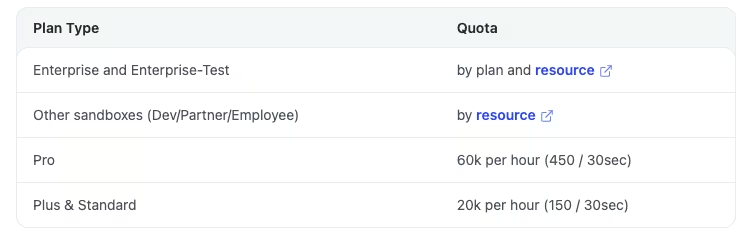
BigCommerce's REST API rate limits for OAuth apps scale with plan: 20,000 requests per hour (150 every 30 seconds) on Standard and Plus, rising to 60,000 requests per hour (450 every 30 seconds) on Pro.
Those tier names, Standard, Plus, and Pro, come from BigCommerce's developer documentation and don't map directly onto the Core, Growth, and Scale storefront plans referenced earlier in this piece.
That REST quota doesn't govern headless traffic directly. Catalyst runs on BigCommerce's GraphQL Storefront API, which caps each request at a fixed complexity score instead, the same limit on every plan. Shopify's Storefront API takes a different approach entirely.
Shopify reserves its rate-limiting for automated and bot traffic, leaving real buyer traffic free of a fixed requests-per-second cap. A headless Catalyst build instead has to keep each individual query under BigCommerce's complexity ceiling, a per-request limit rather than a volume cap.
For a store running complex, deeply nested queries, that's a real architectural difference, well beyond a documentation gap.
Hydrogen's earlier release gives it the framework-maturity advantage in this comparison, while BigCommerce retains stronger native commerce features.
Winner: Shopify.
What Real Users Are Saying
BigCommerce
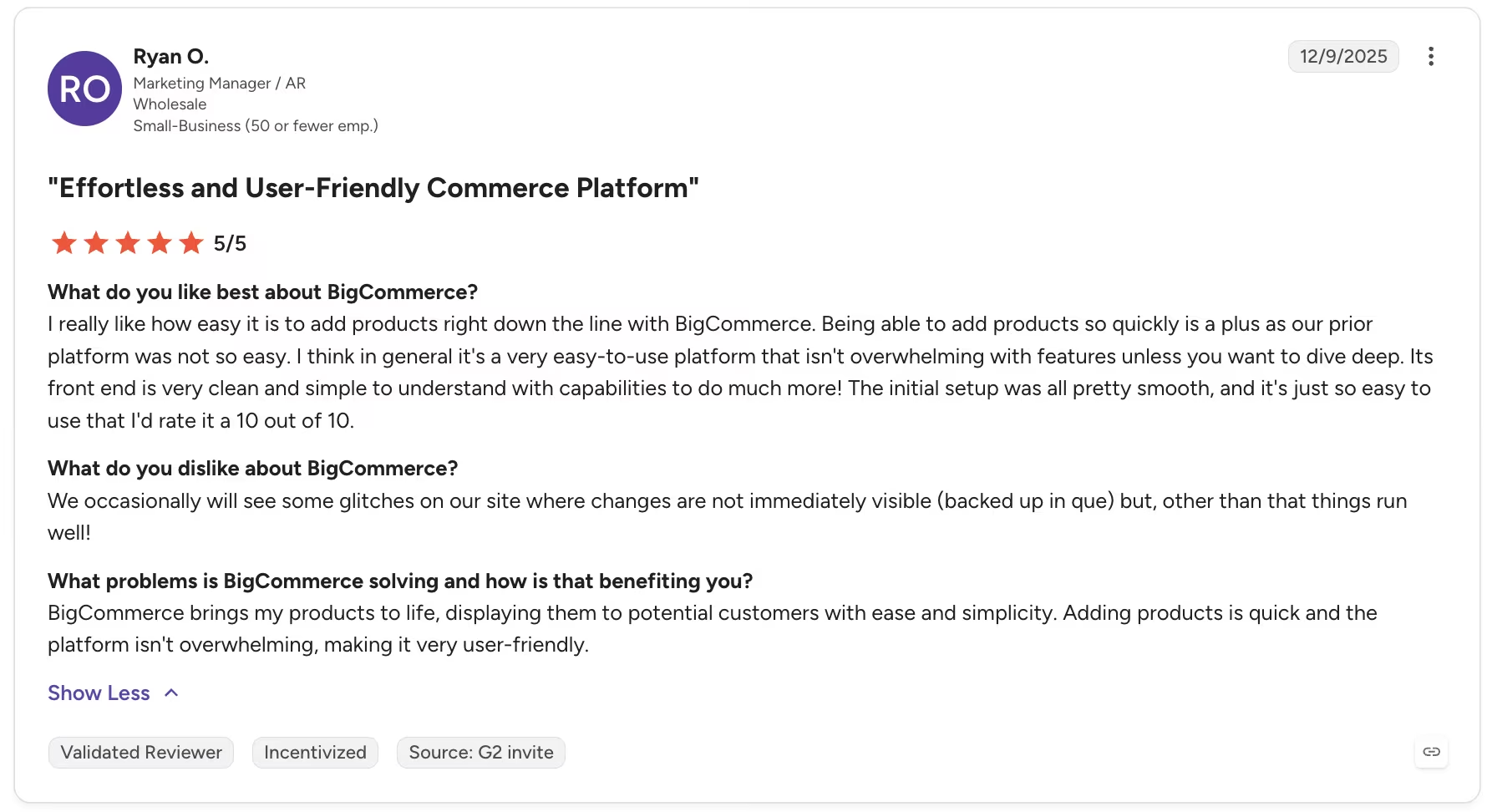
“I think in general it's a very easy-to-use platform that isn't overwhelming with features unless you want to dive deep.” - Ryan O., G2
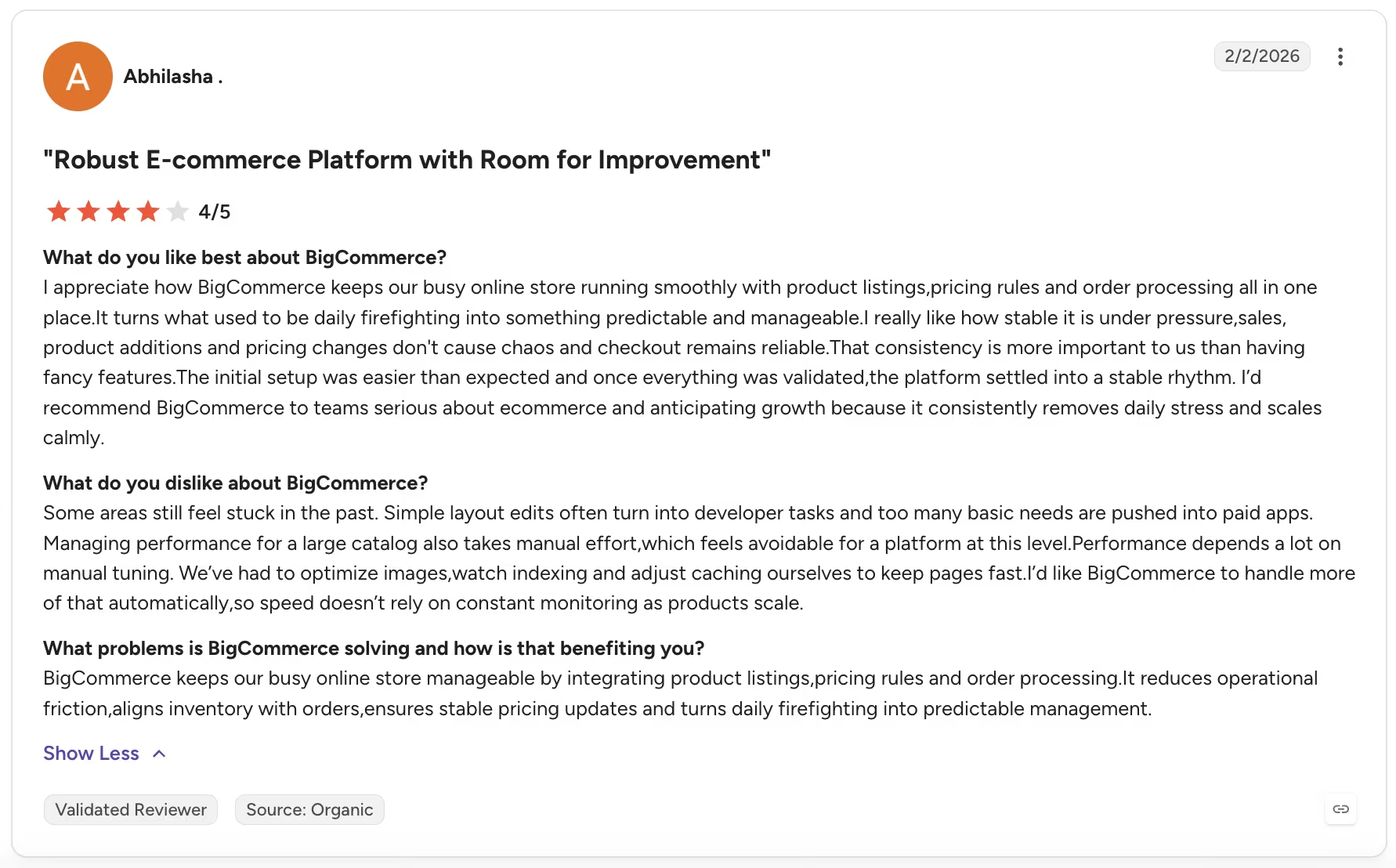
“Some areas still feel stuck in the past. Simple layout edits often turn into developer tasks, and too many basic needs are pushed into paid apps.” - Abhilasha, G2
Shopify
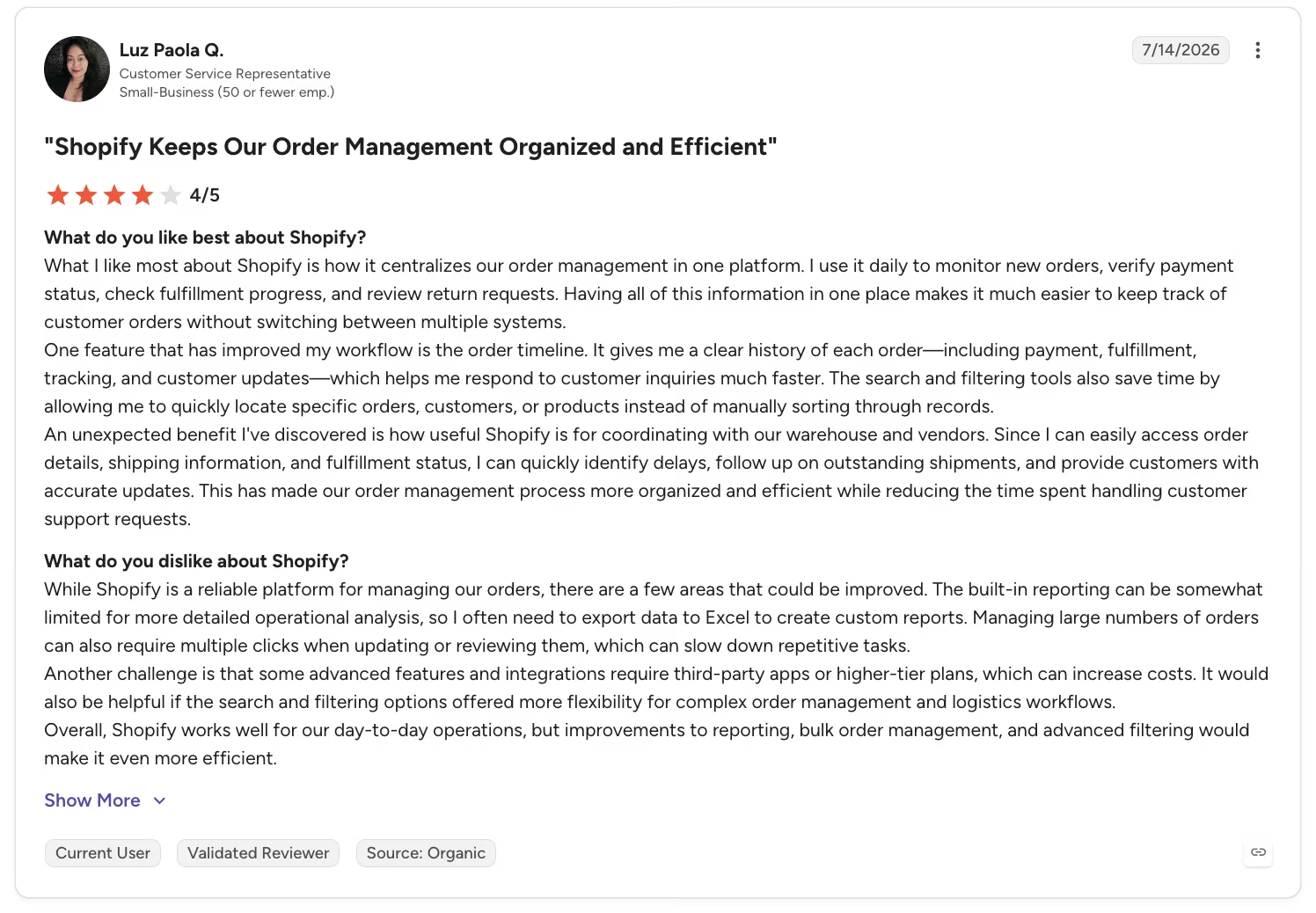
“One feature that has improved my workflow is the order timeline. It gives me a clear history of each order—including payment, fulfillment, tracking, and customer updates—which helps me respond to customer inquiries much faster.” - Luz Paola Q., G2
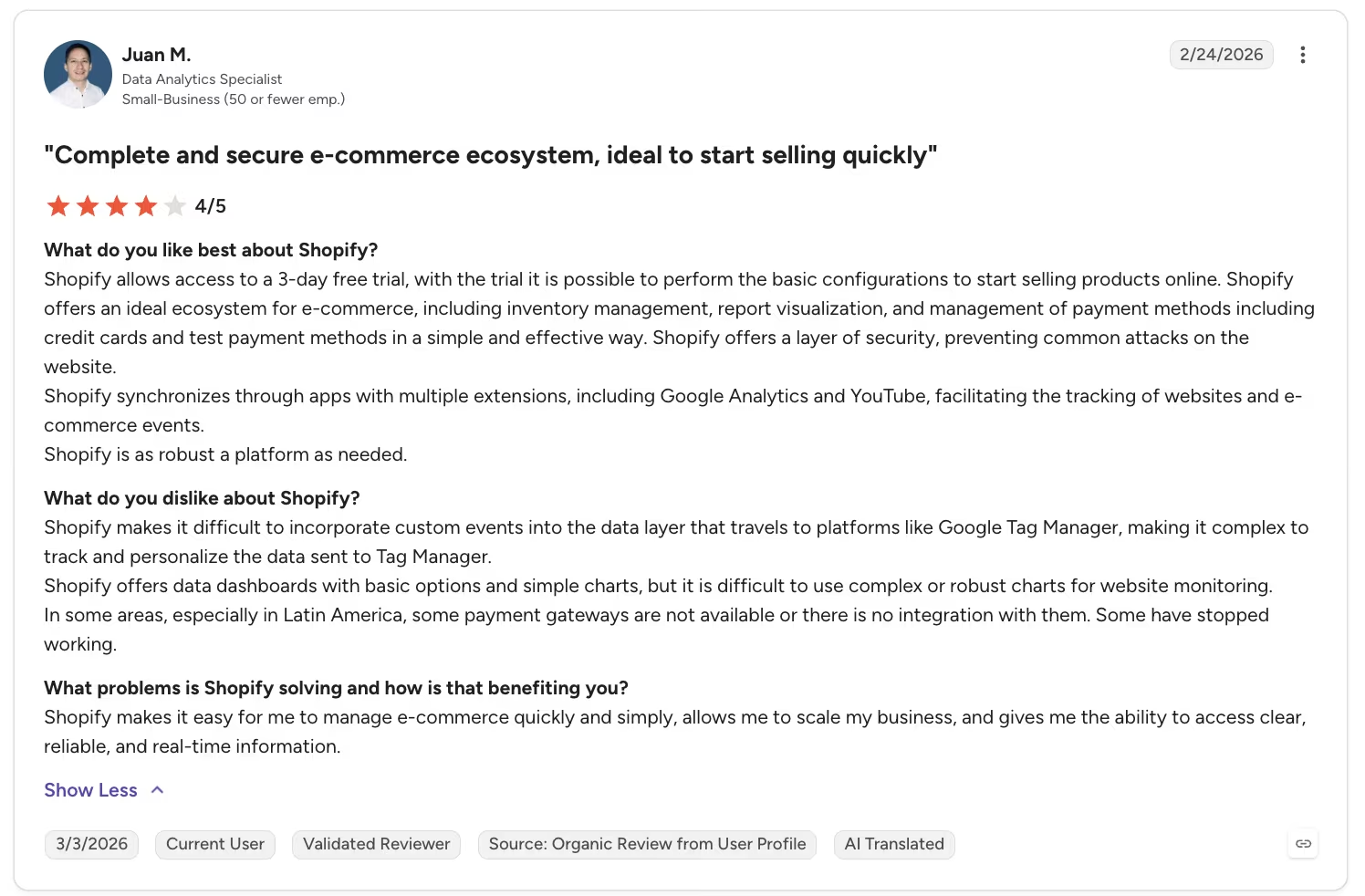
“Shopify makes it difficult to incorporate custom events into the data layer that travels to platforms like Google Tag Manager, making it complex to track and personalize the data sent to Tag Manager.” - Juan M., G2
How to Make Your Choice
There's no flat winner here. Shopify won four of the eight feature areas: ease of use, AI tooling, raw variant capacity, and headless/developer flexibility. BigCommerce won three: built-in features, B2B/multi-storefront capability, and SEO/URL-structure control. Transaction fees and pricing came down to a genuine tie. Both platforms serve different kinds of stores well.
Looking at both finished catalogs side by side at the end of two weeks made the split clear. Both stores held their full 126-variant lineup, BigCommerce in two import batches, Shopify in one. The surrounding tools created the larger difference. BigCommerce included wholesale pricing on Growth and multi-storefront support on every plan, with a per-storefront fee, while Shopify charged extra or required a higher plan for comparable features.
BigCommerce is Better For:
- Merchants with B2B or wholesale needs
- Native SEO tools, gift cards, and other built-in extras
- Multi-storefront or multi-brand operators
- Teams that want to avoid stacking paid apps for core features
Shopify is Better For:
- DTC and B2C brands
- Non-technical founders who want a quick launch
- Stores that lean on social and multichannel selling
- Teams that want plenty of third-party apps to pick from
Also read our WooCommerce vs Shopify breakdown to see how a third platform compares before you commit to either.
My Verdict
For this small-batch catalog with a wholesale side, I'd choose BigCommerce. Its native tiered wholesale pricing was quick to set up on the Growth plan, and every plan supported multiple storefronts, each additional one billed separately.
That changes fast for a simpler shop. A lower-SKU, DTC-only store with no B2B side or wholesale needs would be better served by Shopify's faster setup and lighter learning curve. In this BigCommerce vs Shopify decision, your catalog and business model carry more weight than either platform's sticker price. That's especially true now that the fee structures have converged.
Switching Between BigCommerce and Shopify: What to Know
This build didn't include a migration. Building the same catalog on both platforms from scratch was the point. It let me compare the setup experience directly, skipping the data transfer altogether. A lot of people reading this comparison aren't starting from zero, though. They're already running one platform and weighing whether the switch is worth it.
Migrating Your Product Catalog
BigCommerce to Shopify is the more automated direction. Shopify's own Store Importer app lists BigCommerce as a source platform on its "Import your data into Shopify" screen, and it runs off exported CSV files, no live connection needed.
Getting a product catalog to import cleanly means exporting two separate BigCommerce product files, the Default template and the Bulk Edit template, since Shopify's importer needs both to reconstruct variants correctly. Customers and orders come across as two more CSV exports, uploaded separately from the product files.
Shopify to BigCommerce runs the other way with less automation built in. BigCommerce doesn't ship an equivalent first-party importer for Shopify-sourced data.
The standard path is reformatting Shopify's exported CSVs to match BigCommerce's own product-import template, then uploading through Products > Import in smaller batches. That's the same batching this build's own 126-variant product needed during testing.
Shopify's dedicated importer makes the BigCommerce-to-Shopify move more automated. The reverse direction requires manual CSV reformatting, so budget more setup time.
URL Redirects and SEO
URL redirects are the part of either move that deserves the most caution. A missing redirect can send an indexed URL to an error page and reduce its search visibility after the switch.
Shopify's redirect tool sits under Online Store > Navigation > URL Redirects, with bulk CSV import once the list runs past a handful of pages.
BigCommerce's 301 Redirects tool takes a similar two-column CSV, old URL and new URL, but it only adds new redirects. Updating ones already in place means exporting and deleting them first, then re-importing the corrected file.
Themes and Native Features
Themes never carry over in either direction. A BigCommerce Stencil theme has no Shopify Liquid equivalent, and a Shopify theme has no BigCommerce equivalent, so the storefront gets rebuilt fresh on the new platform every time. The same applies to anything that shipped as native functionality on the platform you're leaving.
The wholesale customer groups I set up natively on BigCommerce would require a Shopify app or Shopify Plus after a move. A Shopify feature supplied by an app would need a BigCommerce equivalent or a rebuild.
Next Steps: Try BigCommerce or Shopify for Free
If your catalog is complex, you're running any type of B2B or wholesale side, or you're planning more than one storefront, start a BigCommerce trial. Build your actual catalog into it before committing to a plan.
If you want to move from an idea to a clean-looking store with fewer setup steps, Shopify's trial gets you there. That's especially true if you don't need native B2B or wholesale tooling. Either way, build your own catalog before you decide. That's what surfaced the differences in this test, more than any marketing page could.
Also read our best AI eCommerce website builders guide for what else is worth trying when neither Shopify nor BigCommerce fully fits your store.
How Emergent Helps Once Your Store Needs Its Own Internal Tools
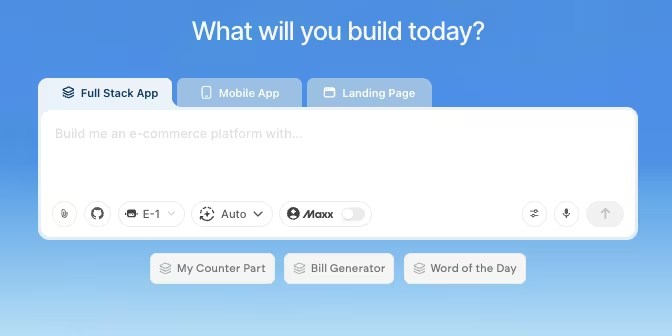
BigCommerce and Shopify both run a full storefront well, but store owners often need something adjacent to the storefront itself, like an inventory reconciliation view, a customer portal, or a quote calculator for a B2B catalog.
Building that usually means hiring a developer or bolting on another SaaS subscription, since neither platform ships it natively.
Emergent fills that gap. The wholesale customer-group work on BigCommerce made the quantity-break pricing logic visible in a way Shopify's setup never did. It's exactly the type of small, specific tool a growing store owner would otherwise need outside help to build.
I described one to Emergent directly. "Build me an internal tool where I can enter a product name and an order quantity, and get back a suggested wholesale price based on quantity breaks I define." That's it, one prompt. What came back was a working wholesale quote calculator, built in about 15 minutes using about 8.78 credits.

That one prompt was the entire brief I handed it. From there, a system of agents scoped the build, wired the pricing logic end-to-end, and confirmed the tool worked before handing it back. I finished with a working tool already assembled, skipping the pile of parts I'd otherwise have to wire together myself.
I wouldn't reach for Emergent to build the storefront itself, since that's not the job it's built for. But for the internal tool neither platform ships, it's the fastest path I've found from a plain-language description to something that works.
It's the tool you build alongside a storefront once you outgrow spreadsheets for the parts neither platform covers. Emergent also offers an MCP connector to plug into the systems you already use, though I didn't test that connector in this build.

Most AI app builders stop at prototypes. Emergent creates production-ready apps you can actually launch.
- Production-ready apps
- Web & mobile apps
- Deploy in minutes







