



The first online store I made for a friend was held together with tape, beginner-level HTML, CSS, and a dream. It had a ridiculous layout, took me days to put together, and had a general energy of “please do not click too many buttons.”
Building a store is easier now, almost suspiciously easier. You no longer need to hand-code a sad little product page and hope it works. You can pick a platform, add products, connect payments, and get much closer to selling in a day.
That's why the WooCommerce vs Shopify question comes up so often: one turns your WordPress site into a store, while the other gives you a hosted store platform from the start. I tried both to see which one is easier to launch with, where each one hurts, and which setup I would trust with my first dollar.
WooCommerce vs Shopify: What's the Difference?
WooCommerce is a free plugin that turns an existing WordPress site into a store. You bring the hosting, domain, and (eventually) a stack of extensions. Shopify is a fully hosted platform: sign up, pick a theme, and your store already has checkout, hosting, and an SSL certificate built in.
Choose WooCommerce if you want more control over your site files, data, and hosting, you're already on WordPress, or your business needs a store as one part of a bigger site with blog, portfolio, or membership content.
Choose Shopify if you want a store live today, you'd rather pay a flat monthly fee than manage hosting and plugin updates, or you're planning to sell in person as well as online.
How the two platforms stack up at a glance:
| Feature | WooCommerce | Shopify |
|---|---|---|
| Starting Price | Free plugin, but needs a WordPress plan which starts from $9/month ($4/month billed annually) | $39/month ($29/month billed annually) |
| Transaction Fees | 2.9% + $0.30 per U.S. card transaction via WooPayments; 0% platform cut | 2.9% + 30¢ on Basic, dropping to 2.5% + 30¢ on Advanced; third-party processor fee ranges from 2% on Basic to 0.6% on Advanced |
| Free Trial/Entry | Free to install on self-hosted WordPress; no time limit | 3-day free trial, then paid plan required |
| Themes | No dedicated WooCommerce theme picker; store themes live under WordPress's Appearance tab | Shopify Theme Store with free and paid ecommerce themes |
| Hosting | Self-hosted; you choose the provider | Managed hosting and SSL included |
| Best For | Store owners who want full control and already use WordPress | Founders who want a store live without managing infrastructure |
Meet WooCommerce
WooCommerce is open-source ecommerce software built on top of WordPress, and it now runs on 8.2% of all websites, which W3Techs puts at 11.7% of the content management system market.
I first tested WooCommerce through WordPress.com's free hosted plan, but WordPress wouldn't let me install the plugin without a paid plan. The paid-plan requirement pushed me to try WooCommerce in a different way.

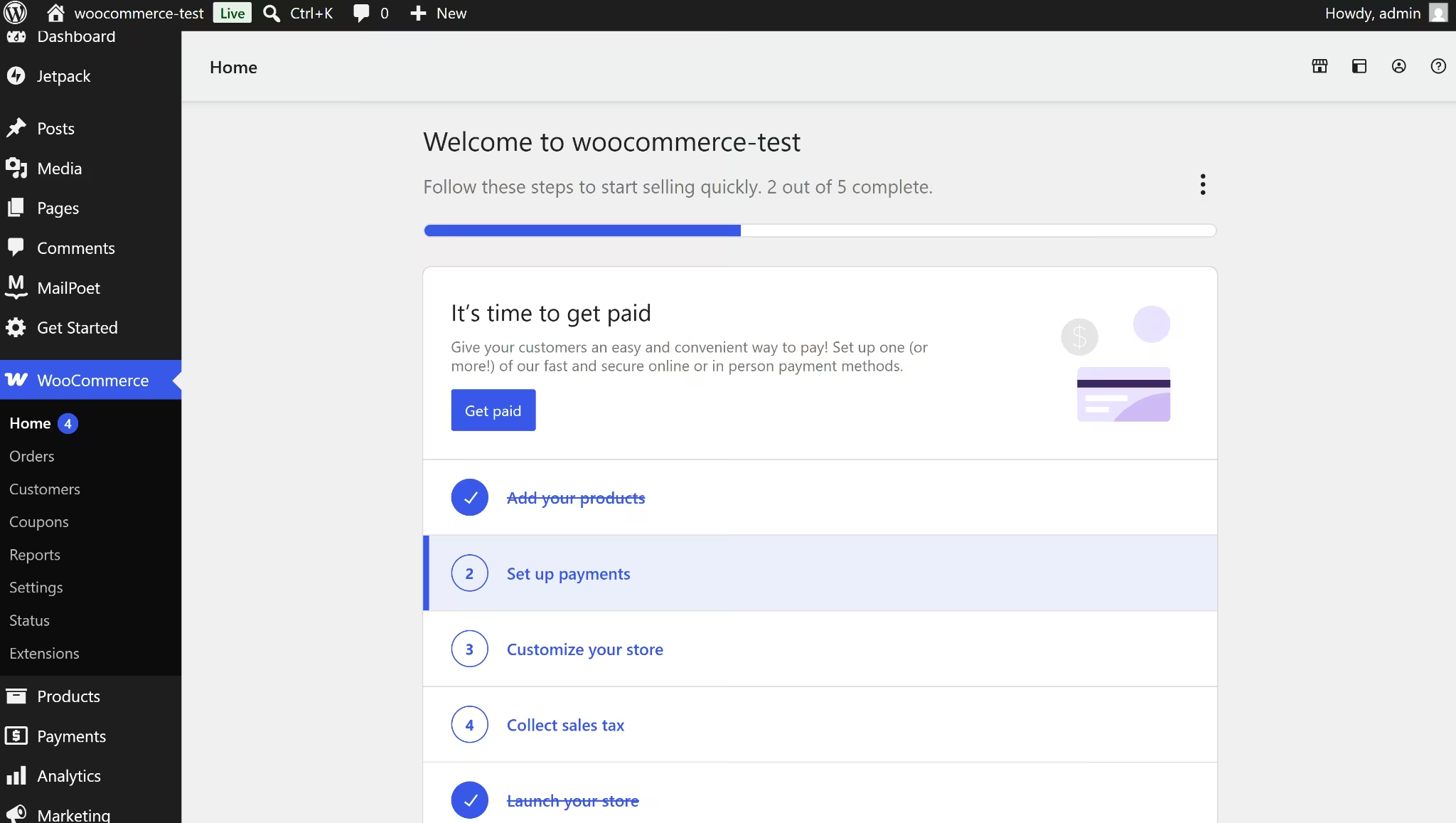
I installed WordPress locally on my computer using LocalWP, then added the WooCommerce plugin directly. The local install let me install the plugin, add products, import sample items, change the theme, and run a checkout with offline payments, all without paying for hosting.
Across both setups, WooCommerce felt less like signing up for a store builder and more like adding commerce to a WordPress site. Products, Orders, Analytics, and Settings all live inside the regular WordPress admin.
WooCommerce's biggest strength and its biggest source of friction come from that shared admin structure. You get more control than with Shopify, but you also spend more time assembling the pieces around the store.
Meet Shopify
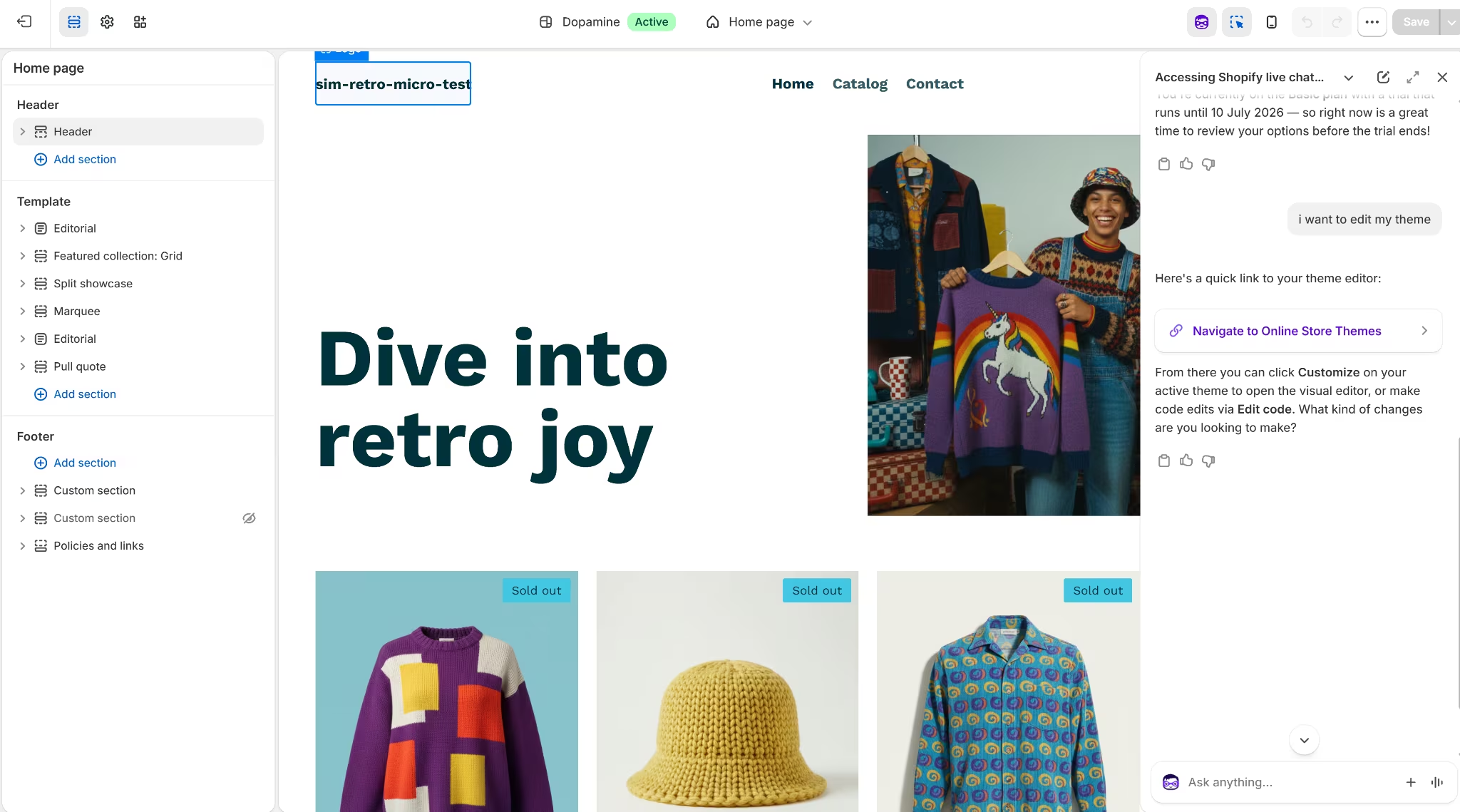
Shopify is a fully hosted, done-for-you commerce platform. There's no separate hosting bill and no server to configure, since Shopify handles security and platform updates on its end. You sign up, pick a theme, and Shopify's setup checklist walks you through adding your first product.
Unlike WooCommerce, which is free and can be tested locally, Shopify has no free plan. Shopify's pricing page lists a three-day free trial before it asks for payment, which was enough time to test the admin, the payments menu, and the theme creator.
WooCommerce vs Shopify: Feature-by-Feature Comparison
The at-a-glance table above only tells you so much, which is why I priced both out, timed the setup, tested checkout and payments, and dug into shipping, marketing, SEO, and security. Here's what I found.
Pricing and Total Cost
WooCommerce is free to install, but only on a self-hosted setup (you pay for hosting and domain separately) or one of WordPress.com's paid plans. WordPress.com's Personal plan starts at $9/month, or $4/month billed annually, and includes plugin installation, hosting, and support. WordPress.com's free plan blocks plugin installs entirely.
Shopify has no free plan. Basic starts at $39/month, or $29/month billed annually, the cheapest of four tiers, and bundles hosting, checkout, SSL, and support into that one price. Grow, Advanced, and Plus scale up from there with lower card rates and more staff accounts.
For this test, I ran WooCommerce on localhost. It's free but not live, so I couldn't add online payments and shipping tools.
Winner: WooCommerce for the lowest possible starting cost. Self-hosted WooCommerce has no monthly platform fee, and the paid plans start at a much lower price than Shopify.
If your focus is turning visitors into customers while managing an online store, ClickFunnels vs Shopify breaks down how each platform approaches the job.
Ease of Setup
WooCommerce took a few hours to reach a sellable state, and it wasn't straightforward. The plugin installation itself took minutes, and its wizard proactively offered WooPayments, shipping, PayPal, MailPoet, and tax rates all on one screen.
But getting set up meant WordPress first, then the plugin, then a theme under Appearance, then products, then extensions for payments, shipping, email, and SEO.
Populating the store was one of the easier parts. WooCommerce's Products screen has a built-in CSV importer to import an existing catalog in bulk.
Shopify got me to a basic product listing in under 20 minutes. For the theme, I could search for a pre-built template or describe what I wanted and generate one from a prompt; either route took minutes.
The setup checklist then walked me straight to adding my first product, without a plugin stack or hosting first. Shopify has a bulk CSV importer for products, and its Import screen also pointed me to recommended apps for migrating data from another platform entirely, not just a plain CSV upload.

Winner: Shopify. A sellable listing in 20 minutes versus a confusing few hours, with no account-connection blockers in the way.
Design and Themes
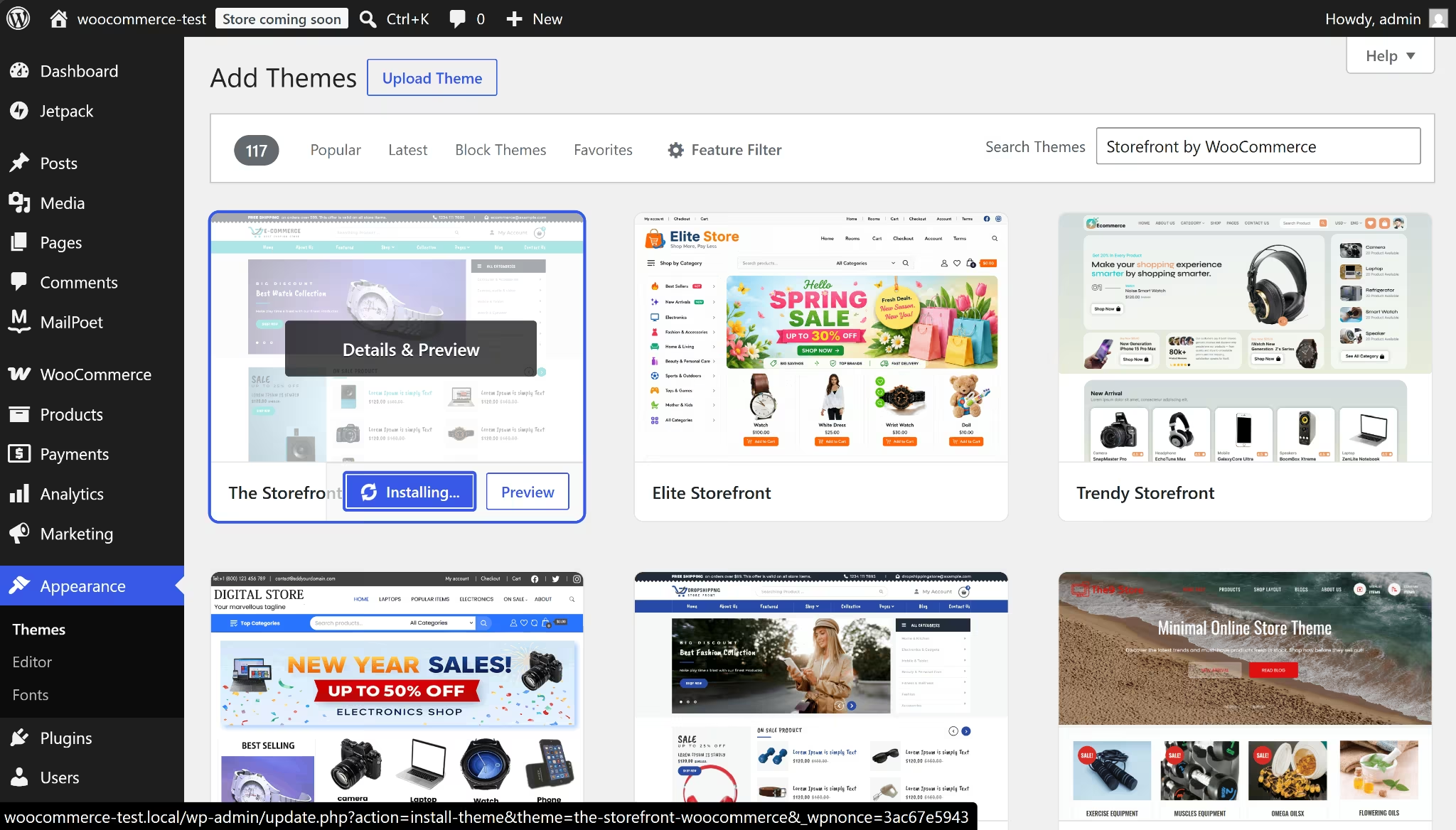
WordPress's Appearance tab lists every installed theme in one place, with no way to filter for ecommerce-specific ones. Store themes sit mixed in with themes meant for blogs or portfolios that have nothing to do with selling.
Finding one meant already knowing to search for "Storefront" specifically.
Because it's WordPress underneath, WooCommerce works with page builders like Elementor or the native block editor once a theme is active, which means custom layouts can go much further if you have the time or developer help.
WordPress.com also has a separate AI site builder, but it can't build ecommerce functionality, so it's not a shortcut in this instance. It also asked me to pick a paid plan before launching.
The Shopify Theme Store lists 1,200+ themes in total, with a mix of free and paid options. Sorting by price, low to high, free themes come first, then paid themes starting at $100, up to $500 at the highest.
I also generated a custom theme from a prompt, which returned three options to pick from. Unlike WordPress.com's AI builder, the prompt-generated theme came with cart and checkout built in, so no separate plugin was needed to make it sell anything. Once selected, the theme was editable with drag-and-drop or by prompting Sidekick, Shopify's AI assistant, directly.

WooCommerce gives you more room to make it look like nothing else on the internet, provided you or a developer put in the work. Shopify gives you a shorter path to a professional-looking store.
Winner: Shopify, for out-of-the-box polish and speed. WooCommerce keeps an edge only in raw flexibility, since Elementor and template-file access have no ceiling, unlike Shopify's drag-and-drop and prompt tools.
Sales Features and Inventory
WooCommerce covers stock tracking, categories, product images, and product types on simple products and per-variation price, stock, and SKU on variable ones.
Creating variants takes more steps. You switch the product type to "Variable product," add attributes, then generate or manually add each variation from a separate Variations tab.
Shopify lets you list unlimited products across its plans, matching those basics out of the box. You can add products and their variants manually or through the Shopify-approved CSV import. I used a sample import, with size and color variants that appeared automatically, each with a separate SKU, price, and stock count.
Each variant can also be individually published to specific sales channels, including Point of Sale (POS).
Speaking of Point of Sale, WooCommerce's native POS lets you sell from your existing catalog, sync inventory in real time, and accept payments through WooPayments or Stripe, all via the WooCommerce Mobile App.
It's free, plus $5/month per card reader and standard processing rates.
WooCommerce doesn't offer multi-location support or receipt printing as of now, so you'd need a third-party extension like Jovvie, which handles multi-location POS and connects to receipt printers through its BizPrint integration, for those advanced retail features.
Shopify has POS capabilities in every paid plan. Shopify's Basic plan already covers basic checkout, staff PINs, customer profiles, and basic printed receipts, unlike WooCommerce's native POS.
You can upgrade to Shopify’s POS Pro ($89/month per location) for advanced features like unlimited staff, cross-location returns, custom branded receipts, and inventory management.

Winner: Shopify. Its variant setup is simpler to click through, and its POS has a clear paid path to advanced features. WooCommerce matches it on basic in-person selling for free, but has no native tier to grow into if you need more.
Payments and Transaction Fees
WooCommerce supports WooPayments plus Stripe, Square, Visa Acceptance Solutions, and Airwallex as one-click installs, plus offline methods like bank transfer, check, and cash on delivery. WooPayments itself covers more than cards, including Apple Pay, Google Pay, WooPay, Affirm, Klarna, and Cash App Afterpay.
WooPayments charges 2.9% + $0.30 per U.S. card transaction, with no setup or monthly fees, plus separate rates for international cards and currency conversion.

Shopify Payments' card rate drops as you move up plans, with no separate transaction fee on top:
- Basic: 2.9% + $0.30 online, 2.6% + $0.10 in person
- Grow: 2.7% + $0.30 online, 2.5% + $0.10 in person
- Advanced: 2.5% + $0.30 online, 2.4% + $0.10 in person
Skip Shopify Payments for a third-party processor, and Shopify adds a surcharge on top, which scales the same way:
- Basic: 2%
- Grow: 1%
- Advanced: 0.6%"
Every tier includes Shop Pay access to over 250M+ buyers, support for 130+ currencies, and built-in fraud protection.
Shopify also has manual payment methods, including bank deposit, money order, and cash on delivery, plus a searchable list of 100+ third-party providers like PayPal and AliPay.

For value, Shopify Payments bundles more into the same rate WooPayments charges. WooPayments' one edge is being a fully independent, free download, though it still needs a WordPress.com account link to activate, which can fail depending on your hosting setup.
Winner: Shopify. On Basic, Shopify Payments matches WooPayments' flat 2.9% + $0.30 rate while bundling in Shop Pay, multi-currency selling, and fraud protection. On Grow and Advanced, Shopify's rate drops below WooPayments' rate entirely.
Marketing Tools
WooCommerce's Marketing tab has one-click integrations for Google, Reddit, Snapchat, and TikTok built in, each syncing your product catalog directly to that platform's ads manager. Email and SMS aren't part of that native lineup, so sending a welcome email meant installing a separate plugin like Mailchimp or MailPoet.
MailPoet's Starter plan is free and supports up to 500 subscribers and 5,000 emails a month, but I got stuck at account activation. The confirmation email link failed on repeated attempts, more likely an account-verification bug than a WooCommerce-side limitation.
Either way, you're managing a second system for something Shopify includes by default.
Shopify's plans include email campaigns, SMS campaigns, customer segments, marketing automations, abandoned checkout recovery, discount codes, and gift cards as a built-in system. All this can be found in your Messaging builder tool.

Shopify is also rolling out new WhatsApp messaging features to the Messaging builder.
Winner: Shopify. Both platforms offer official, easy-to-find channel apps for Google, TikTok, and other ad platforms, but Shopify's built-in email and SMS beat installing and troubleshooting a second plugin just to send a welcome message.
Shopify is adding Agentic Storefronts, a feature that lets users discover and buy products directly in AI chats like ChatGPT and Copilot.
Shipping
WooCommerce Shipping prints USPS, UPS, and DHL Express Worldwide labels directly from the dashboard, at label rates discounted up to 90%. It also generates invoices, packing slips, and pick lists for orders.
Activating label printing needs a WordPress.com account, and that connection only completes on a live, publicly reachable site. I tested WooCommerce on the free tier with no live host, so shipping failed for the same reason WooPayments did.
WooCommerce Shipping doesn't show live carrier rates to customers at checkout; that feature was discontinued in 2018, and now needs separate extensions.
Shopify's shipping settings sit behind an active paid plan, too. Its discount program covers major markets with named carriers, with label rates discounted up to ~88% through USPS, UPS, and DHL in the US.
The same discount program extends to Canada Post in Canada, Royal Mail in the UK, and Poste Italiane, Colissimo, and Correos across Italy, France, and Spain.
Once you're on a plan, the Settings → Shipping and delivery page opens up everything else for free. That includes shipping profiles by zone, preferred carriers, local delivery and pickup options, and packing slip templates.
Winner: Shopify, for sellers in the US, Canada, the UK, Italy, France, and Spain.
SEO
WooCommerce comes out clearly ahead on SEO, even though it has no native SEO feature.
Because it's built on WordPress, plugins like Yoast SEO give full control over meta tags, canonical URLs, and sitemap structure, which matters if organic search is your main acquisition channel.
Yoast SEO also added the clearest product-level guidance in my test. On a test product page, it flagged missing internal links, a missing meta description, and thin content, while confirming the keyphrase was already in the title and slug.
Yoast is free; Yoast Premium costs $118.80 a year for features like the Redirect Manager and an internal link planner.
WordPress's blogging structure is also more developed, with true categories, tags, and scheduled publishing.

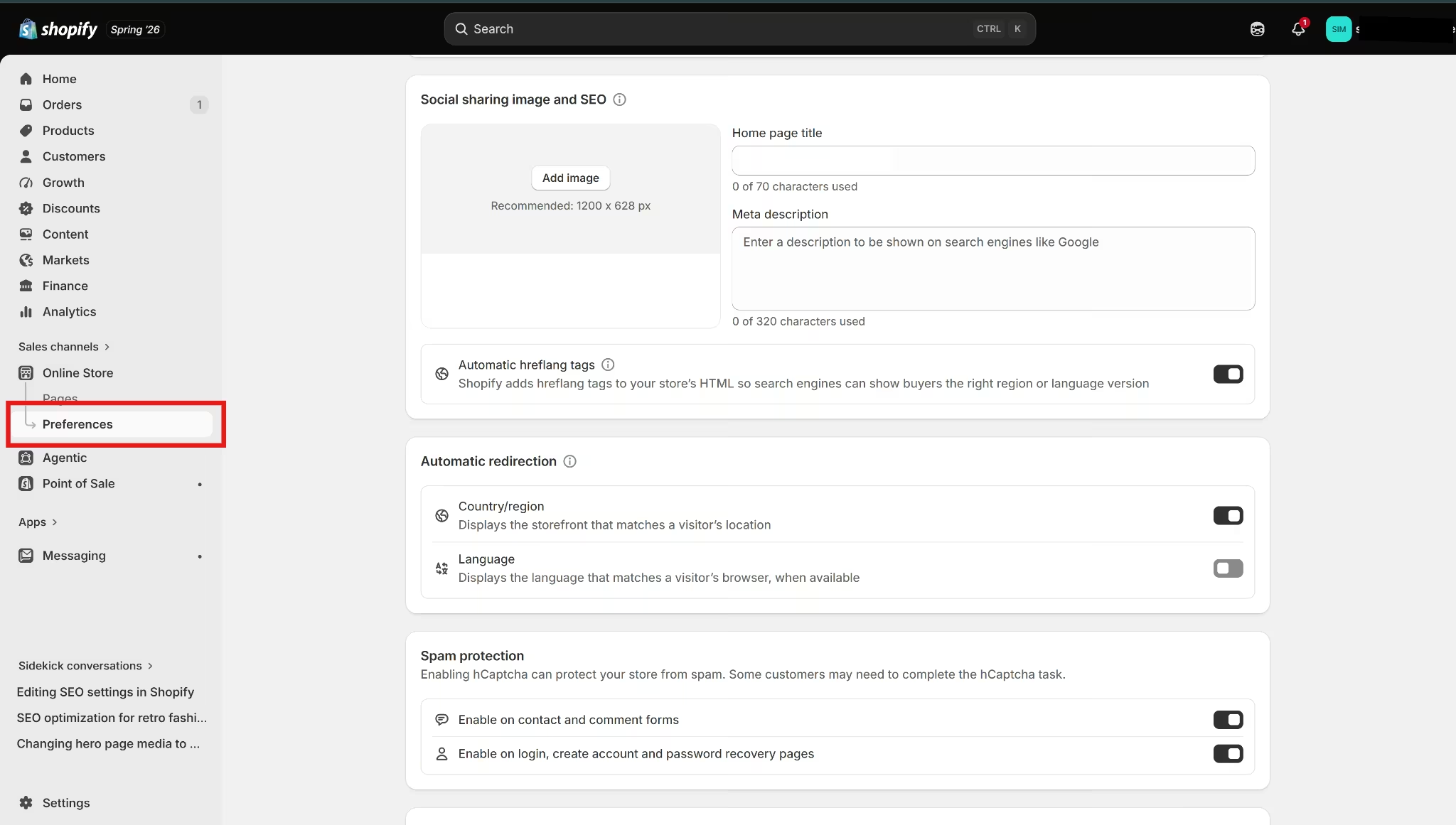
Shopify is easier to manage, but less flexible. Every product, page, and blog post has a search engine listing section where you can edit the title, meta description, and URL handle. The site-wide Preferences page covers the homepage title, meta description, and social image.
Shopify's setup is simple, but it is not as deep as working inside WordPress with an SEO plugin like Yoast.
Shopify automatically generates a sitemap and a working robots.txt file at the store's root domain with no setup needed. Shopify's themes also canonicalize URLs automatically, so duplicate product pages don't need manual fixing.
The bigger SEO limitation is Shopify’s URL structure. You cannot redirect URLs that use fixed Shopify paths such as /products, /collections, and /collections/all. You can edit the final URL handle, but you cannot remove those path folders from the store structure.
WooCommerce has no such constraints. You can edit suffixes and create custom permalinks with extensions like Custom Permalinks for WooCommerce.
Blogging is another Shopify tradeoff of note. Shopify supports blog posts, tags, scheduling, and excerpts, but it is still lighter than WordPress for content-heavy sites. Shopify lets you organize blog posts by category or subject, but WordPress offers content teams a more capable publishing system.
Winner: WooCommerce for content-heavy stores and deeper SEO control.
Security and Privacy
WooCommerce can be secure, but much of the work falls to the store owner, host, or developer. WooCommerce recommends SSL for the whole store and says most payment gateways require it.
Plugin risk is the bigger issue on WooCommerce. Patchstack's 2026 State of WordPress Security report recorded 11,334 new vulnerabilities in the WordPress ecosystem in 2025, with 91% found in plugins.
None of this means WooCommerce is unsafe. It means plugin choice, updates, backups, admin access, and hosting quality become part of running the store.
Privacy follows the same pattern as plugins. WooCommerce gives you more control over the stack, but every payment gateway, analytics tool, email plugin, ad pixel, cookie banner, shipping extension, and abandoned plugin can touch customer data.
On the other hand, Shopify handles more of the security setup inside the hosted platform. Every Shopify store is PCI compliant by default, and its Level 1 PCI DSS compliance covers the store, shopping cart, and web hosting.
Shopify also provides free TLS certificates for all domains added to Shopify, so HTTPS is handled within the platform rather than being another setup task.
Shopify still has app risk. Third-party apps can access store data depending on their permissions, so privacy is not automatic just because the platform is hosted. The difference is that Shopify handles more of the core store security, while WooCommerce leaves more of the stack in your hands.
Winner: Shopify. WooCommerce gives you more control over your store, but Shopify gives first-time store owners a safer default.
Customer Support
WooCommerce support depends on which part of the store stack is causing the issue. Its support policy states that it covers products sold on WooCommerce.com, including help with installation, configuration, and use.
The same policy says WooCommerce does not provide general WordPress support, third-party product support, or support for third-party customizations.
Troubleshooting an issue on WooCommerce usually starts with checking for updates and testing for theme or plugin conflicts. If that doesn't resolve it, the AI Assistant is the next stop, or you can search the documentation directly.
A Help Desk request is the last resort for anything that doesn't cover.
Getting to the AI Assistant means creating a separate, free WooCommerce.com account and logging in by linking WordPress.com. Once inside the WooCommerce.com portal, there's a working AI Assistant with access to WooCommerce's documentation, plus a resources panel covering self-service guides and troubleshooting topics.

Shopify keeps more of the support experience within a single product. Shopify has 24/7 live chat on Basic and Grow, enhanced live chat on Advanced, and priority support on Plus. Shopify also has an AI assistant called Sidekick, which is always there to help.
I tested the 24/7 live chat support path through the Shopify Help Center. I asked the chatbot for human support and was shown a wait time of less than five minutes. Shopify stuck to its time, and I had prompt human support.

Winner: Shopify. WooCommerce has useful help, but the support path depends on the stack. Shopify keeps more of the help experience inside one admin, which is easier for a first-time store owner.
What Real Users Are Saying
Here's what buyers say about WooCommerce and Shopify on G2 and Reddit.
WooCommerce
Pros: G2 rates WooCommerce a 4.4 based on 1,200+ reviews. Its aggregated review tags for WooCommerce skew toward plugin flexibility and easy integration, with reviewers on the WooCommerce G2 page consistently pointing to how well you can tailor it to specific store needs.
WooCommerce has also picked up G2's Easiest Setup (Enterprise, Spring 2025) and Best Results (Small Business, Spring 2025) badges.
Cons: The same G2 page's top complaint tags are slow performance and expensive, tracking with the plugin-cost pattern covered earlier in this piece. One reviewer said: "It feels clunky and a bit outdated, especially with subscriptions and reporting."
Reddit tells a similar story about tradeoffs rather than defects. In a thread comparing the two on r/woocommerce, one user summarized it as WooCommerce being like holding the deed to a house, while Shopify is more like renting one.
Shopify
Pros: Shopify holds a 4.4 out of 5 rating from over 4,500 reviews on G2, with Ease of Use, Quick Setup, and Easy Integration as the most common praise tags on the Shopify G2 page. One reviewer wrote that "Shopify makes the inventory process very easy, especially when dealing with trading cards that have so many variations."
Cons: The top complaint tags on the same G2 page are that it’s expensive and offers limited customization.
How to Make Your Choice
Both platforms can run a store that people can buy from. The decision mostly comes down to whether you'd rather manage infrastructure yourself for more control, or pay a flat fee to skip that entirely.
WooCommerce Is Better For:
- Store owners already running WordPress who don't want a second system.
- Businesses that need content (blog, membership pages, resources) alongside the store, not separate from it.
- Anyone who wants full ownership of their code and customer data with no vendor lock-in.
Shopify Is Better For:
- Founders who want a store live this week without learning hosting or plugins.
- Businesses selling in person as well as online, thanks to built-in POS.
- Anyone who'd rather pay one predictable monthly fee than piece together hosting, security, and extensions separately.
My Verdict
Starting from zero with no existing WordPress site, I'd start on Shopify's trial. It gets you to a sellable store faster, and the flat monthly cost is easier to plan around than WooCommerce's patchwork of hosting, theme, and extension fees.
But if I already had a WordPress site, or SEO and content were the growth engine for my store, I'd stay on WooCommerce and accept the extra setup time as the cost of running the whole stack myself.
Next Steps
Both platforms get you a live store: WooCommerce with full code ownership, Shopify through a polished, hosted platform with built-in support.
Running a store on WooCommerce means you’d need to be hands-on or pay someone who’d be hands-on in your place. Maintaining a Shopify store is less work but at a premium; this includes card-rate surcharges for skipping Shopify Payments, premium themes, and paid apps for anything past the basics.
But if you're a non-technical founder who wants a store shaped exactly around your business, not around a platform's templates and fee structure, there's a third path worth knowing about.
Emergent takes a different route to the same goal. Emergent is a vibe coding platform that lets you describe your dream store directly, and its agents design, code, and deploy it without you having to touch code. There’s no plugin stack to babysit and no per-app fees stacking up.
Instead of struggling with WordPress admin menus or watching Shopify's fees stack up, Emergent’s ecommerce website builder can build a catalog, cart, and checkout straight from a prompt. You can also turn it into an app in a few minutes.
Already have a WooCommerce or Shopify store? Emergent’s got you, too. It lets you build any missing workflows around your existing Shopify and WooCommerce store data, like a custom inventory dashboard, fulfillment tracker, reorder alert system, CRM sync, customer follow-up flow, or internal reporting tool.
Build the tool your business needs on Emergent. Start with 10 free credits today.

Emergent designs, writes, and publishes your whole site from one prompt. No templates, no drag-and-drop.
- Full site from one prompt
- Custom design, real pages
- Publish in minutes







