



Bolt.new Pricing Plans: TL;DR
Bolt is a browser-based AI app builder, and its pricing has four tiers. Here's the lineup before we get into what each one buys you:
| Plan | Price | Best For |
|---|---|---|
| Free | $0 | Learning and quick prototypes |
| Pro | $25/month ($18/month, billed annually) | Solo builders and freelancers |
| Teams | $30/month per member ($27/month per member, billed annually) | Small teams and agencies |
| Enterprise | Custom | Governance-heavy orgs |
The plan you pick sets your base cost and monthly token allowance. Two people on the same $25 plan pay the same subscription, but the one who builds more will run through the allowance first.
You type one prompt into Bolt, and a working app appears in seconds. It feels free. Then you add a database, wire up a login, and watch the token meter move faster than you expected.
I spent two weeks testing Bolt pricing across every tier, building the same small app from scratch: a content refresh tracker with a login, a database, and a filter view. I ran it on Free first, then upgraded to Pro, logging the token meter after every single prompt.
The first prompt cost about 180,000 tokens and hardly registered. One edit later, I'd hit Bolt's daily cap with the filter still broken. The sticker price says $25. What you end up spending depends on how much you build, and that number surprised me.
By the end, you'll be able to size up your own Bolt bill before you're the one stuck mid-build with an empty token balance.
How Bolt's Token Pricing Works (and How Fast Tokens Burn)
Tokens are units of AI work. Every prompt you send, and every response Bolt generates, spends them. Your plan sets how many you get each month, and your project decides how fast they disappear.
Here's exactly how fast they went in my build. I gave Bolt one prompt to scaffold the whole thing:
"Build a content refresh tracker web app. I need a table of blog posts with columns for URL, title, last-updated date, and a priority flag (high, medium, or low). Add a filter that shows only high-priority posts and posts not updated in the last six months. Include a simple login so only I can see it, and store the data in a database."
That first scaffold cost roughly 180,000 tokens. It gave me a working table with a few sample rows and barely dented the meter. While the project was tiny, every prompt was cheap.
Then I added the database and a second view, and the follow-ups got expensive fast. A single edit could burn 250,000 tokens or more, even for a small change.
Here's why: Bolt spends most of its tokens reading and syncing your project files, so the bigger the project, the more each message costs.
The 180,000-token scaffold plus that first real edit already pushed me past Bolt's 300,000-token daily cap. Everything after that had to wait for the next day's allowance.
The worst drain was debugging. My filter kept returning the wrong posts, so I re-prompted a few times to fix it. That one loop ate about 400,000 tokens across the back-and-forth, more than twice the cost of the original build. Error loops are where budgets blow up.
By the time the tracker worked, I'd spent roughly 2.4 million tokens total. Free's 1M monthly allowance would not have finished it within one month. On Pro's 10M base, this one small app used about a quarter of my monthly tokens.
Your project's size affects how quickly you use the allowance included with your plan. A small landing page uses far fewer tokens than a multi-file app with a database.
What Controls How Fast You Burn Tokens
A few levers change how fast you burn tokens:
- Standard vs Max agent: Standard is on every plan and is faster and more token-efficient for everyday edits. Max, on Bolt's paid tiers, reasons more deeply for complex builds and costs more.
- Build, Plan, and Discussion modes: Build mode edits your code and spends the most. Plan mode talks through the approach for less. Discussion mode is pure chat and costs the least.
- Token rollover: On paid plans, unused tokens roll over for one extra month. On Free, they reset and vanish.
- Buying more tokens: Eligible users can purchase token reloads after using their monthly allowance. Reloads are available on a top-tier monthly Pro plan or an annual Pro plan.
Brainstorm in Plan or Discussion mode before you switch to Build, and write fuller prompts up front. Talking the change through first meant fewer wrong turns in Build mode. Each vague follow-up used more tokens, so tighter prompts kept the meter down.
Bolt.new Plan Details
A feature checklist tells you what's included, but how far your tokens stretch once you're building is what moves your bill. That's the lens for each tier below.
Free Plan: $0
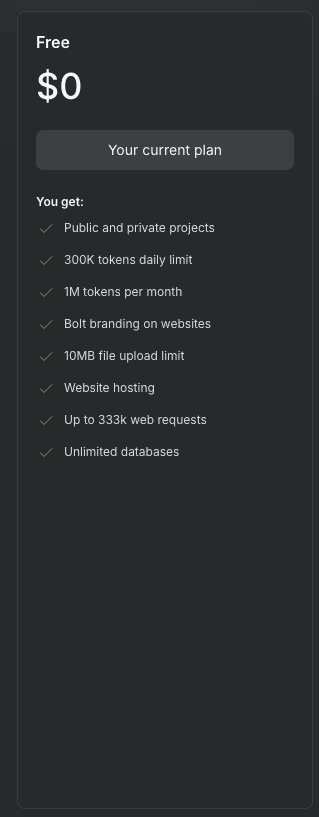
I kicked off my own test on Free, since it's the tier most people try Bolt on first. The plan hands you 1M tokens a month, split by a 300,000-token daily ceiling, and that ceiling is what you'll feel first.
My first scaffold prompt, the one that built the initial post table, cost roughly 180,000 tokens on its own, more than half the daily allowance gone before I'd added a single real feature.
I hit the daily cap on my first real edit that session, with the database half-wired and the filter still unfinished.
That interruption left the feature incomplete, and I had to reconstruct where I had stopped after the daily allowance reset.
Free includes hosting and a database with no credit card.
It offers no way to buy past that wall, though, since reloads are paid-plan only.
What's included: 1M tokens per month with a 300,000-token daily cap, website hosting, unlimited databases, 10MB file uploads, and up to 333,000 web requests. Sites carry Bolt branding and can't use a custom domain, and tokens don't roll over.
Best for: Learning the tool, testing an idea, and shipping a quick single-page app.
Pros: The free tier is a playground. No credit card required, so you can build a small working app and see the meter move before you pay anything.
Cons: The 300,000-token daily cap interrupted my session once the database was in. My 2.4M-token tracker also exceeded the 1M monthly allowance.
Pro Plan: $25/month ($18/month, billed annually)
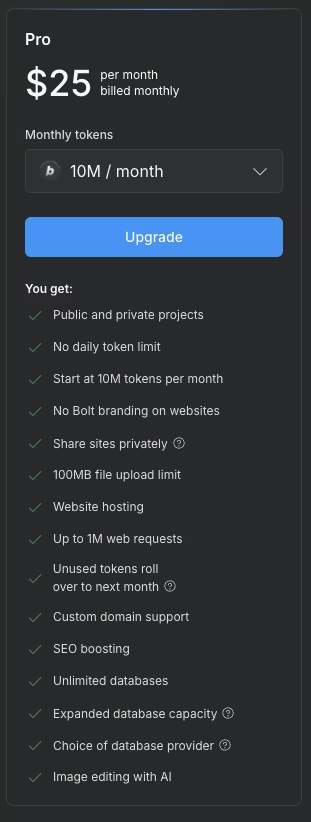
The Free tier's daily cap stopped me mid-build, so I moved to Pro. The daily cap disappears entirely, and the monthly allowance rises from 1M to 10M tokens, exactly 10 times Free's monthly allowance.
That headroom let me finish the content tracker without waiting for another daily reset.
The debugging phase is where Pro earned its price. As covered above, that debug loop alone would have blown past Free's entire daily cap. On Pro, it was a dent, well short of a wall.
My full build also left enough of the 10M monthly base for another small project the same month, and unused Pro tokens carry into the next month while Free tokens do not.
Pro fits someone iterating on one project across several sessions without Free's daily interruptions.
What's included: No daily cap and a starting 10M tokens per month, with unused tokens rolling over one extra month. You also get custom domain support, no Bolt branding, 100MB file uploads, up to 1M web requests, expanded database capacity, a choice of database provider, and AI image editing.
Best for: Solo builders, freelancers, and anyone iterating on the same app across a week.
Pros: Removing the daily cap unblocked my longer build session. I could keep prompting until the tracker worked, and unused tokens could roll into the next month.
Cons: Debugging can use a noticeable share of the allowance. My error loop cost 400,000 tokens, and several projects of similar size would use the 10M base quickly. You can buy a reload once you hit the allowance.
Teams Plan: $30/month per member ($27/month per member, billed annually)
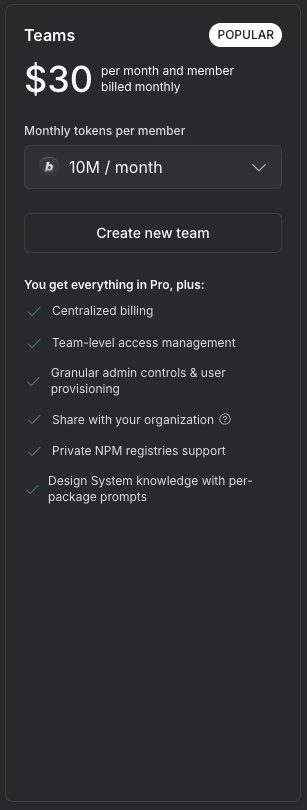
Teams uses the same per-seat mechanics as Pro, so run the math before adding more seats.
Each paid member starts with the same 10M monthly allowance as Pro. Tokens are assigned individually, with no pooling across the team.
A three-person team lands at $90/month ($81/month, billed annually) and receives three separate 10M-token allowances rather than one shared 30M pool.
A debug loop like the one from my own build can burn a meaningful share of a single member's allowance while a teammate doing lighter work leaves theirs mostly untouched. Tokens cannot be transferred between their accounts.
Centralized billing and admin controls replace several separate subscriptions, logins, and invoices, though each member's token allowance still has to be managed individually.
Reloads work the same way for teams, and the extra tokens stay tied to the member who bought them.
On a five-person team, that same per-seat math pushes the base price to $150/month ($135/month, billed annually) before anyone tops up at all.
What's included: Everything in Pro, plus centralized billing, team-level access management, admin controls and user provisioning, org-wide project sharing, private package registries, and shared design-system knowledge.
Best for: Small teams and agencies that need shared billing and admin oversight.
Pros: The governance layer is the draw here. One bill, managed access, and admin controls make Bolt workable for a group, replacing a set of scattered personal accounts.
Cons: Tokens are assigned per member, with no shared pool. A heavy builder runs dry while a light teammate's balance sits untouched, and the per-member price climbs with every seat you add.
Enterprise Plan: Custom
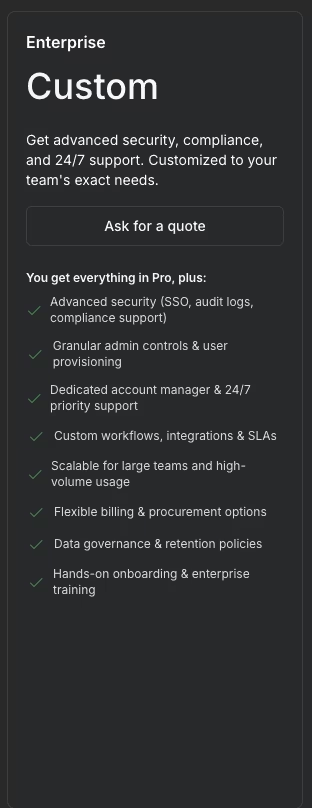
What's included: Single sign-on (SSO), audit logs, compliance support, a dedicated account manager, 24/7 priority support, custom workflows and integrations, service-level agreements (SLAs), data governance, and hands-on onboarding. There's no public price, so you contact sales.
Best for: Larger organizations with security, compliance, and procurement requirements.
Pros: For a security-reviewed org, the SSO, audit logs, SLAs, and dedicated support are usually what gets a tool through IT approval and procurement, which the self-serve plans can't clear on their own.
Cons: Those controls will add little value for a builder who does not need enterprise security, support, or procurement features.
Hidden Costs Beyond Your Bolt Plan
Your plan price is only the floor. A few costs sit outside it, and they surprised me more than the subscription did.
Token reloads are one possible extra cost. Once you've used the monthly allowance, buying more tokens pushes your total above the base subscription.
External services are billed separately. If you connect Stripe for payments, Supabase for data, or a service such as OpenAI, you pay those providers directly. Bolt builds the connection, and you cover the usage.
A custom domain carries its own cost. Bolt supports custom domains on Pro and up, but you still register and pay for the domain through a registrar.
Higher hosting usage can also add cost if a project moves past the plan's included limits, separate from token spend.
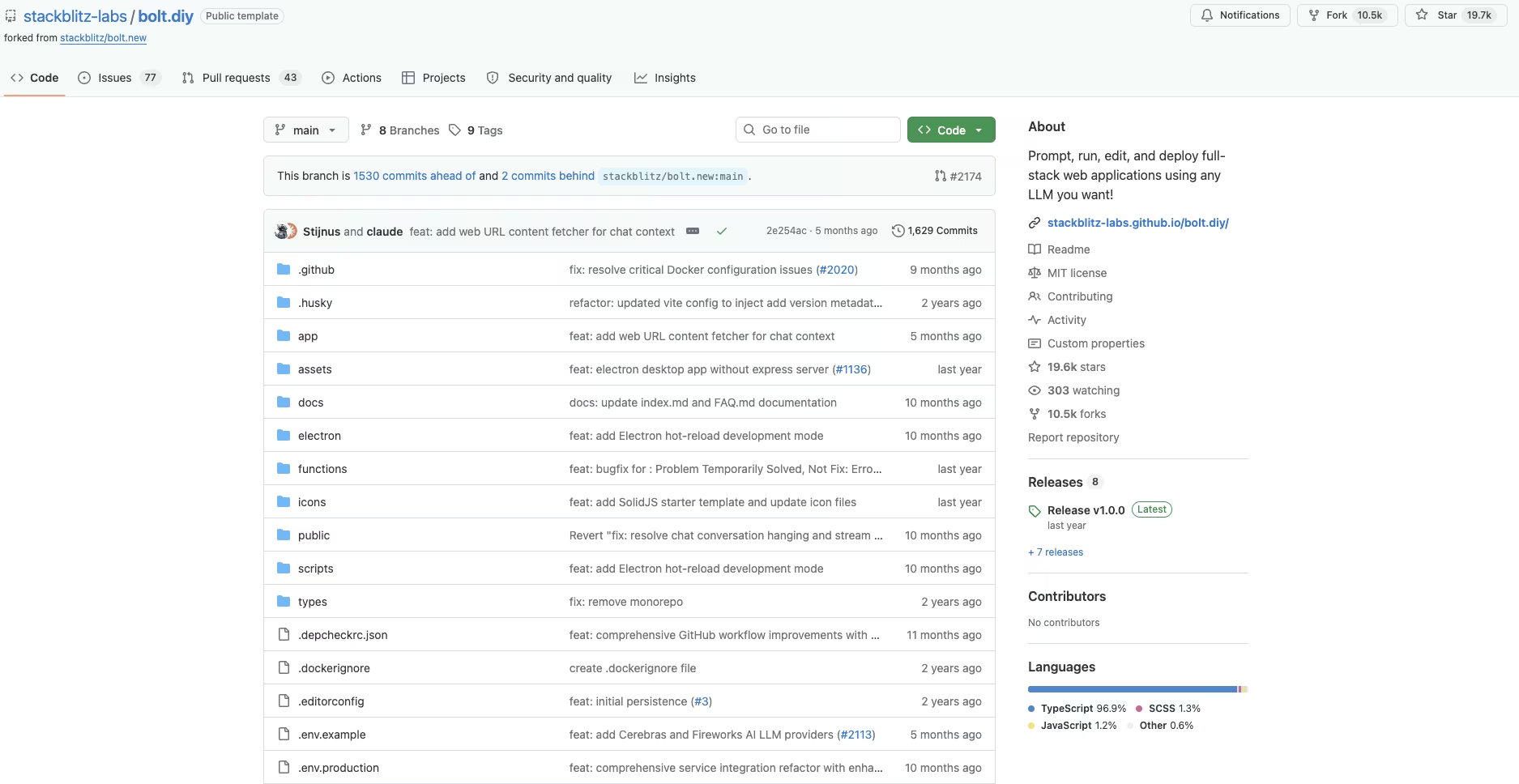
If you'd rather avoid a Bolt subscription, Bolt.diy is Bolt's free, open-source version on GitHub. You run the software yourself, choose the model provider, and handle infrastructure and updates. The software is free, but model usage and hosting can still create costs.
What Will You Spend on Bolt Each Month?
The plan table shows the fixed subscription cost. What you're building determines how quickly you use its allowance, and whether you stay put, size up a plan, or top up with a reload.
My content tracker used about 2.4 million tokens to reach a working version, roughly a quarter of Pro's 10M monthly base. One debug loop accounted for 400,000 tokens.
Here's what those numbers look like across a few common use cases:
| Use Case | Estimated Monthly Tokens | Plan That Fits | Estimated Monthly Cost |
|---|---|---|---|
| Learning or one prototype | Under 300K | Free | $0 |
| 1-2 small apps (like my tracker) | 2M-5M | Pro | $25/month ($18/month, billed annually) |
| Active freelancer, several apps a month | 8M-15M | Pro or a higher allowance | $25/month or more, depending on the chosen allowance |
| Small agency (3 builders) | Per-member usage similar to Pro | Teams | $90/month for 3 seats ($81/month for 3 seats, billed annually) |
| Heavy production, several large builds at once | Consistently past the plan allowance | Pro or Teams, plus regular reloads | Well above the plan price; budget for reloads |
These are estimates built from my own token math, not a guarantee. A debug-heavy week or a larger codebase can push the ranges higher.
Which Bolt Plan Should You Choose?
The right plan comes down to how much you'll build and who's building with you.
Choose Free if you:
- Are learning the tool or testing a single idea.
- Only need quick prototypes and can live with the daily cap and Bolt branding.
Choose Pro if you:
- Iterate on the same app across days and keep hitting the free daily wall.
- Want a custom domain, no branding, and rollover on the tokens you don't use.
Choose Teams if you:
- Build alongside a few teammates and need one bill and shared admin controls.
- Accept that each member gets a separate token allotment, with no shared pool.
Choose Enterprise if you:
- Need SSO, audit logs, or a signed SLA to get the tool approved.
- Have procurement and compliance requirements a self-serve plan can't meet.
Is Bolt Worth the Cost?
Bolt is one of the fastest ways I've found to get from a prompt to a running app, and that speed is worth the price.
Bolt is worth it if you:
- Build small-to-medium apps and understand that larger projects use the included tokens faster.
- Value fast in-browser iteration and can move to a higher allowance if several projects exhaust the base plan.
Skip Bolt if you:
- Need the same monthly allowance to support any project size without limiting how much you can prompt.
- Expect to debug heavily or run several large projects at once, where token use can exhaust the allowance quickly.
My take after the build: Pro at $25/month is fair for a single small app, since mine used about a quarter of the 10M allowance. Heavier months cost more, but nothing is charged automatically.
Bolt Alternatives and Pricing Comparison
If Bolt's token model doesn't fit how you want to pay, compare the best Bolt.new alternatives before choosing another builder. Here's the cheapest paid plan for each:
| Tool | Starting Price | Best For |
|---|---|---|
| Bolt | $25/month ($18/month, billed annually) | Fast in-browser prototyping |
| Emergent | $20/month ($17/month, billed annually) | Shipping a working app from one prompt |
| Lovable | $25/month ($21/month, billed annually) | Design-polished full-stack apps from chat |
| Replit | $20/month ($18/month, billed annually) | Coding with an AI agent in a full IDE |
| v0 by Vercel | $30/month per user | Generating UI from prompts |
Each tool measures usage differently. Bolt and v0 use tokens, Replit and Lovable include monthly credits before additional usage charges, and Emergent includes a monthly credit allowance.
Those models change how quickly each allowance runs out during repeated edits and debugging.
Emergent vs Bolt: Which Should You Choose?
I ran the same content refresh tracker brief through Emergent to compare its agent-led build process and credit system with Bolt's hands-on workflow and token allowance.
Bolt.new keeps you in the driver's seat. You watch the code, edit it, re-prompt, and steer every step in the browser. That control makes the free tier great for learning, but each extra prompt spends more of your token allowance.
Emergent takes a more agent-led route. I told it what I wanted once, and it scoped and built the working tracker end to end, including the login, data, and filter view. I didn't wire up each piece myself.
Emergent uses credits, so the test required fewer separate build interactions than my Bolt test.
Emergent is better for: Getting a working app from one detailed brief when you'd rather not manage each build step yourself.
Bolt is better for: Fast in-browser prototyping and hands-on iteration, plus a free AI app builder plan you can use for learning.
Use both if: You want to test an idea through hands-on iteration before trying a more automated build.
Sketch the idea in Bolt first, then give the validated brief to Emergent to build a more complete working version without prompting for every piece.
My Bolt Pricing Verdict
Bolt clearly lists its plans, but you cannot know how quickly a project will use the included tokens before building it.
Free covers learning, Pro handles longer build sessions at $25/month ($18/month, billed annually), Teams adds group billing and controls, and Enterprise adds security and support. The token allowance determines how much prompting each plan supports.
Bolt is a fair option for small apps when you prompt carefully. Heavy debugging or several concurrent projects can exhaust the included tokens faster, especially as project size increases. Choose the allowance that fits your expected usage rather than the lowest listed price.
Most builders stop at a prototype. Emergent ships real web and mobile apps, with accounts, databases, and payments included.
- Production-ready apps
- Web & mobile apps
- Deploy in minutes







